
I have been building distributed systems for twenty years, and every few years something comes along that genuinely changes how we architect software. AI agent orchestration is that thing right now. Not because the concept is new (workflow engines have existed forever) but because the failure modes are invisible until they hit production, the token costs compound in ways that spreadsheets do not capture, and the framework you choose in week one tends to stick around longer than you intended.
Last year I helped three separate companies migrate off their initial agent framework choices because what worked in a Jupyter notebook completely fell apart under production load. Each time, the conversation started the same way: “we built this with framework X and it works great in demos.” Each time, the problems were identical: state management, observability, and cost. In all three cases, they had picked a framework based on a tutorial, not based on what production-grade agent infrastructure actually requires.
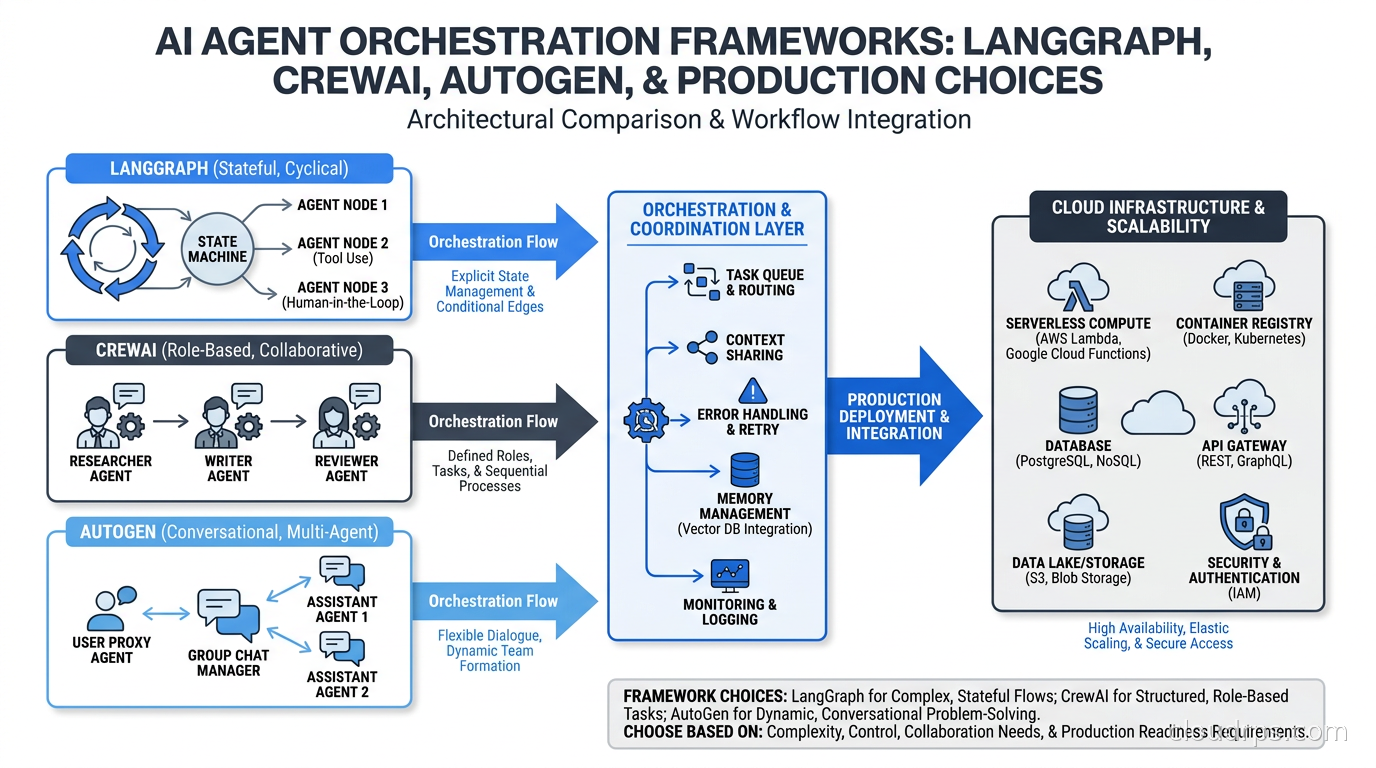
This article is the guide I wish had existed when those teams started. I am going to compare the four frameworks that dominate real production deployments in 2026: LangGraph, CrewAI, AutoGen (now AG2), and the OpenAI Agents SDK. I will cover the architecture, the trade-offs, and the cloud infrastructure considerations that determine whether your agent system survives contact with reality.
What Agent Orchestration Actually Means
Before comparing frameworks, it is worth being precise about what we are actually comparing. An agent framework does two jobs. First, it decides which agent or tool runs next: the routing problem. Second, it manages state between those invocations: the persistence problem. Frameworks that solve the routing problem well but ignore the persistence problem will eventually cause you serious pain.
Most tutorial-level agent examples sidestep the persistence problem entirely. The agent runs in a single process, keeps all state in memory, and finishes in under a minute. That works fine for demos. It does not work when your agent is processing a complex workflow that takes 45 minutes, calls external APIs that fail intermittently, needs to pause for human approval, or has to resume after a process restart.
The frameworks I cover here exist on a spectrum from high-level-and-opinionated (CrewAI) to low-level-and-explicit (LangGraph). Neither extreme is wrong. They are optimized for different use cases, and the right choice depends on your production requirements, not on which has the better README.
One thing to settle up front: agent orchestration frameworks are not the same as Model Context Protocol servers. MCP standardizes how agents connect to tools and data sources. The orchestration framework decides how agents are sequenced and how state flows between them. You will almost certainly use both, but they solve different problems.
LangGraph: The Production Standard for Stateful Workflows
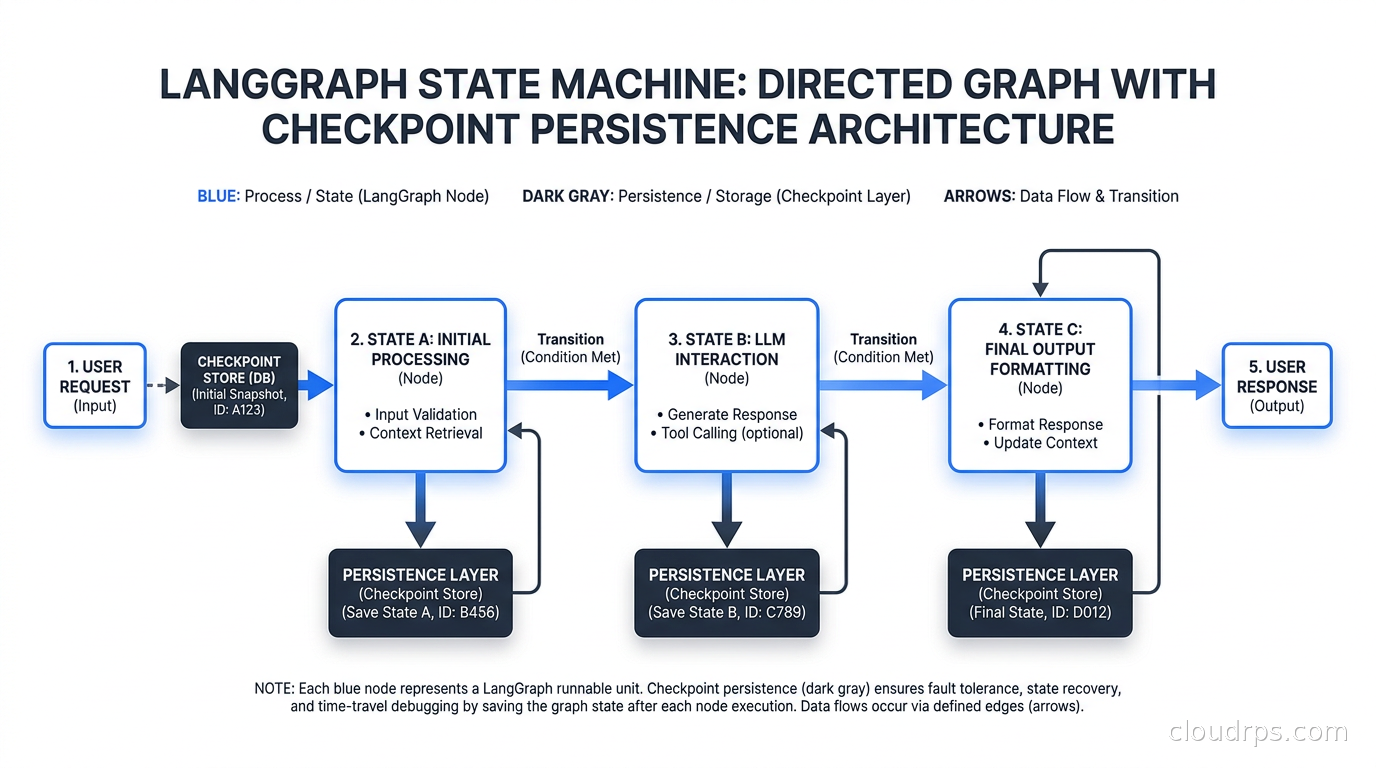
LangGraph treats an agent workflow as a directed graph where nodes are callables (agent steps, tool calls, conditionals) and edges carry state between them. The state is a typed dictionary that gets threaded through every node. Checkpointing is built in: LangGraph can persist state to Postgres, SQLite, or a custom backend after every node execution.
That checkpointing is what makes LangGraph genuinely production-ready. If a node fails halfway through a 30-step workflow, you can resume from the last checkpoint instead of starting over. If you need a human approval step, the graph pauses and waits. If you need to inspect what happened at any point in the workflow, the checkpoint history gives you a complete audit trail. This is not a nice-to-have feature. In regulated industries or any system where a failed run has a real cost, it is mandatory.
from langgraph.graph import StateGraph, END
from langgraph.checkpoint.postgres import PostgresSaver
from typing import TypedDict

class WorkflowState(TypedDict):
    task: str
    research_output: str
    draft: str
    review_score: int
    final_output: str

def route_on_score(state: WorkflowState) -> str:
    return "writer" if state["review_score"] >= 7 else "researcher"

graph = StateGraph(WorkflowState)
graph.add_node("researcher", researcher_agent)
graph.add_node("writer", writer_agent)
graph.add_node("reviewer", reviewer_agent)
graph.add_conditional_edges("reviewer", route_on_score)

checkpointer = PostgresSaver.from_conn_string(os.environ["DATABASE_URL"])
app = graph.compile(checkpointer=checkpointer)
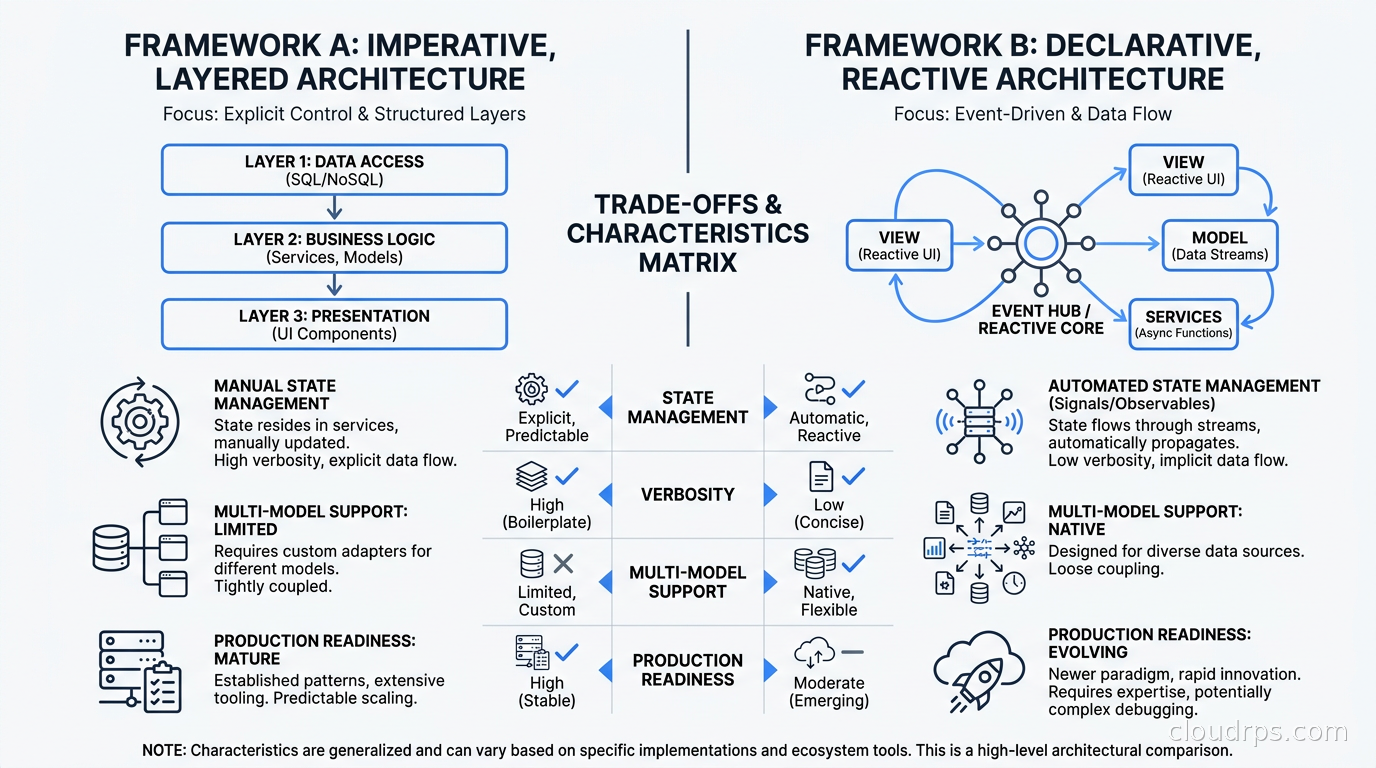
The trade-off is verbosity. A LangGraph workflow that would take 20 lines in CrewAI might take 80 lines in LangGraph. You define the state schema explicitly, define every node as a function, define every edge as a conditional or unconditional connection, and then compile the graph. This feels tedious until the first time you need to debug a production failure. Then you are deeply grateful for the explicit structure.
In production, I run LangGraph workflows behind a FastAPI service with each workflow triggered by a job ID from a message queue. The checkpointer writes to RDS Postgres with efficient jsonb indexing on state fields. You get durability, resumability, and a queryable history of every workflow run, which becomes essential when someone asks why a particular run cost three times the expected token budget.
LangGraph also supports streaming out of the box. Every node execution emits events that you can stream to a client. This matters for user-facing agent applications where you need to show progress in real time instead of making the user wait for a multi-minute silent gap. The streaming API works whether you are using HTTP SSE, WebSockets, or polling.
The operational overhead is real. You need a checkpointer backend, and you need to think about state schema migrations when your workflow logic changes. LangGraph has a versioning mechanism for this, but it requires discipline. Teams that update their state schemas carelessly will break in-flight workflows. Treat the workflow state schema the way you treat a database schema: with migrations and versioning, not with grep-and-replace.
For teams building agent workflows that need to be auditable, resumable, or human-in-the-loop, LangGraph is the framework I recommend first.
CrewAI: Speed to Prototype, Real Migration Risk
CrewAI gives you a higher-level abstraction. Instead of defining a graph, you define a crew: a set of agents with roles, goals, and backstories, and a set of tasks with expected outputs. The framework handles the routing internally based on the crew’s process type (sequential, hierarchical, or parallel).
from crewai import Agent, Task, Crew, Process

researcher = Agent(
    role="Senior Research Analyst",
    goal="Find accurate technical information",
    backstory="Expert at synthesizing complex technical topics",
    tools=[search_tool, scrape_tool],
    llm="gpt-4o"
)

write_task = Task(
    description="Write a technical summary on {topic}",
    expected_output="A 500-word technical summary with citations",
    agent=writer
)

crew = Crew(
    agents=[researcher, writer],
    tasks=[research_task, write_task],
    process=Process.sequential
)
This readability is genuinely useful for prototyping and for organizations where business stakeholders need to review and modify workflow logic. A crew definition reads almost like a job description. Non-engineers can understand what each agent is supposed to do, which matters when the people specifying the workflow logic are not the people implementing it.
The problems emerge at scale. CrewAI’s default state management is session-scoped. If the process crashes, the state is gone. Session-scoped state also means the agent has no memory of users between conversations: persistent episodic and semantic memory across sessions requires explicit memory infrastructure beyond what any orchestration framework provides by default, as covered in the AI agent memory architecture guide. The framework added memory backends in 2025, but the integration requires custom configuration that is not obvious from the documentation. Checkpoint-on-failure support is not native the way it is in LangGraph. You can build it, but you are building it yourself.
The token overhead is also measurable. CrewAI injects role descriptions, goal definitions, and backstories into every LLM call, which means its abstractions tend to be noticeably more token-hungry than an equivalent LangGraph implementation, where you control exactly what goes into each prompt. On longer workflows with many context-handoff steps, that overhead compounds. At the scale of 100,000 agent runs per month, the cost difference becomes a budget conversation.
I have seen teams use CrewAI effectively in two scenarios. First, for internal tools where crashes are acceptable and the volume is low. Second, as a prototyping layer where they build the happy-path logic in CrewAI and then rewrite the production system in LangGraph once they understand the workflow shape. The second pattern is more common than CrewAI’s documentation suggests.
AutoGen and AG2: Microsoft’s Enterprise Bet
AutoGen (rebranded as AG2 after the open-source fork in late 2024) takes a conversational model to orchestration. Agents communicate via message passing. The orchestration happens through a GroupChat or a two-agent conversation where one agent instructs another. The result feels natural to LLM developers but can be difficult to make deterministic.
The AutoGen model has genuine strengths. Code execution agents are first-class: AutoGen was designed from the beginning for agentic coding workflows where one agent writes code and another executes it in a sandboxed environment. The framework has native Docker integration for safe code execution. Microsoft’s enterprise backing means the documentation is substantial and the security story has been thought through more carefully than some alternatives.
The trade-off is non-determinism. When agents communicate via natural language instructions, the routing becomes unpredictable in ways that are hard to test systematically. I have seen AutoGen-based systems work flawlessly in testing and then route completely differently in production because the LLM interpreted an instruction slightly differently under different context conditions. LangGraph’s explicit conditional edges eliminate this class of failure. AutoGen does not.
AG2 has been adding more explicit control flow constructs to address this. The trajectory is toward something that looks more like LangGraph over time. But as of 2026, if your production workflow requires deterministic routing, AutoGen requires significant additional scaffolding to achieve it.
For agentic coding systems specifically, including internal developer tools and automated code review pipelines, AutoGen remains the strongest choice because of the sandboxed code execution primitives. For general workflow orchestration, I generally steer teams toward LangGraph.
OpenAI Agents SDK: Simple but Provider-Coupled
OpenAI released its Agents SDK in March 2025. The design philosophy is explicit handoffs: agents call other agents like functions, with type-safe interfaces between them. The code is clean and readable. The coupling to OpenAI’s APIs is tight.
from openai.agents import Agent, handoff

billing_agent = Agent(
    name="Billing Agent",
    instructions="You handle billing inquiries and payment issues."
)

support_agent = Agent(
    name="Support Agent",
    instructions="You help users with account issues.",
    handoffs=[handoff(billing_agent), handoff(technical_agent)]
)
The handoff model is intuitive. The coupling is the problem. The SDK works well when you use OpenAI models throughout. It becomes awkward when you need to route some tasks to Claude for reasoning, some to cheaper models for simple extraction, and some to self-hosted models for data privacy. Multi-model routing, which is increasingly common in production cost optimization, requires workarounds that undermine the SDK’s simplicity.
The state management story is also minimal at launch. Handoffs carry the conversation context, but there is no native checkpointing. For short-running workflows where a crash is acceptable, this is fine. For complex long-running workflows, you need to add your own persistence layer.
I use the OpenAI Agents SDK in one specific context: building agents that are tightly integrated with OpenAI platform features, including file search and code interpreter. In that context, the native integration justifies the coupling. Everywhere else, the lack of multi-model support and durable state make it a secondary choice.
Anthropic’s Agent SDK is similar in positioning: tightly integrated with Claude’s tool use API and the Model Context Protocol infrastructure, but best evaluated if your agent system is Claude-native. For organizations with mixed model strategies, the same coupling concerns apply.
Cloud Infrastructure for Agent Systems
The framework choice matters, but the infrastructure underneath it matters just as much. Agent workflows have different operational characteristics than traditional web services, and deploying them like regular stateless APIs is a mistake I see constantly.
Compute model: Agent workflows are long-running and CPU-light. A workflow that takes 10 minutes is mostly waiting on LLM API calls. This makes spot instances and preemptible VMs attractive for agent workers. I run LangGraph workers on AWS spot instances with Karpenter managing node provisioning. When a spot interruption happens, the checkpointer state in Postgres preserves the workflow, and the next worker picks it up from the last checkpoint. Without durable state, spot instances are unusable for agent workloads. With it, they are the obvious cost choice.
State persistence: Every production agent system needs an external state backend. For LangGraph, I use RDS Postgres with connection pooling via PgBouncer. The checkpoint writes are small (a few KB of JSON per node), but they can be high frequency on large workflow volumes. Database connection pooling is not optional at scale. Without it, a surge in concurrent workflow runs will exhaust your Postgres connection limits in seconds.
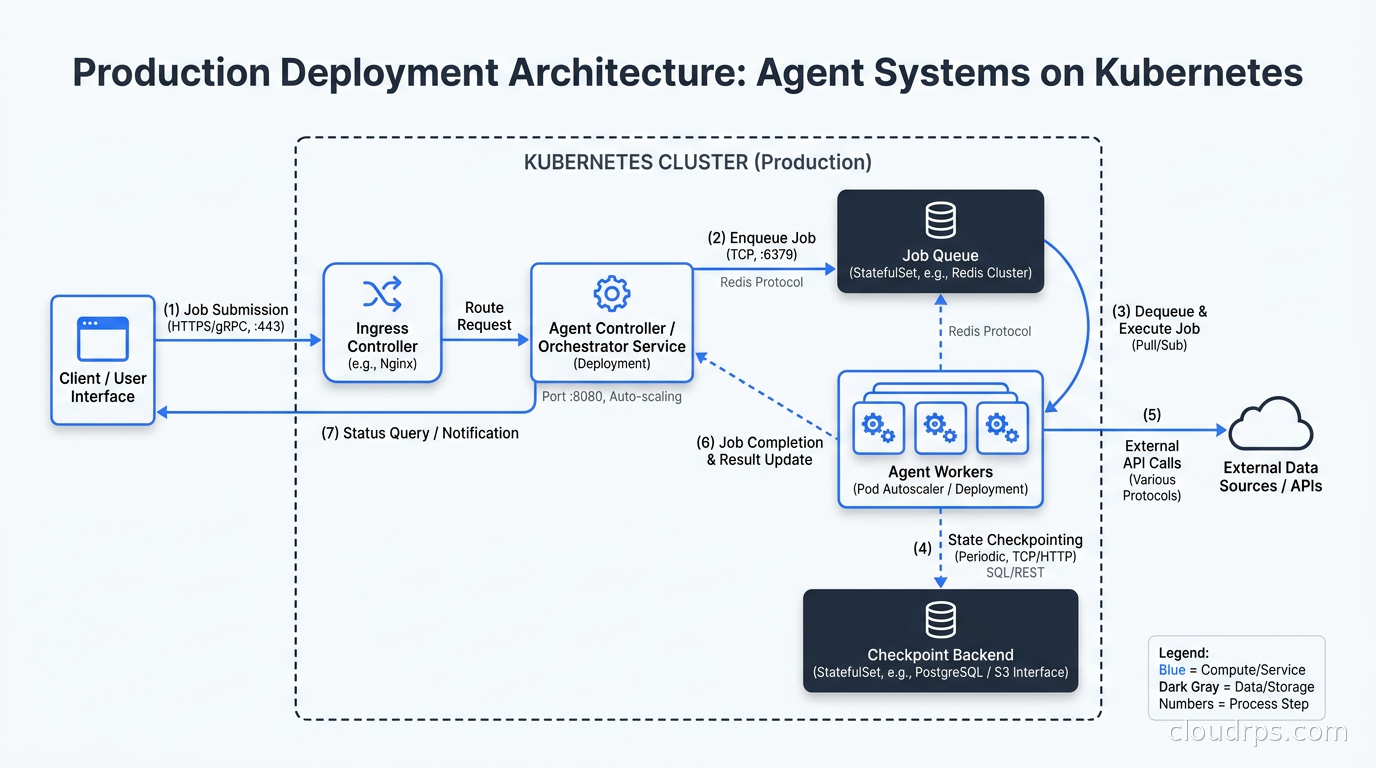
Queuing: Agent workflows should not be triggered directly via synchronous HTTP in production. Use a job queue: SQS, RabbitMQ, or Kafka. The queue provides backpressure, retry logic, and decoupling between the API layer and the agent workers. An event-driven architecture where an API endpoint enqueues a workflow and returns a job ID, with polling or webhooks for status updates, handles burst traffic far better than synchronous HTTP. It also gives you a natural place to implement dead-letter queues for failed workflows.
Observability: LLM calls inside agent workflows need distributed tracing to be debuggable. I instrument every agent node with OpenTelemetry spans, including input token count, output token count, model used, and latency. LLM observability tooling like Langfuse or Arize Phoenix gives you prompt tracing, token cost breakdown, and latency attribution per workflow step. Without this, diagnosing why a workflow ran 5x over expected cost is nearly impossible. You are left guessing which agent consumed the budget.
Cost control: Token costs are the primary cost driver for agent systems, and they are the cost driver most teams underestimate. Implement input and output token tracking per workflow run, per agent role, and per task type. Set hard limits (maximum tokens per workflow run) and soft alerts before those limits are hit. An AI gateway like Kong AI Gateway or a custom proxy layer gives you rate limiting, cost tracking, and model routing in one place. Without a gateway, you will discover your token budget problem in the invoice, not in your monitoring dashboard.
Durable Execution and the Temporal Alternative
One more option deserves mention: running agent workflows on Temporal instead of an agent-specific framework. Temporal gives you durable execution with automatic retry, versioning for workflow logic changes, and query APIs for workflow state. You write your agent steps as Temporal activities and your routing logic as a Temporal workflow. The state management and failure recovery are Temporal’s problem, not yours.
The trade-off is infrastructure. It requires running a Temporal server (or using Temporal Cloud at additional cost) and writing your agent logic in Temporal’s programming model. For teams already using Temporal for other workflows, adding agent workloads is natural. For teams new to Temporal, the learning curve is real but finite. Teams evaluating the broader durable execution landscape, including Restate, DBOS, Hatchet, and Inngest as alternatives with different operational footprints, can find a detailed comparison in the durable execution guide.
I have deployed agent systems on both LangGraph and Temporal. My honest assessment is that Temporal produces more operationally reliable systems at the cost of higher initial complexity. For high-stakes automation (financial workflows, compliance processes, anything where a failed run has a real dollar cost or a regulatory consequence) Temporal is the better choice. For general-purpose agent workflows where the primary requirement is getting to production quickly, LangGraph with a Postgres checkpointer is simpler and sufficient.
The scaling challenges specific to agentic AI in production compound on top of whatever framework you choose. Token throughput limits, concurrency bottlenecks in the LLM API, and context window management are infrastructure problems that exist regardless of framework.
How to Actually Choose
Here is the decision framework I use when advising teams:
Start with your durability requirement. If a workflow can fail and restart from scratch without meaningful cost, any framework works. If a workflow takes more than five minutes or calls external APIs that have costs or rate limits, you need checkpointing. That means LangGraph, Temporal, or a custom state management layer on top of CrewAI or AutoGen.
Consider your team’s Python proficiency. LangGraph requires understanding TypedDict, conditional edges, and graph compilation. For teams with strong Python backgrounds, this is not a barrier. For teams where the agent logic is written by data scientists or domain experts who are not systems programmers, CrewAI’s higher-level abstraction may produce more maintainable code even if it is less production-robust.
Consider your model diversity. If you are committed to a single LLM provider, provider-native SDKs are simpler to start with. If you route between multiple models for cost or capability reasons (and at scale, you always end up doing this) use a provider-agnostic framework like LangGraph. The AI gateway layer handles model routing without entangling it with framework logic.
Consider your existing infrastructure. If you are already running Kubernetes for other workloads, packaging your agent workers as deployments with a horizontal pod autoscaler is a natural fit. Agent workers are stateless processes that pull from a queue and write state to an external backend. They scale like any other queue consumer. Integrating with your existing Kubernetes operators and autoscaling infrastructure is usually simpler than running a parallel platform.
Start simple and let production teach you. Every team that has come to me for a migration started too complex. Pick one framework, deploy one workflow to production, run it for a month, and then decide what you actually need. The framework migration cost is real but manageable. The cost of over-engineering before you understand your production patterns is higher. Voice agents are a specialized subset where the orchestration framework choice intersects with real-time audio infrastructure: LangGraph’s streaming events are essential when you need to pipe LLM output tokens to a TTS synthesizer within a 300ms latency budget. See the real-time AI voice infrastructure guide for the full picture.
What I Would Build Today
If I were starting a new agent system today, my default stack would be: LangGraph for workflow orchestration with Postgres as the checkpoint backend, FastAPI as the API layer, SQS as the job queue, OpenTelemetry with Langfuse for observability, and an AI gateway for multi-model routing and cost control. For any workflow where subagents need to communicate across frameworks or cloud providers, I would add A2A (Agent-to-Agent) protocol endpoints to each agent: A2A is the emerging standard for inter-agent delegation across LangGraph, CrewAI, and AutoGen agents, and the major cloud platforms now support it natively. For any agent in the stack that needs to navigate websites or interact with authenticated web applications, I treat browser sessions as a separate infrastructure concern rather than a library-level detail: the cloud browser infrastructure guide covers managed platform options (Browserbase, Steel, Airtop, Cloudflare Browser Run), session security architecture, and the lifecycle patterns that keep browser-enabled agents from becoming credential management nightmares.
CrewAI would be my choice if the primary authors are domain experts who need to modify workflow logic frequently without deep Python knowledge, and if the workflow volume is low enough that the operational simplicity outweighs the production risks. I would still add a Postgres memory backend and instrument every crew run with token counts.
AutoGen would be my choice for internal coding automation workflows, specifically pipelines that generate and execute code in sandboxed environments. The native Docker integration and code execution primitives are genuinely ahead of the other frameworks for that use case.
The agent framework is not the hard part. The hard part is the infrastructure that surrounds it: durable state, cost visibility, failure recovery, and the observability tooling that tells you what your agents are actually doing versus what you think they are doing. Build the boring infrastructure first. Let the agent be the interesting part.
Updated September 1, 2026: corrected the OpenAI Agents SDK release date and removed an unsourced token-overhead benchmark figure while keeping the underlying point.
Get Cloud Architecture Insights
Practical deep dives on infrastructure, security, and scaling. No spam, no fluff.
By subscribing, you agree to receive emails. Unsubscribe anytime.