
Six months ago, one of the engineering teams at a client I was working with decided to go all-in on autonomous coding agents. They picked a capable agent, gave it access to their GitHub organization, wired it to their internal CI system, and handed developers a Slack command that let them describe a task and have the agent go build it. The first two weeks were genuinely impressive. The agents were opening pull requests, writing tests, fixing lint failures, and doing it fast. Then a few things happened in quick succession.
First, an agent committed a .env file with API keys to a private repo. The file was immediately reverted, but the commit was in git history and the credentials had to be rotated across four downstream services. Second, an agent was assigned to “add logging to the payments service” and somehow also refactored the retry logic in a way that changed behavior under error conditions, and this got merged because the diff was large and the reviewer rubber-stamped it. Third, we noticed their LLM API spend had tripled in two months without any corresponding increase in developer output metrics.
None of these failures were the fault of the agent itself. They were infrastructure failures. The team had treated coding agents like a regular developer tool instead of what they actually are: autonomous systems that need their own platform engineering layer.
After twenty years of building cloud infrastructure, I have seen this pattern before. We went through the same cycle with containers (deployed them without resource limits, wondered why the host fell over), with Kubernetes (gave every team cluster-admin, wondered why things kept breaking), and with microservices (gave every service a database superuser, wondered why incidents spread everywhere). Autonomous coding agents are the next system that needs careful infrastructure design, and most organizations are still in the “we gave it too much access and hoped for the best” phase.
This article is the infrastructure guide I wish that team had read before they plugged the agents in.
The Threat Model Is Different
The first thing to understand is that a coding agent is not a developer. A developer has implicit context about what they should and should not touch. They know not to push secrets, they understand the blast radius of a change, they recognize when something looks wrong and stops. An agent has none of that implicit context unless you build it in explicitly at the infrastructure layer.
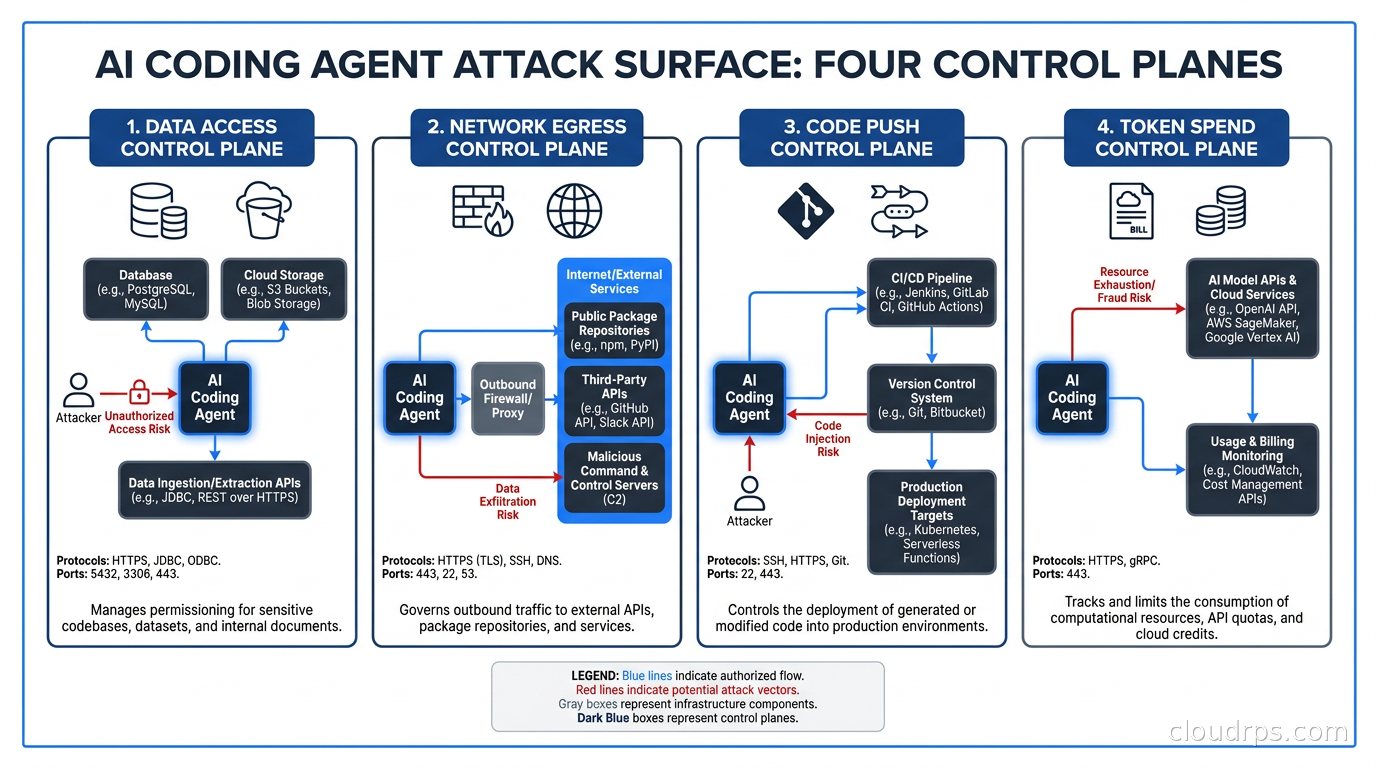
The threat model for coding agents has four dimensions: what data can the agent read, what systems can the agent call, what code can the agent push, and how much money can the agent spend. Left uncontrolled, a well-meaning agent will vacuum up everything it can read, call every external API that might be useful, push changes to production-adjacent paths, and generate enough LLM tokens to make your finance team ask uncomfortable questions.
I am not being alarmist here. The securing AI agents article covers prompt injection and LLM-layer attacks. This article is about the orthogonal set of problems: the infrastructure controls that limit what an agent can do regardless of what its LLM layer decides to attempt.
Ephemeral, Isolated Execution Environments
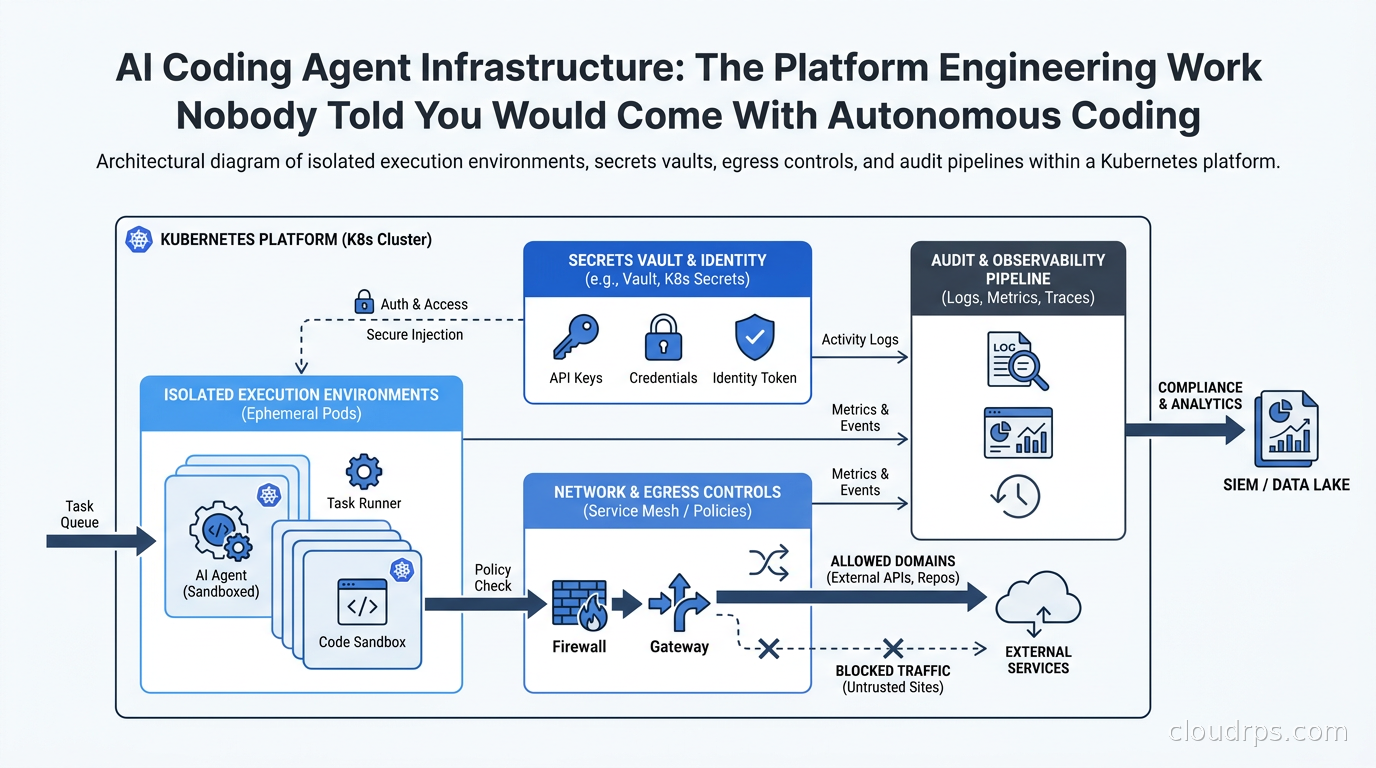
The single most important control is running each agent session in a fresh, isolated environment with a scope-limited filesystem. Every coding agent session should get its own container or microVM. That container gets a clone of the target repository and nothing else. It has no access to other repositories, no persistent home directory, no shared volumes, and no ability to reach the previous session’s state.
I have seen teams run coding agents on shared developer workstations or persistent VMs with broad filesystem access, and this creates exactly the kind of ambient credential discovery risk that bit the team in my opening story. When you give an agent a persistent environment, it accumulates context it was never supposed to have: SSH keys in ~/.ssh, AWS credentials in ~/.aws/credentials, git configuration with tokens embedded in remote URLs, and all the other detritus that accumulates in a developer’s home directory over months of work.
The right model is borrowed from cloud development environments: every session is a new, clean environment spun up from a definition file, with exactly the tools and access the task requires, and torn down when the session ends. For Kubernetes shops, this means a pod-per-session model, ideally using stronger isolation via gVisor or Kata Containers for untrusted agent workloads. For teams not on Kubernetes, Docker containers with explicit bind-mounts scoped to a single checked-out repository are the minimum baseline.
The container image itself matters too. Strip it down. The agent needs the language runtime for the project it is working on, the project’s build tools, and the agent binary itself. It does not need curl, wget, SSH clients, or any other exfiltration primitives that serve no purpose in a coding task. I use distroless or Wolfi-based images for this, following the same logic described in the container image hardening guide.
Network Egress: Allowlists, Not Blocklists
This is the control most teams skip because it feels like it would break too many things. It will break some things, and fixing those things is exactly the point.
A coding agent’s legitimate network needs are actually quite narrow. It needs to reach the LLM API. It needs to reach the package registries for the project’s language (npm, PyPI, Maven, etc.). It may need to reach an internal artifact registry. It needs to be able to clone from and push to the version control system. That’s it. In my experience, that’s maybe eight to twelve specific endpoints.
By contrast, what an agent will try to reach if you let it: external documentation sites, GitHub raw content URLs for code snippets, any API that the code it is reading happens to reference, and occasionally arbitrary endpoints from hallucinated tool calls. Some of those are benign. Some are not. The correct approach is an egress allowlist enforced at the network level, not a blocklist.
For Kubernetes environments, a NetworkPolicy that denies all egress by default and permits only the specific CIDR ranges and ports for the allowed endpoints gives you this control with minimal operational overhead. For non-Kubernetes environments, an egress proxy with an explicit allowlist achieves the same result. Deny by default, permit explicitly, log everything that hits the deny rule.
The logging piece is not optional. When an agent’s egress is blocked, you want to know. That blocked request is either a signal that your allowlist is missing a legitimate endpoint (fix it), or evidence that something unexpected happened in the agent’s behavior (investigate it). Either way it is useful information, and silently dropping the traffic hides it.
Secrets and Identity: The Hardest Part to Get Right
I want to spend significant time here because this is where most teams have the most exposure, and the solutions are more nuanced than “use a secrets manager.”
Coding agents need credentials to do their jobs. They need API keys to call external services the code integrates with, repository tokens to push commits, and potentially cloud credentials to run integration tests. The naive approach is to inject the same credentials a developer would use. Do not do this.
The right model uses three principles: separate identity, minimum scope, and short lifetime.
Separate identity means the agent has its own identity that is distinct from any human developer. When the agent pushes a commit, it should show in git history as “agent-session-f2a8c1” or similar, not as a human developer’s identity. When the agent makes an API call, that call is attributable to the agent session, not to a person. This matters for audit trails and it matters when something goes wrong. You want to know immediately whether an action was taken by a human or an agent without having to reconstruct it from logs.
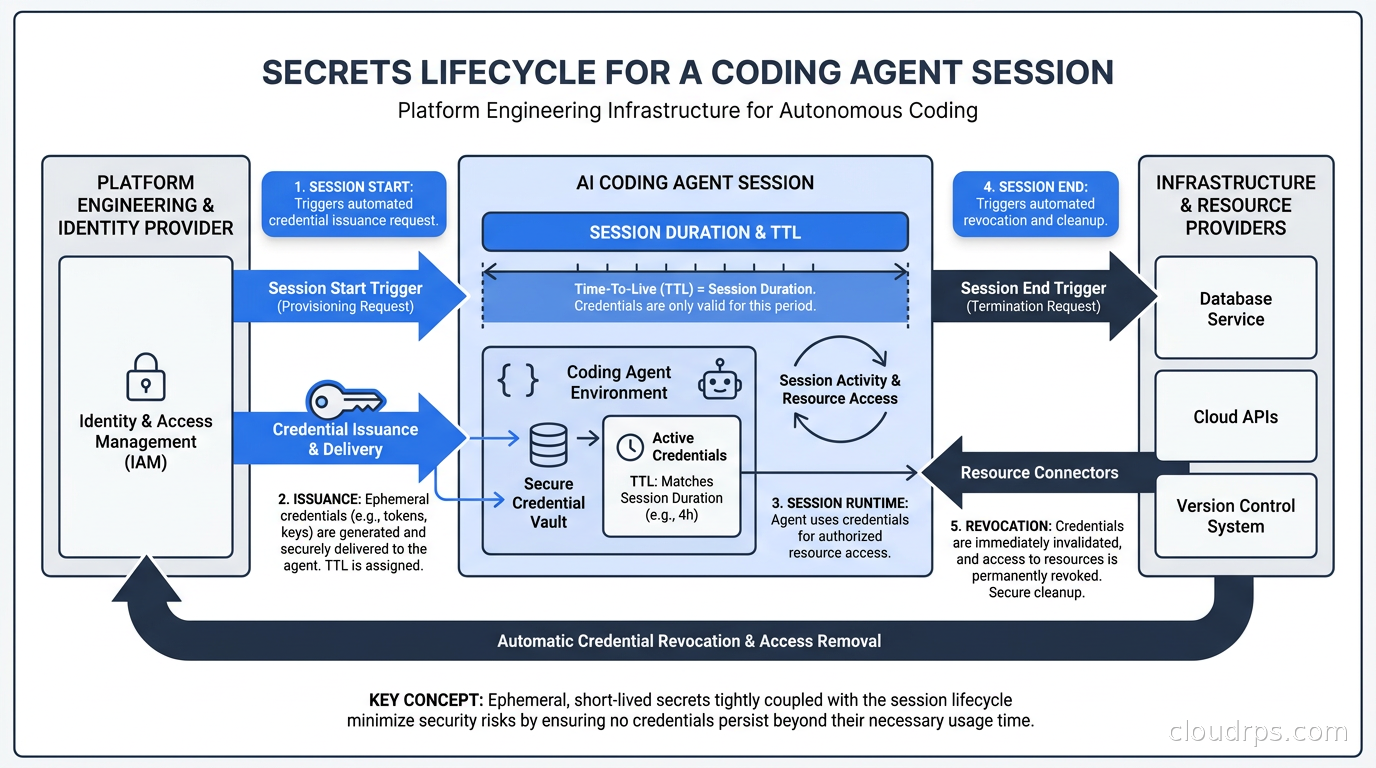
Non-human identity governance is an area that gets underinvested in at most organizations, and coding agents make it urgent. You need a machine identity lifecycle: create it when the session starts, scope it to the session’s allowed resources, expire it when the session ends. Workload identity federation is the right mechanism for cloud credentials. The agent’s pod gets a Kubernetes service account, that service account is bound to a narrow IAM role via IRSA or Workload Identity, and the resulting credentials expire automatically.
Minimum scope means the agent can read the resources it needs and write only the specific resources the task requires. For a coding agent working on a feature branch of the payments service, the minimum required scope is: read access to the payments repository, write access to the agent’s own branch in that repository, and read-only access to any external services referenced in the code. That’s it. No write access to main or production branches. No access to unrelated repositories. No access to production databases. No access to infrastructure control planes.
In practice, implementing minimum scope for repository access means provisioning a short-lived GitHub App installation token scoped to a single repository and a single branch. GitHub’s API supports this. Most teams are using PATs with organization-wide access instead, because it is easier. The easier path is also the path that costs you when something goes wrong.
Short lifetime means credentials expire at the end of the session. If an agent session is expected to last at most two hours, the credentials should have a two-hour TTL with no renewal capability. An agent session that runs for four hours is either stuck or doing something unexpected. Expired credentials force the situation to surface rather than letting it continue silently.
For the secret management infrastructure layer, HashiCorp Vault’s dynamic secrets feature does this cleanly: the agent session requests credentials, Vault generates them with a TTL matching the expected session duration and revokes them automatically afterward. AWS IAM, GCP Workload Identity, and Azure Managed Identities all support analogous patterns for cloud credentials.
Audit Logging: What Did the Agent Actually Do?
When something goes wrong with a coding agent, the first question is always “what exactly did it do?” Without comprehensive audit logging, you spend hours reconstructing events from git history, LLM API logs, and whatever the agent happened to write to stdout. That is not good enough for a production-grade system.
Every coding agent session should produce a structured audit log containing at minimum: every file read, every file written, every shell command executed, every external network call made (endpoint, method, response code), every LLM API call (model, token count, prompt summary without the full content), and every credential access. This is not the same as the agent’s verbose output or its thinking trace. This is a security-oriented record of what the agent’s process actually touched.
The best implementations I have seen treat the agent’s audit log as a separate output stream from the agent’s task log, written to an immutable audit store that the agent itself cannot modify. The agent’s process can write to its working directory and to stdout, but the audit log is written by a sidecar or by the agent runtime itself, not by the agent’s LLM-driven logic.
For Kubernetes deployments, an audit sidecar that tails system call events via eBPF gives you ground-truth visibility that is independent of what the agent reports about itself. Tools from the Falco ecosystem, covered in more depth in the container runtime security guide, can surface unexpected behaviors at the kernel level, catching things the agent’s application-layer logging might miss.
Cost Governance and Rate Limiting
This is the control that saves your budget and often the control that gets implemented last, after someone already gets a scary invoice.
Every coding agent session should have a hard token budget. When the budget is exhausted, the session stops. The developer gets notified that the agent hit its limit, and they can choose to extend the budget manually or break the task into smaller pieces. This sounds harsh but it is essential. Without it, a single agent session that enters a reasoning spiral or gets stuck in a loop can generate thousands of dollars of LLM API spend before anyone notices.
The practical implementation depends on your LLM access pattern. If you are going through an AI gateway (and you should be, as covered in the AI gateway architecture guide), the gateway can enforce per-session token limits and rate limits at the proxy layer, before the requests even reach the LLM provider. This is more reliable than trying to track token usage in the agent itself, because the agent’s tracking is self-reported and the gateway’s tracking is enforced.
Cost attribution is the other half of this. You want to know not just how many tokens were spent globally, but how many were spent by which team, which project, and which agent session. This enables you to have real conversations about ROI: team A spent 50,000 tokens on an agent session that produced a 200-line pull request that got merged; team B spent 400,000 tokens on a session that produced a pull request that was immediately reverted. Those conversations require the attribution data to exist.
Tag every LLM API call from an agent session with metadata: team ID, project name, session ID, agent type. Most LLM providers allow custom metadata on API calls or have usage APIs you can correlate with your own session metadata. The AI FinOps guide has more detail on the cost attribution patterns that work at scale.
Access Controls: What Code Can the Agent Touch?
Repository and branch permissions are the last line of defense against an agent making changes outside its intended scope. The policy I have settled on after working with several teams on this:
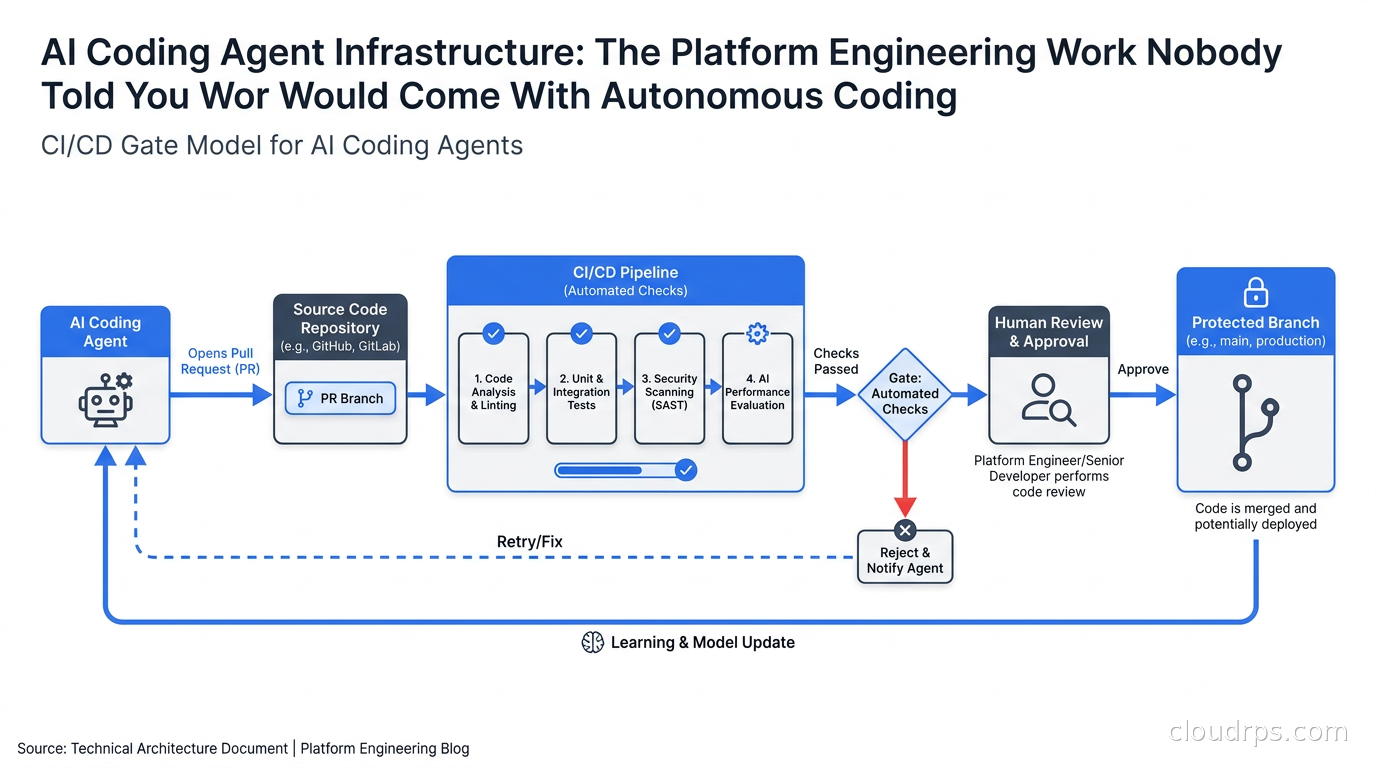
Agents can create branches. Agents can push commits to their own branches. Agents cannot push to main, master, or any protected branch. Agents cannot merge pull requests. Agents can open pull requests, which requires at least one human reviewer before anything reaches the default branch.
This pattern preserves the agent’s utility while keeping a human in the loop for anything that lands in the codebase permanently. The cost is that you cannot have a fully autonomous pipeline that deploys to production without a human touching it, and I consider that a feature rather than a limitation. The right graduation path is: start with agents that only open PRs, build trust with specific teams in specific repositories over time, and expand permissions incrementally as your organization understands the failure modes.
For organizations on GitHub, enforcing this at the infrastructure level means branch protection rules with required reviewers and restrictions on who (or what) can push to protected branches. The agent’s machine identity (its GitHub App or service account) should explicitly not have the bypass-branch-protection permission.
CI/CD Integration and the Gate Model
Agents need access to CI results to know whether their code works. They will look at test output, lint results, and build logs to iterate on failures. This is legitimate and valuable. The infrastructure question is how to give them this access without giving them the ability to do more than read.
The cleanest model I have implemented uses a read-only API token scoped to job log access for specific pipelines. The agent can see the results of CI runs on its own pull requests. It cannot trigger CI on arbitrary branches. It cannot cancel or re-run other people’s jobs. It cannot access build artifacts from other pipelines.
For teams using GitHub Actions with self-hosted runners, this means the agent’s runner has network access to the GitHub API but uses a token that is scoped to the Actions Read permission on the specific repository, nothing more.
The approval gate at the PR level also means you can implement automated checks before a human reviewer even looks at an agent PR: run your full test suite, run your security scanning, run your linting. If these fail, the PR gets flagged and the human reviewer knows the agent’s output needs work before it is worth their time. This gives you quality gates without requiring a human to manually check every agent output from scratch.
The Organizational Work That Makes Infrastructure Controls Stick
Infrastructure controls by themselves are necessary but not sufficient. You also need organizational practices that make these controls meaningful.
Define the scope of each agent deployment explicitly. An agent deployed to help with the API team’s feature work is not the same as an agent deployed to help with infrastructure changes. The permissions, resource access, and approval workflows for each should be different. I have seen teams make the mistake of deploying a single agent configuration that works for their least-sensitive codebase and then using the same configuration for everything, including code that manages production secrets and infrastructure state.
Train reviewers on what to look for in agent-generated pull requests. Agent code is often syntactically correct and stylistically acceptable but logically wrong in subtle ways: edge cases that were not in the test suite, retry logic that does not handle timeouts correctly, database queries that are correct for the happy path but create locks under load. Reviewers who know they are looking at agent output will apply different scrutiny than they would apply to output from a known colleague.
Establish incident runbooks for agent failures before you deploy them. When an agent does something unexpected, the response should be defined: suspend the agent’s session token immediately (not just revoke the PR, suspend the identity so it cannot take further actions), run the audit log through your incident review process, determine scope of impact, rotate any credentials the agent had access to as a precaution. Having this process written down before the incident means you execute it in minutes rather than hours.
Where This Is Going
The teams getting this right in 2026 are treating coding agent infrastructure the same way they treat their application security posture: as an ongoing practice rather than a one-time setup. They have platform teams that maintain agent execution environments, security teams that review agent audit logs periodically, and FinOps practices that track agent cost attribution against the outcomes the agents produced.
The economics of this investment make sense. A single incident involving a leaked credential or an unexpected production change costs more in engineering hours and customer trust than building the infrastructure controls correctly would have. The teams that built proper isolation and audit logging from the start have not had those incidents, and they have also been able to expand agent usage more aggressively because they have the visibility to know when something is going wrong before it becomes a crisis.
Autonomous coding agents are not going away. The question is whether your infrastructure will be ready when they become standard practice at your organization.
Get Cloud Architecture Insights
Practical deep dives on infrastructure, security, and scaling. No spam, no fluff.
By subscribing, you agree to receive emails. Unsubscribe anytime.