
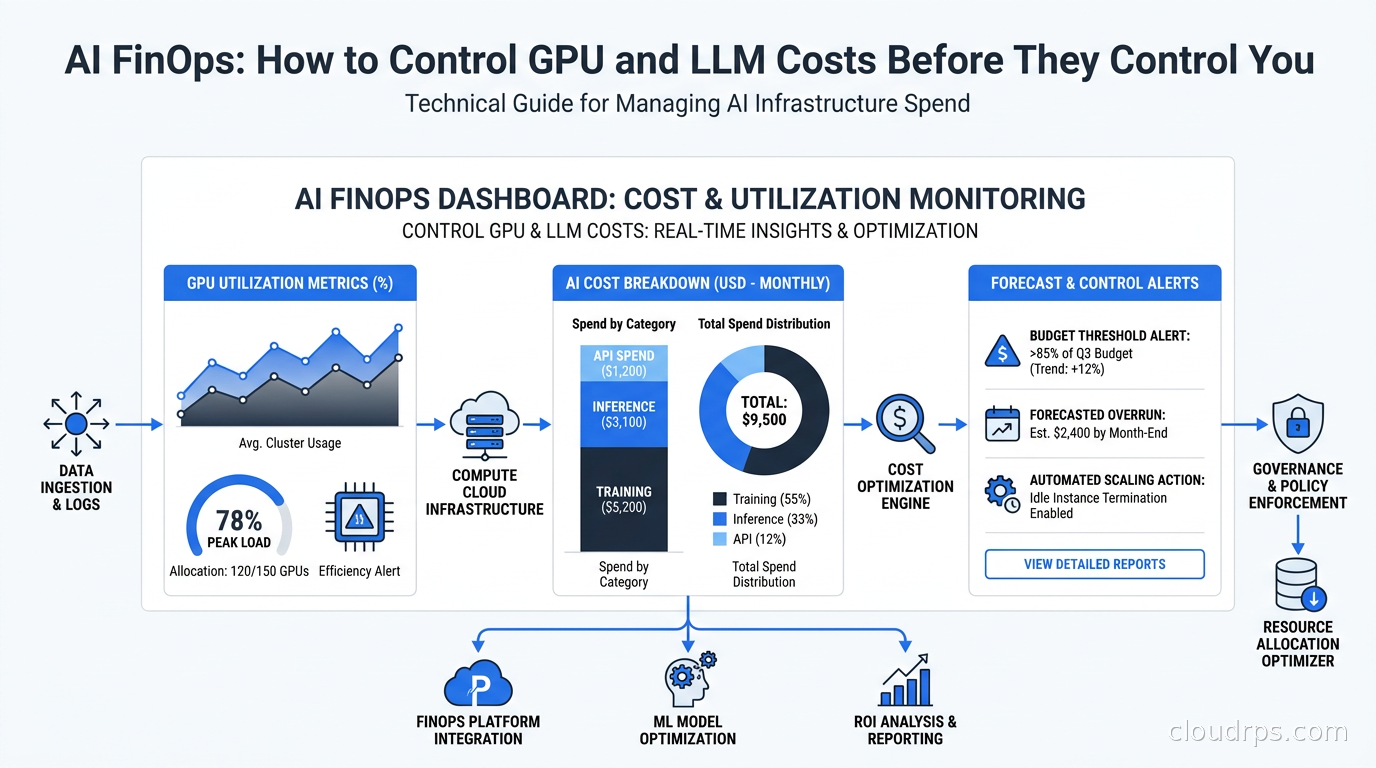
I got the call at 11pm. The head of infrastructure for a Series B startup was staring at a $340,000 AWS bill for a month they hadn’t shipped anything significant. They had a handful of engineers running experiments with fine-tuning, some inference endpoints they’d forgotten to shut down, and a data processing pipeline quietly consuming GPU hours for batch embeddings. Nobody had set budgets. Nobody had tagged resources. Nobody had asked “wait, is that endpoint still getting traffic?”
I’ve spent twenty years building and operating cloud infrastructure, and I’ve watched the same story repeat itself with every new compute paradigm: VMs, then containers, then serverless, and now AI. The costs are always invisible until they’re catastrophic. But AI workloads have a particular ability to generate surprise bills because the unit economics are brutal, the hardware is expensive, and engineers treat GPUs like compute-neutral resources.
They’re not. A single A100 instance on AWS (p4d.24xlarge) runs around $32 per hour on-demand. A team of five engineers casually running experiments for a month can generate six figures in compute costs without a single production workload shipped. An agentic application making 40 tool calls per user query before returning an answer will run through your LLM API budget faster than any capacity model you’ve built.
AI FinOps is not the same as regular FinOps. The principles overlap, but the mechanics are entirely different. Here is what actually works.
Why Your Standard FinOps Playbook Falls Short
If you’ve read about FinOps practices and cloud cost optimization, you know the fundamentals: tag your resources, right-size your instances, buy Reserved Instances for steady-state workloads, and turn off things you’re not using. All of that still applies. But AI workloads introduce cost drivers that standard FinOps tooling often can’t see clearly.
First, the cost per token consumed is non-trivial. When you call a frontier model API, you’re paying per input and output token. A team that builds a chatbot and forgets to cap output token limits can generate enormous bills from a few power users who ask the model to “write me a comprehensive report on every aspect of…”
Second, GPU memory is a shared but finite resource. Unlike CPU workloads where you can overcommit and let the scheduler sort it out, GPU VRAM doesn’t overcommit. If your model requires 70GB of VRAM and you have 80GB cards, you get one model per card. Packing strategy matters enormously for unit economics.
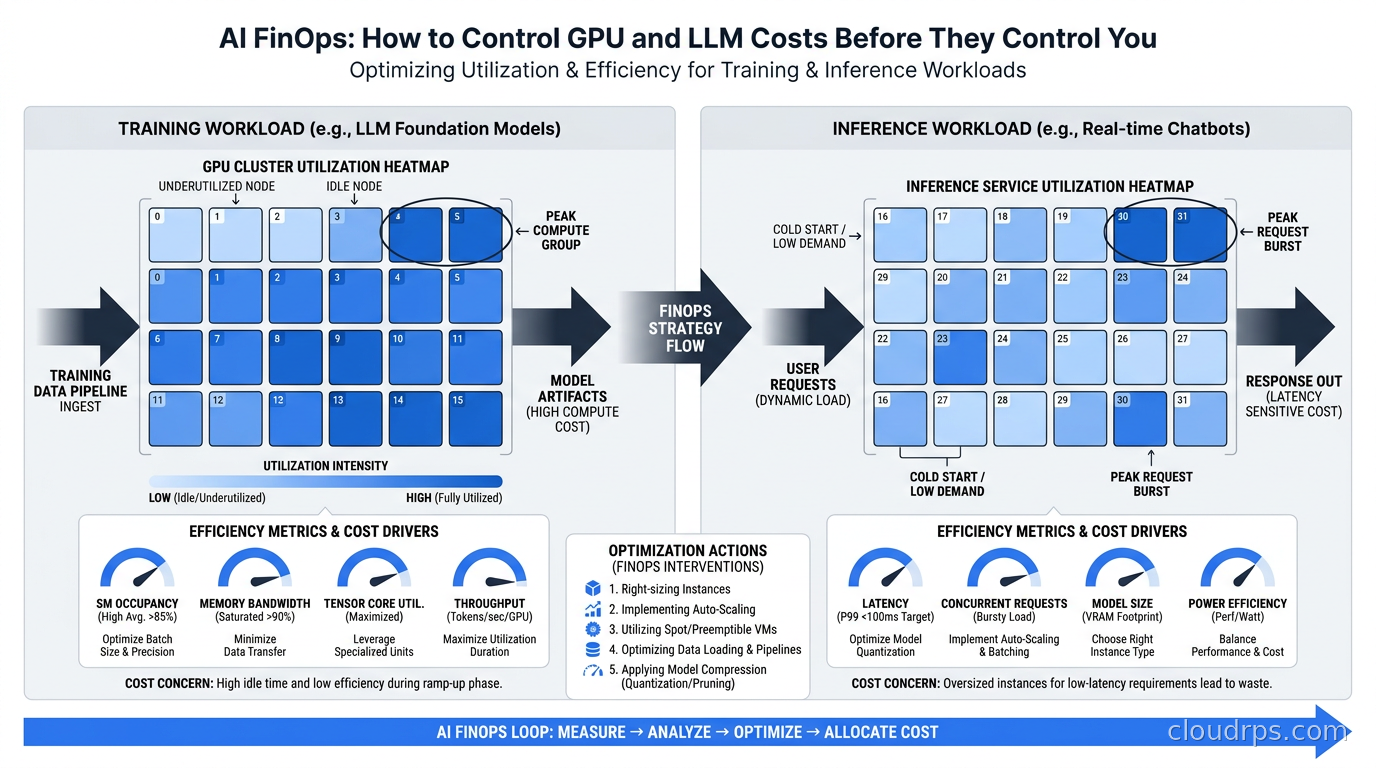
Third, training and inference have completely different cost profiles. Training is bursty, embarrassingly parallel, and should almost always run on spot or preemptible instances. Inference is latency-sensitive, requires steady capacity, and has a fundamentally different ROI calculation. Treating them the same way is where teams consistently get into trouble.
Fourth, the cost of an LLM call is often invisible at the application layer. When your application makes 47 tool calls in an agentic loop before answering a user query, each of those calls costs money and contributes to latency. Without tracing from the LLM layer back to the business action it enabled, you’re flying blind.
The Cost Anatomy of an AI Workload
Before you can optimize costs, you need to understand where the money actually goes. Most teams have a rough sense that “GPU is expensive” but no breakdown. Track these four buckets separately, because the optimization strategy for each is completely different.
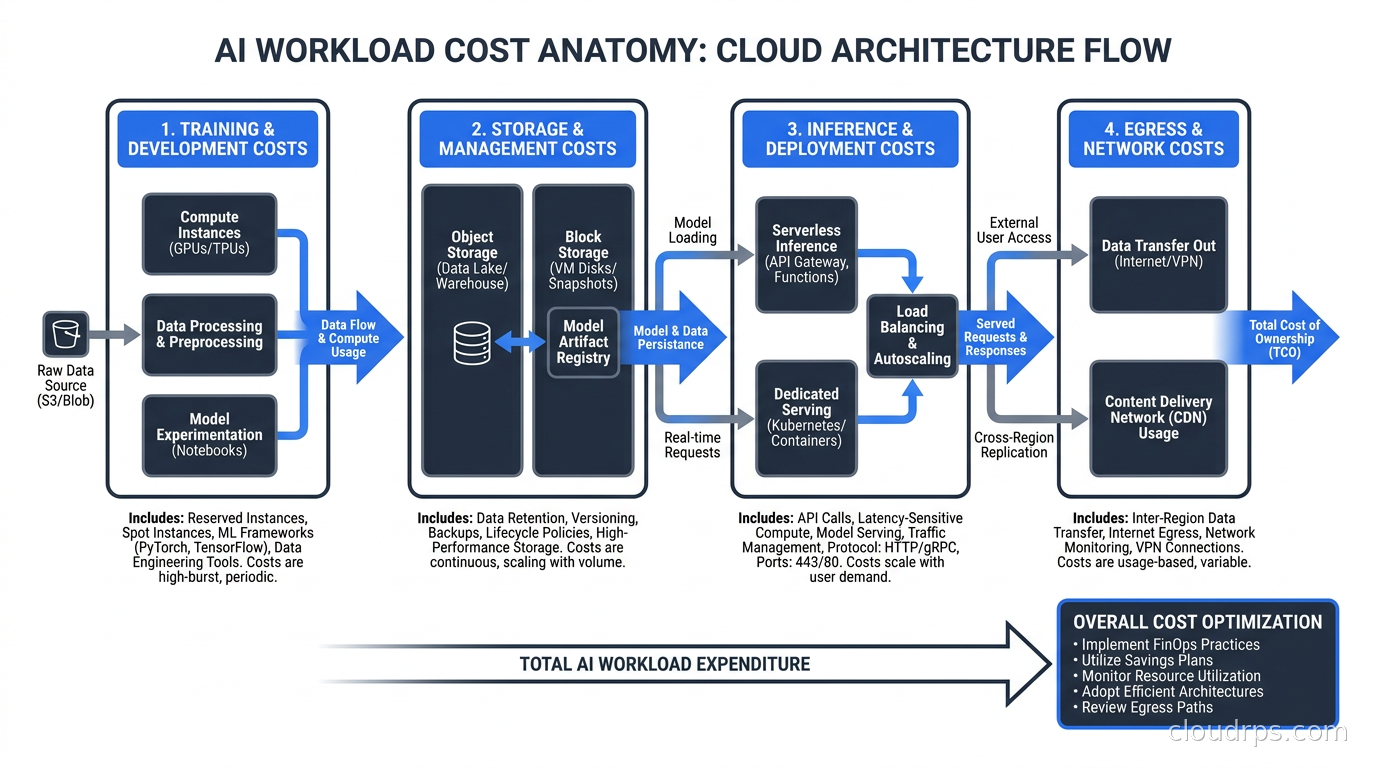
Training and Fine-Tuning Compute
This is the most variable category. A full pre-training run for a large model can cost millions of dollars. A supervised fine-tuning job using LoRA or QLoRA on a 7B parameter model might cost a few hundred. The variance is enormous, which means budgeting requires knowing what kind of training job you’re actually running.
Track training jobs as discrete events with a cost attached to each run. Every time an experiment finishes, you should be able to answer: what did this run cost, what GPU-hours did it consume, and what was the outcome? If you can’t answer those questions, you’re running science experiments with no lab notebook and no accountability for the electricity bill.
Inference Compute
This is the steady-state cost that dominates once you’re in production. An inference endpoint that serves a thousand users per day at 200ms P99 latency has very different cost characteristics than one serving a thousand batch jobs overnight.
The key metric here is cost per inference request, tracked by model size and hardware type. A 70B parameter model served on a single H100 will have a very different cost per token than the same model served with vLLM or SGLang using continuous batching. Inference engine selection alone can meaningfully change your cost per token, and most teams don’t benchmark this before choosing their serving stack.
Model Storage
Model artifacts are large. A 70B parameter model in float16 takes about 140GB of storage. If you’re iterating on fine-tuned variants and keeping checkpoints, storage costs accumulate fast. The mistake I see repeatedly is storing every checkpoint in expensive object storage tiers rather than tiering to cheaper cold storage after a few days. Most checkpoints are never loaded again once training converges.
Embeddings databases for RAG architectures also carry storage costs that scale with your document corpus. A naive implementation that re-indexes everything nightly because incremental indexing is harder to build can generate substantial and unnecessary storage churn costs. If you’re on AWS, Amazon S3 Vectors is worth evaluating for workloads with intermittent retrieval patterns; AWS’s own published claims put the vector storage and query cost reduction well into the double digits compared to always-on managed vector databases, though you should validate that against your own access patterns rather than take the marketing number at face value.
Data Transfer and API Egress
If you’re calling external LLM APIs, your LLM costs live in your application’s API budget rather than your compute budget, making them easy to miss in a cloud cost dashboard. If you’re running models in your own cloud, the egress costs for serving inference responses to users in different regions add up at scale. A model deployed in us-east-1 serving European users pays data transfer charges on every inference response. At high request volumes, that adds up to a line item worth optimizing.
The Inference Optimization Playbook
Inference is where most production AI teams spend the majority of their GPU budget. Unlike training, you can’t just throw more parallelism at it to finish faster. You need to extract maximum throughput from each GPU-hour.
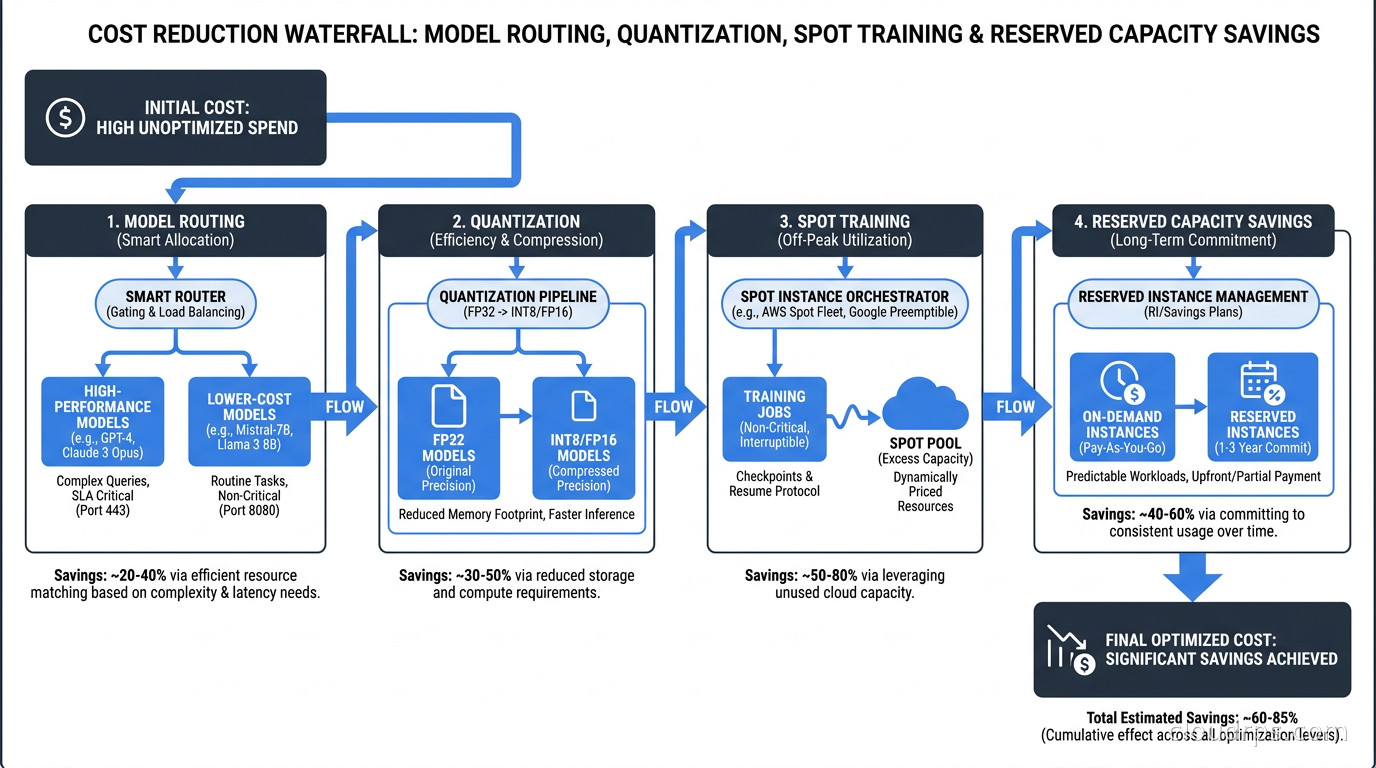
Quantization: Most models run at 8-bit or 4-bit precision with minimal quality degradation for many use cases. Moving from float16 to int8 cuts VRAM requirements roughly in half, which means you can fit more model replicas on the same hardware or serve a larger model on cheaper hardware. The tradeoff is a small accuracy hit and some inference slowdown for compute-bound workloads, but for most production use cases this is a favorable exchange. Choosing the right format matters: AWQ is the current standard for production GPU serving while GGUF is better suited for developer workstations and edge deployments. Our LLM quantization guide covers the full format comparison, VRAM arithmetic, and how to pick the right precision level for your specific hardware and quality requirements.
Continuous batching: Rather than processing requests one at a time or in fixed batches, engines like vLLM use continuous batching to keep the GPU saturated by filling empty slots with new requests as previous ones complete. This can improve throughput by 10 to 50x compared to naive single-request serving. The throughput improvement directly translates to lower cost per request.
Serverless GPU inference: For bursty or low-to-medium utilization workloads, serverless GPU platforms like Modal, RunPod, and Together.ai provide scale-to-zero compute that eliminates idle GPU costs entirely. If your inference workload averages below 40% utilization, the serverless pricing model will typically beat a dedicated instance even after accounting for the platform margin.
Multi-model serving: If you have multiple models serving different use cases, running them on separate endpoints is wasteful. Multi-model serving platforms can pack multiple smaller models onto a single GPU or serve them from the same hardware with time-sharing. This is particularly effective when your models have different peak-traffic windows and can share hardware across them. For teams running H100 or A100 hardware, MIG partitioning and GPU time-slicing can double or triple effective inference capacity from the same physical hardware before you spend a dollar on additional nodes. For teams running NVIDIA-supported models, NVIDIA NIM’s pre-optimized inference containers deliver NVIDIA’s hardware-specific TensorRT optimizations through a managed Kubernetes operator, which can reduce the engineering cost of squeezing per-GPU efficiency without building the TensorRT-LLM pipeline by hand.
Request routing by complexity: Not every user query needs your most capable and expensive model. A classification task asking “is this customer sentiment positive or negative?” doesn’t need a 70B parameter frontier model. A model routing layer that sends simple requests to a cheap 7B model and complex requests to a frontier model can cut inference costs substantially without users noticing the difference. This routing logic belongs in your AI gateway architecture. For latency-sensitive features or workloads touching privacy-regulated data, moving inference entirely on-device eliminates API costs for that traffic class; the on-device AI inference guide covers the cost model and when the engineering investment pays off compared to continued cloud API spend.
Prompt caching: If your application sends a large static system prompt on every API request (instructions, compliance policies, output schemas), you are paying to recompute that context on every single call. Provider-side prefix caching lets the model reuse precomputed KV cache entries for a shared prompt prefix, meaningfully reducing input token costs with zero model quality impact (the discount rate varies by provider; check current published pricing). For document analysis tools, compliance pipelines, and any workload with substantial static context, prompt prefix caching is often the fastest path to a significant reduction in LLM API spend, requiring only modest engineering effort to implement.
Speculative decoding: For latency-sensitive, low-concurrency workloads (interactive chat, coding assistants, voice AI), speculative decoding uses a lightweight draft model to propose multiple candidate tokens that the target model verifies in a single forward pass, delivering 2-4x speedup without any change to output quality. It is a decode-phase optimization that works best below batch size 32, so it complements continuous batching rather than replacing it. The speculative decoding production guide covers EAGLE-3 configuration for vLLM and SGLang and how to set the batch-size threshold where speculative decoding should disengage automatically.
Training Cost Control
Training is where spot instances make the most sense, and also where teams leave the most money on the table by not using them. Spot instances on AWS or preemptible VMs on GCP can cut training costs by 60 to 90% compared to on-demand GPU instances. The tradeoff is interruption risk, managed with checkpointing.
The key discipline for cheap training is checkpoint-driven development. Every training job should checkpoint its state at regular intervals, typically every N steps or every hour, whichever is shorter. If the spot instance gets interrupted, the next run resumes from the last checkpoint rather than starting over. Most modern training frameworks support this natively, and frameworks like DeepSpeed and FSDP make it straightforward to implement. One underappreciated GPU utilization killer is storage I/O during checkpoint writes: if your checkpoints are writing to slow storage, GPUs sit idle during the write. Sizing your storage layer properly (and for multi-node training, using a parallel file system like Lustre or WEKA rather than NFS) is a genuine training cost optimization.
Beyond spot usage, distributed training has its own cost traps. Multi-node training introduces expensive inter-node communication. If your training job spends 30% of its time waiting on collective operations rather than doing useful compute, you’re paying for GPU time wasted on network fabric overhead. Profiling your training jobs to understand the compute-to-communication ratio is worth doing before you scale to multi-node runs.
Experiment tracking is a force multiplier for training cost control. When researchers can see the loss curves, hyperparameter configurations, and costs of every experiment in one place, they make better decisions about which runs are worth scaling. Running the same ineffective configuration at large scale because nobody compared it to yesterday’s run is a surprisingly common and expensive mistake. MLflow, Weights and Biases, and similar tools pay for themselves immediately if you’re running any meaningful volume of experiments.
Cost Allocation and Chargeback
Here is where AI FinOps gets politically complicated. When a single GPU cluster serves five different teams and six different applications, how do you allocate costs?
The honest answer is: imperfectly, but consistently. Perfect cost attribution for AI workloads is genuinely hard because GPU memory is shared between models, inference batches contain requests from multiple users, and training jobs don’t always map cleanly to product teams. But “perfect” is the enemy of “good enough to change behavior.”
A workable approach is to tag at the job level. Every training job gets a team tag, a project tag, and a cost-center tag. Every inference endpoint gets the same. You aggregate costs weekly and show teams their bills. The first time a research team sees that their experiment-of-the-week cost $12,000, they start thinking more carefully about which experiments are worth running and which can be scoped down. The broader tagging infrastructure this depends on, including how to enforce required tags via SCPs and IaC guardrails and how to sequence showback before chargeback, is covered in the cloud FinOps tagging and cost allocation guide.
For Kubernetes-based AI infrastructure, namespace-level cost allocation with tools like OpenCost or Kubecost is a reasonable starting point. Pair it with GPU-specific metrics from DCGM Exporter to get per-namespace GPU utilization data, and you can build a fairly accurate picture of who’s consuming what. If your cluster serves multiple teams, deploying Kueue for fair-share GPU scheduling is one of the highest-leverage interventions you can make: teams that share a GPU pool without a queuing layer typically run at low utilization; with Kueue enforcing quota and admission control, the same hardware often reaches substantially higher utilization.
The harder problem is API cost allocation. When your application calls an external LLM API, the bill goes to a single account. Attributing that bill back to the feature, user cohort, or team that generated it requires instrumentation at the application layer: logging which model was called, with what input token count, for which user segment, triggered by which product feature. Most teams don’t build this upfront, and they regret it when the invoice arrives and nobody can explain why it doubled.
Budgets and Alerts That Actually Work
No AI FinOps practice works without automated budgets and alerts. The pattern that works is a three-tier system.
First, set a monthly budget for each cost category: training, inference, and API costs tracked separately. Alert at 50%, 75%, and 90% of budget. At 50% you’re informing. At 75% you’re asking teams to review their usage. At 90% you’re getting someone senior involved.
Second, set anomaly detection on daily spend. An AI workload that suddenly consumes 3x its typical daily compute is a signal that something broke: a runaway training job, an inference endpoint that stopped caching results, or a forgotten batch job intended as a one-time run. The major cloud providers all support anomaly alerts natively. For a detailed breakdown of how to configure AWS Cost Anomaly Detection, set up alert routing workflows, and layer in automated guardrails, see the cloud cost anomaly detection guide.
Third, set hard limits on experiment workloads. Researchers should have a budget envelope for experiments, and when they hit it, the job stops or requires explicit approval to continue. This sounds restrictive, but in practice it forces better experimental design. The “$340,000 month with nothing shipped” scenario I opened this piece with is a direct consequence of the absence of this discipline.
Supplement cloud-native budget tooling with GPU-specific monitoring from your observability stack. DCGM metrics give you utilization, memory usage, and temperature per GPU; for a complete guide to deploying DCGM Exporter in Kubernetes and building the alerting stack that surfaces throttling and hardware failures, see GPU infrastructure observability with DCGM. Correlating low utilization with high spend tells you where you have idle capacity that should be scaled down or consolidated.
The Model Selection Problem
One of the highest-leverage cost decisions in AI FinOps is model selection, and it gets made informally by engineers every day. The default behavior is to use the most capable frontier model for everything, because it gives the best results on whatever the engineer is testing that afternoon. The production behavior should be to use the cheapest model that meets the quality bar for the specific task.
This requires actually measuring quality for your specific use case, which many teams skip. “GPT-4 gives better results” is not a measurement. “GPT-4 achieves 94% task completion rate versus 87% for the 7B model on our evaluation set” is a measurement, and it lets you make a rational cost-quality tradeoff.
Build an evaluation pipeline for your key use cases. Run candidate models through it. Pick the smallest model that clears your quality threshold. Revisit quarterly as new models are released. Model capabilities at a given price point improve rapidly, and yesterday’s frontier model capability is often available today in a much cheaper package.
Reasoning models like o3, Gemini 2.5 Pro with Deep Think, and Claude Extended Thinking introduce a distinct tier above standard frontier models. They can cost 10 to 50 times more per request due to thinking tokens, and their latency profile requires async infrastructure rather than synchronous API calls. For workflows where you are considering these models, the AI reasoning models production guide covers budget token calibration, thinking token cost attribution, and the routing heuristics that prevent reasoning model spend from exploding in production.
For agentic workflows in particular, LLM observability tooling matters enormously. An agentic system that makes dozens of model calls to complete a single user task needs tracing that shows you exactly how many calls were made, what they cost, and whether each one was necessary. Without this, you can’t identify the loops, redundant calls, and over-engineered agent graphs that are silently burning your budget.
Reserved Capacity and Committed Use Discounts
GPU instances are expensive on-demand, but cloud providers offer significant discounts for committed use. AWS Savings Plans, GCP Committed Use Discounts, and Azure Reserved Instances all apply to GPU workloads. The discounts typically range from 30 to 60% depending on the commitment term and flexibility options.
The challenge is that AI infrastructure is evolving fast. Committing to H100 capacity for three years made sense in 2024 but looks less attractive as next-generation hardware delivers dramatically better price-performance. The safe approach is to commit to what you know is steady-state: your production inference capacity that runs at consistent utilization. Keep experimental and training workloads on spot or on-demand, since those are variable by design. Teams doing large-scale training should also evaluate neocloud GPU providers as an alternative to hyperscaler reserved instances: CoreWeave, Nebius, and Lambda Labs often have more GPU availability and competitive reserved pricing for training-heavy workloads.
ARM-based instances are worth evaluating for inference workloads that are CPU-bound: smaller models, embedding generation, and reranking pipelines. AWS Graviton3 and Graviton4 instances offer better price-performance than x86 for these workloads, and the software stack has matured enough that porting is usually straightforward. I’ve seen teams cut their embedding pipeline costs meaningfully by moving from x86 to Graviton with no code changes other than a target architecture flag. For GPU-intensive training workloads, the bigger cost lever is hyperscaler custom silicon: AWS and Google both make credible published claims that Trainium 3 and Ironwood TPU offer significant savings over equivalent NVIDIA GPU instances for stable training jobs, with the tradeoff being upfront framework porting effort and those vendor numbers deserving independent verification on your own workload.
Putting It Together: Where to Start
If you’re reading this because your AI bill surprised you last month, start here. Not with a comprehensive FinOps platform purchase. Not with a six-month organizational change program. Start with the things that generate quick wins and visibility.
Week one: get visibility. Tag every GPU resource with team, project, and environment. Export cost data to a dashboard you’ll actually look at. Spend one week doing nothing but understanding your cost breakdown across the four buckets I described. You’ll almost certainly find something embarrassing. If you run AI workloads across more than one cloud (AWS Bedrock, Azure AI Foundry, GCP Vertex), enable FOCUS billing exports from each provider: the FOCUS spec now includes AI and LLM spend categories, giving you a unified schema to query total AI cost across providers from a single table.
Week two: shut off idle endpoints. Inference endpoints that serve zero or near-zero traffic are pure waste. Set up utilization-based scale-to-zero for development and staging endpoints. This alone often cuts 20 to 30% of inference costs immediately, because dev endpoints have a habit of running 24 hours a day serving zero requests.
Week three: establish a training checkpointing standard. Every training job must checkpoint. Every team must use spot instances for training unless there is a documented reason not to. This is a policy, not a suggestion, and it applies equally to research teams and production teams.
Month two: implement model routing. Identify your top three use cases by token volume. Build evaluation datasets for each. Find the smallest model that meets quality requirements. Route traffic accordingly. If you have high-volume, well-defined tasks running on frontier API, model distillation is worth evaluating as a month-three project: you train a task-specific student model on the teacher’s outputs, and the per-token inference cost can drop by orders of magnitude for stable workloads. This is the single highest-leverage ongoing optimization available. One nuance if you are evaluating Mixture-of-Experts models for routing: MoE cost accounting is tricky because you pay the memory cost of all 671B parameters in a model like DeepSeek V3 but only compute with 37B per token. Your cost-per-token metrics look cheap on compute but the always-on memory reservation cost is substantial and often invisible in standard FinOps tooling. The MoE infrastructure guide covers how to account for this in your cost models. A separate cost dimension appears if you are moving into multimodal serving: vision tokens from image inputs drive VRAM consumption and processing cost in ways that standard token-counting dashboards miss. The multimodal AI infrastructure guide includes a cost attribution model for vision workloads that integrates with your existing FinOps tagging strategy.
Month three: set budgets with teeth. Budget alerts that nobody reads are theater. Budgets that pause workloads or require approval to exceed are real governance. Implement job-level cost tagging, weekly cost reviews with team leads, and hard limits on experiment workloads.
The economics of AI infrastructure are brutal, but they’re manageable with the right operational practices. Twenty years in, I still believe the most expensive thing in cloud infrastructure is not the GPU. It’s the engineering habit of treating infrastructure as infinite and free until the bill arrives.
Build visibility first. The optimization opportunities will make themselves obvious.
Updated September 1, 2026: removed unsourced statistics as part of an accuracy review.
Get Cloud Architecture Insights
Practical deep dives on infrastructure, security, and scaling. No spam, no fluff.
By subscribing, you agree to receive emails. Unsubscribe anytime.