
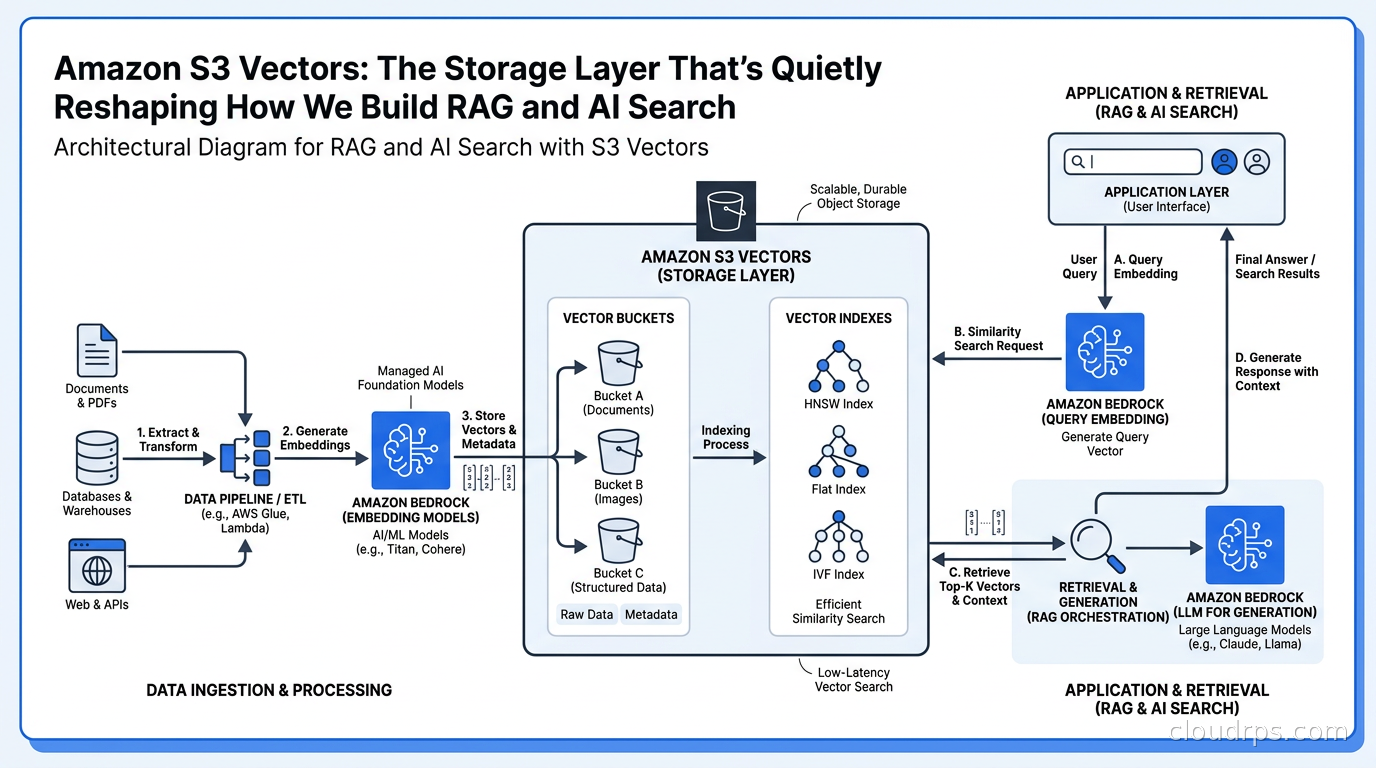
When AWS announced S3 Vectors in July 2025, I filed it under “interesting preview, wait and see.” By the time it hit general availability in December 2025, I had already migrated two RAG workloads off managed vector databases onto it. By March 2026, when it expanded to 31 regions, my remaining skepticism was gone. This is one of those services that looks like a minor extension of an existing product until you run the cost numbers and realize it fundamentally changes the economics of building AI-powered search.
Twenty years of infrastructure work has taught me to be suspicious of announcements that promise 90% cost reductions. Usually the asterisk is the story. With S3 Vectors, the numbers are real, but they come with architectural trade-offs that aren’t always obvious from the marketing material. Let me walk through what it actually is, when to use it, and where it will disappoint you.
What S3 Vectors Actually Is
S3 Vectors is not a new vector database. That framing leads architects astray immediately. It is object storage, specifically Amazon S3, extended with native vector indexing and querying capabilities. The mental model is closer to “S3 with an embedded approximate nearest neighbor index” than “Pinecone running inside AWS.”
You create a vector bucket, which is a distinct bucket type from the standard S3 buckets you’re used to. Inside that bucket, you create one or more vector indexes. Each vector index holds your embeddings, associated metadata, and the index structures needed to execute similarity queries. You interact with the service through a dedicated API surface, not the standard S3 PutObject and GetObject calls.
The scale numbers are substantial. Each vector index supports up to two billion vectors. Each vector bucket supports up to 10,000 vector indexes. That is enough scale for virtually any retrieval workload that isn’t a top-ten hyperscaler building a general-purpose search engine for the entire internet.
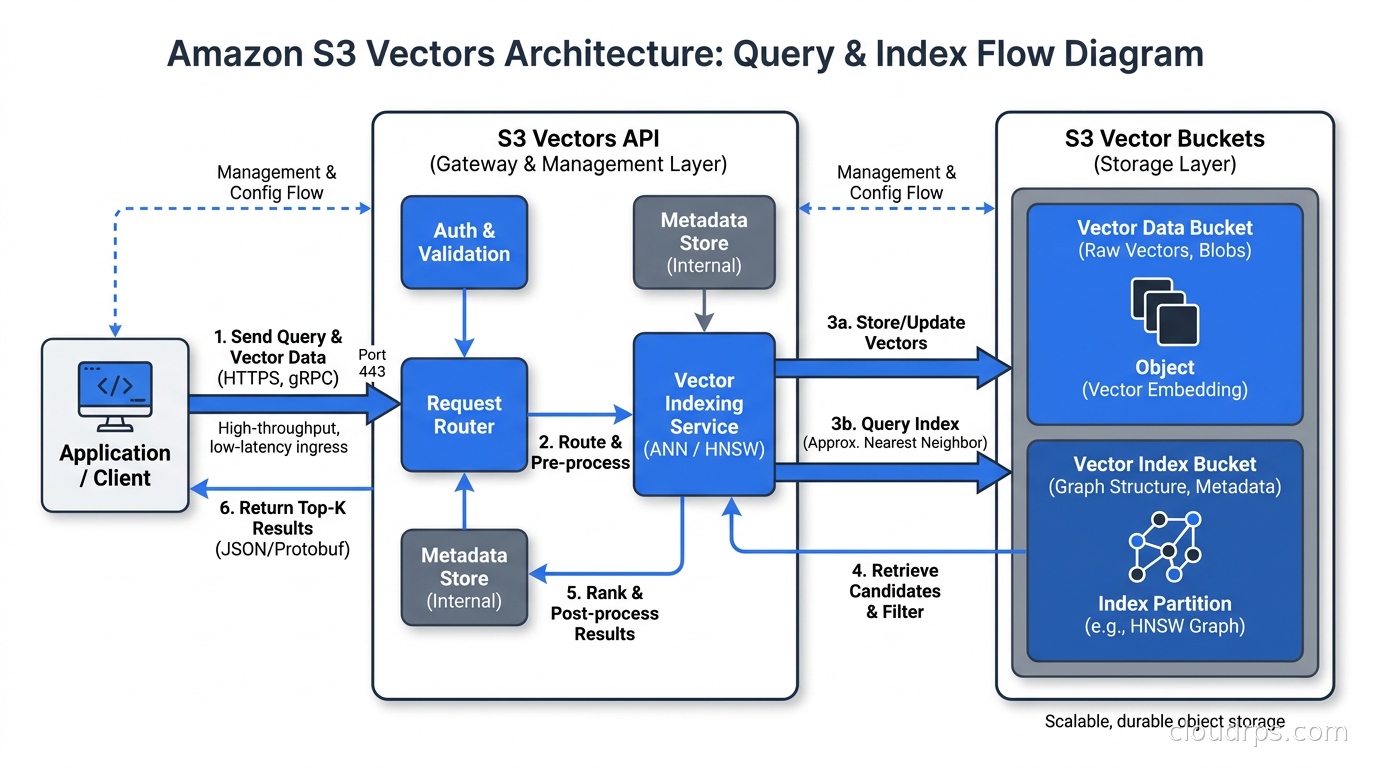
The query behavior is straightforward: you send a query vector and get back the k nearest neighbors, with optional metadata filtering to scope results before the similarity search executes. Response times land under one second for infrequent queries, and the service drives down to around 100 milliseconds for workloads that exercise the index regularly and therefore benefit from warm caches. Those numbers put it squarely in the range that works for RAG: a 300-millisecond vector retrieval step is perfectly acceptable in a pipeline where the LLM call itself costs 800ms to two seconds.
The Cost Story
Here is where things get genuinely interesting, and where I want to be precise because there are important caveats.
AWS claims S3 Vectors reduces total costs to upload, store, and query vectors by up to 90% compared to purpose-built vector databases. That claim is plausible in specific scenarios. Purpose-built managed vector databases like Pinecone or Weaviate Cloud charge substantially for always-on compute that keeps indexes warm and ready for low-latency queries. You pay for compute capacity whether you’re running 100 queries a minute or zero.
S3 Vectors is consumption-based. You pay for storage, put operations, and query operations. There is no baseline compute charge. For workloads with bursty or intermittent query patterns, this collapses costs dramatically. I had a RAG system for an internal knowledge base that got maybe 500 queries a day. On a managed vector database, I was paying roughly $300 a month for a provisioned tier that could handle 10x that throughput. After migrating to S3 Vectors, the same workload costs about $40 a month. That is a real 87% reduction and it matches AWS’s claim.
For high-throughput workloads running thousands of queries per minute, the math changes. At that volume, purpose-built vector databases amortize their compute cost over enough queries that they become competitive on a per-query basis, and they offer lower latency guarantees. The break-even point in my experience sits somewhere around 2,000 to 5,000 queries per hour, depending on vector dimensionality and the specific vector database you’re comparing against.
This is not a universal replacement for Pinecone or Weaviate. It is the right choice for a large category of workloads that were previously over-engineered and over-priced.
The Architecture of a Vector Bucket
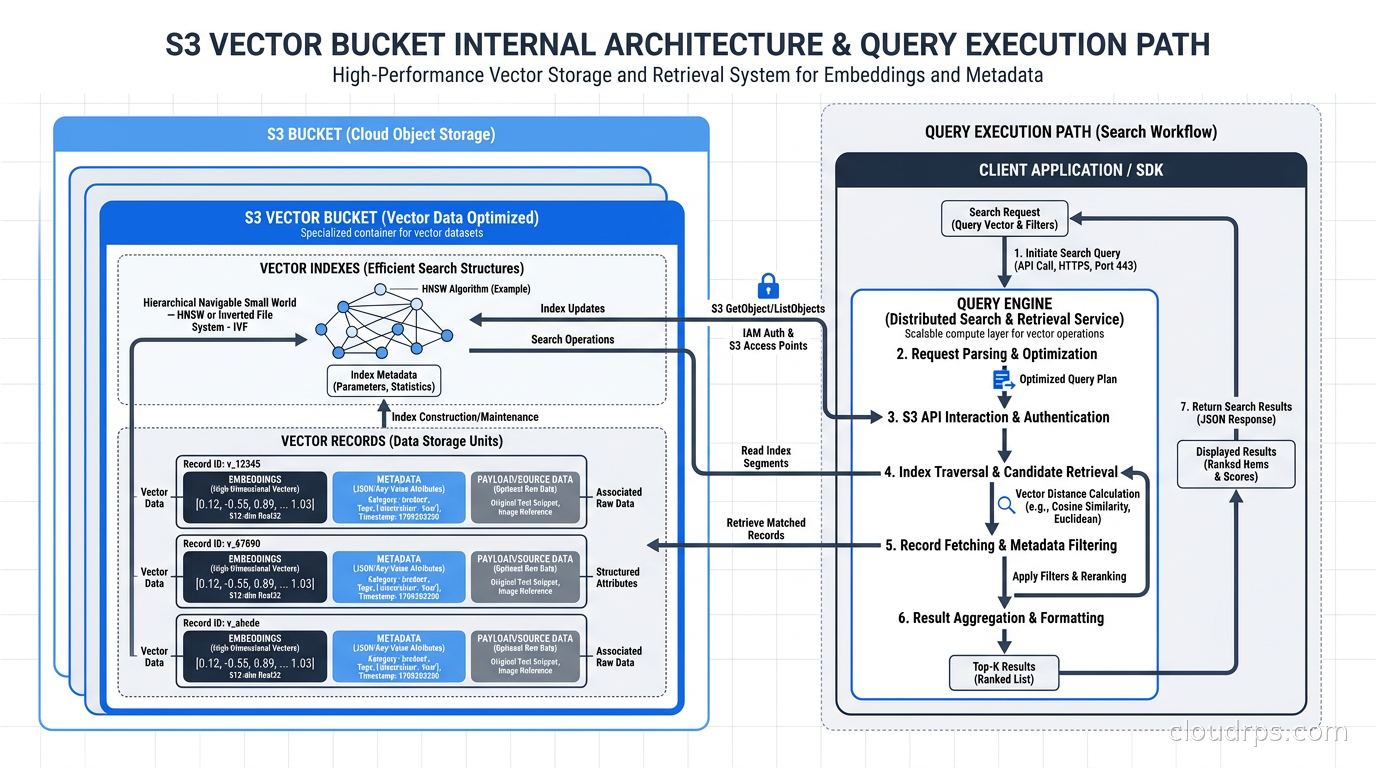
Understanding how to design around S3 Vectors requires understanding its internal structure a bit more deeply than the marketing page describes.
A vector bucket is a namespace. It does not store vectors directly. Instead, you create vector indexes inside it, and the indexes are where the actual embeddings live. Think of the vector bucket as a database cluster and the vector indexes as the individual tables.
Each vector index has a fixed dimensionality, set at creation time. If you’re using a 1536-dimension text embedding model (OpenAI’s text-embedding-3-small, for example) you create an index with dimension 1536. All vectors in that index must match that dimensionality. This is standard for any vector store, but it means you need to plan your index layout around your embedding model choice upfront.
The metadata story is important for real workloads. Each vector can carry a metadata payload, a JSON object with arbitrary key-value pairs. When you execute a similarity query, you can include a metadata filter that pre-filters the candidate set before running the nearest neighbor search. This is how you implement tenant isolation, date range filtering, document type scoping, or any other domain-specific segmentation without creating separate indexes for each segment.
I have seen teams make the mistake of creating a separate vector index per customer in a multi-tenant system. With S3 Vectors, you generally do not want to do that at fine granularity. The right pattern is one index per embedding model per logical domain, with tenant ID or other segmentation attributes in the metadata. You can maintain up to 10,000 indexes per bucket if you genuinely need that many, but most architectures should not approach that limit.
Building a RAG System With S3 Vectors
Let me walk through a concrete RAG architecture using S3 Vectors, because the code and operational patterns matter more than abstract discussion.
The ingestion pipeline works like this. Your documents get chunked and passed to an embedding model. The resulting vectors, along with metadata about the source document (chunk text, document ID, source URL, creation timestamp, any access control labels), get written to S3 Vectors via the PutVectors API call. You can batch up to 500 vectors per API call, which is important for throughput during bulk ingestion.
For our production RAG pipelines, I typically run ingestion through a queue-based system. Events land in SQS, an ECS task pulls them, generates embeddings, and calls PutVectors in batches. This decouples ingestion throughput from the embedding model API rate limits and keeps the pipeline resilient to partial failures.
The retrieval path is simpler. Your query arrives, goes through the same embedding model to generate a query vector, hits the S3 Vectors QueryVectors API with optional metadata filters, and returns the top-k results by similarity score. You package those results as context and pass them to your LLM. The entire retrieval path from query to retrieved chunks typically takes 150 to 400 milliseconds in my production systems, which is well within acceptable parameters for an interactive RAG application.
The Bedrock Knowledge Bases integration is worth calling out separately. If you’re already using Bedrock for your LLM calls, as many teams are after the platform matured significantly through 2025, you can point a Knowledge Base directly at an S3 Vectors index. Bedrock handles the retrieval step automatically, and you get native integration with managed embedding models like Amazon Titan or Cohere Embed without writing the retrieval plumbing yourself. For teams that want to minimize infrastructure code, this is a compelling path. For teams that need precise control over chunking strategies, metadata schemas, or retrieval logic, you will likely want to manage the integration yourself.
When to Use S3 Vectors, and When Not To
I want to be direct about the trade-offs because this is where a lot of cloud architects get into trouble by picking the shiniest new service without matching it to their actual requirements.
Use S3 Vectors when:
Your workload has intermittent or bursty query patterns. If you have thousands of queries during business hours and near-zero overnight, S3 Vectors’s consumption pricing dramatically undercuts always-on provisioned databases. Internal knowledge bases, document search for enterprise applications, and compliance query systems often fit this profile.
You need to store billions of vectors affordably. At truly large scale, the storage economics of S3 (versus a managed vector database’s storage tier) are significant. If you have 500 million document chunks, S3 Vectors is probably cheaper for storage alone.
You are already deep in the AWS ecosystem and want to reduce operational surface area. No separate vector database cluster to manage, no additional vendor relationship, no separate monitoring setup. It’s just S3 with a different API.
Your latency requirements are in the 100ms to 500ms range for retrieval. That covers most RAG and semantic search applications.
Do not use S3 Vectors when:
You need sub-50ms vector retrieval latency consistently. Purpose-built vector databases with provisioned compute and in-memory indexes will beat S3 Vectors on latency at high QPS. If you’re building a real-time product search on a high-traffic e-commerce site, you probably need something else. The same applies to high-frequency trading applications that use semantic similarity in their pipelines, though I will admit those are unusual architectures.
You need advanced index types beyond approximate nearest neighbor search. Some specialized workloads need exact nearest neighbor search, specific HNSW parameter tuning, or hybrid search combining dense and sparse retrieval natively within the same query. Purpose-built vector databases are more configurable at this level.
You require vector database features like access control at the index level, versioned indexes with rollback capability, or advanced analytics over your vector collection. S3 Vectors is deliberately focused: store vectors, query by similarity, filter by metadata. That is its scope.
Comparing Costs Across Storage Options
Because I know this question will come up: how does S3 Vectors compare to running pgvector on RDS or Aurora, which is what many teams defaulted to when they needed a cheap vector store that lived inside their existing database infrastructure?
The comparison is nuanced. pgvector on a shared PostgreSQL database is extremely convenient if your application already runs on Postgres. The query can join against application tables, you have full SQL expressiveness, and there is no separate service to manage. But it carries limitations at scale: the index lives in memory for optimal performance, so your database instance needs enough RAM to hold the working set of your vector index, and that gets expensive quickly as your collection grows. A 10 million vector collection with 1536-dimension embeddings requires roughly 60GB of RAM just for the index. That drives you toward very large RDS instance classes.
S3 Vectors externalizes that concern entirely. The indexing infrastructure is managed by AWS and scales independently of any single machine’s memory capacity. You are trading some latency headroom for scale and cost efficiency, which is the right trade for most enterprise document retrieval workloads.
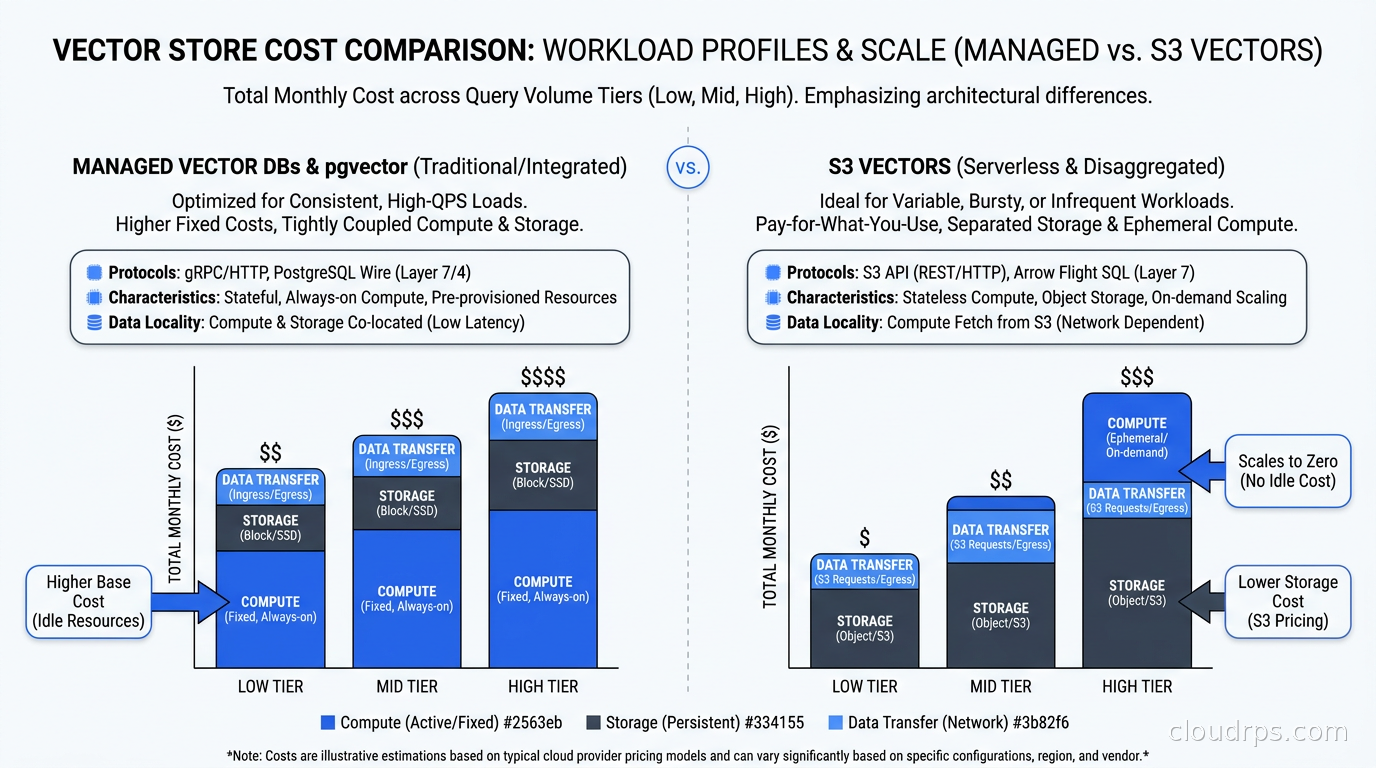
For the full vector database landscape, including when pgvector, Pinecone, and Weaviate make sense, our vector databases guide covers the trade-offs in detail. S3 Vectors sits at a different point in that design space: lower cost, managed scale, sufficient latency for most RAG workloads, but less configurable than purpose-built options.
Operational Considerations
A few things I have learned running S3 Vectors in production that are not obvious from the documentation.
Index warming matters. S3 Vectors returns sub-100ms latencies for frequently accessed indexes. For workloads where the index is queried infrequently, you may occasionally see the higher end of the latency range on the first query after a period of inactivity. This is similar to cold-start behavior in serverless compute. For most enterprise RAG applications, this is irrelevant. For latency-sensitive applications, pre-warm your indexes by running periodic background queries.
Metadata cardinality affects query performance. If you are filtering on metadata fields with very high cardinality, for example filtering by a UUID-format document ID to retrieve chunks of a specific document, the pre-filter can become the bottleneck rather than the similarity search. Design metadata schemas with filtering query patterns in mind. Low-cardinality metadata fields (document type, tenant tier, date bucket) filter efficiently. High-cardinality fields used as exact-match filters can be slow.
Batch your puts aggressively during ingestion. The PutVectors API accepts up to 500 vectors per call. Use maximum batch sizes during bulk ingestion. I have seen teams default to single-vector puts out of habit from working with other APIs, and the ingestion throughput suffers by orders of magnitude.
Plan your index schema before you ingest at scale. Unlike a relational database where you can add columns with a migration, changing the dimensionality of a vector index requires creating a new index and re-ingesting everything. The metadata schema is more flexible since it’s schemaless JSON, but the core embedding dimension is fixed. Get this right the first time.
Consider your embedding model lifecycle carefully. If you swap from text-embedding-3-small (1536 dimensions) to a newer model with different dimensionality, you will need to re-embed and re-ingest your entire corpus. This is true of any vector store, not just S3 Vectors. The AI FinOps practices we use for managing LLM costs apply here too: track embedding API costs during ingestion and build a plan for re-embedding when model generations change.
Integration With the Broader AI Infrastructure Stack
S3 Vectors fits cleanly into a broader AI infrastructure design. It is the retrieval storage layer, not the full stack. You still need an embedding model (managed via Bedrock, OpenAI API, or self-hosted), a chunking and ingestion pipeline, an orchestration layer that wires retrieval into the LLM prompt, and an LLM serving layer.
For teams using an AI gateway for LLM API management and cost control, S3 Vectors integrates naturally: retrieval calls go to S3 Vectors, LLM calls go through the gateway, and you get unified cost visibility across both. The combination of S3 Vectors for cheap retrieval storage and a well-configured AI gateway for LLM cost control is a compelling stack for enterprises trying to run production AI on a responsible budget.
For teams on AWS who are choosing between Bedrock and other managed AI platforms for their overall AI infrastructure, the S3 Vectors integration is a meaningful point in Bedrock’s favor. The Bedrock vs. Vertex AI comparison covers the platform-level decision in depth, but the native Knowledge Base integration with S3 Vectors removes a significant amount of integration work if you’re in the AWS ecosystem.
LLM prompt caching and vector storage optimization are two of the highest-impact cost levers in a production RAG system. Tackle both, and you can often reduce your AI infrastructure costs by 70% or more compared to a naive first implementation.
What This Means for AI Infrastructure Architecture
There is a broader pattern here worth naming explicitly. The major cloud providers are progressively absorbing capabilities that previously required specialized third-party services. Five years ago, you needed Snowflake because the cloud providers’ native data warehouses were inadequate for analytic workloads. Today, BigQuery and Redshift are genuinely competitive for many workloads. The same dynamic is playing out with vector storage.
This is not necessarily bad news if you are building on specialized vector database infrastructure. The managed products from Pinecone, Weaviate, and Qdrant are more capable, more configurable, and better suited to high-throughput production search workloads. They will retain their niche. But the middle of the market, the workloads that need “good enough” vector retrieval at reasonable cost without deep operational expertise in vector database management, is being absorbed by S3 Vectors and equivalent services from Google and Azure.
For cloud architects thinking about self-hosted storage options, S3 Vectors adds another dimension to that decision. If your retrieval workload fits S3 Vectors’s cost and latency profile, the managed service likely makes more sense than running a self-hosted Milvus or Weaviate cluster. The operational burden of maintaining vector database infrastructure is substantial and rarely well-understood before you’re in the middle of an index corruption incident at 2am.
Getting Started
The migration path from a managed vector database to S3 Vectors is straightforward if you have a clean abstraction layer in your application code. Build an interface that isolates your vector operations: upsert vectors, query by similarity, delete by ID, filter by metadata. Swap the implementation from your current vector database client to the S3 Vectors SDK. Test against a small subset of your data, validate retrieval quality (because the approximate nearest neighbor algorithm may return slightly different results than your previous index), and then migrate.
For greenfield RAG systems, start with S3 Vectors unless you have a specific reason not to. It is simpler to operate than a managed vector database, cheaper for most workload profiles, and good enough for the vast majority of enterprise retrieval workloads. The time you save not managing a separate vector database service is real time that goes into building the application layer.
The teams I know that have adopted S3 Vectors are not abandoning their sophisticated vector search architectures. They are rerouting their lower-value, cost-sensitive workloads onto S3 Vectors and keeping their specialized tooling for workloads that genuinely require it. That is exactly the right segmentation.
Twenty years of building distributed systems has made me cautious about vendor promises, but also pragmatic about following the cost curve. When a service eliminates 80-90% of your cost for a specific workload class without requiring you to sacrifice correctness, you use it. S3 Vectors is that service for a large category of AI retrieval workloads, and it was ready for production use well before most teams noticed it was available.
Get Cloud Architecture Insights
Practical deep dives on infrastructure, security, and scaling. No spam, no fluff.
By subscribing, you agree to receive emails. Unsubscribe anytime.