
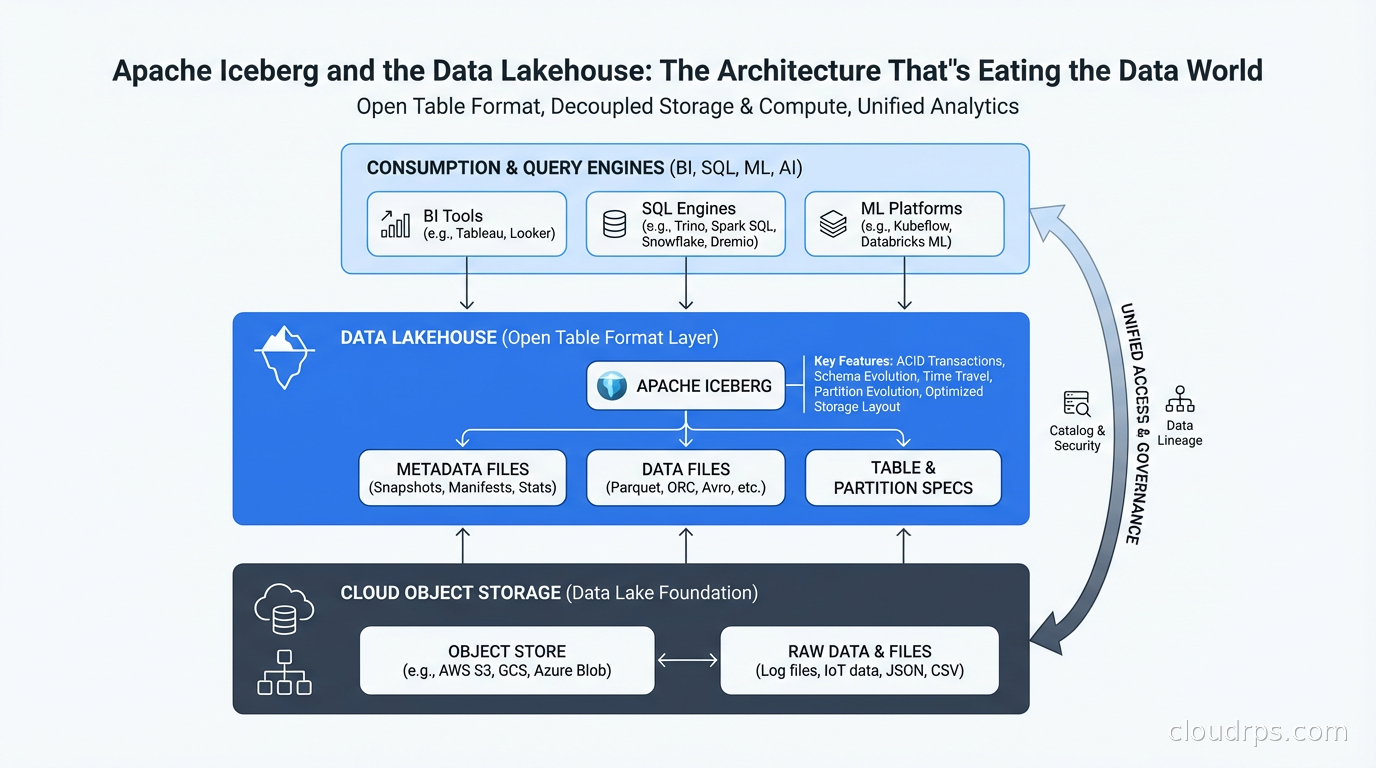
I spent three years of my career fighting the data lake swamp problem. We had petabytes of Parquet files in S3, a Hive metastore that was perpetually confused about schema, and a ritual every Monday morning where the data team would discover that some upstream job had silently changed a column type and corrupted a month’s worth of reports. We had “the data lake.” What we actually had was organized chaos with an S3 bill.
Apache Iceberg changed that. And when I say changed, I don’t mean a small improvement. I mean the entire mental model for how you store and query analytical data shifted. The rise of the lakehouse architecture, built on open table formats like Iceberg, is the most significant structural change in data engineering in the past decade. If you’re still thinking about data storage as a binary choice between a data lake and a data warehouse, you’re about two years behind.
Here’s what Iceberg is, how the lakehouse concept actually works, and why I think it’s the right default architecture for most analytical workloads today.
The Problem Iceberg Solves
To understand Iceberg, you need to understand the failure modes of raw Parquet-on-object-storage, which is what most “data lakes” actually are.
Traditional data lakes store data as files, typically Parquet or ORC, organized in directory hierarchies in S3 or GCS. Query engines like Hive, Presto, or Spark read those files. This works at small scale. At large scale, you run into several painful problems.
First, there’s no ACID. Two jobs writing to the same table at the same time corrupt it. You either serialize writes with application-level locking (painful) or accept occasional corruption (worse). Reading while writing gives you partial results. Every data engineer has a war story about this. Mine involves a replication job that decided to overwrite a partition mid-flight while a customer-facing dashboard was reading it. Fun times at 2 AM.
Second, schema evolution is a nightmare. Hive’s schema-on-read means every reader needs to handle every possible schema version. Add a column? Fine. Rename a column? Congratulations, you just broke every query that referenced the old name by position. Drop a column? Good luck finding all the places that assumed a specific column order.
Third, performance at scale requires workarounds. To query a large table efficiently, you need to know which files contain which data. Without metadata, every query scans everything. People built partition pruning on top of Hive, but it only helps if you partition correctly and queries align with partitions. Get it wrong and you’re doing full scans of multi-terabyte tables.
Fourth, time travel and auditability are impossible. If someone runs a bad DELETE or UPDATE, you’re restoring from backup. There’s no concept of “show me what this table looked like at 9 AM yesterday.”
Iceberg solves all four of these problems at the table format layer, below the query engine.
How Iceberg Actually Works
Iceberg is fundamentally a specification for how to organize and track data files. The data itself still lives in Parquet (or ORC or Avro) in your object store. What Iceberg adds is a metadata layer that gives you the database semantics you’ve been missing.
The architecture has three layers. At the bottom are data files: the actual Parquet files containing your rows. Above that are manifest files: JSON or Avro files that list which data files exist and summarize their contents (min/max values per column, row counts, null counts). At the top is the manifest list, which lists all manifest files for a snapshot.
This three-layer hierarchy is what makes everything else possible.
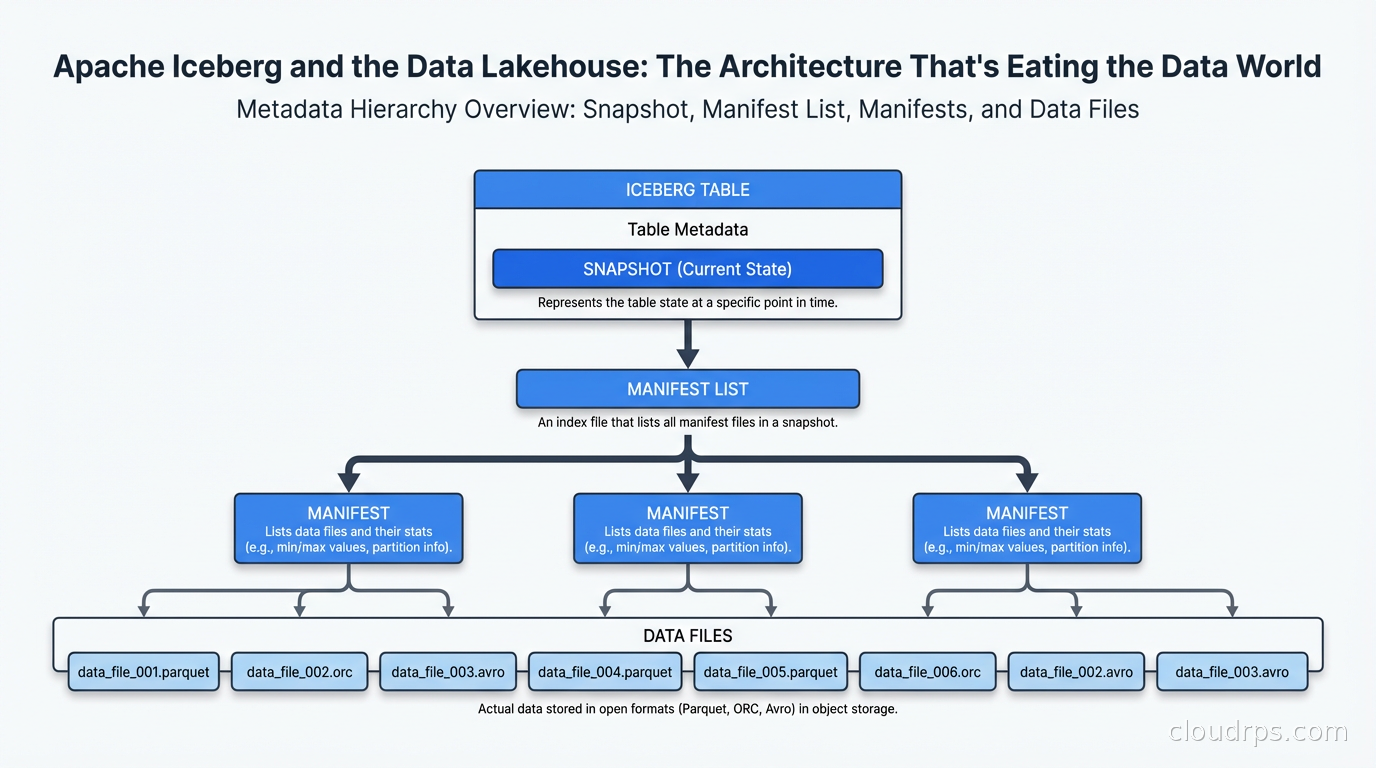
When Iceberg writes data, it creates new data files, then new manifest files pointing to those data files, then a new snapshot pointing to the new manifest list. The old snapshot still exists pointing to the old manifest files. The catalog (Hive Metastore, AWS Glue, Nessie, or Polaris) stores the current snapshot pointer.
This snapshot isolation is how you get ACID. Readers pin to a specific snapshot and see a consistent view of the data even while writers are creating new snapshots. Two concurrent writers use optimistic concurrency: each creates its own snapshot and the catalog does an atomic compare-and-swap to update the current pointer. If two writers conflict, one retries. This is exactly how modern databases handle concurrent writes.
The column-level statistics in manifests (min, max, null count, distinct count) are how Iceberg achieves query performance. When you run WHERE timestamp > '2024-01-01', Iceberg reads the manifest files, checks which data files have max(timestamp) greater than your filter, and skips all files where max(timestamp) < your threshold. This is called data skipping. In practice, on well-written tables, you can skip 90%+ of your data files without reading them.
Hidden partitioning is another Iceberg superpower that took me a while to fully appreciate. In Hive, if you partition by year/month/day, your query must include WHERE year=2024 AND month=3 to benefit from partition pruning. Users writing ad-hoc queries forget this and you get full table scans. In Iceberg, you define partition transforms (truncate, bucket, year, month, day, hour) and Iceberg applies them transparently. Query WHERE timestamp > '2024-03-01' and Iceberg automatically prunes to relevant partitions. The user doesn’t need to know how the table is partitioned.
The Lakehouse Architecture
The data lakehouse is what you get when you combine the economics of object storage (cheap, scalable, vendor-neutral) with database semantics (ACID transactions, schema enforcement, efficient querying). Iceberg is the most mature open standard for achieving this, though Delta Lake (from Databricks) and Apache Hudi (from Uber) solve the same problem with different trade-offs.
The canonical lakehouse architecture looks like this: raw data lands in your object store via your ingestion pipeline (Kafka, Fivetran, custom ETL). A processing layer (Spark, Flink, dbt) reads, transforms, and writes back to Iceberg tables in the same object store. Multiple query engines (Trino, Athena, Spark SQL, DuckDB, StarRocks) read from the same Iceberg tables without copying data. A catalog (Glue, Nessie, Polaris) tracks table metadata and access control.
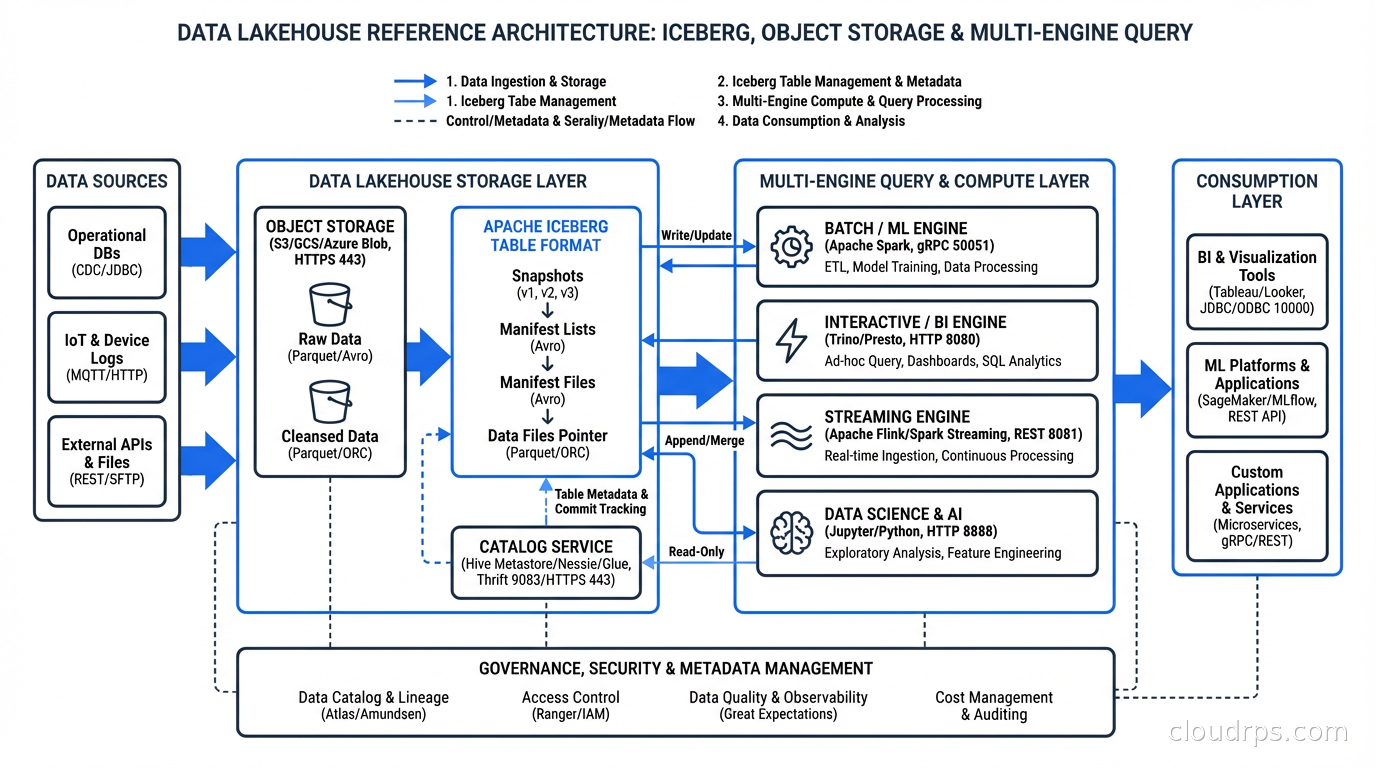
The critical insight is engine interoperability. You’re not locked into a single vendor’s compute. You can use Spark for heavy batch transformations, Flink for streaming writes via change data capture, Trino for interactive ad-hoc queries, and DuckDB locally for development. All of them reading the same canonical Iceberg tables. Compare this to Snowflake or BigQuery where your data is in a proprietary format and you’re billed for every query whether you like it or not.
This is architecturally different from a traditional data lake, which gives you storage but forces you to choose a single query engine. And it’s different from a data warehouse, which gives you the query engine but locks you into proprietary storage at premium prices.
Iceberg vs Delta Lake vs Hudi
This is the question I get asked most often when people are evaluating lakehouse architectures, so let me be direct about what I’ve seen in practice.
Apache Iceberg has the best ecosystem breadth. Nearly every query engine supports it natively or via connector: Spark, Trino, Flink, Athena, BigQuery Omni, Redshift Spectrum, Dremio, StarRocks. The Apache governance model means no single vendor controls the specification. Polaris Catalog (open source) and Project Nessie give you multi-table transactions and catalog versioning. This is my default recommendation for new projects.
Delta Lake (Databricks’ format) has the best Spark integration because Databricks wrote it for Spark. If your organization is all-in on Databricks, Delta Lake with Unity Catalog is a polished experience. The recent Delta Uniform feature makes Delta Lake tables readable as Iceberg, which is an admission that Iceberg won the ecosystem battle. Delta Sharing is useful for sharing data across organizations.
Apache Hudi is optimized for streaming upserts and CDC workloads. If you have high-frequency row-level updates (think ride-sharing or e-commerce where individual records update constantly), Hudi’s record-level indexing can outperform Iceberg for those specific patterns. Uber built it for exactly this use case. For most analytical workloads, Iceberg is more flexible.
The honest answer: if you’re starting fresh in 2026, start with Iceberg. The ecosystem support is now broad enough that you won’t run into interoperability gaps, and you won’t be locked into a single vendor’s pricing.
Integrating Iceberg with Your Data Stack
The practical question is how Iceberg fits into what you already have. Let me walk through the most common scenarios.
Ingestion from operational databases: Use Change Data Capture (Debezium + Kafka) to stream changes from PostgreSQL or MySQL. Flink or Spark Structured Streaming writes these changes as Iceberg upserts using the Merge-On-Read or Copy-On-Write strategy. MOR gives you faster writes but slower reads (merges are done at read time). COW gives you slower writes but faster reads (compaction happens at write time). For frequently-updated operational replicas, I use MOR with scheduled compaction jobs. For analytics tables that are append-mostly, COW.
dbt integration: dbt supports Iceberg as a materialization target through adapters (Spark, Trino, Athena). You write your transformations in SQL, dbt handles the incremental logic, and everything materializes as Iceberg tables. This is now my default pattern for transformation layers: dbt on Trino writing Iceberg tables to S3.
Catalog choices: This matters more than most people realize. The catalog is the central source of truth for which tables exist and where their metadata lives. AWS Glue is the easiest path on AWS, deeply integrated with Athena and EMR. Apache Polaris (recently graduated to a top-level Apache project) is the open-source option with multi-catalog federation. Project Nessie adds Git-like branching: you can create a branch, run experimental transformations, and merge or discard them without affecting production. I’ve used Nessie for exactly this: running a large schema migration on a branch, validating output, then atomically swapping.
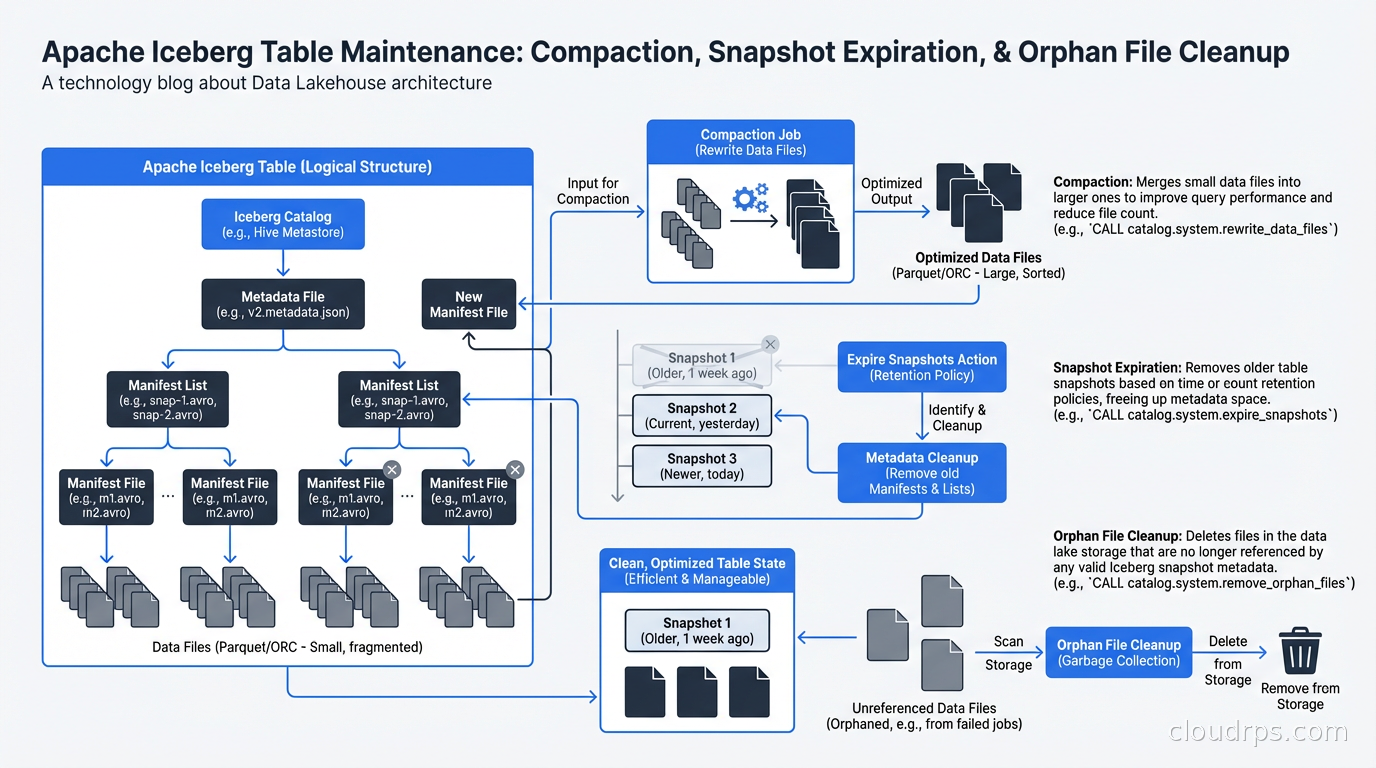
Cost optimization: Iceberg’s metadata structures need maintenance. Without regular compaction, you accumulate small files (the “small files problem” plagues any distributed write system). Without snapshot expiration, your metadata grows unboundedly. Run scheduled compaction jobs (Spark’s rewriteDataFiles) to merge small files into larger ones. Run snapshot expiration to remove old metadata. I typically keep 7 days of snapshots for time travel and expire older ones.
When NOT to Use Iceberg
I want to be honest about the cases where Iceberg isn’t the right answer.
If your team is small (under 5 data engineers), your data volumes are modest (under a few TB), and you don’t need real-time or near-real-time analytics, a managed data warehouse like BigQuery or Snowflake is often the right answer. The operational overhead of running catalogs, managing compaction jobs, and tuning manifest sizes is real. A data warehouse abstracts all of that at the cost of vendor lock-in and per-query pricing.
If you need sub-second query latency on constantly-changing data, Iceberg (and lakehouses generally) are still a step behind purpose-built OLAP systems like ClickHouse or Apache Druid. Iceberg queries typically have cold-start latency from metadata reads and file opens. For dashboards that need to refresh in 100ms, Iceberg isn’t there yet.
If you’re doing real-time stream processing where you need exactly-once semantics and millisecond latency, Kafka + Flink is still your processing layer. Iceberg handles the storage tier, not the streaming tier.
For everything else, especially analytics workloads at scale where you want to avoid vendor lock-in and control your costs, the lakehouse with Iceberg is the most pragmatic architecture I’ve worked with.
Migrating to Iceberg
If you’re currently on raw Parquet with Hive, migration is easier than you might expect. Iceberg provides in-place table migration: you can convert existing Parquet tables to Iceberg format without rewriting data. The migration creates an Iceberg metadata layer pointing to your existing files. You can validate that queries return identical results, then switch your readers over.
The trickier part is schema governance. When you migrate, you have the opportunity to enforce column naming conventions, add column-level documentation, and set up schema evolution policies. Don’t skip this. The reason your Hive tables are a mess is usually because there was no enforced schema contract. Iceberg gives you the tools to fix that; use them.
For data mesh implementations, Iceberg is a natural fit. Each domain team owns their Iceberg tables, publishes a schema contract, and other teams read via Trino or Spark without needing to copy data. The catalog provides discovery. This is the practical implementation layer under the data mesh conceptual framework.
Practical Recommendations
After running Iceberg in production for a couple of years, here’s what I’d tell you to do.
Start with Trino or Athena for reads. They’re the most mature Iceberg readers and handle metadata caching well. Use Spark for writes if you’re doing batch, Flink for streaming.
Target file sizes of 128MB to 512MB for analytical workloads. Smaller files mean more metadata reads and slower queries. Larger files make partial reads inefficient.
Partition thoughtfully. Hidden partitioning removes the user-facing complexity, but the physical layout still matters. Partition by time for time-series data. For lookup tables, don’t over-partition.
Use Z-ordering (available via rewriteDataFiles with SortStrategy) for columns you frequently filter on but don’t use as partition keys. Clustering data by two or three dimensions dramatically improves data skipping.
Monitor your compaction lag. If small files are accumulating faster than you compact them, query performance degrades progressively. Build compaction metrics into your data observability stack.
The data world has been converging on this architecture for years. The open table format wars are effectively over, with Iceberg winning on ecosystem breadth. If you’re still debating whether to adopt it, the question has shifted from “should we?” to “how do we do it well?” Start with one domain, get the operational patterns right, then expand. The payoff in query performance, data quality, and storage cost reduction is real.
Get Cloud Architecture Insights
Practical deep dives on infrastructure, security, and scaling. No spam, no fluff.
By subscribing, you agree to receive emails. Unsubscribe anytime.