
A few years into my career I was helping a media company debug a query that was taking eleven minutes on what seemed like a trivial filter. The table was two terabytes, the query selected three columns, and the predicate was a single date range on the most common filtering column in the warehouse. By every reasonable estimate the job should have finished in under a minute.
The root cause was Parquet row groups that averaged nine megabytes each. Someone had run a Spark job with tiny batch sizes and written hundreds of thousands of micro-files, each with a single tiny row group. The query engine was doing the right thing mechanically but the file format was set up to fail: there were so many row group metadata lookups that the footer reads alone took longer than the actual data scans should have. We re-wrote the table with 256MB row groups over a weekend, and the same query finished in forty seconds.
That experience taught me something I should have understood years earlier: Parquet is not just a storage format you plug in and forget. It has a physical layout with real performance implications, and if you do not know how it works, you will misconfigure it and wonder why your lakehouse is slow.
After twenty years building data platforms, I still see engineers treat Parquet as a black box. They know it is columnar, they know it is better than CSV, and they know it is the default for Apache Iceberg, Delta Lake, and Apache Hudi. But they cannot tell you what a row group is, why dictionary encoding matters, or how their query engine decides which parts of a file to skip. This article fixes that.
Why Parquet Exists: The Dremel Lineage
Parquet was born from a collaboration between Twitter and Cloudera that started in fall 2012, influenced by Google’s Dremel paper and its record shredding algorithm for nested data. Twitter needed faster analytics on its Hadoop clusters; Cloudera needed a columnar format for its Impala SQL engine. Rather than build two incompatible formats, Julien Le Dem from Twitter and Nong Li from Cloudera co-led the project. Version 1.0 shipped in July 2013 and graduated to a top-level Apache project on April 27, 2015.
The core insight is column orientation. A CSV or JSON file lays out data row by row: all fields for record one, then all fields for record two, and so on. If you query only three of fifty columns, you read and discard 94% of the bytes from disk. A columnar format groups all values for a given column together. Query those three columns, and you read roughly 6% of the data, because you skip the other forty-seven columns entirely.
Column orientation also improves compression dramatically. A column of country codes contains a small set of repeated strings. A column of sensor timestamps from a monotonically increasing sequence compresses with simple delta encoding. When values of the same type sit together, compression algorithms can do far more than they can against the mixed bytes of a row-oriented format.
Physical Layout: Magic, Row Groups, Column Chunks, Pages
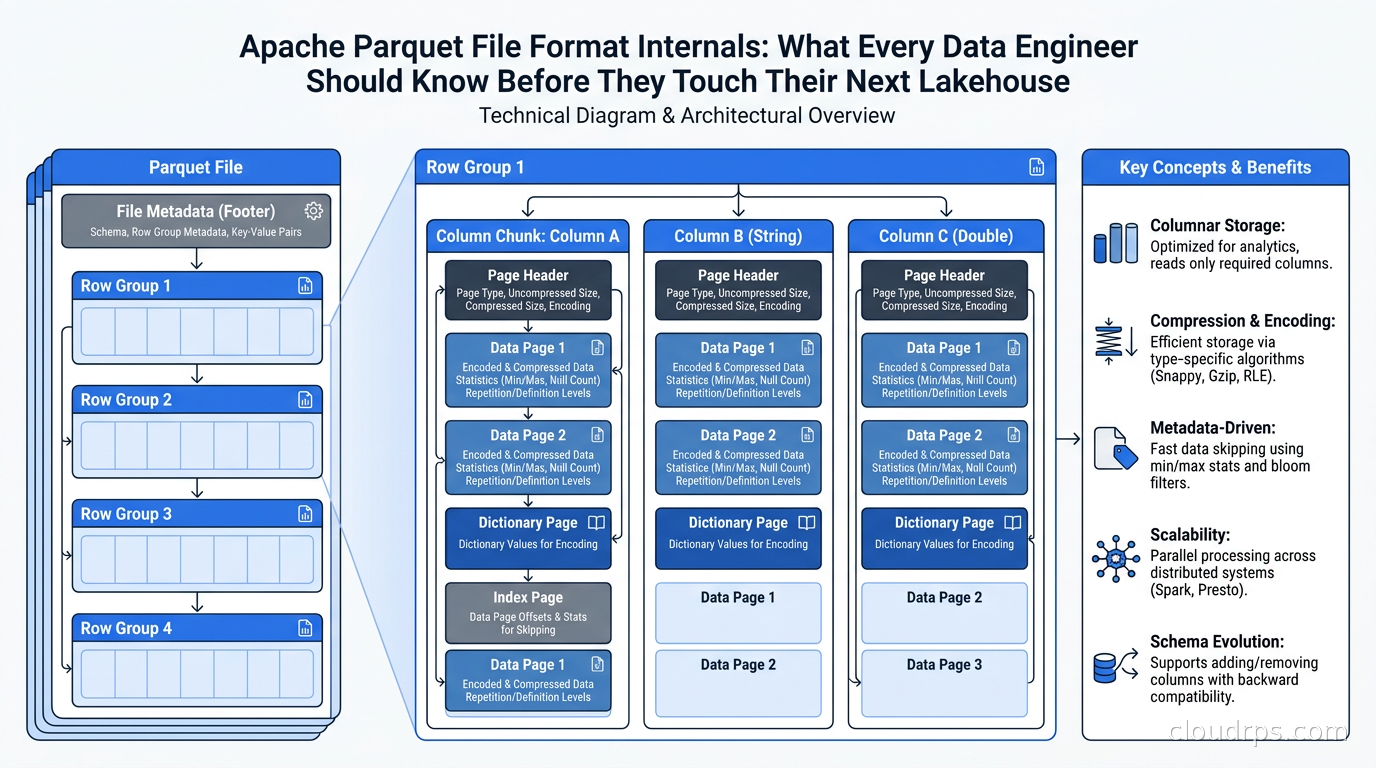
A Parquet file starts and ends with the four bytes PAR1. These magic bytes let tools quickly identify the format without reading the entire file. The useful content lives between them, organized as follows.
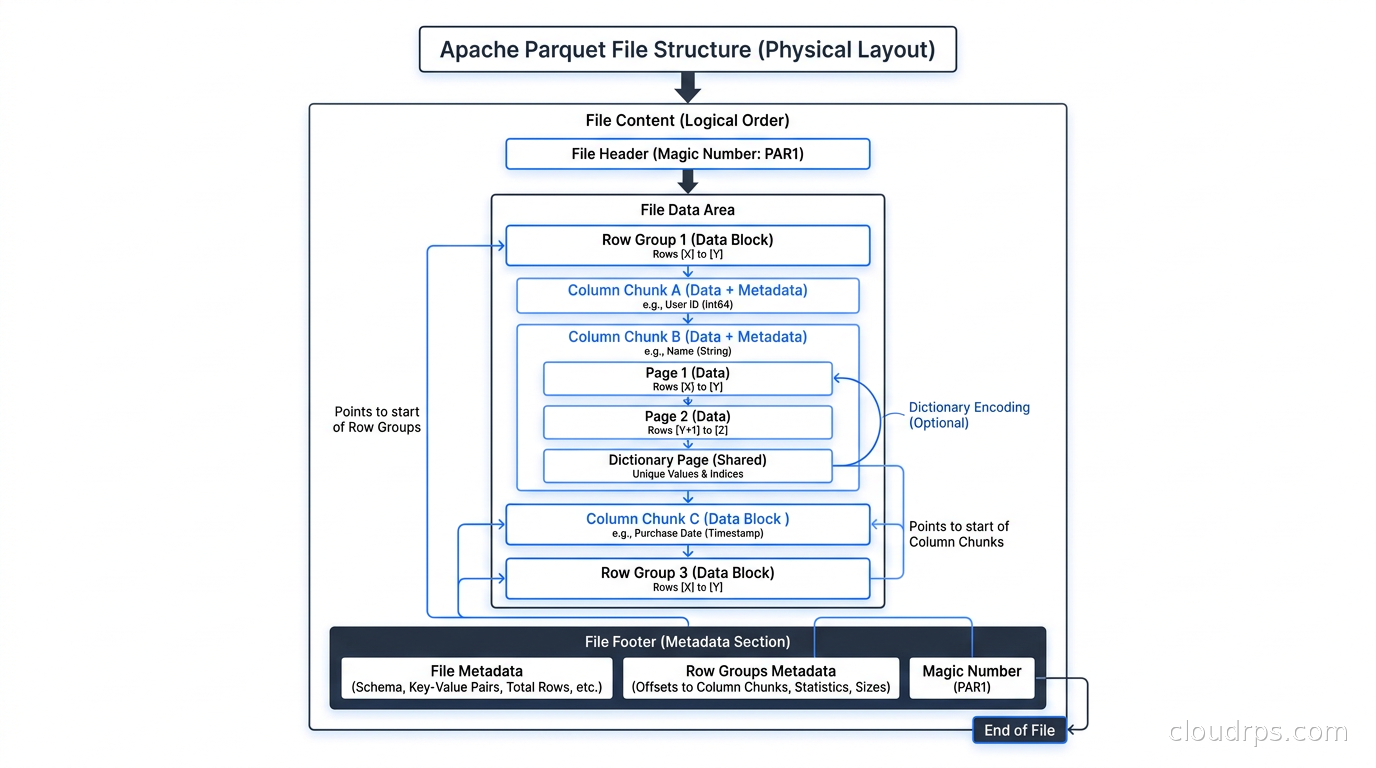
Row groups are horizontal partitions of the data. If your file has ten million rows and you configure 128MB row groups, you will get several row groups depending on how compressible the data is. Each row group contains all columns for the rows it covers. Row groups are the coarsest unit of I/O parallelism: different workers in Spark, Trino, or DuckDB can process different row groups independently.
Column chunks are the vertical slices within a row group. Each row group contains exactly one column chunk per column in the schema. When a query engine applies column pruning, it reads only the column chunks for the columns it needs and skips the rest. The file format makes this practical because each column chunk is stored contiguously on disk, and the footer tells you its exact byte offset and length.
Pages are the smallest unit within a column chunk. A column chunk is divided into one or more pages, and pages are the unit where encoding and compression are applied. There are three page types: data pages (the actual values), dictionary pages (the lookup table for dictionary-encoded columns), and index pages (used for column-level statistics and bloom filters). A typical page target is around one megabyte, though many tools let you tune this.
The footer is where everything ties together. At the end of the file, Parquet stores a Thrift-encoded metadata block containing the full schema, the locations and sizes of every row group and column chunk, per-column statistics (minimum value, maximum value, null count), and optional bloom filter data. The last four bytes before the final PAR1 magic are a four-byte little-endian integer giving the footer length. Readers start by seeking to the end of the file, reading the footer length, then seeking backward to load the footer. Only after parsing the footer do they know which row groups and column chunks to read.
This design means readers can decide what to skip entirely on the client side, without any server-side index service. The file is self-describing.
Encodings: How Parquet Shrinks Columns
Parquet uses encoding to transform raw column values into a more compact representation before the compression codec sees them. Encoding and compression are separate layers: encoding exploits type-specific patterns in the data, while compression is a generic byte-level pass. Getting encoding right often matters more than choosing the right compression codec.
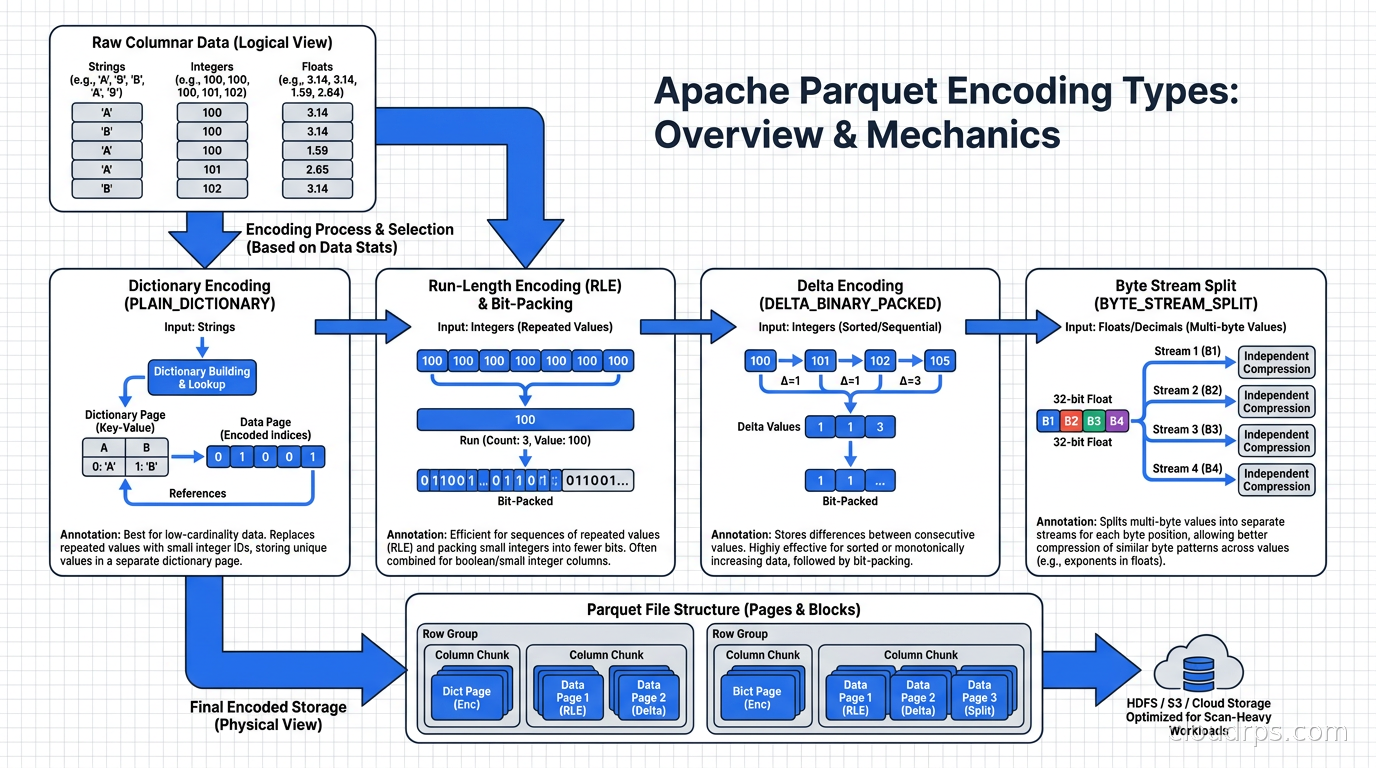
Dictionary encoding is the most impactful encoding for most real-world analytical data. The first time a value appears in a column, it gets assigned a small integer index. Subsequent occurrences store that index instead of the full value. For a column of country codes with fifty distinct values across a million rows, this replaces variable-length strings with one or two byte integers. The dictionary itself is stored in a dictionary page at the front of the column chunk. If the dictionary grows too large (the threshold is configurable, typically 1MB), Parquet falls back to plain encoding for the remainder of the column chunk.
Run-length encoding combined with bit-packing (RLE/BITPACK) is used for the integer indices produced by dictionary encoding, as well as for boolean columns and repetition/definition levels in nested schemas. Run-length encoding replaces repeated identical values with a count and a value. Bit-packing packs multiple small integers into a single byte, so if your dictionary indices only go up to fifteen, they fit in four bits each. The two are combined because real data alternates between runs of identical values and varying values.
Delta Binary Packed encoding targets integer sequences where consecutive values change by a small amount. Timestamps in event data are the canonical example: if each event timestamp is 100ms after the previous one, the deltas are all 100 and they compress to almost nothing. Row IDs and monotonically increasing sequence numbers also benefit here. Rather than storing the actual values, Parquet stores the first value and then the deltas, further bit-packed.
Delta Length Byte Array handles string columns where the strings have similar lengths. Instead of storing the full byte length of every string, it stores the first length and then the deltas between consecutive lengths. When combined with dictionary encoding for low-cardinality string columns, this encoding is rarely needed, but for high-cardinality strings of consistent length (UUIDs, hashed values, product codes) it helps.
Byte Stream Split is a newer encoding for floating-point numbers. It reorders the bytes of each float value so that all the sign/exponent bytes from every value are grouped together, followed by all the mantissa bytes. This makes the byte stream more compressible, since sign and exponent bytes tend to be correlated across values in the same column. If you have columns of sensor measurements or machine learning features stored as FLOAT or DOUBLE, this encoding paired with ZSTD can noticeably shrink the file.
PLAIN encoding is the fallback: values are stored as-is in their native binary representation. For high-cardinality string columns where dictionary encoding would overflow, or for large binary payloads, PLAIN is what you get.
Compression Codecs
After encoding, Parquet applies a compression codec to each page. Codec selection affects both write throughput, read throughput, and final file size. The choices available are Snappy, ZSTD, LZ4, Gzip, and Brotli, plus the UNCOMPRESSED option.
Snappy was the original default in many Hadoop-era tools. It compresses and decompresses fast with moderate CPU overhead, at the expense of compression ratio. For high-throughput streaming writes where CPU is the bottleneck, it makes sense. For cold analytical data you write once and query many times, the compression ratio penalty of Snappy costs you in both storage and I/O.
ZSTD (Zstandard) is my recommendation for most new data. It offers a compression ratio closer to Gzip at decompression speeds approaching Snappy, and it offers configurable compression levels so you can tune the tradeoff. Level 3 is a sensible default for most workloads. Tools like DuckDB, Polars, and modern Spark configurations default to ZSTD or allow easy switching. If you are setting up a new data lake today, use ZSTD.
LZ4 (specifically the LZ4 raw format used in Parquet, not the LZ4 frame format) has the fastest decompression speed of any option here. For query-intensive workloads where you read far more than you write, LZ4 reduces the CPU overhead of decompression at the cost of a larger file than ZSTD.
Gzip achieves the best compression ratio of the widely supported codecs but its single-threaded compression is slow. For active analytics workloads, the decompression overhead usually makes Gzip a net negative. Brotli sits between Gzip and ZSTD in both ratio and speed, but its support is uneven across query engines.
Codec choice interacts with encoding: dictionary-encoded columns are already highly compact before compression sees them. The codec makes the most difference on PLAIN-encoded columns with high entropy. If you are storing raw JSON blobs or binary data, the codec matters a lot. If your data is well-encoded integer and string columns, it matters less.
Statistics, Bloom Filters, and the Footer
The footer stores statistics at two granularities: per column chunk (covering one column across an entire row group) and per page (covering a subset of a column chunk). Both levels record the minimum value, maximum value, and null count for the column.
Query engines use these statistics for row group filtering. If a query says WHERE event_date BETWEEN '2026-10-01' AND '2026-10-31' and a row group has a maximum event_date of 2026-09-30, the engine can skip that entire row group without reading a single data byte from it. This is the most impactful optimization in a well-tuned Parquet file: it turns full table scans into targeted range reads when data is sorted or partitioned on the filter column.
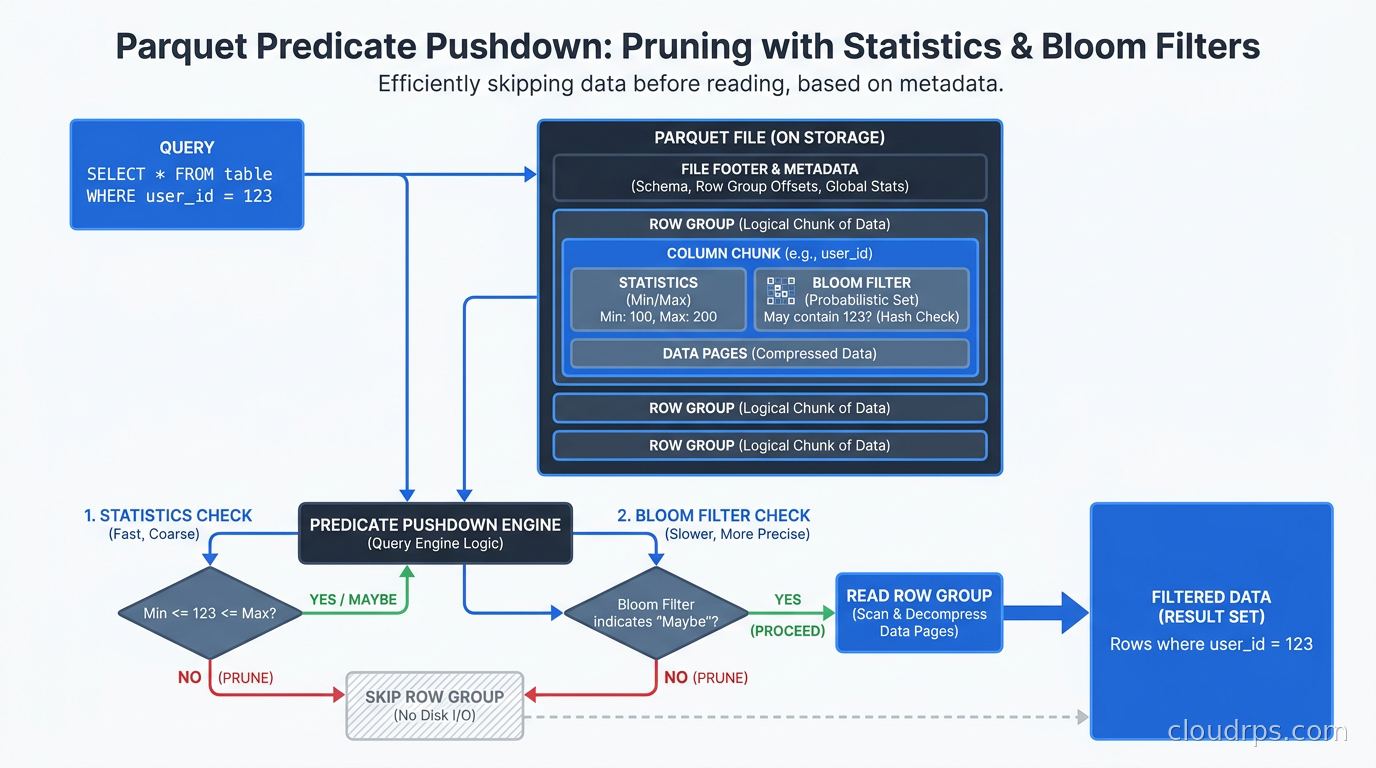
Parquet also supports optional bloom filters per column chunk. A bloom filter is a probabilistic data structure that can answer the question “is this value definitely NOT in this column chunk?” with no false negatives. For equality predicates on high-cardinality columns (user IDs, order IDs, device fingerprints), bloom filters let you skip row groups that cannot possibly contain the queried value, even when the min/max statistics are too broad to help. If your user IDs run from one to a hundred million and a row group contains IDs in the range 50M to 51M, the min/max statistics are nearly useless for most user-specific queries. A bloom filter on user ID lets you skip that row group immediately when querying for a user ID not present in it.
Column indexes, introduced in format version 2.4, extend page-level statistics with byte offsets for each page boundary within a column chunk. This allows an engine to seek directly to the page containing a matching value instead of scanning through the entire column chunk sequentially. Combined with row group filtering, this means a well-tuned query engine can narrow from “scan the whole file” to “read three pages in row group seven” without any external index service.
Predicate Pushdown and Column Pruning in Practice
Understanding the physical layout makes it clear what query engines actually do when they claim to “push down” predicates into Parquet.
Column pruning happens first. The engine reads the footer, identifies which column chunks are needed to satisfy the query’s SELECT list and WHERE predicates, and reads only those chunks. For a table with fifty columns and a query that touches five, this alone reduces I/O by 90%. This is free: you get it on any Parquet file without any special configuration.
Row group filtering comes next. The engine reads the row group-level statistics in the footer (which are small and can be cached in memory) and evaluates the query’s filter predicates against those statistics. Row groups that cannot contain matching rows are excluded entirely. For this to work well, your data needs to be physically sorted or clustered on the filter columns. An event log sorted by timestamp gives excellent row group skipping on date range queries. The same log with rows in random order gives no benefit.
Page-level filtering (column index pushdown) is supported in modern engines including Trino, Apache Spark, and DuckDB. Within a row group, the engine uses column indexes to skip pages that fall outside the predicate range. This is a refinement on row group filtering that matters most when row groups are large and the queried value range covers only a fraction of the row group.
Bloom filter evaluation is for equality predicates on high-cardinality columns. If you search for a specific order ID, and each row group has a bloom filter on the order ID column, the engine can test the target ID against each bloom filter and skip any row group that returns “definitely not present.” This is expensive to store (bloom filters add per-row-group overhead) but can dramatically accelerate point lookups in a system that otherwise requires a full scan.
The practical implication: sort or partition your data on your most common filter columns. Store one column per file partition where possible. Use ZSTD compression. Configure row groups between 128MB and 512MB for general analytics. For DuckDB-heavy workloads specifically, aiming for row groups of around 100K to 1M rows fits its parallelism model better than size-based targets, as DuckDB parallelizes at the row group level.
Tuning Row Group and Page Size
Row group sizing is one of the most impactful Parquet configuration decisions.
Too small (under 32MB, or under 10K rows for DuckDB): metadata overhead dominates. Reading a file with ten thousand tiny row groups requires ten thousand metadata lookups before any data is read. Row group filtering also becomes worthless because each row group covers too few rows to skip efficiently.
Too large (over 1GB): write-side memory requirements climb, since writers must buffer an entire row group before flushing. Bloom filters and column indexes become coarser, and recovery from partial write failures is harder.
The Apache Parquet documentation uses 1GB row groups in its optimized-read example paired with 1GB HDFS blocks. In practice, 128MB to 512MB is a common sweet spot for general analytics workloads. For Polars and DuckDB workflows, the DuckDB documentation recommends targeting row groups by row count (around 100K to 1M rows) rather than raw byte size, since DuckDB’s parallelism model assigns one thread per row group.
Page size tuning matters less than row group sizing for most teams. The default of around 1MB is reasonable. Smaller pages improve column index pushdown granularity; larger pages improve compression ratios but reduce statistics precision.
Schema Evolution in Parquet
Parquet is schema-on-write: each file embeds its own schema in the footer, and readers must reconcile schemas across files written at different times. Safe evolution operations include adding an optional (nullable) column, changing a column from required to optional, and renaming a column in engines that use column IDs rather than names. Unsafe operations include changing a column’s data type or dropping a required column, both of which require rewriting files.
In practice, schema evolution in a production data lake is managed above the file format layer. Apache Iceberg and Delta Lake both maintain a unified schema view across files written at different times using their own catalog mechanics. The Parquet schema in each file reflects what was current when it was written; the table catalog provides the authoritative current schema. This is one of the main reasons table formats exist: raw Parquet alone cannot safely serve as a mutable, evolving data store.
Parquet vs ORC vs Avro vs Arrow IPC
The data engineering ecosystem has several competing columnar and serialization formats, each with a different home turf.
ORC (Optimized Row Columnar) originated in the Hive ecosystem and remains the preferred format for Hive ACID tables. ORC has built-in bloom filters and sometimes compresses slightly better on string-heavy workloads, but its multi-engine support is weaker: Arrow, Polars, and most cloud warehouse connectors give first-class treatment to Parquet, with ORC as an afterthought. A 2023 academic evaluation (arxiv.org/pdf/2304.05028) found Parquet faster for scans and noted that ORC’s many encoding choices create decoder overhead.
Avro is row-oriented and belongs in a different category. It excels at event streaming and message serialization (Kafka schemas, registry payloads) because schema evolution is baked in. It is not a good choice for analytical queries: reading three columns out of fifty requires deserializing the full row for every record. I use Avro at ingestion, then convert to Parquet for the analytical layer.
Apache Arrow IPC format is designed for in-memory columnar exchange between services, not persistent storage. Arrow is what Apache Arrow Flight uses to move columnar data without serialization overhead. It has no compression story comparable to Parquet’s, no row group statistics, and no predicate pushdown metadata. Use Arrow on the wire; use Parquet at rest.
For new data engineering work, Parquet is the default for persistent analytical storage. ORC is relevant only for existing Hive estates. Avro belongs at ingestion. Arrow belongs in memory and on the wire.
Parquet in 2026: What Is Changing
The Parquet community has been active. The most significant recent addition is native support for a Variant type, a binary encoding specification for semi-structured data. Announced in early 2026, with groundwork laid in mid-2025, the Variant type lets you embed JSON-like documents inside a Parquet column while still enabling predicate pushdown on the document’s contents. This matters for event data and machine learning feature pipelines where some fields are structured and others are schema-on-read blobs. Prior to the Variant type, the common workarounds were storing JSON as plain strings (losing all column-level optimization) or shredding every possible field into separate columns (causing schema explosion).
There is also ongoing community discussion about Parquet versioning and what format evolution looks like long-term. The data lakehouse ecosystem has pushed hard on format evolution as table formats like Iceberg have set expectations around snapshot isolation and schema evolution that raw Parquet cannot meet alone. Expect the Parquet format to continue evolving toward better native support for the patterns that table formats currently handle above the file layer.
Native column encryption is another area gaining adoption. Parquet supports column-level encryption so that sensitive columns can be encrypted with different keys from the rest of the file. Teams handling PII or regulated financial data can encrypt specific columns while leaving metadata and other columns readable. As compliance requirements tighten around cloud data warehousing, expect column encryption to move from optional to standard.
Debugging Parquet Performance
Parquet files are easy to introspect without a full query engine. DuckDB reads Parquet directly with a SELECT statement. Polars handles it natively in both eager and lazy mode. In Python, pyarrow.parquet.read_metadata() dumps the full footer contents, including row group sizes, encoding choices, compression settings, and min/max statistics for every column.
When debugging a slow query in a Parquet-backed system, I start by reading the footer metadata: how large are the row groups, what compression is in use, are statistics present, and are the min/max values on the filter column narrow enough to enable pruning? Those four questions cover the majority of common performance problems.
Conclusion
Parquet is not magic. It is a well-designed columnar file format with a physical layout that your query engine can exploit if you give it the right inputs. Row groups that are sized appropriately for your engine, data sorted on your most common filter columns, ZSTD compression for new workloads, and schema discipline at the write layer: these decisions determine whether your data lake runs fast or burns money on unnecessary I/O.
After twenty years of watching teams set up data platforms, the engineers who understand their file format beat the ones who do not, every time. The good news is that Parquet’s design is not complicated once you see the whole picture. It is a file with magic bytes, row groups, column chunks, pages, and a Thrift footer. Everything else follows from those five concepts.
Updated November 8, 2026: Initial publication.
Get Cloud Architecture Insights
Practical deep dives on infrastructure, security, and scaling. No spam, no fluff.
By subscribing, you agree to receive emails. Unsubscribe anytime.