
I first ran into Apache Pulsar around 2018 when a client was hitting the ceiling on Kafka’s partition rebalancing model. They had a multi-tenant SaaS platform serving hundreds of enterprise customers, and every time a customer’s throughput spiked, they were reshuffling partition leadership across the cluster at the worst possible moment. We evaluated Pulsar, ultimately shipped it, and learned a lot of painful lessons about what “separated storage” actually costs you operationally. Seven years later I have deployed Pulsar clusters in regulated financial services, telecom, and IoT platforms, and I have a clear picture of where it excels and where it will frustrate you.
The short version: Pulsar’s architecture is genuinely different from Kafka’s, not just cosmetically different. That difference is sometimes exactly what you need and sometimes exactly the wrong tradeoff. Understanding which situation you are in requires understanding the architecture at a deeper level than most evaluation guides go.
The Problem Pulsar Was Built to Solve
Yahoo built Pulsar in 2013 to handle messaging at a scale that was straining their existing systems. The root problem was operational: Kafka ties each partition’s data to a specific broker. When you need to expand the cluster, you run partition reassignment, which copies gigabytes of data across the network while the cluster is under production load. For Yahoo, which was managing a system with millions of topics across multiple data centers, that model was unworkable.
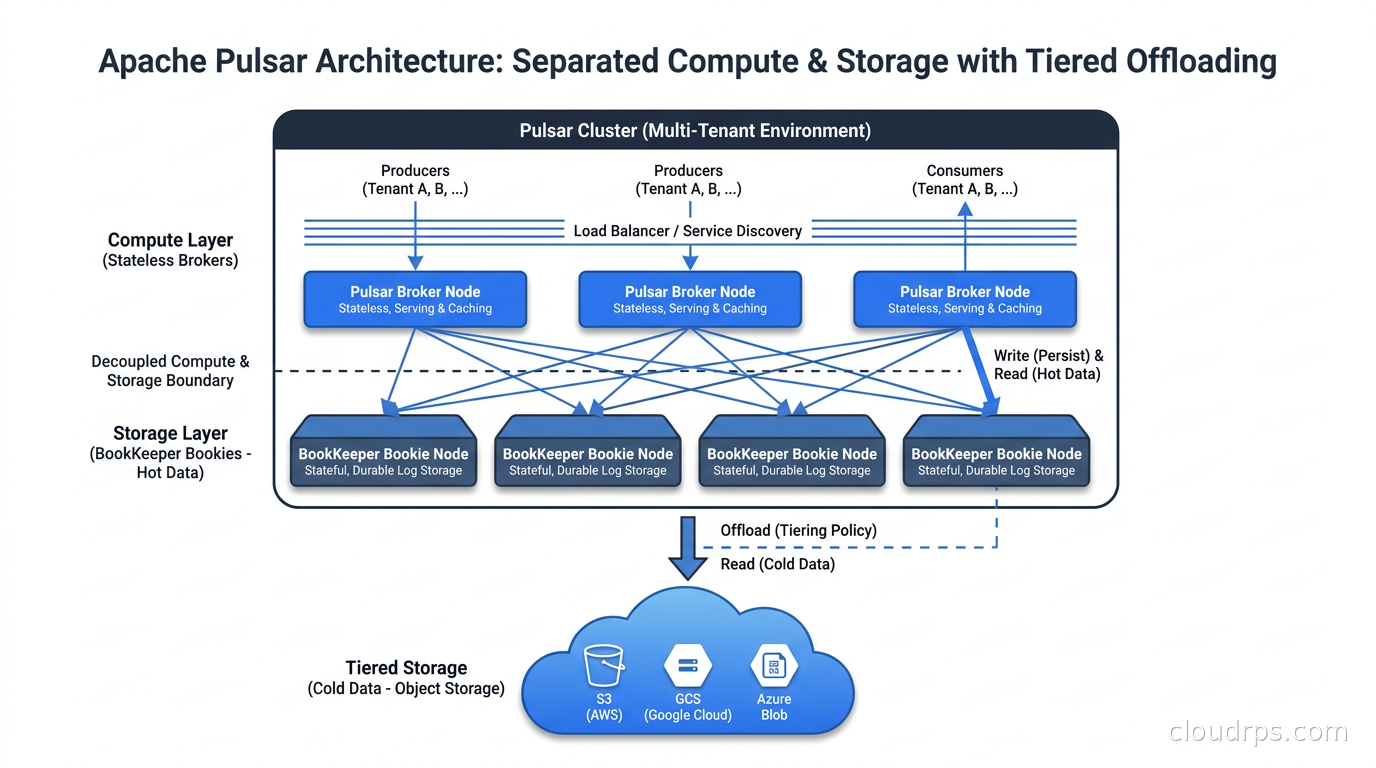
Pulsar’s architects solved this by separating the concerns that Kafka keeps bundled together. In Kafka, a broker is responsible for both serving reads and writes AND storing the data on local disk. In Pulsar, brokers are stateless. They handle protocol, compute message routing, manage subscriptions, and enforce policies, but they do not store anything permanently. All durable storage goes to Apache BookKeeper, a distributed log storage system that runs as a separate cluster of “bookies.”
This separation is the core of everything interesting and everything frustrating about Pulsar in production.
How BookKeeper Actually Works
When a Pulsar topic receives a message, the broker responsible for that topic (called the topic owner) writes the message to a BookKeeper ensemble. An ensemble is a subset of bookies; by default, a write quorum of two bookies must acknowledge the write before the broker confirms receipt to the producer. A larger ack quorum means more durability; a smaller ensemble means lower write latency but reduced fault tolerance.
BookKeeper stores data in ledgers: append-only, immutable segments of log data. A topic in Pulsar is represented as a sequence of ledgers. When a ledger fills up or the broker decides to roll over (configurable), it creates a new ledger. This is different from Kafka’s segment file model, but it serves a similar purpose of providing a recoverable unit of storage.
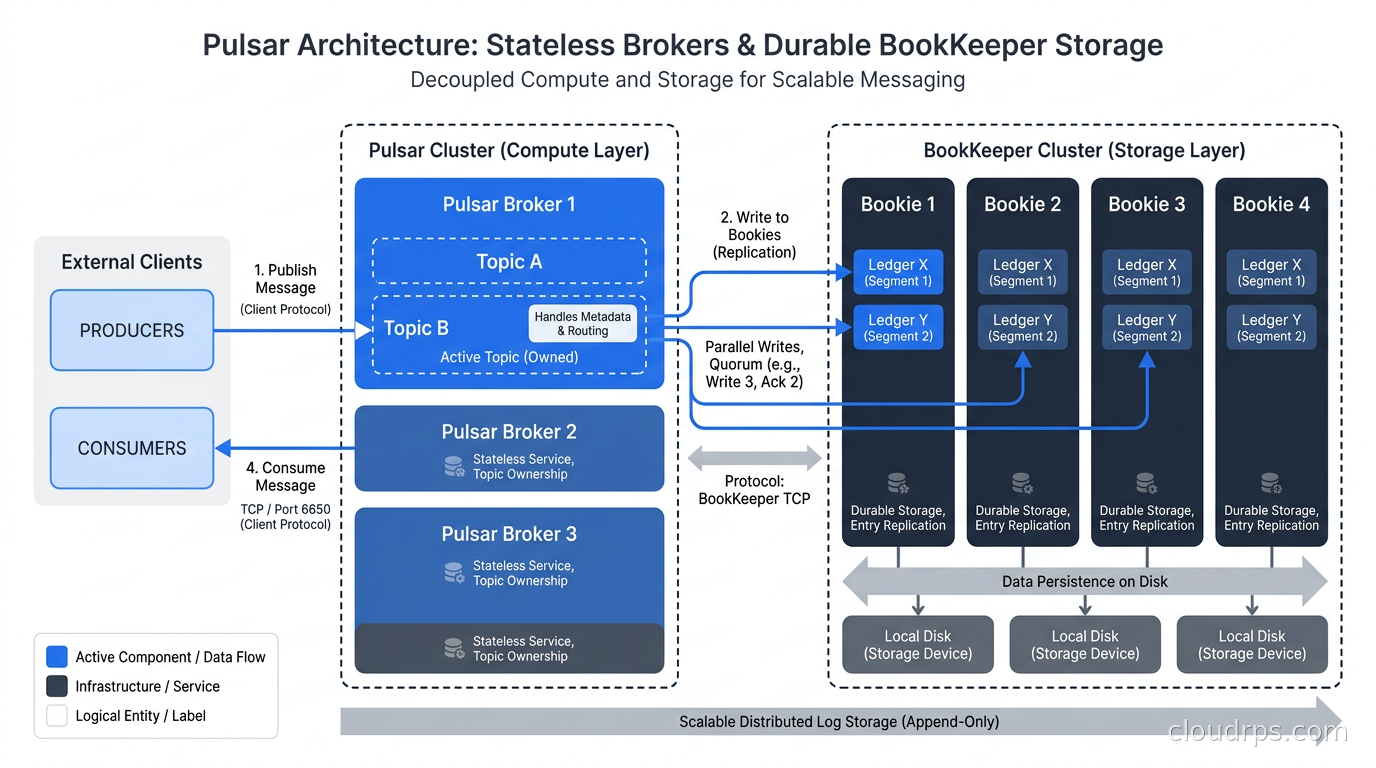
The key operational consequence: when a Pulsar broker fails, another broker immediately takes ownership of its topics. There is no data to copy because the data lives in BookKeeper, not on the broker’s local disk. The new owner broker simply reconnects to the relevant ledgers and resumes serving traffic. In Kafka, a broker failure triggers leader election, but the new leader already has the data because it was replicating to its local disk. Pulsar’s failover is faster in practice because it is purely a metadata operation, but it introduces a dependency on BookKeeper availability that Kafka simply does not have.
I have seen this tradeoff bite teams during BookKeeper issues. If your bookie cluster degrades, every Pulsar broker in the cluster is affected simultaneously, because they all share the same storage backend. In Kafka, a broker failure is contained to the partitions that broker owns. With Pulsar, a storage layer problem becomes a cluster-wide problem. Size and operate your BookKeeper cluster with the same rigor you apply to your Pulsar brokers.
The Multi-Tenancy Model
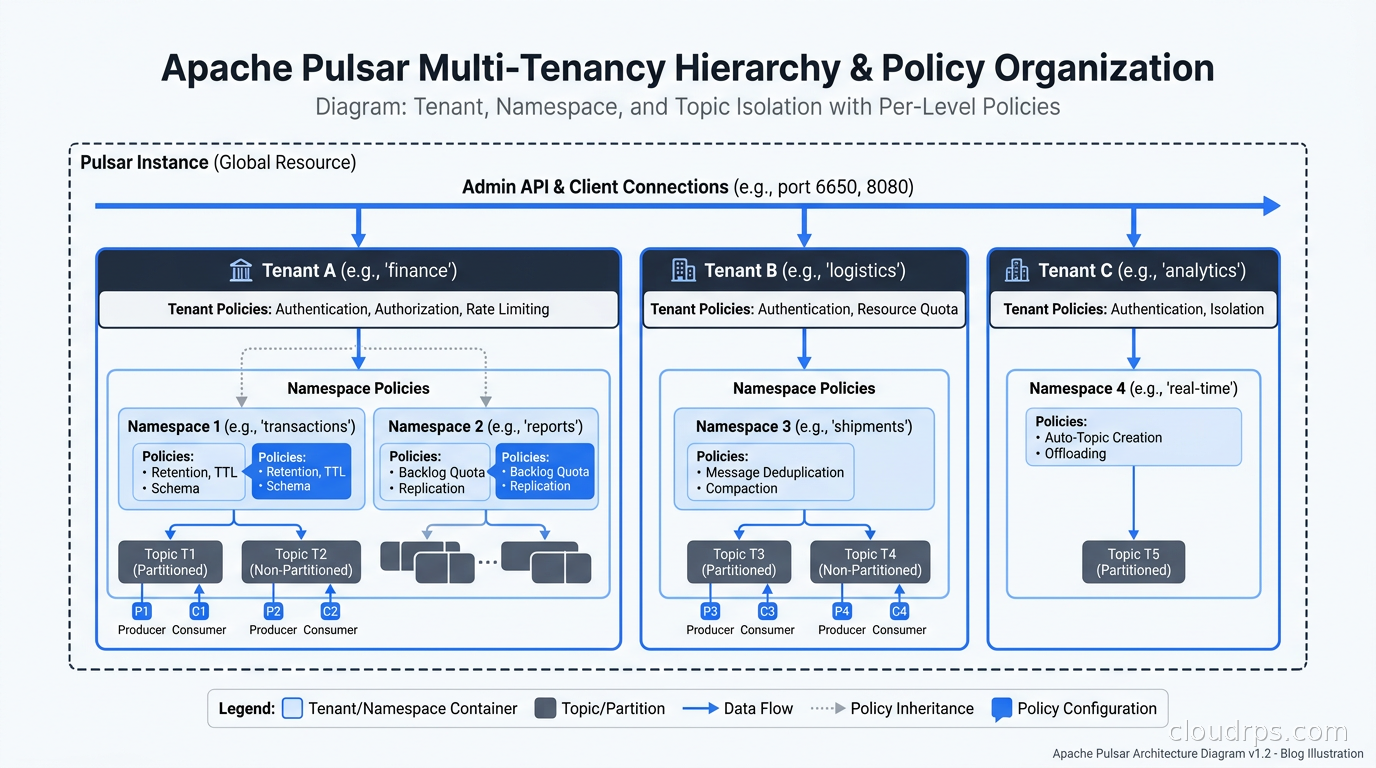
This is where Pulsar genuinely shines over Kafka, and it is the feature that made it the right call for that original client I mentioned. Pulsar has a three-level namespace hierarchy built into its core: tenants, namespaces, and topics.
A tenant maps to an organization or a large team. A namespace maps to an environment or a domain within that tenant. Topics live inside namespaces. The full topic name looks like persistent://tenant/namespace/topic-name.
This is not just cosmetic organization. Pulsar enforces resource quotas, retention policies, encryption requirements, and access control independently at each level. You can give a tenant a quota of 100 MB/s throughput and a namespace a retention policy of seven days, and the platform enforces these without any application-level coordination. In Kafka, achieving this level of isolation requires external tooling like Kafka quotas, ACLs, topic naming conventions, and usually a service that enforces all of it together.
For a SaaS platform operator, the difference is significant. When a new enterprise customer onboards, you create a tenant, assign them namespaces for their different services, and apply rate limits from a central admin API. Their topics are logically isolated; you can even create per-tenant encryption keys using Pulsar’s built-in message encryption, which uses a per-message symmetric key wrapped by the tenant’s RSA public key. No message content from one tenant is readable by another tenant’s consumers, even if they share the same physical cluster.
I have built platforms on top of this model and it works well when the team understands the operational overhead. The namespace model means you are managing more configuration objects than you would in Kafka. Use Pulsar’s admin REST API or the pulsarctl CLI to automate tenant and namespace provisioning as part of your customer onboarding pipeline, not as a manual step.
Subscription Types and Consumption Patterns
Pulsar’s subscription model is more expressive than Kafka’s consumer group model, and understanding the four subscription types is essential for designing correct consumers.
Exclusive subscriptions are the default for event ordering guarantees. Only one consumer can be active at a time. If the consumer fails, another waiting consumer takes over. This is appropriate for cases where order is critical and you cannot parallelize consumption.
Failover subscriptions allow multiple consumers to be registered, but only one is active. Messages flow to the active consumer until it fails, at which point the next consumer in line takes over. The ordering guarantee is preserved. This is your high-availability ordered consumption pattern.
Shared subscriptions distribute messages across multiple consumers in round-robin fashion. Throughput scales horizontally with consumer count, but ordering is not guaranteed within a topic. This is equivalent to Kafka’s consumer group model, with the difference that Pulsar can have more consumers than partitions, since Pulsar topics are not bound by a fixed partition count in the same way.
Key_Shared subscriptions assign messages with the same key consistently to the same consumer. This preserves per-key ordering while parallelizing across multiple keys. This is the subscription type I reach for most often in production for stateful stream processing, because it gives you the parallelism of shared with the ordering guarantees needed for per-entity processing.
One thing that catches teams off guard: Pulsar uses a cursor-based acknowledgment model rather than Kafka’s offset-based model. Consumers acknowledge individual messages, and Pulsar tracks which messages each subscription has acknowledged. This allows individual message redelivery without rewinding the entire partition, which is genuinely useful for poison pill handling, but it also means the acknowledgment tracking state can grow large for subscriptions with many unacknowledged messages. Monitor msgBacklog per subscription in production and set unacked message limits (maxUnackedMessagesPerConsumer) to prevent consumers from holding an unbounded number of unacknowledged messages.
Tiered Storage
One of Pulsar’s most operationally valuable features is tiered storage offloading. Once a ledger reaches a configurable age or size threshold, Pulsar can offload it from BookKeeper to cheaper object storage (S3, GCS, Azure Blob Storage, or HDFS). The broker maintains a manifest of which ledgers are on BookKeeper versus offloaded storage, and consumers that need to read historical data are transparently redirected.
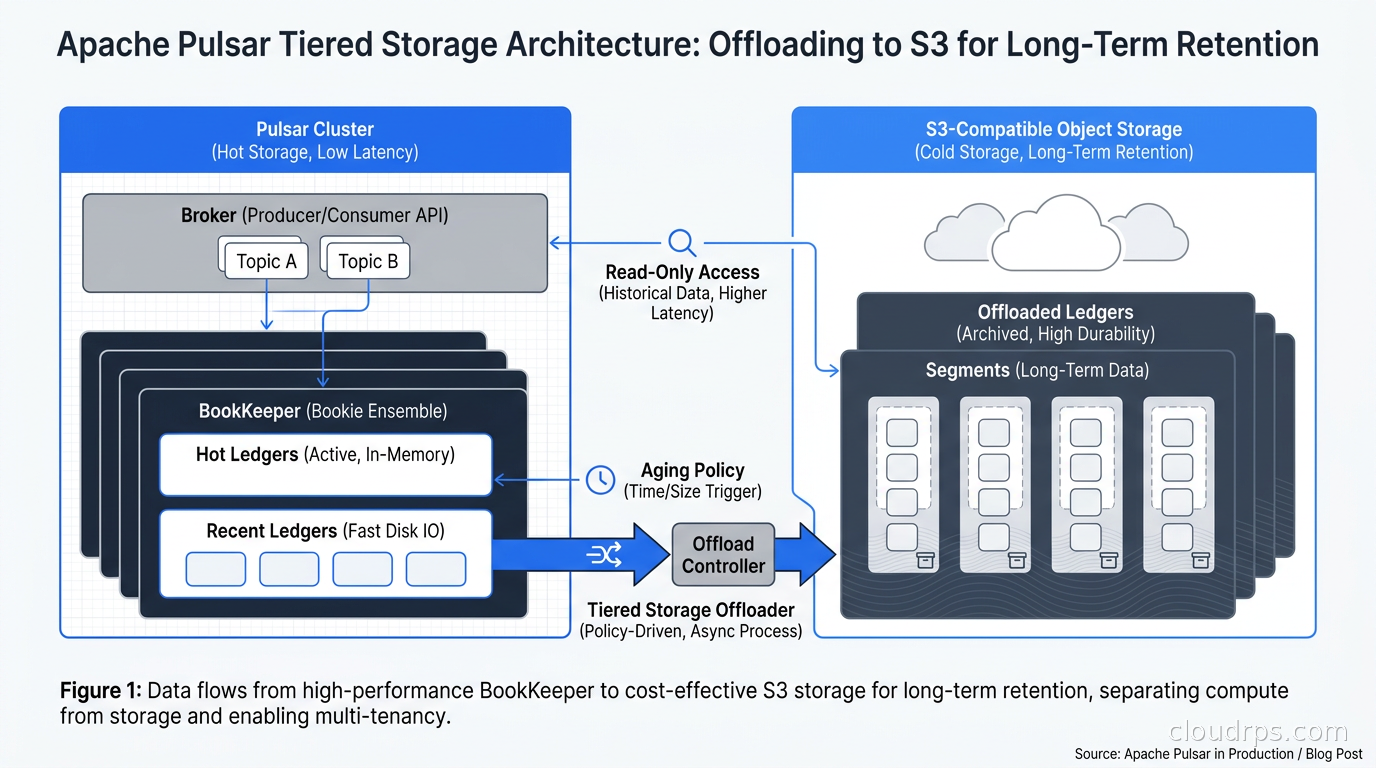
This is a significant cost advantage for use cases with long retention requirements. Keeping 30 days of data on BookKeeper SSDs is expensive. Keeping seven days on BookKeeper and offloading older data to S3 Standard or S3 Intelligent-Tiering costs a fraction of that. I have seen this reduce storage costs by 60-70% for high-volume topics that need compliance-mandated retention.
Configure tiered storage at the namespace level with a managed ledger offload threshold and a driver-specific configuration block. The aws-s3 driver is the most commonly used in AWS environments. Watch out for the offload lag: the offload process is asynchronous, so there is a window where a ledger is fully written but not yet moved to object storage. Size your BookKeeper cluster to handle the maximum accumulation of un-offloaded data during that window.
For teams interested in Pulsar’s position relative to other Kafka alternatives, our Kafka alternatives comparison covering Redpanda, AutoMQ, and WarpStream is worth reading first. Those alternatives stay closer to the Kafka protocol, making migration simpler; Pulsar takes a fundamentally different architectural stance.
Pulsar IO: The Connector Framework
Pulsar IO is Pulsar’s equivalent of Kafka Connect. It provides a framework for building source connectors (which pull data into Pulsar topics) and sink connectors (which push data from topics to external systems). Connectors run as Pulsar Functions under the hood, which means they are managed by the Functions worker, scale independently, and can be deployed and updated without touching the broker configuration.
The connector library is smaller than Kafka Connect’s, which has been growing for years and has hundreds of community connectors. Pulsar IO has solid coverage for the most common integrations: Kafka, Cassandra, Aerospike, Elasticsearch, Debezium-based CDC sources, and major cloud services. If you need something unusual, you may end up writing a custom connector; the Java API is clean and well-documented, but the operational cost of maintaining a custom connector is real.
Pulsar Functions themselves deserve a mention. They are lightweight compute units that consume from one or more input topics, process messages, and optionally produce to an output topic. The runtime options are Java, Python, and Go. Functions can run in a local thread mode for development, on the Pulsar cluster for simple deployments, or in a Kubernetes-native mode where each function instance becomes a pod. For teams already using Apache Flink for stateful stream processing, Pulsar Functions fill a lighter-weight niche: simple transformations, routing, enrichment, and filtering that do not need Flink’s full windowing and state management capabilities.
Deploying Pulsar on Kubernetes
The recommended path for Kubernetes deployments is the Apache Pulsar Helm chart, which the community actively maintains. StreamNative also provides the Luna Streaming distribution, which adds enterprise support, additional connectors, and a management console. For teams who want the community version, the official Helm chart gives you full control.
A minimal production Pulsar cluster on Kubernetes requires at least three components running as separate StatefulSets or Deployments: ZooKeeper (or Oxia, the newer replacement), BookKeeper bookies, and Pulsar brokers. A fourth component, the Pulsar proxy, fronts the brokers for client connections and handles authentication. The Functions worker can be deployed as a sidecar to brokers for small clusters or as a separate Deployment for larger ones.
Size the bookie cluster by your write throughput and required disk capacity. Each bookie write involves writing to its local disk and acknowledging writes from other bookies, so write amplification scales with your write quorum size. For a write quorum of 2 with 3 bookies in the ensemble, expect roughly 2x write amplification at the bookie level. SSDs are strongly recommended; spinning disks are viable only for very low-throughput clusters. I have run Pulsar on local NVMe SSDs with extremely good results; the BookKeeper journal write path is one of the most latency-sensitive operations in the entire stack.
The Kubernetes operator pattern is a better fit for Pulsar than manual Helm management once you are running more than a handful of clusters. StreamNative’s Pulsar Operator handles rolling upgrades, scaling operations, and configuration changes as Kubernetes custom resources. For teams running multiple Pulsar clusters for different tenants or environments, this reduces operational toil significantly.
One common production mistake: deploying brokers and bookies on the same nodes without anti-affinity rules. Under heavy load, broker-side CPU contention spills over to bookie I/O paths, and you end up with latency spikes that are genuinely difficult to diagnose. Use pod anti-affinity to keep brokers and bookies on separate node pools.
Pulsar vs Kafka and When Each Is the Right Answer
After twenty years of building data infrastructure, my honest view is that neither Pulsar nor Kafka is universally superior. The choice depends on your specific constraints.
Choose Pulsar when:
- You are building a multi-tenant platform where tenant isolation, per-namespace policies, and per-tenant quotas are first-class requirements, not afterthoughts.
- You need tiered storage as a core feature rather than a bolt-on solution. Kafka has tiered storage now, but Pulsar’s implementation is more mature and deeply integrated.
- Your topic count is very high. Pulsar handles a million topics in a cluster without the per-partition overhead that Kafka accumulates at scale. If you are running 50,000 topics today and expect that to grow, Pulsar’s architecture handles this more gracefully.
- You want to consume the same stream with multiple independent subscription types without consumer group coordination overhead.
Choose Kafka (or a Kafka-compatible alternative like Redpanda or AutoMQ) when:
- Your team already knows Kafka and you have a large ecosystem of Kafka-compatible tooling. Kafka’s ecosystem is larger, full stop.
- You need the broadest connector library. Kafka Connect has years of community-built connectors that Pulsar IO will not match for some time.
- You are doing stream processing with Flink, and you want the simplest integration path. Flink’s Kafka connector is battle-tested in more production environments than its Pulsar connector.
- Your team cannot afford to operate two complex distributed systems (Pulsar brokers plus BookKeeper). Kafka requires only Kafka plus ZooKeeper (or nothing with KRaft), which is a simpler operational model.
The honest tradeoff is complexity for features. Pulsar gives you things Kafka does not have natively: multi-tenancy, tiered storage, and topic-level isolation at scale. But it costs you operational complexity because you are running and tuning two distributed storage systems instead of one.
Schema Management
Pulsar has a built-in schema registry, which is a significant difference from Kafka’s approach of relying on the external Confluent Schema Registry or alternatives. The Pulsar schema registry is embedded into the broker and is accessible via the standard admin API. It supports Avro, Protobuf, JSON Schema, and KeyValue schemas.
Schema compatibility checking is enforced at the topic level, so a producer trying to write a message that breaks a backward-incompatible schema change gets a rejection at the protocol level before the message enters the topic. This is a cleaner failure mode than discovering a schema mismatch at the consumer side after messages are already in the log.
The limitation is that the built-in schema registry does not have the maturity or tooling of the Confluent Schema Registry. You will not find a pulsarctl equivalent of kafka-avro-console-consumer that makes ad-hoc inspection easy. Build schema inspection tooling into your internal developer workflows rather than assuming off-the-shelf tools will cover you.
Geo-Replication
Pulsar’s geo-replication is a first-class feature, not an add-on. You configure replication at the namespace level, specifying which clusters should receive copies of all messages produced to topics in that namespace. The replication is asynchronous by default; a message acknowledged in one cluster is eventually replicated to all configured peer clusters.
The replication implementation uses Pulsar’s own producer mechanism: a replication cursor is maintained per topic per peer cluster, and a system producer writes messages to the remote cluster. This means geo-replication does not require any additional components; it runs within the existing broker and BookKeeper infrastructure.
For compliance requirements around data residency, you can use geo-replication with selective replication policies: a namespace can be configured to replicate to some clusters but not others. This lets you keep EU customer data within EU clusters while still using a shared global Pulsar deployment for non-regulated topics.
Observability and Monitoring
Pulsar exposes metrics via a Prometheus endpoint on each component. The key metrics to monitor are:
pulsar_producer_rateandpulsar_consumer_rateper topic and namespacepulsar_msg_backlogper subscription (your early warning for consumer lag)pulsar_storage_sizeper topic (tracks BookKeeper usage before tiered offload kicks in)bookie_write_latency_quantileat p99 and p999 (the heartbeat of your storage layer)pulsar_broker_components_thread_executor_queue_size(thread pool saturation on the broker)
The Grafana dashboard distributed with the Pulsar Helm chart is a solid starting point, though I always add a custom dashboard focused on the metrics relevant to your specific subscription types and tenant quotas. Integrate Pulsar metrics into your existing observability stack rather than running a separate monitoring silo.
War Story: The Bookie Journal Disk
The most painful Pulsar incident I have worked through involved a misconfigured journal disk on the bookies. BookKeeper separates the write path into a journal (sequential writes for durability) and a ledger directory (organized writes for reads). The journal needs to be on the fastest storage available; it is on the critical path for producer acknowledgment latency.
We had deployed bookies with the journal and ledger directories sharing the same disk because the initial storage budget was tight. Under normal load, this worked. Under a throughput spike, journal writes started competing with ledger reads, latency spiked to seconds, and producers started timing out. The brokers began reporting storage errors even though disk utilization was only at 40%, because the bookie was refusing new writes due to latency thresholds.
The fix was separating the journal onto dedicated NVMe drives. We did this with zero downtime by decommissioning one bookie at a time, re-provisioning it with the separate journal disk, and adding it back to the ensemble. But it took four hours to roll through the cluster and cost us several hours of degraded latency before we completed the fix. If I am sizing a new Pulsar cluster today, dedicated journal disks are non-negotiable.
Getting Started Without Getting Burned
If you are evaluating Pulsar for a new platform, start with the Helm chart in a staging environment and spend time with the admin API before committing. The pulsarctl CLI covers most operations: creating tenants and namespaces, checking topic stats, managing subscriptions, and triggering compaction on compacted topics. Get comfortable with it before you need it under pressure.
Deploy the Pulsar Manager UI (the community web console) in your development environment. It is not production-grade tooling, but it gives you a visual representation of your tenant hierarchy and subscription state that accelerates learning.
Most importantly, do not treat BookKeeper as a black box. Understand how ledger rollover, ensemble placement policy, and the journal and ledger directory separation affect your cluster behavior. That investment in understanding pays dividends every time you troubleshoot a latency spike or plan a capacity expansion.
Apache Pulsar is not the right choice for every streaming platform. But for multi-tenant platforms with large topic counts, long retention requirements, and strict tenant isolation needs, it solves problems that Kafka’s architecture makes genuinely difficult. Understanding both systems at this level lets you make that call based on your actual constraints rather than hype in either direction.
Get Cloud Architecture Insights
Practical deep dives on infrastructure, security, and scaling. No spam, no fluff.
By subscribing, you agree to receive emails. Unsubscribe anytime.