
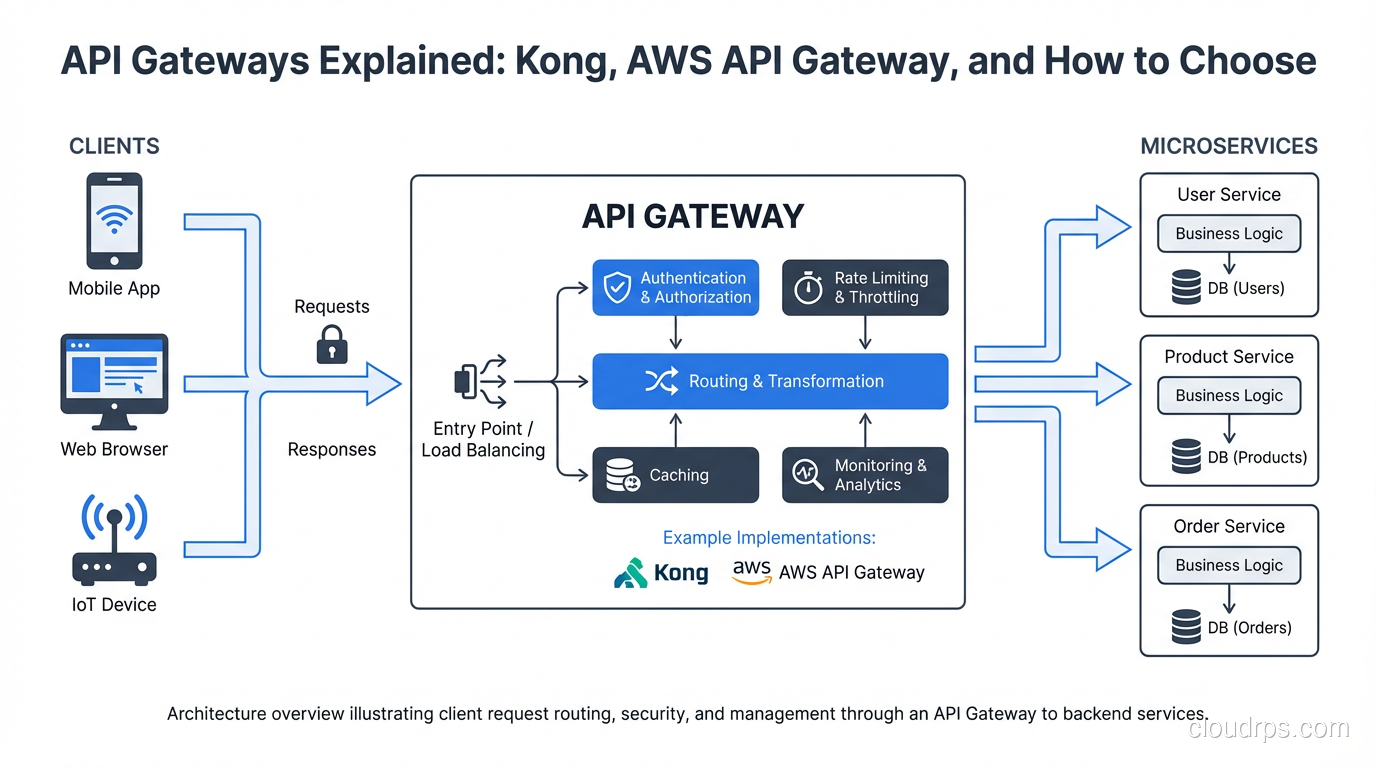
I’ve had a recurring conversation with teams moving to microservices: “we’ll just point nginx at our services and handle auth and rate limiting in each service individually.” I’ve had this conversation enough times to know where it ends. Eighteen months later, they’re dealing with five different auth implementations, no consistent rate limiting, zero visibility into cross-service traffic patterns, and someone suggests they should probably look at an API gateway.
The gateway isn’t optional in a microservices architecture. The question is which one and how you configure it.
What an API Gateway Actually Does
An API gateway sits at the edge of your service mesh, handling north-south traffic: requests from external clients to internal services. Don’t confuse it with a service mesh, which handles east-west traffic between services. These solve adjacent but different problems. You typically need both in a mature microservices deployment, as I covered in service mesh explained.
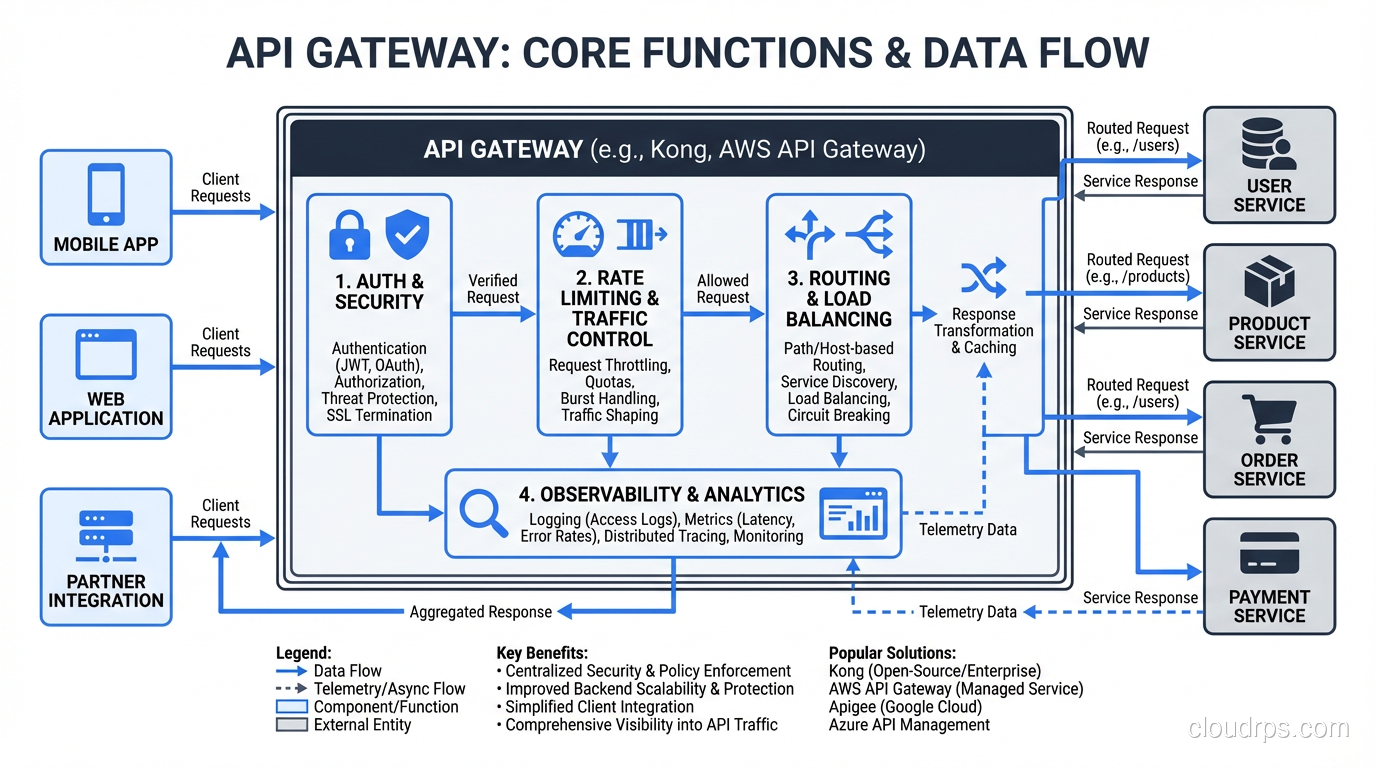
The core functions a gateway provides:
Routing: Match incoming requests to backend services based on path, host, headers, or other attributes. /api/users/* routes to the user service, /api/orders/* routes to the order service. This sounds simple but routing rules grow complex in practice: path rewriting, versioning strategies, traffic splitting for deployments.
Authentication and authorization: Validate JWTs, API keys, OAuth tokens, or mTLS certificates before requests reach your services. The gateway becomes the single enforcement point for auth policy. This means your services don’t need to implement auth themselves: they trust that anything reaching them has already been authenticated.
Rate limiting: Prevent any single client from overwhelming your services. Can be applied per IP, per user, per API key, per endpoint, or any combination. Needs to be implemented at the gateway rather than per-service because clients don’t care which service they’re hitting when they’re spamming requests.
Request/response transformation: Translate between formats, add or strip headers, transform request bodies. Useful for API versioning where you want to accept old client formats and translate to new service contracts without modifying either client or service.
Observability: Centralized logging, metrics, and tracing for all external traffic. The gateway sees every request, making it the ideal place to capture cross-cutting metrics: requests per second, error rates, latency distributions per endpoint. Combining this with distributed tracing gives you end-to-end visibility from client to database.
TLS termination: Terminate HTTPS at the gateway, route internal traffic over HTTP or mTLS depending on your security model. This centralizes certificate management rather than distributing it across every service.
The Managed vs Self-Hosted Decision
Before comparing specific products, frame the decision correctly. Managed gateways (AWS API Gateway, Azure API Management, Google Cloud API Gateway) trade control for operational simplicity. Self-hosted gateways (Kong, Traefik, APISIX) trade operational burden for flexibility and cost at scale.
Neither is categorically better. The right answer depends on your scale, team capabilities, and requirements.
AWS API Gateway: When Managed Wins
AWS API Gateway is the default choice for teams building AWS-native serverless architectures. If you’re running Lambda functions behind HTTP endpoints, API Gateway is the natural pairing. The integration is tight: you configure your API through CloudFormation or the console, and AWS handles scaling, TLS, and availability.
The HTTP API type (not the older REST API type) is significantly cheaper and faster for simple proxy use cases. REST APIs add features like request/response transformation, usage plans, and API keys, but they’re roughly 3.5x more expensive per request.
Where API Gateway excels:
- Zero infrastructure management: no servers, no clusters, no version upgrades
- Native integration with Lambda, DynamoDB, Step Functions
- Built-in DDoS protection through AWS Shield
- Usage plans and API keys for third-party developer APIs
- Automatic scaling with no capacity planning
Where it gets frustrating:
- The 29-second integration timeout is a hard limit. Long-running operations need workarounds.
- Advanced routing logic (weighted routing for canary deployments, complex header matching) is limited compared to self-hosted options.
- Custom plugins or middleware aren’t possible. You get what AWS ships.
- Vendor lock-in is real: your routing config, authorizers, and integration patterns are AWS-specific.
- Cost becomes significant at high request volumes. At 1 billion requests per month, you’re spending $3,500+ on the gateway alone.
API Gateway is the right choice when: you’re building a greenfield serverless architecture on AWS, you want zero operational overhead, your APIs don’t have exotic routing requirements, and you’re not yet at a scale where cost is a primary concern.
Kong: The Self-Hosted Benchmark
Kong is built on NGINX and OpenResty (LuaJIT on NGINX). It started as a plugin-driven API gateway and has evolved into a comprehensive platform with Kong Gateway (OSS), Kong Enterprise, and a mesh product.
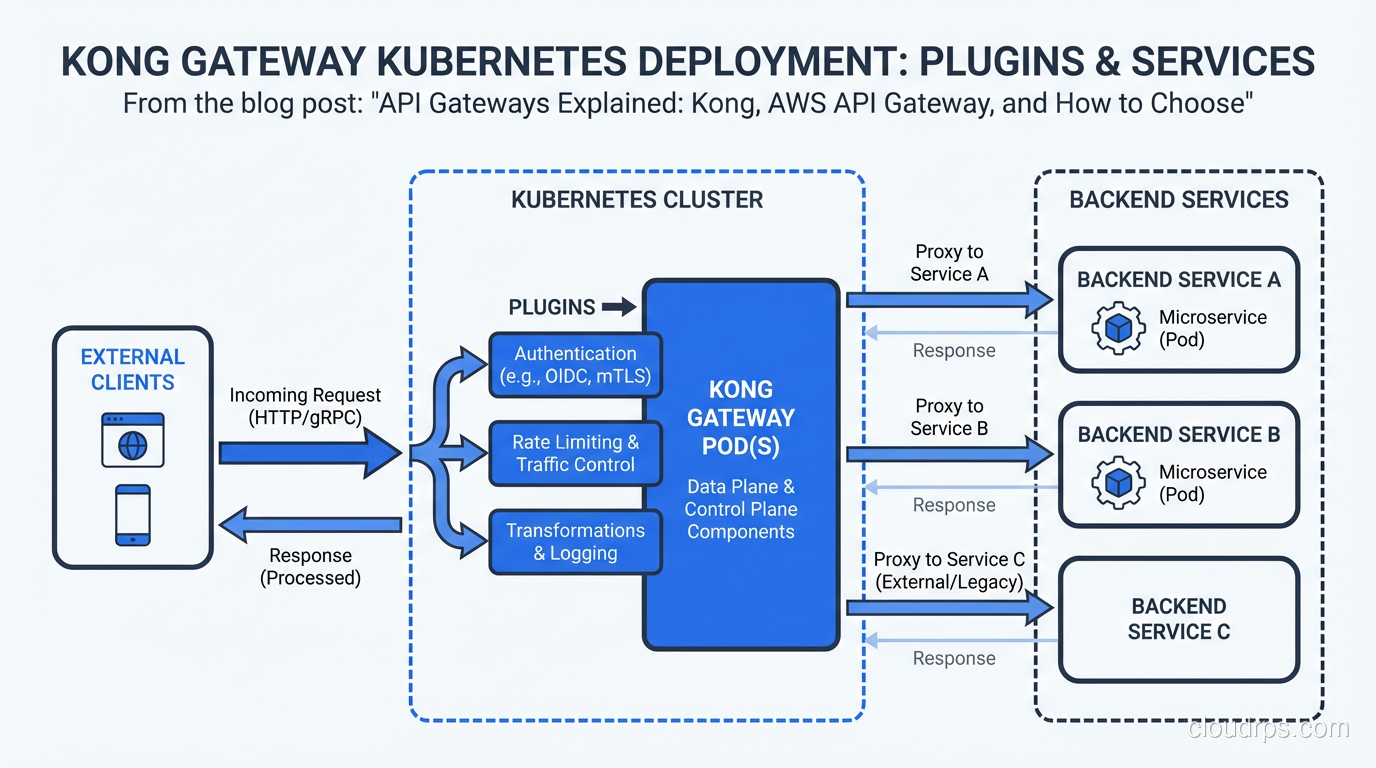
The architecture is straightforward: Kong instances sit in front of your services, routing traffic based on configured routes. Configuration lives in a PostgreSQL database (or in declarative YAML in DB-less mode). A separate Kong Admin API manages configuration at runtime.
What makes Kong worth the operational overhead:
Plugin ecosystem: Kong has hundreds of plugins for auth (JWT, OAuth2, LDAP, mTLS), rate limiting (local, Redis-backed, sliding window), logging (HTTP, TCP, file, cloud providers), and transformation. More importantly, you can write custom plugins in Lua, Python, JavaScript, or Go. When you need behavior that no managed gateway supports, you can build it.
Kubernetes-native with the Kong Ingress Controller: Replace your Nginx ingress controller with Kong and get gateway functionality for free as traffic enters your cluster. Annotate your Kubernetes services with rate limits, auth requirements, and transformations.
Performance: Kong handles hundreds of thousands of requests per second per instance with sub-millisecond latency overhead. NGINX’s battle-tested event loop is the foundation.
DB-less mode with declarative config: Configure Kong entirely through YAML and manage it as code with GitOps workflows. Eliminates the operational burden of running PostgreSQL for the gateway config.
The honest downsides: you’re running and maintaining NGINX-based infrastructure. Version upgrades require care. High availability requires running multiple Kong instances with shared configuration state. If you’re not already comfortable with proxy infrastructure, there’s a learning curve.
Kong makes sense when: you’re self-hosting in Kubernetes or on-prem, you need custom plugin logic, you’re cost-sensitive at high request volumes, or you need routing capabilities that managed services don’t support.
Traefik and APISIX: Alternatives Worth Knowing
Traefik has become the default ingress controller for many Kubernetes deployments because it auto-discovers services through Kubernetes service discovery and Let’s Encrypt integration. If your primary need is “route HTTP traffic to the right service and handle TLS”, Traefik is operationally simpler than Kong. The plugin ecosystem is smaller, and it’s less suited for complex API management use cases (developer portals, usage plans, advanced auth flows). But for internal cluster ingress, it’s excellent.
Apache APISIX is a newer NGINX-based gateway that’s been gaining traction, particularly in Asia. It uses etcd rather than PostgreSQL for configuration storage (etcd is already running in most Kubernetes clusters), supports a similar plugin model to Kong, and benchmarks show slightly lower latency. If you’re evaluating Kong, APISIX is worth including in your comparison.
The Configuration That Matters
Regardless of which gateway you choose, these configuration decisions have the most operational impact:
Rate limiting strategy: Choose between in-memory (per-instance, doesn’t coordinate across instances), Redis-backed (shared state, accurate across all instances, adds a Redis dependency), and cluster-based (eventual consistency, no external dependency). For most use cases, Redis-backed rate limiting with a sliding window algorithm is the right call. Local in-memory limits work fine if you’re okay with slightly inaccurate enforcement across a cluster.
Auth delegation vs auth at gateway: You can validate tokens at the gateway and pass user identity as a header to backend services, or you can pass the token through and let services validate themselves. The gateway validation approach is simpler and faster (one validation point) but means services trust the gateway completely. If a service is reachable without going through the gateway, it’s unprotected. Enforce network policies so services are unreachable except via the gateway.
Circuit breaking: A gateway is the ideal place to implement circuit breaking: if a backend service starts returning errors at a high rate, stop sending it requests and return an error to clients immediately. This prevents cascading failures from one service taking down your entire gateway under load. This pairs with fault tolerance patterns described in fault tolerance vs high availability.
Health checks and retry logic: Configure active health checks so the gateway stops routing to unhealthy instances without relying on passive detection through client errors. Retry idempotent requests once on failure, but don’t retry blindly: retrying a non-idempotent operation can cause duplicate transactions. This is a real production mistake I’ve seen teams make.
Multi-Region and Global Gateways
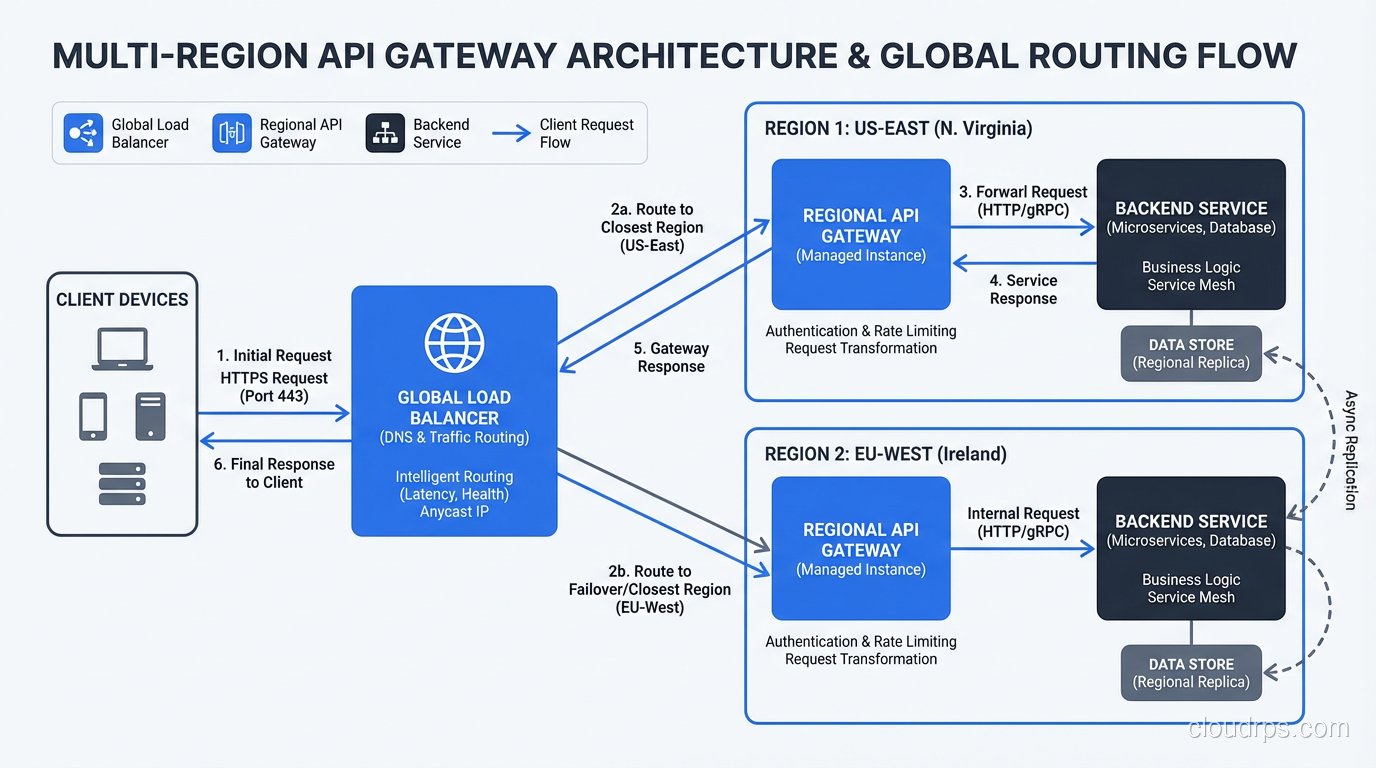
When you operate in multiple regions, you need to think about where your gateway lives and how requests are routed to the right region. The options:
DNS-based routing: Route clients to the nearest region using latency-based or geolocation DNS policies. Each region has its own gateway instance. Simple, but failover between regions depends on DNS TTLs.
Global load balancer: AWS Global Accelerator, Google Cloud Load Balancer, Cloudflare, or Fastly sit in front of your regional gateways and route to the optimal region. This provides anycast routing (requests are directed to the nearest PoP), DDoS protection, and faster failover than DNS. The tradeoff is cost and an additional layer of configuration.
Distributed gateway with shared config: For Kong, you can run instances in multiple regions sharing the same PostgreSQL configuration database (if latency to the database is acceptable) or sync configuration through CP/DP (control plane / data plane) mode, where the control plane stores config and data planes in each region pull updates periodically.
My preference for serious multi-region deployments: run a global CDN/load balancer (Cloudflare or AWS CloudFront) as the outermost layer for DDoS protection and anycast routing, then regional Kong instances that handle auth, rate limiting, and routing to services. This keeps the cost-per-request of the managed layer low while giving you control over gateway behavior at the regional level.
Cost Reality Check
The cost calculation between managed and self-hosted is non-trivial.
AWS API Gateway HTTP API costs $1 per million requests. At 100 million requests per month, that’s $100/month and not worth thinking about. At 10 billion requests per month, that’s $10,000/month just for the gateway. A Kong cluster to handle that load is maybe three EC2 instances plus operational overhead. The crossover varies by team size and operational maturity, but it’s real and worth calculating before you’re locked in.
Factor in data transfer costs too. API Gateway charges for data out at standard AWS rates. If you’re returning large response payloads, CDN caching at the gateway level can dramatically reduce both costs and latency.
For comprehensive cost management, treat your gateway as a FinOps concern: instrument it with the metrics you need to right-size your tier and make the build-vs-buy decision at the right scale.
What I’d Do Today
For a team starting fresh on AWS with serverless-first architecture: start with API Gateway HTTP API. Get your APIs working, understand your traffic patterns, and revisit when costs or requirements change.
For a team on Kubernetes with existing microservices: deploy Kong with the Ingress Controller. Use DB-less declarative config managed in git. Enable the JWT auth plugin and rate-limiting plugin. You’ll cover 90% of your needs in a few hours.
For a team with complex auth requirements, custom middleware needs, or serious cost pressure: self-host APISIX or Kong. Accept the operational burden in exchange for control.
What I wouldn’t do: skip the gateway and implement cross-cutting concerns in each service. The consistency and observability benefits of centralized enforcement compound over time. Every new service you add without a gateway is another service that will have its own auth logic, its own rate limiting decisions, and its own gap in your traffic visibility.
The gateway pays for itself the first time you need to add rate limiting to your entire API surface without touching any individual service. That moment will come.
For the security model behind what the gateway enforces, the zero trust security patterns describe how gateways fit into a broader identity-based access model. And for understanding the networking layers your gateway operates at, Layer 4 vs Layer 7 explains why HTTP gateways can do things that network load balancers can’t.
Get Cloud Architecture Insights
Practical deep dives on infrastructure, security, and scaling. No spam, no fluff.
By subscribing, you agree to receive emails. Unsubscribe anytime.