
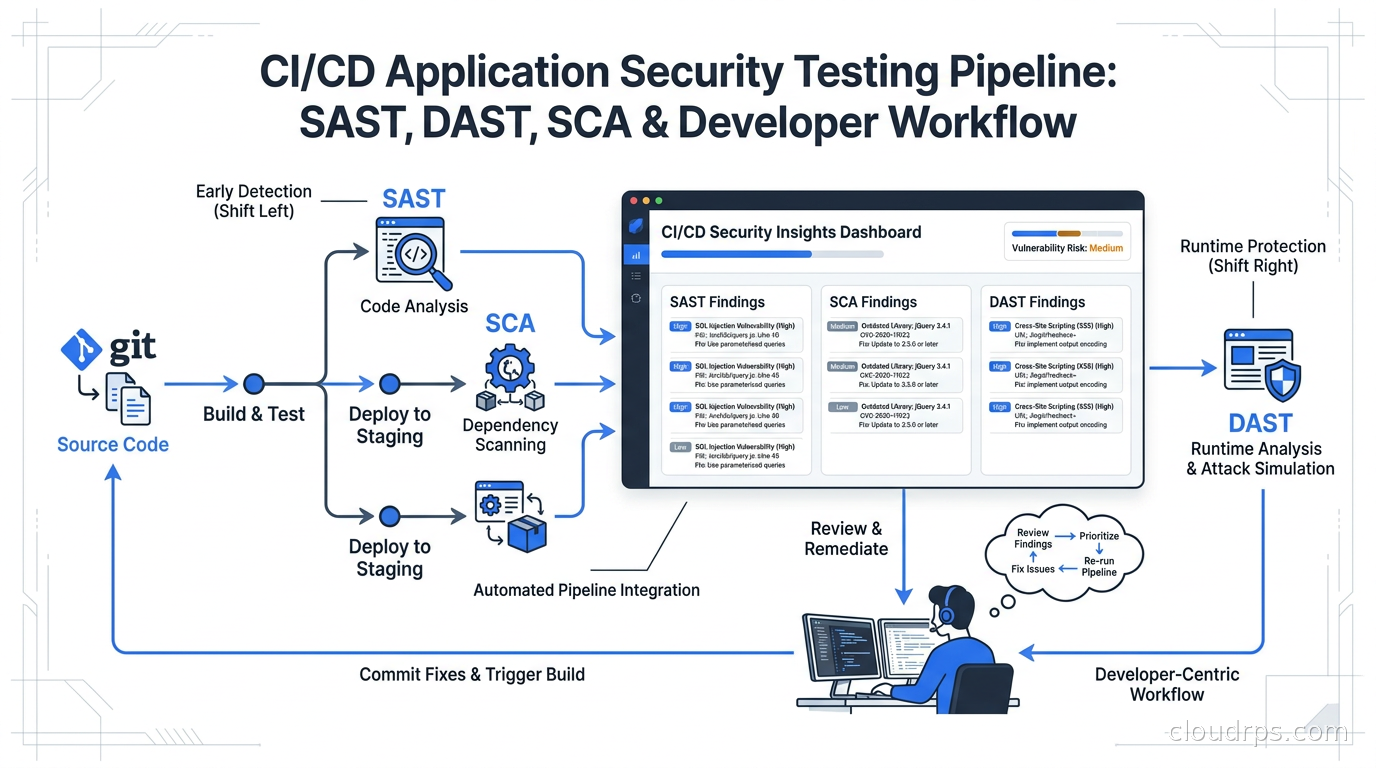
The phrase “shift left on security” has been in every conference talk for a decade. Every engineering org I’ve consulted with over my twenty years in cloud architecture has a version of it in their security roadmap. About half of them have actually shipped it, and maybe a quarter of those are happy with the result.
The others, and I have been on several of these teams myself, end up in one of two failure modes. Either the security tooling gets ignored because it blocks too many PRs with noise, or it never gates anything and becomes a reporting exercise that nobody reads. Neither outcome makes you more secure.
What actually works is treating application security testing as a product problem, not just a tooling problem. You need to choose the right scanning methods for each part of your pipeline, configure them to produce signal rather than noise, and design gates that block real risk without becoming a tax on engineering velocity. This article is the guide I wish I had had when I was first building these pipelines.
What SAST, DAST, and SCA Actually Cover
People often conflate these three or treat them as interchangeable. They are not. They answer different questions and catch different classes of bugs.
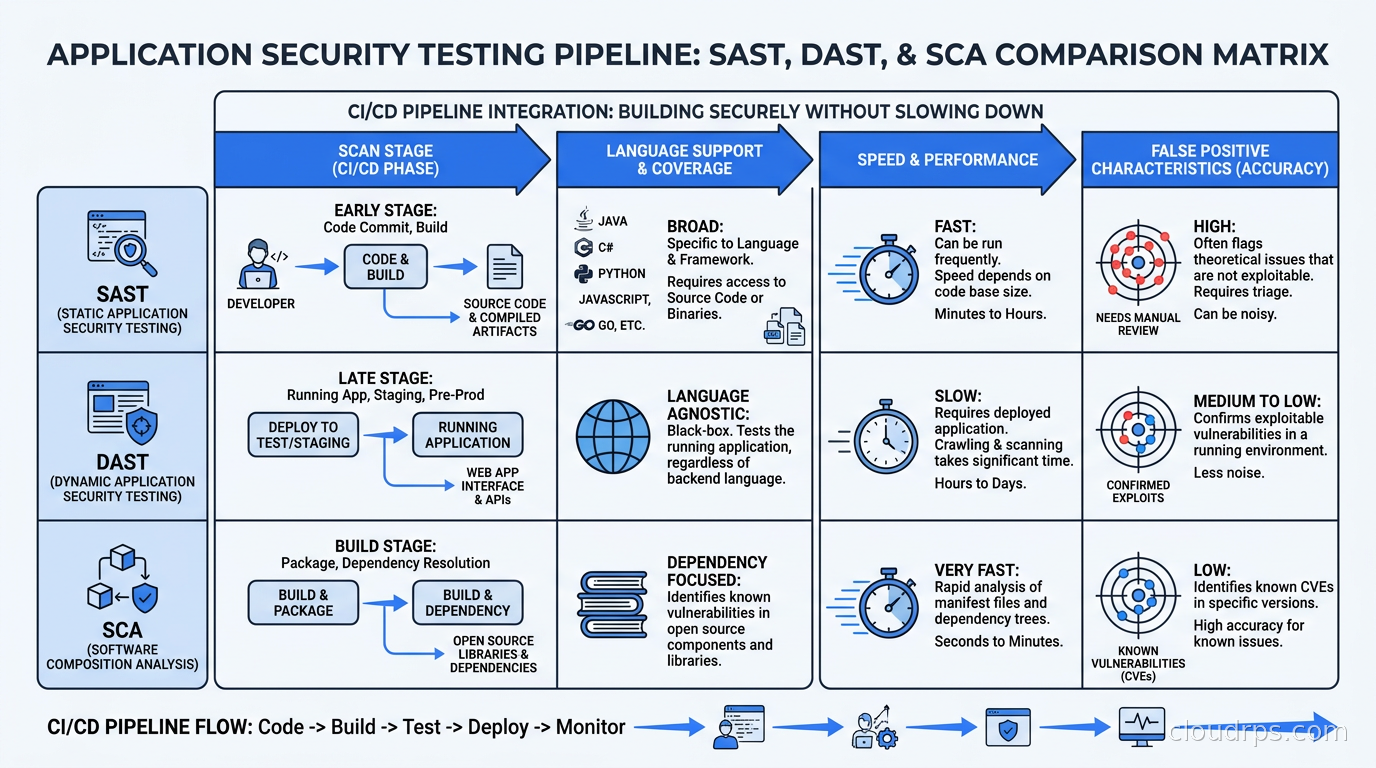
Static Application Security Testing (SAST) analyzes source code or compiled artifacts without running the application. It catches things like SQL injection patterns, hardcoded secrets, insecure cryptographic choices, and unsafe deserialization. It runs fast, integrates naturally into a PR workflow, and requires no running environment. The tradeoff: it sees the code in isolation, which means it misses vulnerabilities that only manifest at runtime through configuration, environment, or the interaction of multiple services.
Dynamic Application Security Testing (DAST) exercises a running application from the outside, the same way an attacker would. It sends malformed requests, tries injection payloads, probes authentication flows, and looks for behaviors that betray implementation flaws. It catches real vulnerabilities that SAST cannot see, but it requires a deployed environment and takes longer to run. Getting DAST into a pre-merge gate is hard; most teams run it against staging nightly instead.
Software Composition Analysis (SCA) audits your dependencies. Your application is mostly code other people wrote, and SCA matches your dependency tree against vulnerability databases like the NVD, OSV, and GitHub Advisory Database. It catches CVEs in libraries you pulled in six months ago, license compliance issues, and the supply chain risks that software bill of materials tooling was designed to address.
None of these three replaces the others. A mature AppSec program runs all three in appropriate parts of the pipeline.
SAST: Choosing Between Semgrep and CodeQL
The two tools that dominate modern SAST workflows are Semgrep and CodeQL. They take fundamentally different approaches, and understanding the difference determines where each belongs in your pipeline.
Semgrep is a pattern-matching engine. You write rules in YAML that describe syntactic or semantic patterns to flag. Scans are fast, typically completing in seconds to low minutes on a normal service. The rules are readable, so your AppSec team can write them without understanding compiler internals. The limitation is that the open-source version of Semgrep operates within a single file and function scope, so it misses vulnerabilities that require tracing data flow across module boundaries. After Semgrep Inc. relicensed parts of the Community Edition engine in 2025, a community-maintained fork called OpenGrep emerged for teams that wanted an open-source engine with cross-file taint analysis.
CodeQL (now maintained by GitHub) builds a queryable relational database of your entire codebase and runs analyses written in its own query language, QL. Because it understands the whole program as a graph, it can trace tainted data from a user-controlled input through ten layers of function calls to a sink. That semantic depth catches things Semgrep cannot. The cost is scan time: CodeQL builds run from minutes to tens of minutes on large codebases, and the learning curve for writing custom queries is steep. It is free for open-source projects and public repositories on GitHub, and GitHub-native teams get it essentially for free through Code Scanning.
My recommended split is to run Semgrep on every PR for fast feedback, and CodeQL on a schedule or against merge to main for deep analysis. The combination gives you breadth at PR time and depth before code reaches production. Teams that try to run CodeQL on every PR usually end up with frustrated engineers waiting on long scan jobs, and that friction corrodes adoption faster than any misconfiguration.
For teams starting fresh, the GitHub-integrated approach of enabling Code Scanning (CodeQL) plus a Semgrep action gives you reasonable coverage with minimal operational overhead. SonarQube remains a popular choice for organizations that want a single portal consolidating code quality and security findings, especially in enterprises that already have it deployed.
One thing I push hard on: use the secrets detection layer as a separate concern. Semgrep and CodeQL are not optimized for detecting API keys and credentials in code. Run Gitleaks or TruffleHog as their own step, and treat a secrets finding as a P0 blocker on every PR without exception.
SCA: The Dependency Graph Is Your Real Attack Surface
Most application security programs start with SAST because it feels like code review. But in practice, the findings that lead to actual breaches at modern organizations come disproportionately from third-party libraries. Every framework, ORM, HTTP client, and utility package you depend on is code running in your production environment with your permissions.
The core of SCA is matching your dependency lock files against vulnerability databases. The tools that dominate this space in 2026 are Snyk, Grype (from Anchore), Trivy (which does both container and dependency scanning), GitHub’s native Dependabot, and OWASP Dependency-Check. Snyk has the broadest language support and the most polished developer experience, surfacing findings inline in PRs and suggesting remediation automatically. Grype and Trivy are open-source alternatives that integrate well into self-managed CI pipelines.
The important operational distinction is between reachability analysis and simple CVE matching. A basic SCA scanner flags every CVE in every package you have installed, whether or not your code actually calls the vulnerable function. A scanner with reachability analysis, which Snyk and a few others provide, traces whether the vulnerable code path is actually invoked. The false positive rate drops substantially, and your developers spend less time triaging findings that will never affect them.
SCA also connects directly to supply chain security and SBOM generation. Modern CI pipelines should generate an SBOM on every build and store it as a build artifact alongside the container image. When a new CVE drops, you need the ability to query “which of our deployed services uses this package and what version?” without manually scanning everything again. The SBOM is that query surface.
License compliance is the SCA use case that often gets overlooked until legal notices it. Not every open-source license is compatible with commercial use or with each other. GPL contamination through a transitive dependency is a real problem that has burned organizations before. Good SCA tooling flags license policy violations alongside security findings.
DAST: The Hard Part Nobody Talks About Honestly
DAST is where most AppSec programs stall. The reason is deployment complexity. To do DAST properly, you need a running instance of your application with realistic configuration, seeded with test data, accessible to the scanner, but isolated from real users and data. That is harder than it sounds, especially for services that depend on other services, external APIs, or databases that cannot contain test data.
The tool landscape has matured significantly. ZAP, which remains one of the most widely adopted free DAST tools (its active development and widespread deployment are well-documented as of 2026), is commonly used for automated scan integration. StackHawk, built on ZAP with a developer-focused interface and native CI/CD integration, is a popular commercial option for teams that want ZAP’s engine with less operational friction. For teams doing API security testing specifically, tools that understand OpenAPI specs and can automatically generate targeted test cases against your API definitions are worth the investment.
A realistic DAST integration looks like this: you have a nightly pipeline that deploys the current main branch to a dedicated staging environment, runs a DAST scan against it, and files tickets for findings above a severity threshold. Trying to integrate DAST into every PR gate is usually impractical unless your application is small and your deployments are very fast. The exception is if you can scope DAST to only the changed endpoints, using your API change diff to reduce scan surface, but building that scoped scan requires tooling investment most teams have not made.
I have seen teams over-invest in DAST and under-invest in SCA, which is arguably backwards in terms of risk reduction per engineering hour spent. Fix your dependency hygiene first, then layer in DAST as your program matures.
The False Positive Problem Is a Product Problem
The number one reason security programs fail at the CI/CD level is false positives. I have watched this dynamic play out multiple times: security tooling rolls out, developers start getting blocked by findings that are not real vulnerabilities or are not applicable to their context, the complaints escalate to engineering leadership, and the gates get loosened until they block nothing. Six months later the tools are still running but nobody looks at the output.
False positives come from two sources. The first is configuration: security tools have defaults tuned for broad detection, not for your specific stack and risk profile. Out of the box, they will flag patterns that are safe in your context, deprecated functions you use intentionally because they work fine for your use case, and CVEs in test dependencies that never ship to production.
The second source is context mismatch: a finding is technically accurate according to the rule, but the risk is mitigated by architecture decisions the scanner cannot see. An injection risk in a database query is real; the same pattern querying an in-memory data structure that never touches user input is not. SAST tools find the pattern, not the context.
The fix for both is to build a triage and suppression workflow from day one. Every tool supports annotation-based suppression, where a comment in code tells the scanner “this finding has been reviewed and accepted.” These suppressions should be tracked, require justification, and reviewed periodically. Separate from per-finding suppressions, maintain a global suppression list for rules that are not applicable to your stack at all. Audit that list quarterly.
The key engineering discipline is to distinguish between “this finding is a false positive” and “this finding is real but low risk given our controls.” Both can be suppressed, but they belong in different categories with different review timelines.
Security Gates: What to Block, What to Warn, What to Report
Not every finding should block a PR. That statement makes some security practitioners uncomfortable, but refusing to acknowledge it is how programs end up with ignored tooling. The right model is a tiered approach:
Block: Critical and high severity findings with high confidence, secrets in code, known-exploited CVEs from authoritative sources like the CISA KEV catalog, and SBOM anomalies that indicate unexpected new dependencies. These warrant blocking because the risk of proceeding is concrete and the fix is typically clear.
Warn at PR time, block before deployment: Medium severity findings, CVEs in direct dependencies that are not in CISA KEV, and DAST findings from nightly scans. Engineers see these as PR comments, they are tracked in tickets, but they do not block the PR. They do appear as requirements before a service can graduate to production.
Report only: Low severity findings, informational findings, CVEs in indirect transitive dependencies for vulnerabilities with low EPSS scores. These go into a dashboard, are reviewed in monthly AppSec reviews, and feed into prioritized remediation sprints without blocking any individual deployment.
The EPSS (Exploit Prediction Scoring System) score is underused in gate configuration. A CVE with a CVSS score of 8.0 and an EPSS score of 0.002 has a very low observed probability of being actively exploited; it should not block a PR with the same urgency as a CVE with CVSS 6.0 and EPSS 0.45. Layering EPSS into your SCA gate logic meaningfully reduces noise without sacrificing the findings that actually matter. The vulnerability management article on this site goes deeper on that scoring framework.
Consolidating Findings with ASPM
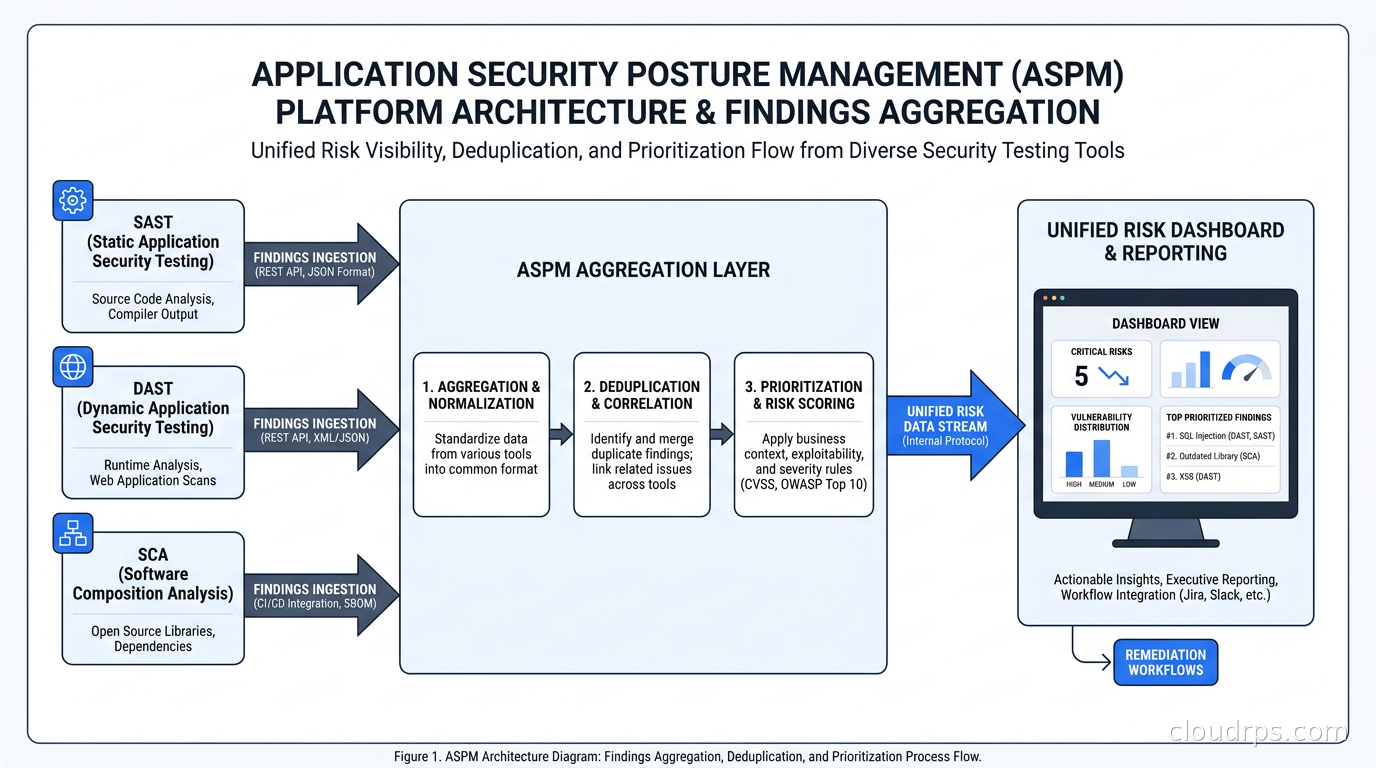
As you add more scanning tools, the noise problem gets worse before it gets better. A developer seeing the same finding from Semgrep, CodeQL, and Snyk simultaneously, possibly with different severity ratings, is going to stop trusting all of them.
Application Security Posture Management (ASPM) tools, sometimes folded into the broader CNAPP category, consolidate findings from multiple scanners into a unified view with deduplication, context enrichment, and unified severity. ArmorCode, Apiiro, Seemplicity, and the ASPM modules of Snyk and Wiz are examples of this category. The value proposition is correlation: linking a SAST finding in service A to the fact that service A is exposed to the public internet and handles PII, which makes that finding much more urgent than the same code pattern in an internal batch job.
For teams running many services, ASPM pays for itself in analyst time. For smaller engineering organizations, a well-configured GitHub Security tab or a self-managed DefectDojo instance can serve the same function without the commercial spend.
Building the Full Pipeline
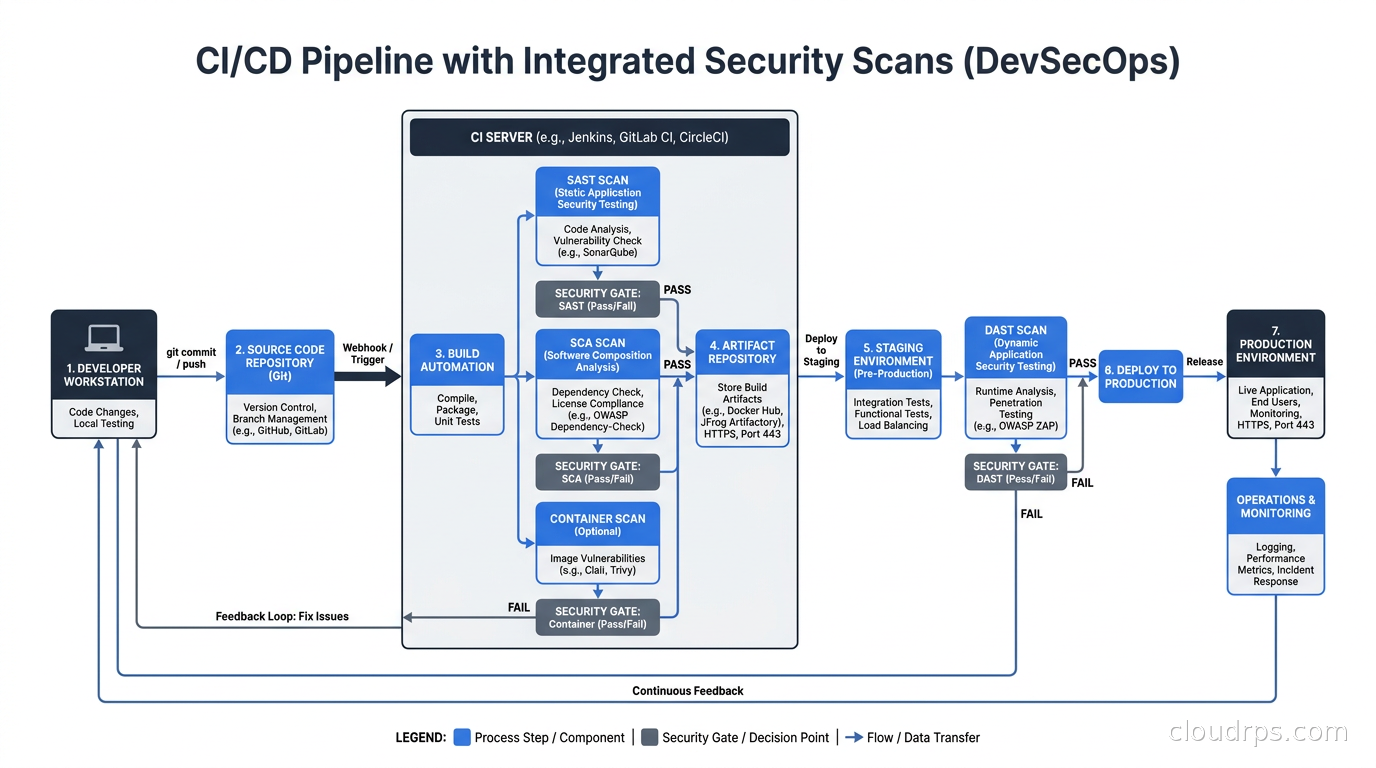
Here is the pipeline shape I recommend as a starting point, calibrated for a mid-size engineering organization running microservices on Kubernetes:
On every PR:
- Semgrep with a curated rule set (start with the OWASP Top 10 rules, add custom rules for your frameworks over time)
- Gitleaks or TruffleHog for secrets detection
- SCA scan against your lock files using Grype or Snyk, configured to block only on CISA KEV entries and critical CVEs in direct dependencies with EPSS above your threshold
- License compliance check
On merge to main:
- CodeQL full analysis for deep semantic findings
- SBOM generation and storage as a build artifact
- Container image scan (Trivy or Grype) against the built image
Nightly against staging:
- DAST scan (ZAP or StackHawk) against your API surface
- Full SCA rescan to catch new CVEs against your last deployed dependency tree
- Report generation and ticket creation for new findings above threshold
The CI/CD infrastructure for this connects naturally to the patterns covered in the CI/CD fundamentals article and builds on the compliance-as-code approach for attestation and audit trails. If you are running this on Kubernetes, the container image hardening discipline matters upstream of all this scanning: distroless images with minimal attack surface produce far fewer SCA findings because there are far fewer installed packages to audit.
One configuration detail that saves significant maintenance effort: integrate your findings into your issue tracker at creation time, assign ownership based on service ownership metadata, and auto-close tickets when the scan confirms the finding is gone. Findings that live only in a security dashboard tend to get ignored; findings that show up as engineering tickets with owners and SLAs get fixed.
The Compliance Connection
For organizations working toward SOC 2, ISO 27001, or HIPAA compliance, a documented and evidence-generating AppSec pipeline is not optional. Auditors want to see not just that you run security scans but that you have defined severity policies, that critical findings are tracked to remediation, and that someone reviews suppressed findings. Building that audit trail into the pipeline from the beginning is far cheaper than reconstructing it during a compliance review.
The compliance-as-code patterns apply here: treat your security gate configurations as code, version them, and make the policy changes auditable. When an auditor asks “what was your critical finding SLA on October 1?”, you should be able to answer that from git history without hunting through wiki pages.
What I Would Do Differently Starting Today
Twenty years in, the mistake I see most often is organizations trying to build a comprehensive AppSec program before establishing the basics. Start with secrets detection (block everything, no exceptions) and SCA on direct dependencies (block CISA KEV, warn on everything else). Those two measures alone close a significant fraction of the real attack surface at low operational cost. Add SAST incrementally as your team builds familiarity with the tool and its rules. Introduce DAST when you have stable staging infrastructure and an SLA for triaging the output.
The security tools are not the hard part. The hard part is organizational: making security findings feel like useful development feedback rather than bureaucratic friction. That requires investment in developer experience, which means fast scans, accurate findings, clear remediation guidance, and gates that are calibrated to block real risk rather than theoretical worst cases. Engineers who trust their security tooling use it. Engineers who do not trust it work around it.
The shift-left promise is real, but it only delivers if you build the pipeline with developer experience as a first-class requirement alongside security coverage. Most programs that fail are optimized for the security side and neglect the developer experience side. The ones that succeed treat them as equally important.
A well-integrated AppSec pipeline does not make you immune to breaches. It closes the most common paths, it reduces the blast radius of what gets through, and it creates the evidence trail that helps you respond effectively when something does happen. That is what you are actually building toward, and it is worth building right.
Get Cloud Architecture Insights
Practical deep dives on infrastructure, security, and scaling. No spam, no fluff.
By subscribing, you agree to receive emails. Unsubscribe anytime.