
In twenty years of building distributed systems, I have seen the same pattern play out dozens of times: a team adopts a data orchestration tool that works fine on its own infrastructure, then spends the next two years grafting it awkwardly onto Kubernetes. Celery workers behind a scheduler. Airflow running in a VM while the rest of the platform is containerized. Cron jobs on a bastion host that nobody wants to admit still exist.
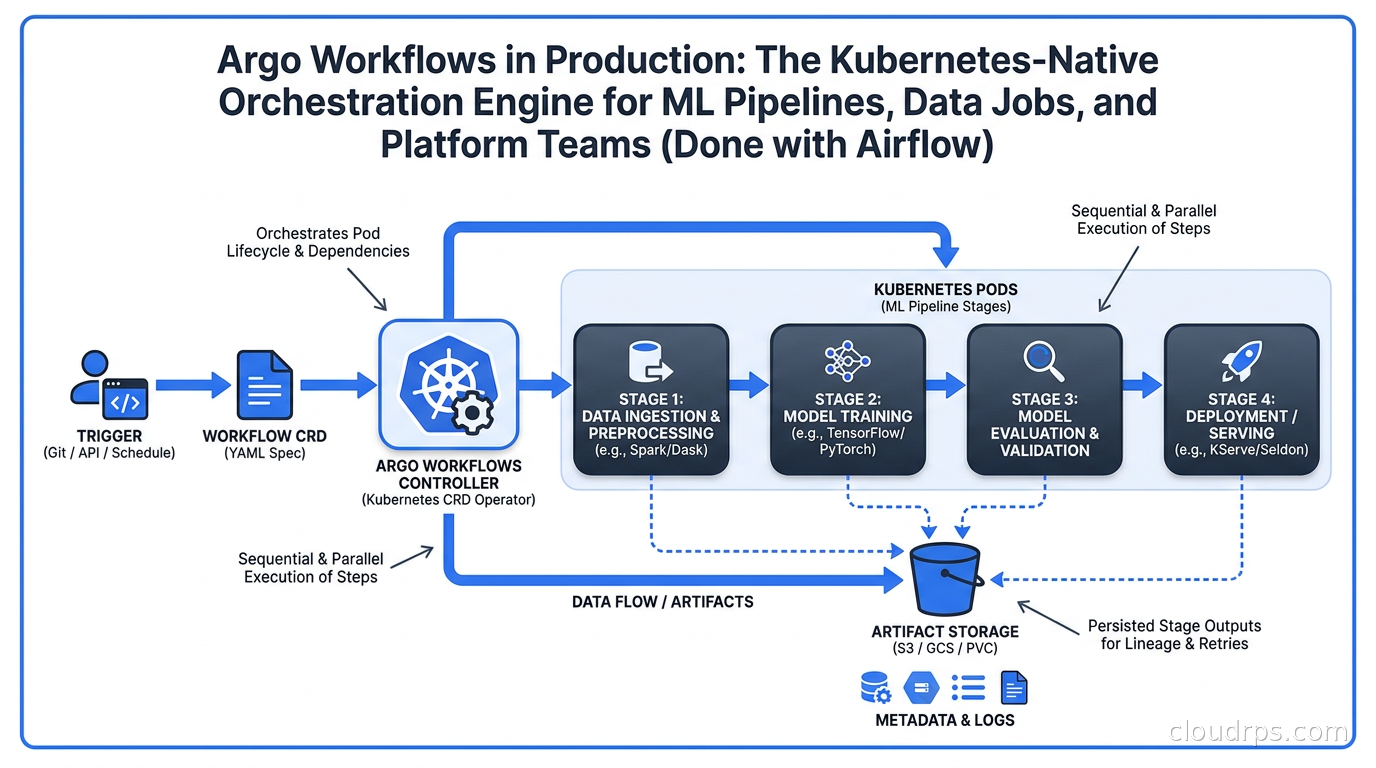
Argo Workflows takes a different approach. Instead of adding Kubernetes support as an afterthought, the entire execution model is Kubernetes. Every step in a workflow runs as a Kubernetes pod. The workflow engine is a controller watching CRDs. Scheduling uses CronWorkflows backed by the cluster’s own scheduler. If you are already running Kubernetes, Argo Workflows does not ask you to maintain a parallel scheduling infrastructure alongside it.
Version 4.0, released in February 2026, brought significant changes to how the project handles artifacts, parallelism control, and CRD validation. This is a good time to understand what Argo Workflows is, where it fits against Airflow and the Python-based orchestrators, and what production deployment actually requires.
What Argo Workflows Actually Is
Argo Workflows is a CNCF project for orchestrating container-based workflows on Kubernetes. The project lives at argoproj/argo-workflows and is part of the broader Argo ecosystem alongside ArgoCD for GitOps deployments and Argo Rollouts for progressive delivery. If you have used ArgoCD to manage application deployments, the Argo philosophy will feel familiar: declarative YAML resources, a Kubernetes controller reconciling desired state, Git as the source of truth.
The fundamental unit in Argo Workflows is the template. A template is a single step that runs a container image, a DAG of other templates, a script, or a suspend gate waiting for human approval. You compose templates into a Workflow or WorkflowTemplate resource, and the Argo controller creates pods for each step.
What makes this genuinely different from other orchestrators is that there is no worker pool, no separate execution environment, and no Python interpreter coordinating tasks. The Kubernetes scheduler handles pod placement. RBAC governs who can submit workflows. Resource requests and limits on pods control what each step can consume. Everything that Kubernetes already does for your application workloads applies to your pipelines.
How It Compares to Airflow, Dagster, and Prefect
The Python-based orchestrators - Airflow, Dagster, Prefect - solve a real problem. Their DAG definitions are code, which means you can use Python’s full type system, test your pipeline logic, import reusable functions, and build complex dependency graphs with conditional logic. Airflow’s ecosystem of operators and providers covers hundreds of data sources. These are genuine advantages.
Where they fall short in a Kubernetes environment is the execution model. Airflow has a Kubernetes Executor and a KubernetesPodOperator, but the Airflow scheduler itself still needs to run, the metadata database needs to stay healthy, and you are now maintaining Airflow infrastructure that sits beside your Kubernetes infrastructure rather than inside it.
Argo Workflows is YAML-first, not Python-first. That is sometimes presented as a disadvantage, but in practice it is a different tradeoff. Your workflows are Kubernetes resources, which means:
- They deploy the same way as everything else: Helm, GitOps, Kustomize
- RBAC controls who can submit and view them, using the same policies as the rest of your cluster
- They work with the Kubernetes scheduler’s node selectors, tolerations, and affinity rules, so GPU steps land on GPU nodes automatically
- Parallelism and resource quotas are governed by the same mechanisms as your application workloads
Canva ran a proof of concept between Argo Workflows and Airflow and chose Argo for its deployment story - specifically the ability to manage DAGs via API and CLI in a Kubernetes-native way.
The rule of thumb I apply: if the primary consumers of your workflows are data engineers who want to write Python and the pipelines interact heavily with dbt, Spark, or SQL databases, Airflow or Dagster gives a richer authoring experience. If your workflows are container-native, your team is already living in Kubernetes, and you want one fewer stateful service to operate, Argo Workflows fits better.
Core Concepts: Templates, DAGs, and the Execution Model
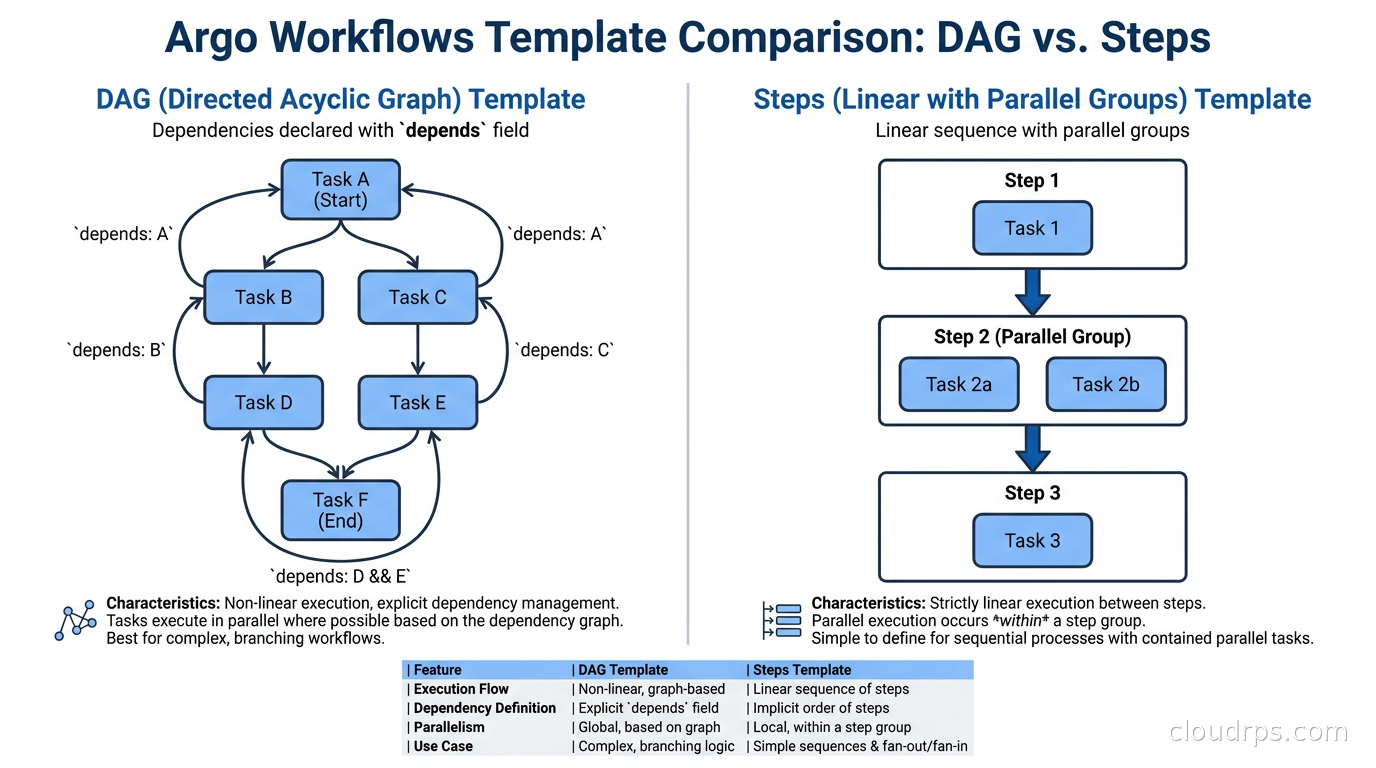
A Workflow or WorkflowTemplate is a Kubernetes resource containing one or more templates. There are four main template types.
Container templates run a single container. This is the workhorse of most pipelines - a Docker image with a command and arguments.
Steps templates define a linear sequence of steps, where each step can run multiple containers in parallel within the step.
DAG templates define dependencies explicitly. Each task in the DAG declares which tasks it depends on via the depends field, which supports Boolean logic and status conditions. If task B should run only when task A succeeded but task C should run whether or not A failed, DAG templates handle that directly.
Suspend templates pause the workflow and wait for an external signal or human approval before continuing. This is useful for ML pipelines that need a human review of model quality before promoting to production.
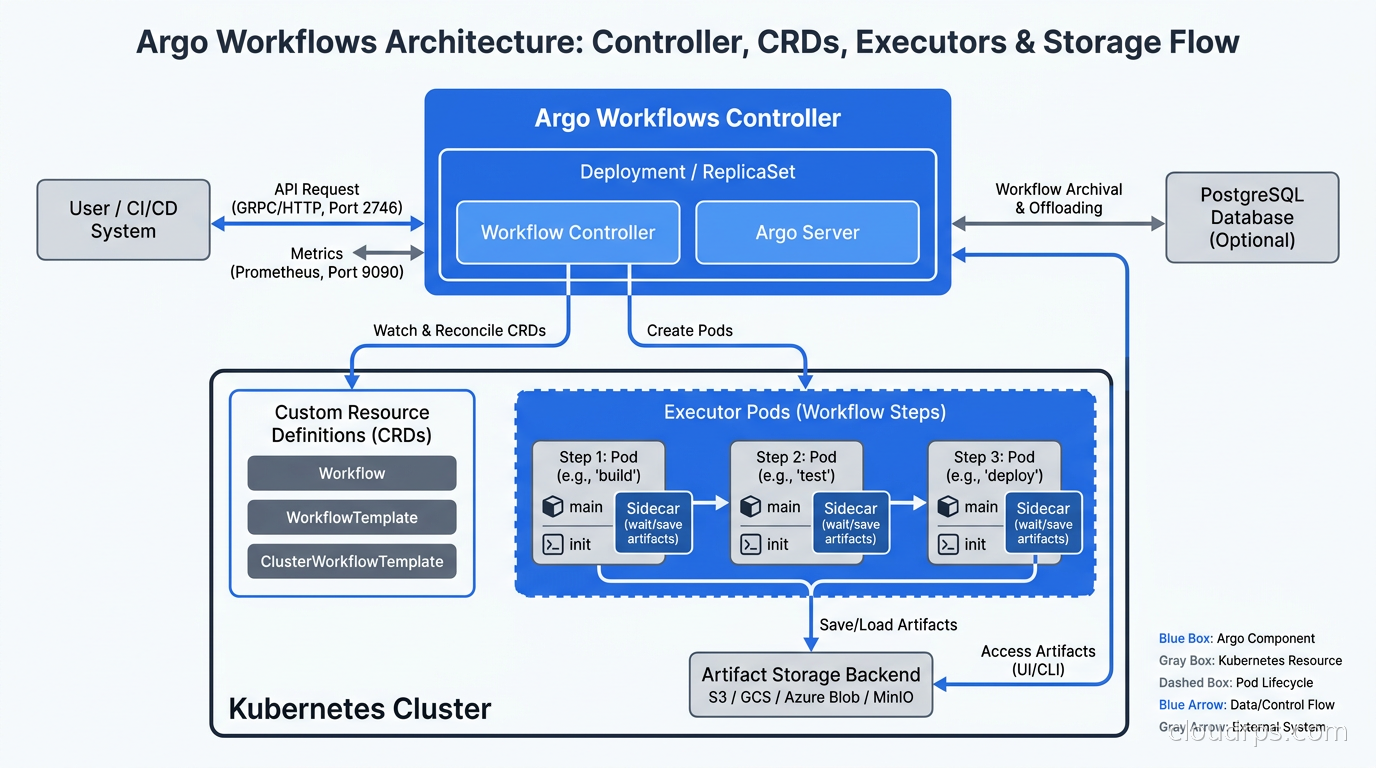
The execution model: when you submit a workflow, the Argo controller creates an executor pod for each template that is ready to run. The executor runs your container, streams logs, handles inputs and outputs, and reports status back to the controller via the Kubernetes API. There is no SSH, no agent running on worker nodes, no persistent connection between the controller and the executor beyond standard Kubernetes API calls.
WorkflowTemplates are namespaced resources that store reusable templates. They work like library functions: you define a parameterized template once and reference it from many workflows using templateRef. This is how platform teams standardize common steps - data validation, model training with standard GPU configuration, notification hooks - and let data scientists build workflows from building blocks without worrying about the infrastructure details.
Argo Workflows 4.0: What Changed
The 4.0 release in February 2026 was a significant step. The headline features:
Artifact drivers as plugins. Before 4.0, artifact storage backends (S3, GCS, Azure Blob, Git, HTTP) were compiled into the Argo Workflows controller binary. In 4.0, artifact drivers can be added as plugins. This means you can support custom storage backends without forking the project or waiting for an upstream merge. The plugin mechanism follows the same pattern as other Kubernetes extension points.
Live parallelism control. Previously, changing the global parallelism setting in the controller ConfigMap required restarting the controller. In 4.0, the controller detects changes to that setting and applies them without a restart. For a workflow engine running production pipelines, eliminating forced restarts for configuration changes matters.
The convert CLI command. Migration from the 3.x CRD format to 4.0 required schema changes. The convert command migrates existing Workflows, CronWorkflows, and WorkflowTemplates to the new format, moving schedules into a dedicated schedules field and converting singular sync primitives to plural. Running this before upgrading saves the manual effort of updating hundreds of workflow definitions.
CRD validation changes. CEL validations were stripped from status blocks and controller-managed CRDs. Server-side validation in validate.go now handles what CEL cannot express in the CRD schema. This resolves a category of upgrade-time surprises where CRD validation rules rejected status fields written by older controllers.
The 4.0 release shipped with contributions from 73 contributors and included 24 new features and over 120 bug fixes. Version 3.7 remains supported for teams not yet ready to migrate. A 4.1 release also exists, so check the end-of-life page at endoflife.date/argo-workflows before pinning a version in production.
Artifact Management in Production
Artifacts in Argo Workflows are how steps pass data to each other. A step that produces a trained model writes it to a known path, Argo uploads it to the configured artifact repository, and the next step downloads it before running.
The artifact repository is configured in a ConfigMap in the same namespace as the workflow controller. In production you will use S3, GCS, or Azure Blob. The controller needs an IAM role or service account with write access to the bucket, and your workflow executors need read access.
apiVersion: v1
kind: ConfigMap
metadata:
  name: artifact-repositories
  namespace: argo
data:
  default-v1: |
    s3:
      bucket: my-argo-artifacts
      region: us-east-1
      endpoint: s3.amazonaws.com
      useSDKCreds: true
      insecure: false
useSDKCreds: true tells the executor to use the pod’s IAM role via IRSA rather than static credentials. Workload identity federation is the right approach here - never store cloud credentials as secrets in the cluster if you can avoid it.
The key artifact consideration for production: artifact paths accumulate. A workflow that runs a hundred times a day with a multi-gigabyte model artifact will fill your bucket quickly. Configure S3 lifecycle policies to expire old workflow artifacts, or use a separate bucket with aggressive lifecycle rules distinct from your actual model registry.
MLOps Pipelines with Argo Workflows
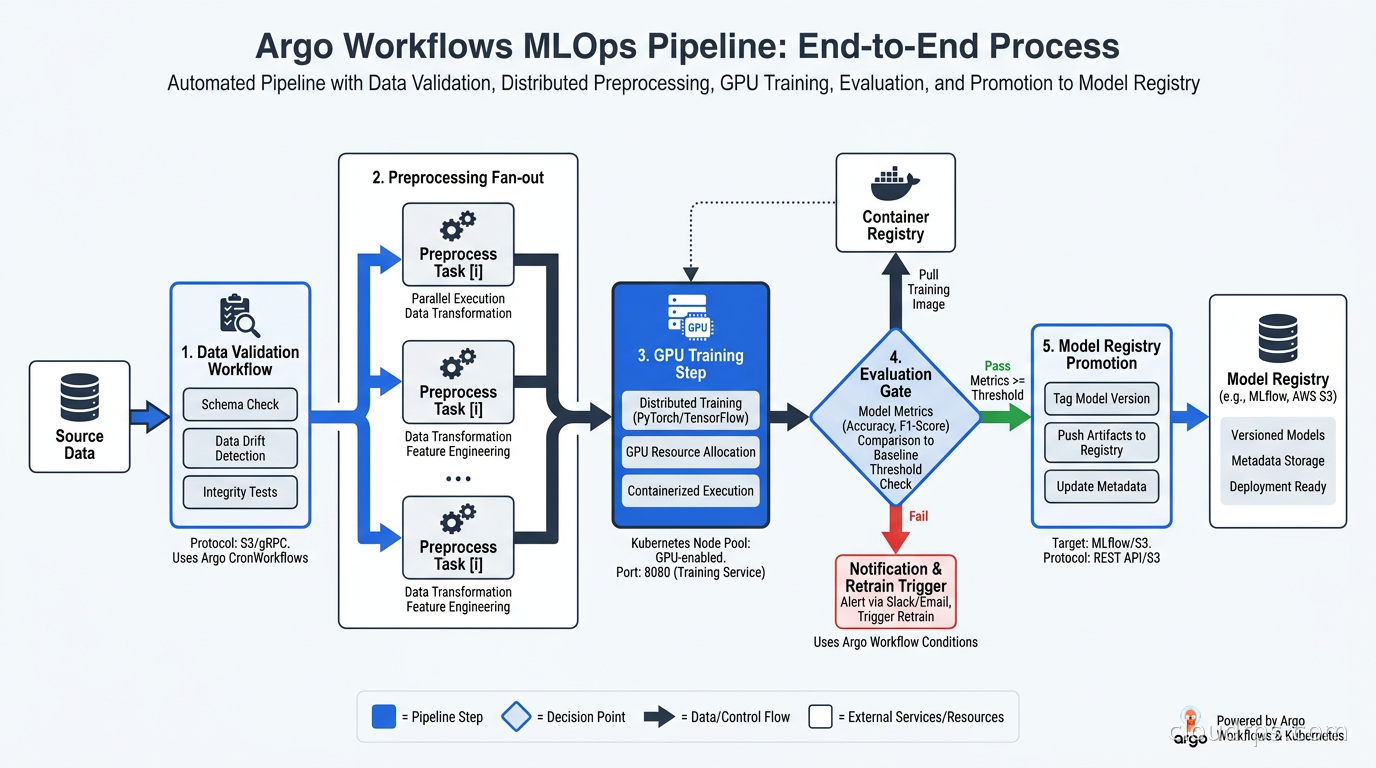
The MLOps use case is where Argo Workflows has found significant traction. The typical ML training pipeline looks like this:
- Data validation: Check input data schema and statistics, fail fast if the distribution has drifted
- Preprocessing: Transform raw data into features, potentially a parallelized step across data partitions
- Training: Run the actual model training, GPU-scheduled to the right node class
- Evaluation: Compare model metrics against a baseline, publish results
- Conditional promotion: If metrics pass the threshold, push the model to the registry; otherwise notify and stop
Each of these steps runs in a different container with different resource requirements. The data validation step might need 2 CPUs and 8 GB of memory. The training step needs a GPU. The evaluation step needs the trained model artifact from step 3, which Argo handles automatically via artifact passing.
Kubeflow Pipelines originally compiled ML pipeline SDK definitions to Argo Workflows under the hood. Metaflow supports Argo as a step backend for Kubernetes execution. If your team is building MLOps infrastructure from scratch and you are already on Kubernetes, Argo Workflows gives you the primitives that higher-level ML platforms have historically been built on.
For GPU steps, you add resource requests directly to the container template:
- name: train
  container:
    image: my-training-image:latest
    command: [python, train.py]
    resources:
      requests:
        nvidia.com/gpu: "1"
        memory: "16Gi"
        cpu: "4"
      limits:
        nvidia.com/gpu: "1"
Node selectors and tolerations work the same way as any other pod spec. If your GPU nodes carry a taint, add the matching toleration. The Kubernetes scheduler handles placement. You can also combine Argo Workflows with Kueue for queue-based GPU scheduling if you need fair-share or gang scheduling across multiple pipelines competing for the same GPU pool.
Concurrency Control and Resource Management
Argo Workflows provides several mechanisms for controlling how many pods run simultaneously.
Workflow-level parallelism: The parallelism field on a Workflow or WorkflowTemplate limits the total number of pods running for that single workflow instance. Useful when a fan-out step creates hundreds of parallel tasks and you want to avoid overwhelming the cluster.
Semaphores and Mutexes: The synchronization field lets you attach a Semaphore or Mutex to a workflow or template. A semaphore is backed by a ConfigMap and limits how many workflows or templates can hold the semaphore simultaneously. This is how you implement “only three training jobs at a time” without writing any scheduling code.
Global controller parallelism: The controller’s parallelism setting caps the total pods the controller will create across all workflows. In 4.0 this can be changed without a controller restart, which was a genuinely useful operational improvement.
Kubernetes resource requests and limits apply to every executor pod. The QoS class of your workflow pods affects eviction behavior. A training job running in a Guaranteed QoS pod (requests equal limits) will not be evicted when the node runs low on memory. Set requests and limits on workflow step containers the same way you would for any production workload - do not leave them unset.
RBAC and Security
Argo Workflows runs workflow pods under a Kubernetes ServiceAccount. By default, this is the default service account, which is almost always wrong. In production, create dedicated service accounts for workflow submission and for workflow execution, and keep their permissions minimal.
Kubernetes RBAC governs who can submit workflows and access the Argo Server UI. The Argo Server supports multiple authentication modes: Kubernetes RBAC (delegating to the cluster’s auth), SSO via OIDC, and a token-based mode for CI systems. In practice you want SSO tied to your identity provider and RBAC rules that let data scientists submit workflows in their namespace but not touch the argo system namespace.
The workflow executor needs specific permissions to interact with the Kubernetes API during execution: creating the executor pod, patching workflow status, reading and creating ConfigMaps for semaphores. The Argo documentation provides minimal RBAC role examples; use those as a starting point and avoid giving workflow ServiceAccounts cluster-admin or broad get pods across all namespaces.
For secret handling, use the Kubernetes Secrets Store CSI Driver or External Secrets Operator to inject credentials as environment variables rather than embedding them in workflow YAML. The same patterns that apply to application secrets apply to workflows.
Argo Events: Event-Driven Workflow Triggers
Argo Events is a companion project that handles event-driven triggers for Argo Workflows. It defines EventSources (where events come from) and Sensors (how to react to events and what action to take).
EventSources include: S3 bucket notifications, webhook endpoints, Kafka messages, GitHub and GitLab webhooks, and Kubernetes resource events. When an EventSource receives an event, it emits it on a channel that Sensors subscribe to. A Sensor can filter events, apply transforms, and trigger actions - most commonly, submitting an Argo Workflow.
The practical use case: a new file lands in S3, triggers an S3 EventSource, which fires a Sensor that submits a preprocessing workflow with the S3 path as a parameter. No polling, no cron job running every minute checking for new files, no Lambda function you have to deploy separately.
In production, Argo Events controllers run as Kubernetes deployments in the argo-events namespace. The EventBus is a required component that handles the event message queue; it uses NATS JetStream or Kafka under the hood. For anything beyond a small cluster, use Kafka as the EventBus backend for durability and scalability.
Deploying Argo Workflows via GitOps
Argo Workflows installs via Helm or raw manifests. The Helm chart supports all major configuration options and works well with GitOps tooling like ArgoCD or Flux. In a production setup I manage the Argo Workflows Helm release via Flux, which means the controller version, configuration, and RBAC are all version-controlled and auditable.
One practical consideration: WorkflowTemplates are namespaced resources. In a multi-tenant cluster where different teams share the same Argo installation, each team’s templates live in their own namespace. ClusterWorkflowTemplates exist for templates that should be available cluster-wide, but those require cluster-scoped RBAC and should be reserved for platform-team-managed templates.
The 4.0 convert command is useful for CI-based migration. If you pin WorkflowTemplate definitions in Git and upgrade the controller, run argo convert in your CI pipeline to automatically migrate the YAML before applying it. That gives you a diff in the pull request showing what changed, which makes upgrade reviews less painful.
When Argo Workflows Is the Wrong Choice
I have to be honest about where it struggles.
Complex Python-native logic. If your pipeline steps involve heavy pandas manipulation, dbt invocations, or intricate Python dependency graphs that benefit from the Python import system, Airflow or Dagster gives a better authoring experience. Argo’s YAML is fine for container orchestration but not for pipelines where the coordination logic is complex Python.
Data engineering at the Python layer. Airflow’s ecosystem of operators for databases, data warehouses, and analytics tools is mature. If your team spends most of their time building Airflow DAGs that call Snowflake stored procedures, Redshift COPY commands, or dbt models, migrating to Argo adds friction without adding value.
Small teams not running Kubernetes. If you are not already operating a Kubernetes cluster, the overhead of running one just to host Argo Workflows is not justified. A managed workflow service like AWS Step Functions or a well-configured Airflow instance is less infrastructure to operate.
High-frequency, sub-minute scheduling. Argo CronWorkflows have a minimum interval of one minute, matching the Kubernetes CronJob minimum. For sub-minute scheduling you need a different tool.
Production Checklist
Before you take Argo Workflows to production, verify:
- Controller and executor run with non-default ServiceAccounts and minimal RBAC
- Artifact repository configured with IAM-based credentials, not static keys
- Global and per-workflow parallelism limits set to match your cluster capacity
- Resource requests and limits on all template containers
- Workflow TTL set so completed workflows do not accumulate in etcd
- Argo Server behind an authentication-enforcing ingress
- Argo Events EventBus backed by Kafka or NATS JetStream with persistence
- S3 lifecycle policies on artifact bucket to prevent unbounded growth
The workflowDefaults controller ConfigMap setting lets you inject defaults across all workflows - TTL, parallelism caps, artifact garbage collection - without requiring every workflow definition to specify them explicitly. Set sensible defaults here and treat per-workflow overrides as exceptions.
The Broader Argo Ecosystem
Argo Workflows sits alongside three other Argo projects that address different phases of the software lifecycle. ArgoCD and Flux handle application delivery via GitOps. Argo Rollouts manages canary deployments and progressive delivery. Argo Events handles event-driven automation. Argo Workflows handles containerized workflow orchestration.
You do not have to use all four. Many teams use only ArgoCD for deployments and Argo Workflows for batch jobs and ML pipelines. The projects are independent: they share a name and project governance but have separate Helm charts, separate controllers, and separate CRDs.
The GitHub organization at argoproj reports over 200 organizations officially using Argo Workflows. The list includes companies running it for ML training pipelines, CI/CD steps, data processing, and batch ETL jobs. The use cases differ but the underlying reason is the same: the team already runs Kubernetes and does not want to operate a second scheduling system alongside it.
In twenty years of building infrastructure, the tools that survive in production environments are the ones that fit naturally into existing operational patterns rather than creating new ones. Argo Workflows fits naturally into Kubernetes because it is Kubernetes: same RBAC, same scheduling, same resource model, same GitOps deployment patterns. That is its real advantage over orchestrators that treat Kubernetes as an execution backend rather than a native runtime.
Get Cloud Architecture Insights
Practical deep dives on infrastructure, security, and scaling. No spam, no fluff.
By subscribing, you agree to receive emails. Unsubscribe anytime.