
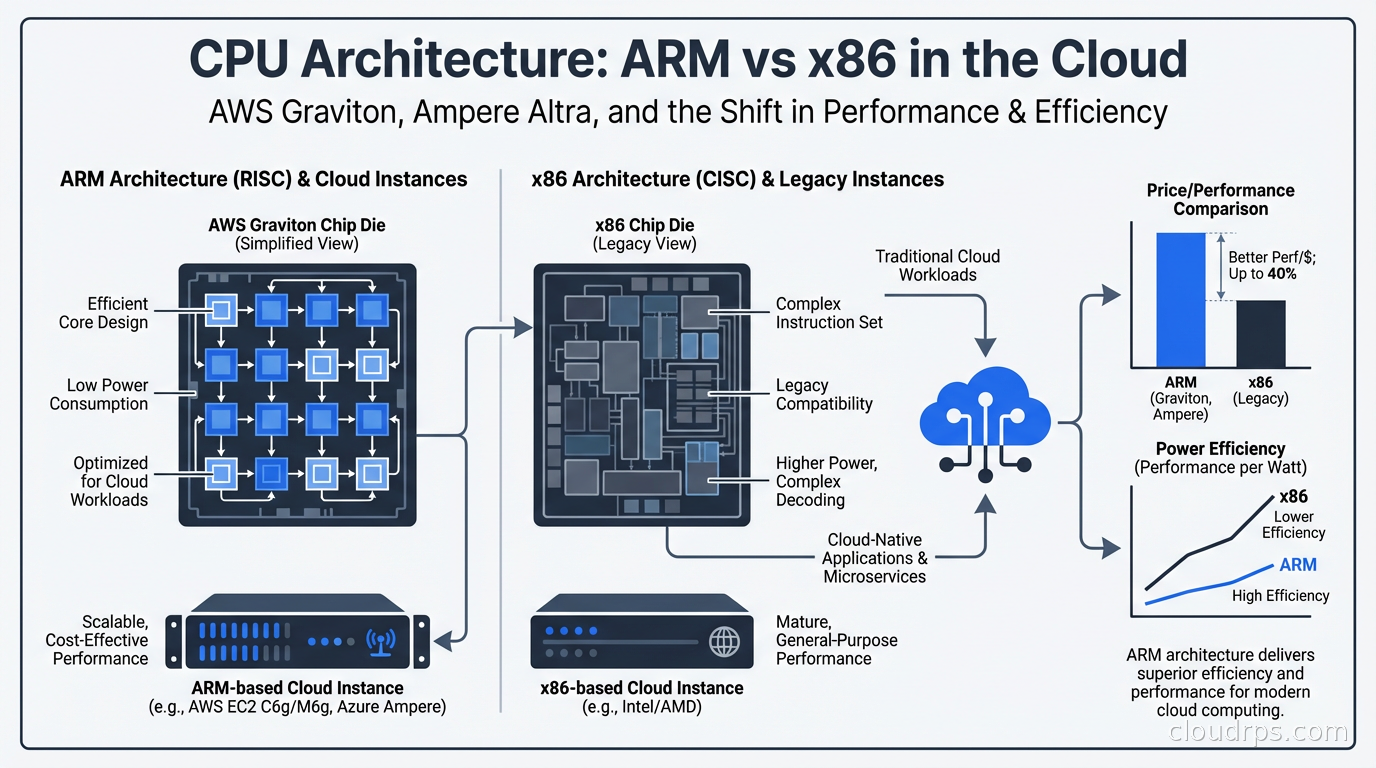
I remember when the first reports of Graviton2 performance came out and a lot of us in the infrastructure community were skeptical. “It’s ARM, it’s different, your software won’t just work.” That was 2019. By 2022, we’d migrated about 60% of our compute fleet to Graviton and were seeing cost reductions in the 35-45% range on comparable workloads. By 2024, defaulting to ARM was the obvious choice for anything new we built.
The x86 monopoly in cloud computing is over. AWS, Google, Microsoft, and every major cloud have ARM-based instances. The ecosystem that used to be a real concern (will my dependencies compile, will my Docker images run) is now a non-issue for 95% of workloads. If you’re still defaulting to x86 instances without a specific reason, you’re leaving money on the table.
Let me break down how ARM in the cloud actually works, which workloads benefit most, and the practical steps for migrating.
Why ARM for Cloud Servers?
ARM’s fundamental architecture advantage for servers comes from its instruction set design and power efficiency characteristics. x86 is a CISC (Complex Instruction Set Computing) architecture that has accumulated decades of complexity, backward compatibility layers, and instructions that modern software rarely uses. ARM is RISC (Reduced Instruction Set Computing): simpler, more regular instruction sets that execute more predictably.
For cloud workloads, this translates into better performance per watt. AWS designed Graviton specifically as a custom ARM-based chip for cloud servers, optimized for the workload patterns they see across their entire fleet. They’re not selling CPUs to PC manufacturers or building chips for gaming laptops. Graviton exists for one purpose: running servers efficiently in AWS data centers.
This vertical integration is the key difference. When Intel or AMD designs a CPU, they optimize for a broad range of workloads and customers. AWS can optimize specifically for cloud server patterns: large memory bandwidth, consistent multi-core throughput, predictable cache behavior. The result is that Graviton3 (and now Graviton4) achieve better performance per dollar on most server workloads than comparable x86 instances, not because ARM is inherently better in every way, but because the chip is purpose-built for its environment.
Google has Axion (ARM-based, introduced in 2024). Microsoft Azure has Cobalt (ARM-based, also 2024). Ampere Computing makes the Altra and Altra Max chips used by Oracle Cloud, Azure, and others. The cloud providers have all made the same bet: custom ARM silicon is the path to better price-performance for general cloud workloads.
AWS Graviton: The Current State
Graviton has gone through four generations. Graviton4, which powers the R8g, M8g, and C8g instance families, is the current generation as of 2025. Each generation has made substantial improvements.
Graviton2 (2019): First version that was genuinely competitive. 64 vCPUs, custom Neoverse N1 cores. About 40% better price-performance than comparable x86 instances for many workloads.
Graviton3 (2022): Doubled the compute performance, added DDR5 support, doubled the memory bandwidth vs Graviton2. The C7g family became the best general-purpose option for CPU-bound workloads. Added Graviton3E for HPC and ML workloads.
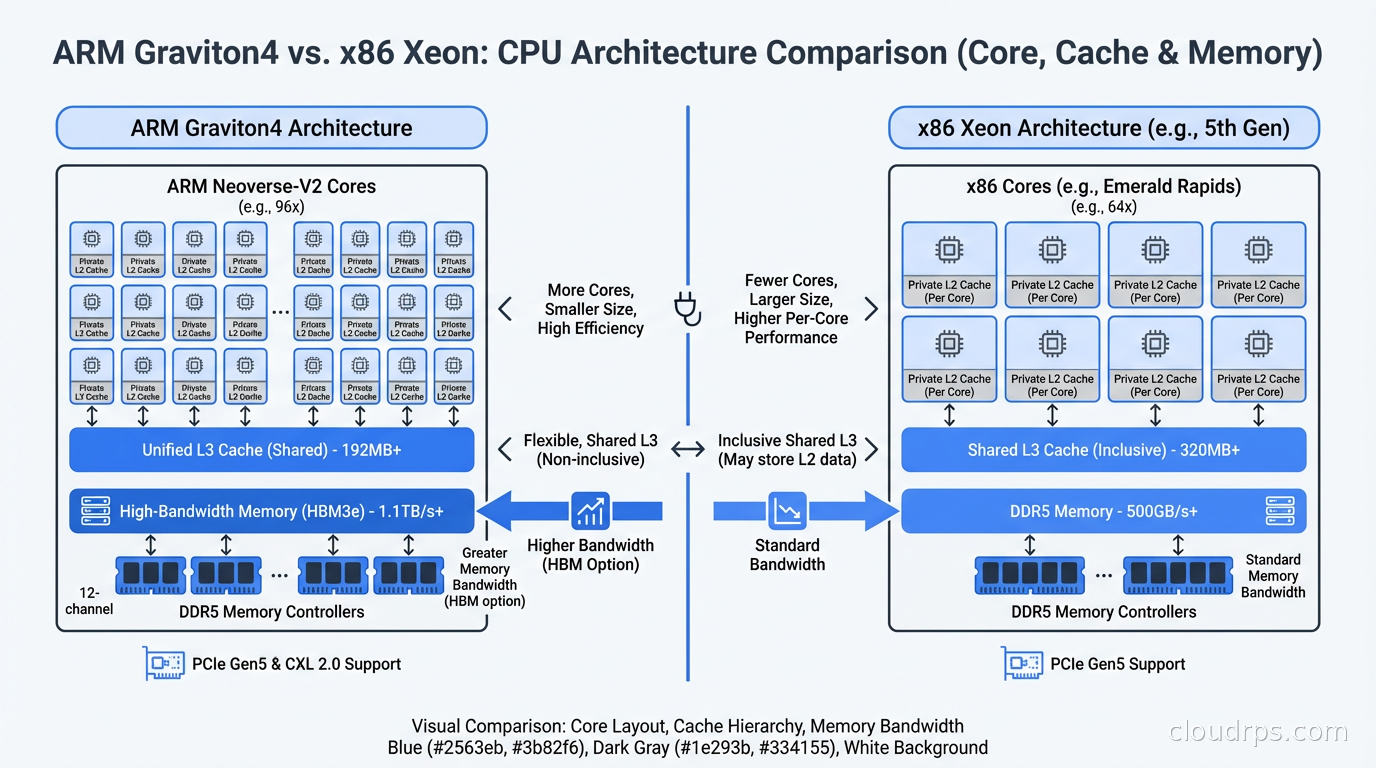
Graviton4 (2024): 50% more compute cores than Graviton3 per socket, significantly higher memory bandwidth, improved cryptography acceleration. The M8g.metal instances give you access to the bare metal Graviton4 chips for workloads where virtualization overhead matters.
For most workloads, I default to Graviton4 M8g or C8g instances. The “M” family is general-purpose balanced compute and memory. The “C” family is compute-optimized. The “R” family is memory-optimized for in-memory databases and caches.
Ampere Altra: The ARM Alternative
AWS doesn’t have a monopoly on ARM cloud instances. Ampere Computing makes the Altra and Altra Max processors, which are ARM-based chips designed specifically for cloud servers. Oracle Cloud Infrastructure (OCI) offers Ampere A1 and A2 instances, which have been remarkably popular partly because OCI’s pricing is aggressive and Ampere instances are often available at very low cost.
Ampere Altra’s differentiating feature is its core count. The Altra Max has up to 128 cores, all single-threaded (no hyperthreading). This is a deliberate architectural choice: instead of exposing virtual cores via hyperthreading, every “core” is a real physical core with dedicated execution resources. For workloads that are sensitive to CPU noise (trading systems, real-time audio/video processing, anything where tail latency matters), this predictability is valuable.
On Azure, the Cobalt 100 series provides ARM-based instances. Google’s Axion instances (T2A series) use Ampere Altra. Across the board, these ARM options are offering 20-40% cost savings vs x86 equivalents with equal or better throughput.
What Workloads Benefit Most
Not everything benefits equally from ARM. Here’s what I’ve seen in practice:
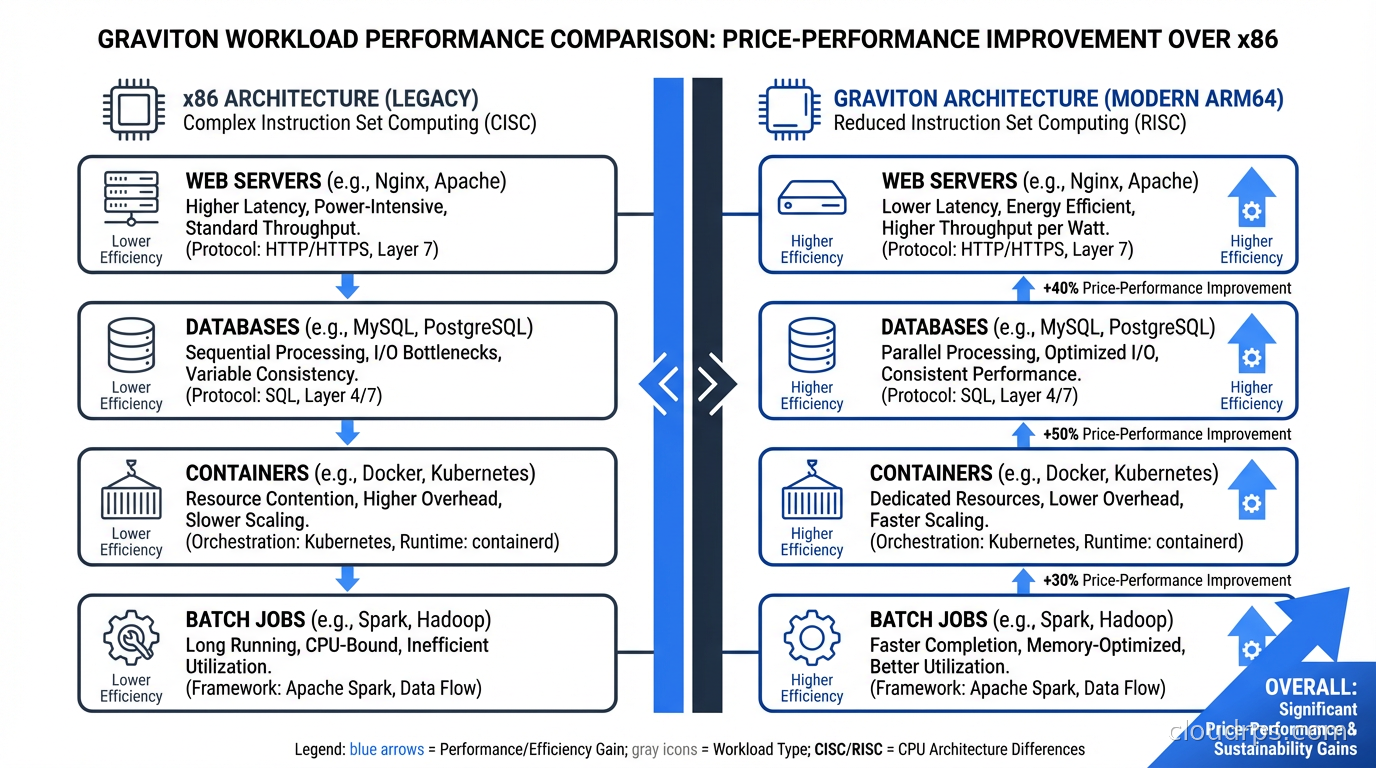
Web application servers: Excellent fit. Go, Python, Node.js, Ruby on Rails, Java running web backends all perform at least as well on Graviton as x86, often better. The memory bandwidth improvements in Graviton3 and 4 particularly help Java workloads with garbage collection.
Containers and microservices: Kubernetes on Graviton (EKS node groups using M7g or M8g instances) typically delivers 30-40% cost savings vs x86 for most microservice architectures. This is where I see the most dramatic savings in practice because the compute fleet is large.
Databases: PostgreSQL on Graviton3 and 4 shows improvements on the order of 20-30% for typical OLTP workloads. Amazon RDS and Aurora both offer Graviton-based instance types. I’ve migrated several RDS PostgreSQL clusters to Graviton and seen consistent improvements in queries-per-second at the same cost point. Redis (ElastiCache) on Graviton is similarly improved.
Batch processing: Spark, Hadoop, data pipeline workloads all work well. EMR on Graviton is a good default.
Where ARM is less advantageous: Workloads with heavy AVX-512 usage (specific scientific computing, some cryptography implementations) may not see the same benefits because ARM’s SIMD implementation differs. Workloads using x86-specific ISA extensions (though these are increasingly rare in cloud workloads) need special attention. Single-threaded workloads that depend on raw per-core clock speed: x86 chips can still run at higher single-core frequencies, so extremely single-threaded code may run faster on x86 per instance.
GPU workloads: Currently, NVIDIA’s production GPU instances (H100, A100, L40S) are all x86-based. If you’re running LLM inference or AI training on NVIDIA GPUs, you’re on x86 and ARM isn’t relevant to your GPU instances. That may change over time.
The Migration: What Actually Breaks
I want to be honest about what used to be a migration concern and what still is.
Container images: This is the most common friction point. If you’re using public Docker images, most popular images now publish multi-architecture manifests that include both amd64 (x86) and arm64 variants. When you pull on an ARM instance, Docker automatically pulls the arm64 variant. Where you get burned is with older or less-maintained images that only have amd64 builds. Check your image manifests with docker manifest inspect <image> before migrating. For your own images, add arm64 builds to your CI/CD pipeline. GitHub Actions, CircleCI, and AWS CodeBuild all support building ARM images.
Compiled binaries: Pre-compiled third-party binaries are the other friction point. Most modern package managers (apt, yum, pip, npm, go get) handle ARM natively. Where you run into trouble is with manually downloaded binaries, scripts that assume x86, or custom compiled software that doesn’t have ARM build support. We had exactly this issue with a third-party monitoring agent that only shipped an x86 binary. Short-term fix: run it in an x86 container on the ARM instance (compatibility layer). Long-term fix: switch to a monitoring agent with ARM support.
Performance characteristics: Even when code runs correctly on ARM, the performance profile can differ. If you’re running tight benchmarks or have latency SLOs, validate on ARM before migrating production. Most workloads perform equivalently or better, but not everything is the same.
Nitro Hypervisor nuances: AWS Graviton instances run on the Nitro hypervisor, which strips out virtualization overhead aggressively. This is mostly a good thing, but it means some low-level monitoring tools that hook into virtualization layers behave differently. Specifically, tools that read CPU counters via hypervisor interfaces may need configuration updates.
Migration Strategy
The safest migration path I’ve used:
Start with stateless workloads: web servers, API services, workers. These are easiest to migrate because you can run mixed fleets (some x86, some ARM) during transition and validate with production traffic via weighted routing.
Use auto-scaling groups with instance type overrides. Specify both ARM and x86 instance types in your ASG, let Spot Fleet or On-Demand blended purchasing handle allocation, and validate that your application performs correctly on both. Then progressively increase the ARM weight.
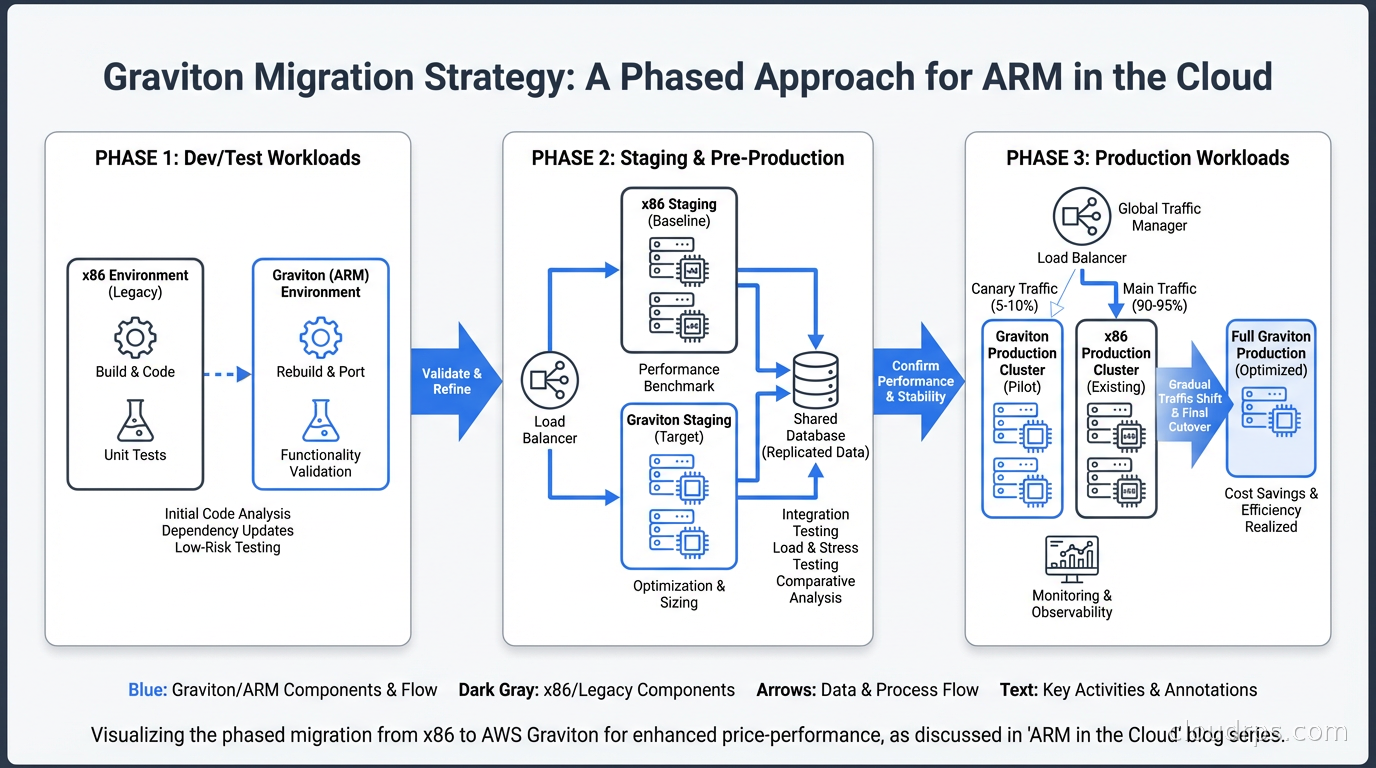
For Kubernetes: add Graviton node groups to your existing cluster, taint them with kubernetes.io/arch=arm64:NoSchedule, and selectively tolerate the taint in pods you want to test on ARM. Once validated, remove the taint and let the scheduler place workloads across node types. Eventually, make Graviton the default node group.
For databases: migrate dev and staging first. Run a parallel benchmarking period where you run the same query load against both x86 and ARM replicas. Validate query performance, replica lag, and any operational tooling. Then migrate production with a fast failback plan.
One thing I’d strongly recommend: do your migration cost math before you start. The savings vary by workload type and current instance sizing. Use the AWS Compute Optimizer recommendations as a starting point. It will tell you which of your running instances would benefit from migration and estimate the savings. Don’t assume 40% savings universally. I’ve seen 60% on some workloads and 15% on others.
Graviton for Specific Services
AWS has ARM-optimized instance types across their entire managed service portfolio. This is where the savings can compound significantly because you’re not just migrating EC2:
ElastiCache: Graviton-based Redis nodes have better memory bandwidth, which matters for Redis because nearly everything is memory-bound. R7g instances for ElastiCache.
RDS and Aurora: M7g and R7g Graviton instances for PostgreSQL, MySQL, and MariaDB workloads. Aurora on Graviton3 shows particular improvements for read-heavy workloads.
Lambda: AWS Lambda runs on Graviton2 for arm64 functions and the cost is 20% cheaper than x86 with generally equivalent or better performance for most runtimes (Node.js, Python, Java, Go).
EKS node groups: Managed node groups with Graviton instances. Bottlerocket OS (AWS’s container-optimized OS) supports ARM natively.
The pattern I recommend for new workloads: default to Graviton for everything except GPU instances. Make x86 the exception rather than the rule. Your FinOps team will thank you.
Benchmarking Properly
A mistake I see regularly is running benchmarks that don’t reflect your actual workload. Running sysbench or stress-ng and concluding ARM is X% faster or slower tells you almost nothing about your production behavior.
Benchmark what you actually run. For a web service: use your actual request corpus, reproduce your actual database query mix, include your actual serialization/deserialization patterns. For a batch job: run your actual Spark queries on representative data. For a database: use pgbench with a workload that matches your read/write ratio and query complexity.
Run benchmarks for at least 24 hours for workloads with diurnal patterns. Include your monitoring and logging overhead in the benchmark: sometimes an agent using 5% CPU on x86 uses 3% on ARM, or occasionally the reverse.
The fundamental reality of ARM in the cloud in 2026 is that it’s not a question of whether your workloads can run on it. It’s a question of whether you’ve done the migration work to capture the cost savings. For most cloud workloads, the answer is yes, and the economics are compelling enough that it’s worth the engineering investment. The total cost of ownership difference, over 3-5 years, is often significant enough to pay for multiple engineering salaries.
Make it your default. Treat x86 as a special case that requires justification.
Get Cloud Architecture Insights
Practical deep dives on infrastructure, security, and scaling. No spam, no fluff.
By subscribing, you agree to receive emails. Unsubscribe anytime.