
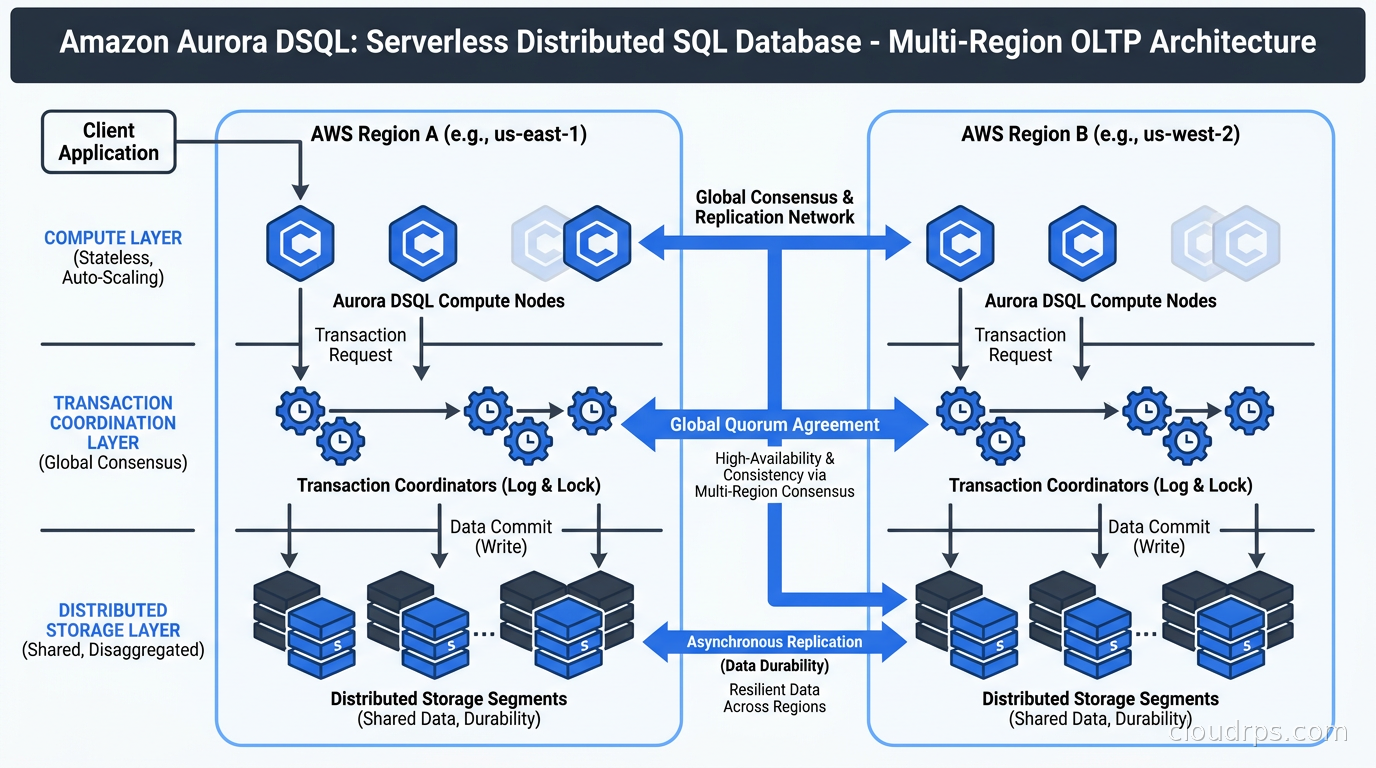
Multi-region active-active SQL has been a white whale for database teams for a long time. I have watched engineers try to solve this problem with Aurora Global Database and a single writer, with CockroachDB and its Raft-backed consensus, with Google Spanner if the workload happened to live in GCP, and with elaborate custom sharding schemes that became a second full-time job to operate. Each solution required either accepting eventual consistency, provisioning capacity nobody could accurately forecast, or walking away from PostgreSQL tooling entirely.
Aurora DSQL, which Amazon moved to general availability in May 2025, takes a different swing at this problem. It is serverless, it supports active-active writes across multiple regions with synchronous coordination, and it is PostgreSQL 16 compatible in the sense that AWS uses PostgreSQL’s own parser, planner, optimizer, and type system. It also carries a list of unsupported features long enough that calling it “PostgreSQL compatible” requires careful reading of the fine print.
After twenty years of building data platforms on AWS, I have seen a lot of “revolutionary” database launches. Aurora DSQL is genuinely interesting, and it is also genuinely limited in ways that determine whether your workload belongs on it at all. Let me walk through what AWS actually built here and where it fits.
What Aurora DSQL Actually Is
Most databases you interact with at the managed-service layer share an architectural assumption: there is a primary node, it owns writes, and replicas get changes shipped to them. Even sophisticated implementations like Aurora PostgreSQL, which disaggregates storage from compute, still route all writes through a single writer instance that serializes them through one log stream. When you want multi-region writes, you end up with latency proportional to the distance between regions, because the primary must acknowledge before you can respond to the client.
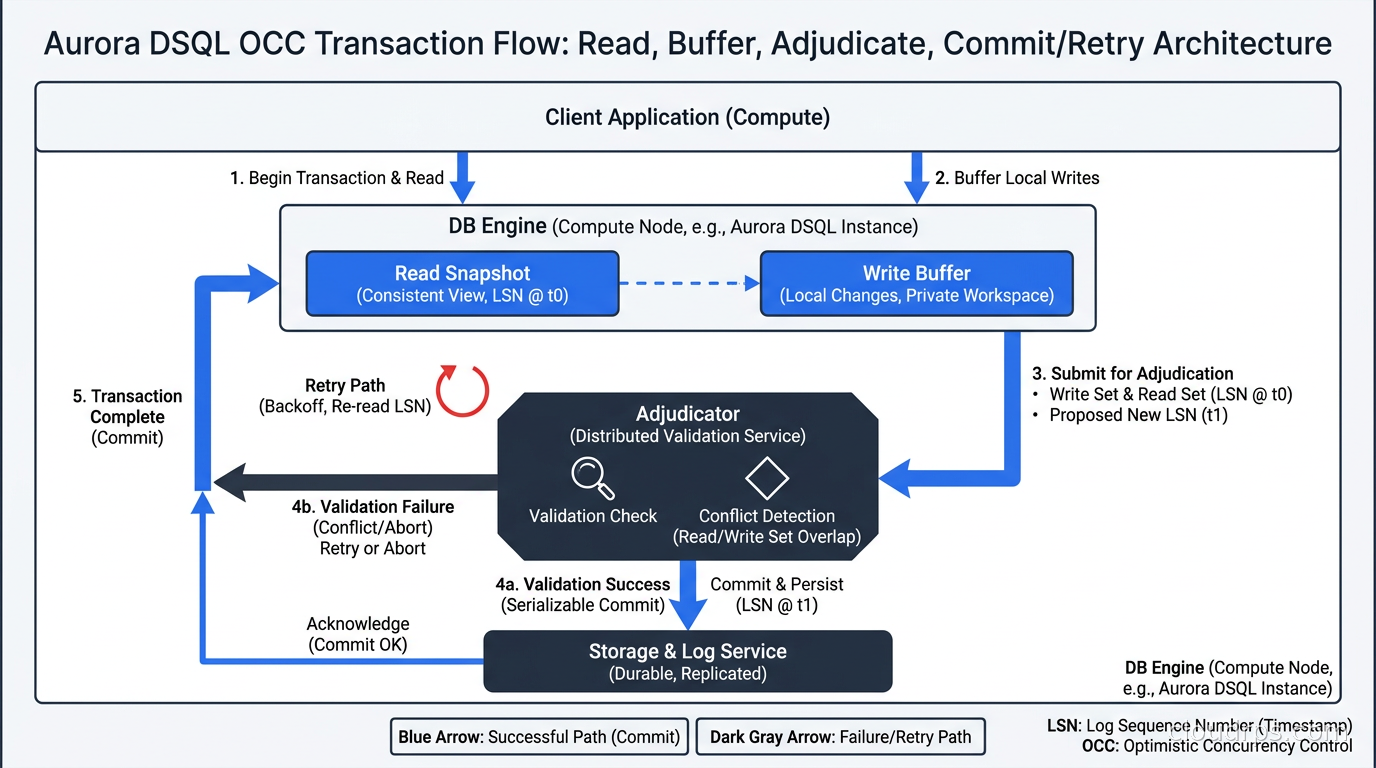
Aurora DSQL tears out that assumption. There is no writer instance. SQL execution, transaction adjudication, durability, and storage are four independently scaling fleets. When your application sends a query, it lands on a query processor running in a Firecracker MicroVM. That processor executes the query against a consistent snapshot without holding any local state. It buffers changes made during the transaction. At commit time, a separate transaction adjudicator checks whether anything the transaction read was modified by a concurrently committed transaction. If there is no conflict, the commit succeeds and changes propagate to the durable storage layer. If there is a conflict, the commit is rejected and your application retries.
This is Optimistic Concurrency Control (OCC), and it has a specific performance character: reads and writes are cheap until they conflict, and then they become expensive because you pay the cost of a retry. This is the opposite of pessimistic locking, where you pay for contention upfront through lock waits. For workloads with low contention, OCC is excellent. For workloads with hot rows, it can become a serious problem.
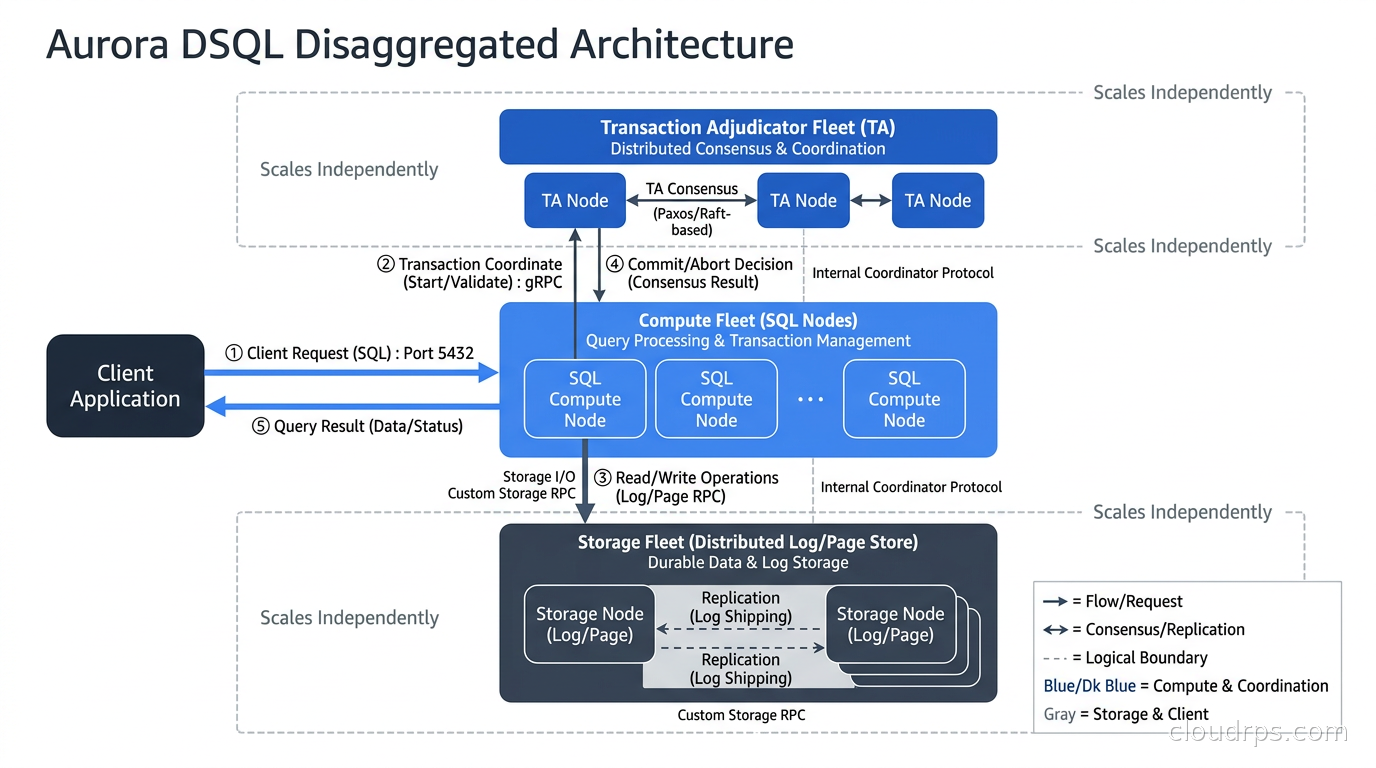
The disaggregated design is also what enables the serverless billing model. Because there is no persistent writer instance, the system genuinely scales to zero when idle. You pay no compute charges when nobody is running queries. The billing unit is the Distributed Processing Unit (DPU), which covers query execution compute, storage I/O, and change data capture streaming when you enable it.
Understanding the ACID properties that back this model matters before you commit to it. For a grounding on what ACID guarantees mean in practice, our ACID properties deep dive covers the foundations. Aurora DSQL’s serializable isolation, implemented via OCC, technically satisfies the isolation requirement, but the application-layer retry logic required when conflicts occur means you need to design for it explicitly, not bolt it on after the fact.
The OCC Transaction Model in Practice
If you are coming from traditional PostgreSQL or Aurora PostgreSQL, the OCC model will require some adjustment to how you write application code. Consider a concrete example.
Imagine a travel booking system. A user queries available seats, sees seat 14A is free, and submits a booking. In a pessimistic-lock system, the read might acquire a row-level lock. In Aurora DSQL, the read acquires no lock. If two users query simultaneously and both see seat 14A as free, both will proceed through application logic toward a commit. The transaction adjudicator will reject one of them at commit time because both read and attempted to modify the same row. One commit succeeds; the other gets an error and must retry.
This is serializable behavior, which is correct. But your application needs to implement retry logic for any write path that could experience contention. AWS provides documentation on the specific error codes to catch and retry on. Teams building on DSQL that get this right tend to wrap transaction retry in a middleware layer that is consistent across the codebase, rather than patching it into individual service handlers. Patching it everywhere becomes a maintenance burden and leaves gaps.
The other meaningful constraint is the transaction row limit: a single transaction can modify at most 3,000 rows. Bulk operations that exceed this need to be batched explicitly at the application layer. This catches teams by surprise during data imports and schema migrations. Migrations require particular care on Aurora DSQL because you cannot mix DDL and DML in the same transaction, and you are limited to one DDL statement per transaction.
PostgreSQL Compatibility: What Works and What Does Not
AWS uses “PostgreSQL compatible” to mean that Aurora DSQL uses PostgreSQL 16’s parser, planner, optimizer, and type system. For applications doing straightforward CRUD operations, this works well. Standard SQL queries, parameterized statements, and common data types behave as expected.
The unsupported feature list is substantial. As of mid-2026, the following were not supported (verify against the current AWS docs, since this list changes as the product matures):
- Triggers of any kind
- Views, including materialized views
- Sequences
- Temporary tables
- User-defined types and tablespaces
- PL/pgSQL and all procedural languages
- Extensions, including PostGIS, pgvector, and most of the PostgreSQL extension ecosystem
- Exclusion constraints
There are also behavioral differences that are subtle but important. Connections time out after one hour. IAM-based authentication is the supported model, and the tokens it generates expire after 15 minutes, which means your connection management layer needs to handle re-authentication. Async indexes are how DSQL handles index creation: a CREATE INDEX returns immediately and the index builds in the background, which requires awareness during migrations where you need the index to exist before running dependent queries.
The GRANT on a database returns an error. Non-admin roles cannot run CREATE SCHEMA without specific configuration. These are not exotic PostgreSQL features; they come up early in any real application.
For teams considering Aurora DSQL as a drop-in replacement for an existing PostgreSQL or Aurora PostgreSQL deployment, these gaps are typically disqualifying unless the application was designed for this model from the start. For new applications built with these constraints in mind, many limitations are workable. I would call DSQL “PostgreSQL inspired” for existing applications and “PostgreSQL for new builds that know what they are signing up for” for greenfield work.
Multi-Region Active-Active Architecture
The headline capability of Aurora DSQL is synchronous active-active writes across AWS regions. In the multi-region configuration, both regions accept writes simultaneously, and the transaction adjudicator enforces serializable consistency across the geographic footprint. AWS claims 99.999% availability for the multi-region configuration (this is a vendor claim; verify it against current SLA documentation and your specific use case requirements).
This is structurally different from Aurora Global Database, which has a single writer region with read-only replicas in other regions. With Global Database, a failover event promotes a replica to writer, which takes time and changes the write endpoint. DSQL’s multi-region model has no failover event for writes because both regions are always accepting them.
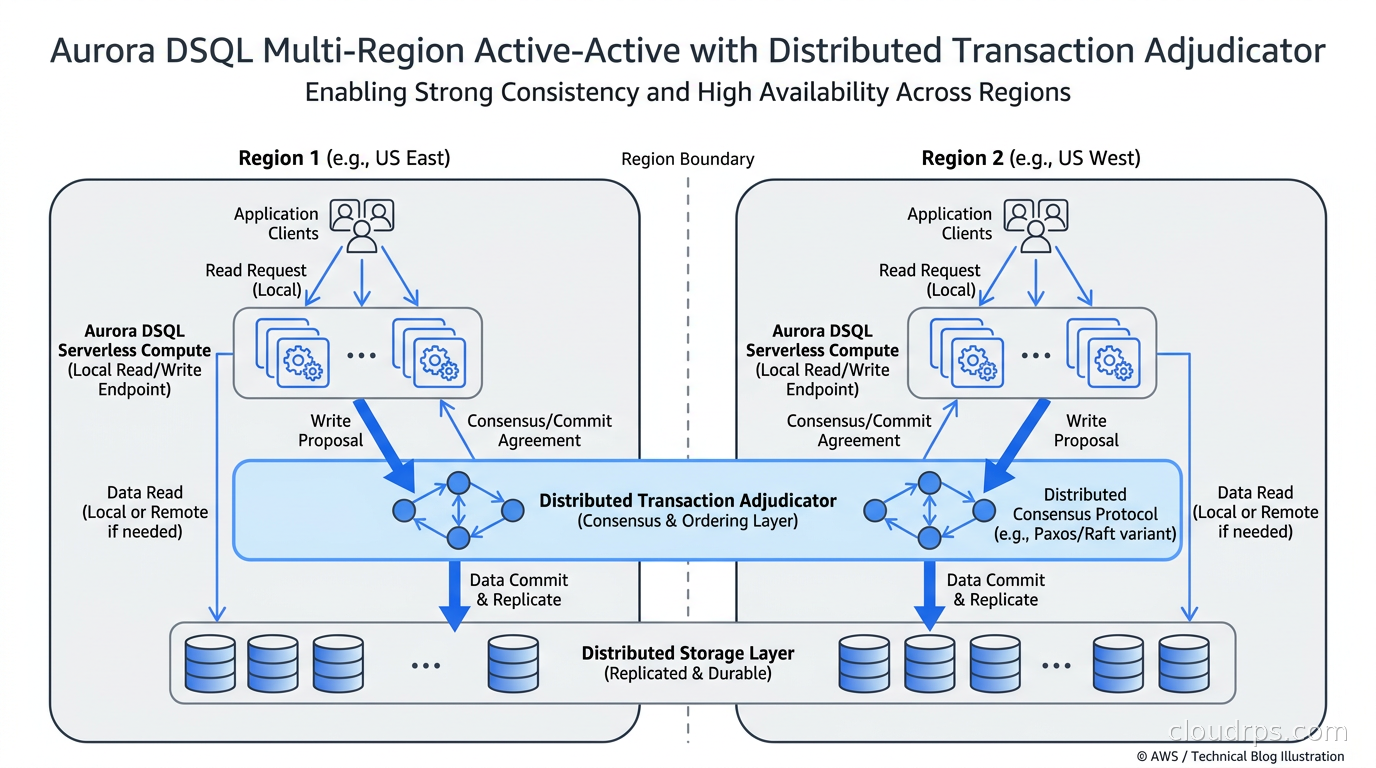
The cost of this capability is higher OCC retry probability. In a multi-region setup, more concurrent transactions are running across the geographic footprint, which increases conflict likelihood. High-traffic, high-contention workloads will see more retries in multi-region mode than in single-region mode. This needs to be modeled and tested before you commit to the architecture.
The pricing implication of multi-region is significant. Writes replicated to additional regions incur DPU charges equal to the originating write. A write that costs X DPUs in the primary region costs X additional DPUs per replica region. For write-heavy workloads, this makes the multi-region configuration materially more expensive than you might expect from the unit price alone.
For teams designing globally distributed systems, our multi-region active-active architecture guide covers the broader patterns and trade-offs in this space. DSQL is one solution to the write availability problem in that design space, not the only one, and the guide provides the framework for evaluating which approach fits your consistency and latency requirements.
Pricing Model: DPUs and When They Get Expensive
The DPU pricing model is flexible but hard to predict before you have production traffic data. AWS added statement-level cost estimates to DSQL query plans in November 2025, which helps with capacity planning, but you cannot budget a DSQL cluster with the same precision as a provisioned instance with known ACU limits.
For current pricing, check the official AWS pricing page directly, as rates change and third-party sources lag. The general structure as of this writing: DPU charges cover query execution compute, storage I/O, and CDC streaming when enabled. Storage is billed separately per GB-month. There is a free tier that covers a fixed number of DPUs and a small storage allocation each month, which is genuinely useful for development and low-traffic workloads.
The model advantages are clear for spiky, low-average-throughput workloads. An application that handles bursts around specific events, or a development database that sits idle most of the day, benefits significantly from paying only for actual usage rather than provisioned capacity. Teams I have worked with have run development and staging environments at near-zero cost with DSQL, which changes the math on environment parity.
The model has structural disadvantages for certain workload shapes. Large databases with moderate transaction volumes carry higher storage costs, because storage billing scales with data size regardless of throughput. Very high write throughput becomes expensive, and the multi-region DPU multiplication amplifies this. Batch workloads that process large numbers of rows hit the 3,000-row limit repeatedly, which adds application complexity.
For broader context on how to think about managed PostgreSQL costs across AWS options, our managed PostgreSQL comparison covers Aurora PostgreSQL Limitless, AlloyDB, and Aurora Serverless v2, which are all relevant comparison points for teams evaluating where DSQL fits in the managed database landscape.
How It Compares to the Alternatives
The distributed SQL space has genuine alternatives, and choosing between them is an architectural decision with long-term implications.
Aurora PostgreSQL with Global Database remains the right choice for most teams that need PostgreSQL compatibility without the feature limitations. It has a full extension ecosystem, supports PL/pgSQL, and works with every PostgreSQL tool available. The trade-off is that writes route to a single region. For applications where reads dominate and writes can accept the latency of routing to a primary region, this is usually the right call for AWS-committed teams.
CockroachDB and YugabyteDB offer distributed SQL with stronger PostgreSQL compatibility in key areas and the ability to run outside AWS. Both use Raft consensus for distributed writes, which is a different concurrency model than DSQL’s OCC. CockroachDB changed its self-hosted licensing in 2024 toward a Business Source License for new releases, which affected some teams running on-premises. YugabyteDB maintained an Apache 2.0 license. Our distributed SQL comparison covers the trade-offs between these options in depth, including how each handles consistency across regions.
Google Cloud Spanner is the most mature distributed SQL product from a hyperscaler, having powered Google’s own infrastructure since 2012. It has a broader feature set, including support for stored procedures, and a longer track record of enterprise adoption at scale. It is GCP-only, which rules it out for AWS-committed teams.
The specific case for Aurora DSQL comes down to: serverless billing on AWS, genuine active-active multi-region writes, and willingness to design within the feature constraints. For teams that tick all three of those boxes, it is a legitimate choice that removes significant operational complexity compared to self-managing distributed SQL.
Infrastructure and Operational Considerations
DSQL connects through the standard PostgreSQL wire protocol, which means most PostgreSQL clients work without modification. Connection pooling behavior requires attention: because connections time out at one hour and IAM tokens expire at 15 minutes, connection pool configurations that assume long-lived connections need adjustment. PgBouncer works with DSQL, but pool configuration needs to account for re-authentication. Our database connection pooling guide covers the patterns that apply here; the DSQL-specific wrinkle is the token expiry, which pushes you toward connection pool configurations with shorter keep-alive settings than you might use for a traditional RDS instance.
Monitoring DSQL requires adapting from the traditional RDS metrics mindset. There is no writer instance CPU to watch. The relevant signals are DPU consumption over time, OCC retry rates, and latency at the 99th percentile across the transaction flow. AWS CloudWatch surfaces DSQL-specific metrics. Building dashboards that surface the retry rate as a primary signal is important for catching contention problems before they become user-visible latency spikes.
Change data capture is supported via DPU billing. Teams building event-driven architectures on top of DSQL can enable CDC to stream changes downstream, which integrates with standard Kafka and Kinesis patterns. The CDC billing is part of the DPU model, not a separate charge structure.
Schema migrations on DSQL deserve dedicated planning time before you start. The one-DDL-per-transaction limit, the 3,000-row DML limit, and the inability to mix DDL and DML in a single transaction mean that migration scripts written for traditional PostgreSQL will not run unmodified. Plan for iterative, batched migrations rather than single-pass scripts.
When to Choose Aurora DSQL
The questions I work through when evaluating Aurora DSQL for a new project:
Does the application need any unsupported features? If the answer is yes to triggers, views, PL/pgSQL, pgvector, PostGIS, or foreign keys, re-evaluate. The unsupported feature list is not cosmetic; it reflects real architectural differences in how the system works.
What is the contention profile of the write workload? Applications with hot rows, such as account balances, inventory quantities, leaderboard entries, or seat availability, will experience OCC retries at volume. Profile this with realistic load testing before committing to the model.
What is the typical transaction size? Bulk operations that modify more than 3,000 rows in a single transaction need to be redesigned. If the application does this in many places, the migration effort is significant.
Is the traffic pattern spiky or steady-state? The DPU model rewards spiky patterns with idle periods. Steady high throughput often costs more than a provisioned alternative.
Is multi-region required from day one? The multi-region capability is compelling, but the DPU cost structure for writes means it is most attractive for workloads where the availability and latency guarantees justify the expense. Single-region DSQL with a recovery strategy covers the need for many teams.
The CAP theorem trade-offs underlying DSQL’s design are worth understanding at a first-principles level if you are designing the system from scratch. DSQL chooses strong consistency over availability in the face of a network partition, consistent with its serializable isolation guarantees. That is the right choice for financial transactions and coordination-heavy workloads, and it is worth making explicitly rather than inheriting by default.
Aurora DSQL makes the most sense for teams building new greenfield applications that are designed for AWS from the start, have spiky or unpredictable traffic with meaningful idle periods, require active-active multi-region writes, can live within the current PostgreSQL feature surface, and have implemented application-level retry logic as a first-class concern.
It makes less sense for migrations from existing PostgreSQL applications without significant application changes, for workloads that rely heavily on the PostgreSQL extension ecosystem, or for steady high-throughput write workloads where DPU costs would exceed provisioned alternatives.
The Trajectory of the Product
One thing I track with any database product this new is the velocity of feature additions. Aurora DSQL reached GA in May 2025 and has expanded regional availability at a consistent rate through 2026, with coverage across North America, Europe, Asia Pacific, and South America. The feature surface has grown since launch.
That rate of investment suggests AWS is committed to the product. Teams making architecture bets on DSQL are betting on continued development, and the regional expansion trajectory through 2026 is a positive signal. The unsupported feature list will shrink. Some of the constraints, such as the row limit per transaction and the DDL restrictions, are more fundamental to the architecture, so I would not expect those to go away, but compatibility gaps around views and sequences have clearer paths to resolution.
The practical implication: check the current AWS documentation rather than any secondary source, including this article, for the current feature support status. The situation as of this writing may already be more capable than what was true at GA.
Verify current pricing, supported features, and regional availability at the official Aurora DSQL documentation and the AWS pricing page before making architecture decisions. Feature support has changed since GA and will continue to change.
Get Cloud Architecture Insights
Practical deep dives on infrastructure, security, and scaling. No spam, no fluff.
By subscribing, you agree to receive emails. Unsubscribe anytime.