
Early in my career, I worked at a company that had what they considered a solid security system for their internal applications. Every user had a username and password. If you could log in, you could access everything. Payroll data, customer records, infrastructure configs, HR files, all of it. Authentication and authorization were the same thing: if you proved who you were, you were authorized for everything.
That ended badly. A customer support rep’s credentials were compromised through a phishing attack, and the attacker had full access to the entire application suite. Customer financial data, employee records, internal tooling, all reachable from a single compromised account that should have only had access to a support ticketing system.
That incident taught me a lesson I’ve carried for decades: authentication and authorization are fundamentally different problems, and treating them as one is a recipe for disaster. Authentication tells you who someone is. Authorization tells you what they’re allowed to do. Every access decision requires both, and conflating them is one of the most common security architecture failures I encounter.
Authentication: Proving Who You Are
Authentication (often abbreviated AuthN) is the process of verifying a claimed identity. When you log into a system, you’re asserting “I am user X” and the system verifies that claim.
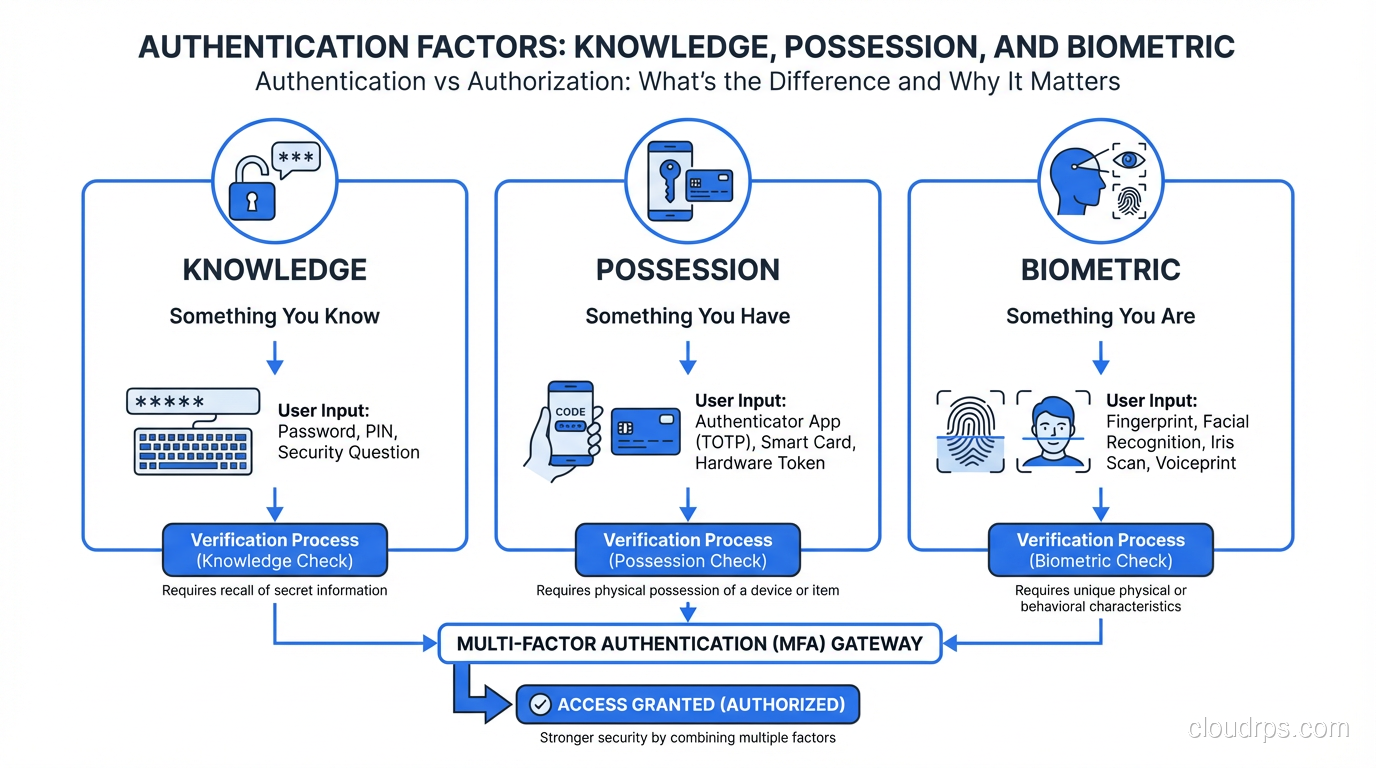
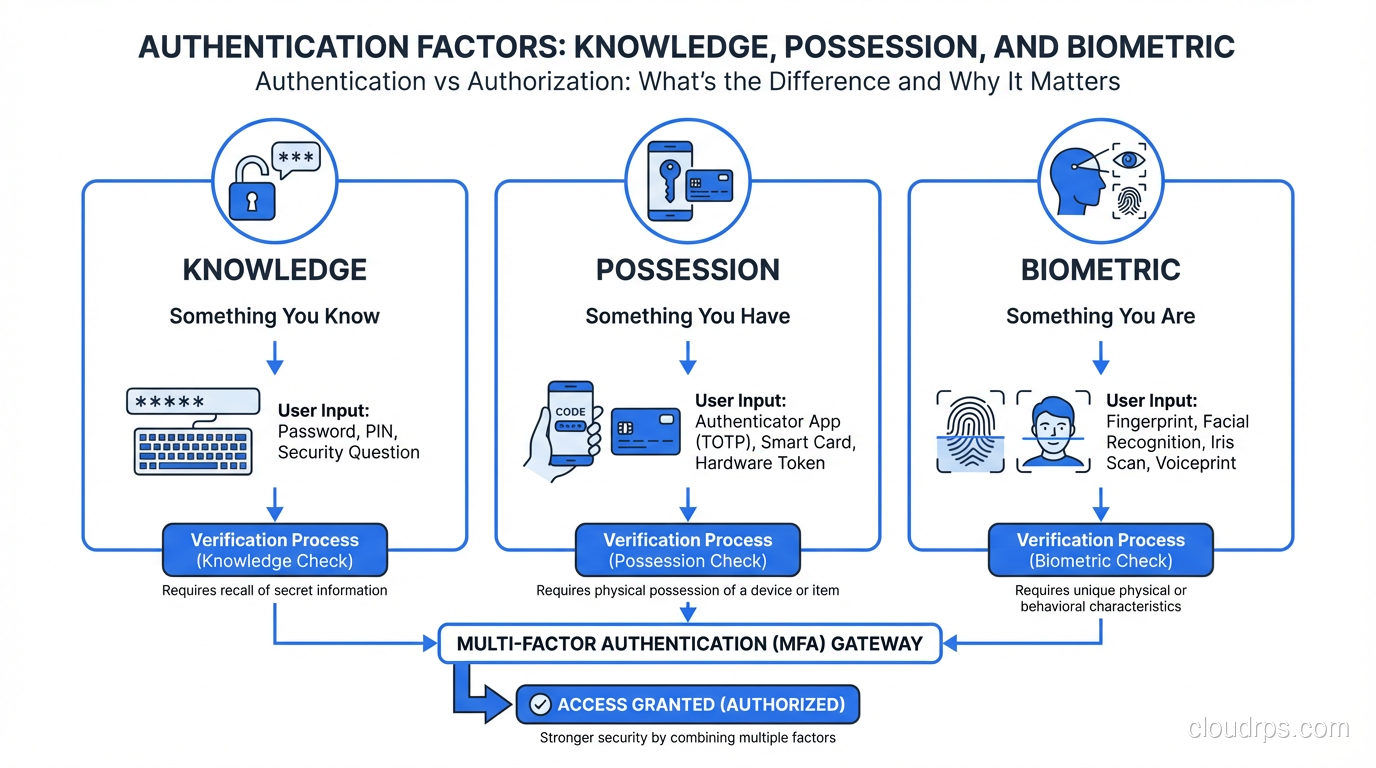
The mechanisms for verification fall into three categories, which you’ve probably seen described as factors:
Something you know: a password, PIN, or security question answer. This is the weakest factor on its own because knowledge can be shared, guessed, phished, or brute-forced.
Something you have: a phone (for push notifications or TOTP codes), a hardware security key (FIDO2/U2F), a smart card, or a certificate stored on a device. Physical possession is harder to compromise remotely.
Something you are: biometrics like fingerprints, face recognition, and iris scans. These are convenient but come with unique challenges, since you can’t rotate your fingerprint if it’s compromised.
Multi-factor authentication (MFA) requires verification from two or more of these categories. A password plus a TOTP code from your phone combines something you know with something you have. This is dramatically more secure than either factor alone, which is why MFA is a non-negotiable requirement in any modern security architecture.
How Modern Authentication Works
The days of every application maintaining its own user database should be behind us (though they often aren’t). Modern authentication centralizes identity through dedicated protocols and providers.
Single Sign-On (SSO) allows users to authenticate once with an identity provider (IdP) and access multiple applications without re-authenticating. This isn’t just a convenience feature; it’s a security improvement. Fewer login prompts mean fewer opportunities for credential theft, and centralized authentication means centralized policy enforcement, logging, and revocation.
SAML (Security Assertion Markup Language) is the enterprise SSO protocol that’s been around since the early 2000s. It uses XML-based assertions exchanged between an Identity Provider and a Service Provider. The flow: user tries to access an application, the application redirects to the IdP, the user authenticates at the IdP, the IdP sends a signed SAML assertion back to the application confirming the user’s identity and attributes.
SAML works and is deeply entrenched in enterprise environments. It’s also verbose, complex to implement correctly, and carries a long history of implementation vulnerabilities (XML signature wrapping attacks, assertion replay). If you’re implementing SAML, use a well-tested library. Never parse and validate SAML assertions manually.
OAuth 2.0 and OpenID Connect (OIDC) are the modern standard. OAuth 2.0 is an authorization framework (we’ll get to that), and OIDC is an authentication layer built on top of it. OIDC gives you an ID token (a JWT) that contains verified identity claims: who the user is, when they authenticated, and how.
The OIDC Authorization Code flow (with PKCE for public clients) is the recommended approach for web and mobile applications:
- Application redirects user to the IdP’s authorization endpoint
- User authenticates at the IdP
- IdP redirects back to the application with an authorization code
- Application exchanges the code for tokens (ID token + access token) via a back-channel request
- Application validates the ID token to confirm user identity
Federated Identity extends these patterns across organizational boundaries. When you click “Sign in with Google” on a third-party application, that’s federated identity. Google is asserting your identity to an application that trusts Google as an identity provider.
Authentication Tokens
Once a user authenticates, the system issues a token that represents the authenticated session. The user presents this token with subsequent requests instead of re-authenticating every time.
Session cookies: the traditional approach for web applications. The server creates a session, stores session data server-side, and gives the client a session ID in a cookie. Simple but requires server-side session storage.
JWTs (JSON Web Tokens): self-contained tokens that include claims (identity, expiration, roles) signed by the issuer. The server can validate the token without looking up session state. This makes JWTs popular in distributed architectures where multiple services need to verify identity without sharing a session store.
JWTs come with their own pitfalls. They can’t be revoked mid-lifetime without additional infrastructure (a token blocklist or short expiration times with refresh tokens). They can be large, adding overhead to every request. And JWT validation bugs are a common source of vulnerabilities. I’ve seen systems that accepted unsigned tokens, tokens with "alg": "none", or tokens signed with the wrong key.
Keep JWT lifetimes short (15 minutes for access tokens) and use refresh tokens for longer sessions. Validate the signature, issuer, audience, and expiration on every request. Use a tested library, not manual JSON parsing.
Authorization: Deciding What You Can Do
Authorization (often abbreviated AuthZ) is the process of determining whether an authenticated identity has permission to perform a requested action on a specific resource. You’ve proven who you are. The question is whether you should be allowed to do what you’re asking to do.
This is where the real complexity lives. Authentication is a binary question: is this identity verified? Authorization is a multi-dimensional question: does this identity, in this context, with this device, at this time, have permission to perform this action on this resource?
Authorization Models
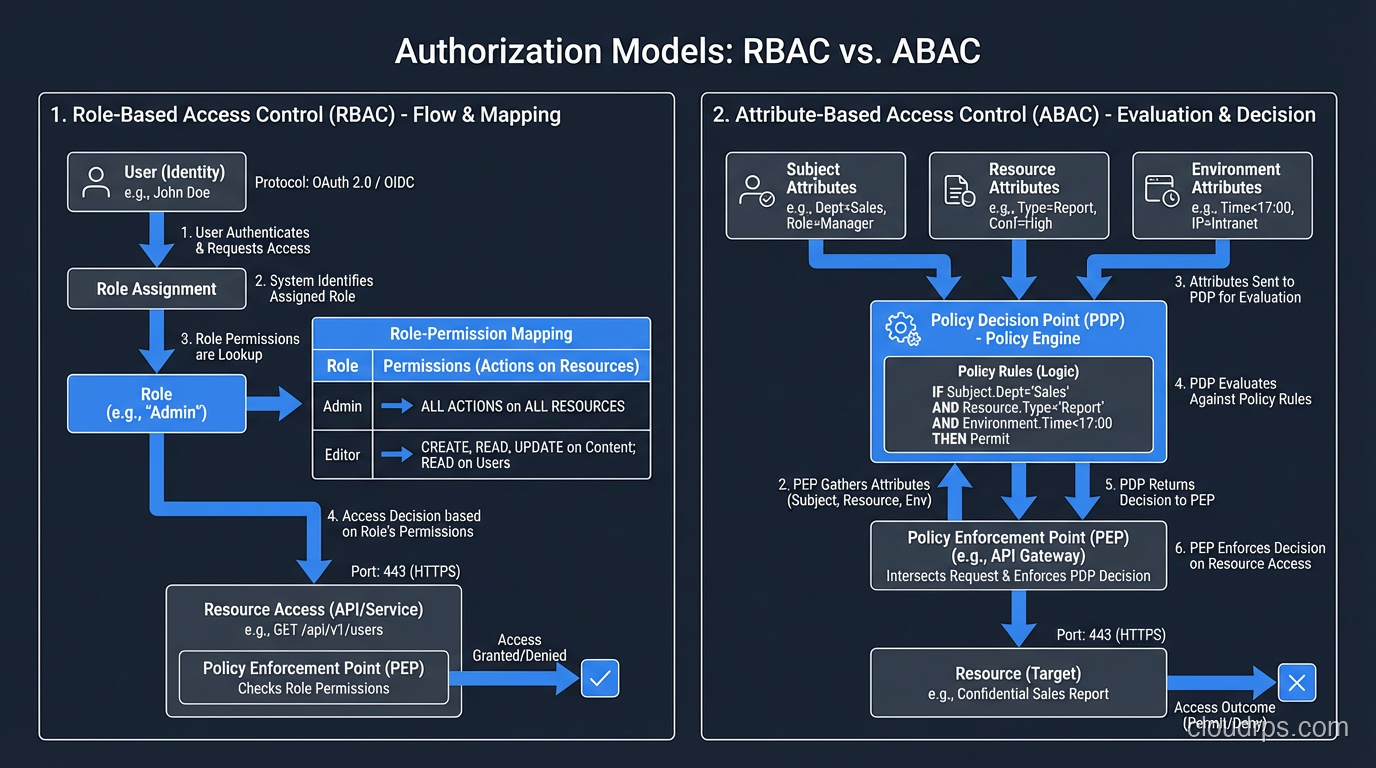
Role-Based Access Control (RBAC) is the most common model. Users are assigned roles, and roles have permissions. A “developer” role might have read access to production logs and write access to staging environments. An “admin” role might have full access to infrastructure.
RBAC is straightforward to understand and implement. Its weakness is granularity. Roles tend to accumulate permissions over time (role bloat), and users tend to accumulate roles they no longer need (privilege creep). I’ve audited organizations where the “developer” role had permissions from six different teams because each team added “just one more thing” to the role instead of creating a purpose-specific role.
Attribute-Based Access Control (ABAC) makes decisions based on attributes of the user, the resource, the action, and the environment. “A user with the department=engineering attribute can read resources with classification=internal during business hours from a managed device.” ABAC is more flexible than RBAC but more complex to implement and reason about.
Policy-Based Access Control formalizes authorization decisions in policy engines. AWS IAM is a policy-based system where you write JSON policies that specify which principals can perform which actions on which resources under which conditions. Open Policy Agent (OPA) is a popular general-purpose policy engine for implementing policy-based authorization in custom applications.
Relationship-Based Access Control (ReBAC) makes decisions based on relationships between entities. “User A can edit Document X because User A is a member of Team B, and Team B owns Folder Y, and Document X is in Folder Y.” Google’s Zanzibar paper formalized this model, and implementations like SpiceDB and Authzed make it practical. If your application has complex sharing and collaboration requirements, ReBAC is worth evaluating.
The Principle of Least Privilege
Regardless of which model you use, the guiding principle is the same: least privilege. Every identity should have the minimum permissions necessary to perform its function, and no more.
This sounds simple. In practice, it’s one of the hardest things in security. Users request broad access “just in case.” Applications are deployed with admin credentials because “we’ll restrict them later.” Service accounts accumulate permissions across years of feature additions and nobody audits them.
I make it a practice to review IAM policies and role assignments quarterly. Every quarter, I ask: does this identity still need these permissions? When was the last time they used them? If a permission hasn’t been used in 90 days, it’s a candidate for removal.
AWS IAM Access Analyzer, Azure AD access reviews, and similar tools automate this analysis. Use them.
Where Authorization Happens
In well-architected systems, authorization is enforced at multiple points:
API Gateway / Reverse Proxy: coarse-grained authorization. Does this user have any access to this service? Token validation and basic scope checking happen here.
Application Layer: fine-grained authorization. Does this user have permission to perform this specific action on this specific resource? Business logic authorization lives here.
Data Layer: row-level or column-level security. Even if the application has a bug, the database enforces access restrictions. This is your last line of defense.
Infrastructure Layer: IAM policies control what the application itself can do, including which S3 buckets it can read, which DynamoDB tables it can write to, and which KMS keys it can use.
Defense in depth applies to authorization just as much as it applies to network security. A single authorization check at the API gateway is not sufficient. What happens if the gateway has a bug? What if a developer creates a new endpoint and forgets to add the authorization check? Layered authorization catches these gaps.
Where Authentication and Authorization Intersect
While they’re conceptually distinct, authentication and authorization are deeply intertwined in practice.
Claims-Based Architecture
Modern systems use claims (attributes about the authenticated user included in the authentication token) to drive authorization decisions. An OIDC ID token might include claims like:
{
  "sub": "user-123",
  "email": "alice@example.com",
  "groups": ["engineering", "platform-team"],
  "roles": ["developer", "on-call"],
  "department": "infrastructure"
}
The authentication system verifies identity and issues the token with these claims. The authorization system reads the claims and makes access decisions. The authentication and authorization concerns are separate, but the token bridges them.
This is why getting your identity provider right matters so much. If the IdP includes incorrect claims (a user gets the “admin” role they shouldn’t have, or a group membership isn’t updated when someone changes teams), the authorization decisions downstream are wrong. The authorization layer is working correctly; it’s just working with bad data.
OAuth 2.0 Scopes
OAuth 2.0 scopes are a mechanism that bridges authentication and authorization. When an application requests an OAuth token, it specifies scopes, which are broad categories of permission like read:messages, write:files, or admin:users. The user consents to these scopes during authentication, and the resulting access token is limited to the granted scopes.
Scopes are coarse-grained authorization. They tell you the maximum permissions the token can exercise. Fine-grained authorization (can this user edit this specific document?) still needs to happen at the application level.
I’ve seen applications that relied entirely on OAuth scopes for authorization, treating admin scope as blanket admin access across all resources. Scopes are a ceiling, not a floor. They limit what’s possible, but the application must still check whether a specific action on a specific resource is permitted.
Step-Up Authentication
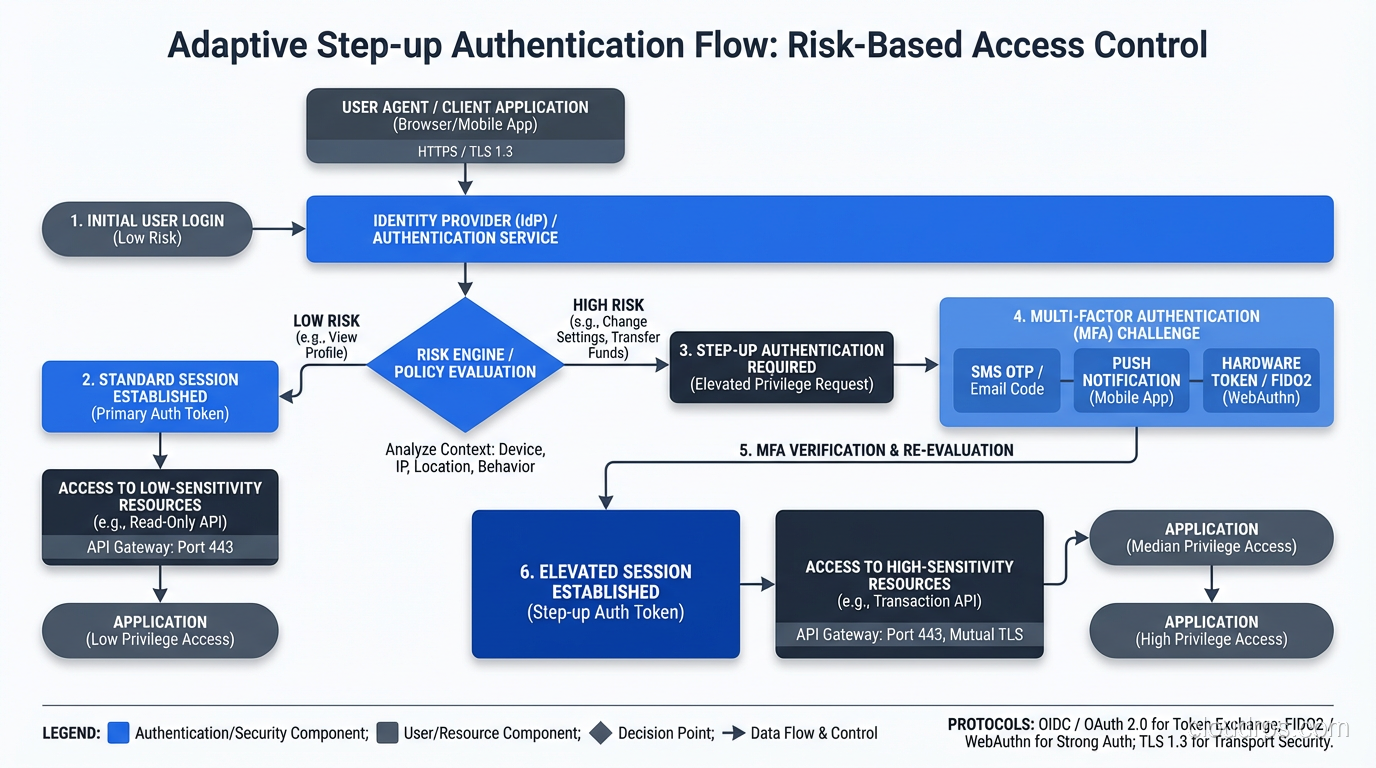
Sometimes the authorization decision depends on the strength of the authentication. Viewing your account balance might require standard authentication. Transferring funds might require step-up authentication, re-verifying your identity with a stronger factor.
This is common in banking and financial applications. The system evaluates the action’s risk level and demands proportional authentication strength. A user authenticated with just a password might be authorized for read-only operations but required to provide a second factor before performing write operations.
Common Mistakes and Anti-Patterns
Mistake 1: Authorization in the Frontend Only
Checking permissions in the UI (hiding buttons, disabling menu items) is not authorization. It’s a user experience feature. An attacker who sends requests directly to your API bypasses every frontend check. Authorization must be enforced server-side, at the API level, on every request.
I was once called in to investigate a breach where a web application properly hid admin functionality from non-admin users in the UI. But the admin API endpoints had no server-side authorization checks. The attacker simply called the admin endpoints directly and had full administrative access. The “authorization” was client-side CSS.
Mistake 2: Conflating Authentication and Authorization
“If you can log in, you can access everything” is the most dangerous simplification in security. I described this at the beginning of this post, and I still encounter it regularly. Every application should have distinct authentication and authorization layers, even if the authorization is simple role-based checking.
Mistake 3: Hardcoded Roles in Application Code
Authorization logic scattered through application code as if (user.role === 'admin') checks is brittle, unauditable, and impossible to change without code deployments. Externalize your authorization logic into a policy engine or authorization service. This lets you audit policies centrally, update them without deploying application code, and test them systematically.
Mistake 4: Not Validating Tokens
I’ve audited applications that accepted JWTs without verifying the signature, accepted expired tokens, or didn’t check the audience claim. Each of these is a path to authentication bypass. Token validation is not optional. Verify signature, issuer, audience, expiration, and not-before time on every single request.
Mistake 5: Overly Long Session Lifetimes
Sessions that last for days or weeks without re-authentication expand the window for token theft and session hijacking. Use short-lived access tokens (15-30 minutes) with refresh tokens for longer sessions. Require re-authentication for sensitive operations. Implement idle timeouts.
The Architecture That Works
After decades of building identity and access management systems, here’s the architecture pattern I keep coming back to:
Centralized Identity Provider: one IdP (Okta, Azure AD, Auth0, Keycloak) handles all authentication. SSO across all applications. MFA enforced at the IdP level. Device trust evaluated during authentication.
Standardized Token Format: OIDC ID tokens for identity. OAuth 2.0 access tokens for API authorization. Short-lived, signed, with appropriate claims.
Externalized Authorization: a policy engine (OPA, Cedar, AWS Verified Permissions) evaluates authorization decisions based on policies, user attributes, and resource attributes. Applications delegate authorization decisions to this engine rather than implementing ad-hoc checks.
Defense in Depth: authorization enforced at the API gateway (coarse), application layer (fine-grained), and data layer (row-level). No single point of failure.
Continuous Monitoring: all authentication events and authorization decisions logged. Anomaly detection on login patterns, access patterns, and privilege usage. Automated alerts on suspicious activity.
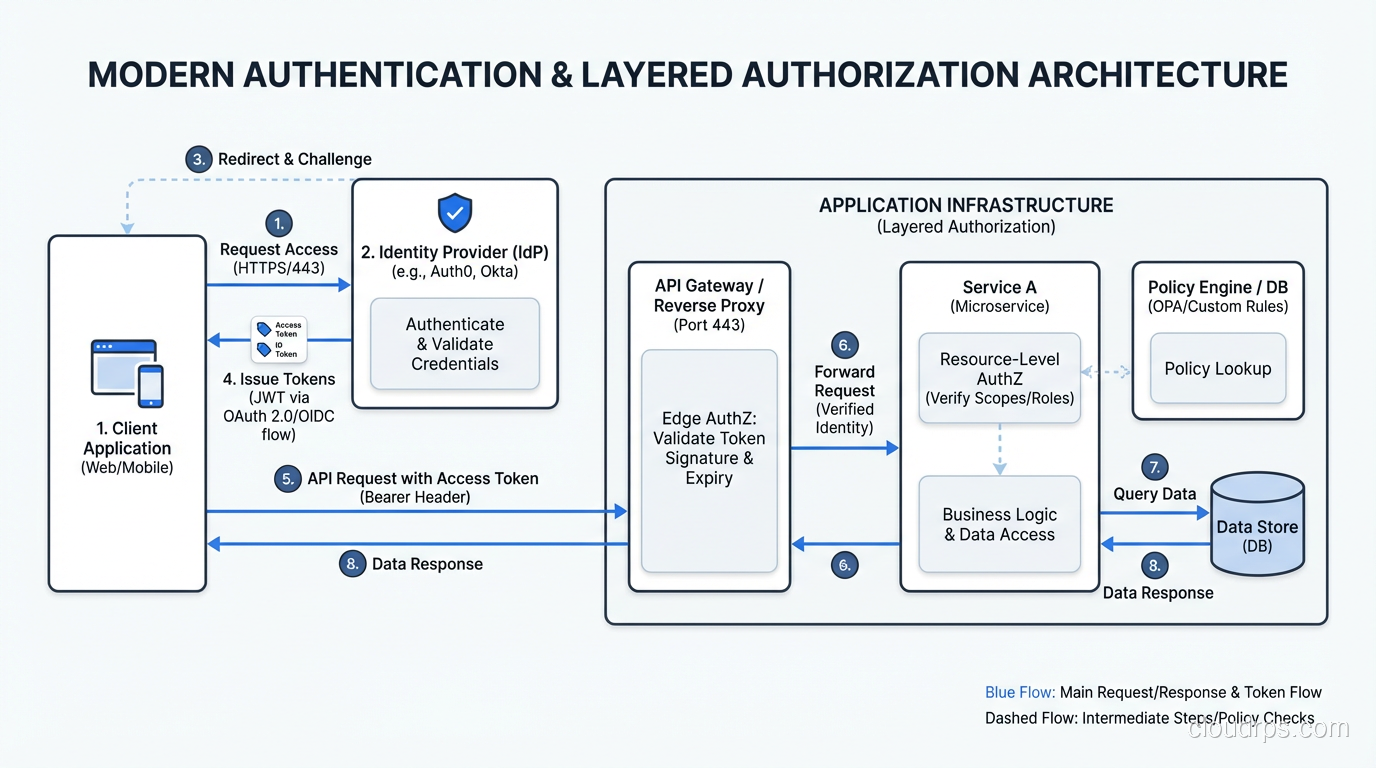
This architecture separates concerns cleanly. The IdP owns authentication. The policy engine owns authorization logic. Applications consume identity and delegate access decisions. Changes to authentication policy (require stronger MFA, block compromised devices) happen at the IdP without touching applications. Changes to authorization policy (add a new role, restrict access to a resource type) happen in the policy engine without touching applications.
Beyond the Basics: Emerging Patterns
Continuous Authentication: rather than authenticating once and trusting the session, continuously evaluate trust signals throughout the session. Mouse movement patterns, typing cadence, device posture changes, location anomalies. Any change in the trust signals can trigger re-authentication or session termination.
Just-in-Time Access: privileged access granted on request for a limited time window, with approval workflows and full session recording. No standing privileges. This is central to Zero Trust security implementations.
Decentralized Identity: verifiable credentials and decentralized identifiers (DIDs) that give users control over their identity data. Still early stage, but worth watching as the standards mature.
Wrapping Up
Authentication and authorization are two halves of the access control equation. Authentication proves identity: who are you? Authorization evaluates permissions: what can you do? Both must be present, both must be enforced server-side, and they should be implemented as separate, composable layers.
Get authentication right with a centralized IdP, SSO, and MFA. Get authorization right with externalized policies, least privilege, and defense-in-depth enforcement. Log everything. Review permissions regularly. And never, ever treat a successful login as a blanket authorization for everything in your environment.
The gap between authentication and authorization is where breaches happen. Close it deliberately, architecturally, and continuously.
Get Cloud Architecture Insights
Practical deep dives on infrastructure, security, and scaling. No spam, no fluff.
By subscribing, you agree to receive emails. Unsubscribe anytime.