
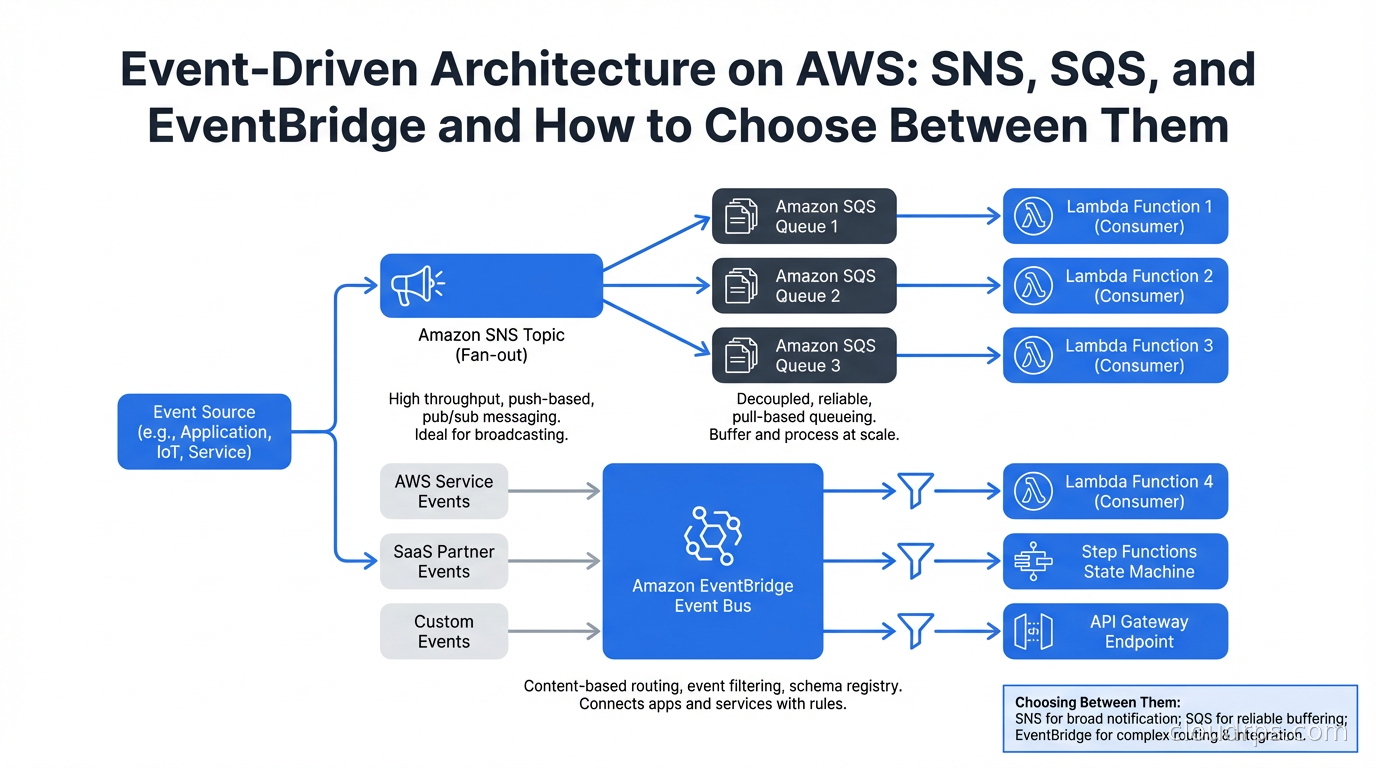
The architecture decision I have seen go wrong most consistently in AWS-native applications is choosing the wrong messaging service for the wrong reason. Teams pick SQS because they have heard of it. They add SNS because a tutorial told them to. They ignore EventBridge because it sounds like enterprise middleware. Then six months later they are asking why their event routing logic is scattered across Lambda functions and why adding a new event consumer requires code changes in three places.
AWS gives you three genuinely different messaging primitives. Understanding what each one actually does, at the level of how messages move and who is responsible for routing, saves you from an architecture that works until it does not.
The Three Services, Clearly Differentiated
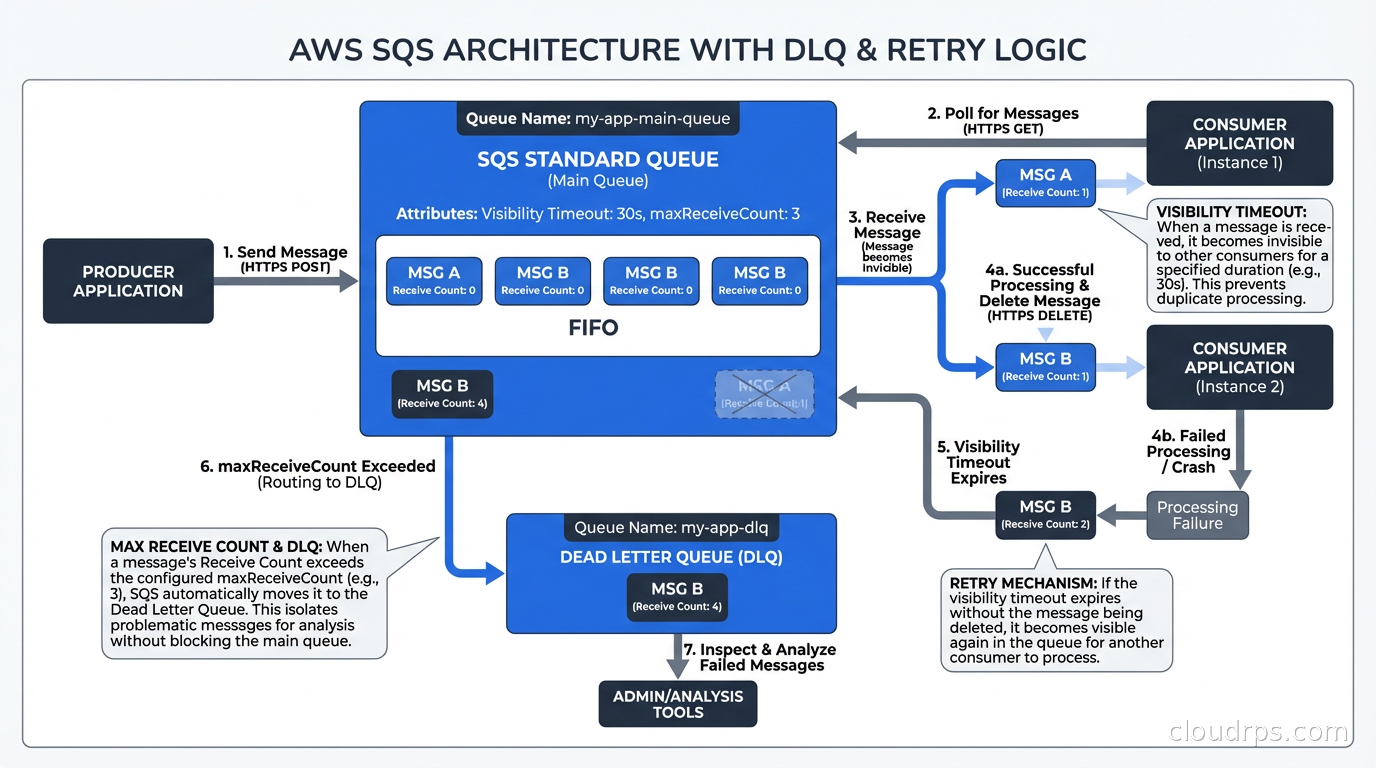
SQS (Simple Queue Service) is a point-to-point message queue. A producer writes messages to a queue. One consumer reads them. SQS manages message retention (up to 14 days), delivery (at-least-once), and visibility timeouts (the period a message is invisible after being received, giving the consumer time to process and delete it). SQS is fundamentally a work queue: one worker pool consuming from a shared list of tasks.
SNS (Simple Notification Service) is a pub-sub notification service. A producer publishes to a topic. Every subscriber to that topic receives a copy of the message. Subscribers can be SQS queues, Lambda functions, HTTP endpoints, email addresses, or SMS numbers. SNS is a fan-out mechanism: one published message, many recipients.
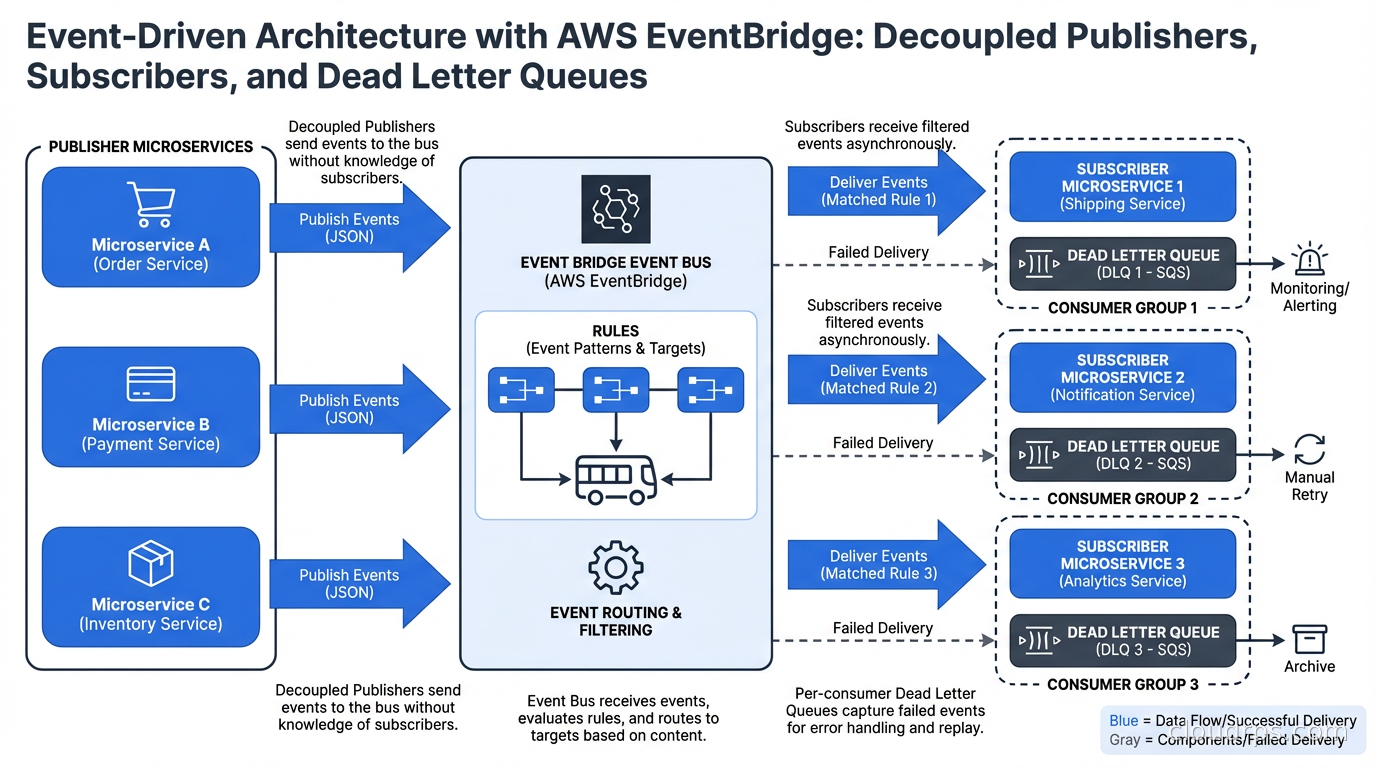
EventBridge is an event bus with content-based routing. Producers publish events to an event bus. EventBridge evaluates rules against each event’s content and routes matching events to configured targets. The critical difference from SNS: EventBridge routes based on event content (any field in the event JSON), not just topic subscription. EventBridge also integrates natively with over 200 AWS services and 200+ SaaS partners as event sources.
These are not three versions of the same thing. They solve different problems. Picking the right one starts with understanding what kind of coupling you want between producers and consumers.
SQS: Queue Semantics and Why They Matter
SQS has two queue types: Standard (at-least-once delivery, best-effort ordering) and FIFO (exactly-once processing within a message group, strict ordering within groups).
The key SQS concept to understand operationally is the visibility timeout. When a consumer calls ReceiveMessage, the message becomes invisible to other consumers for the duration of the visibility timeout. If the consumer successfully processes the message, it calls DeleteMessage and the message is gone. If the consumer crashes or fails to delete within the timeout, the message becomes visible again and another consumer can pick it up.
This is how SQS achieves fault tolerance. The flip side is that your processing must be idempotent. If the visibility timeout expires mid-processing and another consumer picks up the message, you get double processing. For a task like “send a welcome email”, double processing means two welcome emails. Design your consumers to handle this.
FIFO queues use message group IDs to provide ordering within a group. All messages with the same group ID are processed in order by a single consumer at a time. This is useful for ordered operations like financial transaction sequences, but adds throughput constraints (FIFO queues have lower throughput ceilings than Standard queues).
The dead letter queue (DLQ) is the error handling mechanism you must configure. After a message exceeds the maximum receive count (you set this; I default to 3), SQS sends it to a configured DLQ. Without a DLQ, repeatedly failing messages get retried indefinitely and can block your queue. With a DLQ, they are isolated for investigation.
{
  "deadLetterTargetArn": "arn:aws:sqs:us-east-1:123456789:my-service-dlq",
  "maxReceiveCount": 3
}
Monitor your DLQ depth. A growing DLQ is a signal that your consumers are failing silently. I have been on call when a team noticed their DLQ had 40,000 messages. They had been failing for two days but no one had set an alarm on DLQ depth. The alarm is two lines of CloudFormation. Configure it.
SNS: Fan-Out Patterns in Practice
SNS is most powerful when you use it in combination with SQS. The SNS-to-SQS fan-out pattern is the most common AWS messaging pattern I see in production and for good reason.
The pattern: a service publishes an event to an SNS topic. Multiple SQS queues are subscribed to the topic. Each queue feeds a different consumer service. The result is that a single event publication reaches multiple independent consumers without the publisher knowing about them.
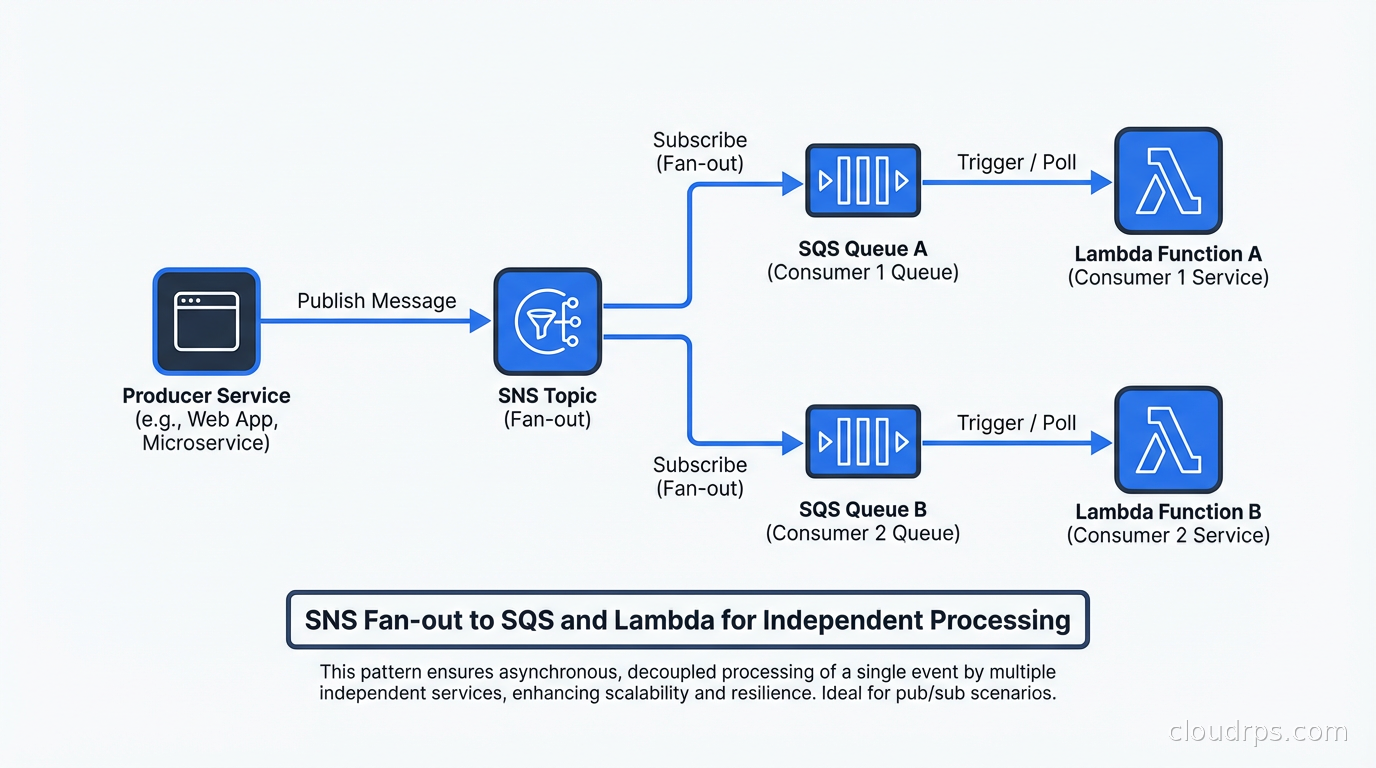
Why SQS in between rather than direct Lambda subscriptions to SNS? Because SQS provides durability and backpressure. If your consumer Lambda is throttled or experiencing errors, SNS would retry delivery for a limited time and then drop the message. With SQS in between, messages queue up until your consumer recovers, and DLQ policies apply.
SNS supports subscription filter policies that allow each subscriber to receive only messages matching specific attributes. This is proto-content-based routing: you can have a single SNS topic for order events and different queues subscribing for only status: "fulfilled" or only status: "cancelled" events:
{
  "status": ["fulfilled"]
}
This is useful but limited. Filter policies only work on message attributes (metadata), not the message body. And if your routing logic grows complex (route to queue A if country is US and amount > 1000, to queue B if country is EU), you are going to be managing attribute-level filter logic across many subscriptions. That is where EventBridge’s content-based routing becomes much cleaner.
EventBridge: Content-Based Routing Done Right
EventBridge is the service I see most underutilized. Teams reach for SNS because they understand pub-sub and avoid EventBridge because it feels more complex. The complexity is worth it when you have non-trivial routing requirements.
An EventBridge rule matches events based on their JSON content using pattern matching. The patterns support equality, prefix matching, numeric ranges, and the exists operator:
{
  "source": ["com.mycompany.orders"],
  "detail-type": ["order.created"],
  "detail": {
    "amount": [{"numeric": [">", 1000]}],
    "country": ["US", "CA"],
    "customer_tier": ["premium"]
  }
}
This rule matches order.created events from US or Canadian premium customers with amounts over $1000. The matching is evaluated by EventBridge, not by your code. No Lambda function has to parse the event and decide whether to forward it.
EventBridge also supports event buses beyond the default bus. You can create custom event buses for your own application events, use partner event sources (Stripe sends payment events directly to your bus, Zendesk sends ticket events), and receive events from other AWS accounts via cross-account access.
The event archive and replay features are genuinely useful for debugging and disaster recovery. Archive events on a bus for a configurable retention period. When something goes wrong (a consumer had a bug and processed events incorrectly), replay the archived events through updated consumers to correct state.
Where EventBridge is not the right choice: high-throughput messaging (EventBridge has lower throughput limits than SQS), when you need guaranteed FIFO ordering (EventBridge does not guarantee event order), or when you need long retention periods (SQS retains for 14 days; EventBridge event buses are not a storage system).
Choosing Between Them: A Decision Framework
I use this mental model:
Use SQS when: you have work to distribute across multiple workers processing the same type of task (job queues, batch processing, task distribution), you need at-least-once delivery with visibility timeout semantics, or you need FIFO ordering within groups.
Use SNS when: you need to fan out a single event to multiple independent subscribers and the routing logic is simple (all subscribers receive all events, or filter on message attributes).
Use EventBridge when: you have complex routing logic that should be centralized rather than embedded in consumers, you need to integrate with AWS service events (EC2 state changes, S3 object events, CodePipeline state changes), or you want to connect SaaS partner events to your infrastructure.
Use SNS + SQS together when: you need fan-out plus durability and backpressure for each consumer (the most common production pattern).
Use EventBridge + SQS or Lambda when: you have complex routing rules feeding multiple downstream consumers, and you want the routing logic centralized in EventBridge rather than scattered across consumers.
The pattern I use most in production:
Event Producer
     |
     v
EventBridge (custom bus, with rules)
     |          |          |
     v          v          v
  SQS A      SQS B      Lambda C
(high-vol) (orders)  (notifications)
EventBridge handles routing. SQS provides buffering and backpressure for high-volume consumers. Lambda handles low-volume, latency-sensitive operations like notifications.
Dead Letter Queue Strategy Across Services
DLQs exist in different forms across these services and you need a coherent strategy for all of them.
SQS DLQ: messages that exceed maxReceiveCount go here. Monitor depth with CloudWatch and alert when non-zero for more than 5 minutes. Have runbooks for common failure modes (database connectivity, downstream API rate limits, schema validation failures).
SNS DLQ: messages that could not be delivered to a subscriber after retries go here. Requires the subscription to have a DLQ configured (it is not automatic). If your SNS-to-Lambda subscription fails, without a DLQ you silently lose events.
Lambda DLQ (or destinations): for asynchronous Lambda invocations, failed events can be sent to an SQS DLQ or SNS topic. Lambda Destinations are the modern replacement: you configure a success destination and a failure destination.
EventBridge DLQ: events that matched a rule but could not be delivered to the target go to the target’s DLQ. Each target in an EventBridge rule can have its own DLQ.
The operational pattern: configure DLQs everywhere, add CloudWatch alarms on all DLQ depths, and keep runbooks current. When a DLQ has messages, you want to know within minutes, not hours.
Event Schema Management
One pain point that emerges as your event-driven system grows: schema management. You publish an event with certain fields. Consumers depend on those fields. A producer adds a new required field. Consumers break.
For SNS/SQS systems, EventBridge Schema Registry provides schema discovery and versioning. EventBridge can automatically infer schemas from events flowing through your bus. You can also register schemas manually using OpenAPI or JSONSchema formats and generate type-safe code bindings for multiple languages.
For higher-throughput systems that grow to the point where EventBridge’s limits feel constraining, this is where Apache Kafka and stream processing frameworks become relevant. Kafka provides higher throughput, longer retention, replay from any offset, and a richer ecosystem for stream processing with Flink and Kafka Streams. But Kafka requires significantly more operational investment than AWS managed services.
The decision between managed AWS messaging and Kafka is a variant of the serverless vs. containers trade-off: managed services reduce operational burden and scale automatically, but impose limits on throughput, retention, and customization. Self-managed Kafka scales much higher and offers more flexibility, at the cost of operational complexity. Teams building cloud-agnostic microservice architectures sometimes reach for NATS.io with JetStream as a portable, lightweight alternative to both, trading AWS-native integration for dramatically simpler operations and multi-tenancy built in.
Integrating with Serverless and Microservices
Event-driven architecture and serverless computing compose naturally on AWS. SQS is a native Lambda event source: configure an SQS trigger on a Lambda function and Lambda polls the queue, batches messages, and invokes your function. The scaling works automatically: Lambda scales out concurrent invocations based on queue depth.
For microservices architectures, event-driven communication decouples services at the network level. Service A does not call Service B directly. It publishes an event. Service B subscribes. This reduces temporal coupling (both services do not need to be available simultaneously) and allows you to add new consumers without modifying producers. One reliability challenge in event-driven microservices is ensuring the database write and the event publication succeed or fail atomically. The transactional outbox pattern solves this without distributed transactions, and it works with SQS, SNS, or EventBridge as the downstream target.
The trade-off is that tracing a request across event-driven boundaries is harder than tracing synchronous calls. Without distributed tracing headers propagated through event payloads, you lose the ability to correlate an incoming user request with all the downstream events it triggered. OpenTelemetry and distributed tracing require explicit propagation of trace context through your event payloads. Build this in from the start; retrofitting it is painful.
Cost Considerations
SQS pricing is per request (roughly $0.40 per million requests for Standard queues). SNS is per publish and per delivery ($0.50 per million publishes, delivery pricing varies by protocol). EventBridge is per event ($1.00 per million events on custom buses).
For most applications, messaging costs are not material relative to compute. Where costs become notable: high-frequency events at significant scale. If you are publishing a million events per minute, that is 1.44 billion events per day, and EventBridge at $1/million works out to roughly $1,440/day, about $43,000/month, for that single producer. That is the point where messaging costs stop being a rounding error and start showing up in a FinOps review.
The FinOps perspective on messaging: consolidate small events where possible (batch ten small notifications into one larger payload), use SQS Standard rather than FIFO unless you actually need ordering (FIFO is more expensive), and set appropriate retention periods rather than the maximum (14 days of SQS retention you never use costs nothing extra, but archive storage in EventBridge does accumulate).
Event-driven architecture done well reduces operational coupling between services and makes individual components easier to reason about, test, and deploy independently. Event-driven architecture done poorly creates debugging nightmares and silent failure modes. The difference is usually careful attention to DLQs, schema management, distributed tracing, and choosing the right service for the right job. When you find yourself chaining multiple Lambda functions with SQS queues to represent a multi-step business process, it is worth evaluating whether AWS Step Functions would serve better: its state machine model makes branching logic, retries, and parallel execution explicit and auditable in ways that Lambda-plus-queue chains are not.
Updated September 1, 2026: corrected the EventBridge cost example, which had a math error of roughly 1000x.
Get Cloud Architecture Insights
Practical deep dives on infrastructure, security, and scaling. No spam, no fluff.
By subscribing, you agree to receive emails. Unsubscribe anytime.