
Twenty years of working with cloud infrastructure, and the pattern I see most reliably at companies that are struggling is not bad Kubernetes configuration or overly permissive security groups. It is a complete lack of account structure. A single AWS account for everything, or a handful of accounts with no governance model, no guardrails, no central access, and billing reports that nobody can make sense of. Then a compliance audit arrives, or a developer accidentally deletes a production RDS instance from the wrong console tab, and suddenly everyone wants to know why this wasn’t sorted out years ago.
Building a solid multi-account AWS strategy is one of those foundational investments that pays off for years and costs much more to retrofit than to build right the first time. This article covers the full stack: why you need multiple accounts, how to structure them with AWS Organizations, how Control Tower automates the setup, how IAM Identity Center gives you sane central access, and how Service Control Policies and Resource Control Policies give you actual guardrails instead of just policies that live in a document nobody reads.
Why Multiple AWS Accounts?
The most important reason is blast radius. An IAM misconfiguration, a runaway Terraform apply, a compromised long-lived access key - all of these are bounded by the account they happen in. If your production and development workloads share an account, a bad apply in staging can affect production resources. They share service limits, they share networking, and they can share fate in ways you do not want.
Beyond blast radius, accounts are the natural boundary for:
Billing and cost allocation. You can do tag-based cost allocation, but it is fragile. Teams forget to tag things, providers do not always support tags, and you end up with an allocation model built on approximations. Account-level separation gives you clean cost boundaries without tagging gymnastics. For teams doing serious cloud cost optimization, this matters.
Regulatory and compliance boundaries. If you handle data under HIPAA, PCI-DSS, or GDPR, you need to demonstrate what systems touch regulated data and what controls are in place. A dedicated account for regulated workloads with strong guardrails is far easier to audit than trying to carve out a compliance boundary inside a shared account.
Service limits. AWS imposes per-account service quotas on almost everything: EC2 instances, Lambda concurrency, VPCs, EIPs, load balancers. A separate account for each major workload means one team’s growth does not throttle another.
Security isolation. An account is a hard boundary in AWS’s IAM model. Cross-account access is always explicit and visible. Within a single account, the blast radius of a privilege escalation or compromised role is much larger.
The AWS recommendation, backed by their Well-Architected Framework, is one account per environment per workload for anything serious. That sounds like a lot of accounts - it is. A mature organization might have dozens or hundreds. That scale is exactly why you need Organizations, Control Tower, and IAM Identity Center to manage them.
AWS Organizations: The Foundation
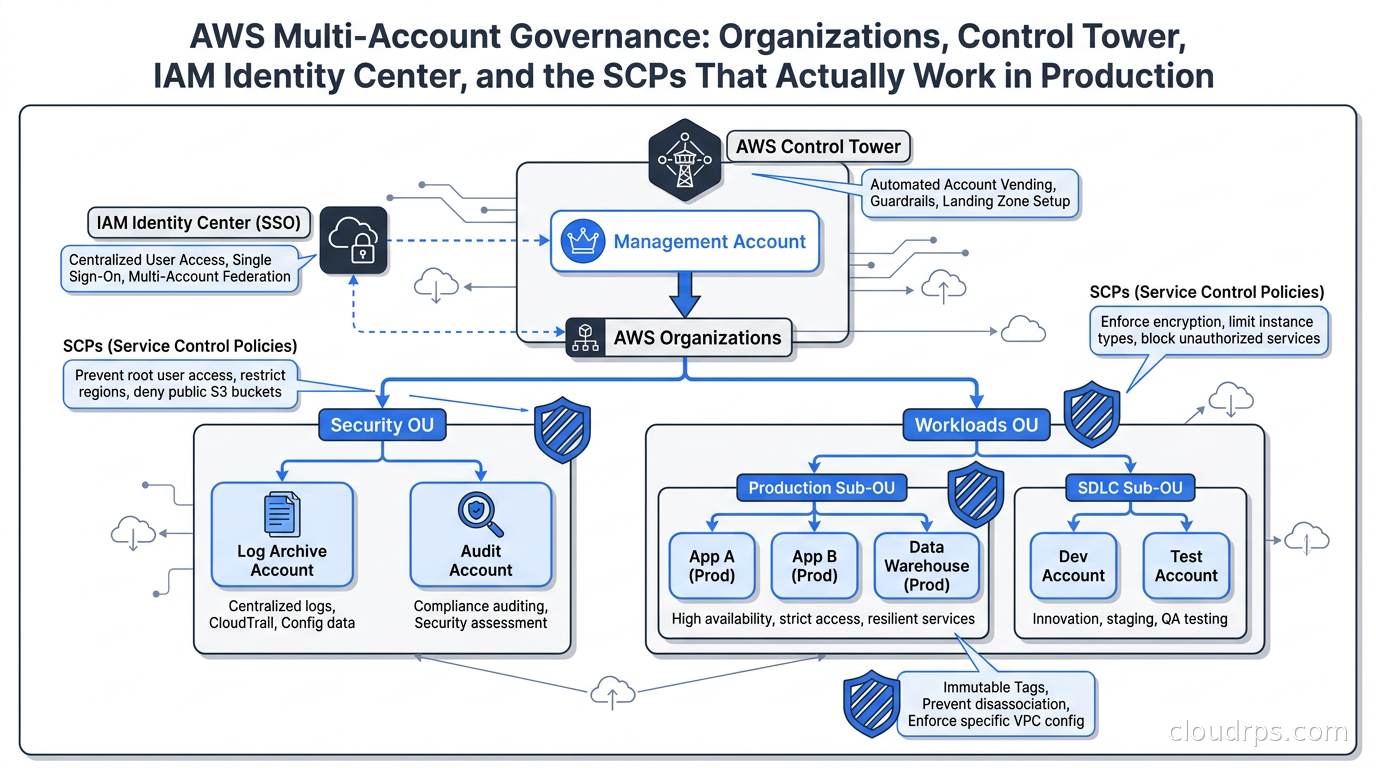
AWS Organizations is the service that ties accounts together under a common management structure. At the top sits the management account (formerly called the master account), which is where Organizations lives and where consolidated billing aggregates. Below that you build a hierarchy of Organizational Units (OUs), each of which can contain accounts and child OUs.
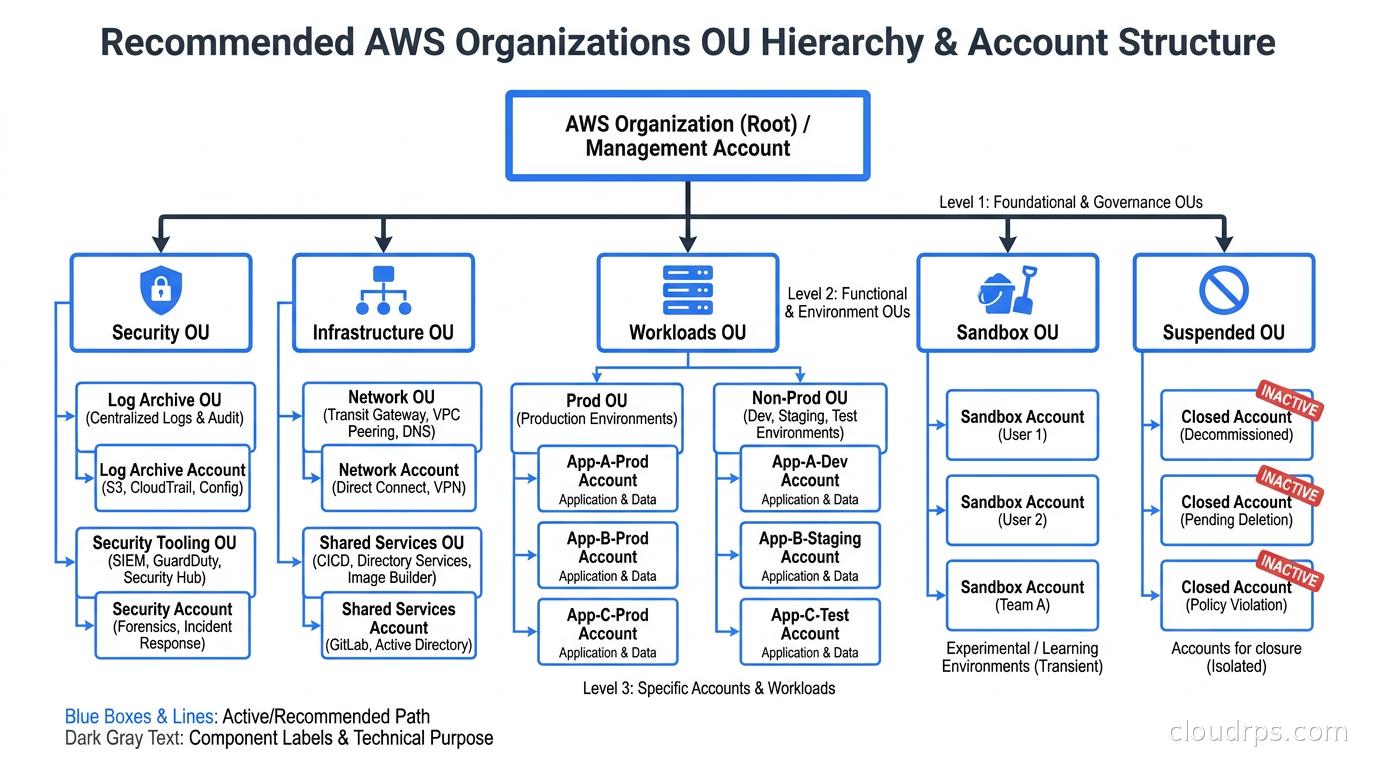
The OU hierarchy is where your governance model lives. Here is a structure that works well for most organizations, based on the AWS recommended multi-account strategy:
Root (the top of the hierarchy)
- Security OU - Log Archive account, Audit account. Created by Control Tower, never put workloads here.
- Infrastructure OU - Shared services: networking hub account, DNS, shared tooling.
- Workloads OU
- Prod OU - Production accounts for each major workload
- SDLC OU - Dev, staging, test accounts
- Sandbox OU - Developer experimentation accounts with spending limits
- Suspended OU - Accounts pending deletion, quarantined accounts
The key principle: OU structure should match how you want to apply governance, not how your org chart looks. SCPs (which we will get to) attach to OUs and inherit down the tree. An SCP on the Workloads OU applies to every account under it.
Management account hygiene. This is the most underrated point in multi-account discussions. The management account is extremely privileged - it can do things no other account can, including reading SCPs and making changes to Organizations itself. Use it only for billing, Organizations management, and Control Tower. Do not run workloads there. Lock down its root user with a hardware MFA key and a group email address, not a personal one. I have seen what happens when someone leaves a company and takes the MFA device for the management account with them.
AWS Control Tower: Automating the Landing Zone
Setting up Organizations by hand - creating the right OUs, the right accounts, applying baseline Config rules, enabling GuardDuty, setting up CloudTrail in every account - is tedious and error-prone. Control Tower automates all of this through what AWS calls a landing zone.
When you set up Control Tower, it creates:
- A landing zone with your OU structure
- A Log Archive account in the Security OU that receives CloudTrail and Config logs from every enrolled account
- An Audit account that aggregates findings and is the target for cross-account access for security tooling
- IAM Identity Center as the central access portal
- A baseline set of detective and preventive controls (called guardrails or controls)
Control Tower’s landing zone version 4.0, released in November 2025, added a Controls-Only mode that lets you use Control Tower purely as a controls governance plane without mandating its full organizational opinions on account structure. For organizations that already have a mature Organizations setup, this is useful - you can adopt Control Tower’s control library without ripping out your existing structure.
What you pay for. Control Tower itself does not have a direct charge, but you pay for every underlying service it enables: AWS Config recording per resource per account, CloudTrail in every account, and SSM Automation. At scale, the Config costs can be substantial. Before enrolling a hundred accounts, do the math on Config costs in your regions. Teams running lean on cloud cost management often get surprised by Config bills when they enroll everything at once.
Enrolling existing accounts. Control Tower works well for new accounts provisioned through it. Enrolling existing accounts requires more care - existing CloudTrail trails, Config recorders, and IAM configurations can conflict. AWS has documentation on the enrollment process, but expect to spend time resolving drift in older accounts.
IAM Identity Center: Central Access Without the Mess
Before IAM Identity Center (formerly AWS SSO), managing access across dozens of accounts meant either maintaining IAM users in each account (a maintenance nightmare), or building your own SAML federation setup (a different kind of nightmare). IAM Identity Center gives you a single portal where users see all the accounts they have access to and assume roles with a click or a CLI command.
The model is straightforward: you create Permission Sets (think IAM policies that define a role), then assign those permission sets to users or groups for specific accounts. A developer assigned the PowerUser permission set on account dev-payments-123 can assume that role from the portal or with aws sso login.
Integration with external identity providers. Most enterprises already have Okta, Azure Active Directory, or Google Workspace. IAM Identity Center federates with any SAML 2.0 IdP and supports SCIM provisioning so that when you add someone to the “AWS-Developers” group in Okta, they automatically get access to the right accounts. This is the setup you want - group membership in your IdP drives AWS access, and offboarding an employee means removing them from your IdP, not hunting through every AWS account.
Permission sets and the principle of least privilege. I have seen organizations create a single AdministratorAccess permission set and give it to everyone. This defeats the purpose. Build permission sets that match job functions: a read-only permission set for analysts, a limited developer permission set for SDLC accounts, a break-glass administrator set with a short session duration and strong alerting on use. The break-glass set should require MFA per-use and have session durations of an hour or less.
CLI and SDK access. The aws sso login flow works well interactively. For CI/CD systems and automated pipelines, use IAM roles with appropriate trust policies rather than long-lived access keys. Workload identity federation from GitHub Actions, Kubernetes service accounts, or other OIDC providers is the right model for automation - no long-lived credentials to rotate or leak.
Service Control Policies: The Guardrails That Actually Enforce Things
SCPs are permission boundaries applied at the OU or account level. They define the maximum permissions that principals in those accounts can have. A principal can only do something if both the SCP allows it and their IAM policy allows it. SCPs cannot grant permissions, only restrict them.
This makes SCPs the right tool for governance guardrails: they enforce limits that individual account administrators cannot override. Even if someone has AdministratorAccess in an account, an SCP blocking them from disabling CloudTrail means CloudTrail stays enabled.
The deny-list strategy. AWS accounts get a full-allow SCP by default (called FullAWSAccess). Most organizations layer explicit deny SCPs on top, blocking specific actions. This is easier to maintain than an allow-list and less likely to accidentally break something. Common deny SCPs:
{
  "Effect": "Deny",
  "Action": [
    "organizations:LeaveOrganization",
    "cloudtrail:StopLogging",
    "cloudtrail:DeleteTrail",
    "config:StopConfigurationRecorder",
    "config:DeleteConfigurationRecorder",
    "guardduty:DisassociateFromMasterAccount",
    "guardduty:DeleteDetector",
    "securityhub:DisableSecurityHub",
    "macie2:DisableMacie"
  ],
  "Resource": "*"
}
This single SCP, attached to the root OU, ensures no account can remove itself from the organization and no principal can disable core security services. I always add this as the first SCP in any new landing zone.
Region restriction. Many compliance frameworks require you to prevent data residency outside approved regions. An SCP on the Workloads OU that denies all actions outside us-east-1 and us-west-2 (or wherever you are allowed to operate) prevents developers from accidentally spinning up resources in ap-southeast-1 while troubleshooting an issue.
SCP limits. As of May 2026, each OU and account can have up to ten SCPs attached (increased from the original five), and each SCP supports up to 10,240 characters (doubled from 5,120). These limits still require deliberate policy design. Group related restrictions into single policies, use condition keys to keep policies concise, and resist the urge to enumerate every API action individually when Resource: "*" with a condition key works better.
What SCPs cannot do. SCPs do not apply to the management account. This is a design limitation you have to accept - keep the management account locked down and use IAM controls there instead. SCPs also do not restrict actions taken by AWS service principals (things AWS services do on your behalf), which matters for understanding the full threat model.
Resource Control Policies: The Complement to SCPs
AWS introduced Resource Control Policies (RCPs) in November 2024. While SCPs restrict what principals in your accounts can do, RCPs restrict what anyone - including external principals - can do to resources in your accounts. This is a fundamentally different control point.
The canonical use case is a data perimeter: an S3 bucket should only be accessible from within your organization, not from arbitrary AWS accounts or public internet. An RCP can enforce this:
{
  "Effect": "Deny",
  "Principal": "*",
  "Action": "s3:*",
  "Resource": "*",
  "Condition": {
    "StringNotEquals": {
      "aws:PrincipalOrgID": ["o-exampleorgid111"]
    },
    "BoolIfExists": {
      "aws:PrincipalIsAWSService": "false"
    }
  }
}
This policy, attached at the root OU, prevents any principal outside your organization from making S3 API calls against your buckets, regardless of the bucket policy. At launch, RCPs support S3, STS, KMS, SQS, and Secrets Manager. For other services, SCPs and resource-based policies remain your primary enforcement layer.
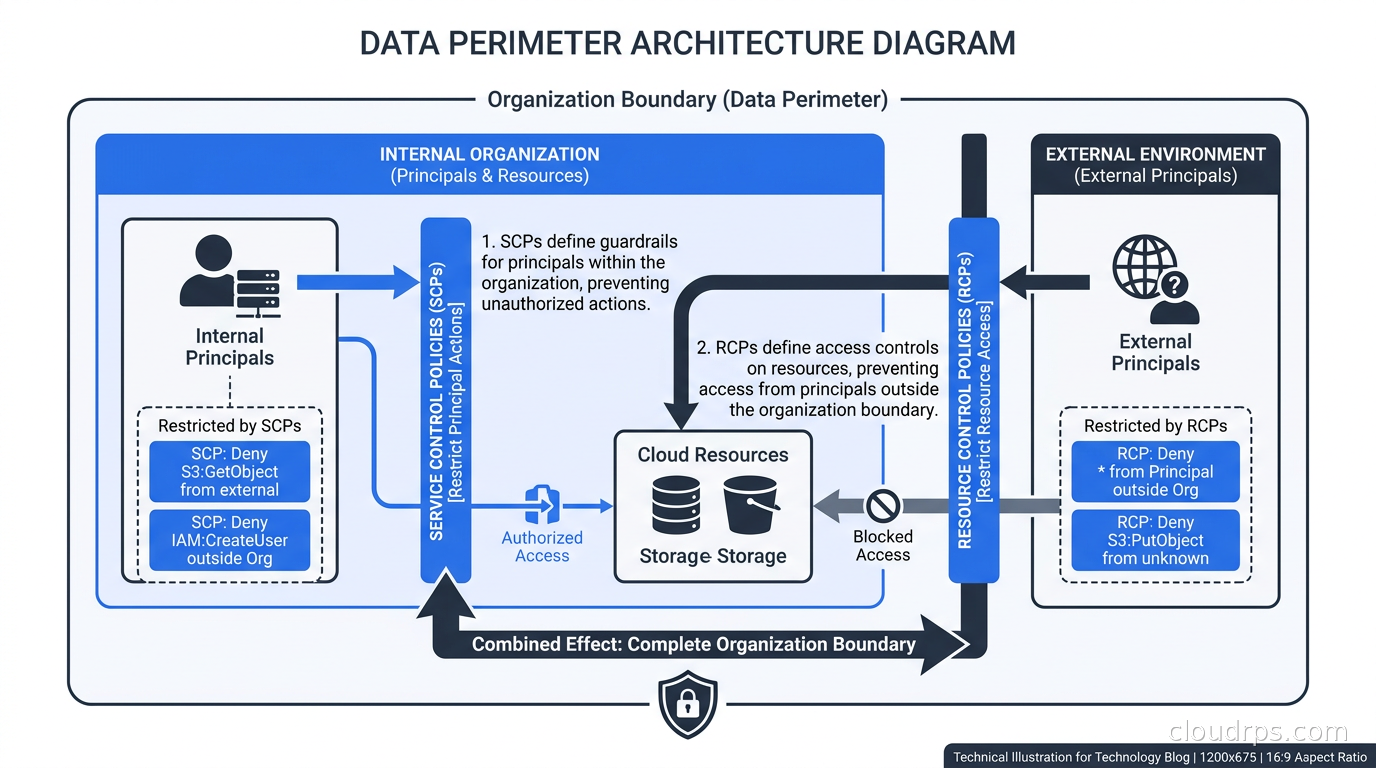
The SCP plus RCP combination is what AWS calls a data perimeter: SCPs ensure your identities only access trusted resources, RCPs ensure your resources are only accessed by trusted identities. Building this out properly is meaningful work - a few evenings with the AWS data perimeter workshop documentation - but it is the closest thing AWS has to a hard organizational boundary.
Account Factory for Terraform: Account Vending at Scale
The anti-pattern I see most often in growing organizations: someone needs a new AWS account, they email the cloud team, a human clicks through the Control Tower console to provision it, the account is delivered three days later with inconsistent baseline configuration. Then two months later someone discovers the account is missing GuardDuty or has a misconfigured IAM baseline.
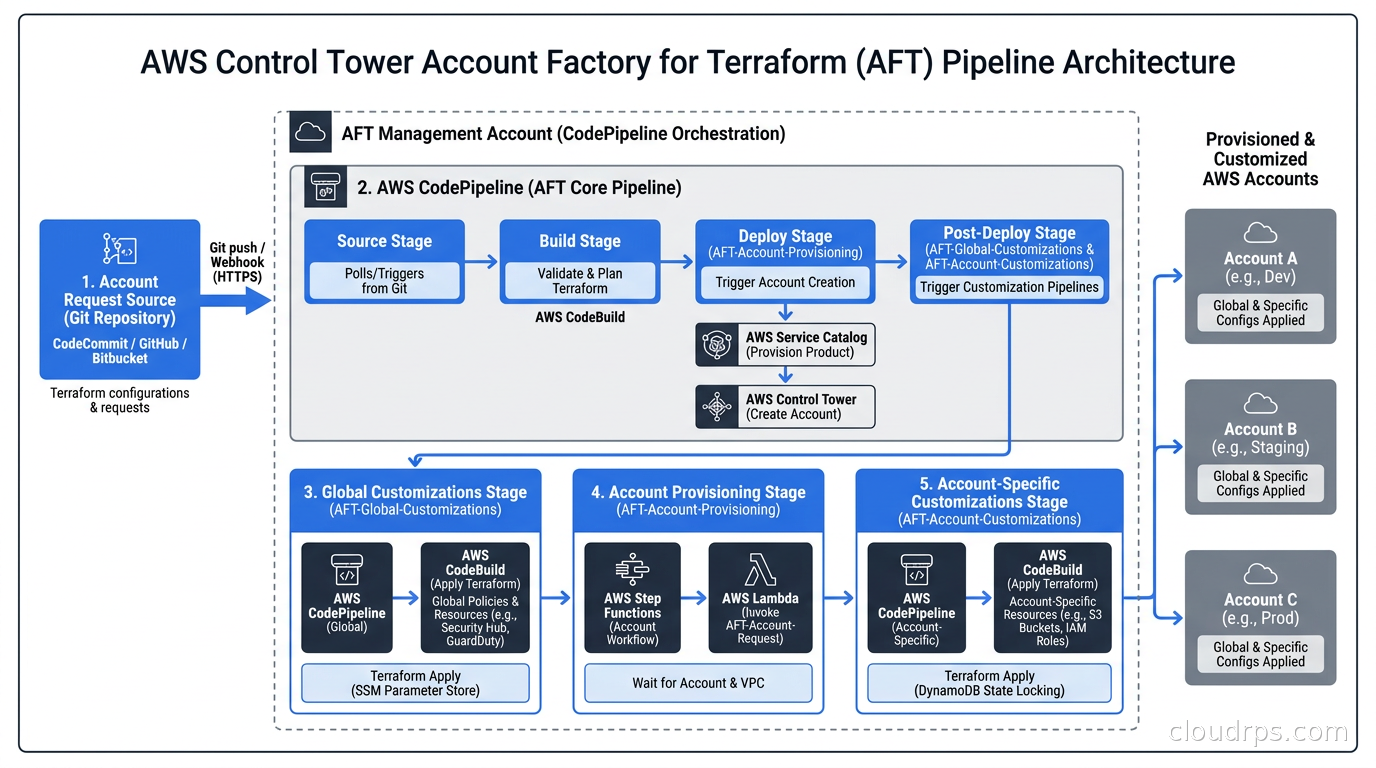
Account Factory for Terraform (AFT) solves this. AFT is a set of Terraform modules maintained by AWS that implement a GitOps-based account vending pipeline. When you need a new account, you open a pull request adding account request parameters to a git repository. AFT picks that up, provisions the account through Control Tower, and then applies customizations - installing your standard security tooling, configuring baseline networking, setting up cross-account roles - automatically.
The AFT pipeline runs in CodePipeline across four stages: account request, account provisioning, global customizations (applied to every account), and account-specific customizations.
A July 2026 update to AFT added the ability to re-trigger account customizations when an account moves to a different OU. Previously, if you moved an account from the SDLC OU to the Prod OU, you had to manually re-run customizations. Now you can set aft_customization_triggers = ["account_move"] and AFT handles it automatically. This matters for organizations that promote accounts through environments.
The infrastructure as code discipline this enforces is the real value. Every account in your organization is backed by code in version control. You have an audit trail of every account creation, every customization change, and every modification. When the auditors ask “what controls are applied to account X,” you can answer with a git log.
Multi-Account Networking
Account isolation is great until you need services to talk to each other. The standard patterns for cross-account networking are Transit Gateway (for VPC-to-VPC connectivity at scale), PrivateLink (for service-to-service access without routing table complexity), and VPC sharing via RAM (for sharing subnets from a central networking account).
The usual architecture for a mature AWS environment involves a central networking account in the Infrastructure OU that owns the Transit Gateway and all cross-account routing. Spoke VPCs in workload accounts attach to the TGW and send inter-account traffic through it. Firewall policies live centrally, and egress to the internet routes through a shared inspection VPC. This is covered in more depth in the article on AWS VPC connectivity.
One networking point worth making in the governance context: VPC sharing is underused. Rather than creating a VPC in every account, you can share subnets from a central networking account into workload accounts. Teams get their own subnets and can launch resources in them, but the underlying VPC and routing infrastructure is centrally managed. This simplifies IP address management significantly, especially as you approach IPAM limits with many small VPCs.
The Account Consolidation Anti-Pattern
Occasionally I work with teams that have gone the opposite direction: they tried to rationalize their AWS footprint by merging separate accounts back into a single shared account or a small number of accounts, usually to save money on the per-account Config overhead. This almost always ends badly.
The Config costs are real, but the blast radius and compliance exposure from shared accounts is worse. The right response to high Config costs is to tune your Config recording (record only global resources, skip high-churn resources like ephemeral EC2 instances if they are not a compliance requirement) and to use FinOps controls to catch unexpected cost growth. Do not undo account isolation to save on observability costs.
Common Mistakes That Bite Organizations
Running workloads in the management account. I have seen production databases in the management account of large companies. The management account bypasses SCPs and has Organization-level permissions. It is also harder to apply least-privilege controls there. Reserve it for Organizations, billing, and Control Tower operations only.
Flat OU structure. A single “Workloads” OU with all accounts in it means you cannot apply different governance policies to production versus development. Production accounts need stricter SCPs (no public S3 buckets, no internet-facing endpoints without explicit approval). Development accounts can be more permissive. Structure your OUs to match the governance variation you actually need.
SCPs that break Control Tower. Control Tower needs to be able to create IAM roles, attach policies, and run SSM Automation documents in managed accounts. SCPs that are too broad in their denials - blocking IAM role creation entirely, for instance - will break Control Tower’s ability to manage accounts. AWS maintains a list of actions that must remain available for Control Tower; consult it before deploying broad IAM-blocking SCPs.
Not planning account email addresses. AWS requires a unique email address per account. Organizations with many accounts often end up in a mess because they used personal emails, individual team email addresses, or aliases that point to departed employees. Use a structured format with a group alias: aws+prod-payments@company.com, aws+dev-payments@company.com. If your email provider supports plus-addressing, a single inbox can receive messages for all account root addresses.
Ignoring the Log Archive account. The Log Archive account is only useful if someone is looking at the logs. Route its CloudTrail and Config logs to your SIEM. Set S3 lifecycle policies so logs expire after your retention requirement (but not before). Enable S3 Object Lock on the log bucket so logs are immutable for the required retention period. The compliance as code tooling you use for SOC 2 or ISO 27001 will need these logs to be complete and intact.
Not using breakglass procedures. At some point you will need account-level access that bypasses normal IAM Identity Center flows - a real emergency, not just a pager alert. Have a documented break-glass procedure that includes direct IAM role access for specific emergency scenarios, a runbook, alerting on any use of the break-glass role, and a mandatory post-incident review. The secrets management layer for break-glass credentials deserves separate treatment.
Practical Advice on Getting Started
If you are starting from scratch, stand up Control Tower before you have more than a handful of accounts. It is far easier to build the governance model before the accounts exist than after. Use AFT from day one, even if your initial footprint is small - the discipline of account-as-code pays off immediately.
If you have an existing mess of accounts, the path is harder but not impossible. Start by enrolling existing accounts into Organizations without Control Tower (just Organizations) to get consolidated billing and a basic OU structure. Then enroll them into Control Tower one at a time. Expect to spend time resolving drift - IAM roles that conflict with Control Tower’s expectations, missing Config recorders, ad-hoc CloudTrail configurations. This is tedious but finite work.
For the SCP rollout, start with the safety net SCPs: block leaving the organization, block disabling GuardDuty and CloudTrail, block modifying the Log Archive bucket. These are low-risk (they stop bad things from happening) and high-value (they give you confidence in your governance model). Add region restriction and service-specific SCPs after the safety net is in place and you have verified nothing is broken.
For IAM Identity Center, connect your external IdP before giving anyone the new portal link. Getting users moved over from local IAM users to centrally-federated identities is a change management exercise, not just a technical one. Communicate the timeline, document the new access model, and keep a rollback plan for the first few weeks.
The return on investment here is not abstract. Centralized access management means you can offboard a departing employee in five minutes instead of hunting through forty accounts removing IAM users. SCP guardrails mean you sleep better knowing production configuration cannot be accidentally deleted. Account-level billing means you actually understand what each team is spending. These are the concrete outcomes that make multi-account governance worth the setup investment, even if the setup itself is not glamorous work.
Related reading: the article on cloud landing zones covers the conceptual foundation for any multi-account design, and the GitOps model for infrastructure management pairs naturally with AFT’s git-driven account vending approach.
Get Cloud Architecture Insights
Practical deep dives on infrastructure, security, and scaling. No spam, no fluff.
By subscribing, you agree to receive emails. Unsubscribe anytime.