
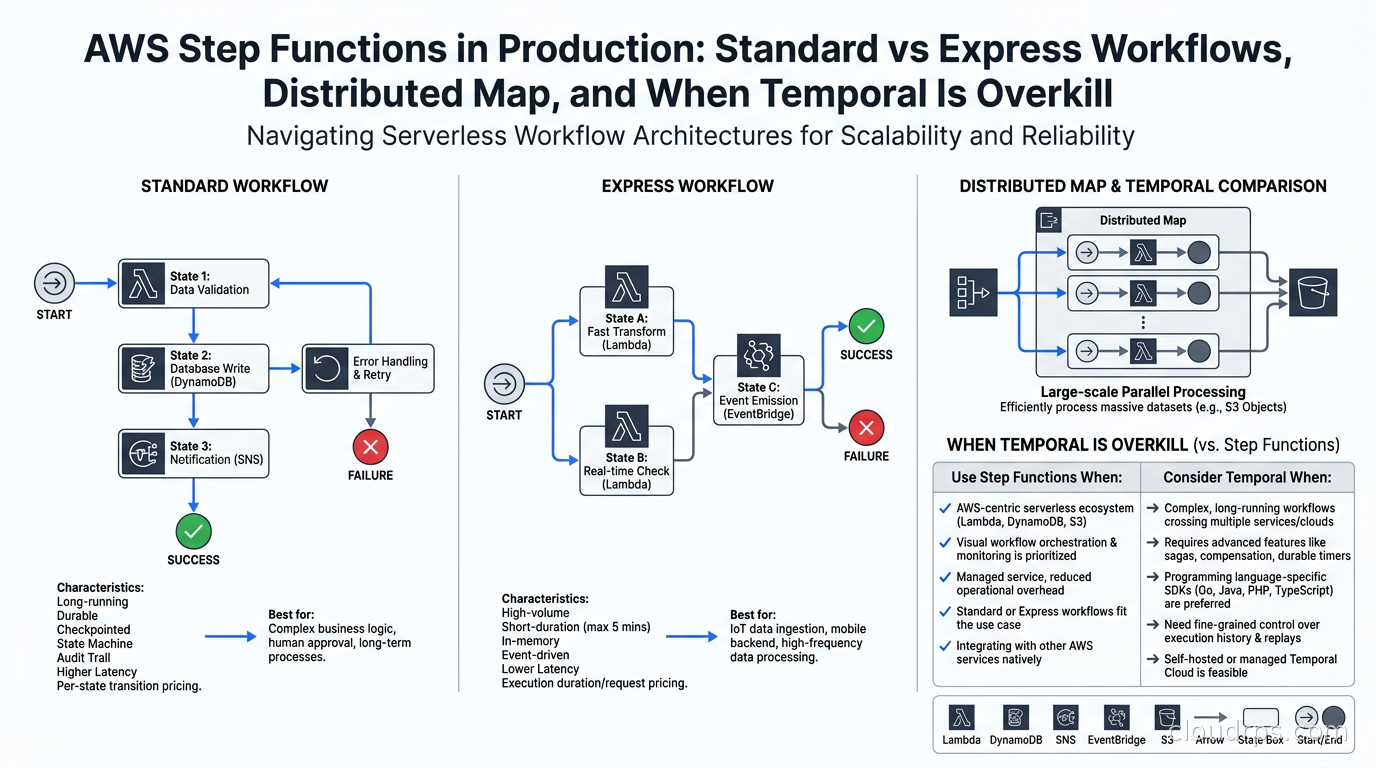
I have spent a significant portion of my twenty years building distributed systems chasing the same ghost: workflow state. Order processing that needs to survive a Lambda timeout. A multi-step data pipeline that needs human approval in the middle. A batch job that needs to fan out across ten thousand S3 objects and aggregate the results. The naive solution is always to glue Lambdas together with SQS queues and pray nothing drops a message at step three. The elegant solution, on AWS, is almost always AWS Step Functions, and yet I still see teams skipping it because they tried it once, got confused by the YAML, and decided Temporal was worth the operational overhead.
That is the wrong call for most workloads, and this guide is about showing you why.
AWS Step Functions is one of the oldest managed orchestration services in the cloud ecosystem, launched in 2016, and it has grown substantially since then. The additions of Distributed Map for large-scale parallel processing, JSONata as an alternative to JSONPath, and workflow variables have turned it into a genuinely capable platform for everything from simple Lambda chaining to multi-million-record batch processing. The catch is that the workflow type decision (Standard vs Express) and the data flow model have real operational consequences. Getting those wrong means either paying far more than necessary or running into limits that shut down your execution at the worst possible moment.
The Two Workflow Types: A Real Decision, Not a Footnote
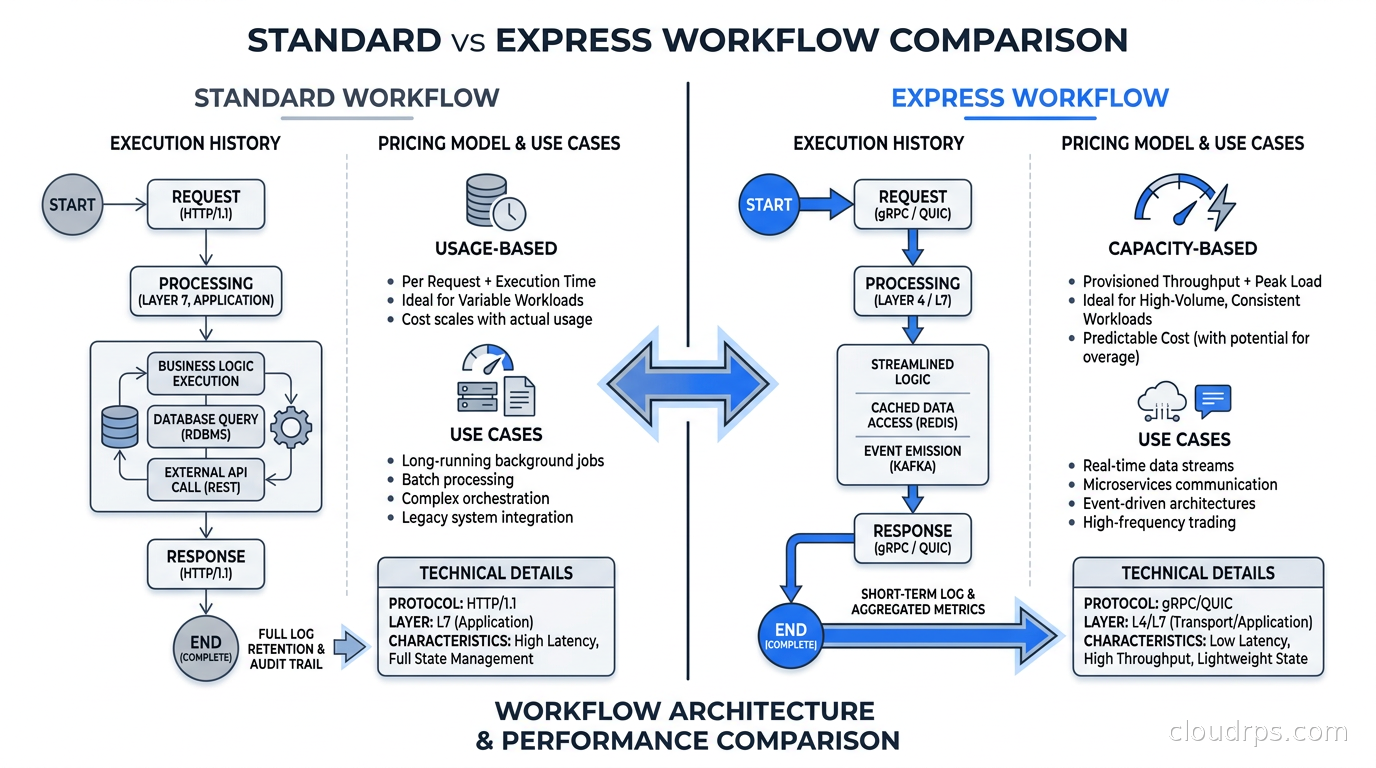
Every Step Functions tutorial eventually mentions that there are two workflow types and then hand-waves past the decision as if it is obvious. It is not. The choice determines your execution semantics, your maximum duration, your pricing model, and whether you can use certain state types at all.
Standard workflows run for up to one year, maintain a full execution history with an event-by-event audit trail, and provide exactly-once execution semantics for each state transition. The pricing model is $0.025 per 1,000 state transitions, with 4,000 free transitions per month. A five-step workflow that runs 10,000 times a day costs $1.25 per day in transitions, which is negligible. Standard workflows support all state types including Wait states that pause for an external callback, which makes them the right choice for any workflow that involves humans, external events, or multi-day processing.
Express workflows are fundamentally different: they run for a maximum of five minutes, they provide at-least-once execution semantics (meaning states can execute more than once if the execution is retried), and they are priced per-request ($1.00 per million executions) plus per-duration ($0.00001667 per GB-second with a 64 MB minimum). They have no execution history in the console unless you push to CloudWatch Logs, which means debugging is harder by default. Express workflows exist for high-volume, short-duration orchestration where you want Step Functions to replace Lambda-to-Lambda coordination without the per-transition cost adding up.
The heuristic I use: if the workflow involves anything that could block waiting for an external event, if it runs for more than a few seconds, or if you need an audit trail, use Standard. If you are replacing a chain of five synchronous Lambda calls that together take under a minute and you expect millions of executions per day, use Express.
I have seen teams make both mistakes. One team put an order processing workflow on Express and hit the five-minute limit when a third-party payment API started taking 90 seconds to respond during peak load. Another team ran a high-frequency ETL pipeline on Standard workflows and watched their state transition count turn into a meaningful AWS bill because they had 40 states in the workflow running hundreds of thousands of times per day. Both were fixable, but both were painful.
The Amazon States Language: JSONPath Was Fine, JSONata Is Better
The Amazon States Language (ASL) is the JSON-based definition language for Step Functions state machines. For most of its history, data manipulation in ASL meant JSONPath: a query syntax for extracting values from the input JSON and passing them between states. JSONPath is workable for simple field extractions but becomes genuinely ugly when you need any transformation logic. The common workaround was to add a Lambda function just to reshape a JSON payload, which adds latency, cost, and another thing to deploy and maintain.
In late 2024, AWS introduced JSONata support as an opt-in alternative, announced prominently at re:Invent 2025. JSONata is a declarative expression language that can filter, transform, and aggregate JSON data without any Lambda. You can do string concatenation, arithmetic, conditional logic, and array transformations inline in the state machine definition. The query language is selected at the state machine level or overridden per-state with a QueryLanguage field.
The same release also added workflow variables: named slots that persist across state executions within a single workflow run. Before variables, if you needed a value from step two available at step eight, you had to thread it through every intermediate state’s input and output, which produced fragile state machines where changing the shape of any intermediate result broke downstream states. Variables fix that cleanly.
In practice, a state machine definition now looks something like this at the top level for a JSONata-enabled workflow:
{
  "Comment": "Order processing pipeline",
  "QueryLanguage": "JSONata",
  "StartAt": "ValidateOrder",
  "States": { ... }
}
And within a state, transformations look like {% $orderTotal * 1.1 %} rather than a reference chain through JSONPath. The reduction in boilerplate Lambdas alone is worth the migration. I have seen state machines drop from 12 Lambda invocations to 6 after a JSONata refactor, with meaningful improvements in latency and cost for high-frequency Express workflows.
Distributed Map: The Step Functions Feature That Deserves Its Own Article
The Map state in Step Functions has existed for years in Inline mode: iterate over an array in the workflow’s input, run the same states for each item, collect the results. Inline Map is fine for arrays up to a few hundred items. When you need to process tens of thousands of items, and when those items come from an S3 object or a separate array too large to pass through workflow state, you need Distributed Map.
Distributed Map runs each iteration as a separate child workflow execution rather than as inline state transitions within the parent. This means each item gets its own execution context, its own retry tracking, and its own isolated execution history. The parent workflow waits for all children to finish (or reaches the configured concurrency limit and drains as slots open). As of mid-2026, Step Functions supports up to 10,000 concurrent child executions per Distributed Map iteration by default.
The data model is the key architectural difference. Distributed Map can read its input from S3 directly: a CSV file, a JSON array file, or JSONL (JSON Lines format, which AWS added support for). This means you can trigger a Step Functions execution with a small input payload and have the Distributed Map state process a file with millions of records by reading each line from S3 independently.
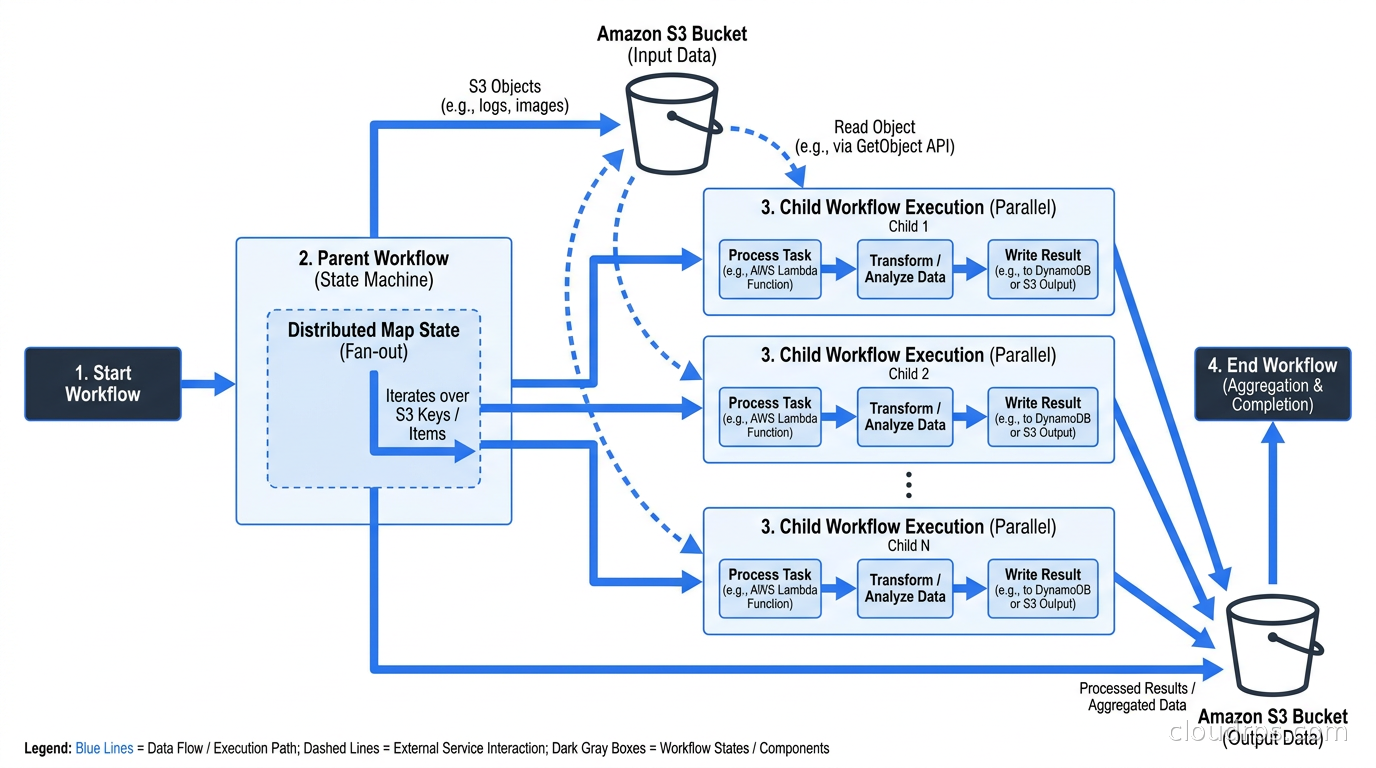
There is an important constraint: Distributed Map only works in Standard parent workflows, not Express. The child executions can be Express (which is the cost-efficient choice for short per-item work), but the parent that orchestrates the map must be Standard. This is easy to miss in the documentation.
The pattern I use for large batch workloads:
- A Standard parent workflow triggers, receives a reference to the input S3 file in its input payload.
- A Distributed Map state reads the S3 file, spawning one Express child execution per item (or per configurable batch size if you want to process items in groups).
- Each Express child calls the relevant SDK integrations directly (writes to DynamoDB, calls an API, pushes to a queue) without a Lambda in the middle.
- The child returns a compact result: status code, item ID, and a pointer to any error detail written to S3. Not the full item data.
- The parent aggregates results, writes a summary to DynamoDB, and notifies downstream systems.
The pointer-back-to-S3 pattern for child results is not optional for anything beyond trivial datasets. The parent execution collects all child outputs, and if each child returns a large payload, the parent’s result size hits limits quickly. Keep child outputs small and write the detail elsewhere.
Direct SDK Integrations: Skip the Lambda
One of the biggest misuses of Step Functions I have seen is treating it as a Lambda sequencer: every state calls a Lambda, and the Lambda calls an AWS SDK API. This adds unnecessary latency (Lambda cold start, invocation overhead), unnecessary cost (Lambda invocation fee plus Lambda duration), and unnecessary operational surface (another function to deploy, monitor, and maintain).
Step Functions supports optimized SDK integrations that call AWS service APIs directly from the state machine definition: DynamoDB GetItem and PutItem, SQS SendMessage, SNS Publish, Bedrock InvokeModel, S3 GetObject, and dozens more. For many workflows, you can replace multiple Lambda functions with direct state transitions. The integration type matters for error handling: the .sync suffix (e.g., arn:aws:states:::dynamodb:putItem) runs synchronously and returns a result you can use immediately in the next state, while .waitForTaskToken pauses the execution until your downstream service calls back with the token, which is the mechanism for human approval workflows and long-running async integrations.
The Bedrock integration is particularly useful for AI-driven workflows. A multi-step LLM pipeline (extract, classify, generate, verify) runs cleanly as a Step Functions state machine with Bedrock direct integrations at each stage, no Lambda glue, and automatic retry logic in the state machine definition. For teams building on AI gateway and LLM proxy patterns or more complex AI agent orchestration pipelines, Step Functions handles the outer loop reliably while the AI service handles the inference.
Error Handling and Retry Patterns
This is where Standard workflows genuinely shine. Each state in a Standard workflow can define Retry blocks (with configurable MaxAttempts, IntervalSeconds, BackoffRate, and JitterStrategy) and Catch blocks that route failed executions to error-handling states. The execution history records every attempt, every error, and every state transition, which makes debugging production failures far more tractable than digging through CloudWatch Logs.
A production retry block for an external API call looks like this:
"Retry": [
  {
    "ErrorEquals": ["ServiceUnavailableException", "TooManyRequestsException"],
    "IntervalSeconds": 2,
    "MaxAttempts": 6,
    "BackoffRate": 2,
    "JitterStrategy": "FULL"
  },
  {
    "ErrorEquals": ["States.ALL"],
    "IntervalSeconds": 1,
    "MaxAttempts": 3,
    "BackoffRate": 2
  }
]
The JitterStrategy: FULL addition (available since 2023) implements exponential backoff with full jitter, which prevents the thundering herd problem when multiple concurrent executions are retrying the same downstream service simultaneously.
One pattern that took me too long to discover: using a Catch block that routes to a Choice state rather than directly to a failure state. The Choice state can inspect the error type and route to different recovery paths: auto-healing for known transient errors, human escalation for data quality errors, and dead-letter recording for everything else. This turns the error handler into a small workflow of its own rather than a binary pass/fail.
Step Functions vs Temporal vs EventBridge Pipes
This comparison comes up constantly, and the answer genuinely depends on what you are building.
EventBridge Pipes is the right tool when you have a single source feeding a single target with optional filtering and enrichment: a DynamoDB stream that enriches events with additional lookups before pushing to an EventBridge bus, or an SQS queue that feeds a Lambda with batching. EventBridge Pipes does not replace Step Functions for multi-step orchestration. It handles one-to-one integration, not complex branching logic. For the broader event routing patterns around EventBridge, SNS, and SQS, the services complement each other rather than compete.
Temporal is the right tool when your workflow logic lives primarily in application code, when you need multi-language support beyond what Step Functions supports, when your execution history requirements exceed Step Functions’ 25,000-event limit, or when you need workflow portability across clouds. Temporal’s code-first approach makes it more testable and more maintainable for complex workflows with lots of branching logic. The Temporal workflow engine article covers this in depth. The trade-off is operational overhead: Temporal requires running a Temporal server cluster (or paying for Temporal Cloud), managing its dependencies, and handling upgrades. For teams that live entirely in AWS and want managed infrastructure, Step Functions is compelling precisely because there is no cluster to operate.
Step Functions wins when you are AWS-native, when your workflow is orchestrating AWS services (DynamoDB, SQS, SNS, Bedrock, ECS tasks), when you want the visual workflow editor for onboarding junior engineers or documenting complex flows, and when your workflows fit within its limits. The 25,000-event history limit is rarely a constraint in practice: a 10-step workflow running 2,500 times before it hits the limit is most workflows.
Where Step Functions loses: workflows that require more than 64KB of input/output at the state transition level (Temporal supports 2MB), workflows that need the execution logic embedded in code for testability, and workflows where you need to query execution state programmatically across millions of concurrent runs.
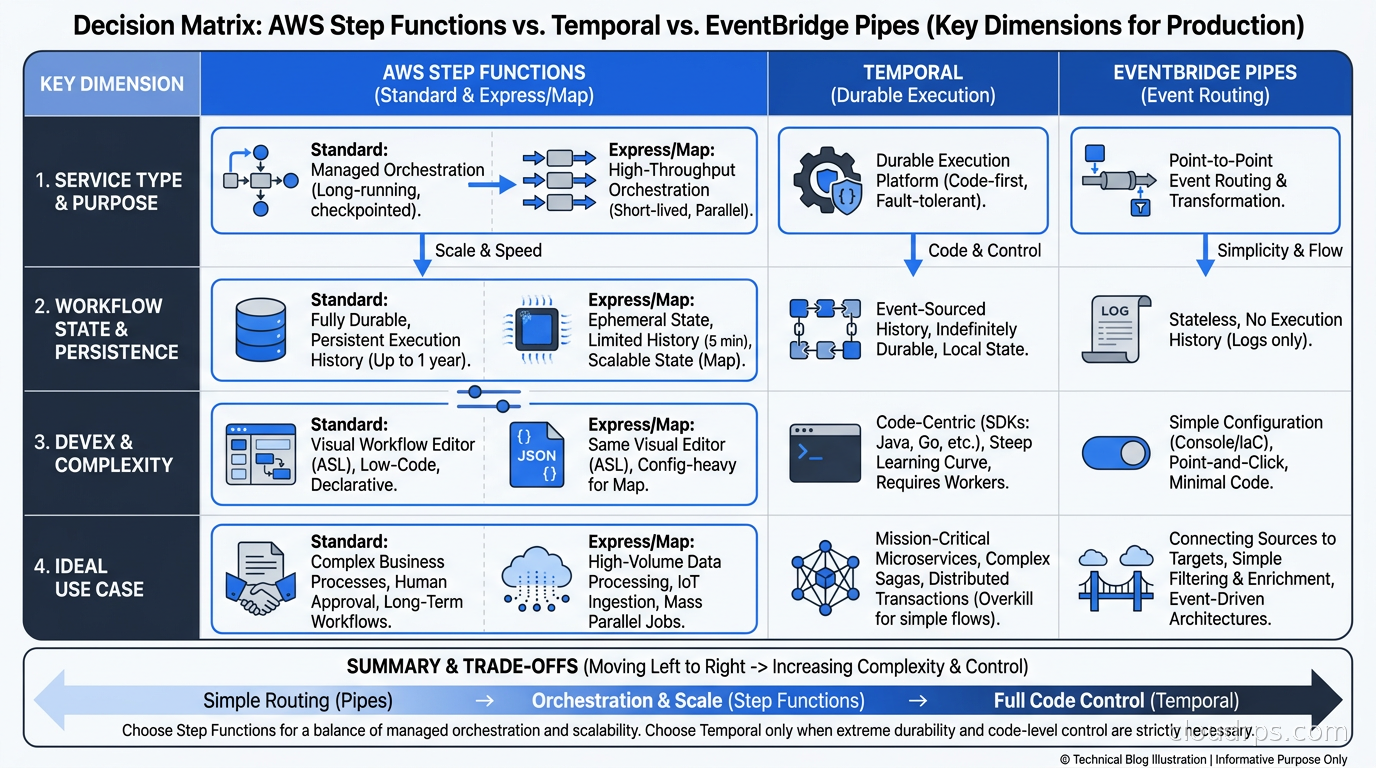
The durable execution alternatives article covers the broader landscape of orchestration engines beyond Temporal. Step Functions occupies the managed, AWS-native corner of that space, and for teams that have already committed to AWS, the managed plane often wins the operational argument.
Observability in Practice
Standard workflow executions are queryable in the console and via API, with full event history. The problem is scale: when you have millions of concurrent executions, the console becomes unwieldy and you need programmatic access to execution status.
The patterns that work:
Tag your executions with correlation IDs from your application at execution start. This makes it possible to find the Step Functions execution corresponding to a specific order, user action, or request ID without grepping through CloudWatch.
Push execution events to CloudWatch Logs for Standard workflows if you need durable, queryable log history beyond the execution detail page. For Express workflows, CloudWatch Logs is the only place execution detail is persisted; configure it explicitly or you will have nothing to look at when debugging.
Use X-Ray tracing end-to-end. Step Functions integrates with X-Ray natively: each state appears as a segment in the trace, Lambda functions invoked from states appear as subsegments, and SDK integration calls show up as trace spans. A request that touches 12 states across 3 Lambda functions and 4 DynamoDB calls is fully visible in a single X-Ray trace. For teams using OpenTelemetry for distributed tracing across their stack, X-Ray provides the Step Functions side of the picture that OTel cannot reach directly.
Track execution duration as a metric. CloudWatch provides
ExecutionTimeas a built-in metric for Standard workflows. Set an alarm for executions that exceed your expected maximum duration. Workflows that take longer than expected usually mean an external dependency is sick, a Wait state callback was never sent, or a downstream queue is backing up.
Pricing in Context
The Step Functions pricing model is easy to overlook until a workflow runs unexpectedly frequently or grows in complexity. The numbers, verified against AWS pricing as of October 2026:
Standard: $0.025 per 1,000 state transitions, with 4,000 free per month. A 10-state workflow running 100,000 times a month costs $25. The same workflow running 10 million times a month costs $2,500.
Express: $1.00 per million executions plus $0.00001667 per GB-second. Duration cost at minimum 64 MB billed memory for a 1-second Express execution is $0.00000107. A million short Express executions costs about $2 in request fees plus duration.
The crossover point depends heavily on workflow shape. High-transition, low-volume workflows favor Express on cost even if duration is under five minutes. Low-transition, long-running workflows are exactly what Standard is designed for. For cost optimization guidance on workflow-heavy architectures, the cloud cost anomaly detection patterns apply well: step function transition counts are predictable enough to anomaly-detect, and a sudden spike usually indicates a retry storm or a bug causing executions to loop.
Gotchas I Have Actually Hit
The 256KB state size limit still bites people. Even with workflow variables, each state’s input and output is bounded. If you pass large payloads through state machine states, move the data to S3 and pass a reference. This is not optional for anything beyond small documents.
Wait states and heartbeats require you to send the task token. A workflow using waitForTaskToken pauses indefinitely until your code calls SendTaskSuccess or SendTaskFailure with the token. If your downstream system receives the token but never calls back because it crashed, the execution hangs. Use a timeout on the Wait state to bound the hang time, and handle the States.HeartbeatTimeout error explicitly.
Express workflows and at-least-once semantics. At-least-once means a state can run more than once. Every Lambda you invoke from an Express workflow must be idempotent. This is not a Step Functions-specific requirement, but the documentation buries it. Using DynamoDB conditional writes or idempotency keys at every state is the right approach for Express workflows that involve mutations.
The execution list is eventually consistent. If you start an execution and immediately query for it via ListExecutions, it may not appear yet. Build retry logic into any process that looks up an execution immediately after starting it.
Distributed Map and INLINE Map have different limits. Inline Map is bounded by the 25,000-event execution history limit. If each iteration adds more than a few events to the history, you will hit that limit before you expect to. Distributed Map bypasses this because child executions have their own history. Know which you are using and what the implications are.
When to Reach for Step Functions
The pattern I follow after twenty years of building on AWS: reach for Step Functions any time you have two or more asynchronous steps that need reliable coordination and at least one of these conditions is true: the workflow runs for more than a few seconds, the workflow involves an external system that might fail, the workflow needs human review or approval, or the workflow processes a variable number of items that could be empty or could be thousands.
For the narrow case of short-lived, high-volume Lambda chaining with no external async steps, Express workflows with JSONata transformations often replace a brittle Lambda-calls-Lambda-calls-Lambda chain cleanly and cheaply.
For workflows that span days, need 200,000-event execution histories, involve complex business logic better expressed in code than YAML, or must run outside AWS: use Temporal, or look at the broader durable execution landscape.
Step Functions occupies a sweet spot that more teams should use: fully managed, deep AWS integration, no cluster to operate, visual debugging, and a pricing model that is genuinely cheap for most orchestration workloads. The learning curve is the ASL definition format, and with JSONata that curve got meaningfully flatter at re:Invent 2025.
The failure mode I see most often is not teams that tried Step Functions and gave up, it is teams that never tried it and instead built fragile Lambda chains with SQS queues, DynamoDB-as-a-lock, and manual retry logic that they rebuild from scratch for every new workflow. That is weeks of engineering time and months of operational debt, for a problem that Step Functions solves out of the box.
Build the state machine. Debug it in the console. Then go work on something that actually differentiates your product.
Get Cloud Architecture Insights
Practical deep dives on infrastructure, security, and scaling. No spam, no fluff.
By subscribing, you agree to receive emails. Unsubscribe anytime.