
I have spent years helping organizations figure out where to run their workloads, and the question of bare metal versus virtual machines comes up more often than people expect. The cloud industry spent a decade evangelizing virtualization so successfully that many engineers now treat VMs as the natural unit of compute, as though physical servers are some quaint artifact from the pre-cloud era.
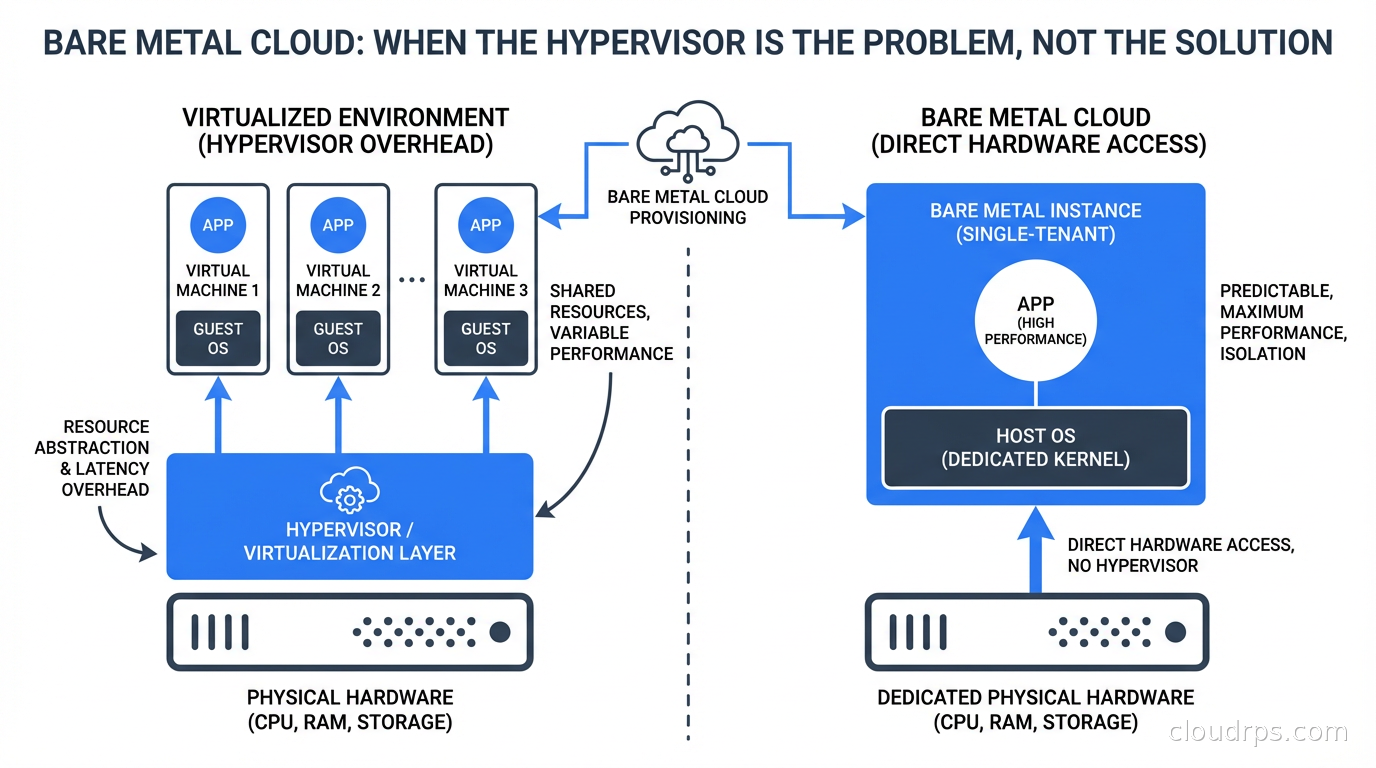
The reality is more interesting. Virtual machines are the right default for a huge range of workloads. But for a specific set of use cases, the hypervisor sitting between your workload and the hardware is not a feature. It is overhead. It consumes CPU cycles for virtualization tasks, adds memory pressure from the hypervisor’s own footprint, and introduces a layer of abstraction that costs you latency you cannot get back.
Bare metal cloud is the answer to a specific question: how do I get dedicated physical hardware with cloud-like provisioning, billing, and automation, without running my own data center? For the right workloads, it is the correct answer. Understanding when and why requires understanding what the hypervisor is actually doing to your performance.
What Bare Metal Cloud Actually Is
Let me be precise because the term gets used loosely. Bare metal cloud means you provision a physical server and you get exclusive access to all of its resources: every CPU core, every thread, all the memory, all the NVMe drives. No other workloads run on your physical host. There is no hypervisor between your OS and the hardware.
What makes it “cloud” rather than “colocation” is the operational model: you provision through an API, billing is on-demand or reserved, you do not manage hardware maintenance or rack space, and the provider handles the physical lifecycle. You get the ownership properties of dedicated hardware with the operational simplicity of cloud.
The major providers include Equinix Metal (formerly Packet, the most pure-play bare metal cloud), Oracle Cloud Infrastructure (which has long offered bare metal as a first-class option), IBM Cloud Bare Metal, and various regional providers. AWS, Azure, and GCP offer what they call “bare metal instances” (AWS’s i4i and c7g bare metal types, Azure’s M-series bare metal), but these are a small subset of their instance catalogs, not the primary service model.
This is different from colocation, where you physically ship servers to a data center and manage them yourself. In colocation, you own the hardware, deal with hardware failure, handle firmware updates, and manage every aspect of the physical machine. In bare metal cloud, the provider owns and maintains the hardware; you just get exclusive use of it.
The Hypervisor Tax: What You Are Paying for VMs
To understand when bare metal is worth it, you need a clear accounting of what virtualization costs you. The costs are not uniform across workloads. Some workloads barely notice the hypervisor. Others are substantially impacted.
CPU overhead: Modern hypervisors (KVM, VMware ESXi, Hyper-V) use hardware virtualization extensions (Intel VT-x, AMD-V) to minimize CPU overhead for most instructions. Simple compute workloads run at near-native speed. The overhead shows up in specific scenarios: frequent VM exits (transitions from guest to hypervisor), which happen during certain I/O operations, hypercalls, and interrupt handling. For a CPU-bound data processing workload that stays in userspace, you might see 2-5% overhead. For a workload that hammers I/O, the overhead can be higher.
NUMA and cache topology: Hypervisors can abstract away the physical NUMA (Non-Uniform Memory Access) topology of the server. A physical server might have two CPU sockets, each with local memory. Accessing memory local to your CPU socket is fast; accessing memory on the other socket is slower. When a VM is sized to span NUMA boundaries, or when the hypervisor schedules VM vCPUs across physical NUMA nodes, you can see significant memory latency increases. High-performance applications that have been carefully tuned for NUMA locality on bare metal can perform much worse in a VM.
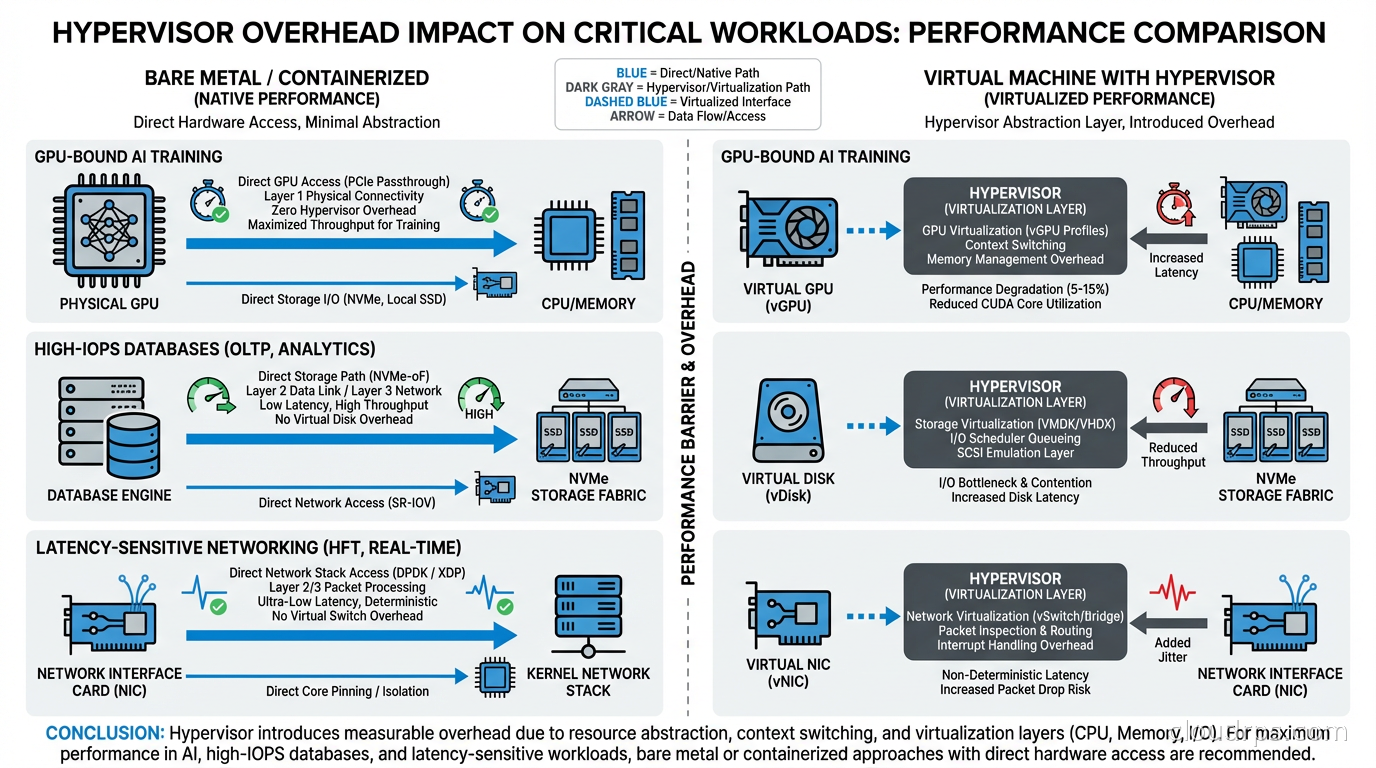
I/O virtualization: Disk and network I/O go through a virtualization layer. For most workloads, this is not a bottleneck. For workloads doing millions of I/O operations per second (high-performance databases, NVMe-backed analytics) or requiring very low-latency networking (financial trading, real-time communications infrastructure), the virtualization layer adds latency and CPU overhead.
Memory overhead: The hypervisor itself consumes memory. On a 512 GB server, the hypervisor might use 2-4 GB for its own operation. More importantly, features like memory ballooning, page sharing, and transparent memory pages introduce memory access patterns that can hurt cache performance for workloads that depend on DRAM bandwidth.
Noisy neighbor effects: Even on hypervisors with strong isolation, your VM shares physical resources with other VMs on the same host. Shared last-level CPU cache, shared memory buses, shared I/O paths. A neighbor doing intensive I/O affects your I/O latency even if they cannot access your data. This is more of an issue on public cloud general-purpose instances than on high-performance instance types, but it is real.
For most web applications, microservices, and general-purpose workloads, none of these matter. The hypervisor overhead is below the noise floor of your application’s bottlenecks. But for specific categories of workloads, they matter a lot.
Workloads Where Bare Metal Wins
GPU-accelerated AI training: This is the dominant use case driving bare metal cloud adoption right now. Large model training jobs on clusters of A100 or H100 GPUs are extremely sensitive to inter-GPU communication performance. When you run GPU workloads in VMs, GPU virtualization adds overhead: vGPU slices, shared PCIe bandwidth, virtualized NVLink. Multi-GPU training uses NVLink for high-bandwidth GPU-to-GPU communication within a server and Infiniband or RoCE for cross-server communication. Virtualization layers on these high-performance interconnects add latency and reduce bandwidth.
I have seen training jobs that were 30-40% slower on GPU VMs than on equivalent bare metal, almost entirely due to collective communication overhead in the AllReduce operations that distributed training depends on. For a training run that costs $50,000 in compute, that gap matters. Our GPU cloud infrastructure guide covers hardware selection in detail; bare metal is the delivery mechanism that lets you access those GPUs without abstraction layers.
High-frequency financial applications: Trading systems, risk engines, and pricing models that require sub-millisecond latency profiles. These applications are often already running kernel-bypass networking techniques (DPDK, RDMA) that do not work in standard VMs. They require precise CPU affinity, NUMA-aware memory allocation, and direct hardware access. The hypervisor is incompatible with the entire operational model.
High-performance databases and storage: PostgreSQL or MySQL running on bare metal NVMe can deliver 2-4x the IOPS of the same database on a cloud VM with virtualized storage, at similar or lower cost. If you are running a database that is genuinely IOPS-limited and you have explored all software optimizations (query tuning, connection pooling, indexing), bare metal is worth evaluating. The database connection pooling patterns that reduce application-side pressure are still relevant, but the storage I/O ceiling is simply higher on bare metal.
High-performance computing and simulation: Physics simulations, CFD (computational fluid dynamics), financial Monte Carlo, genomics workloads. These often have tight coupling between compute nodes using MPI (Message Passing Interface) over high-speed interconnects. VM-to-VM latency over virtualized networks is higher and more variable than direct hardware interconnects on bare metal. This variability hurts the performance of tightly-coupled parallel workloads.
Security-sensitive workloads requiring hardware isolation: Some security requirements mandate that workloads cannot share physical hardware with untrusted tenants. Hypervisor vulnerabilities (Spectre, Meltdown, and their successors) affect shared physical hardware. For workloads that need hardware-level isolation guarantees, bare metal is the only option. This is increasingly relevant in regulated industries and for applications that process sensitive data.
The Economics: Is Bare Metal Actually Cheaper?
The cost question is not simple, and the answer depends heavily on your utilization patterns.
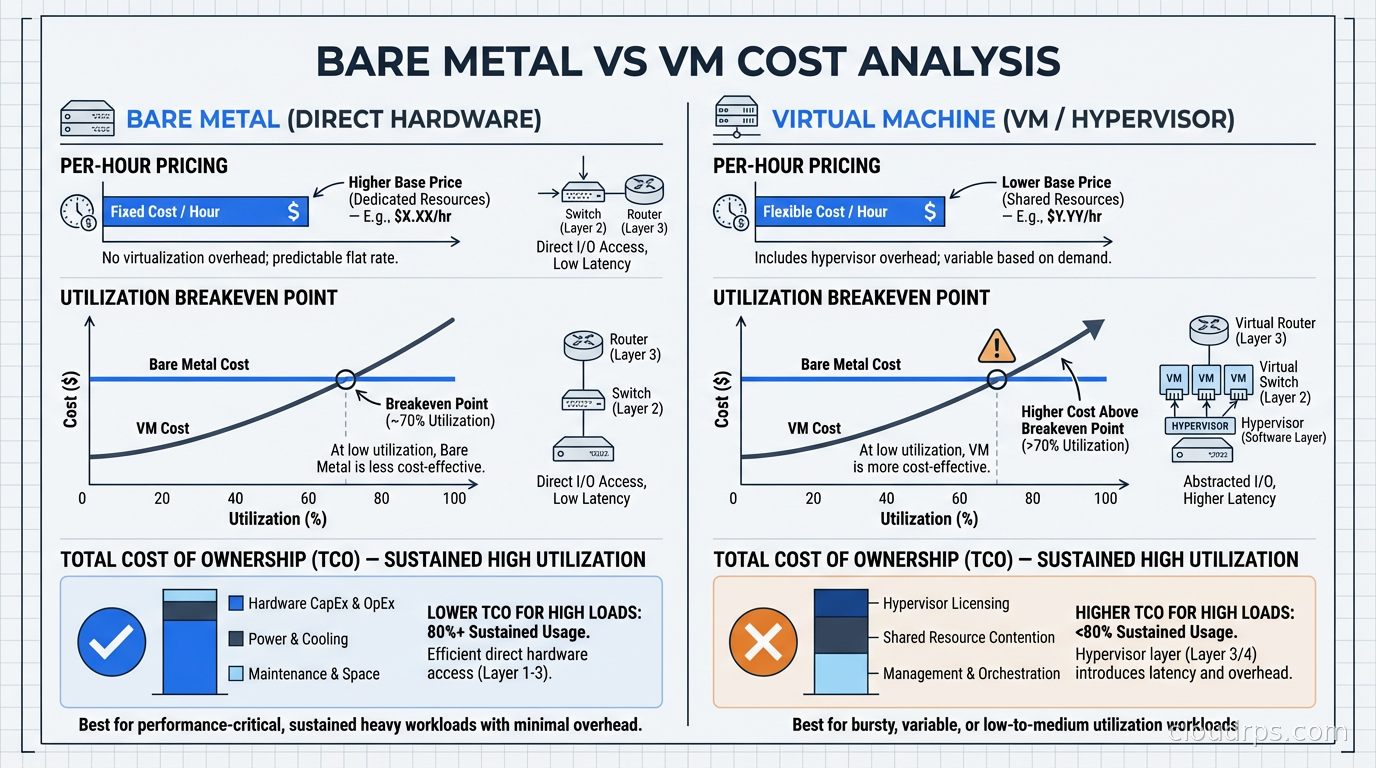
Per-hour, bare metal servers cost more than individual VMs because you are paying for exclusive access to the whole machine. An Equinix Metal c3.small (32 cores, 256 GB RAM) runs around $1.50-2.00/hour. An equivalent allocation of VM cores and memory from AWS might cost $1.00-1.50/hour for On-Demand, or significantly less with Reserved capacity.
But the comparison is wrong. When you run bare metal, you pack your own workloads onto the machine. Instead of buying 32 vCPUs of VM capacity, you are buying the ability to run 32 cores worth of workloads with no noisy-neighbor effects and no hypervisor overhead. If your utilization is high, you extract more work per dollar from bare metal than from VMs.
The breakeven calculation depends on your packing efficiency. If you have a workload that needs the whole machine (training a large model, running a high-throughput database), bare metal is likely cheaper than the equivalent VM capacity. If you have many small workloads that you would run multiple VMs for, VMs’ bin-packing efficiency often wins.
The real cost advantage for bare metal shows up in performance-per-dollar for the specific workloads I described above. A GPU training job that runs in 8 hours on bare metal but 11 hours on equivalent VM infrastructure costs 37% more in GPU compute on the VM path. You are not comparing the hourly rate; you are comparing total cost to accomplish a task.
Provisioning and Operations
The main concern people have about bare metal cloud is operational: is it harder to manage than VMs? The answer is: it depends on the provider and your tooling.
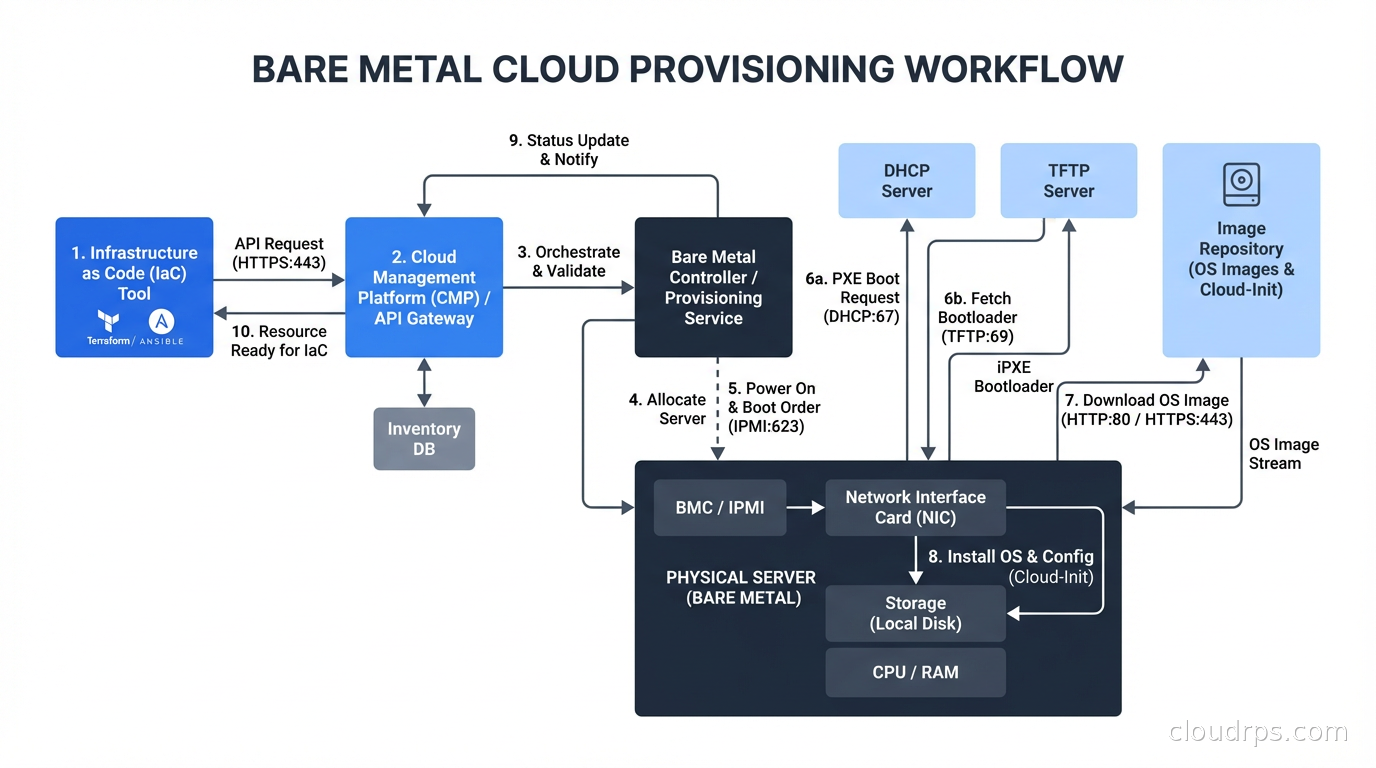
Modern bare metal cloud platforms provision servers in 5-10 minutes via API or Terraform. You get a clean OS image on dedicated hardware, a public IP, and credentials. From this point, your operations look identical to VM operations. You use the same configuration management tools (Ansible, Chef, Puppet), the same monitoring agents, the same container runtimes if you want to run Kubernetes on bare metal.
Equinix Metal’s API is one of the cleaner bare metal provisioning APIs I have worked with. You specify a plan, a location, an operating system, and optionally cloud-init user-data, and you get a running server. The automation story is solid. Terraform provider support is mature.
The operational difference from VMs is in failure handling. When a VM instance has a hardware problem, the hypervisor can live-migrate it to another host. When a bare metal server has a hardware problem, you need to provision a new server and restore your workload to it. This is closer to the “pets vs cattle” continuum, but for the high-performance workloads that justify bare metal, you typically already have an approach to workload migration: checkpointing training runs, database failover to replicas, stateless compute that can be rescheduled.
For long-running stateful workloads on bare metal, you absolutely need a disaster recovery plan. Our disaster recovery planning guide is directly applicable here; the RTO and RPO implications of bare metal failure are different from VM failure, and you should design accordingly.
Kubernetes on Bare Metal
A trend worth addressing: running Kubernetes on bare metal cloud for high-performance workloads. This is increasingly common for GPU clusters and high-throughput data processing.
The pattern is: provision bare metal servers, deploy a Kubernetes distribution (K3s, RKE2, kubeadm-based), and run your workloads as containers with GPU passthrough. The GPU scheduling is handled by the NVIDIA device plugin, which exposes physical GPUs as schedulable resources. Each Pod gets exclusive access to one or more physical GPUs.
This gives you the workload orchestration and scheduling benefits of Kubernetes with the hardware access benefits of bare metal. The Kubernetes control plane adds minimal overhead for the types of workloads that justify bare metal. You lose live migration, but for GPU training workloads you were never using it anyway.
Nutanix’s NKP Metal (announced for GA in the second half of 2026) is targeting exactly this pattern: extending Kubernetes platform management to bare metal for edge and GPU training use cases. It is a sign that the ecosystem is moving toward treating bare metal as a first-class platform for Kubernetes, not an exception. This relates directly to the Kubernetes operators and automation patterns that make it practical to manage stateful workloads on bare metal clusters.
When NOT to Use Bare Metal
Given the trend toward AI workloads making bare metal more popular, I want to be clear about where it is the wrong choice.
Variable workloads do not benefit from bare metal. If your load fluctuates by 10x between peak and off-peak, VMs’ ability to scale up and down is worth more than the hypervisor savings. With bare metal, you either overprovision (expensive) or under-provision (painful).
Workloads you could run at 20% utilization. If your bare metal server sits mostly idle, you are paying for dedicated hardware that is mostly not being used. At low utilization, the VM path is almost certainly more economical.
Teams without the operational maturity to handle hardware failure. If you are a small team running a few services, VM-based infrastructure with its live migration, managed backups, and automatic replacement of failed instances reduces operational overhead that matters a lot at your scale.
Development and staging environments almost never need bare metal. Use VMs for development environments, even if production runs on bare metal. The cost savings are real and the performance difference does not matter for development.
The Actual Decision Framework
Here is how I walk clients through this decision:
First, identify the bottleneck. Is your workload actually hardware-constrained? Profile it. Is the limiting factor CPU, memory bandwidth, I/O, or network? If the limiting factor is application logic, database query performance, or application-level inefficiency, bare metal will not help. Fix the software first.
Second, quantify the overhead. If you are running on VMs and suspect hypervisor overhead, measure it. Run the same workload on a comparable bare metal server (most providers have hourly billing, so this is a cheap experiment) and compare throughput and latency. If the difference is less than 10%, bare metal is probably not worth the operational complexity.
Third, look at the utilization pattern. If you need the resources continuously and at high utilization, bare metal economics improve. If the workload is bursty, VMs’ elasticity wins.
Fourth, consider the operational model. Do you have the team and tooling to manage bare metal failure? If a server goes down at 3 AM, can you recover within your RTO? If not, add that capability before moving critical workloads to bare metal, or choose a provider with stronger infrastructure SLAs.
The cloud architecture tradeoffs that drive organizations to move workloads back on-premises are often the same tradeoffs that make bare metal cloud attractive as a middle path: better performance and cost efficiency than public cloud VMs, without the capital expense and operational overhead of owning your own hardware. For the right workloads, bare metal cloud is not a regression to the pre-cloud era. It is a sophisticated choice about where to place your abstractions.
Get Cloud Architecture Insights
Practical deep dives on infrastructure, security, and scaling. No spam, no fluff.
By subscribing, you agree to receive emails. Unsubscribe anytime.