
I learned to appreciate bastion hosts the hard way. In 2004, I was managing infrastructure for a financial services firm that had a flat network – every server could reach every other server, and administrators connected directly from their workstations to production databases. It worked fine until an admin’s workstation got compromised through a drive-by download. The attacker pivoted from the workstation to the database server in under three minutes. No firewall in the way. No access control. No audit trail worth anything.
The post-incident architecture review resulted in a complete network redesign. Private subnets, tiered security zones, and exactly one hardened entry point for administrative access: a bastion host. That box, a stripped-down Solaris server with nothing but SSH and extensive logging, became the single chokepoint through which every administrative action had to flow.
Twenty years later, the concept is the same even if the implementation has evolved. Let me explain what bastion hosts are, how to build them properly, and when modern alternatives might serve you better.
What Is a Bastion Host?
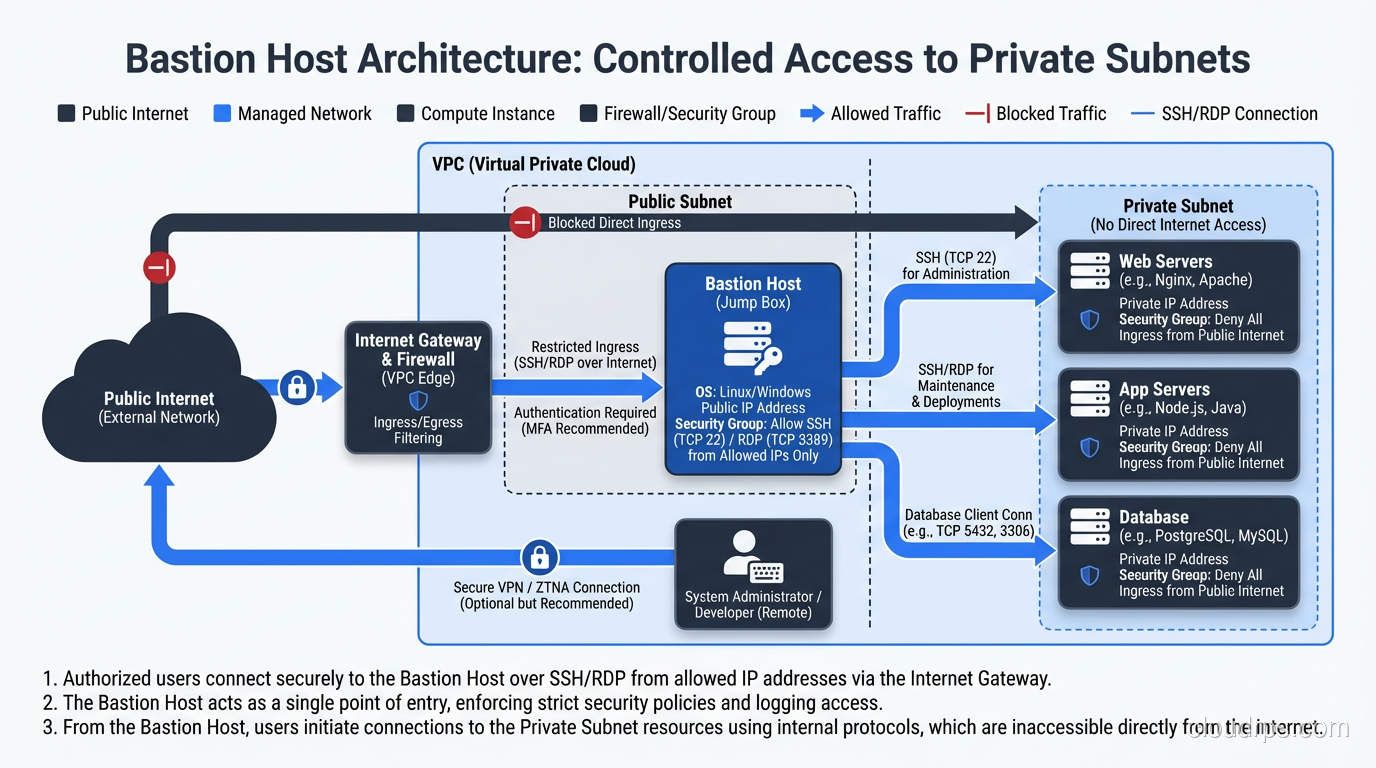
A bastion host (also called a jump box or jump server) is a hardened, special-purpose server that provides a controlled entry point into a private network from an untrusted network, typically the internet.
The name comes from medieval fortification. A bastion is a projecting part of a fortress, specifically designed to withstand attack because it’s the most exposed position. In network architecture, the bastion host sits at the boundary – exposed to the outside, but hardened enough to survive that exposure, and designed to be the only path into the protected interior.
The concept is straightforward: instead of exposing every server in your private network to the internet, you expose one single, heavily secured server. Administrators SSH into the bastion, and from there connect to internal systems. All external access flows through this chokepoint, giving you a single place to enforce authentication, log sessions, and detect anomalies.
Why Bastion Hosts Exist
The fundamental problem bastions solve is the tension between two requirements that are in direct conflict:
Administrators need remote access to servers in private networks. Systems break at 2 AM. Deployments happen from laptops. Configuration changes can’t always wait for physical console access.
Private network servers should not be accessible from the internet. Every exposed service is an attack surface. Database ports, management interfaces, and SSH daemons on production servers should not be reachable from the public internet.
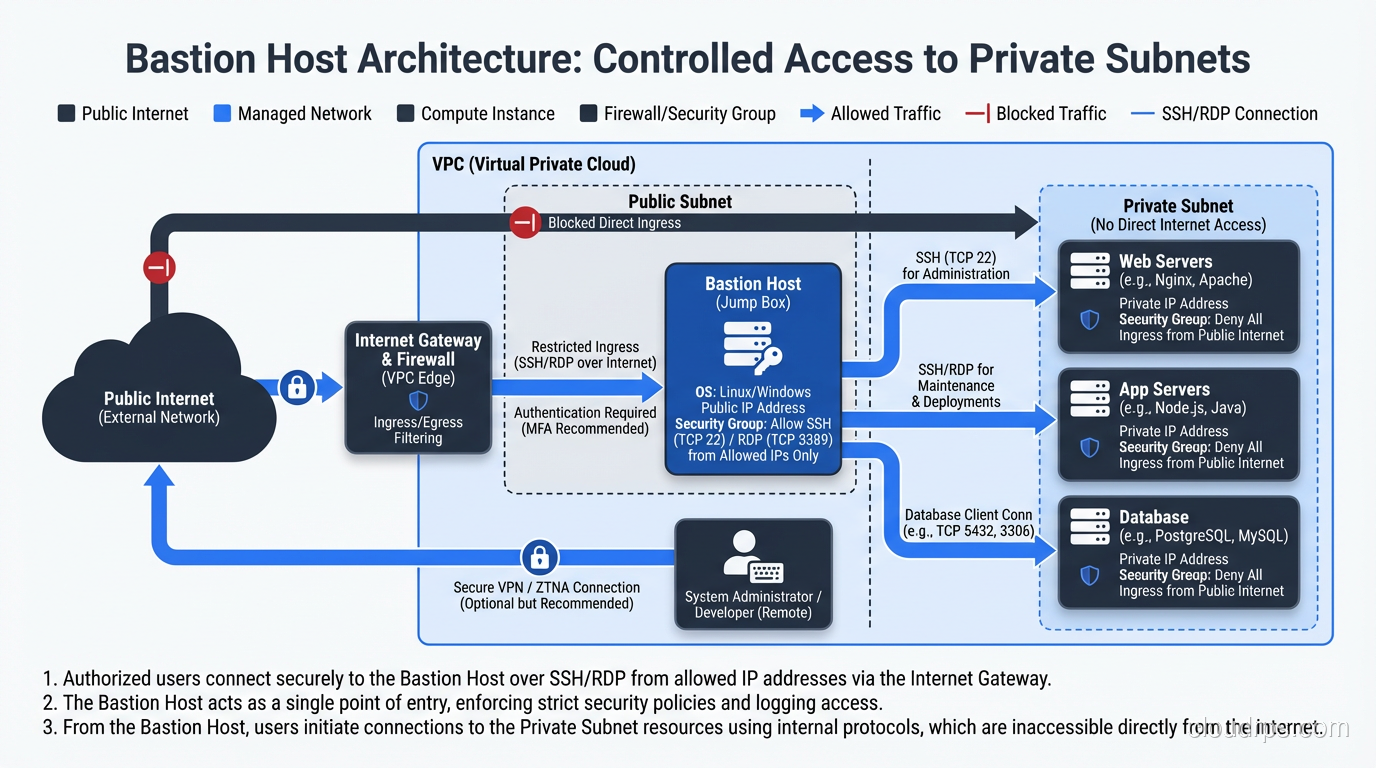
A bastion host resolves this conflict by providing a single, auditable, hardened access point. The private servers remain truly private – no public IP addresses, no internet-facing ports. The bastion is the only system with a foot in both worlds: a public-facing interface for administrators and a private-facing interface for internal connectivity.
This pattern directly supports security group and ACL design. Your private subnet security groups allow SSH only from the bastion’s private IP. Your bastion’s security group allows SSH only from known administrator IPs or VPN ranges. Clean, simple, auditable.
Bastion Host Architecture Patterns
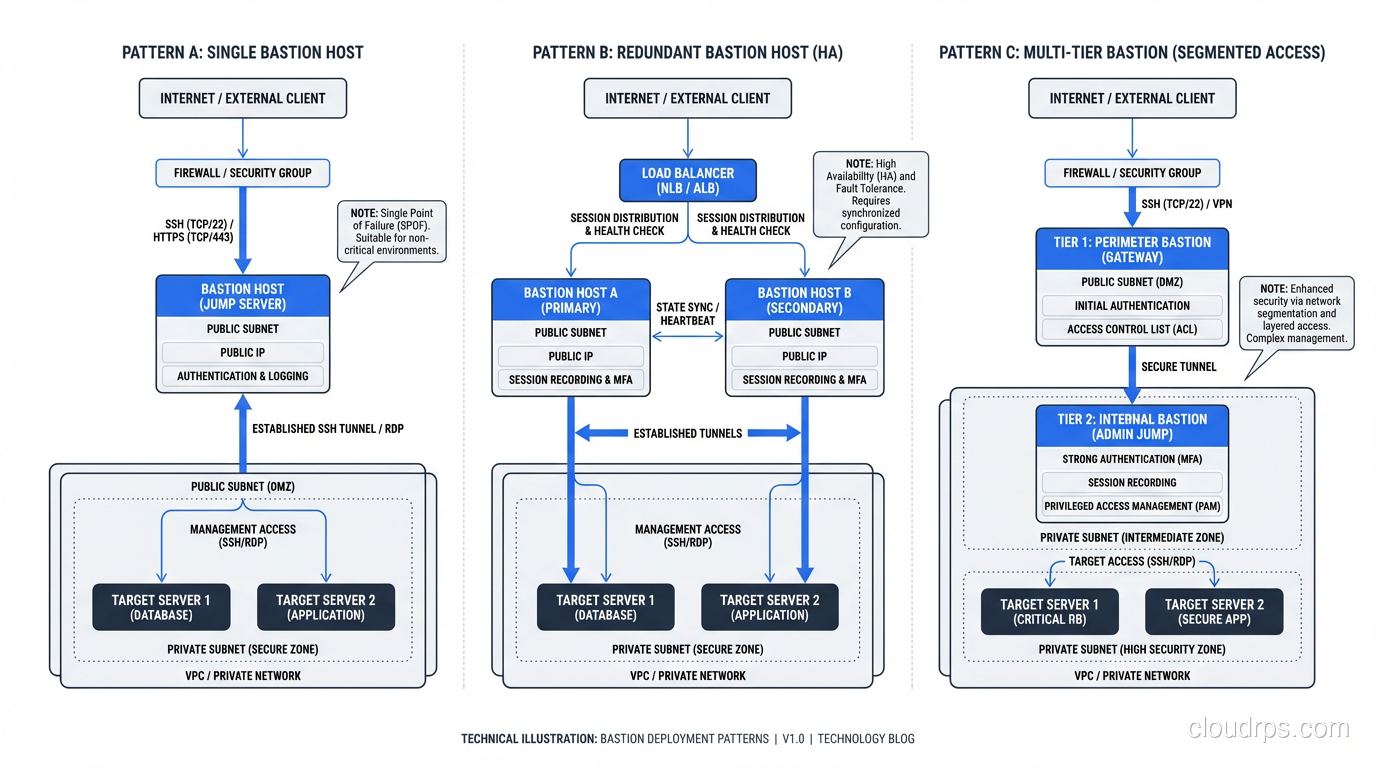
Classic Single Bastion
The simplest deployment: one bastion host in a public subnet, with SSH access restricted to specific source IPs. Administrators SSH into the bastion, then SSH from the bastion to internal hosts.
This is what I deployed in 2004, and it still works. The weakness is the single point of failure – if the bastion is down, nobody can access the private network (which, depending on your perspective, might be a feature).
Redundant Bastion Pair
Two bastion hosts in different availability zones, behind a Network Load Balancer. Both are identically configured. If one fails, the other handles all connections.
This is my standard recommendation for any environment where administrative access is critical to business operations. The additional cost of a second small instance is negligible compared to the risk of losing all remote access during an incident.
Bastion With Session Recording
The bastion host captures complete session recordings – every keystroke, every command, every output. Tools like Teleport, Gravitational, or even the script command can record sessions for later audit review.
I implement session recording in any environment subject to compliance requirements (PCI-DSS, HIPAA, SOX) and in any environment where multiple administrators share access. When something goes wrong in production, the ability to replay exactly what happened is invaluable.
Multi-Tier Bastion
In highly segmented environments, you might have a bastion for the management zone, from which you jump to a second bastion in the production zone, from which you access production servers. Each hop adds an authentication requirement and an audit point.
I’ve deployed this in government and defense environments. For most commercial organizations, a single bastion tier is sufficient.
Hardening a Bastion Host
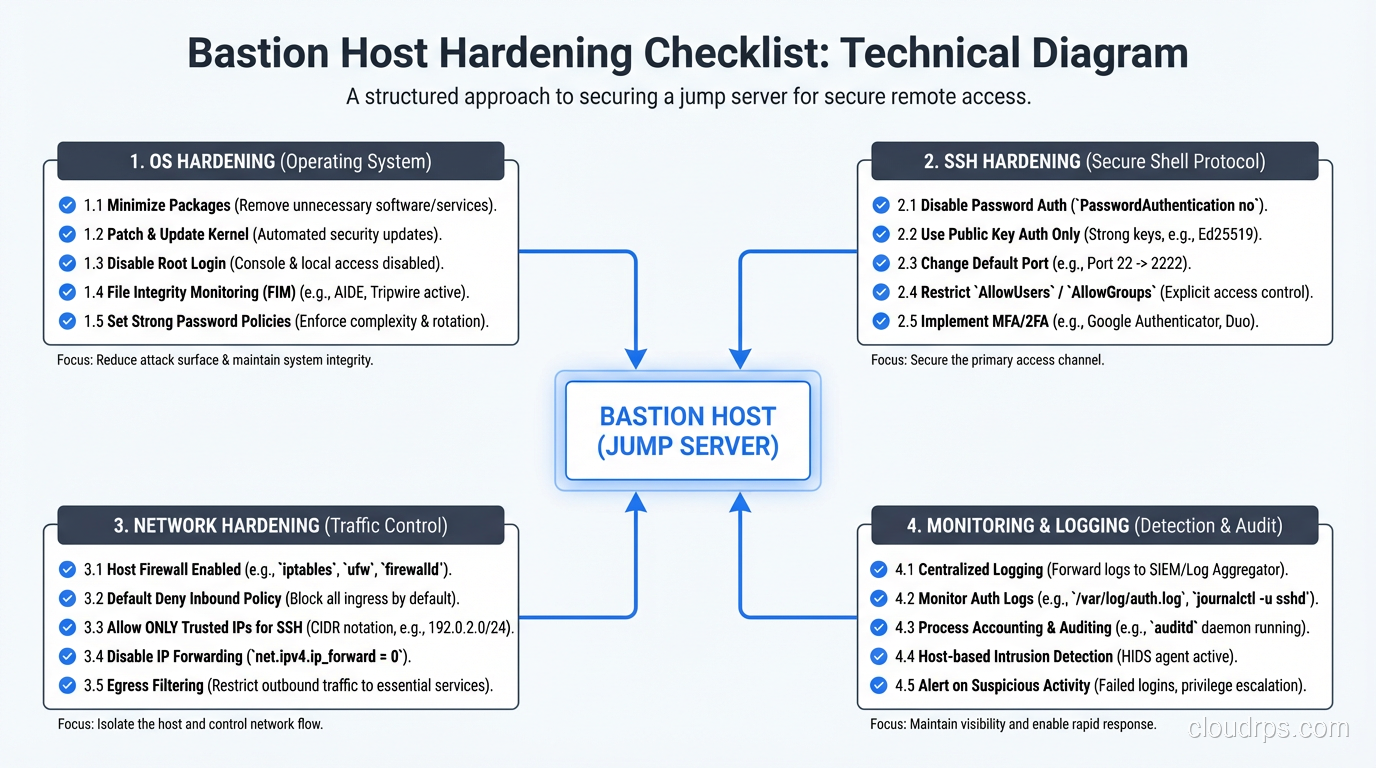
A bastion host is only as secure as its hardening. Since it’s deliberately exposed to the internet, it receives the full force of automated scanning, brute force attempts, and targeted attacks. Every aspect of the system must be locked down.
Operating System Hardening
Minimal installation. Install nothing that isn’t required for SSH access. No web server, no database, no development tools, no package managers (after initial setup). Every installed package is an attack surface.
Disable root login. Administrators log in with named personal accounts. Root access, if needed, is through sudo with individual passwords.
Kernel hardening. Enable SELinux or AppArmor. Disable unnecessary kernel modules. Restrict sysctl parameters: disable IP forwarding (unless the bastion is routing), disable source routing, enable SYN cookies.
File system hardening. Mount /tmp with noexec,nosuid. Use separate partitions for /var/log to prevent log exhaustion from filling the root filesystem.
Automatic patching. The bastion should receive security patches automatically. I typically configure unattended upgrades for security packages on bastion hosts – the risk of a patching-related outage is lower than the risk of running a known-vulnerable SSH daemon on an internet-facing server.
SSH Configuration
The SSH daemon is the bastion’s primary service and its primary attack surface. Configure it aggressively:
# /etc/ssh/sshd_config essentials for a bastion host
Port 22  # Or a non-standard port if you want to reduce log noise
Protocol 2
PermitRootLogin no
PasswordAuthentication no  # Key-based only
PubkeyAuthentication yes
AuthorizedKeysFile .ssh/authorized_keys
MaxAuthTries 3
LoginGraceTime 20
ClientAliveInterval 300
ClientAliveCountMax 2
AllowUsers admin1 admin2 admin3  # Explicit allow list
X11Forwarding no
AllowTcpForwarding yes  # Required for SSH tunneling to internal hosts
PermitTunnel no
Banner /etc/ssh/banner
Key-based authentication only. No passwords. No exceptions. SSH keys with Ed25519 or RSA-4096. Require passphrases on private keys.
Certificate-based authentication. Even better than individual keys, SSH certificates let you issue short-lived credentials from a certificate authority. Users get a certificate that expires in 8 hours instead of a persistent key that lives forever. This is where bastion access is heading.
Network-Level Restrictions
Ingress: Allow SSH (port 22) only from known source IPs – your corporate VPN exit points, specific administrator IPs, or your organization’s IP ranges. Never allow SSH from 0.0.0.0/0 in production. I’ve reviewed environments where the bastion’s security group allowed SSH from anywhere. At that point, you’ve just turned your carefully designed private network into a brute-force-protected public network.
Egress: Allow SSH (port 22) only to the private subnets containing the servers you need to manage. Block all other egress. If the bastion is compromised, this limits the attacker’s ability to exfiltrate data or establish outbound command-and-control channels.
No other services. The bastion should not run HTTP, HTTPS, DNS, or any other service. If you need a web interface for management, that’s a different server.
Monitoring and Alerting
The bastion is your most sensitive internet-facing asset. Monitor it aggressively:
- All SSH authentication attempts – successful and failed. Alert on any login from an unexpected source IP.
- Process execution – any new process running on the bastion should be expected. Alert on anything unusual.
- File integrity – use AIDE, OSSEC, or Tripwire to detect modifications to system files, SSH configuration, and authorized_keys files.
- Session activity – log all commands executed through the bastion. Ship logs to a central SIEM that the bastion itself cannot modify.
- Network connections – any outbound connection that isn’t SSH to a private subnet is suspicious. Alert immediately.
SSH ProxyJump: The Modern Way to Use Bastions
The old way to use a bastion was to SSH into it, then manually SSH from there to the target host. Two separate sessions, two separate authentication events.
The modern approach uses SSH’s ProxyJump directive (or the older ProxyCommand) to create a transparent tunnel through the bastion. From the user’s perspective, they connect directly to the target host. Under the hood, the SSH client establishes a connection through the bastion automatically.
In your ~/.ssh/config:
Host bastion
    HostName bastion.example.com
    User admin
    IdentityFile ~/.ssh/bastion_key

Host internal-*.example.com
    ProxyJump bastion
    User admin
    IdentityFile ~/.ssh/internal_key
Now ssh internal-db01.example.com automatically routes through the bastion. The connection to the internal host is end-to-end encrypted – the bastion forwards the encrypted stream but cannot read it. This is important: even a compromised bastion cannot intercept the session content when ProxyJump is used correctly.
Cloud-Native Bastion Services
The major cloud providers now offer managed bastion services that eliminate the need to maintain your own bastion host:
AWS Systems Manager Session Manager: Provides shell access to EC2 instances without any inbound security group rules. Connections are brokered through the SSM service, authenticated via IAM, and logged to CloudTrail. No bastion host needed.
Azure Bastion: A fully managed PaaS service that provides RDP and SSH access to VMs directly through the Azure portal. No public IPs on target VMs, no bastion VM to manage.
GCP Identity-Aware Proxy (IAP): Wraps SSH and TCP connections in an identity-aware tunnel. Access is controlled by IAM policies and every connection is authenticated and logged.
These services address the primary operational burden of bastions – keeping them patched, monitored, and available. They also provide better authentication (IAM integration, MFA enforcement) and logging (native cloud audit trails) than most self-managed bastions.
I’ve migrated several clients from self-managed bastions to SSM Session Manager, and the operational improvement is significant. No more worrying about bastion OS patches, no more managing SSH keys, no more monitoring the bastion itself for compromise.
Modern Alternatives: Beyond the Bastion
The bastion host pattern is solid, but newer approaches address some of its limitations.
Zero Trust Network Access (ZTNA)
Zero Trust takes the bastion concept further. Instead of a single hardened entry point, every access request is individually authenticated, authorized, and encrypted regardless of the source network. Products like Tailscale, Zscaler Private Access, and Cloudflare Access implement this pattern.
With ZTNA, there is no “trusted” internal network. Every connection, even from inside the data center, must present valid credentials and meet policy requirements. The bastion’s role as a chokepoint is distributed across every access decision.
Ephemeral Bastion Hosts
Instead of maintaining a persistent bastion, spin one up on demand and destroy it after use. Infrastructure as code makes this practical:
- Administrator requests access through a ticketing system
- Automation provisions a fresh bastion instance from a hardened AMI
- The administrator’s SSH key is injected during provisioning
- After the session ends (or a timeout expires), the instance is terminated
- The entire lifecycle is logged
This eliminates the persistent attack surface of a standing bastion. There’s nothing to attack when nobody’s using it. I’ve implemented this pattern with Terraform and Lambda functions for a fintech client, and it works well for environments where administrative access is infrequent.
Privileged Access Management (PAM)
Enterprise PAM solutions like CyberArk, BeyondTrust, and HashiCorp Boundary combine bastion functionality with credential vaulting, session recording, and just-in-time access provisioning. The user authenticates to the PAM system, which handles the connection to the target system using credentials the user never sees.
PAM is the evolution of the bastion concept for organizations that need fine-grained access control and comprehensive audit trails. It’s more complex and expensive than a bastion host, but for regulated environments, the compliance benefits are substantial.
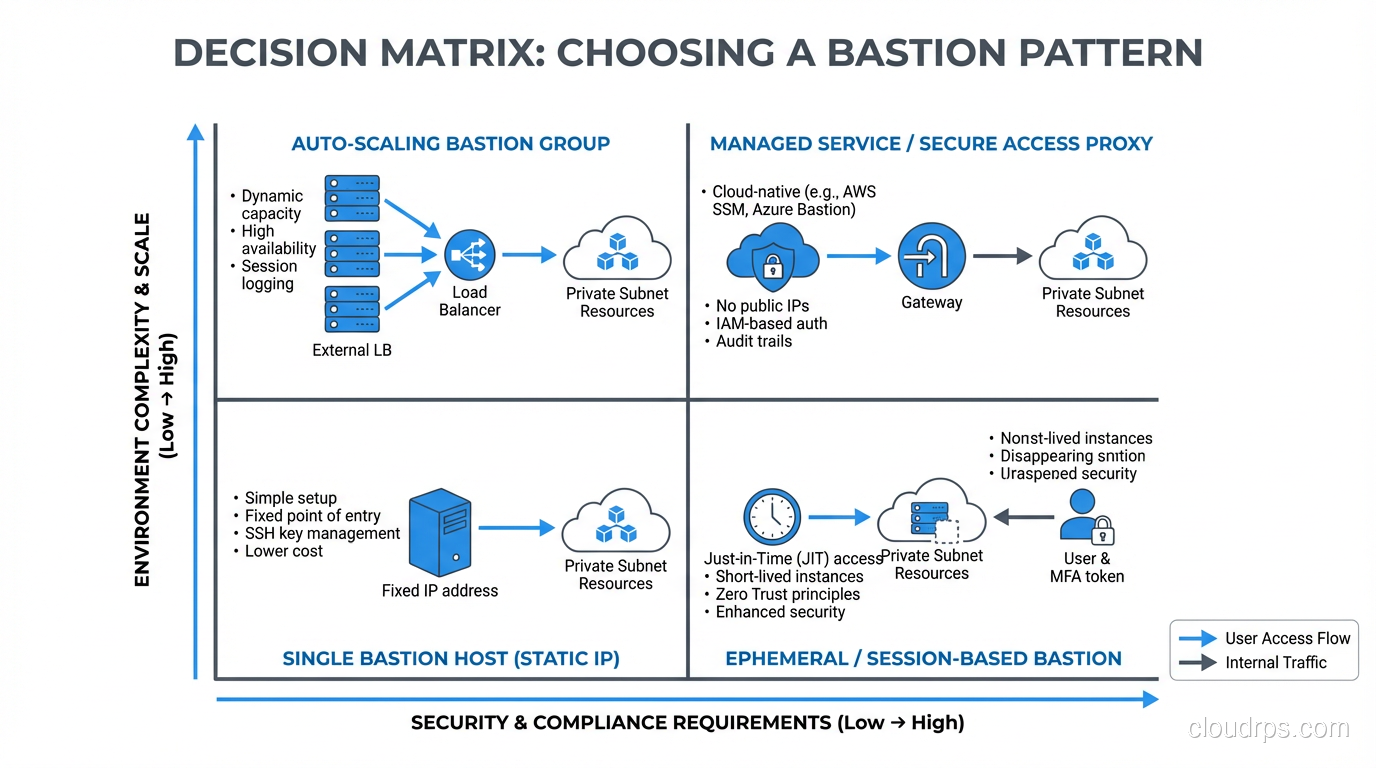
When to Use What
My decision framework for infrastructure access:
Self-managed bastion host: Small environments, simple requirements, teams comfortable with Linux administration. Cost-effective and straightforward.
Cloud-managed bastion service (SSM, Azure Bastion, IAP): Cloud-native environments, teams that want to minimize operational burden, organizations already invested in cloud IAM.
ZTNA: Organizations with mature zero trust programs, distributed workforces, and hybrid/multi-cloud environments.
Ephemeral bastions: High-security environments where persistent attack surface is unacceptable, environments with infrequent administrative access.
Enterprise PAM: Regulated industries, organizations with hundreds of administrators, environments requiring comprehensive session recording and credential management.
Lessons From Two Decades of Bastion Management
The bastion is a target. Never forget that you’re deliberately exposing a system to the internet. Harden it like it’s going to be attacked, because it will be. I check bastion auth logs monthly and I’ve never seen a month without brute force attempts.
Key management is the real challenge. Managing SSH keys across dozens of administrators and hundreds of target hosts is where bastion deployments get messy. SSH certificates with short lifetimes solve this elegantly. If you’re still distributing individual public keys to authorized_keys files, invest in a certificate authority.
Audit everything. The entire point of a bastion is to create a chokepoint where you have visibility. If you’re not logging and reviewing what happens through that chokepoint, you’ve just created inconvenience without security.
Test your failover. If your primary bastion dies during an incident, can you still access your infrastructure? I’ve seen teams discover their backup bastion was misconfigured during the exact moment they needed it most. Test quarterly.
Don’t stop at SSH. Modern bastions often need to support RDP for Windows systems, database client connections, and web-based management tools. Each additional protocol is an additional attack surface that needs hardening and monitoring.
The bastion host is one of the oldest patterns in network security, dating back to the early 1990s. The fact that it’s still relevant in the age of zero trust and cloud-native everything tells you something about the enduring value of the chokepoint pattern. The implementations evolve – from Solaris boxes on a span port to ephemeral containers in the cloud – but the principle remains: control the access, audit the access, and make the access point the hardest thing on your network to compromise.
Get Cloud Architecture Insights
Practical deep dives on infrastructure, security, and scaling. No spam, no fluff.
By subscribing, you agree to receive emails. Unsubscribe anytime.