
About fifteen years ago I was sitting in a meeting where someone from engineering pitched the idea of storing our entire 400TB media library in what was then a relatively new concept: object storage. Half the room looked confused, a quarter looked skeptical, and the VP of infrastructure flat-out said it was a fad. That media library is still running on object storage today. The VP retired five years ago.
I have spent a significant chunk of my career thinking about how data gets stored, retrieved, and moved around. And one of the most persistent sources of confusion I encounter, from junior engineers to seasoned managers, is the difference between block, object, and file storage. People treat them as interchangeable, and they are not. They are fundamentally different paradigms with different strengths, different weaknesses, and very different cost profiles.
Let me break this down the way I wish someone had explained it to me thirty years ago.
Block Storage: Raw Blocks on a Disk
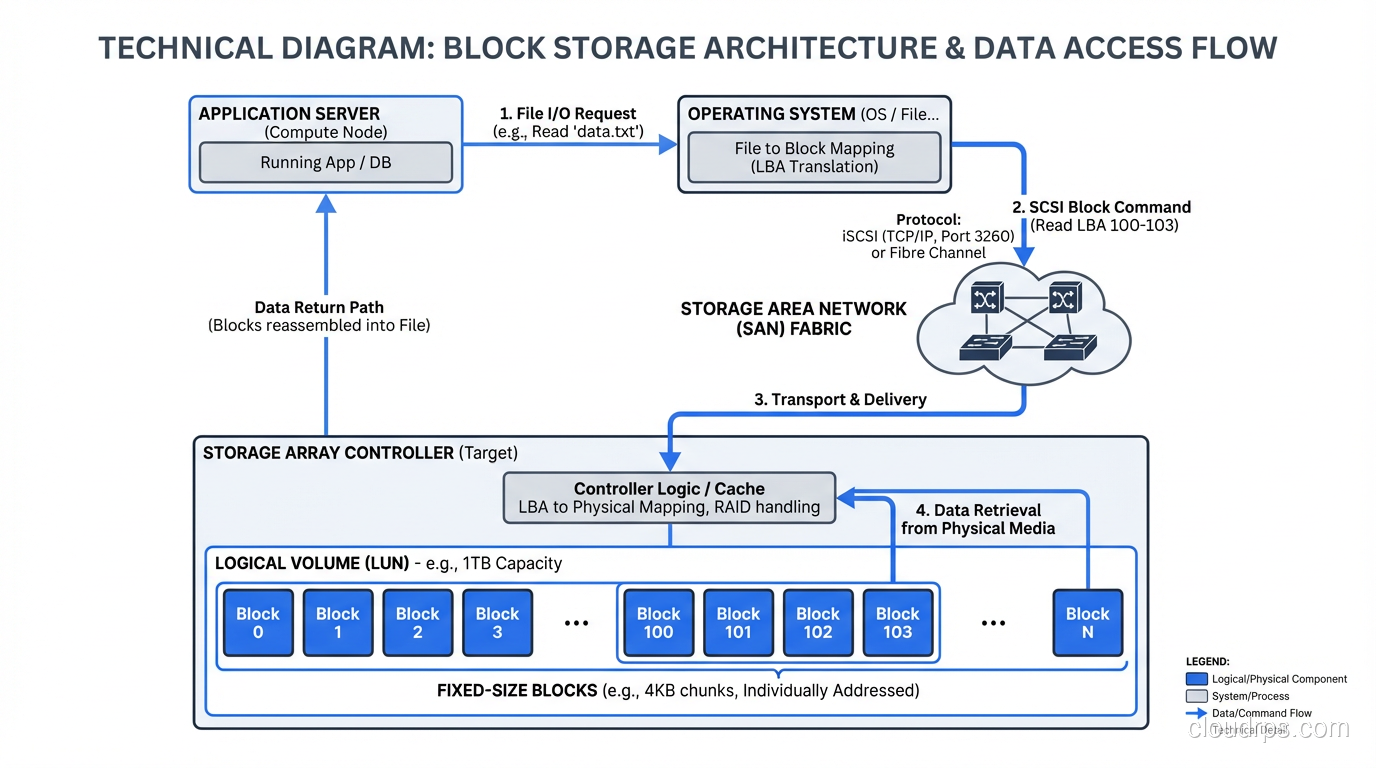
Block storage is the lowest level of abstraction. You get a volume divided into fixed-size chunks (blocks, typically 512 bytes or 4KB) and you read and write those blocks by their address. There is no concept of a file or a folder at this level. It is just a flat address space of numbered blocks.
Your operating system’s filesystem (ext4, XFS, NTFS, ZFS) sits on top of block storage and provides the file/directory abstraction. When you format a disk and create files on it, the filesystem is mapping those files to blocks on the underlying block device.
Why Block Storage Matters
Every database you have ever run writes to block storage. When PostgreSQL issues a write, it is ultimately writing to specific blocks on a block device. When your VM hypervisor stores a virtual disk image, it is writing blocks. Block storage is the foundation that everything else builds on.
The key advantage of block storage is performance and control. There is no translation layer between your application and the storage. You get raw, low-latency access to the underlying medium. For workloads that need consistent, predictable I/O latency (transactional databases, virtual machines, boot volumes), block storage is the only real option.
In a SAN or DAS configuration, block storage can deliver sub-millisecond latency and hundreds of thousands of IOPS. Try getting that from a file share or an object store.
The Limitations of Block
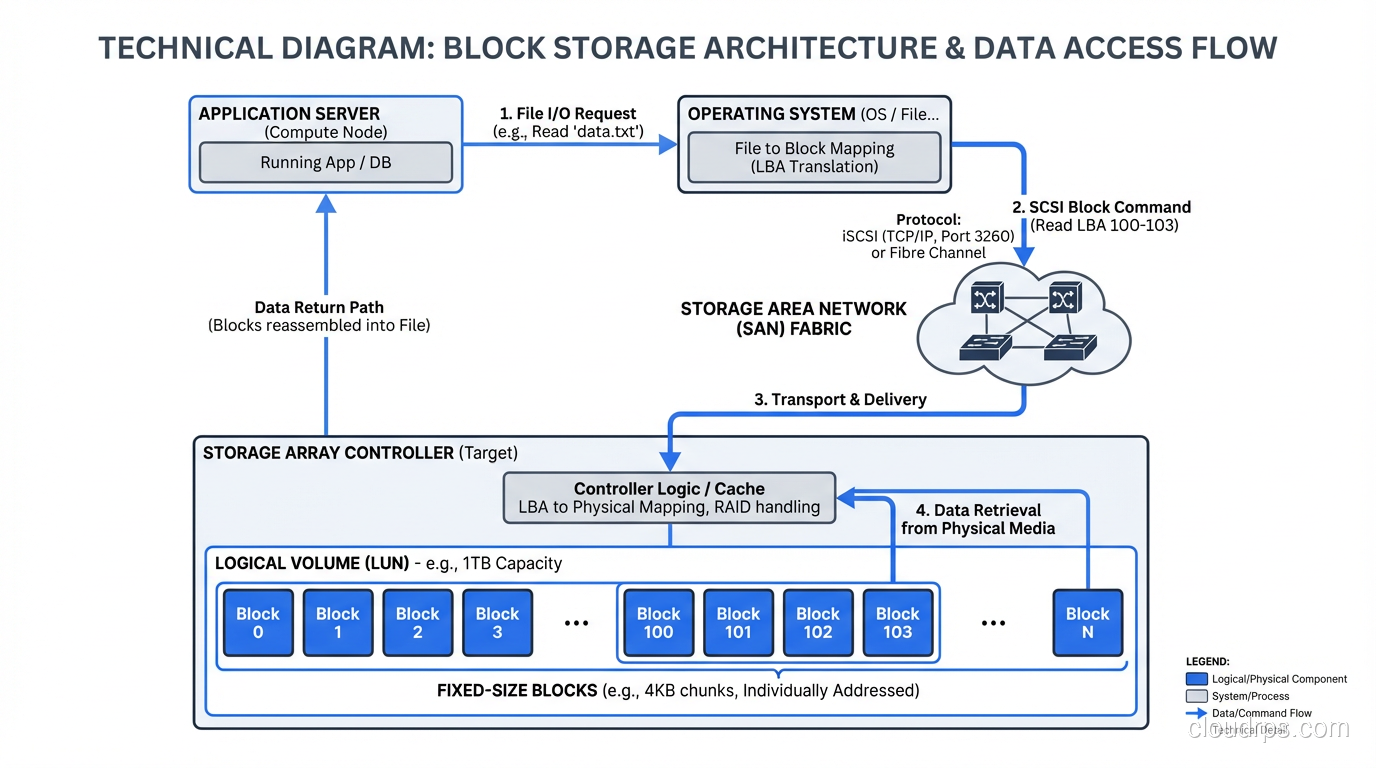
Block storage is expensive per gigabyte, especially when delivered over a SAN. It does not scale horizontally the way object storage does. And it is inherently tied to a specific server or a small cluster of servers. You cannot easily serve block storage to thousands of clients simultaneously.
There is also no built-in metadata beyond what the filesystem provides. If you need rich, searchable metadata on your stored data (and you will, if you are managing millions of assets), block storage gives you nothing out of the box.
File Storage: The Abstraction We All Know
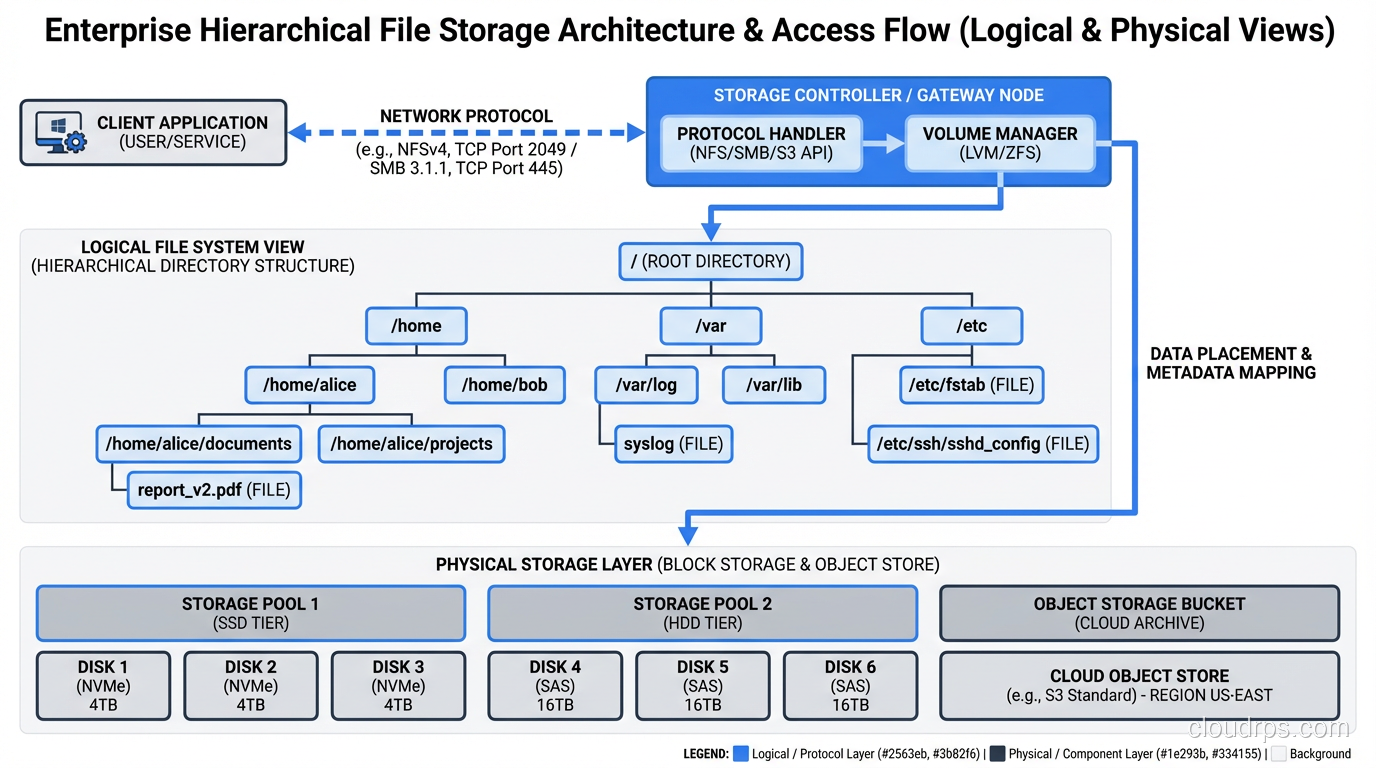
File storage adds a layer on top of blocks: the filesystem. Files have names, they live in directories, they have permissions and timestamps. When you access file storage over a network (via NFS, SMB, or similar protocols), you are using network-attached file storage.
This is how most people interact with storage every day. You open a file, you save a file, you create a folder. The filesystem handles mapping your file operations to block operations on the underlying storage.
Where File Storage Excels
File storage shines for workloads where humans and applications need to interact with named, structured data. Shared drives for teams. Configuration files for applications. Source code repositories. Log files. Application assets that get served by web servers.
The hierarchical namespace (directories within directories) provides natural organization that maps well to how people think about data. I can tell someone to look in /data/projects/2024/client-x/reports/ and they understand immediately where to find what they need.
File storage also supports locking, which matters for collaborative workloads. If two people are editing the same document on a shared NFS mount, the filesystem can mediate access. Block storage has no concept of this.
Where File Storage Struggles
The hierarchical namespace that makes file storage intuitive becomes a liability at massive scale. When you have billions of files, directory listings become slow. Metadata operations (stat, list, rename) bog down. The tree structure does not distribute well across nodes in a cluster.
I ran into this wall hard in 2015 when a client had roughly 3 billion small files on a NAS. Listing a single directory with 2 million files took over a minute. Backup and replication were nightmares because the filesystem had to walk the entire tree to find what had changed. The hierarchical model just does not work at that scale.
File storage over a network also introduces latency that matters for performance-sensitive applications. Every open, read, write, and close is a network round trip. For database workloads with thousands of small random I/O operations per second, this overhead is a dealbreaker.
Object Storage: A Completely Different Model
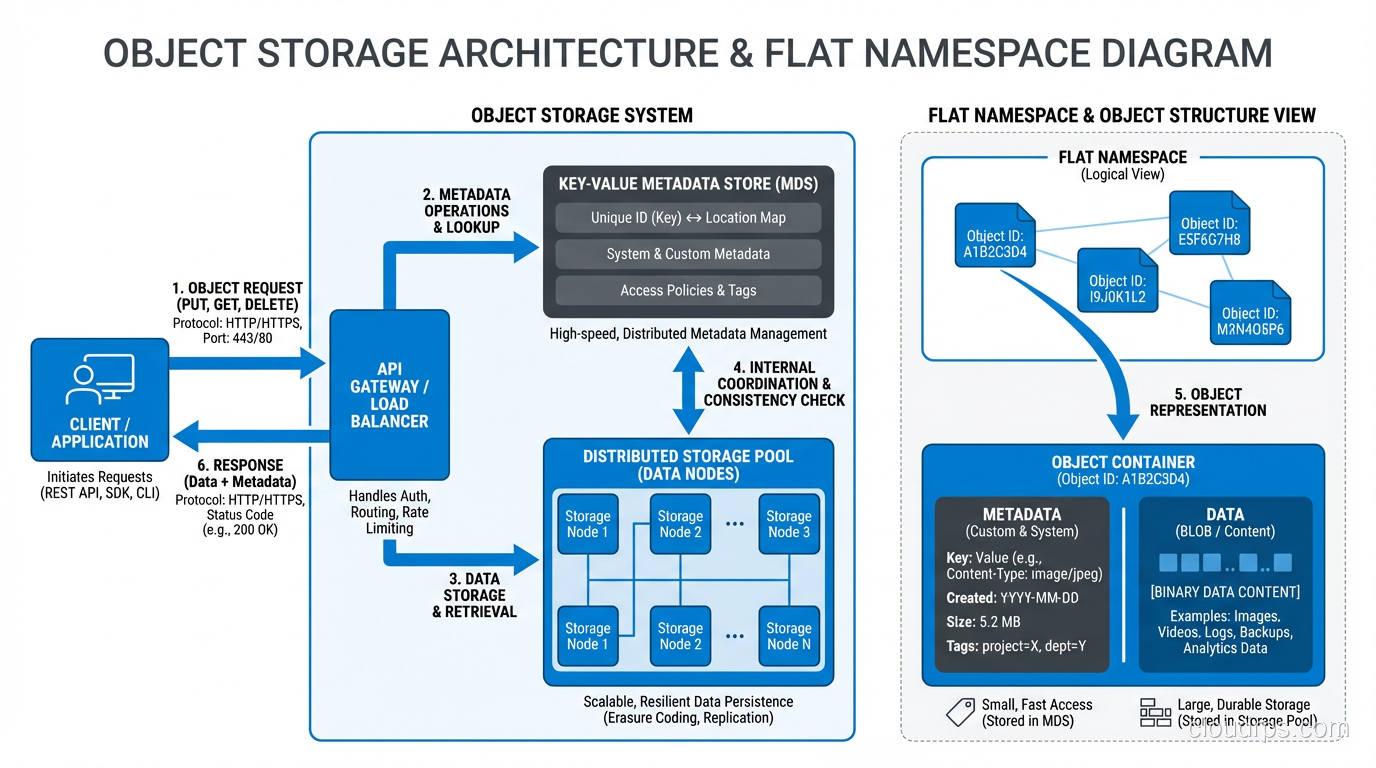
Object storage throws away both the block address space and the file hierarchy. Instead, you get a flat namespace of objects, each identified by a unique key. Each object consists of the data itself, a variable amount of metadata (key-value pairs you define), and the unique identifier.
There are no directories. There are no blocks. You do not mount an object store as a filesystem. You interact with it through an API, typically HTTP-based, like the S3 API that has become the de facto standard.
Why Object Storage Took Over the World
Object storage solved problems that block and file storage could not at scale. The flat namespace eliminates the hierarchical bottleneck. There is no directory to traverse, no tree to walk. Retrieving an object by its key is an O(1) operation regardless of whether the store contains a thousand objects or a trillion.
The metadata model is transformational. Every object can carry rich, custom metadata: content type, creation date, source system, classification, retention policy, whatever you need. This metadata is stored alongside the object and is searchable. When I migrated that 400TB media library to object storage, we attached thirty different metadata fields to each asset. Try doing that with a filesystem’s extended attributes.
Object storage scales horizontally almost without limit. You add more nodes, you get more capacity and throughput. There is no central metadata server to bottleneck. This is why every cloud provider uses object storage (S3, GCS, Azure Blob) as the backbone of their storage offerings. It scales to exabytes.
Cost is the other massive advantage. Object storage on commodity hardware is dramatically cheaper per terabyte than block or file storage. When you are storing petabytes of data (backups, archives, media, logs, data lake contents), the economics of object storage are unassailable.
The Trade-offs of Object Storage
Object storage is not a filesystem replacement. You cannot mount it and run a database on it. The access pattern is fundamentally different: you PUT and GET entire objects. There is no concept of “seek to byte offset 4096 and read 512 bytes.” If you need to modify one byte in a 1GB object, you rewrite the entire object.
Latency is higher than block or file storage. A GET request to S3 typically takes 50-200 milliseconds for the first byte. That is fine for serving images to a website. It is unacceptable for a database that needs to read a page in under a millisecond.
Object storage also provides eventual consistency in many implementations, though this has improved significantly. S3 has offered strong read-after-write consistency since late 2020. But the fundamentally asynchronous nature of distributed object stores means you need to design your application with this in mind.
Understanding these consistency trade-offs ties directly into understanding snapshots and volumes in cloud environments, where the underlying storage model affects how your data protection strategies work.
The Decision Framework I Use
After decades of making these choices, here is how I think about it.
Use Block Storage When…
You are running a database. You are hosting virtual machines. You need raw, low-latency I/O. You need a filesystem you control. Your application issues small, random reads and writes and needs consistent sub-millisecond performance.
Block storage is the workhorse of transactional workloads. Do not try to avoid it for these use cases. You will regret it.
Use File Storage When…
Multiple servers or users need to access the same files. The data is naturally organized in a hierarchy. Your application reads and writes named files. You need file locking for concurrent access. The performance requirements are moderate and the dataset is not in the billions of files.
File storage is the right default for shared application data, content serving, and collaborative workflows.
Use Object Storage When…
You are storing large volumes of unstructured data: images, videos, backups, logs, data lake contents. You need to scale to petabytes or beyond. You need rich metadata on every stored item. Cost per terabyte is a primary concern. Your access pattern is “write once, read many” or at least “read whole objects.”
Object storage is the right answer for more workloads than most people realize. I have seen teams spend ten times more than necessary by putting archival data on file or block storage when object storage would have been vastly cheaper and more appropriate.
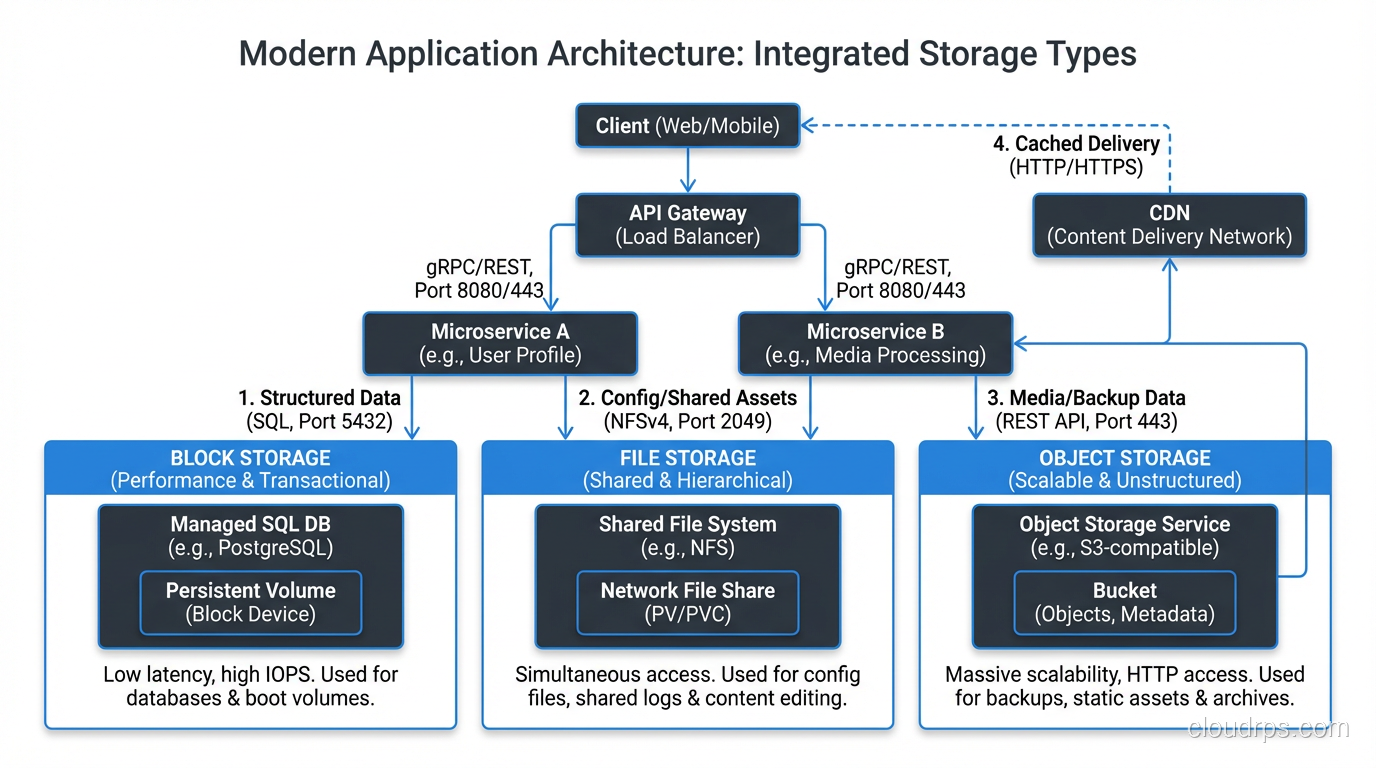
Real-World Architecture: Mixing All Three
In practice, most serious architectures use all three types. Let me describe a platform I helped design two years ago.
The application tier ran on VMs with block storage boot volumes and local block storage for temp space and swap. The primary PostgreSQL database used high-performance block storage, specifically local NVMe in a RAID 10 configuration. Application configuration and shared code artifacts lived on an NFS file share. And the data pipeline ingested raw files into object storage, processed them, and stored results back in object storage for the analytics team to query with tools like Athena and Presto.
Each storage type handled what it was good at. The block storage delivered the IOPS the database needed. The file storage provided the sharing semantics the application tier required. The object storage gave us unlimited, cheap capacity for the data lake.
Trying to force all of these workloads onto a single storage type would have been a disaster. I have seen people try to run databases on object storage (through FUSE mounts; please do not do this). I have seen people dump their entire data lake onto expensive SAN block storage. Neither approach ends well.
The Cloud Native Perspective
If you are building on cloud infrastructure, the abstractions map cleanly. EBS/Persistent Disks are block storage. EFS/Filestore is file storage. S3/GCS/Azure Blob is object storage. The characteristics I have described (latency profiles, access patterns, cost models, scaling behavior) all carry over directly.
The one thing the cloud adds is the ability to switch between storage types more easily. Migrating from EBS to S3 for a workload that should have been on object storage from the start is much easier than ripping out a SAN and replacing it with a NAS appliance in a datacenter. Take advantage of that flexibility.
Stop Treating Storage as an Afterthought
I cannot count the number of post-mortems I have participated in where the root cause was a storage architecture mismatch. A database running on NFS that fell over under load. A data lake sitting on block storage that blew the budget. A media serving pipeline built on file storage that collapsed when it hit a billion assets.
The fix is not complicated: understand what each storage type does well, match it to your workload, and resist the temptation to use one type for everything. Block for transactions, files for sharing, objects for scale. It has been true for twenty years and it is still true today.
Get this right early and you save yourself years of pain. Get it wrong and you will be the one writing the post-mortem at 2 AM, explaining to leadership why the platform needs to be re-architected. I have been on both sides of that conversation, and I strongly prefer the first one.
Get Cloud Architecture Insights
Practical deep dives on infrastructure, security, and scaling. No spam, no fluff.
By subscribing, you agree to receive emails. Unsubscribe anytime.