
The year was 2006 and I was the on-call architect for an e-commerce platform doing about $2 million a day in revenue. Every Thursday night at 11 PM, we’d start the deployment. The whole team would dial into a conference bridge: developers, ops, QA, a nervous product manager, and usually someone from the business side who wanted to “observe.” We’d take the site down, put up a maintenance page, deploy the new code, run through a manual test checklist, and bring the site back up. The whole thing took three to four hours if everything went well. It almost never went well.
One Thursday, the deployment failed catastrophically. We couldn’t roll back because the database migration was irreversible. We spent fourteen hours getting the site back online. The business lost over a million dollars in revenue. My boss’s boss called me on Saturday morning and said, “This can never happen again.”
That’s when I got serious about blue-green deployments.
What Blue-Green Deployments Actually Are
The concept is beautifully simple, which is part of why it works so well.
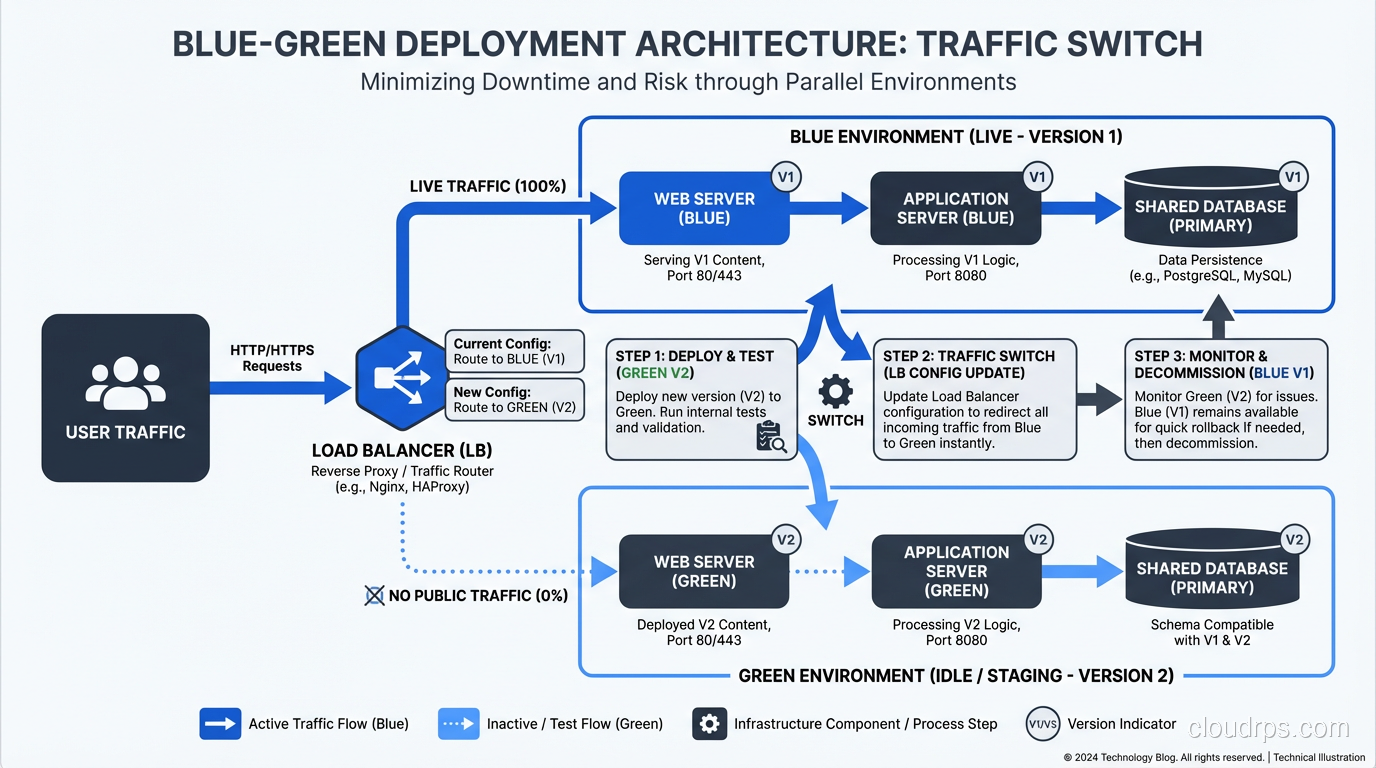
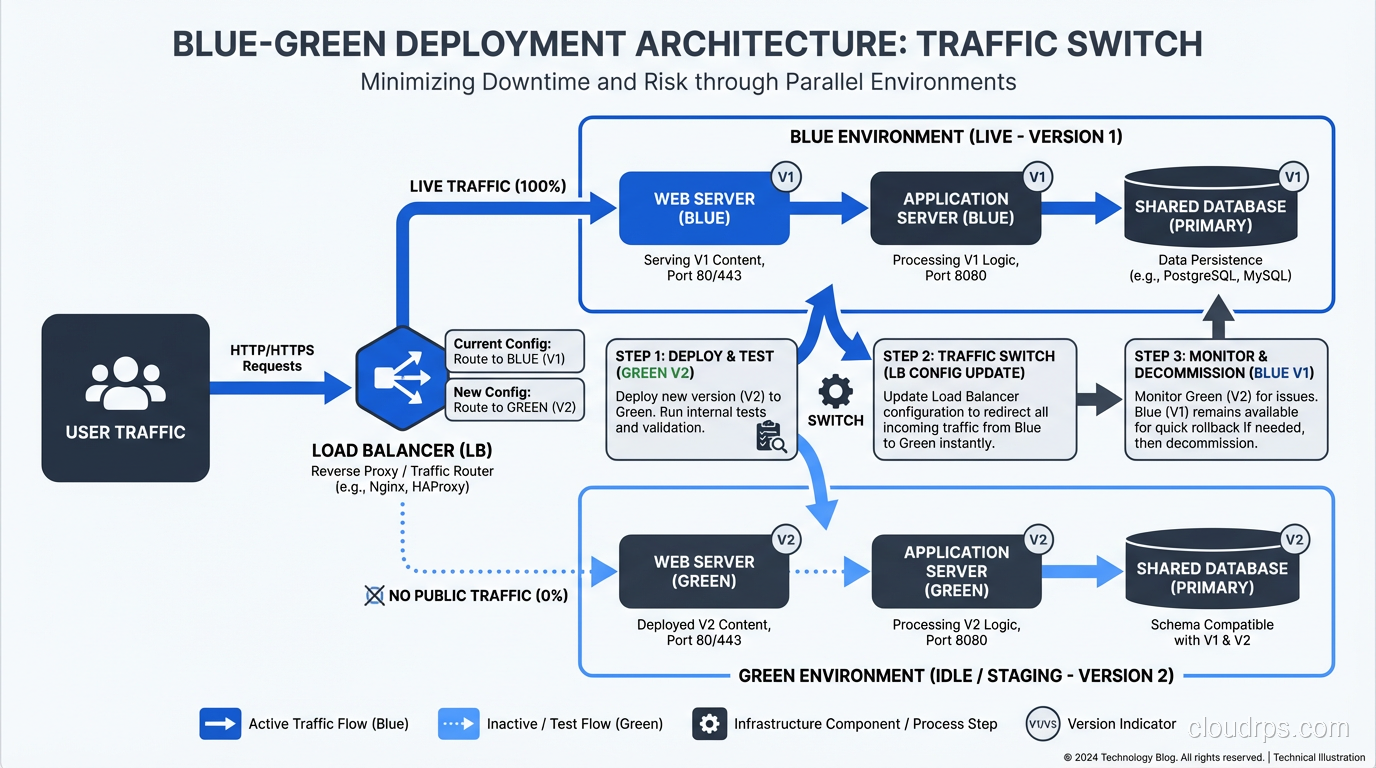
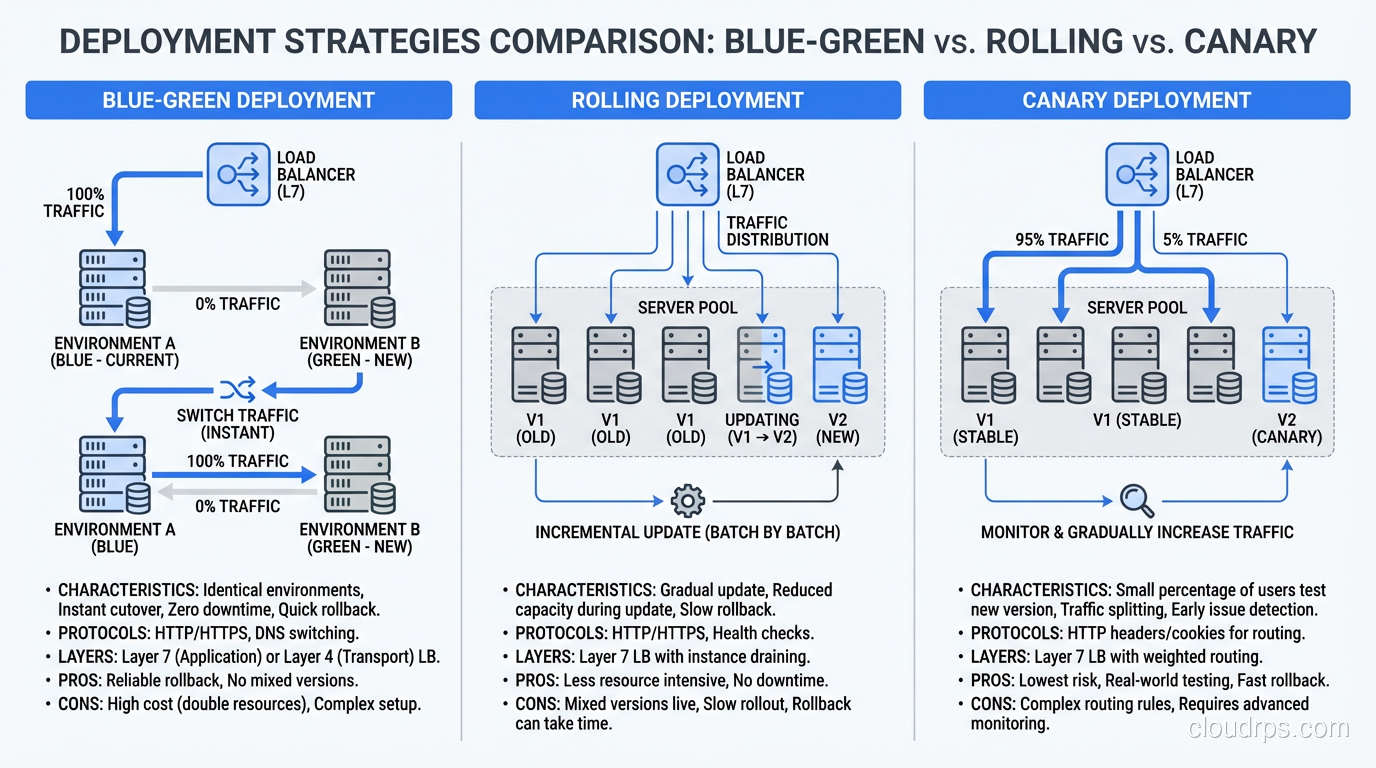
You maintain two identical production environments. One is “blue,” currently serving live traffic. The other is “green,” idle and sitting there ready to go. When you want to deploy a new version, you deploy it to the green environment. You test it. You verify it. And when you’re satisfied, you switch the router so that all incoming traffic goes to green instead of blue.
That’s the entire deployment. A router switch. It takes seconds.
If something goes wrong with the new version, you switch back to blue. Your old version is still there, untouched, running exactly as it was. Rollback takes seconds too.
I’ve heard people describe this as “having a spare tire.” That’s not quite right. It’s more like having two complete cars and just choosing which one to drive today. The analogy is imperfect, but you get the idea.
Why I Prefer Blue-Green Over Other Strategies
There are several deployment strategies out there, and I’ve used most of them in production. Let me explain why blue-green remains my go-to for most situations.
Rolling Deployments
With rolling deployments, you gradually replace old instances with new ones. It works, and it’s the default in most container orchestration platforms. But it has a fundamental problem: during the rollout, you have two versions of your application running simultaneously. If your new version has a different API contract, a different database schema expectation, or any kind of incompatibility with the old version, you’re going to have a bad time.
I’ve debugged too many incidents where the root cause was “version N and version N+1 were running simultaneously and they disagreed about the shape of the data.” Rolling deployments require careful attention to backward compatibility that blue-green largely sidesteps.
Canary Deployments
Canary deployments send a small percentage of traffic to the new version and gradually increase it. This is great for reducing blast radius, and I use canary releases for high-risk changes. But for routine deployments, the overhead of managing traffic splitting, monitoring canary metrics, and running the gradual rollout is more complexity than most teams need.
Blue-Green: The Sweet Spot
Blue-green gives you a clean cutover. One version at a time. No mixed traffic. Simple rollback. For most organizations, this is the right balance of safety and simplicity.
Implementing Blue-Green: The Gritty Details
The concept is simple. The implementation has a few gotchas that nobody tells you about until you hit them in production. I’ve hit all of them.
The Load Balancer Is Your Best Friend
The traffic switch in a blue-green deployment happens at the load balancer layer. You configure your load balancer to point at the blue target group. When you’re ready to switch, you update it to point at the green target group.
In AWS, this is straightforward with an Application Load Balancer and target groups. In other cloud providers, similar constructs exist. If you’re running on-premises, an F5, HAProxy, or Nginx can do the job.
The key is that the switch must be atomic. All traffic switches at once. If you’re using DNS-based switching (changing a CNAME to point at the new environment), be aware that DNS TTLs can bite you. Clients cache DNS responses, so even after you switch the DNS record, some clients will continue hitting the old environment for minutes or hours depending on TTL settings. I’ve been burned by this. Use load balancer target group switching, not DNS, for the actual cutover.
The Database Problem
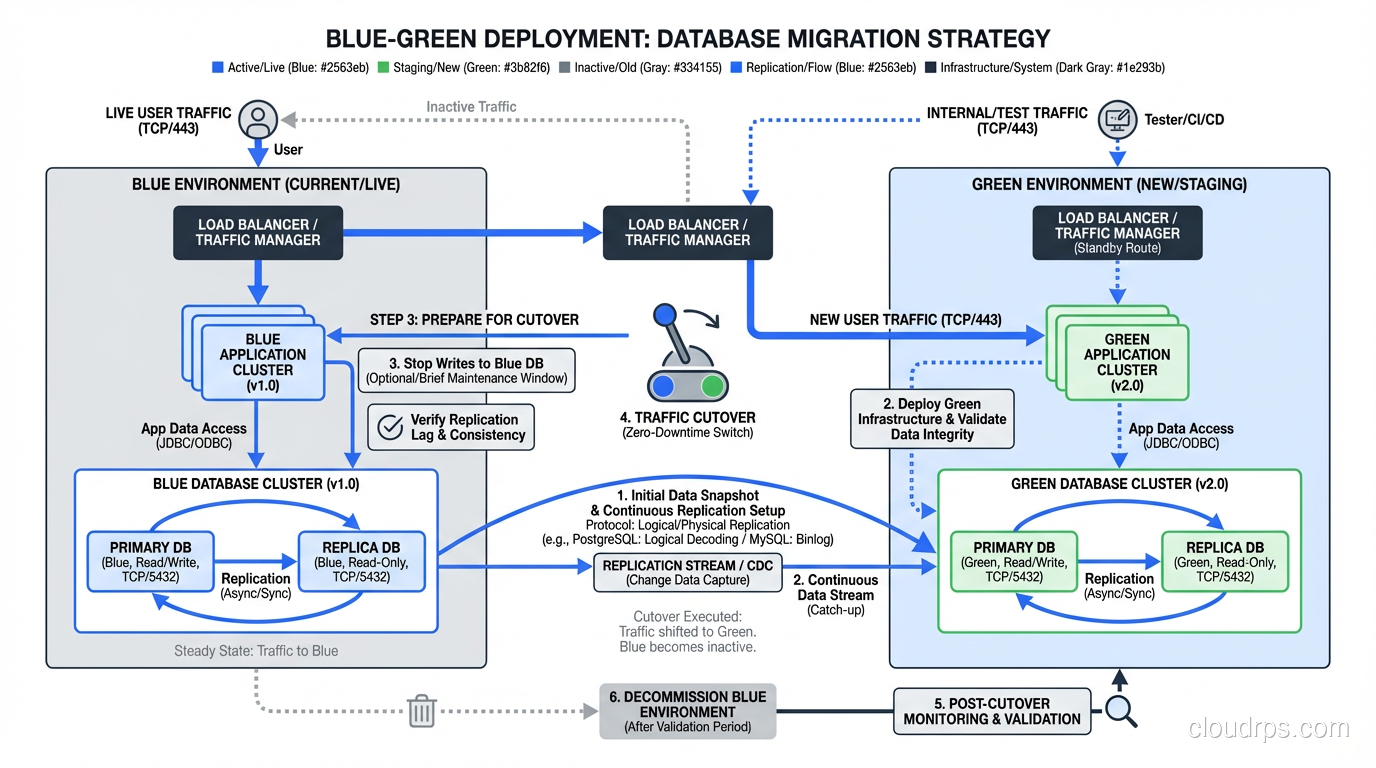
This is the hard part. Your application has two environments, but you almost certainly have one database. Both blue and green need to talk to the same database, which means your database schema must be compatible with both versions of your application simultaneously.
This sounds like it defeats the purpose, and I understand the objection. But in practice, it’s manageable if you follow a disciplined approach to schema migrations:
Always make additive changes. Add new columns, new tables, new indexes. Never rename or delete in the same release that adds the new code.
Use a two-phase migration approach:
- Release N adds the new column (nullable or with a default value) and starts writing to it, but still reads from the old column.
- Release N+1 switches reads to the new column and stops writing to the old one.
- Release N+2 drops the old column.
Yes, this means schema changes take three releases. That sounds slow until you realize those three releases might happen in three days with a solid CI/CD pipeline. And you never, ever have a moment where the running application and the database schema are incompatible.
I’ve seen teams try to take shortcuts here. They do the migration and the code change in one release, and it works 90% of the time. But that other 10% results in 2 AM pages and stressed-out engineers. The two-phase approach is worth the discipline.
Session Management
If your application stores sessions on the server (in-memory or on local disk), a blue-green switch will log out every user. I learned this the hard way when we switched to green and immediately got flooded with customer complaints about being logged out mid-purchase.
The fix: externalize your sessions. Use Redis, Memcached, or a database-backed session store that both environments can access. This is good practice regardless of your deployment strategy, but blue-green makes it mandatory.
Shared State and Background Jobs
Think about everything your application touches beyond the HTTP request-response cycle:
- Background job queues. If blue is processing jobs when you switch to green, what happens to in-flight jobs? Can green pick up where blue left off? You need your job queue (Sidekiq, Celery, SQS, whatever) to be external and version-aware.
- Caches. If blue has warmed up a cache and you switch to green, green starts with a cold cache. Plan for this. Your application needs to handle cache misses gracefully, and you might want to pre-warm green’s cache before switching.
- File storage. If your application writes files to local disk, those files won’t exist on the other environment. Use shared storage (S3, NFS, whatever works for your setup).
- WebSocket connections. If you have persistent connections, a blue-green switch will drop all of them. Your clients need to handle reconnection gracefully.
The Cost Question
The most common objection I hear is: “Blue-green requires twice the infrastructure, so it costs twice as much.”
That’s technically true for the compute layer, but it’s not as bad as it sounds. Modern cloud providers make it easy to spin up the green environment on demand and tear it down after the switch. You don’t need green running 24/7. You need it running during deployment and for a safety period afterward (I typically keep the old environment around for 24 hours as a rollback target).
With auto-scaling groups, spot instances, and reserved capacity, the incremental cost is usually 10-20% of your compute spend, not 100%. And when you compare that cost to the revenue lost during a failed deployment and a four-hour outage, the math works out overwhelmingly in favor of blue-green.
If you’re concerned about infrastructure costs, this is worth factoring into your total cost of ownership calculations.
A Real Blue-Green Deployment Walkthrough
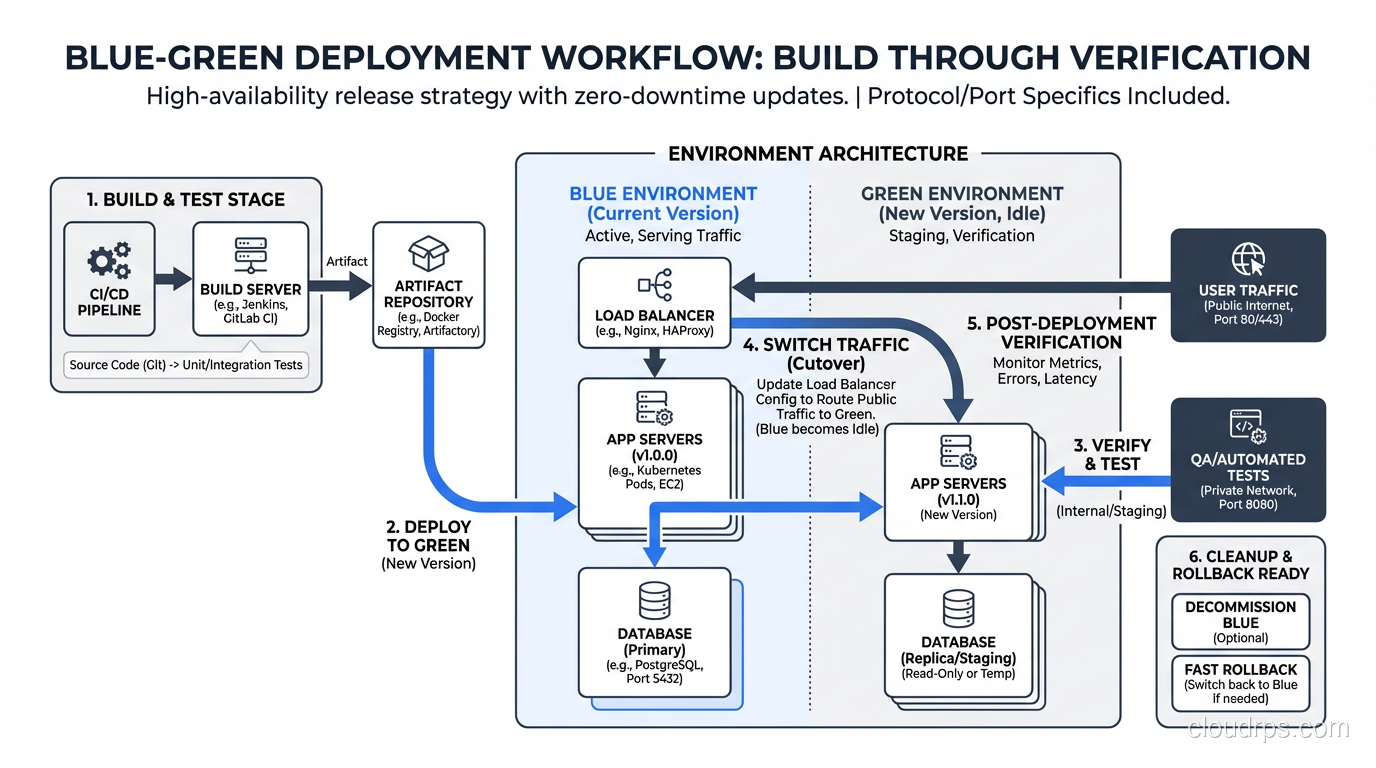
Let me walk through exactly how I set up a blue-green deployment for a recent project. This was a web application running on AWS with an Application Load Balancer, ECS Fargate for compute, RDS PostgreSQL for the database, and ElastiCache Redis for sessions and caching.
Step 1: Infrastructure Setup
We defined two ECS services (blue and green) behind a single ALB. Each service had its own target group. The ALB listener rule forwarded traffic to the blue target group by default.
Step 2: Pre-Deployment
The deployment pipeline built a new Docker image, tagged it with the Git commit SHA, and pushed it to ECR.
Step 3: Deploy to Green
The pipeline updated the green ECS service to use the new image. ECS pulled the image and started new tasks. We waited for all tasks to reach a healthy state (passing health checks).
Step 4: Smoke Tests
The pipeline ran a smoke test suite directly against the green environment using its internal DNS name (not through the ALB). These tests covered authentication, the critical purchase flow, and API endpoint health.
Step 5: Switch
The pipeline updated the ALB listener rule to forward traffic to the green target group. This took about two seconds. Existing connections to blue were allowed to drain gracefully.
Step 6: Post-Switch Verification
The pipeline monitored error rates, latency, and key business metrics for ten minutes. If any metric exceeded its threshold, the pipeline automatically switched back to blue.
Step 7: Cleanup
After 24 hours with no issues, the pipeline scaled down the blue environment (but didn’t destroy it; we kept the task definition and configuration for the next deployment, where blue would become the new target).
Blue-Green at Scale: Lessons from High-Traffic Systems
When you’re running blue-green for systems handling millions of requests per day, a few additional considerations come into play.
Health Check Tuning
Your load balancer health checks need to be aggressive enough to detect problems quickly but not so aggressive that normal latency spikes cause false positives. I typically use a five-second interval, two healthy thresholds, and three unhealthy thresholds. Tune these based on your application’s behavior. This is where solid high-availability architecture comes into play.
Connection Draining
When you switch from blue to green, in-flight requests to blue need to complete. Configure your load balancer’s deregistration delay (connection draining timeout) appropriately. For APIs with quick response times, 30 seconds is usually enough. For applications with long-running requests (file uploads, report generation), you might need several minutes.
Database Connection Pooling
When green starts up, it’s going to open a bunch of database connections simultaneously. If blue is still running and hasn’t been drained yet, you temporarily have twice the database connections. Make sure your database can handle this. Size your connection pool limits and your database’s max connections setting accordingly.
This is an area where scaling concerns overlap with deployment concerns. I’ve written more about this kind of infrastructure planning in my post on scaling web applications.
Monitoring the Switch
Your monitoring needs to be good enough to detect problems within minutes of a switch. This means:
- Real-time error rate dashboards
- Latency percentile tracking (p50, p95, p99)
- Business metric dashboards (orders per minute, signup rate, etc.)
- Automated alerting with thresholds tuned for deployment windows
If your monitoring can’t tell you within five minutes that something is wrong, your rollback capability is wasted because you won’t know you need to roll back.
When Blue-Green Isn’t the Right Choice
I’m a big proponent of blue-green, but I’m not dogmatic about it. There are situations where other strategies make more sense:
Stateful applications with shared-nothing architecture. If each instance maintains its own state (some legacy systems work this way), blue-green becomes very complicated. Rolling deployments might be simpler.
Extremely tight budget constraints. If you genuinely cannot afford the temporary extra capacity, rolling deployments use fewer resources. But honestly, if your deployment infrastructure is this constrained, you have bigger problems.
Massive monoliths with complex database schemas. If every release involves large, complex schema migrations, the two-phase migration approach might not be feasible. In this case, consider breaking your monolith into services with independent deployment lifecycles. That’s a different kind of hard, but it’s the right kind of hard.
Edge or IoT deployments. If you’re deploying to thousands of devices in the field, blue-green doesn’t translate directly. You need progressive delivery strategies designed for distributed edge deployments.
Making the Switch
If you’re currently doing maintenance-window deployments, taking the site down at 2 AM on a Saturday, blue-green is a game-changer. I’ve watched organizations go from dreading releases to doing them confidently in the middle of the business day.
The implementation takes work, especially around database migrations and shared state. But the payoff is immediate and substantial: zero downtime, instant rollback, and the confidence to deploy whenever your code is ready.
Start by mapping your application’s external dependencies: database, cache, file storage, job queues, sessions. Externalize anything that’s local. Set up dual environments behind a load balancer. Build the switching mechanism into your CI/CD pipeline. Add smoke tests. Add automated rollback.
It’s not a weekend project, but it’s not a six-month initiative either. Most teams I’ve worked with get their first blue-green deployment running in two to three weeks. After the tenth successful zero-downtime deploy, someone on the team invariably says, “Why didn’t we do this years ago?”
I always think the same thing.
Get Cloud Architecture Insights
Practical deep dives on infrastructure, security, and scaling. No spam, no fluff.
By subscribing, you agree to receive emails. Unsubscribe anytime.