
There is a point in every successful SaaS product’s life when you realize the architecture that got you to a million users is the exact architecture that will kill you at ten million. I have watched it happen several times over the course of twenty years: a company ships fast, scales vertically, adds some read replicas, maybe does some database sharding, and then one day a single enterprise customer with a runaway background job buries everyone else on the platform. Support tickets flood in. The on-call engineer stares at a dashboard where everything is red. The postmortem conclusion is always the same: “we need better isolation.”
Cell-based architecture is the systematic answer to that problem. It is not a new idea. Amazon Web Services has been running cells since the early 2010s. But it went from “niche pattern at hyperscale companies” to “thing engineers actually debate in architecture reviews” after Slack published their cellular migration story, DoorDash followed with their own, and the QCon and SREcon conference circuit started filling up with “how we cellularized” talks. If you are building a multi-tenant SaaS product at any meaningful scale, you should understand this pattern, even if you are not ready to implement it yet.
What Is a Cell?
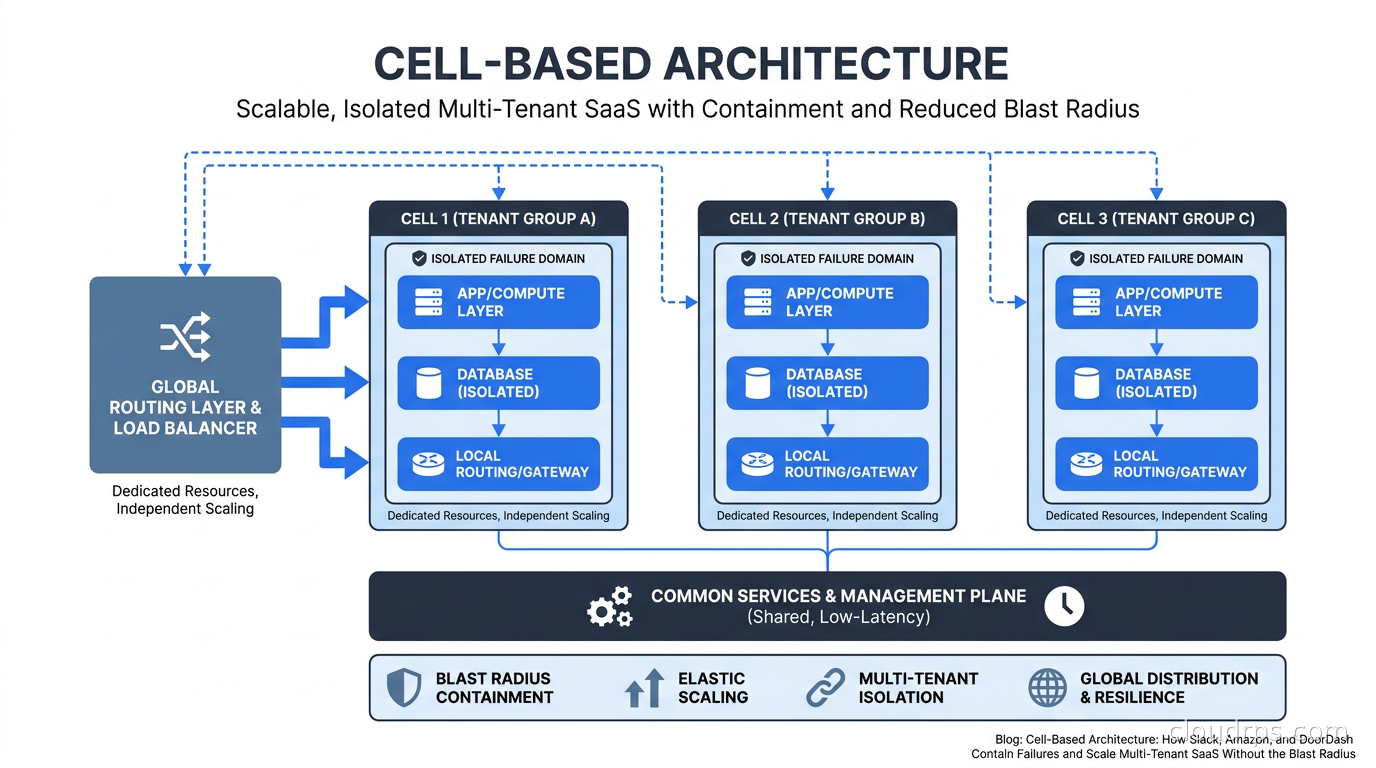
A cell is a self-contained deployment unit that serves a defined subset of your users or tenants. Think of it as a mini-copy of your entire service stack: compute, database, cache, message queue, and whatever else your service needs to function. The key word is “self-contained.” A cell should be able to serve its tenants completely independently of every other cell.
The canonical mental model is ship bulkheads. A single hull breach cannot sink the ship because the compartments are sealed off from each other. If a cell has a problem, whether that is a performance incident, a bad deployment, a corrupted job queue, or a noisy tenant running an expensive report, that problem stays inside the cell. The other cells keep humming along.
Compare this with the alternative: a shared monolithic deployment where all tenants compete for the same database connection pool, the same cache, the same worker processes. Under this model, a single tenant doing something unusual (bulk data export, misconfigured webhook retry storm, poorly optimized new feature rollout) can degrade the experience for thousands of other tenants. This is called the noisy neighbor problem, and it is the primary reason to care about cells.
The Three Components You Need
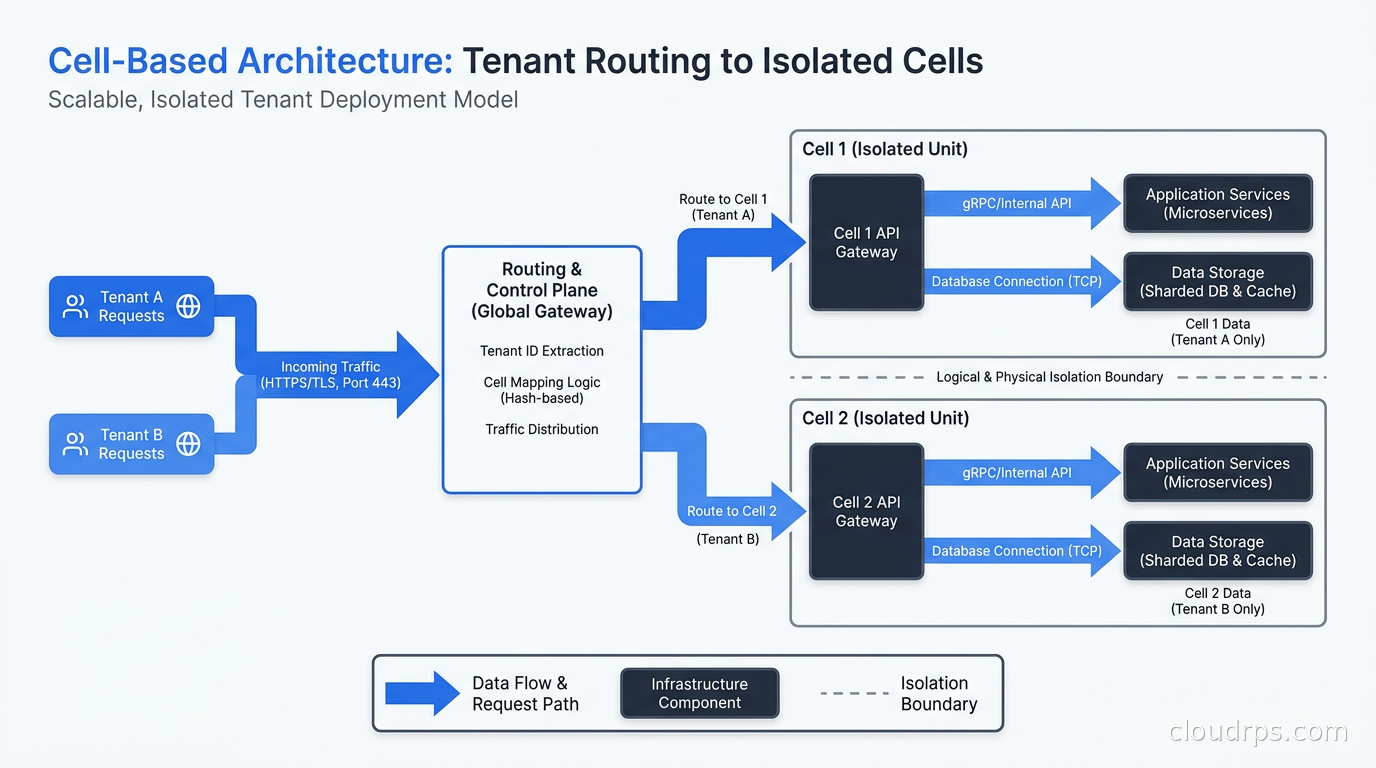
Every cell-based architecture I have designed or reviewed has three core components: the cell itself, the routing layer, and the tenant assignment system. Get these right and everything else follows. Get them wrong and you have just made a complicated mess.
The cell stack is what most people think about first. Each cell contains the same logical services as every other cell. If your product runs an API server, a background worker, a PostgreSQL instance, and a Redis cache, each cell gets all four. The cell boundary is at the infrastructure level, not the application level. Your application code does not need to know it is running inside a cell; it just runs normally. This is important: you want the isolation to be invisible to application developers if possible.
The routing layer sits in front of all cells and handles the problem of “given this incoming request, which cell should handle it?” This is usually implemented as a thin proxy or load balancer with a routing table. The routing key is typically a tenant identifier, which might be an account ID, organization ID, or subdomain. The routing layer looks up the tenant’s assigned cell and forwards the request there. This lookup needs to be fast, since it is on the critical path of every request. I have seen teams use Redis, DynamoDB, and in-memory tables with periodic refresh. Whatever you choose, the P99 latency of this lookup needs to be under a millisecond.
The tenant assignment system manages the mapping of tenants to cells. This is the operational brain of the whole system. It handles new tenant onboarding (which cell should this new customer go to?), cell rebalancing (this cell is getting overloaded, move some tenants), and cell migrations (move tenant A from cell 3 to cell 7 without downtime). This is also the component that most teams underestimate. The routing table itself is simple. The process of safely moving a live tenant between cells without data loss or downtime is genuinely hard.
How Slack Did It
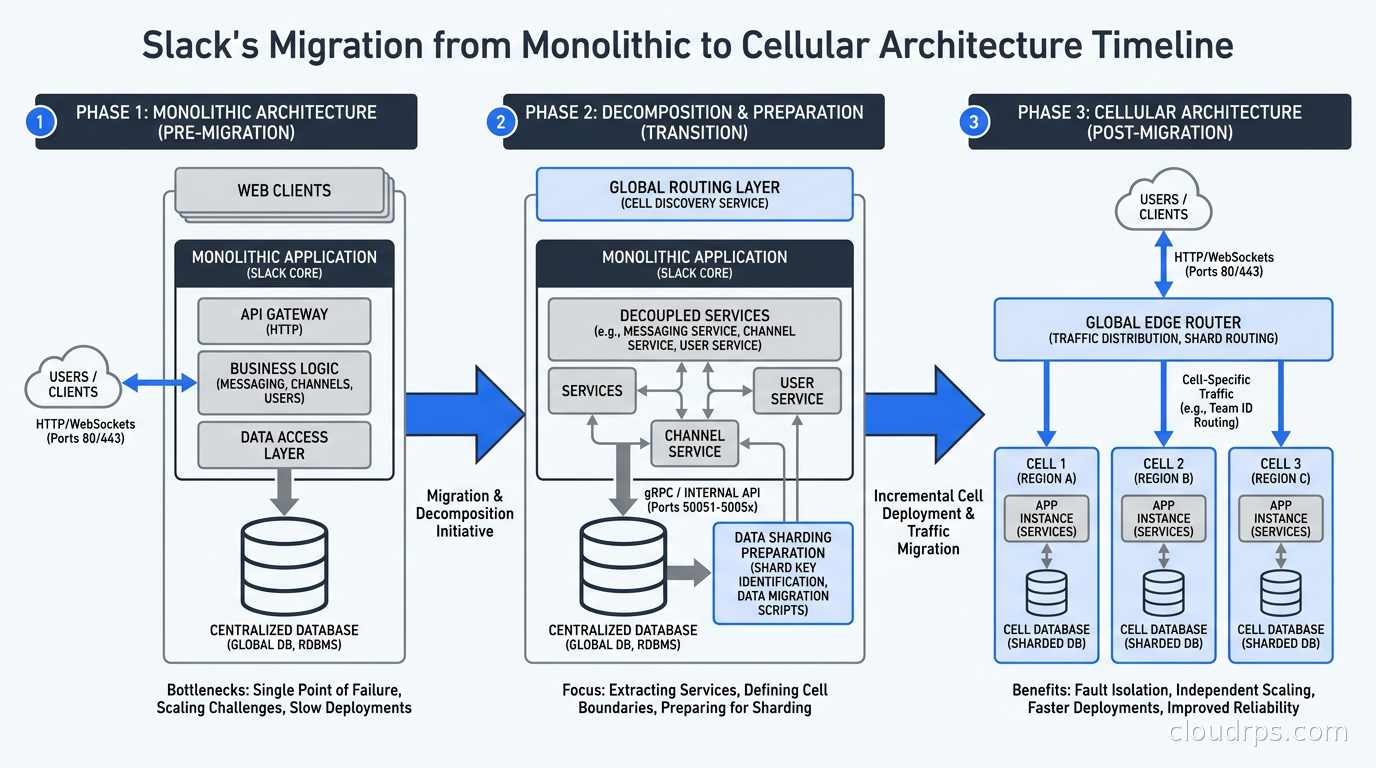
Slack’s case is worth studying in detail because they did not start greenfield. They migrated a product with tens of millions of active users from a shared multi-tenant architecture to a cellular one, which is much harder than building cells from scratch.
The triggering event was availability zone outages. Slack’s workspaces were distributed across a shared MySQL cluster with read replicas, and when an AZ went down, recovery procedures affected all customers simultaneously. The blast radius of any infrastructure event was the entire product. For a business communication platform, that is unacceptable.
Slack’s approach was to define a cell around a shard of their MySQL database. Each cell contained a set of workspace IDs (their primary tenant identifier), a dedicated MySQL primary with replicas, and a set of application servers that only served those workspace IDs. The routing layer used a workspace-to-shard mapping table to direct traffic. This sounds straightforward, but the migration required rethinking every background job, every cross-workspace query (they had some), and every operational runbook.
The key insight from Slack’s post-migration reports is that cell-based architecture changes your incident response from “fix the entire platform” to “fix one cell while the rest keeps serving traffic.” That operational shift is almost as valuable as the fault isolation itself.
Cell Sizing: The Decision That Determines Everything
How big should a cell be? This is the question I get most often from teams adopting this pattern, and the answer is: it depends, but here is a framework.
There are two failure modes:
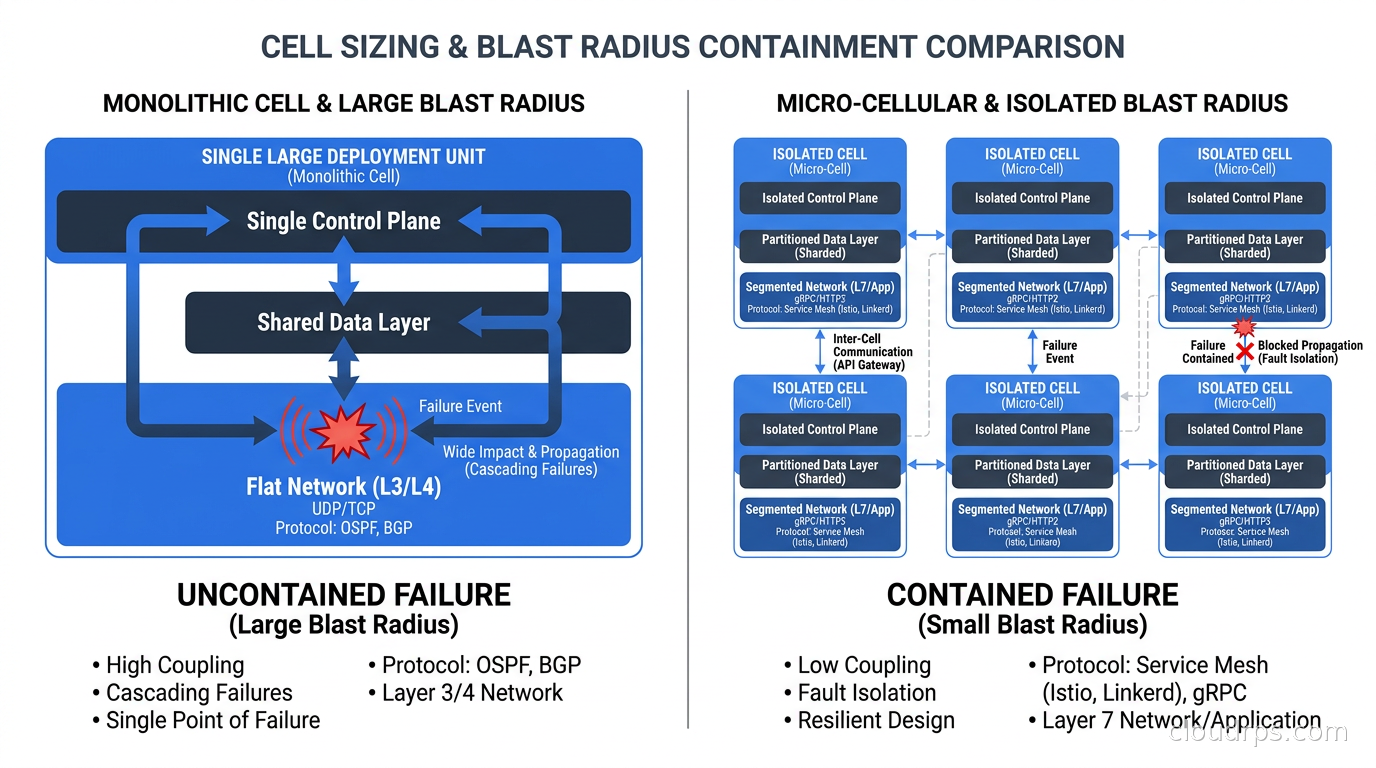
Cells that are too large start to look like your original monolith. If one cell serves 40% of your revenue, a problem in that cell is still a catastrophic incident. You want the blast radius of a single cell failure to be something you can tolerate: a small percentage of tenants, not your biggest customers.
Cells that are too small become an operational nightmare. If you have 1,000 cells each running their own database and worker fleet, your infrastructure cost and operational complexity explodes. Every schema migration, every deployment, every security patch needs to touch 1,000 cells. Teams that started with one-cell-per-tenant often regret it unless they have exceptionally strong automation.
The practical sweet spot for most SaaS companies I have worked with is somewhere between 50 and 500 tenants per cell, depending on tenant size and your service’s resource consumption patterns. You want enough tenants per cell to amortize the fixed overhead, but few enough that a cell failure is not a company-threatening event. Some teams define cells by a resource budget rather than a tenant count: fill this cell until its database reaches X GB or its CPU utilization reaches Y%.
One thing I strongly recommend: assign your largest tenants to dedicated cells. If you have enterprise customers who pay 10x more than your average customer and consume 50x more resources, put each of them in their own cell. This is sometimes called a “whale cell” pattern. The per-customer infrastructure cost is higher, but the support cost of an enterprise outage caused by another tenant is much higher. The most extreme version of the whale cell, increasingly common with regulated enterprise customers, is BYOC (Bring Your Own Cloud): the customer’s cell lives in their own cloud account, under their own IAM policies and VPC, while the vendor still manages the software remotely via an outbound agent.
Routing in Practice
The routing layer is where most teams discover hidden assumptions in their codebase. Here are the problems I have seen most often:
Cross-cell references. Your application probably has places where it stores references to resources from other tenants: a shared document, a notification, an API integration. When those tenants are in the same cell, this works fine. When they are in different cells, you suddenly need a way to look up resources across cell boundaries. Some teams solve this by routing cross-cell reads through a global read-only replica. Others ban cross-tenant references in the data model entirely (which surfaces product decisions you should have made years ago). Neither is painless.
Global data. Some data does not belong to any single tenant: feature flags, product configuration, shared reference tables. You have two options: replicate this data into every cell (adds synchronization complexity), or keep a global layer that all cells read from (adds a dependency that could become a single point of failure). I have seen both approaches work. The replicated approach is more resilient; the global approach is simpler to operate.
Background jobs. Jobs that process data for multiple tenants need to be scoped to a single cell. A nightly reporting job that queries all tenants needs to become N jobs, one per cell. This is usually straightforward to implement but requires careful attention during migration: you do not want jobs running on the wrong cell and processing data they should not touch.
Authentication. If your auth system issues tokens that contain a tenant ID, routing works naturally. If your auth system is session-based and stores state on a shared cluster, you need to either replicate session state across cells or route auth requests to a global auth service separate from the cell stack. I prefer the former for latency reasons.
This is one reason multi-tenancy architecture decisions made early in a product’s life matter so much. If you designed your data model with clean tenant boundaries and used tenant IDs consistently as routing keys, cell adoption is mostly an infrastructure exercise. If you have cross-tenant data sharing baked into your schema, you have architectural surgery ahead of you.
The Database Inside a Cell
The database question deserves its own section because it is usually the hardest part. There are three approaches I have seen in production:
One dedicated database per cell. Each cell gets its own PostgreSQL or MySQL instance. This is the strongest isolation, the easiest to reason about, and the most expensive. Every cell needs its own primary, replicas, backups, and monitoring. Schema migrations need to run on every cell. Teams that go this route generally automate everything and treat cells as cattle rather than pets.
A shared database with per-cell schemas or table prefixes. All cells on a host share a database engine but use separate schemas or table prefixes. This trades some isolation for lower cost and simpler operations. The noisy neighbor problem still exists at the database level (one cell’s query can affect disk I/O for others), but it is contained to a smaller blast radius than sharing a single global database.
Per-cell database with a global metadata layer. The cell database handles transactional workloads, and a central read-only database provides cross-cell reporting and analytics. This is the pattern I recommend most often for mid-size SaaS companies. It gives you strong operational isolation where it matters (writes, real-time reads) while preserving the ability to run business intelligence queries across tenants without jumping through cell routing hoops.
For teams considering a migration, zero-downtime database migrations become even more critical in a cellular world. You are now running migrations across many database instances, and any technique that locks tables or causes replication lag is multiplied across every cell.
High availability within each cell is also non-negotiable. A cell with a single database primary and no replica is a cell that will cause an outage every time you do maintenance. Build redundancy at the cell level, not just at the cluster level.
Deploying Across Cells
Deployments are where cell-based architecture pays a dividend that most teams do not anticipate. When you deploy to a monolithic shared cluster, even a well-designed canary deployment still exposes a fraction of all your tenants to the new code. With cells, you can deploy to a single cell, soak it for an hour, watch the error rate, and then roll forward to the next cell. Your “canary” is an entire tenant cohort, not a percentage of requests.
Slack and Amazon both describe a cell deployment strategy where a “canary cell” is the first to receive new code. If metrics look good after a defined period (SLO compliance, error rate, latency percentiles), an automated promotion process rolls the deploy across the remaining cells. If the canary cell shows problems, the deploy stops and only the canary cell’s tenants experienced the regression.
This approach maps well to the GitOps model. You can represent cell deployments as a sequence of ArgoCD application syncs, with automated gates between each cell that check observability signals before proceeding. I have seen teams reduce their deployment-related incidents significantly with this pattern because the blast radius of a bad deploy is bounded by the first cell to receive it.
Cell Migration: Moving Tenants Without Downtime
Moving a tenant from one cell to another is the most operationally complex routine task in a cellular system. You need to do it when cells become imbalanced, when you want to give a large customer a dedicated cell, when you are decommissioning an old cell, or when you are adding capacity. Here is the general pattern that works reliably:
Phase 1: Sync. Set up replication from the source cell’s database to the destination cell. This can be logical replication in PostgreSQL, binlog replication in MySQL, or a CDC-based approach using something like Debezium (covered in detail in our change data capture guide). Let the destination catch up until replication lag is near zero.
Phase 2: Redirect reads. Update the routing table to send read traffic for this tenant to the destination cell while writes still go to the source. This validates that the destination cell can serve the tenant’s traffic pattern without errors.
Phase 3: Quiesce and switch. Briefly pause new writes for this tenant (you can do this at the application level with a short retry loop), let replication catch up to zero lag, update the routing table to point all traffic to the destination, then resume writes.
Phase 4: Cleanup. After confirming the tenant is healthy on the destination cell, remove the data from the source cell.
The whole process for an average-sized tenant can be done in seconds for the actual cutover phase. The sync phase might take hours for a large tenant. I have seen teams automate this entire workflow and run dozens of tenant migrations per day as routine operations.
Cell-Based Architecture vs Multi-Region vs Multi-Tenancy
These terms get conflated, so let me draw the distinctions clearly.
Multi-tenancy refers to how you share infrastructure between customers. A cell-based architecture is a specific form of multi-tenancy where the sharing boundary is a cell rather than the entire cluster. The multi-tenancy explainer covers the full spectrum from shared everything to siloed-per-tenant.
Multi-region refers to deploying your service across multiple geographic regions, primarily for latency reduction and regional fault tolerance. Cell-based architecture and multi-region are orthogonal: you can have a single-region deployment with many cells, or a multi-region deployment where each region contains its own set of cells. The multi-region active-active architecture article covers the global routing and consistency challenges that come with geographic distribution.
Fault tolerance and high availability are outcomes you are trying to achieve. Cells are one mechanism for achieving them. See the eliminating single points of failure guide for the full toolkit.
When You Actually Need This
Cell-based architecture adds real operational complexity. I want to be honest about that. You need automation, strong observability per cell, a robust routing layer, and engineers who understand the deployment and migration procedures. For a startup with 100 customers, this is massive overkill.
Here are the signals that tell me a team should start thinking about cells:
Noisy neighbor incidents are in your postmortems. If the phrase “tenant X caused degradation for tenant Y” appears in your postmortems more than once per quarter, you have a blast radius problem. Cells fix this structurally.
You have enterprise customers with different SLA tiers. When your $10k/month customers are sitting in the same cluster as your $50/month customers, you have a risk that something the small customers do (or that your platform does while trying to serve them) affects your enterprise relationships. Dedicated cells for enterprise customers are a common starting point.
Your deployments regularly cause partial outages. If you cannot roll out a change to 5% of users without it affecting the rest, your deployment unit is too large. Cells give you a natural deployment ring.
You are approaching the connection limits or throughput limits of a single database. When vertical scaling stops being the answer and horizontal database scaling options all involve sacrificing ACID guarantees, cell-based architecture lets you scale out while keeping a relational database inside each cell.
You are in a regulated industry with data residency requirements. Cells map naturally to data residency: tenant A goes to cells in EU data centers, tenant B goes to cells in US data centers, cell routing enforces the boundary. This is much simpler to audit and certify than a global shared cluster with per-query filters.
The Path from Here
If you are starting fresh, design for cells from day one. This does not mean building all the cell infrastructure immediately. It means: use a consistent tenant ID as your first-class routing key, keep tenant data scoped under that key in your schema, avoid global shared state wherever possible, and architect your background jobs to be scoped to a tenant cohort. When you need cells, you can add the cell boundary as an infrastructure layer without rewriting your application.
If you are migrating an existing system, start with the routing layer and the tenant assignment table, even before you have multiple cells. Get all traffic flowing through a router that knows which cell a tenant belongs to, even if “cell 1” is your entire existing cluster. That routing layer is the foundation everything else builds on, and having it in place makes the actual cell split a much lower-risk operation.
The cellular model is one of those architectural patterns that looks like extra complexity until the first time you contain a major incident inside a single cell while the rest of your platform keeps working. After that, you start wondering how you ever operated without it.
For more on the infrastructure patterns that support cellular deployments, see our deep dives on SLOs and error budgets for defining per-cell reliability targets, and chaos engineering for testing that your cell boundaries actually hold under failure conditions.
Get Cloud Architecture Insights
Practical deep dives on infrastructure, security, and scaling. No spam, no fluff.
By subscribing, you agree to receive emails. Unsubscribe anytime.