
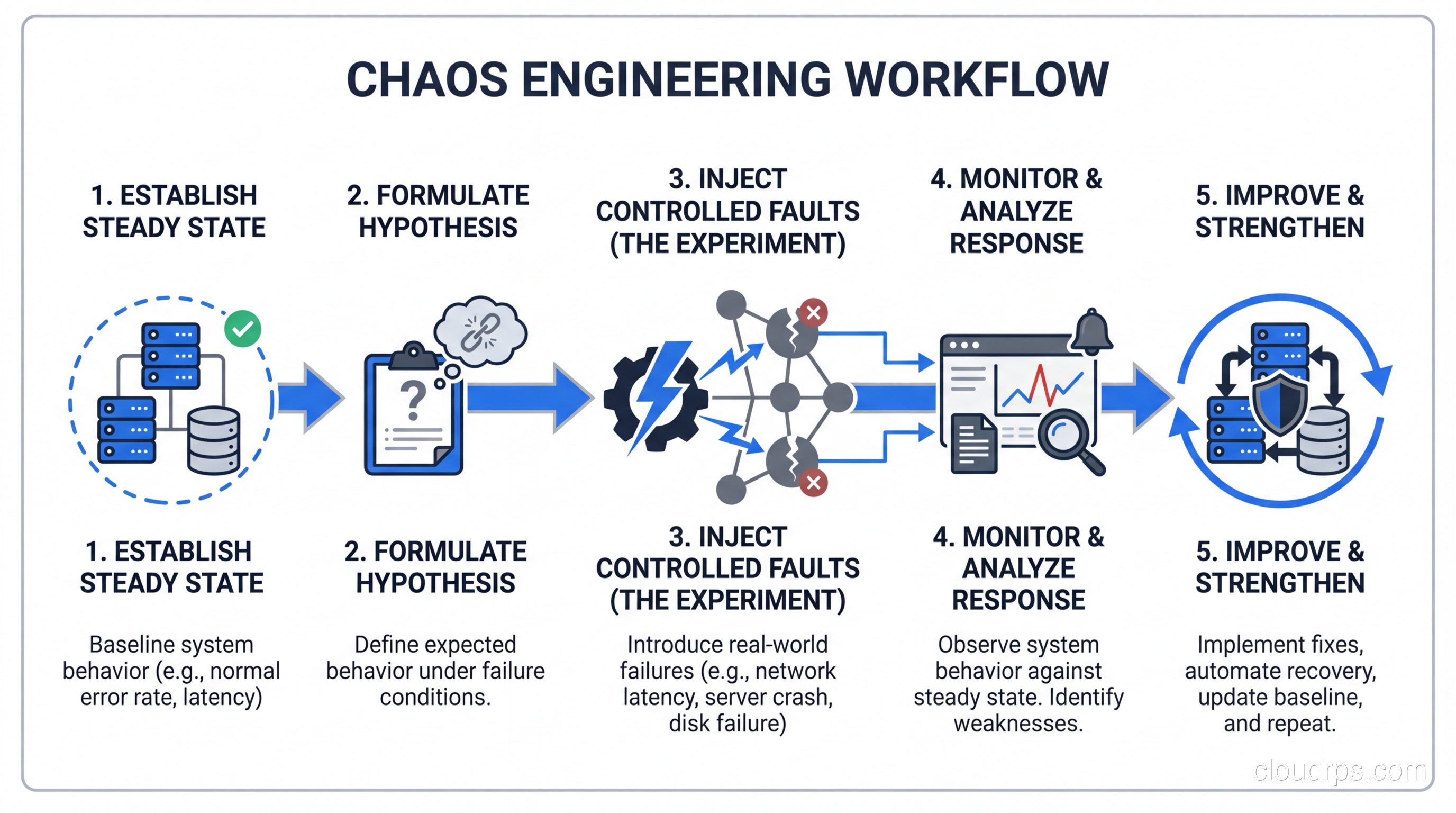
I still remember the first time I deliberately killed a production database replica during business hours. My hands were sweating. My manager was standing behind me. Three engineers had Slack open, ready to roll back. We had rehearsed the abort procedure twice that morning.
The replica went down. Traffic shifted. Latency spiked for about 400 milliseconds, then settled. Alerts fired, auto-recovery kicked in, and the system self-healed in under 90 seconds. We high-fived, documented everything, and moved on to the next experiment.
That was my introduction to chaos engineering, and it fundamentally changed how I think about reliability. After years of running chaos experiments across financial services, e-commerce platforms, and large-scale SaaS products, I can tell you this: the teams that break their systems on purpose are the ones that sleep best at night.
What Chaos Engineering Actually Is (And Isn’t)
Let me clear up the biggest misconception right away. Chaos engineering is not randomly breaking things and seeing what happens. That’s just negligence with a fancy name.
Chaos engineering is the discipline of experimenting on a system to build confidence in its ability to withstand turbulent conditions in production. It follows the scientific method. You form a hypothesis, design an experiment, control the blast radius, measure the results, and improve based on what you learn.
The key word there is “confidence.” You’re not trying to find bugs (though you will). You’re not doing QA (though it complements QA). You’re systematically verifying that the fault tolerance you designed into your architecture actually works under real conditions.
Think of it this way: you can write all the unit tests you want for your retry logic, but until you’ve actually injected 500ms of latency into your payment gateway call in production, you don’t really know if your timeout and retry configuration will hold up. I’ve seen beautifully designed retry policies that looked perfect in code review but caused cascading failures in production because the retry storm overwhelmed downstream services.
The Netflix Origin Story and Why It Spread
Netflix didn’t invent chaos engineering because they were bored. They invented it because they were terrified.
When Netflix migrated from their own data centers to AWS around 2010-2011, they realized something uncomfortable: they were now running on infrastructure they didn’t control. Servers could disappear at any time. Entire availability zones could go offline. The cloud was inherently less predictable than the hardware they owned.
So they built Chaos Monkey, a tool that randomly terminates virtual machine instances in production during business hours. The reasoning was simple: if their engineers knew that any instance could die at any moment, they would build services that were resilient to instance failures by default. No one would build a service that stored state locally or relied on a single instance. The cultural pressure was as important as the technical testing.
This was radical at the time. Most organizations treated production like sacred ground. You didn’t touch production unless something was already broken. Netflix flipped that thinking on its head: better to find weaknesses on your terms than to discover them at 2 AM on Black Friday.
The approach worked so well that Netflix expanded into the Simian Army: Latency Monkey (injecting delays), Conformity Monkey (finding instances that don’t follow best practices), and eventually Chaos Kong, which simulated the failure of an entire AWS region.
Other companies took notice. Amazon, Google, Microsoft, and eventually the broader industry adopted the practice. Today, chaos engineering is table stakes for any organization running distributed systems at scale.
The Scientific Method of Chaos
Every chaos experiment follows a structured process, and skipping steps is how you turn controlled experimentation into actual outages.
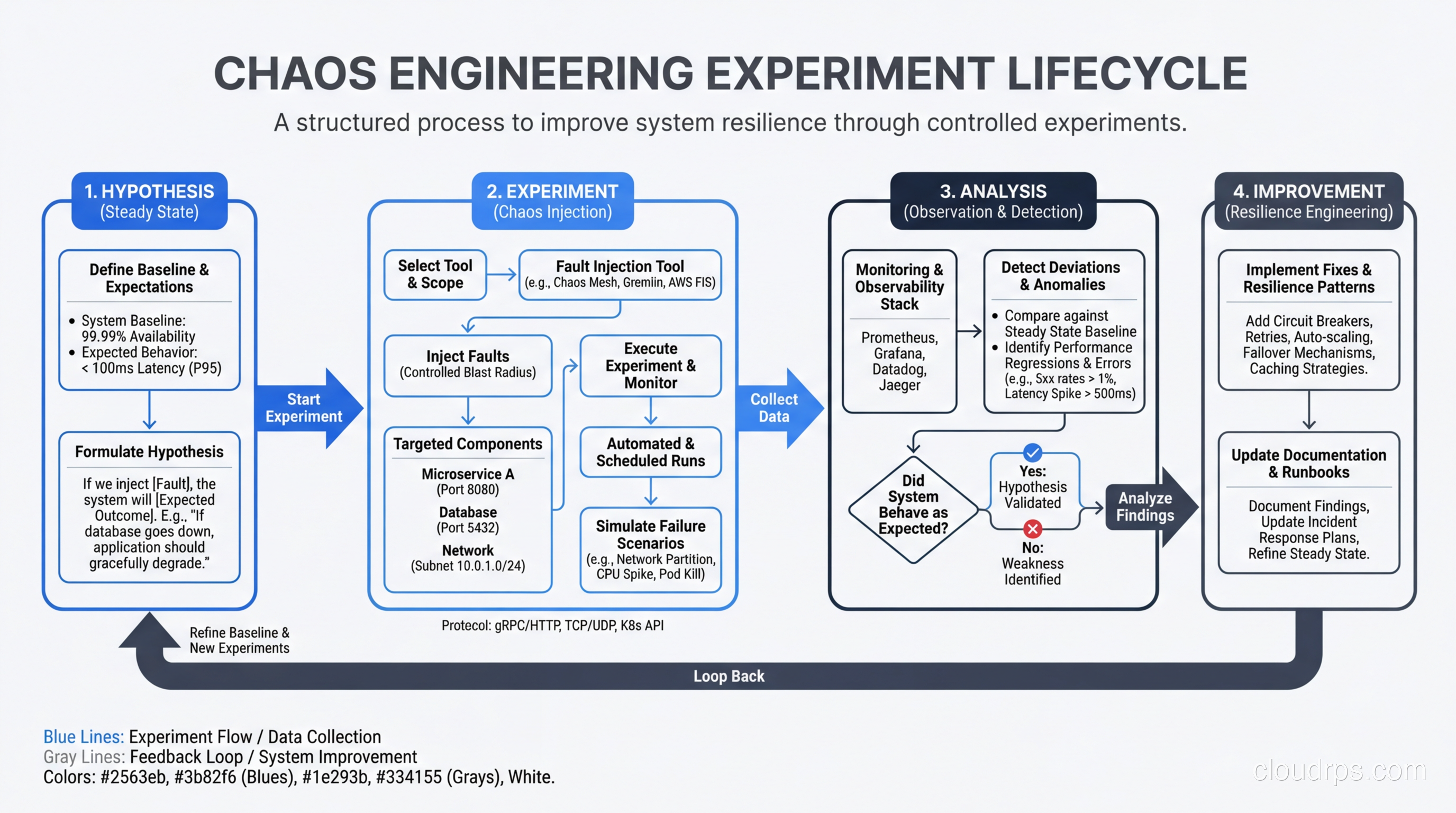
Step 1: Define steady state. Before you break anything, you need to know what “normal” looks like. This means identifying the key metrics that indicate your system is healthy. For an e-commerce platform, that might be orders per minute, p99 latency on the checkout flow, and error rate on the product API. Your monitoring and logging setup is critical here. If you can’t measure steady state, you can’t run chaos experiments.
Step 2: Form a hypothesis. This sounds academic, but it’s the most important step. “I hypothesize that if we terminate one of three API pods, the Kubernetes service will route traffic to the remaining pods and p99 latency will stay below 200ms.” That’s a testable hypothesis. “Let’s see what happens if we kill a pod” is not.
Step 3: Design the experiment. Decide exactly what you’re going to inject, for how long, and what constitutes a failure. Define your abort conditions clearly. If error rate exceeds 5%, you kill the experiment immediately. No exceptions.
Step 4: Run the experiment. Inject the fault, observe the system, and collect data. This is the easy part if you’ve done steps 1-3 properly.
Step 5: Analyze and improve. Did the system behave as hypothesized? If yes, great, you’ve built confidence. If not, you’ve found a weakness before your customers did. Either way, you win.
Step 6: Increase the blast radius. Once you’ve verified the system handles single-instance failures, try killing two instances. Then inject latency alongside instance failures. Real-world failures are rarely single-fault scenarios.
The Chaos Engineering Toolbox
The tooling landscape has matured significantly over the past few years. Here’s an honest comparison of the major players based on my experience deploying them in production environments.
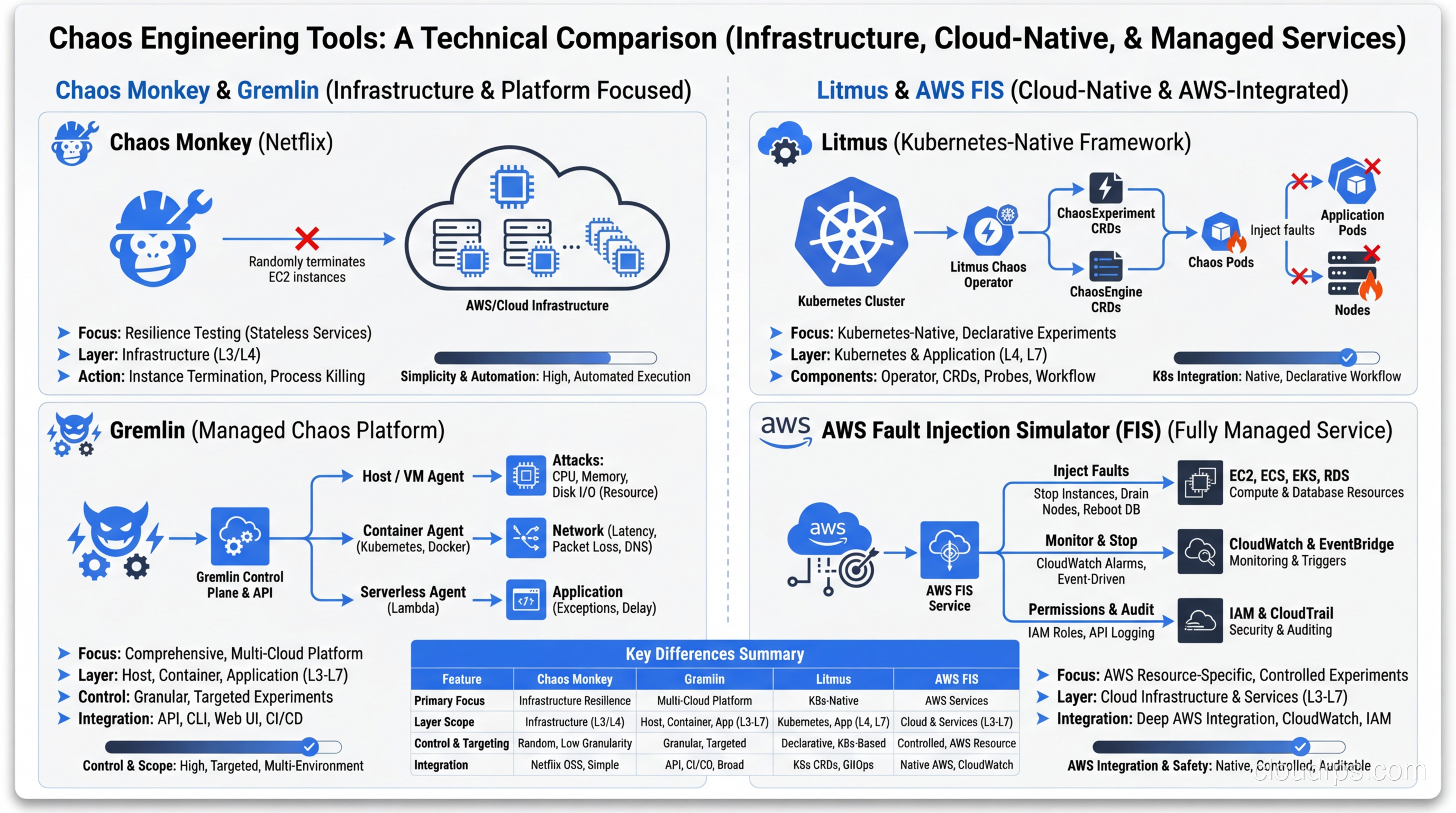
Chaos Monkey is where it all started, and it still has a place for teams running on AWS with Spinnaker. It’s simple, focused on instance termination, and battle-tested. The downside is that it’s narrow in scope. If you need network fault injection or CPU stress testing, you’ll need additional tools. I recommend it as a starting point for teams new to chaos engineering who just want to verify their high availability setup handles instance failures.
Gremlin is the commercial leader and, honestly, the easiest to get started with. It offers a wide range of fault types (CPU, memory, disk, network, process, time), a polished UI for running experiments, and built-in safety controls. The “Scenarios” feature lets you chain multiple faults together to simulate complex failure modes. The trade-off is cost. For large environments, licensing adds up quickly. But if your organization needs something that non-engineers can operate and you want enterprise support, Gremlin is hard to beat.
Litmus (now LitmusChaos) is the CNCF project for Kubernetes-native chaos engineering. If your workloads run on Kubernetes, Litmus deserves serious consideration. It uses ChaosEngine CRDs to define experiments declaratively, which fits naturally into GitOps workflows. The ChaosHub provides a library of pre-built experiments for common Kubernetes failure scenarios: pod kill, container kill, node drain, disk fill, network loss, and more. The learning curve is steeper than Gremlin, but the Kubernetes integration is deeper.
AWS Fault Injection Simulator (FIS) is Amazon’s managed chaos engineering service, and it’s compelling if you’re all-in on AWS. It can inject faults at the infrastructure level (stop EC2 instances, throttle API calls, disrupt networking) with native IAM integration for safety controls. The best feature is the ability to simulate AZ failures, which is brutally effective for testing your multi-AZ architecture. The limitation is obvious: it only works with AWS services.
Chaos Mesh is another CNCF project that’s gained traction, particularly in the Chinese tech ecosystem but increasingly worldwide. It supports a broad range of fault types for Kubernetes (network, IO, time, stress, kernel) and has a decent dashboard. I’ve found it particularly useful for JVM-specific chaos (method-level fault injection) that other tools don’t support as cleanly.
For most teams, my recommendation is: start with Gremlin or AWS FIS if you want quick wins and low friction. Move to Litmus or Chaos Mesh if you’re a Kubernetes-heavy shop that wants deeper integration and open-source flexibility.
Types of Chaos Experiments That Actually Matter
Not all chaos experiments are created equal. Here are the ones that consistently reveal real weaknesses in production systems.
Instance and pod termination. The classic experiment. Kill a compute instance or Kubernetes pod and verify the system recovers. This sounds basic, but I’ve seen organizations with beautifully architected auto-scaling groups that had never actually tested whether traffic rerouted cleanly during instance termination. One team discovered their health check endpoint returned 200 even when the application was in a zombie state, unable to process requests but not quite dead enough for the load balancer to remove it. That’s the kind of single point of failure you only find through real fault injection.
Network latency injection. Add 100ms, 500ms, or 2000ms of latency to calls between services. This is where you discover that your “timeout” of 30 seconds means a user stares at a spinner for half a minute, or that your lack of a timeout means requests back up until the thread pool is exhausted. For a thorough treatment of tracking down these issues, our guide on troubleshooting latency covers the systematic approach.
Network partition. Simulate a network split between services or between your application and its database. This tests your circuit breakers, fallback behaviors, and cache strategies. I once ran this experiment on a service that was supposed to gracefully degrade to cached data when the database was unreachable. Instead, it threw 500 errors because the cache layer had a dependency on the same network path as the database. Nobody caught it in code review because the architecture diagram showed them as separate paths.
AZ and region failure. The big one. Simulate the failure of an entire availability zone (or region, if you’re feeling brave). This validates your disaster recovery planning and cross-AZ routing. AWS FIS is particularly good for this because it can actually stop all instances in a target AZ. I recommend starting with a single AZ failure during a game day before even thinking about region-level experiments.
CPU and memory stress. Saturate CPU or consume memory on specific instances. This tests auto-scaling triggers, resource limits, and quality-of-service mechanisms. You’ll often find that your auto-scaling policy has a 5-minute cooldown that lets the system burn for too long before scaling out.
DNS failure. Corrupt or delay DNS resolution. This is one of the most underrated chaos experiments. DNS is a dependency for almost everything, yet most systems have zero graceful handling of DNS failures. I’ve watched entire microservice architectures collapse because one service couldn’t resolve the hostname of another, and the resulting error handling cascaded into a full outage.
Clock skew. Advance or skew the system clock. This finds bugs in certificate validation, token expiration, cache TTLs, and time-based scheduling. If you’ve ever had an outage caused by an expired certificate, you know why this matters.
How to Run a Game Day
A game day is a planned, structured event where your team runs chaos experiments together. Think of it as a fire drill for your infrastructure. Here’s how to run one that actually produces useful results.
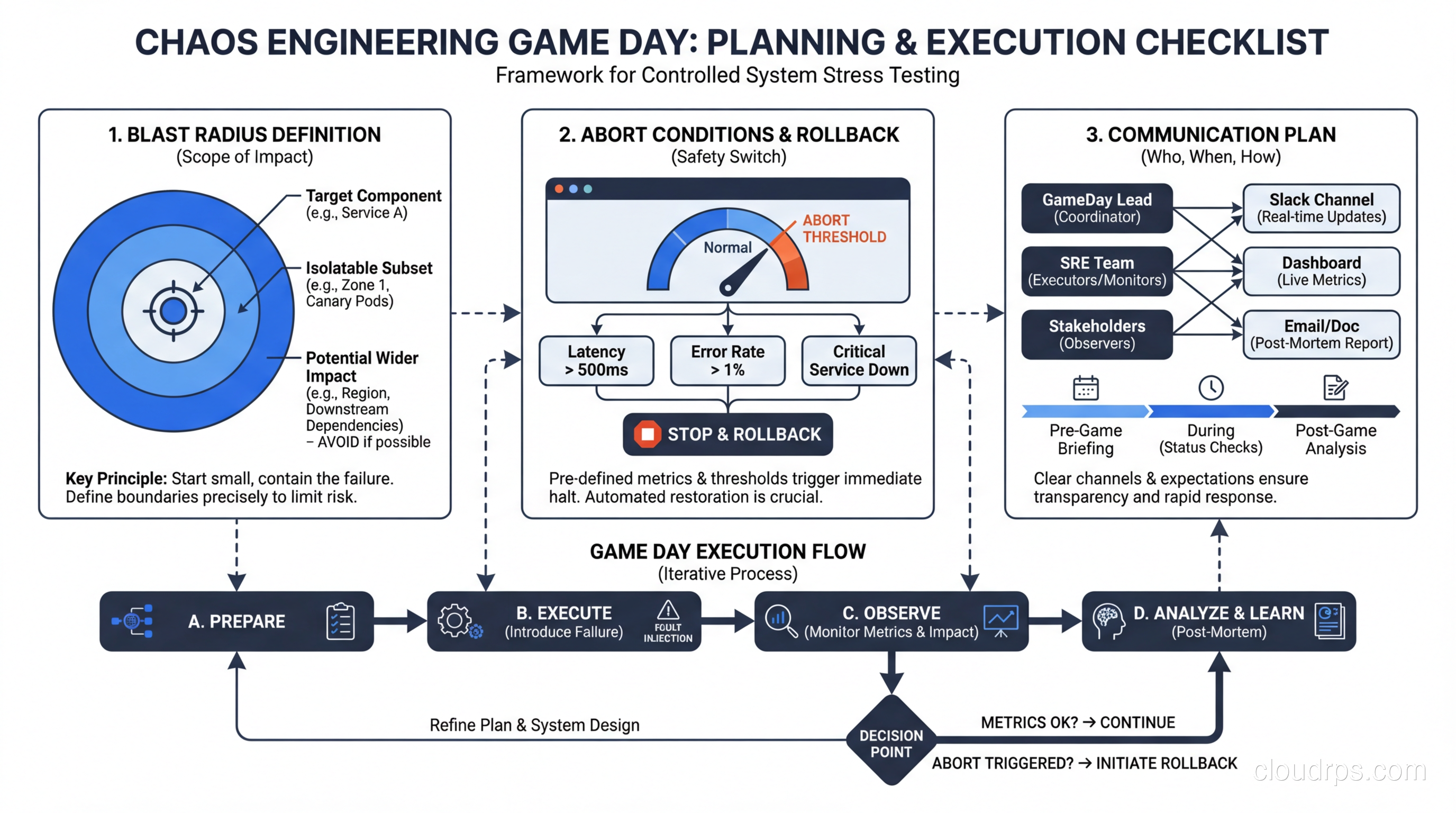
Two weeks before: planning. Identify the system or service you’re targeting. Write up 3-5 experiments with clear hypotheses. Define your blast radius (which environments, which services, which percentage of traffic). Get sign-off from stakeholders. This last part matters more than you think. Nothing kills a chaos engineering program faster than a surprise experiment that causes customer impact without leadership buy-in.
One week before: preparation. Verify your monitoring dashboards are working. Make sure on-call engineers know the game day is happening. Prepare runbooks for each experiment with specific abort procedures. Test your abort mechanism. Seriously, test the abort. If your “kill switch” doesn’t work, you’ve just turned a controlled experiment into a production outage.
Day of: execution. Start with a team standup to review the plan. Run experiments one at a time with at least 15 minutes between them to allow the system to return to steady state. Have someone dedicated to documentation, capturing observations in real-time. This person is not running experiments. They’re watching dashboards, noting behavior, and keeping a timeline.
Keep your blast radius small initially. If you’re testing pod termination, start with one pod out of ten, not five out of ten. If the system handles it gracefully, increase the blast radius in subsequent experiments.
Abort conditions must be non-negotiable. Define them in advance and enforce them strictly. Common abort conditions include: error rate exceeds X%, latency exceeds Y milliseconds for Z minutes, revenue impact detected, or any customer-facing functionality is completely unavailable. When an abort condition triggers, stop the experiment immediately. Don’t try to “just see what happens next.”
After the game day: retrospective. This is where the real value is created. Document every finding. For each experiment, record: the hypothesis, what actually happened, whether it matched expectations, and what actions to take. Create tickets for every issue discovered and track them to completion.
Starting Small: Staging vs Production
“But we can’t break production!” I hear this constantly, and I get it. The first few times, it’s genuinely scary. Here’s my advice on progression.
Phase 1: Chaos in development. Run experiments in your dev environment to validate your tooling and processes. This is low-risk and builds team familiarity. The downside is that dev environments rarely mirror production, so the findings have limited value.
Phase 2: Chaos in staging. Run experiments in a staging environment that closely mirrors production. You’ll catch configuration issues, missing health checks, and incorrect timeout values. This is where most teams should spend their first 2-3 months of chaos engineering.
Phase 3: Chaos in production with reduced blast radius. Target a small percentage of traffic or a single instance. This is where you start finding real issues because production traffic patterns, data volumes, and dependencies are different from staging.
Phase 4: Continuous chaos in production. This is the goal. Automated experiments run continuously with safety controls. Chaos Monkey-style random instance termination during business hours. You’ve reached this phase when your team is confident that the safety controls work and that the experiments won’t cause customer-visible impact.
Most organizations I’ve worked with take 6-12 months to progress from Phase 1 to Phase 3. Getting to Phase 4 is a multi-year journey that requires deep investment in observability, automated recovery, and cultural change.
Building Organizational Buy-In
Let me be honest: the hardest part of chaos engineering isn’t the tooling. It’s convincing your organization to do it.
Engineers are often the easiest to convince. Show them a war story about an outage that chaos engineering would have caught, and they’ll nod along. The resistance comes from product managers, VPs of engineering, and anyone responsible for SLAs.
Here’s the pitch that works: “We already have unplanned outages. Chaos engineering lets us have planned, controlled, small-scope incidents that find weaknesses before our customers do. The choice isn’t between stability and chaos. It’s between finding problems on our terms or finding them during peak traffic.”
Some tactical advice for building buy-in:
Start with a post-incident review. After your next production outage, analyze whether chaos engineering would have caught the issue beforehand. In my experience, the answer is “yes” about 70% of the time. Present this to leadership as a concrete example.
Frame it as risk reduction, not testing. Executives don’t care about testing methodologies. They care about risk to revenue and reputation. Chaos engineering reduces the probability and severity of outages. That’s the framing that gets budgets approved.
Run your first game day on a non-critical service. Pick an internal tool or a low-traffic service for your first experiment. Build a track record of safe, controlled experiments before targeting revenue-critical systems.
Publish results internally. After every game day, publish a summary: what you tested, what you found, what you fixed. This builds organizational awareness and demonstrates value. When the VP sees that you caught a misconfigured health check that would have caused a 30-minute outage during the next peak, that’s worth more than any slide deck.
What Chaos Engineering Catches That Testing Doesn’t
Traditional testing (unit tests, integration tests, load tests) is necessary but insufficient for distributed systems. Here’s what chaos engineering uniquely reveals.
Cascading failures. Service A’s timeout to Service B is 10 seconds, but Service B’s timeout to Service C is 30 seconds. Under normal load, this doesn’t matter. Under failure conditions, Service A retries 3 times while Service B is stuck waiting for Service C, and now Service A has 9 pending requests to Service B, which has 27 pending requests to Service C. Your system just amplified a single failure into an exponential cascade. Integration tests won’t catch this because they don’t simulate partial failures under load. This is exactly the kind of issue that proper scaling design needs to account for.
Configuration drift. Your staging environment has a 5-second timeout for the payment gateway. Production has a 30-second timeout because someone changed it during an incident six months ago and never changed it back. Chaos experiments in production catch these discrepancies because they exercise the actual running configuration.
Hidden dependencies. I once ran a DNS failure experiment and discovered that our “stateless” API service was making a call to a metadata service on startup to fetch feature flags. When DNS failed, the service couldn’t restart, which meant it couldn’t recover from crashes during a DNS outage. No amount of unit testing would have found that dependency.
Incomplete failure handling. Your code catches the database connection exception, but what happens when the connection succeeds but every query times out? What about when the database returns results, but slowly enough to back up your connection pool? These partial failure modes are nearly impossible to simulate in traditional testing but trivial to inject with chaos engineering tools.
Human factors. Chaos engineering tests your people and processes, not just your code. Can your on-call engineer find the right dashboard within 60 seconds? Is the runbook accurate? Does the escalation path work? These are the factors that determine whether a 5-minute incident becomes a 2-hour outage. Teams that do blue-green deployments often think they’ve eliminated deployment risk, only to discover through chaos experiments that their rollback procedure has never been tested end-to-end.
Integrating with Observability and Incident Response
Chaos engineering without observability is like conducting surgery blindfolded. You need to see what’s happening inside your system before, during, and after every experiment.
At minimum, you need three things: metrics (system and application level), distributed tracing, and centralized logging. If you’re running on Kubernetes, you also need pod-level resource metrics and event streams. Your monitoring stack should give you sub-minute visibility into error rates, latency distributions, and throughput for every service involved in the experiment.
The integration with incident response is equally important. Every chaos experiment should exercise your alerting and incident response process. If you inject a fault and your alerts don’t fire, that’s a finding. If the alerts fire but the runbook directs the on-call engineer to the wrong dashboard, that’s a finding too.
Some teams I’ve worked with use chaos experiments as training exercises for new on-call engineers. Rather than waiting for a real incident, they inject a controlled fault and let the engineer work through the incident response process with a senior engineer coaching them. This accelerates on-call readiness dramatically and builds confidence.
The feedback loop looks like this: chaos experiments surface weaknesses, those weaknesses get fixed and documented in runbooks, runbooks get tested in the next chaos experiment, and the cycle continues. Over time, your system becomes measurably more resilient, your runbooks become more accurate, and your engineers become more confident.
Getting Started Tomorrow
If you’ve read this far and want to start chaos engineering, here’s what I’d do in the next week.
Day 1: Audit your monitoring. Can you define “steady state” for your most critical service in terms of concrete metrics? If not, that’s your first task. You can’t do chaos engineering without observability.
Day 2-3: Pick one service and write three hypotheses. “If we kill one pod, traffic will reroute in under 5 seconds.” “If we add 200ms of latency to the database, p99 will increase but stay under 500ms.” “If we fill the disk to 90%, alerts will fire within 2 minutes.”
Day 4: Run the experiments in staging. Document the results. Fix anything that surprises you.
Day 5: Present the results to your team. Show them what you found. Get buy-in for a production game day next month.
That’s it. No massive tool procurement. No organizational transformation. Just start small, be scientific, and build from there.
Chaos engineering isn’t about being reckless. It’s about being deliberate. The systems that survive real-world failures are the ones that have practiced for them. Your users don’t care about your architecture diagrams or your design documents. They care about whether the service works when things go wrong. Chaos engineering is how you make sure it does.
And if you’re thinking about your broader resilience strategy, consider how chaos engineering fits alongside your approach to serverless architectures (where the failure modes are different but equally important to test) and your overall fault tolerance design. These disciplines reinforce each other. The team that designs for fault tolerance, tests with chaos engineering, and monitors with modern observability is the team that builds systems users can depend on.
Get Cloud Architecture Insights
Practical deep dives on infrastructure, security, and scaling. No spam, no fluff.
By subscribing, you agree to receive emails. Unsubscribe anytime.