
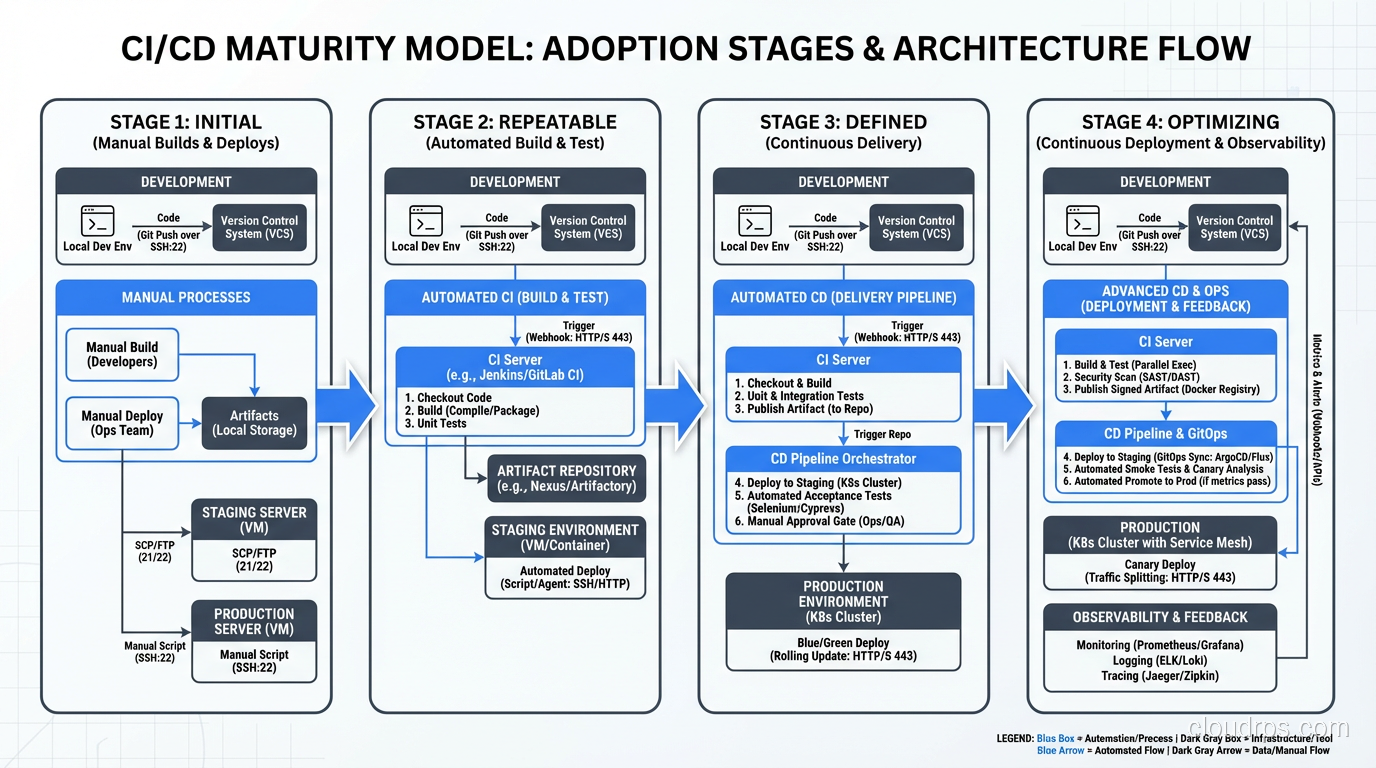
I remember the first time I broke production on a Friday afternoon. It was 1997, and I had just merged three weeks of changes from four different developers into a single branch. The merge took the better part of a day. The deployment took another half day. And then the pager went off at 6 PM, right as I was walking out the door. We spent the weekend rolling back changes by hand, line by line, because we had no idea which of those hundreds of changes had actually caused the failure.
That experience shaped how I think about software delivery for the rest of my career. And it’s why I get genuinely irritated when people treat CI/CD as just another buzzword or checkbox on a job listing. CI/CD is the single most impactful practice I’ve seen in three decades of building systems. It’s not glamorous. It’s not exciting at conference talks. But it’s the difference between teams that ship with confidence and teams that dread every release.
What CI/CD Actually Means (Without the Marketing Fluff)
Let me be blunt: most explanations of CI/CD overcomplicate it. Here’s what it really is.
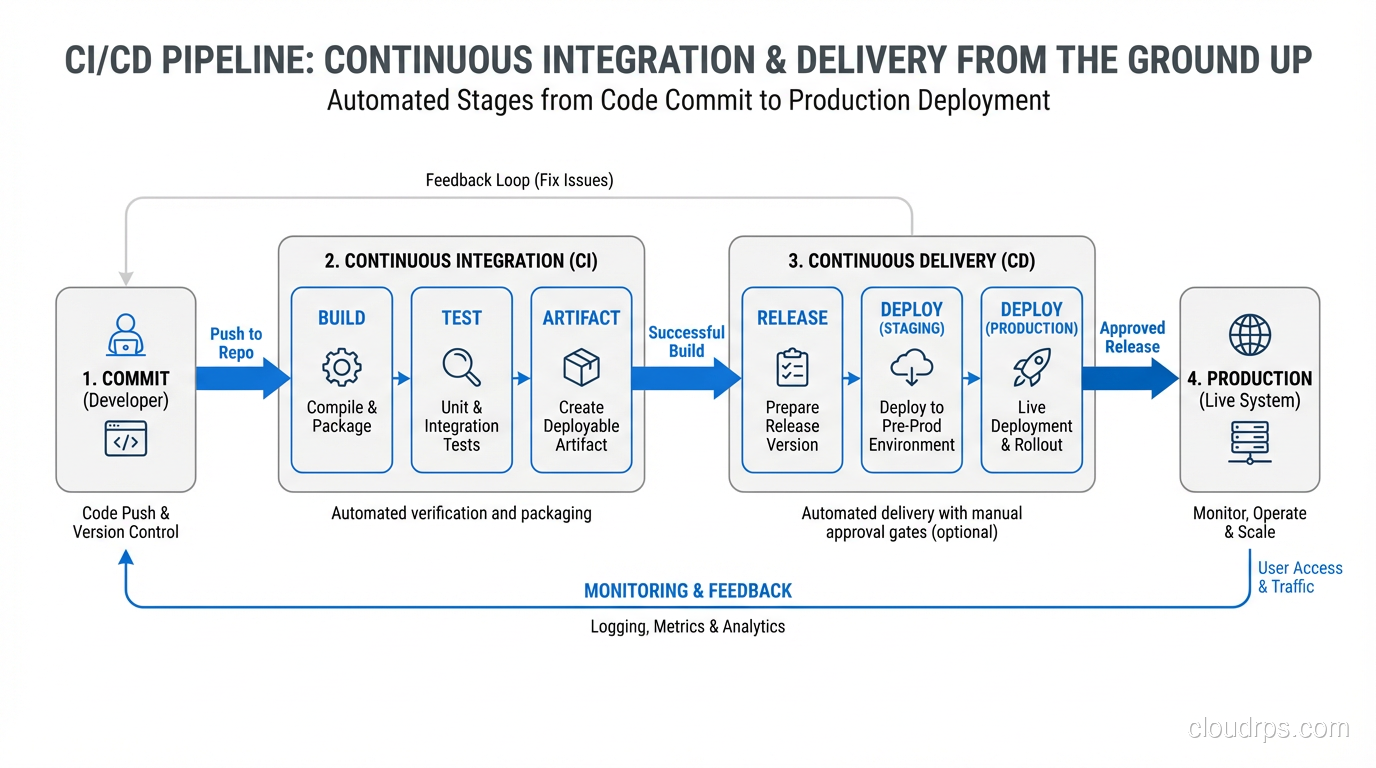
Continuous Integration means every developer merges their work into a shared branch at least once a day, and every merge triggers an automated build and test suite. That’s it. The “continuous” part isn’t about tooling; it’s about the habit. If your team has feature branches that live for two weeks, you’re not doing CI, no matter how fancy your Jenkins setup is.
Continuous Delivery means that every change that passes your automated pipeline is deployable to production at any time. You might not deploy it immediately (that’s a business decision), but the technical capability is always there. The code is always in a releasable state.
Continuous Deployment takes it one step further: every change that passes the pipeline automatically goes to production. No human gates, no approval queues. This scares people, and honestly, it should scare you a little. That healthy fear is what drives you to build better tests.
Why CI/CD Matters More Than You Think
I’ve consulted for maybe fifty organizations over the years, and I can usually predict their deployment frequency within five minutes of talking to them. Teams without CI/CD deploy monthly or quarterly. They batch up changes because deployments are painful and risky. Each deployment becomes a massive event involving war rooms, change advisory boards, and a lot of crossed fingers.
Teams with mature CI/CD pipelines deploy multiple times per day. Not because they’re reckless, but because each deployment is tiny, well-tested, and easy to roll back. The risk per deployment drops to nearly zero.
Here’s what I’ve seen happen when teams adopt CI/CD properly:
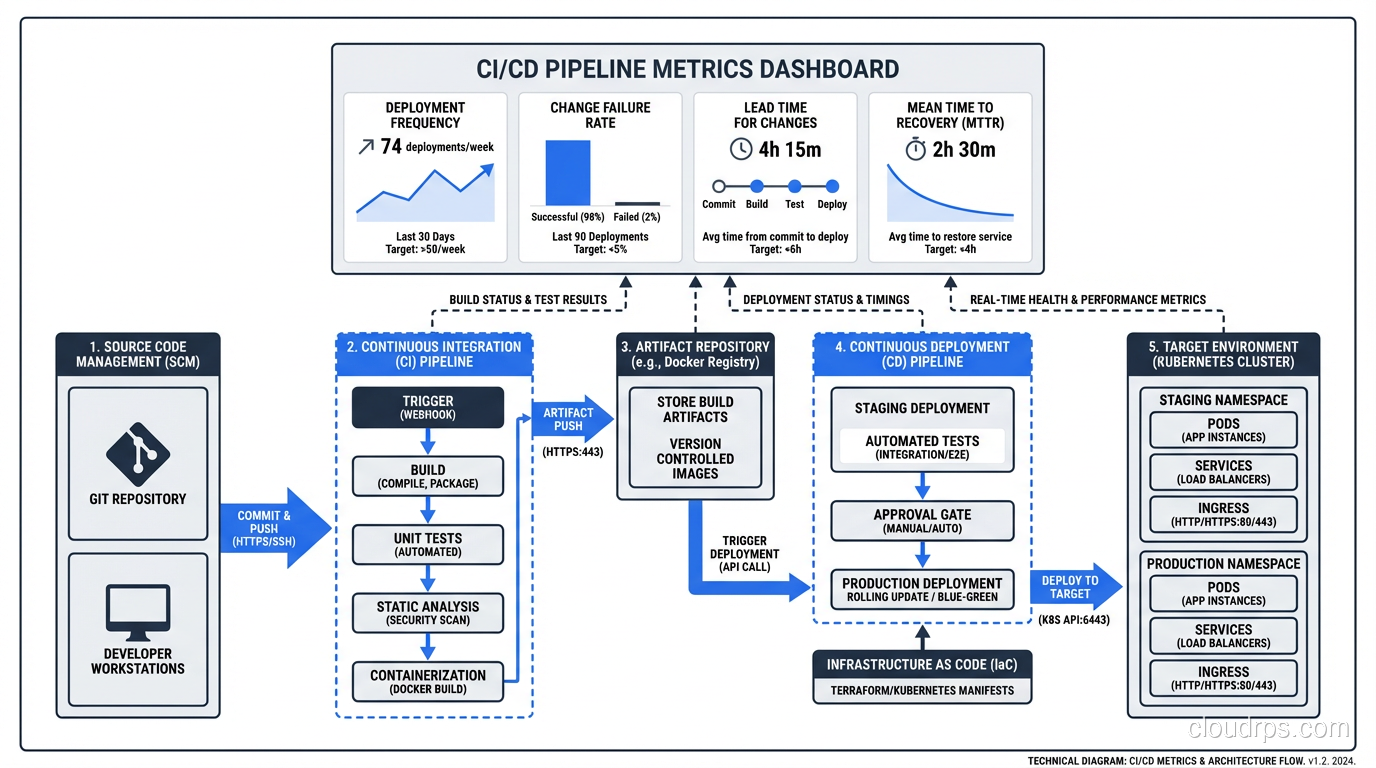
- Lead time drops from weeks to hours. A bug fix that used to take two weeks to reach customers (because it had to wait for the next release train) now gets there the same day.
- Failure rate drops dramatically. Small changes are easier to test, easier to review, and easier to understand. You catch problems in the pipeline instead of in production.
- Recovery time shrinks. When something does go wrong, you’re rolling back a single small change, not trying to untangle a massive release. If you want to go deeper on zero-downtime release strategies, I wrote about that in my piece on blue-green deployments.
- Developer morale goes up. This one surprises people, but it’s real. Developers hate release anxiety. Give them a pipeline they trust and watch their entire relationship with their work change.
Building a CI/CD Pipeline: The Practical Parts
Let me walk through what a solid pipeline actually looks like, in order. I’m going to be opinionated here because I’ve seen what works and what doesn’t.
Stage 1: Source Control and Branching
Everything starts with Git. I don’t care if you use GitHub, GitLab, Bitbucket, or something self-hosted. What matters is your branching strategy.
I’ve gone back and forth on this over the years, but I’ve landed firmly in the trunk-based development camp. Short-lived feature branches (one to two days maximum) that merge into main. No develop branches. No release branches that live for weeks. Every long-lived branch is technical debt that compounds daily.
If trunk-based development sounds scary, that’s a sign your test coverage isn’t where it needs to be. Fix the tests first.
Stage 2: Build
The build stage should do exactly two things: compile your code and produce an artifact. That artifact (whether it’s a Docker image, a JAR file, a compiled binary, or a zip of your static assets) should be immutable. The same artifact that passes your tests is the same artifact that goes to production. No rebuilding for different environments.
I learned this the hard way in 2009 when we had a build that passed all tests in staging but failed in production. Turned out the production build was picking up a different version of a dependency because we were rebuilding from source for each environment. Never again.
For containerized workloads, I strongly recommend building your images as part of CI. If you’re working with Kubernetes and Docker, this becomes even more critical, because your container image IS your artifact.
Stage 3: Automated Testing
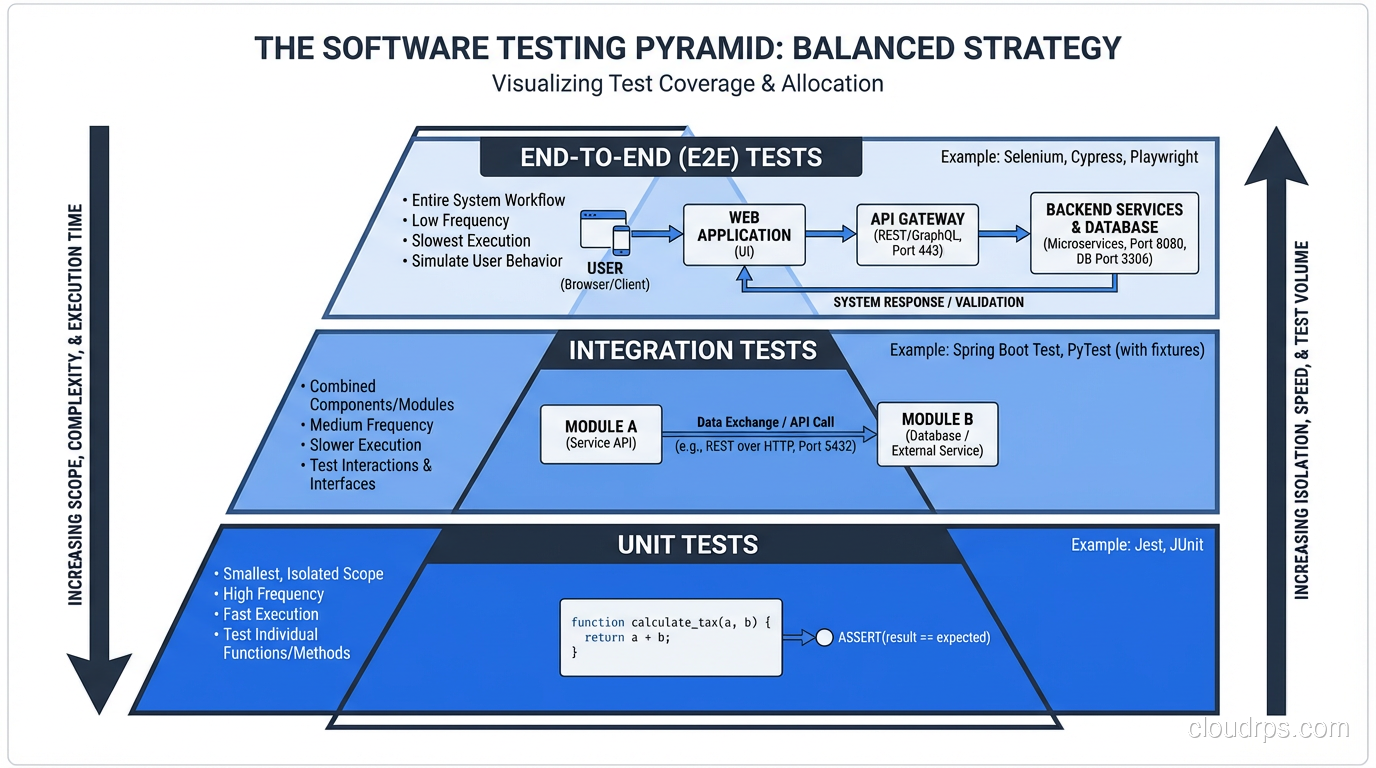
This is where most pipelines either shine or fall apart. Here’s my testing pyramid, refined over decades:
Unit tests run first. They should take seconds, not minutes. If your unit test suite takes more than two minutes, something is wrong. You’re probably hitting a database or network in your “unit” tests.
Integration tests come next. These test the boundaries between your components. Database queries, API contracts, message queue interactions. Five to ten minutes is reasonable.
End-to-end tests run last. These are the most expensive and the most brittle. Keep them focused on critical user journeys only. I’ve seen teams with 2,000 end-to-end tests that take four hours to run. That’s not CI; that’s a bottleneck.
Static analysis and security scanning should run in parallel with your tests. Linting, dependency vulnerability checks, container image scanning: these are cheap to run and catch real problems. The security scanning story has expanded significantly beyond secrets scanning: your pipeline is also your primary defense against supply chain attacks. Generating SBOMs, signing container images with Sigstore, and scanning for known CVEs in dependencies are now baseline expectations for production pipelines, as I cover in detail in my guide on software supply chain security. One critical area people overlook is scanning for hardcoded secrets in your codebase. API keys, database passwords, and tokens committed to git are one of the most common breach vectors. I wrote a full guide on secret management in the cloud that covers how to keep credentials out of your pipeline and inject them safely at runtime.
Stage 4: Artifact Storage
Once your build passes all tests, the artifact goes into a registry. Docker Hub, Amazon ECR, Artifactory, Nexus: pick one and standardize on it. Tag your artifacts with the Git commit SHA, not “latest.” I cannot stress this enough. When it’s 2 AM and you’re trying to figure out exactly what code is running in production, you’ll thank me for this advice.
Stage 5: Deployment
Deployment should be a single command or a single button press. If it requires a runbook, you haven’t automated enough. If it requires SSH access to production servers, you’re living dangerously.
The deployment stage is where you implement your release strategy. Whether that’s a rolling update, a blue-green deployment, or a canary release, the mechanics should be fully automated.
I’m a strong believer in deploying to a staging environment first, running a smoke test suite against it, and then promoting to production. But (and this is important) staging should be as close to production as possible. Different instance sizes, different data volumes, different network configurations: any of these differences will eventually bite you.
Stage 6: Post-Deployment Verification
Your pipeline isn’t done when the code is deployed. It’s done when you’ve verified the deployment is healthy. This means automated smoke tests against production, checking key metrics for regressions, and verifying that error rates haven’t spiked.
This ties directly into your monitoring and logging strategy. Your pipeline should be able to automatically roll back a deployment if post-deploy checks fail. I’ve had this save my team at least a dozen times.
Common CI/CD Mistakes I’ve Seen (and Made)
Mistake 1: The 45-Minute Pipeline
If your pipeline takes more than fifteen minutes end-to-end, developers will stop waiting for it. They’ll merge without checking results. They’ll stack up changes. The whole point of CI, fast feedback, is destroyed.
Parallelize your tests. Cache your dependencies aggressively. Split your test suite across multiple runners. Do whatever it takes to keep that feedback loop tight.
Mistake 2: Flaky Tests
Nothing erodes trust in a pipeline faster than flaky tests. A test that fails randomly teaches your team to ignore failures. Once that happens, real failures get ignored too. I have a zero-tolerance policy for flaky tests: if a test is flaky, it gets quarantined immediately, and someone is assigned to fix or delete it within 48 hours.
Mistake 3: Manual Gates Everywhere
I’ve seen pipelines with five manual approval steps. At that point, you don’t have continuous delivery. You have a very expensive conveyor belt with humans standing at every station. Each manual gate adds hours or days of delay and trains your organization to think deployments are dangerous.
Start with one manual gate before production. As your confidence grows, remove it.
Mistake 4: Ignoring the Database
Your pipeline deploys code changes, but what about schema migrations? Data migrations? If your database changes aren’t part of your pipeline, you’ve got a gap that will absolutely cause incidents. Treat schema migrations as code. Version them. Test them. Roll them forward automatically as part of deployment.
Choosing CI/CD Tools
I get asked about tooling constantly, so let me give you my honest take.
GitHub Actions is my default recommendation for most teams today. It’s well-integrated with the most popular source control platform, the marketplace has actions for almost everything, and the YAML syntax is straightforward once you get past the initial learning curve. The free tier is generous enough for small teams.
GitLab CI is excellent if you’re already in the GitLab ecosystem. The built-in container registry, environments, and review apps are genuinely useful features that you’d have to bolt on with other tools.
Jenkins is still everywhere, and for good reason. It’s incredibly flexible. But that flexibility comes with maintenance overhead. If you’re starting fresh, I wouldn’t choose Jenkins. If you’ve got an existing Jenkins setup that works, don’t rip it out just because it’s not trendy.
CircleCI, Travis CI, BuildKite: all solid. The differences between them matter less than you think. Pick one and invest in learning it well.
What matters more than the tool is the practice. I’ve seen great CI/CD with shell scripts and cron jobs, and I’ve seen terrible CI/CD with million-dollar enterprise platforms. The tool is not the bottleneck. The culture is.
CI/CD and Organizational Culture
This is the part that nobody wants to talk about, but it’s the most important part.
CI/CD is not a technical initiative. It’s an organizational one. You need:
- Developers who write tests. Not “we’ll add tests later.” Tests are part of the definition of done.
- Managers who accept small, frequent releases. If your product manager wants to batch up features for a big quarterly release, your CI/CD pipeline is just expensive window dressing.
- Operations teams that trust automation. If your ops team insists on manual verification of every deployment, you’ll never get to continuous delivery.
- Executive support. Building a solid pipeline takes time and money. Someone has to believe it’s worth the investment.
I spent six months at one organization building what I thought was a beautiful pipeline. Fast builds, comprehensive tests, automated deployments. And nobody used it because the change advisory board still required a two-week review for every production change. The technology was ready; the organization wasn’t.
Getting Started: A Pragmatic Roadmap
If you’re starting from zero, here’s the order I’d tackle things:
- Get everything into source control. Code, configuration, infrastructure definitions, database schemas. Everything.
- Set up automated builds. Every commit should trigger a build. If the build breaks, stop everything and fix it.
- Add unit tests to the pipeline. Start with the most critical paths. Cover the code that handles money, authentication, and core business logic first.
- Automate deployment to a staging environment. One button, one command. No manual steps.
- Add integration and end-to-end tests. Be selective. Cover the critical paths, not every edge case.
- Automate deployment to production. Start with a manual approval gate if you need to. Remove it when you’re ready.
- Add post-deployment verification. Smoke tests, metric checks, automated rollback.
This isn’t a weekend project. For a team of ten, expect three to six months to get a mature pipeline in place. But the payoff is enormous, and you’ll start seeing benefits from day one.
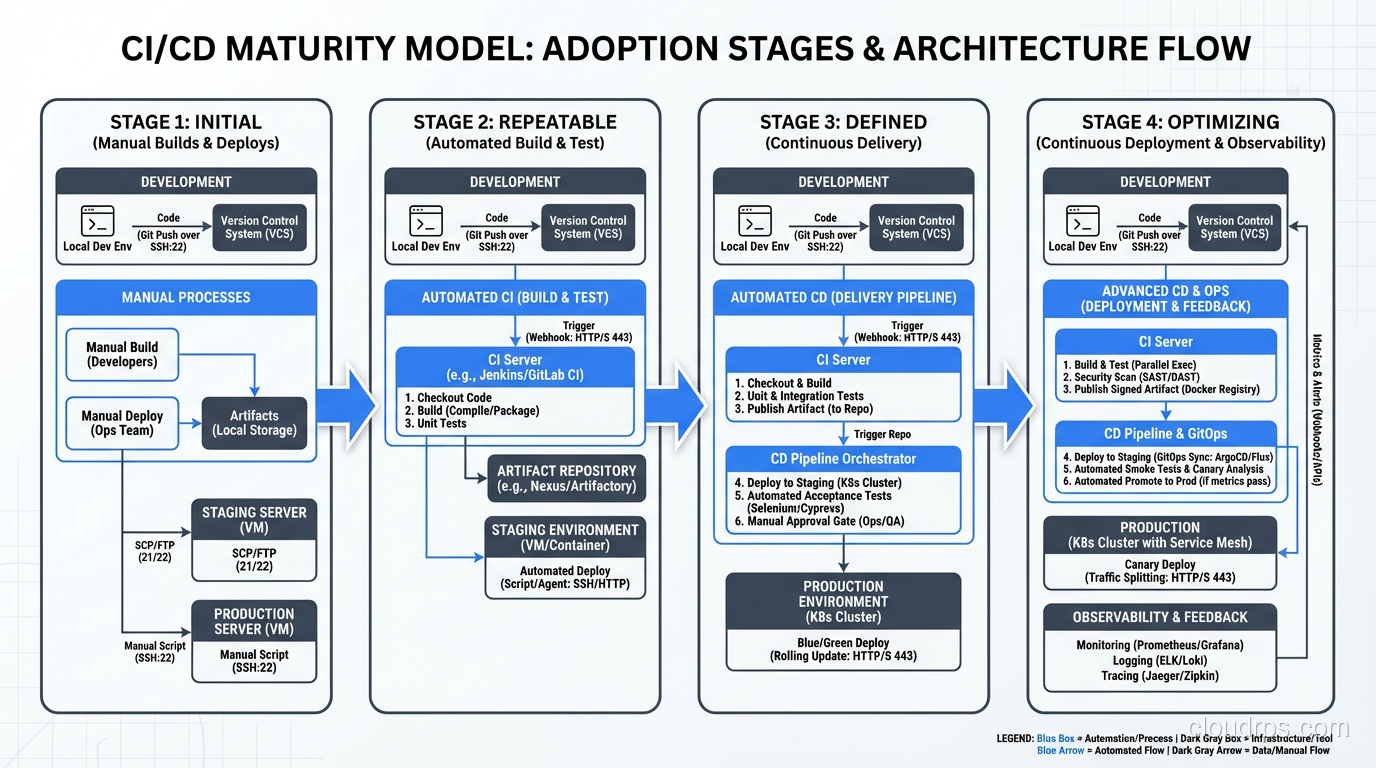
The Payoff
I’ve been building and refining CI/CD pipelines for over twenty years now. The tools have changed dramatically, from custom shell scripts to Jenkins to cloud-native platforms, but the principles haven’t changed at all. Integrate early. Test automatically. Deploy small. Verify everything.
The teams I’ve worked with that embrace these principles ship faster, break less, and sleep better at night. That’s not a theoretical claim. I’ve lived it, over and over, across industries from financial services to healthcare to e-commerce.
If you’re still doing manual deployments, still merging week-old branches, still treating releases like major surgery, you’re leaving an incredible amount of velocity and reliability on the table. Start small, build habits, invest in the pipeline. It’s the highest-leverage work you’ll ever do.
Get Cloud Architecture Insights
Practical deep dives on infrastructure, security, and scaling. No spam, no fluff.
By subscribing, you agree to receive emails. Unsubscribe anytime.