
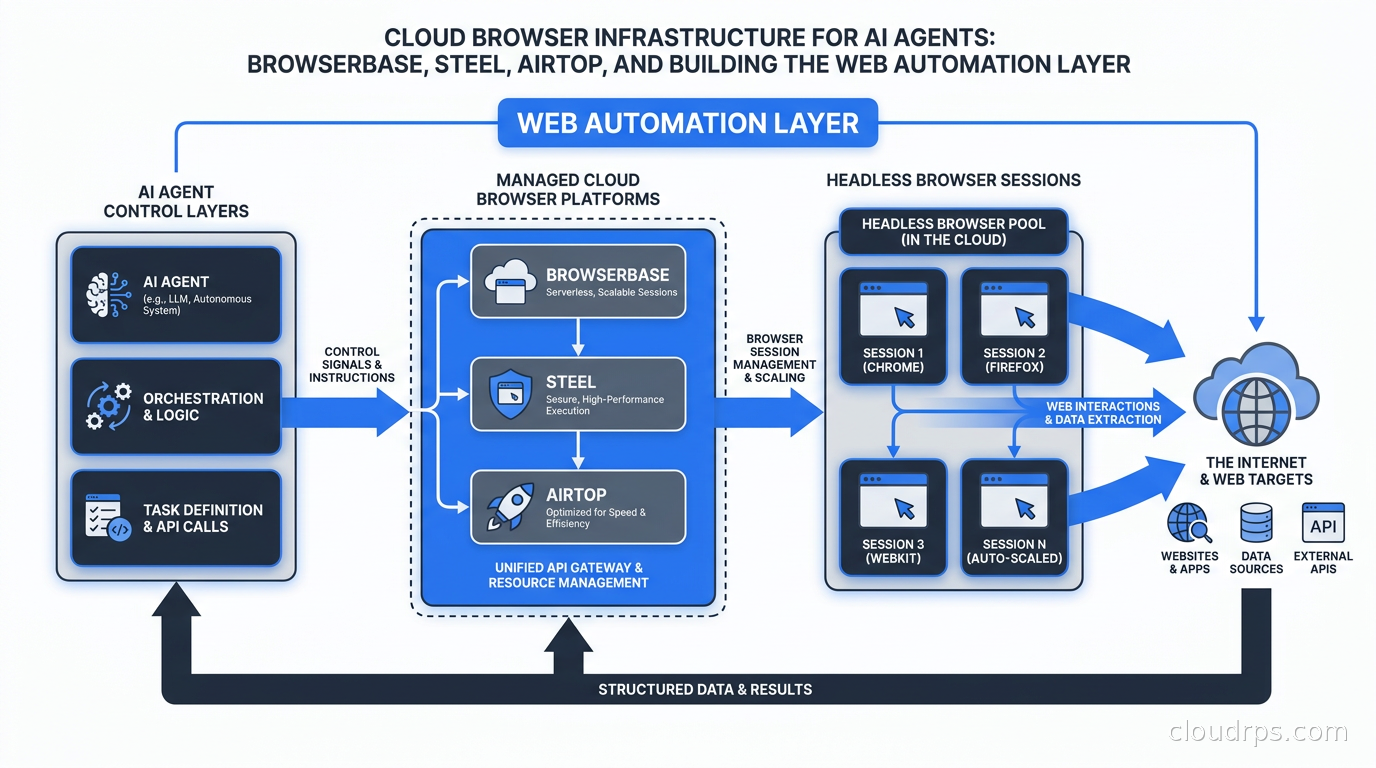
When I started building distributed systems twenty years ago, browser automation was a niche tool for QA engineers. Selenium scripts that clicked through web UIs were fragile, slow, and considered a last resort. You used them when you had no API and no other choice. That framing lasted a long time. Then AI agents arrived, and suddenly the browser became one of the most important surfaces in your entire stack.
The shift happened fast. An AI agent that can browse the web, log in to services, extract structured data, and take actions on your behalf is qualitatively more powerful than one confined to API calls. The problem is that running headless browsers at scale is genuinely hard infrastructure work: session isolation, proxy management, anti-bot evasion, certificate handling, and the security nightmare of executing untrusted agent actions inside a browser that has real credentials loaded. Most teams I talk to tried to build this themselves, hit the same walls, and are now evaluating the managed cloud browser platforms that have emerged specifically for this use case.
This article is for the cloud architect or platform engineer who needs to make a real decision about browser infrastructure. I will cover the architecture layers, compare the leading platforms, walk through the security considerations that actually matter, and give you the patterns that hold up in production.
Why Running Browsers in Production Is Different From Running Services
A headless browser is not like a stateless web service. It is closer to a full desktop operating system session running inside a container. A single Chromium instance can consume 200-400MB of memory at idle and spike dramatically during page loads with heavy JavaScript. Multiply that by hundreds of concurrent agent sessions, add proxy configurations, cookie persistence, and the need for session-level isolation between tenants, and you are running infrastructure that behaves very differently from your typical microservice workload.
There are three problems that bite almost every team that tries to self-host browser automation at scale:
Memory and resource exhaustion. Browsers leak. Pages with memory leaks, poorly behaved JavaScript, and long-running sessions accumulate memory until the process needs to be recycled. Managing that lifecycle gracefully, without losing session state mid-task, requires tooling most teams have not built.
Session isolation and security. When an agent session has valid credentials loaded for a user’s bank account, a SaaS dashboard, or an internal tool, that session cannot share process memory or network namespace with another user’s session. Getting this wrong is not a performance bug: it is a data breach. Achieving proper isolation with Kubernetes pods introduces its own overhead and scheduling complexity.
Anti-bot detection and proxy routing. Most high-value websites aggressively detect and block headless browsers. Getting a clean browser fingerprint, routing through residential or datacenter proxies, rotating user agents, handling CAPTCHAs, and managing the anti-detection stack is a full-time engineering problem that has nothing to do with your actual product.
These are exactly the problems the managed cloud browser platforms were built to solve.
The Architecture Has Three Distinct Layers
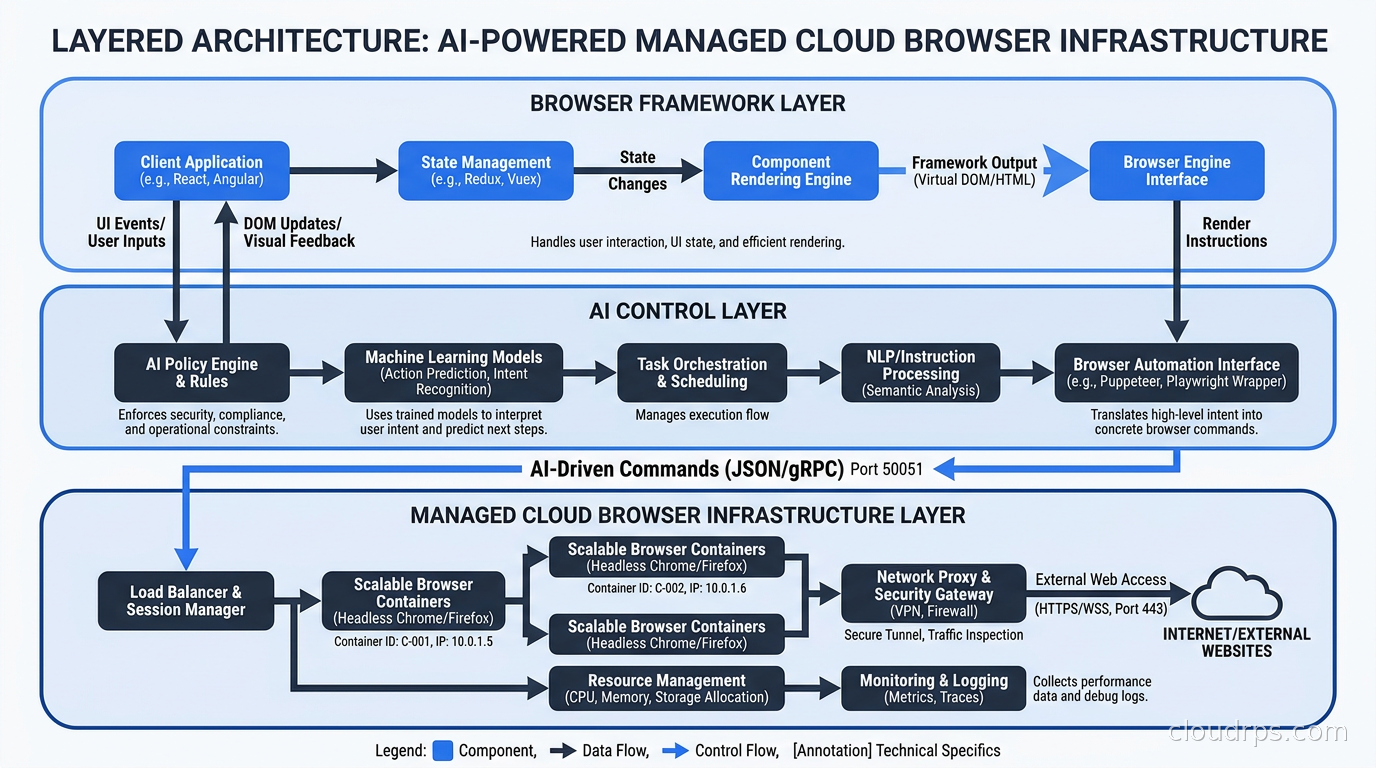
Before comparing vendors, it helps to be precise about what layer each tool lives in. There are three distinct layers, and confusing them leads to choosing the wrong tool for the wrong job.
Layer 1: Browser frameworks. Playwright, Puppeteer, and Selenium are the underlying browser control APIs. They speak Chrome DevTools Protocol to a Chromium instance and expose a programming interface for clicking, typing, navigating, and extracting data. These are not cloud services: they are libraries you run. In a managed cloud browser platform, you still use Playwright or Puppeteer, but the browser process itself runs remotely.
Layer 2: AI-native control layers. Libraries like Stagehand and browser-use sit on top of Playwright and add LLM-driven action primitives. Stagehand, built by the team at Browserbase, exposes three atomic primitives: act (perform an action on the page), extract (pull structured data from the page), and observe (describe what is visible and actionable). Instead of writing code that clicks a specific CSS selector, you write act("click the submit button") and the LLM interprets the current page state and figures out the right element. Browser-use takes a similar approach but is oriented toward fully autonomous agent loops with multi-tab support and memory. Playwright MCP, Microsoft’s MCP server wrapping Playwright, exposes browser control as MCP tools directly to any MCP-compatible agent runtime.
Layer 3: Cloud browser infrastructure. This is where Browserbase, Steel, Airtop, and Cloudflare Browser Run live. They provide the managed pool of browser sessions, handle the machine-level isolation, manage proxies and fingerprinting, and expose either a remote CDP endpoint or a higher-level API. Your application connects to their infrastructure rather than running Chromium locally.
Understanding this layering matters because the right answer for most production agent workloads is to combine all three: use a managed cloud platform at Layer 3, Playwright at Layer 1 connecting to that remote browser, and an AI control layer like Stagehand at Layer 2 for the AI-driven actions.
Comparing the Leading Cloud Browser Platforms
The landscape has consolidated quickly. There are four platforms I would seriously evaluate for production workloads.
Browserbase
Browserbase is the most widely deployed cloud browser platform for AI agents as of late 2026, at least in terms of developer ecosystem adoption. It provides a scalable pool of Chromium instances on remote infrastructure, accessible via the standard Playwright/Puppeteer connect() interface: you point your Playwright browser connection at their endpoint instead of a local binary, and your existing automation code runs unchanged.
Browserbase’s differentiator is the depth of its agent-oriented features. It ships Stagehand as a first-party library, which gives you the LLM action primitives tightly integrated with their session infrastructure. Sessions are ephemeral by default but can persist cookies and local storage when you want continuity across agent steps. Concurrent session limits scale with your plan. The live session debugger, which lets you watch and intervene in an agent session in real time, is genuinely useful when you are debugging agent behavior on a page that is hard to reproduce locally.
The pricing model is session-based. I will not quote specific prices because cloud browser pricing is changing quickly; check their current pricing page for accurate numbers.
Steel
Steel is the open-source option in this space and occupies a different position from Browserbase. The core Sessions API is MIT-licensed on GitHub, ships as a Docker container, and can be self-hosted. When self-hosted, you get the same session management, persistence, and Playwright/Puppeteer compatibility without paying a per-session fee. Steel also offers a managed cloud version for teams that prefer not to operate their own infrastructure.
The self-hosting story is real and well-documented. The Docker image brings up a working Sessions API that behaves identically to the managed service. For teams in regulated industries where data sovereignty or compliance requirements prevent sending browser traffic through third-party infrastructure, Steel’s self-hosted path is the most practical option I have seen.
Steel also documents a bring-your-own-proxy pattern more explicitly than the other platforms, which matters when you need fine-grained control over IP routing. For a compliance-constrained team that already operates its own proxy infrastructure, Steel slots in cleanly.
The trade-off relative to Browserbase is ecosystem depth. Steel has fewer first-party integrations and a smaller library of AI framework examples, though the core infrastructure is solid.
Airtop
Airtop targets the enterprise end of the market and is the most feature-complete platform for agent workflows that require authenticated sessions with real user credentials. Its Live View feature, which lets a human intervene in an active agent session, is implemented more completely than comparable features in other platforms. For workflows that need to hand off to a human when an agent hits a 2FA prompt or a CAPTCHA it cannot solve, Airtop’s tooling around human-in-the-loop interruption is the best I have evaluated.
Airtop also claims built-in support for navigating sites that use OAuth, 2FA, and other advanced authentication flows, and ships with a residential proxy network. The platform advertises SOC 2 Type 2 compliance on its enterprise tier, which matters for the kinds of regulated-industry deployments where this feature set is relevant.
Pricing on Airtop is credit-based and structured more like an enterprise SaaS product. For high-volume commodity scraping, it is expensive relative to the other options. For supervised agent workflows where an enterprise is willing to pay for compliance posture and human-in-the-loop tooling, the pricing fits the use case.
Cloudflare Browser Run
Cloudflare renamed its Browser Rendering product to Browser Run in 2026 and shipped a set of features oriented specifically at AI agent use cases. The fundamental infrastructure advantage is that browser sessions run on Cloudflare’s global network, physically close to the websites you are scraping. For latency-sensitive agent tasks, this matters.
Browser Run exposes both a Playwright-compatible remote CDP interface and a set of quick-action APIs: a /crawl endpoint that accepts a starting URL and returns content in your choice of HTML, Markdown, or structured JSON, with configurable depth and scope, and a screenshot API for vision-based agent tasks. There is also session recording and replay, and a debug view for real-time inspection.
The pricing model is roughly $0.09 per browser-hour at current rates (verify on Cloudflare’s pricing page, as this changes). For teams already running significant Cloudflare infrastructure, the integration story is clean. Workers can spin up browser sessions without leaving the Cloudflare network, which removes a category of egress latency.
Cloudflare Browser Run is the right choice when your agent primarily needs content extraction, when you want a simple /crawl endpoint rather than fine-grained browser control, or when you are building inside the Cloudflare Workers ecosystem and want to avoid round-trips to an external browser platform.
Security: The Part Most Architecture Guides Skip
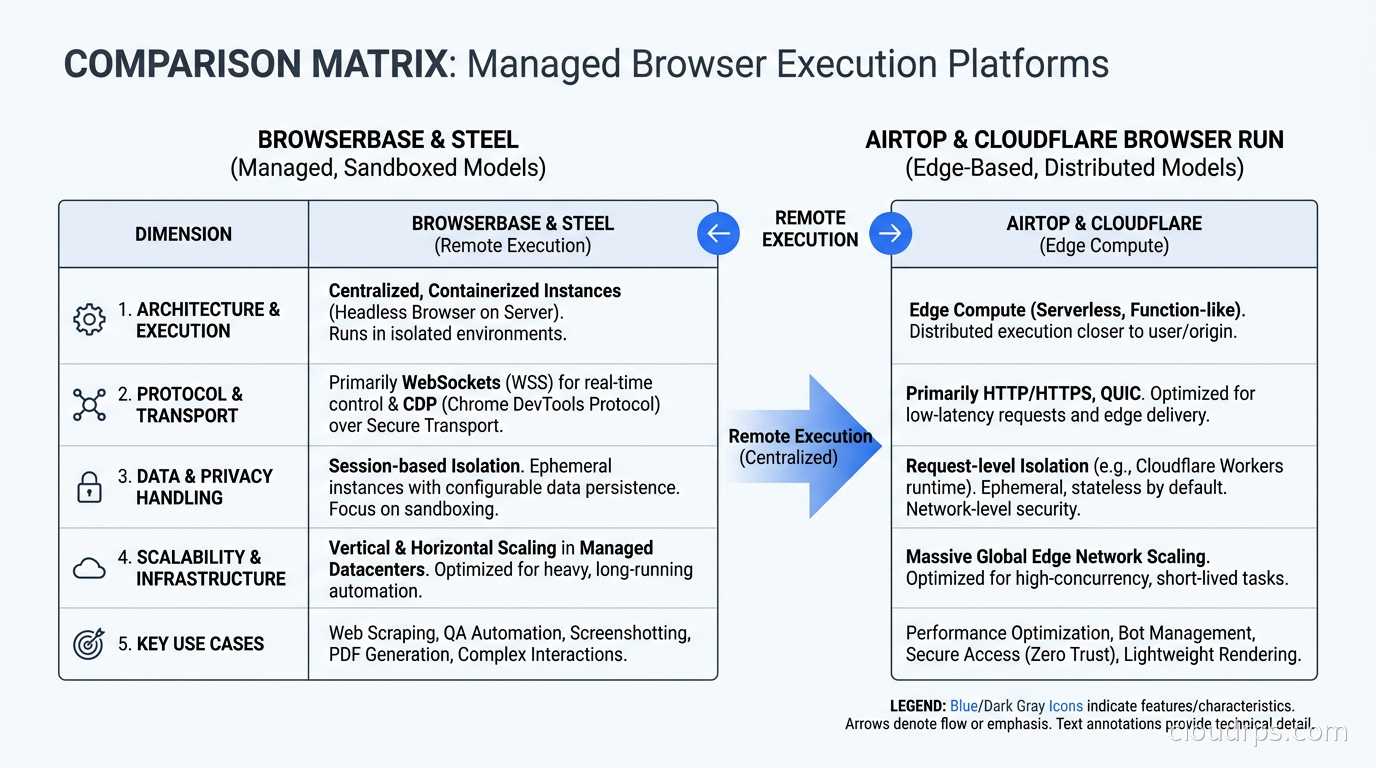
Every cloud browser platform sells you session isolation. Not all of them define what that means. Before you load real user credentials into a managed browser platform, you should understand exactly what isolation model is in effect.
The three questions I ask every vendor and every self-hosted deployment:
Process isolation or container isolation? Running multiple sessions in separate browser processes within the same container namespace is weaker than running each session in its own container with separate network namespaces. A renderer exploit in one session should not be able to reach another session’s memory. Kubernetes-based deployments with proper pod security policies can achieve container-level isolation, but the overhead per session increases significantly.
Network isolation: what can a session reach? An agent session running inside your managed browser platform has network access from the infrastructure’s perspective. If that platform runs in a shared VPC with your other workloads, a compromised or malicious session could potentially reach internal services. For the platforms you do not control (Browserbase, Airtop), you are trusting that their network isolation prevents session-to-session and session-to-infrastructure lateral movement. For Steel self-hosted, you configure this yourself, and the right answer is to run it in an isolated network namespace with no route to your internal services.
Credential handling: where do cookies live? When you load a persistent session with real credentials, those cookies and local storage blobs need to be encrypted at rest and in transit, with strict access controls on which agent runs can access which session state. This is not a given on every platform.
For the workloads that matter most, I use a pattern I call credential forwarding with session affinity: the agent framework acquires short-lived credentials or session tokens from my secrets manager, injects them into the browser session at runtime, and the session does not persist cookies beyond the task lifetime. The browser platform never stores a durable authenticated session. This reduces the blast radius of a platform compromise to a single task window rather than permanent credential exposure.
The sandbox isolation article in this blog, covering gVisor, Kata Containers, and sandboxing untrusted workloads in Kubernetes, is directly relevant if you are self-hosting your browser infrastructure and need stronger workload isolation guarantees. For AI agent isolation more broadly, the security patterns in securing AI agents in production apply at the layer above the browser: preventing prompt injection from influencing what the agent does in the browser session.
The AI Control Layer: Choosing Between Stagehand, Browser-Use, and Playwright MCP
Once you have chosen your cloud browser platform, you still need to decide how your agent actually drives it.
Playwright MCP is the right choice when your agent runtime already speaks MCP and you want standardized, stateless browser tool calls. The Playwright MCP server exposes 15-plus tools including browser_navigate, browser_click, browser_type, and browser_snapshot. Any MCP-compatible agent framework can use it without additional integration work. The limitation is that it is a thin wrapper around Playwright: it does not add semantic intelligence about page structure, so your agent prompt needs to handle the reasoning about which element to interact with.
Stagehand is the right choice when you want to write automation code that is more readable and robust than raw selector-based Playwright, and when you can afford the LLM call overhead per action. The act/extract/observe primitives let you write code at the level of user intent (“click the login button”, “extract all product names and prices”) rather than DOM selectors. This makes automation code far more resilient to UI changes. The cost is LLM latency on every action, which adds up for long-running agent sessions. It integrates natively with Browserbase sessions.
Browser-use is the right choice for fully autonomous open-ended tasks where you want the agent to form its own plan for navigating a website rather than executing a predetermined sequence of steps. Browser-use wraps the entire browser interaction loop in an agent that can reason about multi-tab state, maintain memory across steps, and run parallel sub-agents for tasks that can be decomposed. It is the least deterministic of the three and the hardest to debug, which is a real production concern.
The hybrid pattern that emerges in most mature production deployments: use Stagehand or explicit Playwright for high-value, well-understood workflows where you can validate the automation path, and use browser-use or a custom agent loop for exploratory tasks where the path varies. Do not use a fully autonomous agent loop for anything that executes irreversible actions (sending emails, making purchases, submitting forms) without a human confirmation step.
AI agent orchestration with LangGraph, CrewAI, and AutoGen addresses the orchestration layer above the browser control layer. The browser infrastructure discussed here is what the tool calls from those orchestration frameworks ultimately hit.
Self-Hosting Browser Infrastructure on Kubernetes
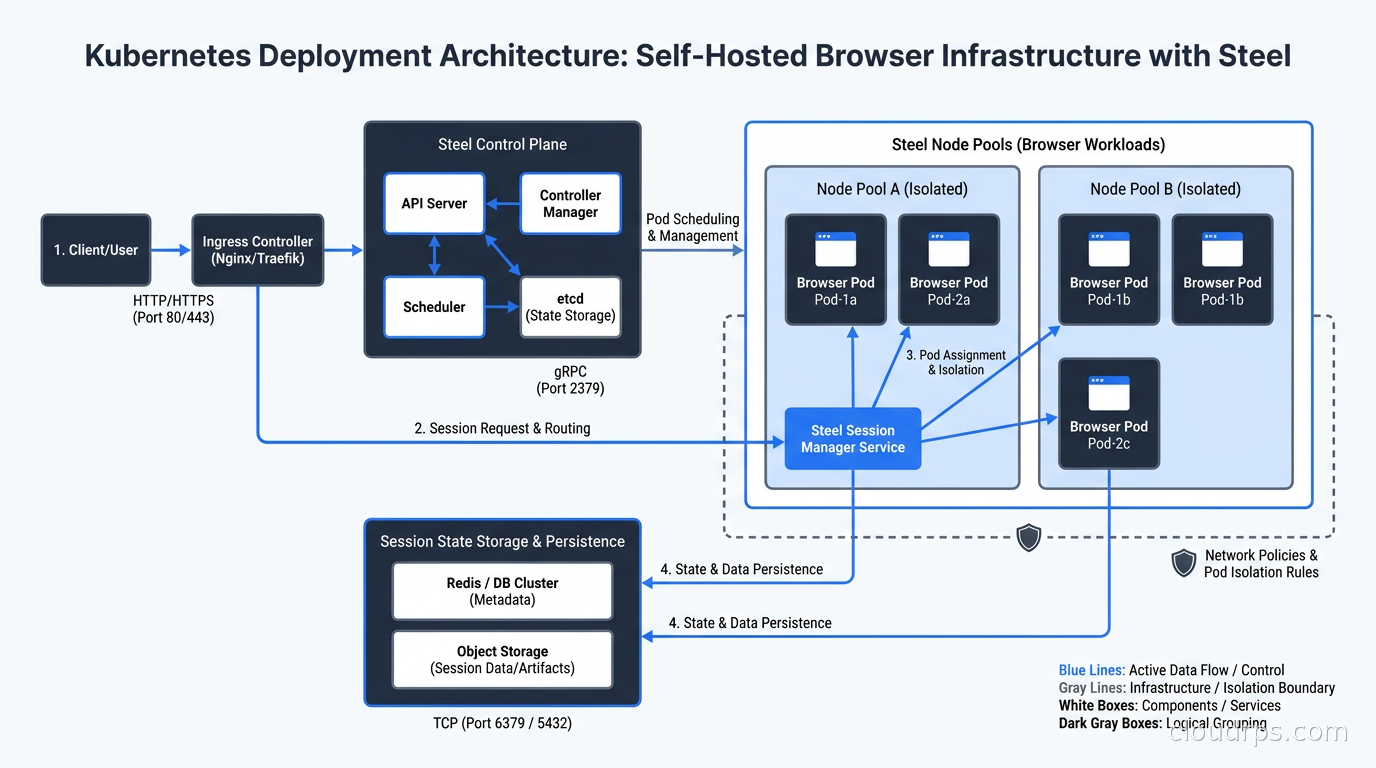
If you are running Steel self-hosted or building your own browser pool, the Kubernetes deployment pattern matters for both cost and isolation quality.
The resource request pattern that works: set CPU requests conservatively (Chromium is bursty, not CPU-intensive at idle) and memory requests to the actual idle footprint, with memory limits set high enough to handle peak page loads. Monitor OOMKilled events on browser pods and tune limits based on observed peak consumption for your actual workload, not generic benchmarks.
For session isolation, run each browser session in its own Kubernetes pod with a hostNetwork: false setting and a network policy that allows only egress to internet destinations and nothing inbound except from the sessions API controller. If you are using Kubernetes network policies for this, Cilium’s network policy implementation gives you the most granular control, including DNS-level egress filtering to restrict which domains a browser session can reach.
For scaling, browser sessions are not fast to spin up: Chromium cold start takes a few seconds even in a warmed container. Maintaining a session pool with pre-warmed browser instances reduces latency for the first action in a new agent run. The pool sizing depends on your concurrency pattern and your acceptable wait time before a session is available.
For storage, cookie and session state persistence at scale needs a shared backing store. Encrypted blobs in S3 or GCS with a tight IAM policy per tenant, with keys derived from tenant identity, is the pattern that survives security audits. Do not store session state in pod-local files: when the pod dies, the session state is gone, and your agent cannot resume.
Connecting Browser Infrastructure to Your Agent Stack
The integration pattern for most teams using LangGraph or similar orchestration frameworks is to define the browser platform as a tool provider: the agent calls a browser_session tool to acquire a session, uses it to complete a task, and closes it when done. Session lifecycle management (timeouts, recycling on error) lives in the tool implementation, not in the agent logic.
For context management, be deliberate about what browser output you feed back into the agent’s context window. Raw HTML from a page is large and mostly noise. Pre-processing browser output into markdown, extracting structured data with Stagehand’s extract primitive before returning it to the LLM, or using a vision model to interpret a screenshot all significantly reduce the context tokens burned per browser step. The context engineering patterns for AI agents article covers token budget management in more depth, and browser output is one of the highest-volume sources of context growth in agent sessions.
For observability, instrument both the browser layer and the agent layer. At the browser layer, you want session duration, memory at close, pages visited, and error events (navigation failures, timeout kills). At the agent layer, you want which tool calls were made, their latency, and what the agent did with the returned content. Without both, debugging a failed agent run that involved browser actions is painful. Most of the LLM observability platforms now support custom span attributes that let you attach browser session IDs to traces, which helps correlate agent reasoning with browser events.
When Not to Use a Cloud Browser Platform
A cloud browser platform is not always the right answer. If the target site has a proper API, use the API. Every browser interaction that could be an API call costs more in latency, money, and fragility. I see teams reach for browser automation reflexively when the target service has a well-documented REST or GraphQL API they have not looked at. Check first.
If you need to scrape content from mostly static or lightly JavaScript-enhanced pages, a scraping API like Firecrawl or Jina AI Reader is cheaper and faster than a full browser session. Cloud browser infrastructure earns its cost on pages that require real browser rendering, JavaScript execution, authentication state, or interactive user flows. For content extraction from public pages, the specialized scraping APIs handle the stealth and scaling concerns for less.
For agentic AI workloads running at scale, the economics of cloud browser sessions add up quickly. A managed browser session that stays open for ten minutes while an agent completes a multi-step form workflow can cost more than the LLM calls for that same task. Build session lifecycle discipline into your agent architecture from the start: acquire sessions late, release them early, and instrument session duration so you can identify agent workflows that are inefficiently holding browser sessions open.
What I Would Actually Deploy Today
If I were architecting browser infrastructure for a new AI agent product today, my decision tree would look like this: for a startup with no compliance constraints building a product that needs browser capabilities, I would start with Browserbase and Stagehand. The developer experience is the best in class and the operational burden is near-zero.
For an enterprise with SOC 2 or other compliance requirements where data sovereignty about browsing sessions matters, I would evaluate either Steel self-hosted on Kubernetes or Airtop’s enterprise tier, depending on whether in-house operations capacity is a constraint.
For a team already deep in the Cloudflare ecosystem building edge-native applications in Workers, Cloudflare Browser Run is the natural fit, especially for content extraction workflows.
For any production deployment: treat the browser session as a privileged credential environment, apply the same zero-trust principles you would to any service with access to user credentials, and invest early in session lifecycle observability. The teams that get burned by browser infrastructure in production are almost always the ones that treated it as a commodity background service and discovered the hard way that a headless Chromium instance holding a user’s bank login deserves the same operational respect as a secrets manager.
The browser is no longer a UI testing tool. For AI agents that interact with the real world, it is core infrastructure. Treat it that way.
Get Cloud Architecture Insights
Practical deep dives on infrastructure, security, and scaling. No spam, no fluff.
By subscribing, you agree to receive emails. Unsubscribe anytime.