
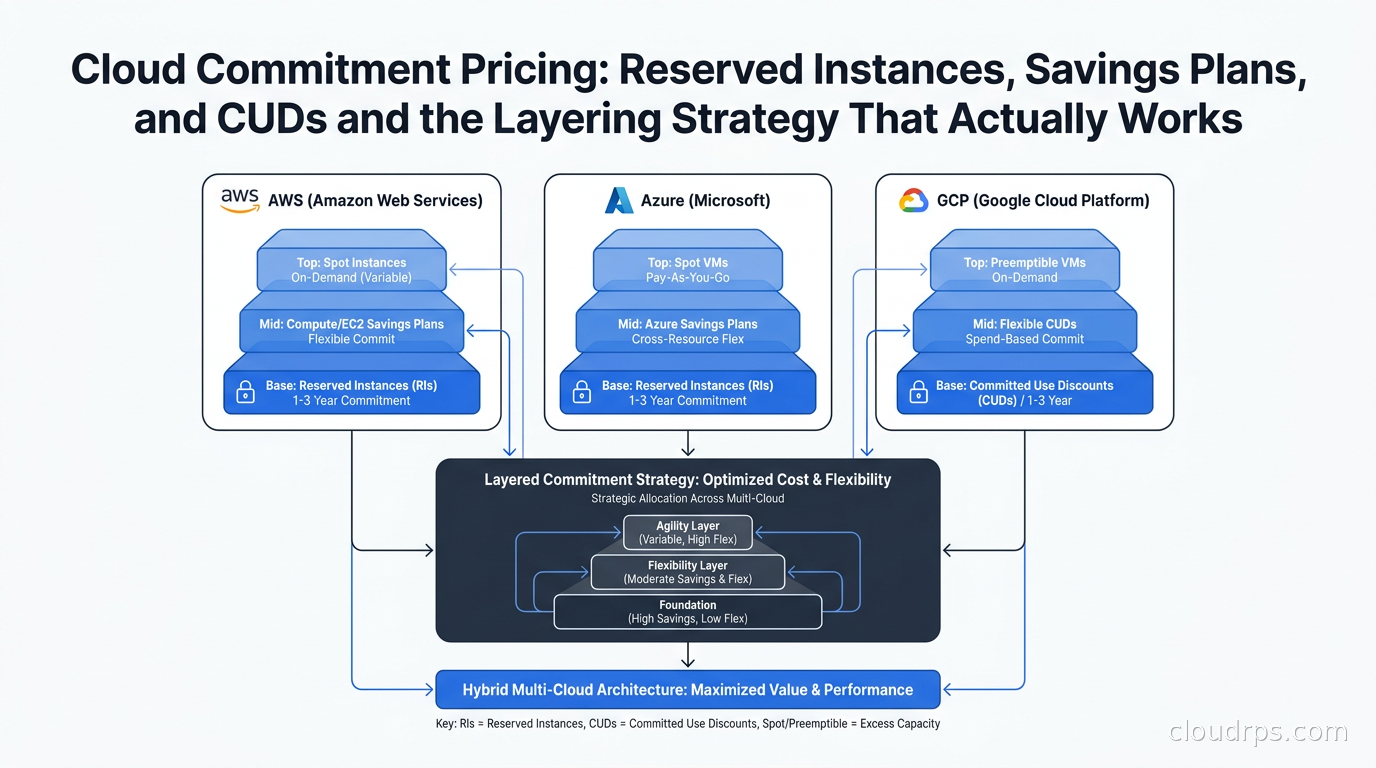
I have spent twenty years watching organizations bleed money on cloud bills in ways that are entirely avoidable. The most common and most painful is running mature, predictable production workloads on on-demand compute at full rack rate. On-demand pricing is a convenience tax. It is designed for workloads where you genuinely do not know what you will need or for how long. Most production workloads are not in that category. They have patterns, they have baselines, and they have budget owners who would prefer not to explain a six-figure quarterly overage.
Commitment pricing, which covers Reserved Instances, Savings Plans, and Committed Use Discounts depending on which cloud you are on, is the primary mechanism for closing that gap. The mechanics differ significantly across providers, and the interaction between the different commitment types within a single cloud is subtle enough that I have seen FinOps-mature organizations leave substantial money on the table because they picked the wrong commitment vehicle for their workload profile. This guide covers how each mechanism actually works, when to use which, and how to layer them without painting yourself into a corner.
Why On-Demand Is a Bad Default for Stable Workloads
On-demand compute makes sense for a narrow class of workloads: proof-of-concept environments, burst traffic with unpredictable magnitude, pre-production environments that run for a few hours per day, and anything you are genuinely still figuring out. For everything else, you are paying a premium for flexibility you are not using.
The premium is not trivial. AWS, Azure, and GCP all price on-demand compute significantly above what you would pay if you committed to one or three years. How significant depends on instance type, region, and term, but all three providers publish substantial discounts for commitments. The flip side is that commitments carry a real cost: if your workload disappears or changes shape dramatically, you either have unused capacity you are paying for, or you face early termination penalties.
This is why naive RI purchasing was such a recurring disaster in the 2015-2019 era. Teams would buy three-year Reserved Instances for their entire current fleet, a new project would come in, the fleet would transform, and they would spend the next two years paying for capacity that no longer matched their workload. The Savings Plans model that AWS introduced in 2019 was a direct response to this. It provides similar discounts with significantly more flexibility.
The right mental model is a layered coverage strategy. You never want to commit 100% of your compute. You want to cover your stable baseline with commitments and leave enough headroom for spot instances and preemptible VMs to handle variable and interruptible workloads, with a thin on-demand buffer for genuine burst.
AWS: The Most Complex Commitment Menu
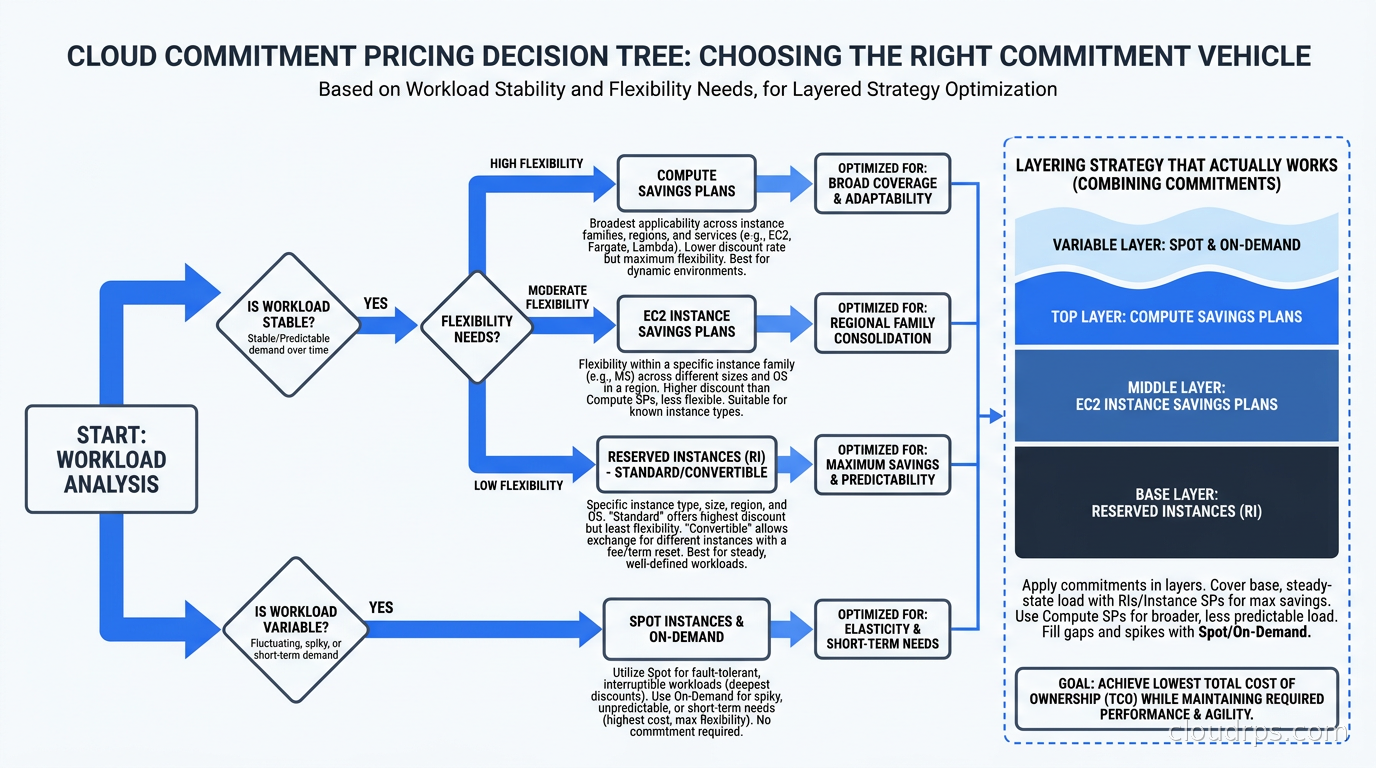
AWS offers the widest range of commitment vehicles, which is both an asset and a trap. Understanding the distinction matters because the wrong choice for your workload profile can cost you meaningfully in either under-utilization or foregone savings.
Standard Reserved Instances
Standard RIs are the oldest and deepest-discounting commitment vehicle AWS offers. You commit to a specific instance type (for example, m7i.2xlarge), in a specific region, for a specific tenancy (shared or dedicated), for a one-year or three-year term. In exchange, AWS prices your instance at a significant discount versus on-demand for every hour you run it. If you have the instance type committed and do not run the instance, you pay for it anyway (assuming you chose the All Upfront or Partial Upfront payment option) or you are billed regardless on a No Upfront RI.
Standard RIs can be converted within the same family (from m7i.2xlarge to two m7i.xlarge, for example) if you purchased Convertible RIs rather than Standard. Convertible RIs trade some discount depth for the ability to change instance type, operating system, and tenancy over the term. They are useful when you know a workload will exist but are less certain about its future instance type.
The RI Marketplace exists for organizations that need to exit an RI early. AWS operates a secondary market where unused RIs can be sold to other customers. The market is liquid for common instance types in major regions and considerably less liquid for specialized or older instance types.
AWS Savings Plans
Savings Plans, introduced in 2019, work differently. Instead of committing to a specific instance, you commit to a minimum dollar spend per hour. AWS has three flavors:
Compute Savings Plans are the most flexible. They apply to any EC2 instance in any region, any instance family, any size, any operating system, and any tenancy. They also apply to AWS Fargate and Lambda. The discount versus on-demand is somewhat lower than what you would get from an equivalent EC2 Instance Savings Plan.
EC2 Instance Savings Plans require you to commit to a specific instance family in a specific region (for example, m7i instances in us-east-1) but you retain flexibility across sizes within that family. They offer deeper discounts than Compute Savings Plans.
SageMaker Savings Plans apply only to SageMaker workloads and are relevant for ML training and inference costs.
The billing mechanics matter: AWS applies Savings Plans to your on-demand usage by first applying any active RIs, then applying Savings Plans from most restrictive to least restrictive. This means EC2 Instance Savings Plans are applied before Compute Savings Plans. Usage beyond your committed spend threshold is charged at on-demand rates.
Which to Choose on AWS
For workloads you know will run specific instance families in specific regions for one to three years, EC2 Instance Savings Plans or Standard RIs usually deliver the deepest savings. For workloads with less predictable instance type distribution (this includes teams running Kubernetes on EKS where Karpenter is actively right-sizing nodes), Compute Savings Plans are the safer choice. The flexibility premium is worth paying when your fleet shape is genuinely dynamic.
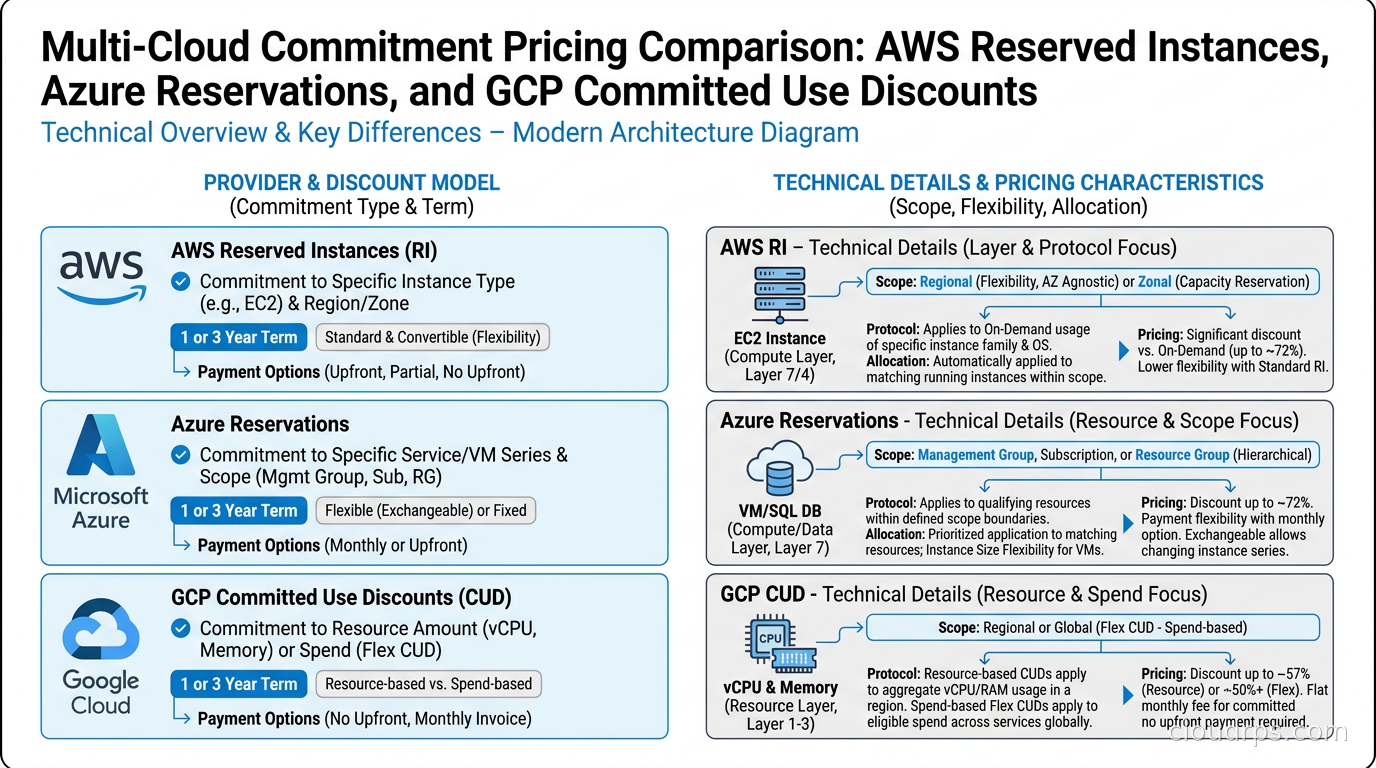
For Reserved Instances specifically, AWS states discounts up to 72% on 3-year all-upfront terms. For Compute Savings Plans, AWS states discounts up to 66% on 3-year terms. These are maximum figures from the AWS pricing pages; actual discounts vary significantly by instance type, region, and operating system.
One important nuance: Standard RIs can provide capacity reservations in a specific Availability Zone when you specify AZ-scoped reservations. Savings Plans do not provide capacity reservations. During capacity-constrained events (rare but real, particularly for GPU instances), having an AZ-scoped RI guarantees you get your instances. This is worth factoring into GPU and high-density instance purchasing decisions.
Azure: Two-Track Commitment Model
Azure runs a similar two-track model: Azure Reservations (the RI equivalent) and Azure Savings Plans. The mechanics and interactions are analogous to AWS but with enough differences to warrant separate attention.
Azure Reservations
Azure Reservations cover a wide range of services: Virtual Machines, SQL Database, Cosmos DB, Azure Cache for Redis, Azure Disk Storage, App Service Plans, Azure Dedicated Hosts, and several others. For teams evaluating whether to commit to managed Redis on Azure versus self-hosting Dragonfly or Valkey on reserved compute, the commitment pricing calculus is a key part of the TCO comparison. For compute, you commit to a specific VM series and region for one or three years. Azure applies Reservations automatically when matching usage occurs, before considering Savings Plans.
One distinction from AWS: Azure Reservations for Virtual Machines include an instance size flexibility feature for most VM families. If you purchased a reservation for a D8s v5, it will also apply (with a ratio conversion) to D4s v5 or D16s v5 in the same region. This reduces the risk of buying the wrong size for a workload that will be right-sized over time.
Azure allows reservation exchanges and cancellations, with a 12% early termination fee if you cancel a reservation. This is less flexible than the RI Marketplace approach, but it means you are not completely locked in for a multi-year term on an aging VM size.
Azure Savings Plans for Compute
Azure Savings Plans operate at a higher level of abstraction than Reservations. You commit to a fixed compute spend per hour (in USD or your billing currency) for one or three years. The plan applies across all VM families, all regions, and across Azure Dedicated Hosts. It does not apply to non-compute services.
The billing interaction is identical to AWS: active Reservations are applied first, and then Savings Plans pick up remaining on-demand usage up to the committed spend rate. This means if you have both, you should think of Savings Plans as the incremental discount layer above your Reservation baseline, not as a replacement for Reservations.
Azure cites up to 65% savings with their 3-year Savings Plan for compute (as of their pricing documentation). Azure Reservations cite up to 72% for 3-year terms on equivalent VM families. The delta between Reservations and Savings Plans on Azure is generally smaller than the equivalent comparison on AWS, which can make Savings Plans more attractive for Azure workloads with moderate fleet variability.
GCP: Committed Use Discounts and Their Specific Mechanics
Google Cloud’s commitment model differs meaningfully from AWS and Azure. GCP does not have a “Savings Plans” concept in the same sense. Instead, it has two types of Committed Use Discounts: resource-based and spend-based.
Resource-Based CUDs
Resource-based CUDs commit to specific vCPU and memory quantities in a specific region for one or three years. When you purchase a resource CUD, you are committing to, for example, 100 N2 vCPUs and 400 GB of N2 memory in us-central1. GCP applies this CUD to any N2 VM instances in that region that consume those resource amounts, regardless of machine type configuration. If you commit to N2 resources, those CUDs apply to n2-standard, n2-highmem, and n2-highcpu instances interchangeably, as long as the total vCPU and memory commitments are satisfied.
GCP states discounts of approximately 37% for 1-year and 55% for 3-year resource CUDs on general-purpose machine families (their documentation figures; verify against current pricing pages as these can change).
Resource CUDs for memory-optimized and accelerator-optimized instances carry different discount rates and restrictions. The separation of vCPU and memory commitments also means you need to be thoughtful about commitment ratios; if your workload uses memory-heavy instances, you may find you hit your memory commitment long before your vCPU commitment, leaving purchased vCPU capacity unused.
Spend-Based CUDs
GCP also offers spend-based CUDs for certain services, including Cloud Run, Cloud SQL, and Spanner. These work more like AWS Savings Plans: you commit to a minimum hourly spend on the service, and GCP applies a discount to usage up to that committed amount. Spend-based CUDs for Cloud Run are particularly useful for teams running containerized workloads without managing VMs, similar to how Compute Savings Plans cover Fargate on AWS.
Sustained Use Discounts
GCP also has Sustained Use Discounts (SUDs) that apply automatically to VMs that run for a significant portion of a billing month, with no commitment required. SUDs and CUDs are mutually exclusive: a VM covered by a CUD does not accumulate SUD credits. Teams migrating from on-demand to CUDs on GCP should account for this; if you have been relying on SUDs and shift to CUDs, your effective savings may not increase as much as the CUD headline number suggests.
The Layering Strategy
The most sophisticated FinOps teams do not think of commitment purchasing as a single decision. They think of it as a coverage stack. The goal is to cover a stable baseline deeply, cover moderate variability with more flexible instruments, and leave the genuinely unpredictable portion as on-demand or spot.
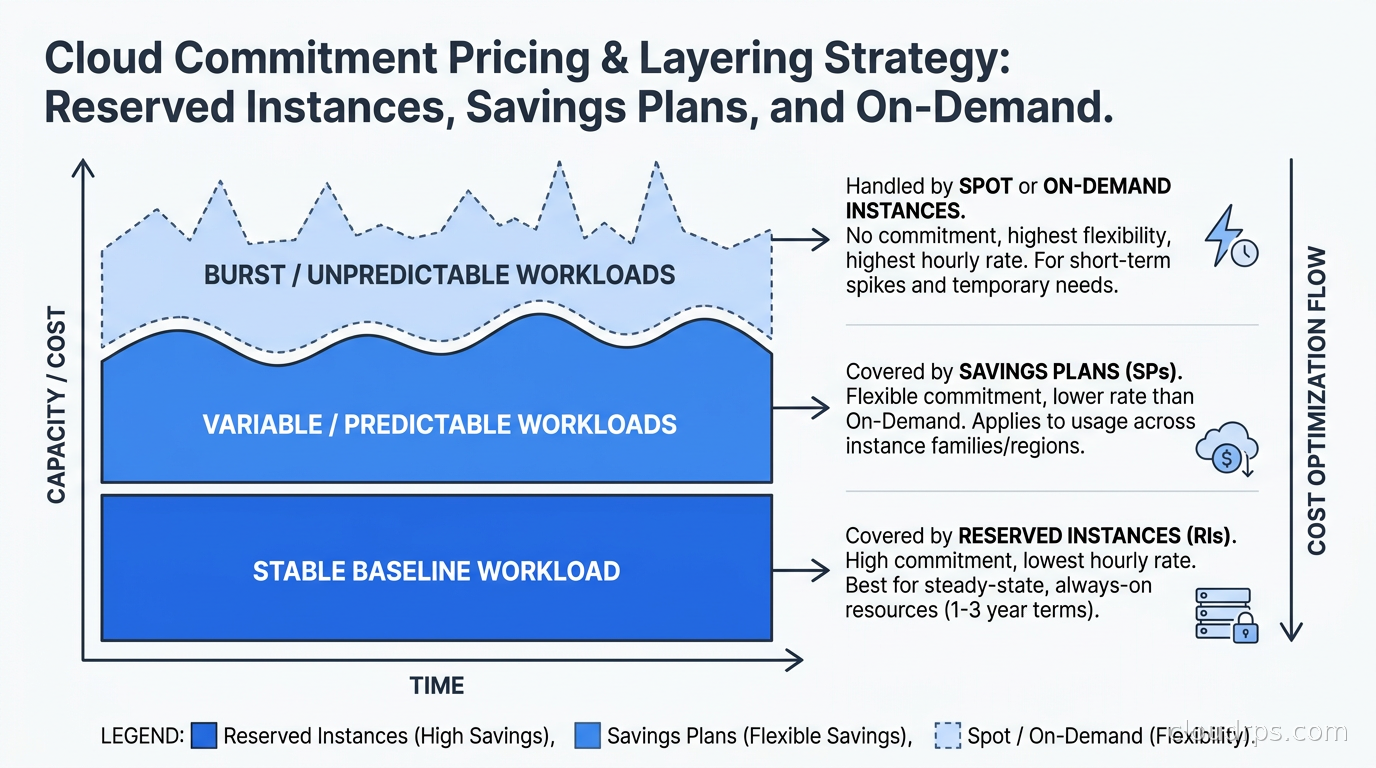
Here is how I structure this in practice:
Layer 1: Stable baseline covered by RIs or resource CUDs. These are the workloads that have been running at roughly consistent utilization for six or more months with no expected architecture changes. Database servers, core application servers, and infrastructure components (VPN endpoints, bastion hosts, monitoring infrastructure) typically land here. These get your deepest-discounting commitment: Standard RIs or AZ-scoped RIs on AWS, VM Reservations on Azure, resource CUDs on GCP. Three-year terms if your organization has budget authority for them. The deeper discount is worth the lock-in for truly stable workloads.
Layer 2: Variable but predictable compute covered by Savings Plans. These are workloads that you know will exist but whose shape may evolve: Kubernetes worker pools where Karpenter is actively changing instance types, services that will grow over the commitment term, and anything running on containers or serverless where instance type is an abstraction. Compute Savings Plans on AWS, Azure Savings Plans, and spend-based CUDs on GCP. One-year terms to stay flexible as your workload evolves.
Layer 3: Burst and variable workloads on Spot or on-demand. Anything that cannot tolerate the cost of a commitment (development environments, batch jobs, ML training runs) goes here. Spot Instances and preemptible VMs provide steep discounts in exchange for potential interruption. This is the right layer for stateless batch processing and for Kubernetes node pools that handle spiky workloads.
The target coverage ratio for most mature organizations is somewhere between 60% and 80% of compute spend covered by commitments. Below 60%, you are likely leaving significant savings on the table. Above 80%, you risk over-committing on workloads that may change, and you are reducing the buffer available for legitimate on-demand usage during spikes or incidents.
This connects to the broader FinOps cost allocation strategy question: you need granular resource tagging to know which workloads belong in which layer. Without tagging discipline, commitment purchasing becomes guesswork.
Common Pitfalls I Have Seen
Committing to the wrong scope on AWS. Region-scoped RIs apply to any instance of the right type across all AZs in that region but do not provide capacity reservation. AZ-scoped RIs provide a capacity guarantee but only apply to instances in that specific AZ. Most teams should use region-scoped unless they have a specific need for capacity guarantees during outages.
Ignoring the SUD-to-CUD transition on GCP. As I mentioned earlier, SUDs do not stack with CUDs. Teams that assume CUD savings are additive to existing SUD savings are consistently surprised when the numbers come in. Model the net change, not just the CUD headline.
Purchasing three-year commitments on Kubernetes clusters without Karpenter. If you are using the Cluster Autoscaler with a fixed set of node groups, your node instance types are relatively predictable and three-year EC2 Instance Savings Plans can make sense. If you are running Karpenter, it will actively right-size nodes across instance families and sizes to find the cheapest option. Your instance type distribution will shift over time. Compute Savings Plans are almost always the better choice in this case.
Not using the RI Marketplace. When organizations over-purchase RIs or workloads change, the RI Marketplace is often the best exit path. It is underused, in my experience, because teams do not know it exists or assume the process is too complex. AWS makes it relatively straightforward, and for common instance types in major regions, you can typically sell unused RIs with minimal haircut.
Treating commitment purchasing as a once-a-year event. Commitment portfolios need active management. Usage patterns change, workloads get decommissioned, and new capacity commitments need to be added as workloads grow. Mature FinOps teams review commitment coverage monthly and rebalance quarterly. This integrates naturally with cloud cost anomaly detection workflows: anomaly detection tells you when something unexpected happened; commitment review tells you whether your baseline coverage is still accurate.
Multi-Cloud Commitment Management
If you are running workloads across multiple clouds (and if you are using managed Kubernetes across providers, as covered in our EKS vs GKE vs AKS comparison), commitment management gets more complex. Each cloud has its own purchasing interface, its own commitment types, and its own billing mechanics.
The practical problem is that multi-cloud commitment decisions are interdependent. If you shift a workload from AWS to GCP, you may have unused AWS RIs and insufficient GCP CUDs. FinOps platforms (CloudZero, Apptio Cloudability, CloudHealth, and others) can provide a cross-cloud view of commitment coverage, but most of the heavy lifting is still manual.
A rule I have used: when making multi-cloud workload placement decisions, model the full commitment impact, not just the on-demand compute cost. A workload that looks cheaper on Cloud B on a per-vCPU basis may actually cost more when you account for unused commitments on Cloud A and the need to establish new commitments on Cloud B.
For teams using the FOCUS billing standard to normalize cloud cost data across providers, FOCUS includes fields for commitment-based discount attribution that make cross-cloud commitment analysis significantly more tractable than it was when each provider had its own proprietary billing format.
Payment Options and Cash Flow
Every commitment vehicle offers multiple payment options: All Upfront, Partial Upfront, and No Upfront (where available). The general rule: All Upfront delivers the deepest discount (you are giving the cloud provider free use of your capital for the commitment term), No Upfront delivers the shallowest discount, and Partial Upfront sits between.
For organizations with access to capital and a clear view that a workload will persist, All Upfront is the rational financial choice if you can calculate the discount value versus your cost of capital. For organizations where cash flow is constrained, No Upfront provides savings without the capital hit.
The interaction with cloud FinOps basics is important here: commitment purchases often require coordination between engineering and finance. Engineering knows which workloads are stable; finance knows what the capital budget allows. Neither group has the full picture alone. Good commitment purchasing requires a regular conversation between the two.
Monitoring Commitment Utilization
Purchasing commitments is only half the job. You need to monitor whether they are actually being utilized. An RI or Savings Plan that covers capacity you are not running is wasted money, just in a different way than on-demand overspend.
AWS provides RI Utilization and Savings Plans Utilization reports in Cost Explorer. Azure provides Reservation Utilization reports in the Azure portal. GCP provides CUD utilization in the Billing reports. All three show you the percentage of committed capacity being consumed over any time period.
The target utilization depends on your strategy. If you have been conservative with commitments and are at 95%+ utilization, you likely have room to purchase more. If you are at 65% utilization on a large RI portfolio, you either over-purchased or your workloads changed significantly.
Monitoring this connects naturally to the broader AI-driven cost optimization story: AI FinOps tools are starting to automate commitment right-sizing recommendations by modeling historical usage patterns and predicting optimal commitment amounts. The tooling is not fully mature, but for large AWS accounts, AWS Compute Optimizer and third-party tools can significantly reduce the manual work of commitment portfolio management.
When Commitments Are Not the Right Answer
Commitments work when workloads are stable and long-lived. There are legitimate scenarios where they are not the right answer:
Short-lived or experimental workloads. If a project has a hard six-month deadline and will be decommissioned afterward, a one-year RI is probably not the right call. On-demand or Spot may be more appropriate despite the higher per-hour cost.
Highly variable workloads with unpredictable peaks. If your compute usage swings widely depending on external events, committing to a high baseline means paying for headroom that is unused most of the time. A lighter commitment covering your true baseline, with on-demand or Spot handling the peaks, is usually more economical.
Workloads undergoing active right-sizing. If you are in the middle of a performance analysis and expect to change instance types significantly, wait until the right-sizing is complete before committing. Buying RIs for the current, un-optimized instance type and then finding that you should have been on a different family is an expensive way to learn.
Commitment pricing is one of the most concrete and immediate levers available in cloud cost management. For organizations running substantial steady-state workloads on public cloud, a well-structured commitment portfolio is often the single largest cost optimization opportunity available. It does not require architectural changes, it does not require new tooling, and the mechanics are well-documented by each provider. The work is in building the discipline to do it systematically rather than reacting to large bills after the fact.
The organizations I have seen do this well treat commitment purchasing as a regular operational process: monthly coverage reviews, quarterly rebalancing, and clear ownership between FinOps, engineering, and finance. The ones that struggle treat it as an annual event or leave it entirely to a single person who understands the mechanics. The discounts are the same in both cases. The discipline is not.
Get Cloud Architecture Insights
Practical deep dives on infrastructure, security, and scaling. No spam, no fluff.
By subscribing, you agree to receive emails. Unsubscribe anytime.