
I picked the wrong data warehouse once. In 2017, we were migrating a financial services client off an on-premise Teradata setup. The data engineering team was small, all SQL analysts, nobody touching Python except for the occasional ETL glue script. The consultants on the project recommended Redshift because the client was all-in on AWS, and that was defensible advice. We spent four months migrating 40TB of historical data, tuned sort keys until we were dreaming about distribution styles, and eventually got things working reasonably well.
Six months later, the analytics requirements changed dramatically. The client wanted to start running ML models against their transaction data. They hired a data science team. Suddenly we were managing EMR clusters alongside Redshift, with Spark jobs writing back aggregate features to a warehouse that never anticipated that pattern. The architecture started looking like a bowl of spaghetti.
We spent another three months moving everything to Databricks. I learned two expensive lessons that year: data platform decisions are hard to reverse, and the four major cloud data warehouses are not interchangeable. They have fundamentally different architectures, different strengths, and different failure modes.
After twenty years watching teams make and unmake these decisions, here is what I actually know about the choice.
The Four Platforms Are Not Doing the Same Thing
This is the truth that marketing material consistently obscures. Every vendor calls themselves a “data platform” or a “data lakehouse” now, but the underlying architecture shapes everything downstream.
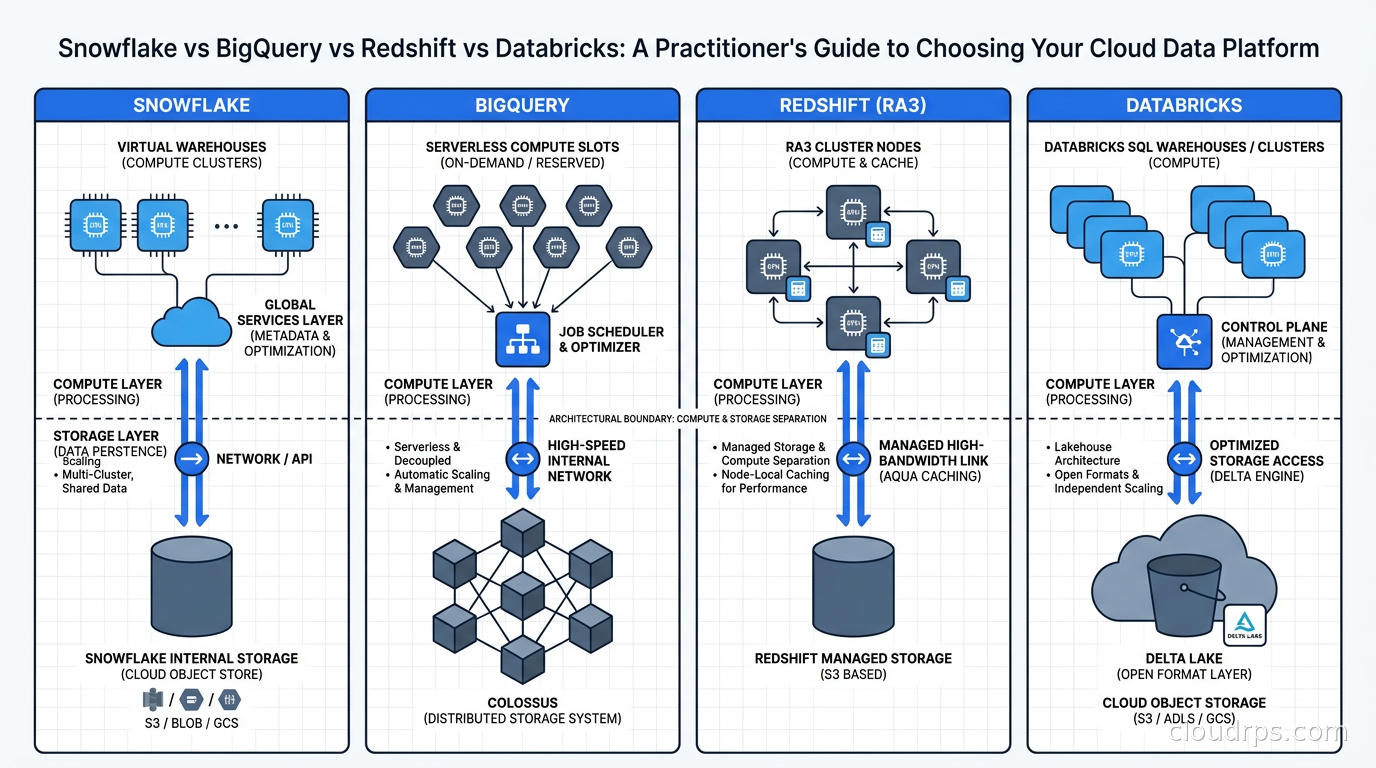
Snowflake is a cloud-native data warehouse built from the ground up on the premise that compute and storage should be completely separate. You store data in Snowflake’s internal format (micropartitions) on cloud object storage, then attach virtual warehouses (clusters of compute nodes) to query it. Those warehouses spin up in seconds, scale independently, and cost nothing when idle. You can run five different teams against the same data without queue contention. It is genuinely elegant the first time you see it work.
BigQuery is Google’s answer to the question: what if you did not have to think about clusters at all? There are no clusters to provision. You submit a query and Google determines how many compute nodes it needs. Storage is separate, billed per TB stored. Query costs default to pay-per-TB-scanned. BigQuery uses the Dremel query engine, designed for interactive analytics at planetary scale. For ad-hoc exploration, it is extraordinarily capable.
Redshift is Amazon’s data warehouse, and it carries the oldest DNA of the four. It was built on ParAccel columnar database technology, which Amazon licensed in the early 2010s (ParAccel itself was later acquired by Actian). For most of its life, Redshift was a cluster-based warehouse where you provisioned nodes, set distribution keys, set sort keys, and tuned aggressively. Redshift Serverless (2022) modernized the experience, but the product has not fundamentally reinvented its architecture the way Snowflake did. It is excellent within the AWS ecosystem and more rough around the edges elsewhere.
Databricks is different from the other three in a meaningful way. It started as a managed Apache Spark service, then the team built Delta Lake on top of Spark to add ACID transactions and schema enforcement to what had been a chaotic data lake world. Today Databricks calls itself a “data lakehouse,” which means it is simultaneously a data engineering platform, an ML platform, and increasingly a SQL analytics warehouse. The scope is genuinely different from the others.
Compute and Storage Separation: Why Architecture Matters More Than Benchmarks
Understanding how each platform handles columnar storage and query execution will save you from performance surprises in production.
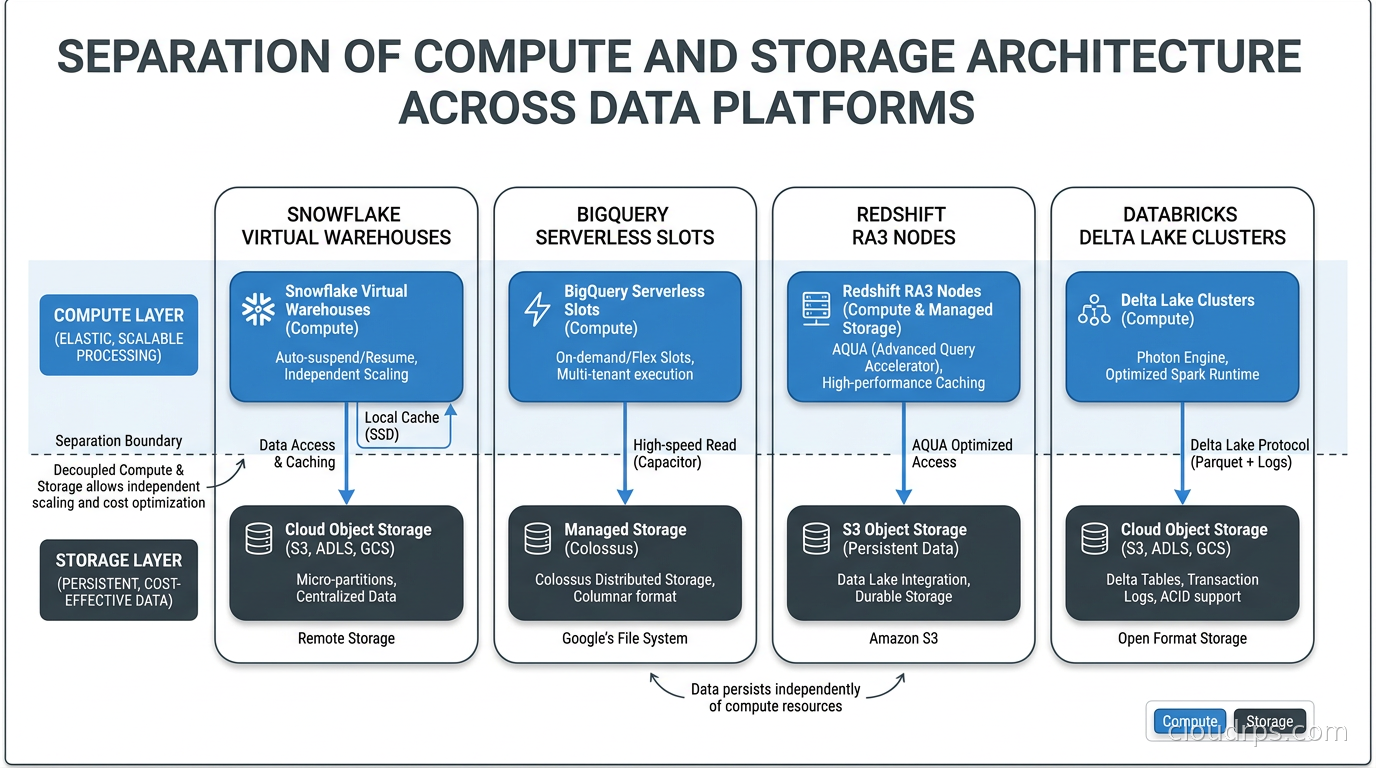
Snowflake achieves true separation with clean operator interfaces. You can resize a virtual warehouse without stopping queries in flight. You suspend it overnight and pay zero compute. Multiple warehouses query the same data simultaneously without interference. The tradeoff: Snowflake’s internal micropartition format is proprietary. You cannot take your data and query it directly with Spark or DuckDB without exporting first. Storage openness is the one place Snowflake genuinely lags its competitors.
BigQuery handles separation on Google’s side entirely. You never manage a cluster. Storage uses Google’s Capacitor columnar format, and layout is managed automatically. BigQuery also supports querying external tables directly in Google Cloud Storage via BigLake, and the BigQuery Omni feature allows querying data living in AWS S3 or Azure Blob Storage through Apache Iceberg. If you are on GCP, the integration depth with the rest of the Google ecosystem is hard to match.
Redshift RA3 nodes introduced managed storage in 2019, moving Redshift toward the separation model. With RA3, data lives in S3-backed Redshift Managed Storage, and compute is the node cluster. Redshift Spectrum extends this further, letting you query raw data in S3 without loading it. But you still think about distribution styles for tables you want to join efficiently. KEY, ALL, EVEN, and AUTO distribution decisions still matter for large join performance in ways they simply do not in Snowflake or BigQuery.
Databricks builds on top of Delta Lake, which stores data as open-format Parquet files on cloud object storage. This is the key architectural advantage: your data is in a format any tool can read. If you decide tomorrow that you want to query your Delta tables with Trino, DuckDB, or even Athena, you can. Delta Lake also supports Apache Iceberg’s open table format standard through Databricks UniForm, which exposes Delta tables as Iceberg metadata simultaneously. The storage openness is real and valuable when your architecture needs to evolve.
Query Performance in Practice
Benchmarks lie. I have read at least a dozen “we ran TPC-DS against all four warehouses” comparisons, and I have watched the results mean almost nothing in production. Here is what actually matters.
Snowflake performs well on complex analytical queries with many joins, especially when table sizes are well-understood and query patterns are consistent. The automatic clustering feature (which continuously reorganizes data within micropartitions based on clustering keys) works well when enabled thoughtfully. Cold start on a freshly resumed warehouse adds 1-5 seconds to the first query, which matters if you have dashboards that fire queries the moment a user opens them.
BigQuery shines on massive ad-hoc queries. Running a full table scan against a 10TB dataset is something BigQuery handles almost trivially because it can throw enormous parallel compute at it without any cluster sizing decision on your part. The serverless model is genuinely fast for interactive exploration. Where BigQuery struggles is complex joins on tables without appropriate partitioning and clustering configured. A poorly designed schema that scans entire large tables on every query generates surprising bills fast.
Redshift has improved significantly with AQUA (Advanced Query Accelerator), which offloads some computation to NVMe-attached processors rather than the network. For well-tuned workloads on properly sized clusters, Redshift is competitive with the others. The problem is “well-tuned” requires ongoing maintenance. I have walked into too many teams where nobody revisited distribution styles in two years, the ANALYZE job ran out of disk space once and never fully recovered, and query performance had quietly degraded without anyone noticing.
Databricks with the Photon engine (a C++ rewrite of Spark’s execution layer) is genuinely fast for data engineering workloads and reasonably fast for interactive analytics through SQL warehouses. The SQL warehouse product has improved substantially since its introduction. For real-time, high-concurrency serving there is now a separate answer: Lakehouse//RT, powered by a new engine called Reyden, currently in Beta. Databricks claims sub-100ms latency at over ten thousand queries per second against governed Delta and Iceberg tables. Its own TPC-H-derived demo (unaudited, competitors anonymized, so weigh it as vendor material) shows Reyden roughly at parity with a leading real-time engine at the 1 GB scale, several times faster at 100 GB, and completing all 22 queries at 1 TB where both anonymized competitors failed to finish. The architectural difference behind those numbers is real and worth understanding: Reyden queries standard Parquet-backed Delta and Iceberg tables in place. Snowflake’s competing Interactive Tables require loading data into separate clustered copies that support only INSERT OVERWRITE mutation and run under short query timeouts (5 seconds by default, per Snowflake’s own documentation), and ClickHouse gets its speed from its native MergeTree format rather than from open files. The honest caveats cut the other way: Lakehouse//RT wants tables managed in Unity Catalog (external Delta tables can be converted in place without moving data), and the Beta currently serves read-only SELECT workloads. It is early, but it targets exactly the operational analytics niche that previously forced you to bolt a dedicated serving database onto your lakehouse. For ML workloads, there is no comparison: Databricks is the only platform where you move from raw data ingestion through feature engineering to model training without leaving the environment.
Pricing: The Part Everyone Underestimates
Cloud data warehouse pricing is complex enough that I have watched companies choose platforms based on list prices and discover the real costs three months later.
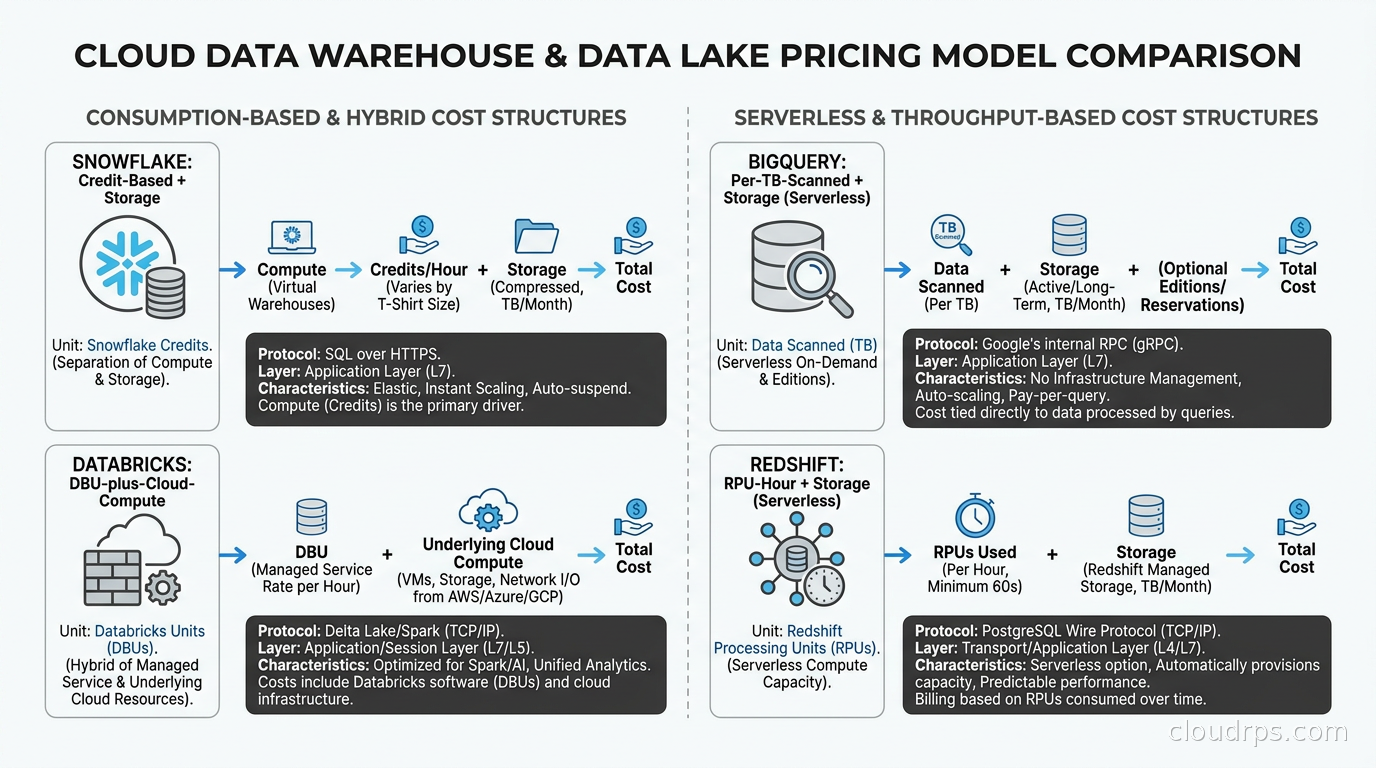
Snowflake uses credits. Pricing varies by cloud provider and region, but roughly $3-4 per credit for Enterprise edition. A small virtual warehouse (1-node equivalent, called XS) consumes 1 credit per hour. A 4XL warehouse (128 nodes) consumes 128 credits per hour. Storage runs roughly $23-40/TB/month depending on the edition. The hidden trap is poorly configured auto-suspend: if your BI tool sends keepalive queries, warehouses stay alive indefinitely. Cost governance in Snowflake requires active management. Understanding FinOps principles becomes mandatory the moment you scale a Snowflake deployment, not optional.
BigQuery charges per TB scanned for on-demand queries, roughly $6.25/TB as of mid-2026. Storage is $20/TB/month for active tables. For teams with predictable heavy workloads, BigQuery Enterprise with capacity commitments (buying slots in advance) cuts costs significantly and makes spend predictable. The on-demand model is free-feeling until one analyst writes a query that accidentally scans 50TB because partitioning was not configured. Partitioning and clustering is not optional at any real scale.
Redshift Serverless charges per RPU-hour (Redshift Processing Unit), roughly $0.45/RPU-hour. A deployment at 128 RPUs running continuously runs about $1,400/day. Provisioned RA3 clusters start around $0.25/hour per node and scale from there. The total cost of Redshift consistently includes more DBA time than the other platforms because tuning cannot be fully automated away. That labor cost shows up in headcount, not cloud bills, which is why it gets underestimated.
Databricks uses DBUs (Databricks Units), with rates depending on workload type and cloud provider. The critical thing: the billing model depends on which flavor of compute you run. On classic compute, Databricks costs are additive to the underlying cloud costs. A large classic cluster on AWS pays Databricks DBU charges plus EC2 on-demand or spot prices simultaneously. On serverless compute, which is where Databricks has moved most of its warehousing story, the infrastructure is folded into a single higher DBU rate and you get one bill from Databricks with no separate AWS, Azure, or GCP compute line item. That makes serverless look expensive on paper (serverless SQL around $0.70/DBU versus $0.22 for classic) when the serverless number is actually bundling the VM cost you would otherwise pay the cloud provider directly. Compare all-in costs, never DBU list rates. The platform premium is justified when you actually use the full breadth of the platform rather than running it as a Snowflake alternative with more complexity.
When to Actually Choose Each Platform
This is the question everyone is asking, and the answer depends on factors most comparison articles ignore.
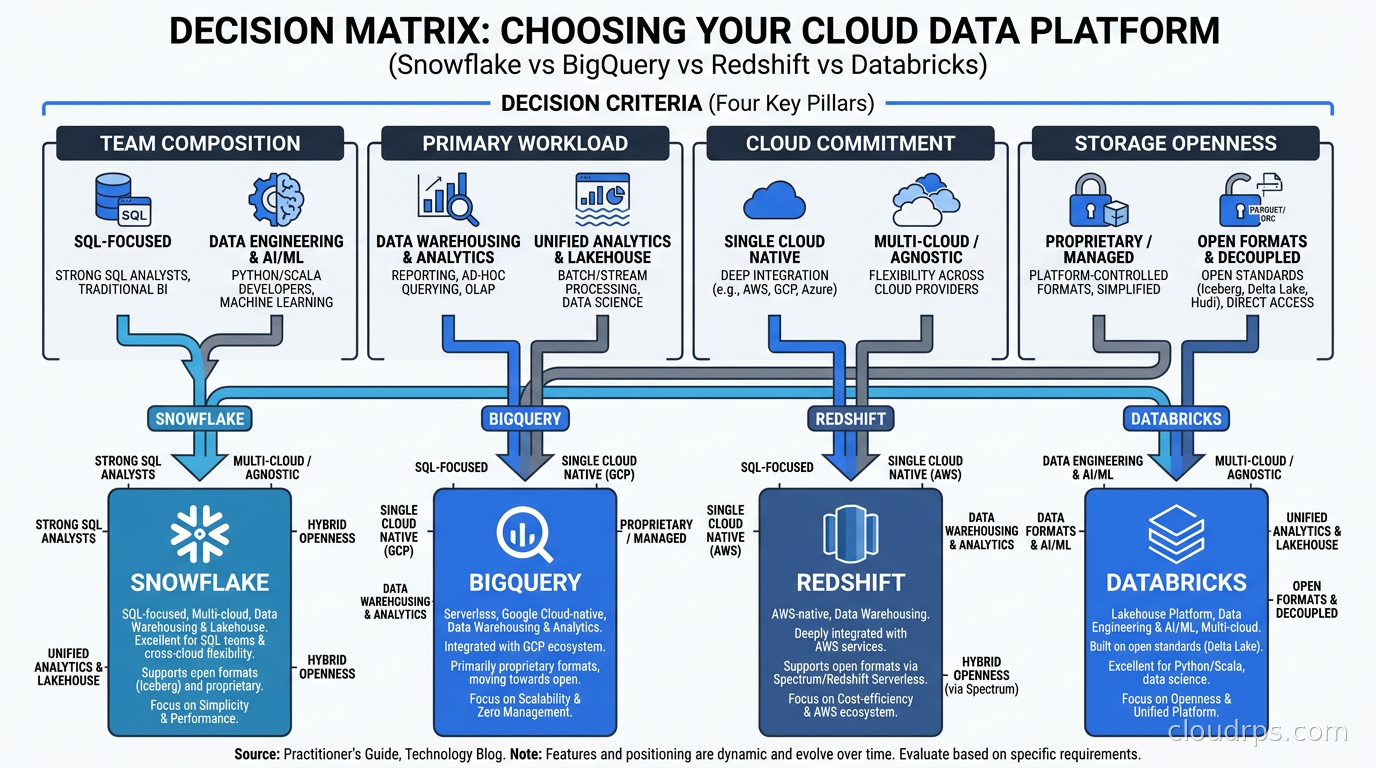
Choose Snowflake when your team is primarily SQL analysts. You need strong data sharing across organizations or departments, including external partners. You are multi-cloud or cloud-agnostic and cannot commit to a single provider’s ecosystem. You want a genuinely managed experience with minimal infrastructure concerns. You are running heavy BI workloads with dbt as your transformation layer: Snowflake plus dbt is the most common production analytics stack for SQL-first data teams in 2026 for good reason.
Choose BigQuery when you are already on GCP, or building on Google Cloud where it would be strange not to use the native warehouse. Your workload is ad-hoc, variable, and exploratory rather than steady-state. Your team has strong SQL skills and limited ops bandwidth for warehouse management. You want BQML for in-database model training. The cross-cloud Iceberg support makes BigQuery viable even for multi-cloud architectures when GCP is your primary home.
Choose Redshift when you are deeply embedded in AWS and have tightly integrated pipelines across S3, Glue, EMR, and Kinesis. Your workload is structured, predictable, and does not need the architectural flexibility of the others. You already have a mature Redshift deployment and the migration cost exceeds the benefit of switching. Redshift is rarely the right first choice in 2026, but it is often the correct “stay put” decision for teams that have invested deeply in the AWS analytics ecosystem.
Choose Databricks when your team includes data engineers and data scientists alongside analysts. You are building streaming ingestion pipelines and need data pipeline orchestration tightly integrated with your compute layer. You are doing ML model development and want a unified environment from raw data to deployed model. You need open-format data storage with genuine portability. The combination of Delta Lake openness, MLflow for experiment tracking, and Unity Catalog for governance is not matched by any of the other three.
The Architecture Convergence Nobody Warned You About
Here is the uncomfortable truth about choosing in 2026: the platforms are converging, and they are converging fast. Snowflake added Snowpark for Python and Java workloads. Snowflake Cortex added ML inference directly in SQL. BigQuery now queries Iceberg tables across clouds. Databricks launched Lakebase in 2025 to add proper OLTP capabilities to what was previously an analytical-only platform. Redshift added ML training via Redshift ML. Every platform is trying to be every other platform.
This convergence is good for the market but makes the choice harder in the short term. My advice: pick based on your team’s primary motion, not on advertised feature parity. Feature parities are table-stakes marketing checkboxes. Architecture depth is what you feel after 18 months.
The primary motion for a pure BI team is running SQL against dimensional models, feeding dashboards, and iterating on metrics definitions. That motion is served better by Snowflake or BigQuery than Databricks, regardless of how many Python notebooks Databricks can host. The primary motion for a machine learning team is feature engineering through model training to serving. That motion is served better by Databricks, regardless of how many Python functions Snowflake has added to Snowpark.
And consider your storage lock-in horizon honestly. Apache Spark and the data lakehouse movement have established that open storage formats compound in value over time. If you choose Databricks, your data lives in open Parquet files on object storage you control. If you choose Snowflake, your data lives in proprietary micropartitions accessible only through Snowflake compute. That difference feels abstract on day one. It feels very concrete on day 730 when you are evaluating whether to switch.
What Migration Actually Costs
Nobody puts these numbers in their platform comparison article, so I will.
Plan 6-18 months to fully migrate a mature data platform that has accumulated real usage. Budget 40% more than your initial estimate, because the scope always expands.
The SQL migration is the easy part. Standard ANSI SQL works across all four platforms for the common 80%. The remaining 20% of queries using platform-specific functions take 80% of the migration effort. Snowflake’s FLATTEN and LATERAL JOIN patterns, BigQuery’s STRUCT and ARRAY nesting, Redshift’s window function quirks, and Databricks’ Spark SQL catalog references are all subtly incompatible dialects that require manual review.
The harder parts are the integrations: every BI tool connection string, every Fivetran or Airbyte connector, every Lambda function that writes to the warehouse, every Airflow DAG with platform-specific operators. These need to be inventoried, tested in a parallel environment, and cut over with rollback plans. Production systems that have accumulated three years of integrations always have more connections than anyone documented.
The hardest part is team retraining. Snowflake’s time travel and zero-copy cloning workflows become muscle memory for analysts who use them daily. BigQuery’s slot reservation model requires a mental model that takes weeks to internalize. Databricks’ notebook paradigm is foreign to people who have worked only in SQL tools. Migration timelines that ignore the human learning curve are wrong timelines.
The Two-Year Total Cost of Ownership Picture
The platform license is only a fraction of the real two-year TCO. The rest breaks down as:
- Data engineering time to build and maintain pipelines on the new platform
- Analyst productivity loss during the ramp period (budget 6-8 weeks of reduced output per analyst)
- Migration engineering cost for the cutover itself
- Adjacent service costs: BI tools, ingestion connectors, orchestrators that complement the warehouse
- Compute costs for adjacent infrastructure like pre-processing Spark jobs or streaming ingestion
The team that most consistently overspends is the team that chose Databricks for a pure analytics use case. In the classic compute era, that mismatch showed up as engineers babysitting clusters and chasing Spark failures instead of building pipelines, and some of those teams eventually migrated back to Snowflake with little to show for the detour. To be fair, Databricks has closed much of that gap: serverless SQL warehouses with Predictive Optimization now handle table maintenance and clustering key selection automatically (what used to be manual VACUUM, OPTIMIZE, and partitioning decisions), so the cluster-babysitting tax largely disappears if you stay on the serverless tier. And one thing I got wrong in an earlier version of this piece: I framed the remaining mismatch as a pricing problem, as if a pure BI team on Databricks were paying for platform breadth it never touches. That is not how the billing works. Databricks pricing is consumption-based per workload: a team that only runs a serverless SQL warehouse pays for warehouse compute and nothing else, and the ML tooling, streaming, and notebooks it never opens cost exactly zero. The mismatch that remains is organizational rather than financial: team skills, BI tooling fit, and ecosystem familiarity. On raw price for performance, the serverless warehouse tiers are close enough across vendors that the only comparison I trust is a proof of concept on your own workload.
The team that most consistently gets good value from Databricks is the team with genuine ML workloads that unified feature engineering, model training, and batch serving on one platform, replacing three separate tools with one, and found the operational overhead justified by the reduction in system complexity.
A Practical Pre-Decision Checklist
Before committing to any platform, I run through a short set of questions with the team:
What does your analytics team actually look like today? SQL-first teams with BI-focused workflows: Snowflake, BigQuery, or a Databricks serverless SQL warehouse, which has become a legitimate pure-warehouse option now that it requires no cluster management and bills only for warehouse compute. Teams with ML engineers doing feature engineering and model development: Databricks, and the operational-overhead caveat that used to accompany that recommendation now applies mainly to classic compute and GPU training infrastructure, not to the warehousing tier.
Which cloud are you primarily on? AWS shops get measurable operational benefit from Redshift’s native service integrations even if Snowflake is technically more capable. GCP shops get a compelling end-to-end story from BigQuery. Multi-cloud shops get the most value from the two platforms that run natively on all three clouds: Snowflake and Databricks.
Is your query volume predictable or spiky? Predictable heavy workloads favor Redshift reserved capacity or Snowflake standard warehouses. Spiky or unpredictable workloads favor BigQuery’s serverless pay-per-query model.
Does vendor lock-in on storage matter to you over a 5-year horizon? If yes, Databricks on Delta Lake and BigQuery with Iceberg support are the most portable options. Snowflake is the most locked-in at the storage layer by a meaningful margin. Teams that go the open-lakehouse route often layer Trino on top of Iceberg as the federated SQL engine, which lets them query across S3, PostgreSQL, and Kafka in a single SQL statement without paying warehouse per-query fees.
What is your data governance maturity? Databricks Unity Catalog is the most comprehensive cross-platform governance layer. Snowflake has strong governance for a warehouse. BigQuery’s column-level security and row-level access policies are mature and worth evaluating if you have compliance requirements.
The right data warehouse is the one that fits the primary motion of your team, keeps adjacent costs visible, and you can honestly revisit every two years as the platforms evolve. The worst outcome is not choosing the “wrong” platform. The worst outcome is choosing the right platform for a team that no longer exists two years later and avoiding the hard conversation about whether to migrate.
Pick deliberately. Document why you picked it. Revisit the decision with data instead of inertia.
Updated September 1, 2026: corrected the Databricks pricing section to distinguish classic compute (additive billing) from serverless compute (single bill), updated the operational overhead discussion to reflect serverless Predictive Optimization and automatic liquid clustering, added Lakehouse//RT with the Reyden engine, corrected the Redshift/ParAccel history, and removed unsourced statistics as part of an accuracy review.
Updated September 6, 2026: corrected the cost framing for SQL-only teams (Databricks billing is consumption-based per workload, so unused platform features cost nothing), expanded the Lakehouse//RT section with Databricks’ published benchmark figures and current Beta limitations alongside Snowflake’s documented Interactive Tables constraints, and added Databricks to the recommendations for SQL-first and multi-cloud teams.
Get Cloud Architecture Insights
Practical deep dives on infrastructure, security, and scaling. No spam, no fluff.
By subscribing, you agree to receive emails. Unsubscribe anytime.