
The first time I helped an enterprise client set up hybrid cloud connectivity, we made the mistake everyone makes: we used VPN. Specifically, IPsec tunnels over the internet. The setup took a weekend, the pricing looked reasonable, and everything worked fine in dev. Then we tried to push a production database replication stream through it, and we learned a painful lesson about the difference between a connection that exists and a connection that performs.
That was back in 2010. In the fifteen-plus years since, I have helped organizations migrate petabytes of data, run real-time trading systems, and connect on-premises mainframes to cloud workloads. The thing that separates the hybrid architectures that work from the ones that generate 2 AM pages is the connectivity layer. And for enterprises running serious workloads, that means dedicated private circuits: AWS Direct Connect, Azure ExpressRoute, and Google Cloud Interconnect.
This guide is what I wish someone had handed me before I spent three years learning these systems the hard way.
Why VPN Is Not Enough
Before we get into the dedicated circuit products themselves, let me explain why we do not just use VPN for everything. Our article on VPNs covers how tunneling and encryption work, but it does not cover what happens when you put production workloads on VPN at scale.
VPN tunnels have three problems that become showstoppers for enterprise workloads.
Bandwidth ceiling. A site-to-site IPsec tunnel running over commodity internet links tops out around 1 to 2 Gbps in practice. AWS advertises up to 1.25 Gbps per tunnel, and you can bond multiple tunnels, but that approach is fragile and operationally painful to maintain. When your database replication jobs or ETL pipelines need sustained throughput, you will hit that ceiling, and the failure mode is not clean: packets start queuing, latency climbs, and applications start timing out without any obvious explanation.
Latency unpredictability. Internet routing is best-effort. The path between your data center and an AWS region might traverse three or four autonomous systems, and those paths shift as BGP re-converges across the internet. I have seen latency spike from 10ms to 80ms for ten minutes because an upstream ISP decided to reroute traffic through a different backbone. For latency-sensitive workloads like SAP HANA replication, real-time fraud detection, or financial transaction processing, that variability is unacceptable.
No end-to-end SLA. Your internet provider’s SLA covers the path to the internet. Not the path from the internet to AWS. Not end-to-end. You are stitching together contracts that cannot be composed into a coherent availability guarantee.
Dedicated private circuits solve all three problems by bypassing the public internet entirely.
How Dedicated Circuits Actually Work
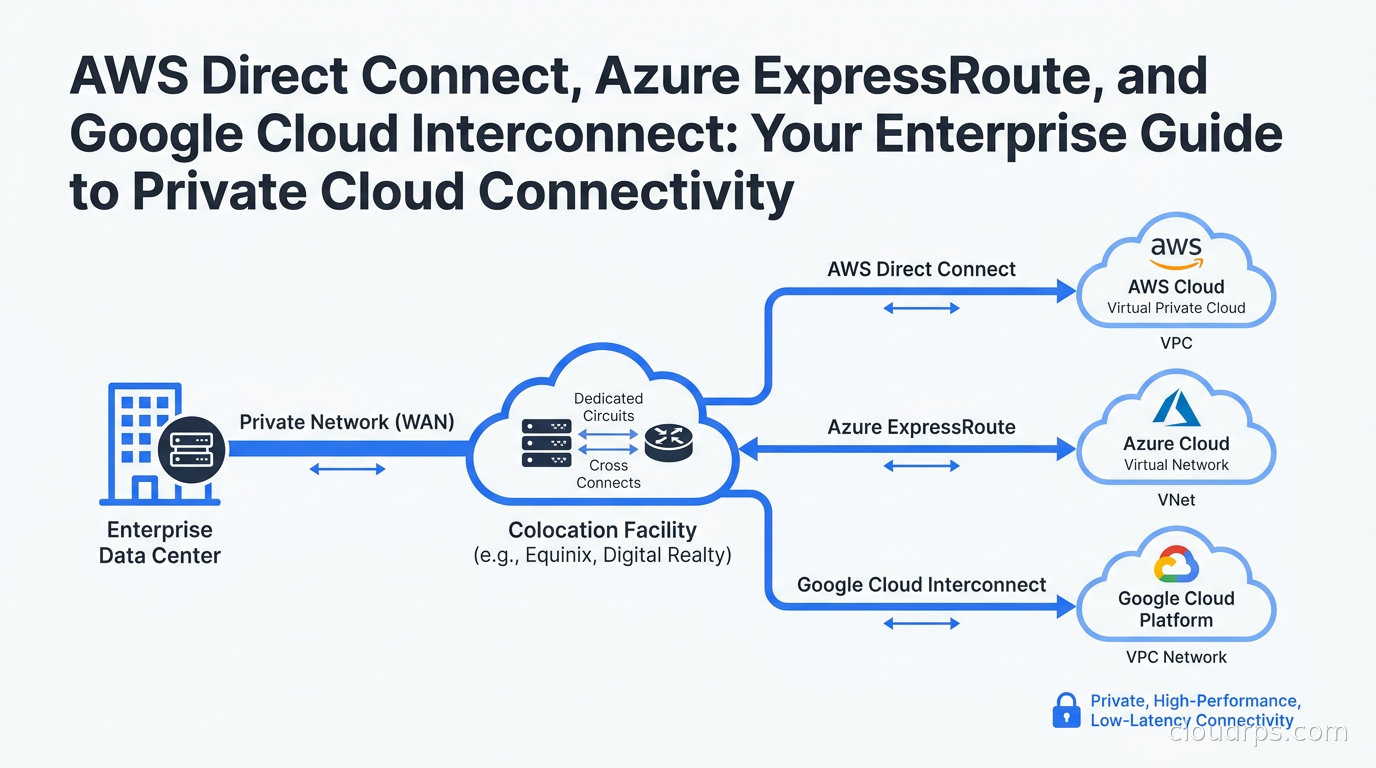
At the physical layer, dedicated cloud interconnects operate through colocation facilities. Each major cloud provider (AWS, Azure, Google) maintains Points of Presence (PoPs) in colocation facilities around the world. These PoPs are essentially cages of network equipment that the cloud provider owns and operates.
You connect to those PoPs in one of two ways.
Colocation model. If your organization has equipment colocated in the same facility as a cloud PoP, you can often provision a cross-connect directly to the cloud provider’s cage. This is the most cost-effective option when feasible, and it gives you physical control over the connection path.
Network provider model. Most enterprises do not have equipment colocated next to AWS or Azure. In that case, you work with a network service provider that maintains connections into the cloud PoPs. The provider extends a virtual circuit from your data center to the cloud PoP across their WAN. Providers like Megaport, Equinix Fabric, Zayo, AT&T, and Lumen all play this role, and the ecosystem is mature in major markets.
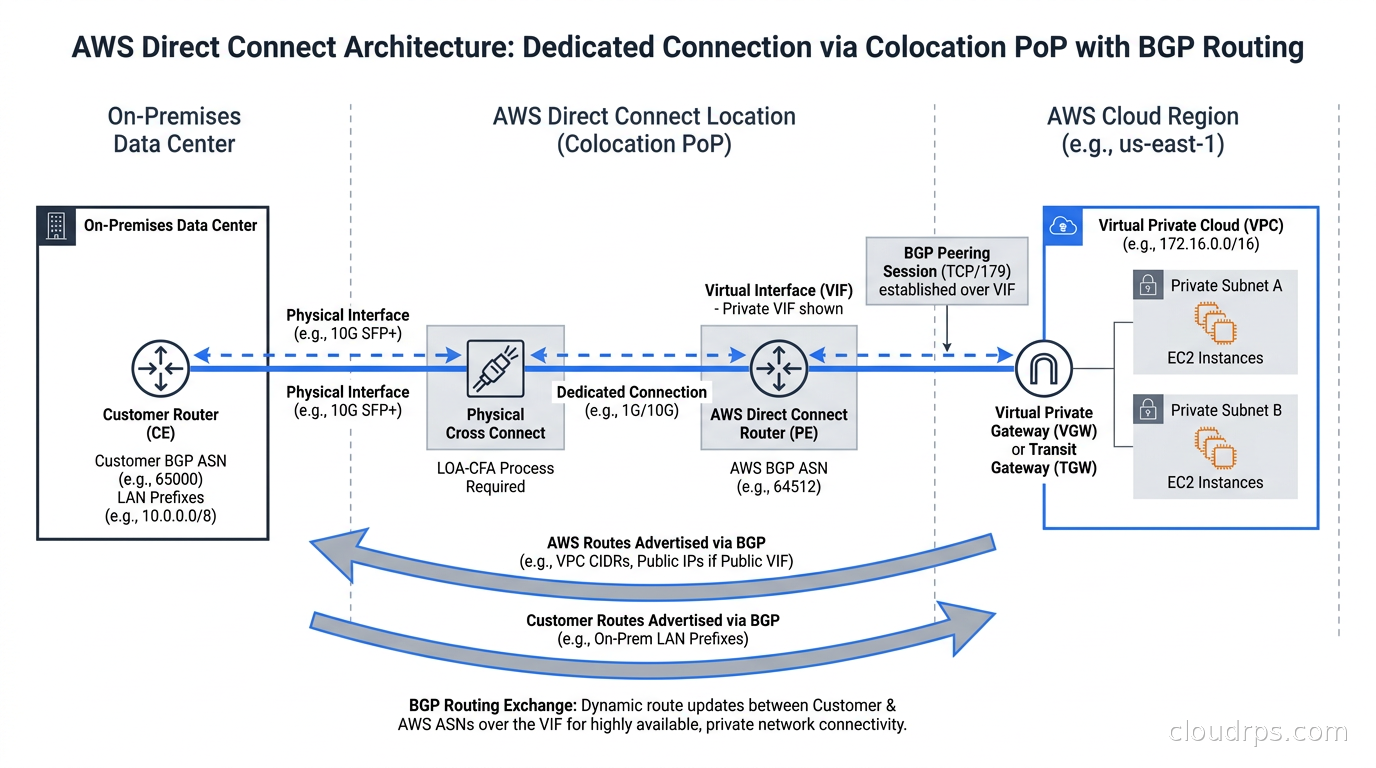
In both cases, the result is a Layer 2 circuit that terminates at your router and the cloud provider’s router. You then run BGP across that circuit to exchange routing information. The cloud provider announces their network prefixes (your VPCs, VNets, or Google VPC subnets), and you announce your on-premises prefixes. Traffic flows privately without touching the public internet.
AWS Direct Connect
Direct Connect is AWS’s dedicated circuit product, and it is the one I have the most production experience with across the most customer environments.
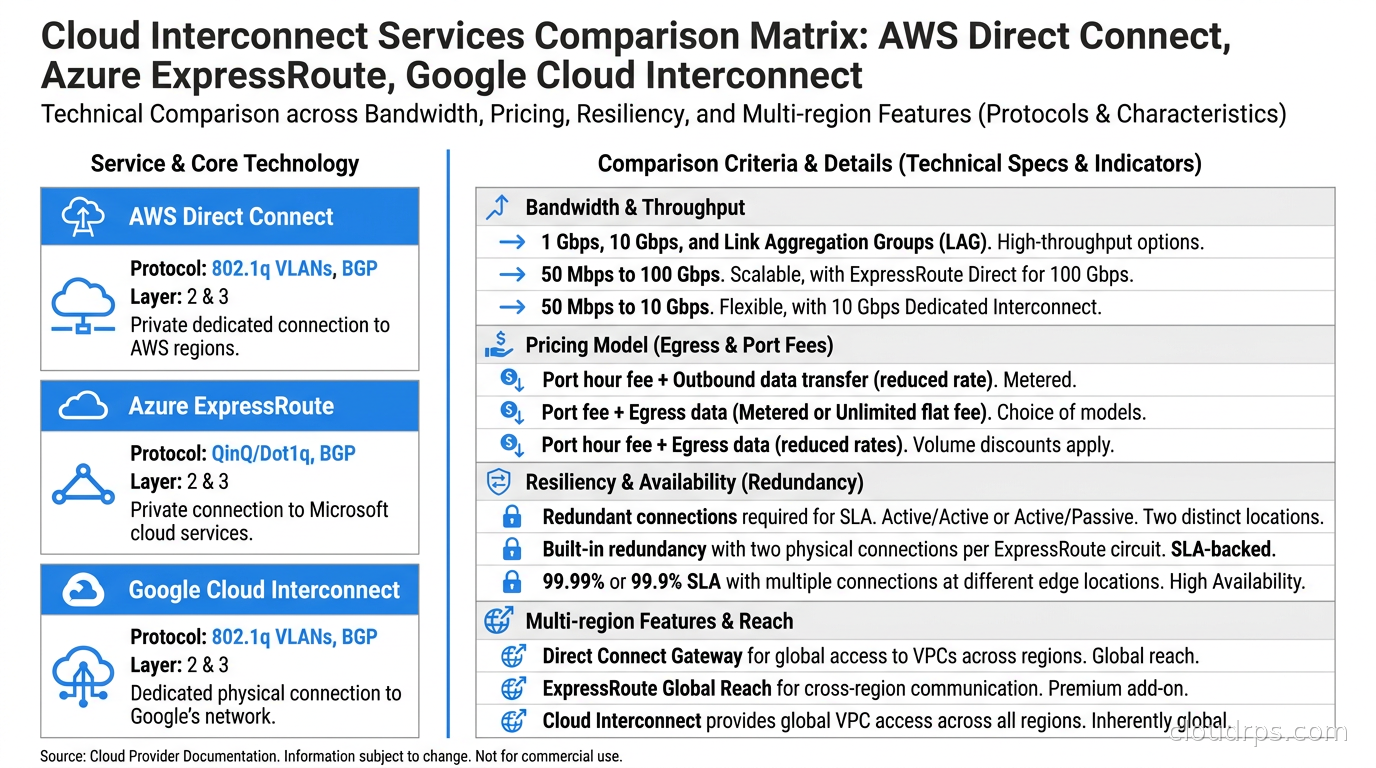
Connection types. You can provision a Dedicated Connection at 1 Gbps, 10 Gbps, or 100 Gbps, or a Hosted Connection through an AWS Direct Connect Partner at bandwidths from 50 Mbps up to 10 Gbps. Dedicated Connections are provisioned directly with AWS and require you (or your colo provider) to have cross-connect capability at an AWS Direct Connect location. Hosted Connections are managed through a partner and are useful when you need less bandwidth or want the partner to handle the physical layer.
Virtual Interfaces. This is where Direct Connect architecture gets interesting. A single physical circuit can carry multiple Virtual Interfaces (VIFs), each representing a separate BGP session:
- Private VIF: connects to a specific VPC via a Virtual Private Gateway (VGW). This is the most common type for connecting to cloud workloads.
- Public VIF: reaches all AWS public service endpoints (S3, DynamoDB, EC2 public IPs) without traversing the internet. Useful for bulk data transfer to S3 without paying internet egress rates.
- Transit VIF: connects to a Direct Connect Gateway, which can then associate with multiple Transit Gateways across multiple AWS accounts and regions.
Direct Connect Gateway. This is the piece that makes multi-region architectures manageable. Instead of provisioning separate circuits to every AWS region where you have workloads, you provision one circuit at a PoP and associate it with a Direct Connect Gateway. The gateway operates across regions and routes traffic to VPCs in multiple regions over the same physical connection. I have seen environments where teams provisioned six separate circuits, one per region, before this capability existed. Managing those six BGP relationships independently was exactly as painful as it sounds. Now I default to the transit architecture from day one.
Pricing. You pay a port fee for the physical connection and a data transfer out (DTO) charge for traffic flowing from AWS to your on-premises network. Data flowing into AWS over Direct Connect is free. The DTO rate over Direct Connect is substantially lower than internet egress: roughly 0.02 USD per GB in US regions versus 0.09 USD per GB for standard internet egress. For organizations moving large data volumes out of AWS, this difference compounds quickly. Our cloud egress costs guide has more detail on modeling these numbers accurately.
Resiliency. AWS documents four resiliency models for Direct Connect: maximum (two connections, two PoPs, two routers on your end), high (two connections, one PoP), development (one connection, VPN backup), and low (one connection, no backup). For anything carrying production traffic, I always go to at least high resiliency. A single circuit is a single point of failure, full stop, and as I have written in the piece on eliminating single points of failure, the lesson usually comes at the worst possible time.
BGP tuning. Direct Connect uses BGP with AS numbers you provide or borrow from AWS’s range. The MED (Multi-Exit Discriminator) attribute controls which connection AWS prefers for traffic destined to your on-premises network. On your side, you use AS path prepending or local preference to control which Direct Connect circuit gets used for outbound traffic. Getting the BGP policy wrong means your VPN failover path gets preferred over Direct Connect during normal operation, paying internet egress rates when you have a dedicated circuit sitting idle. I have seen this happen in production environments and it takes surprisingly long for someone to notice.
Azure ExpressRoute
ExpressRoute is Microsoft’s dedicated circuit product, and it has a few architectural differences worth understanding carefully before you design around it.
Circuit and peering model. An ExpressRoute circuit represents the physical or virtual connection to a PoP. On that circuit you configure peerings, which are analogous to Direct Connect VIFs:
- Azure private peering: provides access to Azure VMs, internal load balancers, and services running inside your Azure VNets.
- Microsoft peering: provides access to Microsoft 365, Dynamics 365, and Azure public services like Azure Storage and Azure SQL Database.
Unlike Direct Connect, where a private VIF connects to a specific VPC, Azure private peering connects to a single VNet by default. To connect multiple VNets, you use ExpressRoute Global Reach or connect your ExpressRoute circuit to an Azure Virtual WAN hub.
ExpressRoute Direct. For organizations that need very high bandwidth at dedicated port speed (10 Gbps or 100 Gbps), ExpressRoute Direct lets you connect directly into Microsoft’s global network backbone without going through a service provider. You provision physical ports in a Microsoft PoP facility and own the full port capacity. I have set this up for two large clients. It requires significant coordination with Microsoft and the colo facility, and the provisioning lead time is longer than standard ExpressRoute, but the raw performance characteristics are excellent.
ExpressRoute Global Reach. This feature allows two ExpressRoute circuits to communicate through Microsoft’s backbone without touching the public internet. The primary use case is connecting two on-premises sites that both have ExpressRoute, using Azure as the transit backbone. This sounds unusual, but I have seen it be exactly the right answer for a multinational with ExpressRoute in London and Singapore who wanted to avoid their MPLS provider’s cross-continental pricing.
Zone-redundant gateways. ExpressRoute gateways come in zone-redundant SKUs (ErGw1AZ, ErGw2AZ, ErGw3AZ). If your workloads require zone-level fault tolerance, you need the zone-redundant gateway. Standard (non-AZ) gateways are deployed to a single availability zone internally and will not survive a zone failure. This is a detail that gets missed in initial architecture reviews more often than it should.
Pricing models. ExpressRoute offers two billing approaches: metered (pay per GB of outbound data) and unlimited (flat monthly fee regardless of volume). For high-throughput workloads, unlimited usually wins after a certain threshold. The calculation is straightforward: divide the unlimited monthly fee by the metered rate per GB to find your break-even egress volume. Above that, unlimited is cheaper. One thing I appreciate about ExpressRoute: inbound data transfer from Azure to your on-premises network is free in both models.
Google Cloud Interconnect
Cloud Interconnect is Google’s equivalent product, and Google has made a few design choices that I think are genuinely well-considered.
Dedicated Interconnect. You provision 10 Gbps or 100 Gbps ports directly in a Google PoP. You can aggregate multiple ports to get higher bandwidth, and Google supports up to eight 10 Gbps circuits per region in a bundle. Like the other providers, you run BGP across the connection. Google’s PoP footprint is somewhat smaller than AWS Direct Connect in some regions, so check coverage carefully for less common markets.
Partner Interconnect. For locations where Dedicated Interconnect is not available, or for bandwidth requirements below 10 Gbps, Partner Interconnect works through supported service providers. You get circuits from 50 Mbps to 50 Gbps through the partner, and BGP terminates at the partner edge rather than directly at Google. This is useful for regional offices that need cloud connectivity but cannot justify a full Dedicated Interconnect.
Cloud Router. Google’s managed BGP router is the entity that terminates BGP sessions from your interconnect and manages route propagation into your VPC. Cloud Router is region-scoped. Unlike AWS, where the Direct Connect Gateway spans regions from a single circuit, Google requires separate VLAN attachments per region. If you have workloads in Google Cloud regions in multiple locations, you need to provision and manage VLAN attachments in each of those regions. This adds operational overhead compared to the AWS transit model, but the per-region granularity also gives you explicit control over what routes are advertised where.
Google’s backbone advantage. When traffic enters the Google network at your PoP connection, it traverses Google’s private fiber backbone to reach the destination region. This backbone is engineered to a quality standard well above commodity internet, which means latency characteristics are often better than you would expect based purely on geography. Traffic from a European on-premises network to a US Google Cloud region enters Google’s backbone in Europe and crosses on Google’s private infrastructure. This is one area where Google’s investment in physical network infrastructure directly benefits Cloud Interconnect customers.
Comparing the Three Providers
Here is how I think about the choice when an enterprise client is designing hybrid connectivity for the first time.
Primarily on AWS. Direct Connect is the obvious starting point. The Direct Connect Gateway and Transit Gateway transit architecture scales to dozens of VPCs across multiple accounts and regions without requiring additional circuits. The partner ecosystem is mature and covers most metros worldwide. Use the high or maximum resiliency model from day one.
Primarily on Azure. ExpressRoute with the unlimited data plan is the standard approach for high-traffic workloads. The metered model generates billing surprises when ETL pipelines have a heavy month. Unless your traffic volume is genuinely predictable and low, default to unlimited. Consider ExpressRoute Global Reach if you are connecting multiple on-premises sites and want to use Azure as the backbone.
Primarily on Google Cloud. Cloud Interconnect is solid, especially if you can leverage Google’s backbone for cross-geography traffic. The 99.99% SLA for Dedicated Interconnect with redundant connections is one of the stronger guarantees available. Plan for per-region VLAN attachment management if you span multiple regions.
Multi-cloud scenarios. This is where cost modeling matters most. You generally do not want to pay for three dedicated circuits unless you have substantial workloads across all three providers. A common pattern I use: primary dedicated circuit to your main provider, IPsec VPN to secondary providers, with a commitment to upgrade secondary connections to dedicated circuits when traffic volume justifies the cost. The multi-cloud strategy guide covers the broader trade-offs of multi-cloud architectures that inform this decision.
One pattern worth knowing regardless of provider: colocation-based interconnect fabric services like Megaport and Equinix Fabric let you provision virtual circuits to multiple cloud providers from a single physical presence in a major colo. If you have an existing colocation footprint, this can significantly reduce the operational complexity of multi-provider connectivity.
Designing for Redundancy
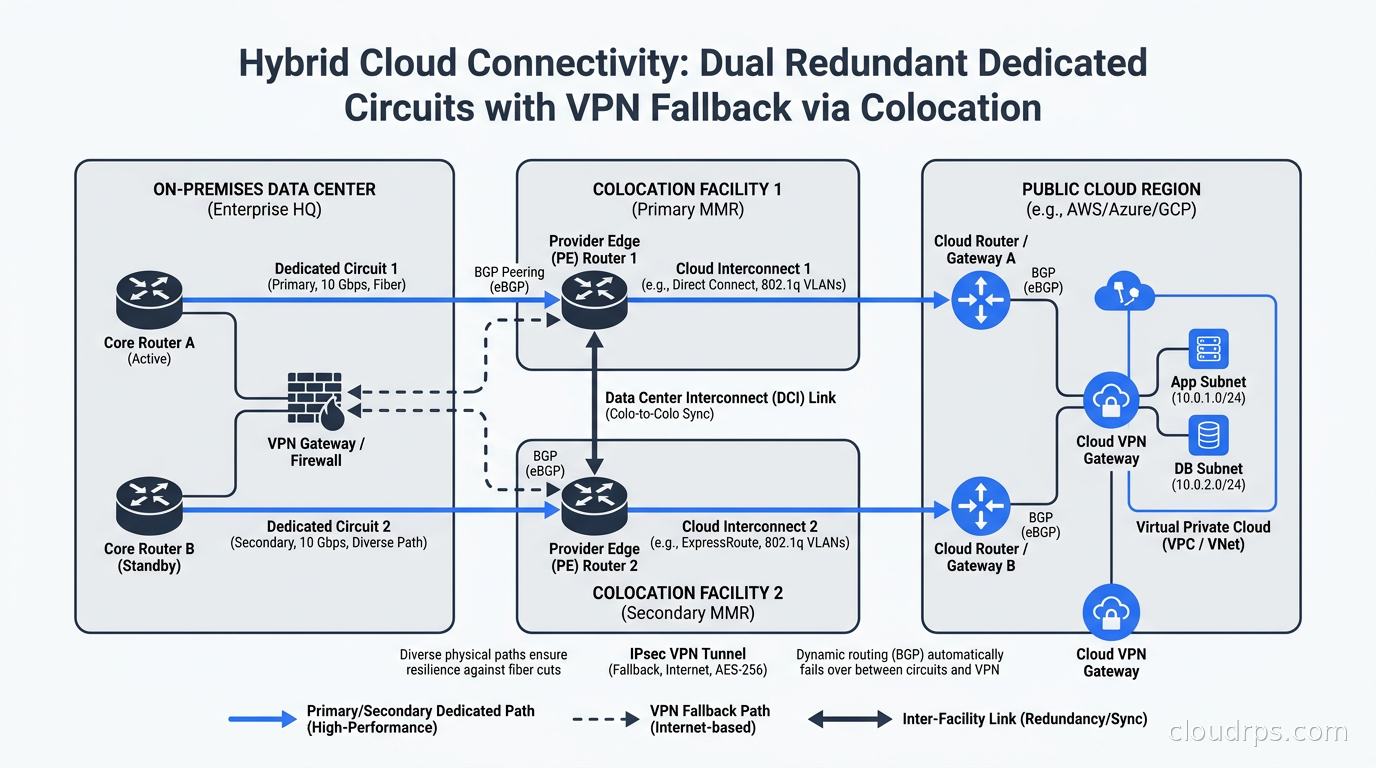
I cannot stress this enough: never put production traffic on a single dedicated circuit. I have seen this cause multi-day outages in organizations that absolutely should have known better.
The standard production redundancy architecture has two layers.
Physical redundancy. Two physical connections terminating on different physical equipment at the cloud provider side. AWS calls this connecting to different Direct Connect devices. Azure requires two separate ExpressRoute circuits. Google requires two VLAN attachments on separate interconnect ports. This protects against a single link failure or a failure at one piece of the cloud provider’s edge equipment.
Geographic redundancy. When budget allows, terminate those two connections in PoP facilities in different metro areas. This protects against a colo facility outage, not just a single link failure. The incremental cost is usually worth it for Tier-1 workloads where any downtime has direct revenue impact.
As a fallback behind both primary connections, maintain IPsec VPN tunnels. Configure your BGP policy so dedicated circuits are always preferred over VPN (higher local preference or lower MED depending on your platform). When a dedicated circuit fails, BGP reconverges and traffic shifts to VPN automatically. Yes, performance will degrade, but the application stays available. Then you can work the circuit failure during business hours instead of performing emergency network surgery at midnight.
Operations and Monitoring
After you have dedicated circuits running, visibility into them is essential. The native cloud provider monitoring covers physical link state and BGP session state, but that is a floor, not a ceiling.
For AWS Direct Connect, CloudWatch metrics include BPS (bits per second), PPS (packets per second), connection state, and BGP session state. Enable VPC flow logs on attached VPCs to understand traffic patterns at the flow level. For Azure ExpressRoute, the Azure Monitor integration tracks BGP route counts, bits in/out, and circuit availability. I watch BGP route count as an early warning indicator: if the count drops unexpectedly, something is wrong in the BGP configuration or the route advertisement.
One operational practice I implement immediately on every engagement: alert on BGP session flaps. A BGP session going down and coming back within a short window often signals a physical layer issue, bad SFP transceiver, or CRC errors on the fiber, that will eventually cause a sustained outage. Catching those flaps early, before they become a sustained failure, has prevented more incidents than I can count. Connect these alerts to your on-call rotation through your incident management system. This fits into the broader observability practices in the monitoring and logging guide.
Also establish latency baselines from your on-premises network to key cloud endpoints over the dedicated circuit. Even on private circuits, latency can drift if there is congestion on the provider backbone or degraded physical layer components. Alert on deviations from baseline, not just on hard failures.
Cost Engineering the Decision
Dedicated circuits are not cheap. A 1 Gbps Direct Connect port plus a provider circuit typically costs 500 to 2000 USD per month depending on location and provider. Before signing a contract, do the math from three angles.
Data transfer savings. Compare your projected data transfer out volume against the difference between internet egress rates and dedicated circuit egress rates. In US AWS regions, that is roughly 0.07 USD per GB savings. If you move 100 TB per month out of AWS, that is 7,000 USD per month in savings, which offsets most circuit costs with room to spare.
Bandwidth cost comparison. What does equivalent bandwidth cost over internet or VPN? At 1 Gbps sustained throughput, you are moving roughly 10 TB per day. Model your actual traffic patterns, not peak bandwidth numbers, because paying for a 10 Gbps port that you use at 200 Mbps most of the time is a bad deal.
Risk cost. Quantify what an outage costs. If your applications generate 1 million USD per hour in revenue and VPN latency variability causes one 30-minute incident per quarter, that is 500,000 USD in expected annual impact. A 24,000 USD annual circuit cost looks very different through that lens. For FinOps practitioners building total cost models, dedicated circuits belong in the calculation from the beginning, not as a surprise line item discovered after the fact.
Migration from VPN to Dedicated Circuits
When I move clients from VPN-only to dedicated circuits, I follow a consistent pattern to avoid production disruptions.
First, provision the dedicated circuit and establish the BGP session, but do not advertise any routes yet. Verify the physical connection is clean (no CRC errors, stable signal levels) and that BGP comes up.
Second, advertise a small number of non-critical prefixes over the dedicated circuit and verify that traffic flows correctly end-to-end. Keep the VPN as the active path for everything else. This smoke-tests the new path without risk.
Third, shift prefixes from VPN to dedicated circuit in small batches, starting with test workloads and moving to production gradually over days or weeks depending on your risk tolerance. Validate application behavior after each shift.
Fourth, once all prefixes are on the dedicated circuit, reconfigure VPN as standby rather than decommissioning it. Lower its BGP preference so it only activates during a circuit failure.
Fifth, after thirty days of stable operation on dedicated circuits, make a deliberate decision about whether to keep the VPN or decommission it. I almost always recommend keeping it.
The temptation to decommission VPN the day the dedicated circuit is healthy is strong. Resist it. The VPN is cheap insurance.
When You Do Not Need Dedicated Circuits
I have spent this entire article explaining the case for dedicated circuits. Let me be honest about when they are the wrong choice.
If you are running cloud-native workloads with no significant on-premises footprint, dedicated circuits solve a problem you do not have. Cloud-native architectures live entirely in the cloud, and connectivity between resources uses VPC peering, Transit Gateway, and PrivateLink, as covered in the AWS VPC connectivity guide.
If your data transfer volume is low (under 5 TB per month in most regions), the egress savings probably do not justify the circuit cost.
If your latency tolerance is high enough to absorb internet variability, VPN is simpler to operate and cheaper to run.
If you are an early-stage company still finding product-market fit, spend that engineering time building product. I have seen startups set up Direct Connect before they had their first production customer. That is optimization in completely the wrong direction.
Dedicated circuits are enterprise infrastructure. They make sense when you have enterprise-level traffic volumes, enterprise-level latency requirements, or compliance requirements mandating that data never traverse the public internet. If you check one of those boxes, the economics and operational characteristics almost always justify the investment.
Where to Go From Here
Private cloud connectivity is the foundation of hybrid architecture. Get it wrong and everything built on top suffers: replication lag, query timeouts, sync failures that produce subtle data inconsistencies across environments. Get it right and it largely disappears from your operational concerns, which is exactly where infrastructure should be.
For the cloud-side networking design that sits on top of these circuits, the AWS VPC connectivity guide covers how to structure VPC peering, Transit Gateway, and PrivateLink once your private circuit is in place. For the strategic question of whether a multi-cloud or hybrid architecture makes sense for your workloads in the first place, the multi-cloud strategy guide lays out the real trade-offs without the marketing spin.
And if you are shopping for SD-WAN to complement your dedicated circuits for branch office connectivity, the SD-WAN and SASE guide covers how those technologies layer with dedicated cloud interconnects in a modern enterprise WAN design.
Updated September 1, 2026: corrected biographical details as part of an accuracy review.
Get Cloud Architecture Insights
Practical deep dives on infrastructure, security, and scaling. No spam, no fluff.
By subscribing, you agree to receive emails. Unsubscribe anytime.