
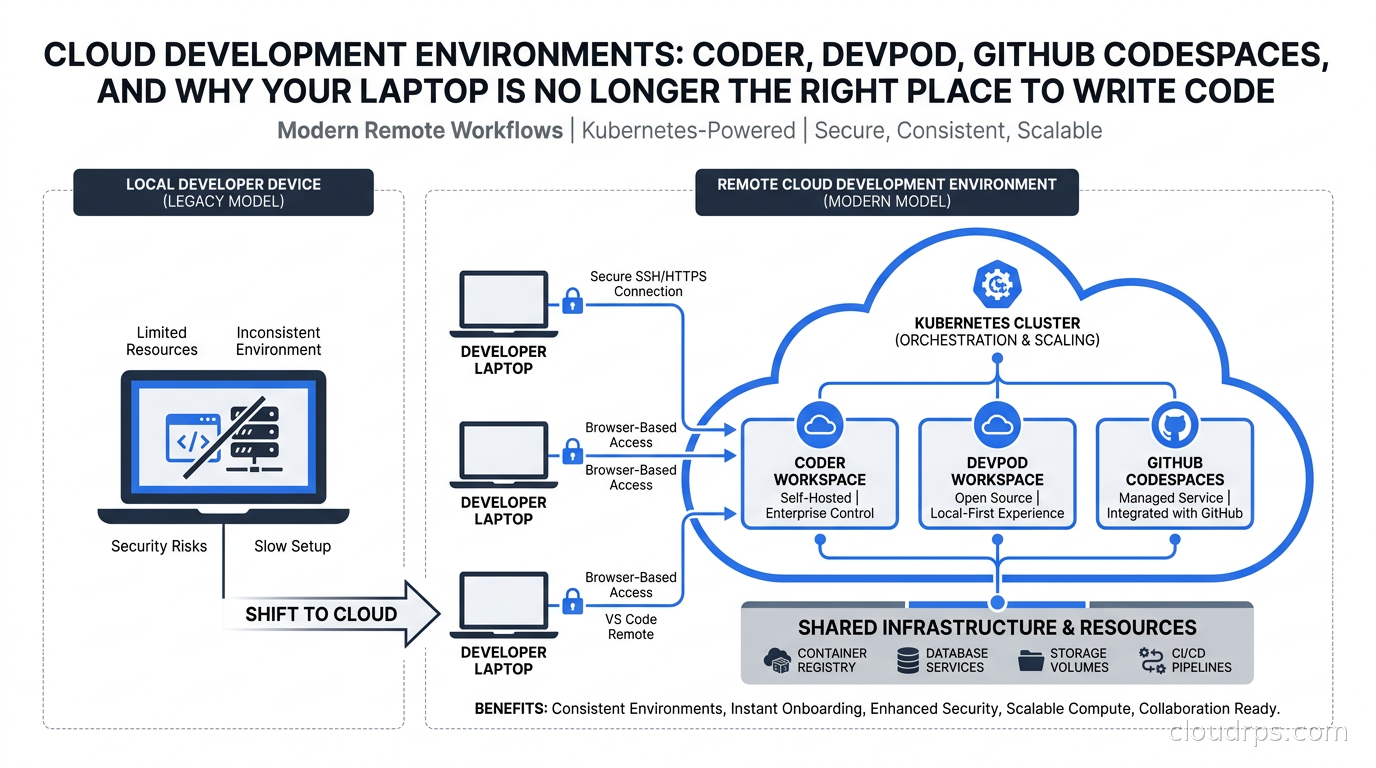
I have been a principal cloud architect for twenty years, and the single biggest source of onboarding pain I have seen across every team I have joined or consulted for is some variation of the same conversation: “It works on my machine.” The new hire just spent three days configuring their laptop. The senior engineer just broke their local environment upgrading a system package. The contractor is using an incompatible version of Node. The CI/CD pipeline passes, but nobody can reproduce the build locally.
These are not small complaints. I have seen teams spend more cumulative engineering time on local environment issues than on entire feature deliveries. And in 2026, the problem is getting worse because now we are running AI coding agents alongside human developers, and agents need environments too, at a scale and disposability that laptops simply cannot provide.
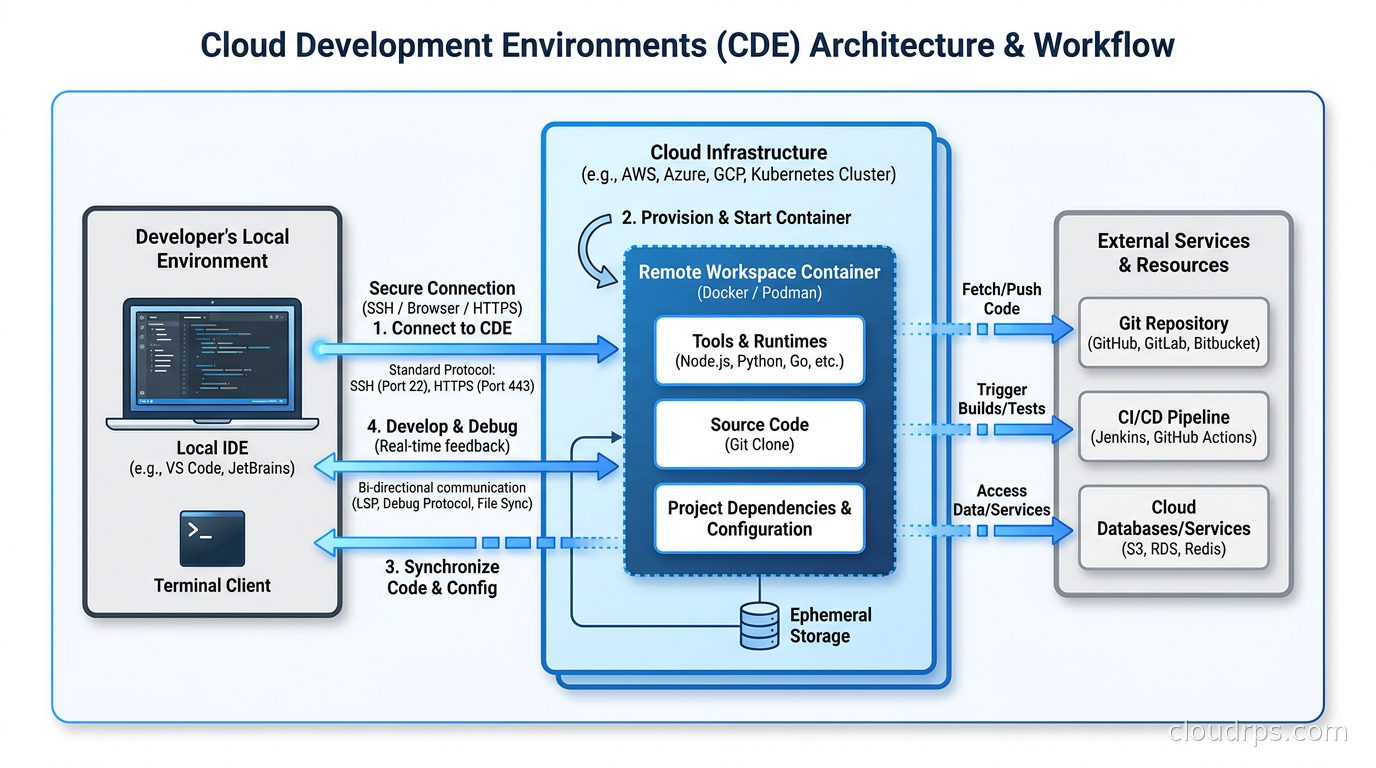
Cloud Development Environments (CDEs) are the architectural answer to this problem. Not cloud editors or browser IDEs, though those exist. I am talking about full, remote, reproducible development environments defined as code, provisioned on demand, and discarded when the work is done. They run on your infrastructure or a managed service, connect to your existing IDE, and look and feel exactly like a local terminal session, except the compute is not on your desk.
This guide is what I would give a platform engineering team getting started: what CDEs actually are, how the major platforms differ, the architecture decisions that matter, and where they break down in practice.
Why Local Development Is Breaking Down
The “works on my machine” problem has existed since the dawn of software. What has changed is the cost. In the early days, teams were small enough that one good setup guide or a shared Docker Compose file solved most problems. Today the failure modes have multiplied.
First, the toolchain complexity has exploded. A typical cloud-native service now requires a local Kubernetes cluster (kind or minikube), a service mesh, a local secrets injector, a database or two, a message broker, and a dozen CLI tools, each with pinned versions. The setup script that worked in January fails in March because someone updated their macOS and Homebrew pulled in a new glibc or Python version. Maintaining that script is a part-time job.
Second, security and compliance requirements are tightening. Source code on developer laptops is an endpoint security nightmare. Laptops get lost. Engineers connect from coffee shops. On a regulated project I worked on in the financial sector, we had to demonstrate that production credentials never touched developer endpoints. Local development made that nearly impossible without elaborate proxies and secrets management gymnastics.
Third, AI coding agents are becoming first-class collaborators. Agents like Claude, Copilot Workspace, and the growing zoo of autonomous coding tools need compute and network access to do their jobs. Running them locally ties up developer machines and creates security boundary problems when the agent needs to execute code, run tests, or make API calls. Every agent invocation should happen in an isolated, disposable environment that gets created for the task and destroyed when the task completes.
CDEs solve all three of these at once. The environment is defined in code, provisioned from that definition on every use, runs on infrastructure you control, and is destroyed when the session ends.
The devcontainer.json Standard
Before going platform-specific, understand the standard underneath everything: the Dev Containers specification, originally developed by Microsoft for VS Code and now maintained as an open standard.
A .devcontainer/devcontainer.json file in your repo defines everything a development environment needs: the base container image, VS Code extensions, port forwarding, environment variables, lifecycle scripts, and mounted volumes. Here is a minimal example for a Go service:
{
  "name": "go-service",
  "image": "mcr.microsoft.com/devcontainers/go:1.22",
  "features": {
    "ghcr.io/devcontainers/features/docker-in-docker:2": {},
    "ghcr.io/devcontainers/features/kubectl-helm-minikube:1": {}
  },
  "postCreateCommand": "go mod download",
  "customizations": {
    "vscode": {
      "extensions": ["golang.go", "ms-kubernetes-tools.vscode-kubernetes-tools"]
    }
  },
  "forwardPorts": [8080, 9090]
}
Check this file into your repository, and any CDE platform that supports the devcontainer spec will be able to produce a working environment from it. This is the critical interoperability layer. You are not locked into a single vendor as long as you define your environment in terms of this standard. The container image, the features, the lifecycle scripts: all portable.
The spec supports Docker Compose for multi-container setups, which is how you run a service alongside its dependencies (Postgres, Redis, a mock of another service) in a single workspace. I have seen teams replace elaborate local Docker Compose configurations with devcontainer.json files and immediately save the fifteen-minute “please re-read the README” conversation with every new joiner.
GitHub Codespaces: The Managed Option
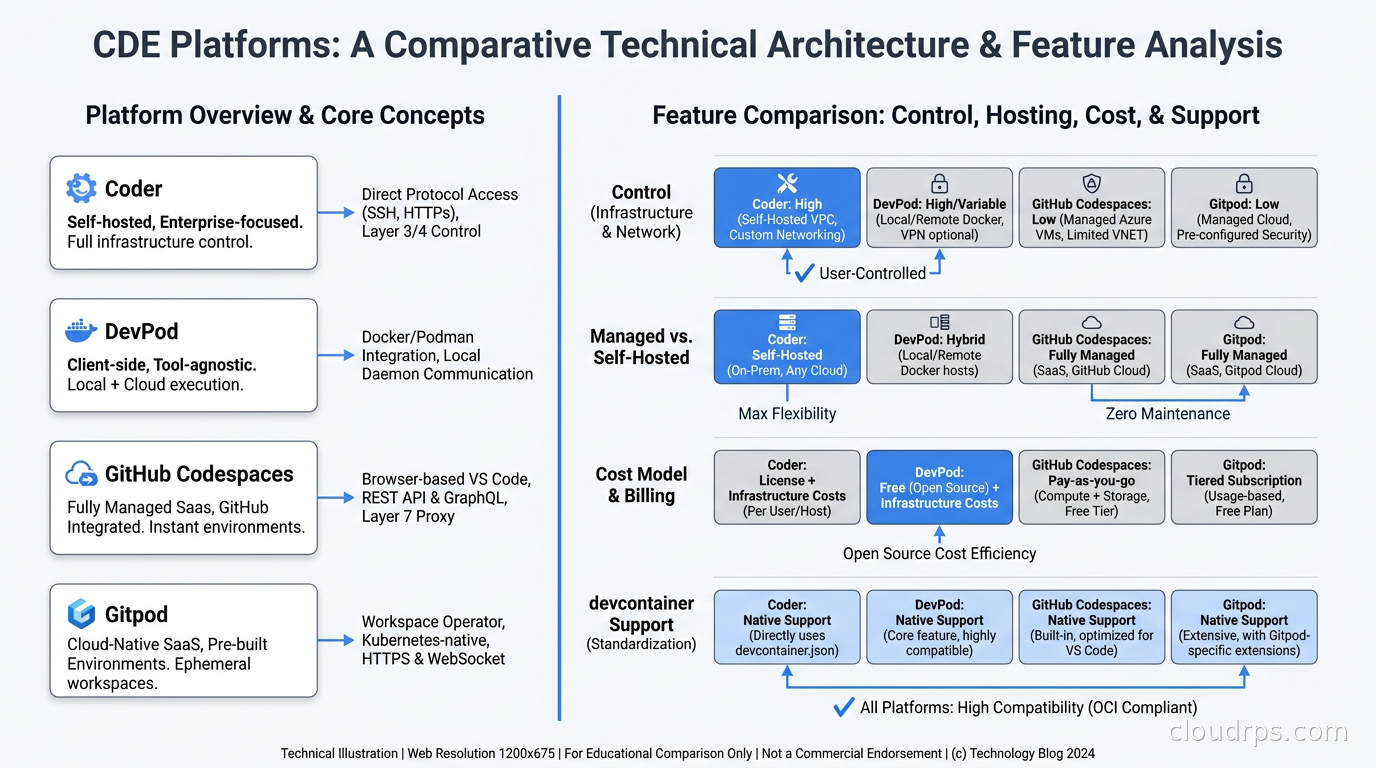
GitHub Codespaces is the most widely deployed CDE platform, mainly because it is built into GitHub and requires zero infrastructure to start. Click the “Code” button on any repo, select “Codespaces,” and within a minute you have a VS Code or JetBrains experience connected to a container running in Azure.
Codespaces reads your devcontainer.json (or uses defaults if one does not exist), provisions a container with the specified specs, and gives you SSH access, a browser-based VS Code, or connection from your local VS Code or JetBrains IDE via a remote extension.
The pricing model is per-core-hour: 2-core machines at a lower rate, scaling up to 32-core and GPU-backed instances for heavier workloads. GitHub gives individual users 60 free hours per month. For organizations, you pay for usage, and idle timeout settings become important for cost control.
Where Codespaces works well: open-source contribution workflows, onboarding new team members, quick one-off fixes where you do not want to set up a local environment. Where it creates friction: deeply integrated service dependencies that need to talk to private infrastructure, compliance requirements that prohibit source code leaving your environment, and cost at scale when hundreds of developers are running Codespaces all day.
The other limitation is customization depth. You control the container and the devcontainer.json, but the underlying infrastructure is Microsoft’s. You cannot bring your own GPU fleet, plug into your private network without tunneling, or tune the node configuration.
Coder: Self-Hosted, Terraform-Defined Workspaces
Coder is where platform engineering teams end up when Codespaces hits its limits. Instead of defining environments purely in devcontainer.json, Coder uses Terraform templates to describe a workspace: what infrastructure it runs on, what container image it uses, what parameters developers can tune, and how it connects back to the Coder control plane.
A Coder template is a Terraform configuration. Here is the shape of one that provisions a Kubernetes pod as a development workspace:
resource "coder_agent" "main" {
  arch = "amd64"
  os   = "linux"
}

resource "kubernetes_pod" "workspace" {
  metadata { name = "coder-${data.coder_workspace.me.name}" }
  spec {
    container {
      name  = "dev"
      image = "ghcr.io/your-org/dev-image:latest"
      env {
        name  = "CODER_AGENT_TOKEN"
        value = coder_agent.main.token
      }
    }
  }
}
The Coder agent runs inside the pod, connects back to the Coder control plane, and exposes SSH access and a web-based VS Code interface. Developers connect from their local IDE using the Coder CLI exactly as if they were SSHing to a remote machine.
What makes Coder powerful for platform teams is the template abstraction. You can build one template for “standard Python development” that provisions a specific image with your internal packages, mounts a secrets volume from Vault, and attaches to the right VPC. You can build another template for “GPU workloads” that provisions a node with an NVIDIA A100. Developers pick from a catalog. They never see the Terraform. The platform team maintains the templates in Git, and Coder pulls updates automatically.
I have built production Coder deployments for teams with 200+ developers and the infrastructure footprint is surprisingly modest: a single Coder control plane deployment (about 2 CPUs and 4 GB RAM handles a large fleet), Postgres for state, and whatever Kubernetes clusters you want to provision workspaces onto. Coder itself can run on the same cluster as the workspaces or on a separate control plane cluster if you want stronger isolation.
The self-hosted model means your source code stays inside your network. For teams in financial services, healthcare, and defense that have data residency requirements, this is not optional. This is where Coder wins against every managed offering.
For teams building on platform engineering practices and internal developer portals, Coder integrates naturally: the Coder API lets you trigger workspace creation from a portal button or a Backstage plugin, so developers request a workspace and it appears in their IDE without knowing anything about the underlying Kubernetes infrastructure.
DevPod: The Open-Source Client Layer
DevPod is a different animal. It is not a managed platform or a control plane. It is an open-source CLI and GUI that implements the devcontainer.json spec against any backend: Docker on a local machine, a remote VM, a Kubernetes pod, an AWS EC2 instance, or a Fly.io machine. You define your environment once in devcontainer.json, and DevPod can instantiate it anywhere.
The appeal is portability. Your devcontainer.json defines the environment. DevPod is the execution engine. Switch backends by changing a flag. The same devcontainer.json that runs on your MacBook in Docker can run on a cloud VM for heavy workloads or on Kubernetes for production-like environments. There is no vendor control plane to trust, no seats to pay for, no SLA to accept.
I have seen DevPod work well in a few specific situations: small teams that want reproducible environments but are not ready to invest in a Coder deployment, developers who want to move heavy compilation work to a powerful cloud VM without setting up a full CDE platform, and organizations that want to validate the devcontainer standard before committing to a vendor.
The tradeoff is that DevPod is a client-side tool, not a platform. There is no workspace catalog, no access controls, no centralized audit logs, no idle shutdown to control costs. For a team of five, those missing pieces do not matter. For a platform engineering team serving two hundred developers, they absolutely do.
Gitpod’s Pivot: From CDEs to Agent Infrastructure
Gitpod was the pioneer in the CDE space and had significant adoption before 2025. In mid-2025, they shut down the classic pay-as-you-go product and pivoted hard toward AI agent infrastructure under a new product called Ona. This is worth understanding because it signals where the industry is heading.
The bet Gitpod made is that the primary consumer of ephemeral development environments in 2025 and beyond is not human developers. It is AI agents. An agent that can write code needs somewhere to run that code, test it, and commit it. That somewhere should be isolated, reproducible, and disposable. The same technology stack that solves “works on my machine” for human developers also solves “I need a clean execution environment for every agent task.”
This creates an interesting architectural pattern: you run your CDE platform not just for developer workspaces but as the execution substrate for your AI workflows. Each agent task gets a fresh workspace. The agent writes code, runs tests, and either commits or discards. The workspace is destroyed. No state bleeds between agent runs. No agent can access another’s filesystem or network connections.
If you are running AI agents in production, this isolation story matters enormously. I have written about the security risks of AI agents in production before, and ephemeral environments are one of the most effective controls you have. A prompt injection that causes an agent to try to exfiltrate data or access unrelated services is largely defeated if the agent runs in a workspace with no credentials beyond what that specific task requires. For teams also looking to give pull request reviewers their own isolated full-stack deployments (as opposed to developer workspaces), the patterns diverge in important ways that I cover in the guide to ephemeral preview environments on Kubernetes.
Architecture Decisions That Actually Matter
When you are designing a CDE deployment for a platform team, several architectural choices determine whether this works well in practice or becomes a maintenance burden.
Network connectivity. Developer workspaces need to reach internal services: databases, internal APIs, artifact registries, secrets vaults. You have three main options. VPN-per-workspace: workspaces connect to your corporate VPN, with all the overhead that implies. Network injection: workspaces run inside your VPC, with access to private subnets via normal cloud networking. Proxy/tunnel: a control plane proxy relays connections. For most teams, the network injection approach is cleanest. Run Coder workspaces in a Kubernetes cluster inside your VPC and give the pod service accounts appropriate IAM roles. The workspace just works the same as any pod in that cluster. This is the approach I recommend unless you are using a fully managed solution like Codespaces where VPN tunneling is your only option.
Image management. Devcontainer base images need to be maintained. Using public images like mcr.microsoft.com/devcontainers/python is fine to start, but production deployments eventually need internal images with your internal CA certificates, pre-installed internal tools, and security hardening. Building on top of distroless or hardened base images reduces the attack surface of the workspace container itself. Establish an internal registry, publish workspace images there, and update them regularly through a CI pipeline the same way you manage any other container image.
Storage persistence. Workspaces that destroy on every session stop are great for reproducibility but terrible for developer experience if you are losing work. Most platforms solve this with persistent volumes: a home directory volume that persists across workspace starts and stops. The workspace container is ephemeral but the developer’s files survive. You need to decide the lifecycle of these volumes: delete after N days of inactivity, manual deletion by the developer, or tied to workspace lifetime. I typically configure 7-day auto-deletion for inactive volume mounts with a warning email at 5 days.
Idle shutdown. Developers start workspaces and forget about them. Without idle shutdown, you accumulate hundreds of running pods consuming CPU and memory. Configure an idle timeout (I use 30 minutes of no activity) that stops the workspace. Most CDE platforms distinguish between stopped and deleted: a stopped workspace can restart quickly from its persistent volume. A deleted workspace loses the volume. Document this distinction loudly.
Resource limits. Kubernetes resource quotas apply to CDE workspaces just like any other pod. Platform teams need to define sensible defaults and allow developer-controlled upgrades up to a limit. A standard Python service workspace might use 2 CPUs and 4 GB RAM. A developer compiling a large Rust project or running local ML inference might need 8 CPUs and 16 GB. Templates in Coder can expose these as parameters with a ceiling set by the platform team. vCluster is worth considering if you want stronger multi-tenant isolation between developer workspaces on the same Kubernetes cluster.
CDEs for AI Agent Workflows
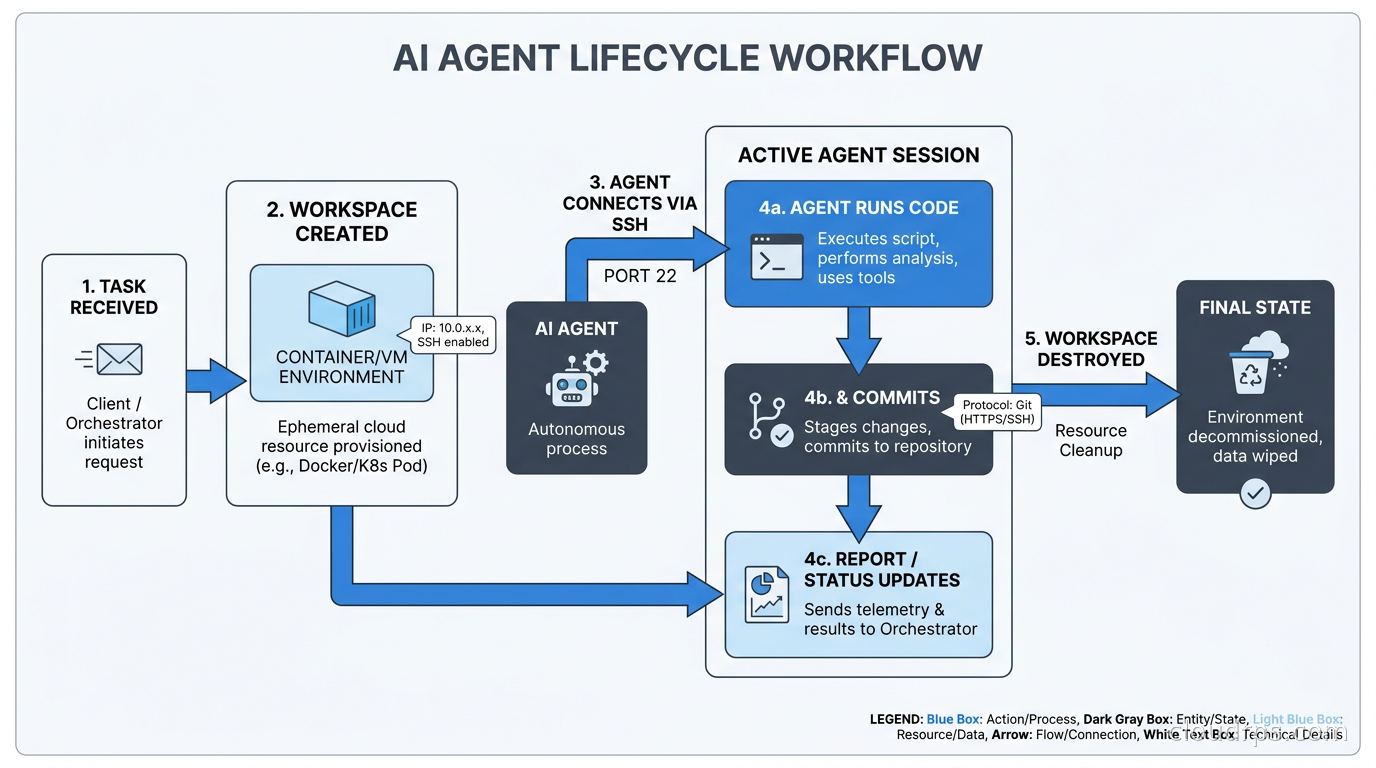
The most technically interesting CDE use case in 2026 is not human developer ergonomics. It is providing isolated execution environments for AI coding agents. Let me walk through the architecture I have been building with several teams.
The pattern is: agent receives a task, CDE platform creates a workspace from a template, agent SSH keys are injected into the workspace, agent accesses the workspace, performs its work (code changes, tests, linting, commits), workspace is destroyed when agent signals completion or hits a timeout.
The security properties are what make this compelling. The agent runs with exactly the credentials necessary for the task: a fine-grained GitHub token scoped to the target repository, a secrets vault token scoped to the relevant secrets, network access only to the services the agent’s task requires. When the workspace is destroyed, those credentials are gone. There is no persistent agent process holding long-lived credentials between tasks. Building the full platform layer around these agent executions, including egress allowlists, per-session identity issuance, audit logging pipelines, and CI/CD gate models, is covered in our AI coding agent infrastructure guide.
This integrates naturally with GitOps workflows since the agent’s output is always a Git commit or pull request, which then flows through your normal CI/CD pipeline. The agent workspace is not in the blast radius of production; it is an isolated development environment the same as any other workspace.
The infrastructure as code tooling for managing these agent workspace templates benefits from exactly the same discipline as your production IaC: reviewed templates, versioned images, tested lifecycle scripts. The fact that a workspace is “just for an agent” does not make the template less important to maintain correctly.
When CDEs Are Not the Right Choice
I want to be honest about where CDEs introduce friction that is not worth it.
For teams that genuinely spend most of their time in frontend development with fast local feedback loops (hot reloading, browser dev tools, visual inspection), remote workspaces add latency that degrades the experience. A 50ms round-trip to a cloud workspace is unnoticeable for a terminal session but becomes aggravating when you are reloading a browser in a fast iteration loop.
For teams with three developers who all use Macs with the same toolchain and rarely have environment conflicts, the investment in maintaining CDE templates and a Coder deployment is not justified. A well-maintained Brewfile and a clear setup script serve a small, stable team just fine.
For workloads that genuinely require local hardware, CDEs are not a substitute. If you are developing for embedded systems that connect via USB, testing with local physical devices, or doing radio frequency work, you still need the local machine. CDEs handle compute workloads. They do not handle physical device access.
Getting Started: A Practical Sequence
If I were advising a platform engineering team starting from scratch, I would sequence the rollout like this.
Start with devcontainer.json adoption, no CDE platform yet. Get every team to define their development environment in a devcontainer.json file. Run it locally with DevPod or VS Code’s built-in Dev Containers support. This gets you environment-as-code for free, with zero infrastructure investment, and forces the habit of documenting environment requirements.
Add GitHub Codespaces for the repositories that have the most onboarding friction. Measure time-to-first-commit for new contributors before and after. This gives you concrete data to justify the platform investment.
Deploy Coder when you have enough signal that the managed offering does not meet your requirements (data residency, private network access, GPU workloads, cost at scale). Start with a single template for your most-used service type. Expand from there.
Extend workspace templates to AI agent workflows after human developer adoption is stable. Reuse the same template definitions and the same image infrastructure.
The crossplane-based infrastructure provisioning patterns work well here if your organization already uses Crossplane: workspace infrastructure can be composed from the same building blocks as production infrastructure, ensuring that workspace environments match production closely.
The ROI Case
I have helped teams calculate the ROI on CDE adoption, and the numbers are consistently compelling for organizations above about 30 developers.
The direct savings come from eliminated setup time: a 3-day onboarding environment setup, even if it happens only once per developer per year (it usually happens more), is measurable. If a developer costs $200/hour all-in and you have 100 developers, a one-day savings in setup time per developer per year is $160,000. The indirect savings from eliminated “it broke my local environment” incidents, which interrupt not just the affected developer but whoever has to help them, compound on top of that.
The indirect costs are real too: maintaining Coder templates requires platform engineering time, workspace images need to be built and updated, and developers who have always worked locally will have a learning curve. My experience is that the total platform engineering cost stabilizes around 0.5 FTEs for a team of 100 developers once the initial setup is complete.
The security and compliance benefits do not have a clean dollar figure but often have a hard requirement attached. If your security team requires that source code not touch developer endpoints, CDEs are not optional, they are the only compliant architecture.
Twenty years ago, I used to joke that the hardest part of any project was getting the development environment working. It was not really a joke. The teams I see adopting CDEs thoughtfully are spending that time building features instead. That is the actual value proposition, and it compounds every sprint.
Cloud development environments integrate directly with your broader developer platform. If you are evaluating where CDEs fit in a full platform engineering strategy, see our guides on platform engineering and internal developer platforms and internal developer portals like Backstage and Cortex for the complete picture.
Get Cloud Architecture Insights
Practical deep dives on infrastructure, security, and scaling. No spam, no fluff.
By subscribing, you agree to receive emails. Unsubscribe anytime.