
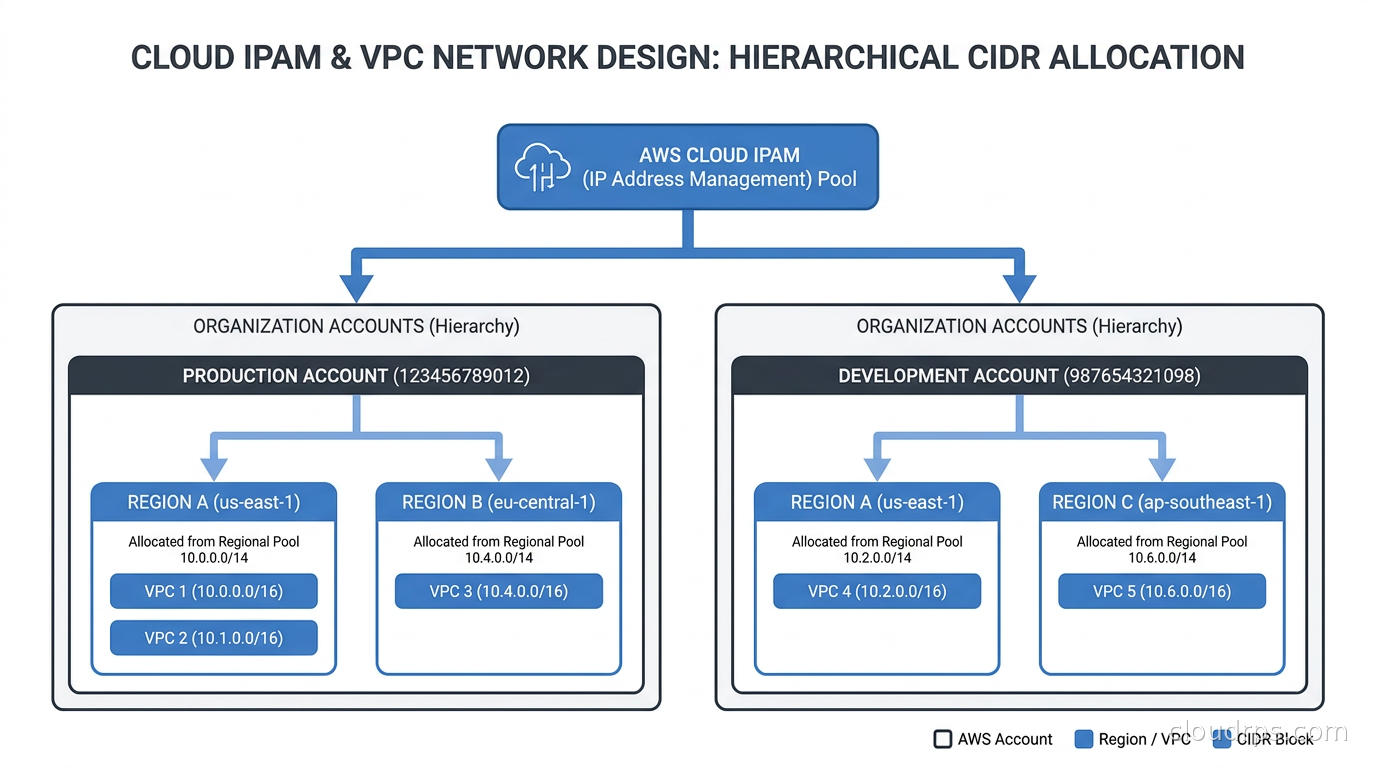
The call came in during a Saturday morning standup, which is never a good sign. A team at a company I was consulting for had just discovered they could not peer two VPCs that both needed to talk to each other. One lived in the production account, one in the data platform account. Both had been built independently by separate teams, both had chosen 10.0.0.0/16, and now there was no path forward except a re-addressing project that would take weeks. Infrastructure was already running. Workloads were already deployed. The networking team had to choose between a painful migration and a convoluted NAT-based workaround that nobody was happy about.
That was not a technical failure. It was a planning failure, and I have seen variations of it in some form at almost every company that scales past a handful of AWS accounts without a deliberate IP address management strategy.
Twenty years into this career, I can say with confidence: address space planning is one of those things that seems unimportant until it becomes the most important thing in the room.
The Problem Is Bigger Than It Looks
When you start in cloud, a single VPC with 10.0.0.0/16 feels like more address space than you could ever need. 65,536 IP addresses. Go wild.
Then you add environments. Development, staging, production. Multiple regions for latency or compliance. Multiple AWS accounts for blast radius isolation (which you should be doing; the multi-account VPC and connectivity patterns matter a lot here). Then Kubernetes clusters with pod CIDRs. Then databases in private subnets, load balancers in public subnets, Lambda functions needing VPC access, containerized tasks, maybe a direct connect back to on-premises infrastructure.
Before you know it, you have forty VPCs, twelve AWS accounts, three cloud providers, and a spreadsheet that nobody trusts.
The RFC 1918 private address space is finite. You have three blocks to work with:
- 10.0.0.0/8: About 16.7 million addresses
- 172.16.0.0/12: About 1 million addresses
- 192.168.0.0/16: About 65,000 addresses
That sounds like plenty. But GKE and EKS clusters consume address space aggressively: a node pool might use /24 per node for pod addresses. A Transit Gateway attachment requires a dedicated subnet. Application Load Balancers need enough IPs per Availability Zone to scale. AWS itself reserves five IP addresses in every subnet you create, so a /28 (sixteen total addresses) gives you only eleven usable ones. Plan carelessly, and you will burn through 10.0.0.0/8 faster than you expect, especially when secondary CIDR ranges for Kubernetes get involved.
And the real cost of overlap is not just inconvenience. You cannot peer VPCs with overlapping CIDRs. You cannot establish a Site-to-Site VPN to on-premises if the address spaces conflict. Transit Gateways propagate routes, and conflicting routes cause real confusion. The cloud egress and cross-AZ traffic costs are painful enough without also having to route traffic through a NAT box to work around an address space mistake.
The Allocation Hierarchy That Actually Works
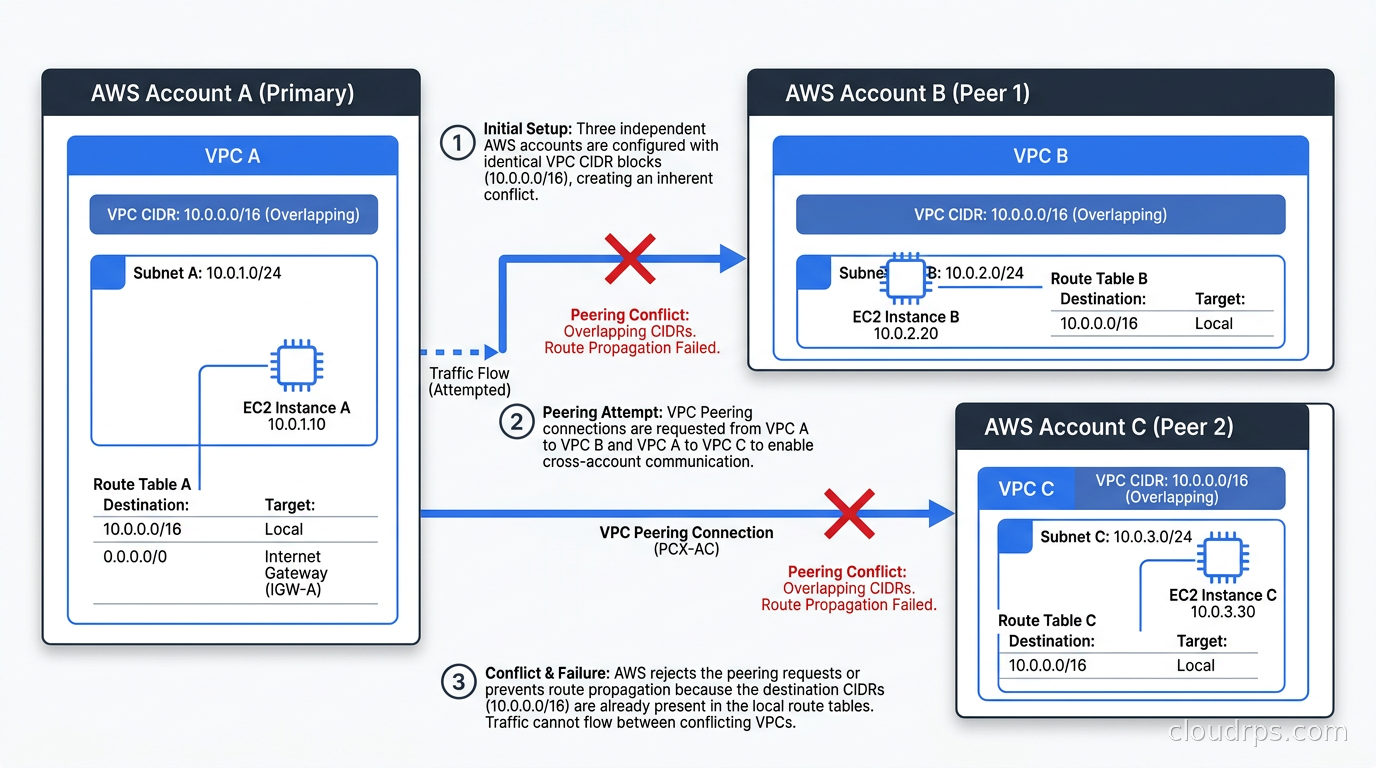
The approach I use and recommend is a three-level hierarchy: supernet, then per-account or per-environment block, then per-AZ subnet.
Start with a supernet reservation. Dedicate a large contiguous range to cloud infrastructure and protect it from anything else. If you are on AWS, 10.0.0.0/8 is a reasonable starting point for cloud, with 172.16.0.0/12 reserved for on-premises or colocation. If your on-prem already uses 10.x ranges, invert that. The point is to make a decision at the organizational level and write it down somewhere authoritative, not a Confluence page that will be out of date in six months.
Allocate per-account or per-environment blocks. Carve the supernet into /16 blocks (or /18 if you need more accounts). Each AWS account gets one. Each Azure subscription or GCP project gets one. Never share a block between accounts. This is the rule that prevents the overlap disaster I described at the top.
A common scheme for AWS multi-account environments:
10.0.0.0/16to10.9.0.0/16reserved for production workloads10.10.0.0/16to10.19.0.0/16for development and staging10.20.0.0/16to10.29.0.0/16for shared services and tooling10.30.0.0/16to10.39.0.0/16for data platform accounts10.40.0.0/16and beyond for future expansion
The exact groupings matter less than having them. What matters is that each account gets a unique, non-overlapping range, and you enforce that before anyone clicks “Create VPC.”
Allocate per-AZ subnets within each VPC. Within each /16, break into /24 subnets by function and Availability Zone. Three AZs, three public subnets, three private subnets, three database subnets. That gives you a predictable layout: 10.5.1.0/24 is AZ-A public, 10.5.2.0/24 is AZ-B public, 10.5.3.0/24 is AZ-C public, 10.5.11.0/24 is AZ-A private, and so on.
This seems rigid, but rigidity in network design is a feature. When someone asks me “what’s the private subnet for the production app account in us-east-1 AZ-A,” I want a deterministic answer, not a trip to the AWS console.
AWS VPC IPAM: The Native Tool
AWS launched VPC IP Address Manager in late 2021, and the team has been steadily expanding it. As of January 2026, IPAM supports enforcement policies for RDS instances and Application Load Balancers, which means you can now require that specific resource types draw from specific pools rather than just letting engineers pick CIDRs by hand.
VPC IPAM operates in two tiers. The free tier gives you public IP insights and basic management within a single account and region, which is enough to get visibility but not enough for serious multi-account work. The advanced tier enables centralized IPAM across an entire AWS Organization, enforces allocation policies, and tracks utilization per pool.
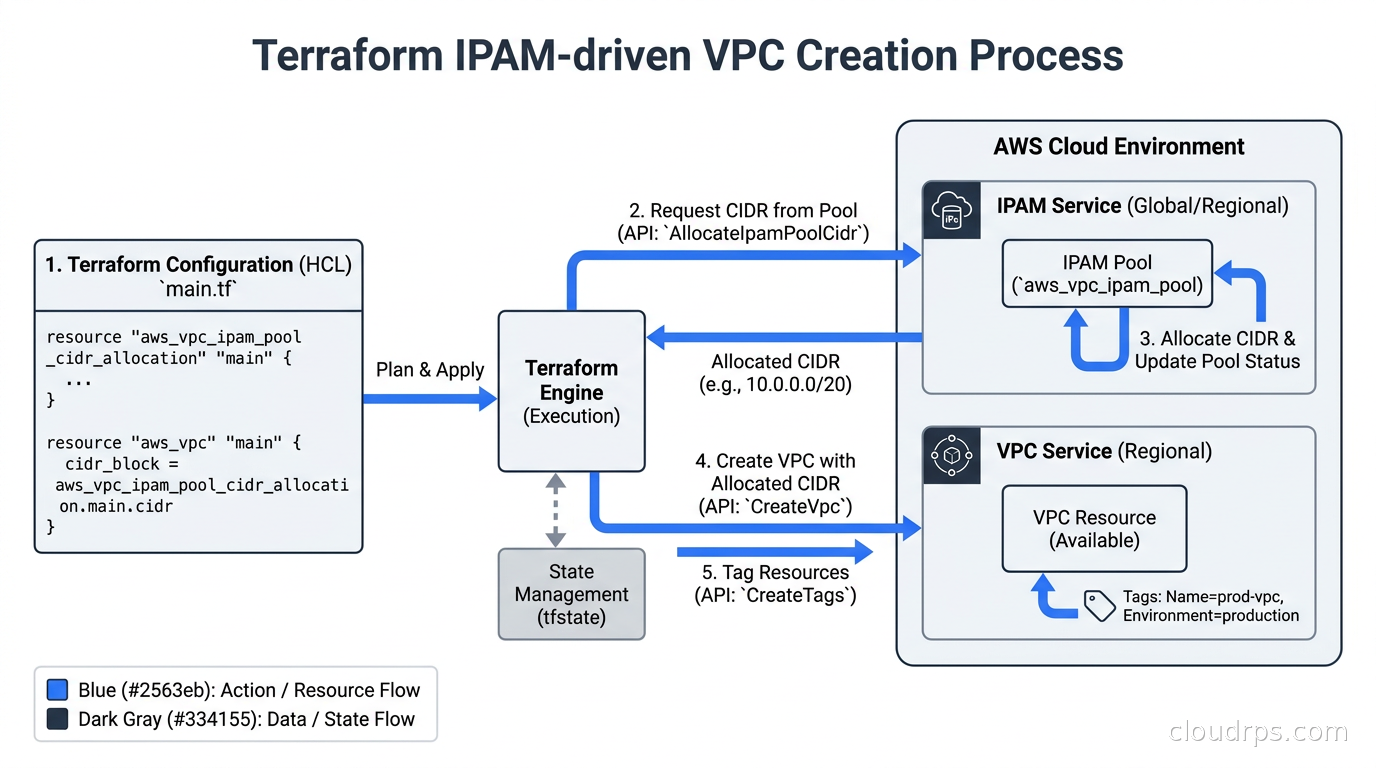
The model is hierarchical: you create a top-level pool covering your entire cloud supernet (say, 10.0.0.0/8), then child pools for each account or environment, and then allocations from those child pools when VPCs are created. Terraform can call the IPAM allocation API, which means VPCs can request CIDRs programmatically without anyone manually coordinating what the next available block is.
This is the shift that matters: instead of maintaining a spreadsheet, you have an API-driven allocation system that guarantees uniqueness. The infrastructure as code layer consumes IPAM allocations automatically, and engineers stop having to think about whether a CIDR is already in use.
One important constraint: AWS VPC IPAM is scoped to AWS. It has no awareness of what you have in Azure or GCP, what your on-premises ranges are (except as manually added reservations), or what your colocation partner is using. That limitation matters more as organizations go multi-cloud, which brings us to the harder problem.
Azure and GCP: A Less Unified Story
Azure’s equivalent is built into Azure Virtual Network Manager. The IP address management feature is generally available in most Azure regions, and it supports creating hierarchical pools, automatically assigning non-overlapping CIDRs when virtual networks are created, and reserving ranges to prevent conflicts with on-premises. The integration with Azure’s management groups means you can scope policies to subscriptions or entire Azure AD tenants.
GCP takes a more hands-off approach. There is no single IPAM console. Instead, GCP expects you to manage address space through Terraform (or Deployment Manager, though the latter is less common now) and track utilization via the Compute Network API. GCP’s secondary ranges for GKE pod and service CIDRs add another dimension: you need to plan for those separately, and they can consume address space quickly if you are running many node pools.
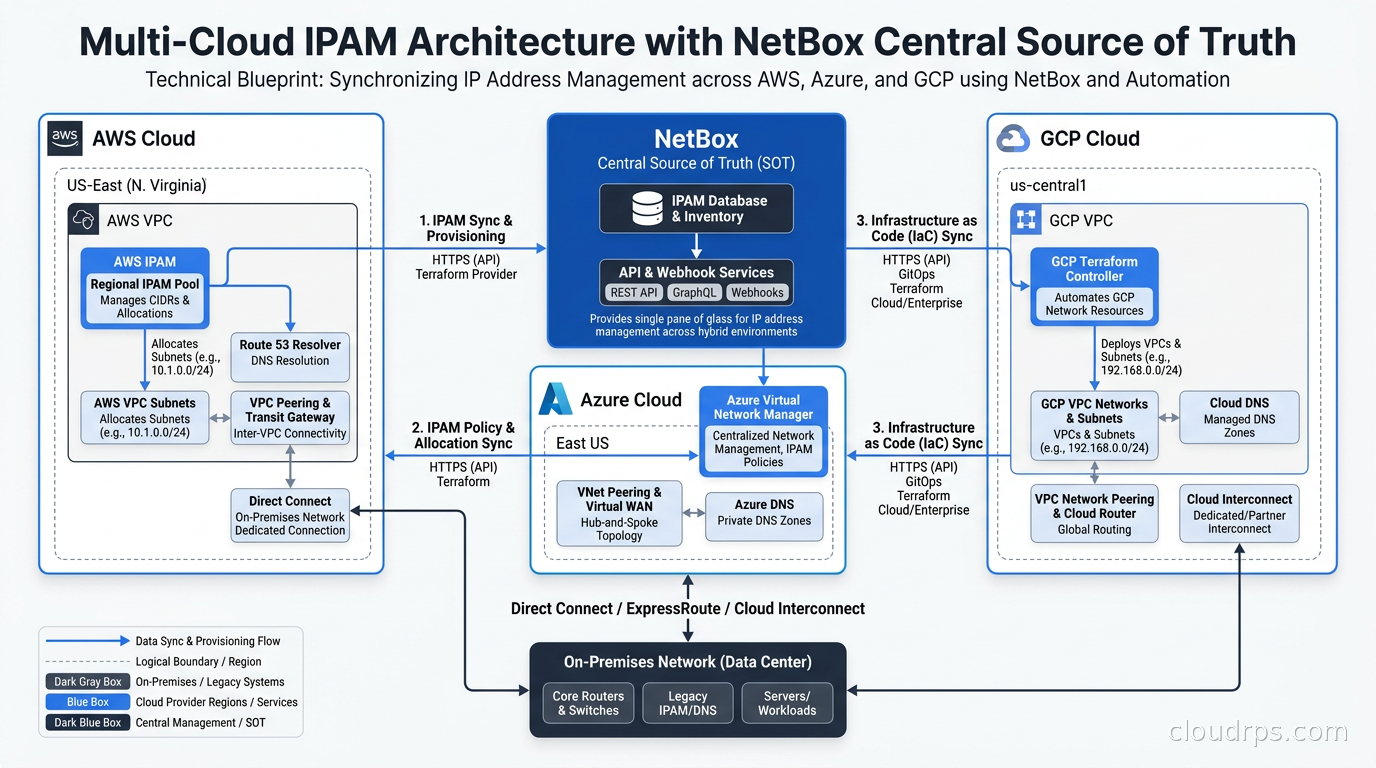
For teams on a single cloud, the native tools are good enough. For multi-cloud teams, none of the native tools see each other. AWS IPAM does not know what Azure allocated, Azure IPAM cannot see GCP secondary ranges, and neither knows about on-premises. Something has to sit above all of them.
NetBox as Your Source of Truth
For multi-cloud or hybrid environments, NetBox is the most widely adopted open-source solution. It is an Apache 2.0-licensed platform that manages IP address management, device inventory, rack diagrams, and connection tracking. The API is comprehensive, and the REST and GraphQL endpoints make it straightforward to integrate with Terraform, Ansible, and custom automation.
The way I use NetBox in practice: it is the single source of truth for all allocated ranges, across every cloud provider and on-premises network. Every VPC CIDR gets a prefix record in NetBox with tags indicating which cloud account, region, and environment owns it. Before any new VPC is created, the Terraform module calls the NetBox API to request the next available /16 from the appropriate pool. NetBox marks it as allocated and records the cloud account ID. The Terraform run then uses that CIDR when creating the VPC.
This setup means the spreadsheet is dead. The source of truth is the IPAM system, and the IPAM system is updated programmatically rather than by hand. Drift becomes detectable because you can compare what NetBox believes is allocated against what actually exists in the cloud accounts.
Nautobot is a NetBox fork from Network to Code that adds workflow automation and a stronger plugin ecosystem. Either one works; the choice usually comes down to whether you want the simplicity of vanilla NetBox or the orchestration features in Nautobot. phpIPAM is another option but generally less suited to modern cloud environments because the API is less capable.
Commercial alternatives include Infoblox (which has a DDI product that covers DNS, DHCP, and IPAM in one platform) and SolarWinds IP Address Manager. Both are enterprise-grade and significantly more expensive, but they can make sense when you need tight integration with existing network management stacks that already run on those platforms.
Subnet Sizing: Where Engineers Consistently Go Wrong
The three mistakes I see most often on subnet sizing:
Too small for what will eventually live there. A /28 gives you 16 IPs, minus the 5 AWS reserves, which leaves 11 usable. That is fine for a single service with a fixed footprint, but not for a subnet that might grow. When someone says “it’s just the bastion host subnet,” they mean for now. Size for what it could reasonably become.
Not accounting for ALB and NAT gateway requirements. Application Load Balancers need enough addresses per Availability Zone to scale without exhausting the subnet. AWS recommends at least a /27 (32 addresses) per AZ for ALB subnets, and larger if you expect heavy traffic spikes that trigger ALB scaling. NAT Gateways each consume one Elastic IP and a private IP per AZ; make sure your public subnets have room.
Not reserving address space for future subnets. If you build a VPC with all /24 subnets consumed, you have no room to add subnet types later. I keep at least one /22 worth of unallocated space in every VPC for future use cases: maybe a new tier of workloads, maybe a dedicated subnet for a new service type, maybe a Kubernetes pod CIDR that needs to be within the VPC range.
The CIDR notation basics article covers the math behind subnet sizes if you need a refresher on how prefix lengths translate to host counts.
IPv6: The Long-Term Answer You Are Not Ready to Use Yet
The long-term solution to address space exhaustion is IPv6, and AWS, Azure, and GCP all support dual-stack VPC configurations. IPv6 addresses are globally unique and effectively inexhaustible, so the overlap problem disappears.
The practical reason most organizations are not on IPv6 exclusively in 2026 is legacy. Many internal tools, monitoring systems, database drivers, and security appliances have incomplete or buggy IPv6 support. Firewalls and security groups have to be audited for correct IPv6 rules. Monitoring and logging pipelines sometimes struggle with IPv6 addresses in structured fields. The path to full IPv6 is real but slow.
What I recommend in most cases is planning for dual-stack from the beginning. When you design a new VPC, enable IPv6 alongside IPv4 even if you are not routing IPv6 traffic yet. Associate an AWS-provided IPv6 CIDR block (Amazon assigns these from its own public IPv6 space, so there is no shortage) and configure subnets in dual-stack mode. This means your infrastructure is IPv6-capable without actually relying on it, and you can migrate services incrementally without a flag-day cutover.
The overlap concerns of IPv4 do not apply to the AWS-provided IPv6 blocks because Amazon manages uniqueness. For GCP and Azure, they similarly manage the IPv6 assignment. The IPAM problem largely dissolves, though you still need documentation of what you have.
Automation: Codifying the Allocation Process
A strategy that lives in a document and gets manually followed is a strategy that will eventually drift. The IPAM approach should be enforced by automation, not by human discipline.
For AWS, the VPC IPAM Terraform provider can automate the request-and-assign cycle. A standard module pattern:
data "aws_vpc_ipam_pool" "production" {
  filter {
    name   = "tag:environment"
    values = ["production"]
  }
}

resource "aws_vpc_ipam_pool_cidr_allocation" "this" {
  ipam_pool_id = data.aws_vpc_ipam_pool.production.id
  netmask_length = 16
}

resource "aws_vpc" "main" {
  cidr_block = aws_vpc_ipam_pool_cidr_allocation.this.cidr
}
With this pattern, the CIDR is not hardcoded anywhere. Whoever creates a new VPC calls the same module, IPAM issues the next available block, and the allocation is recorded centrally. The Terraform state management patterns you use for the rest of your IaC apply here too.
For NetBox-based multi-cloud workflows, the same principle applies but mediated through the NetBox API. The Terraform module calls NetBox to get the next prefix, NetBox marks it reserved, and Terraform provisions the VPC (or VNet or GCP VPC) with the assigned CIDR.
The discipline to maintain: treat IPAM as infrastructure. Version control your IPAM configuration, audit it periodically against what actually exists in the cloud, and flag drift. NetBox’s API makes it straightforward to write a reconciliation script that compares allocated prefixes against actual VPC CIDRs and alerts when something was created outside the process.
The Operational Reality: Reclaiming Space
One thing nobody tells you upfront: IPAM is not just about allocation. It is also about reclamation. VPCs get created for experiments and prototypes, and they do not always get deleted. Each one holds a CIDR block that might never be released. Over time, the pool fills with leases on infrastructure that no longer exists or is barely used.
A periodic audit process matters. Compare your IPAM records (whether in AWS VPC IPAM, NetBox, or wherever) against actual cloud resources. Flag CIDRs allocated to VPCs that have no running resources, no route tables with meaningful entries, or that have been untouched for more than a few months. Reclaim them back to the pool.
This is also where tagging discipline pays off. If every VPC has tags indicating team, environment, and purpose, the audit is much faster. The FinOps tagging and cost allocation patterns apply here beyond just cost: tagging is the metadata layer that makes network governance tractable.
For teams running multi-cloud architectures, the reclamation problem is harder because you need tooling that spans providers. A NetBox-based source of truth helps here: when you have one place that knows everything, you also have one place to run the audit.
Connecting IPAM to Your Broader Network Architecture
Address management does not exist in isolation. The decisions you make here connect directly to how your transit network is structured: whether you are using AWS Transit Gateway in a hub-and-spoke model, whether you are peering VPCs directly, whether you need to route back to on-premises over a Direct Connect. All of those constructs require non-overlapping address space to function. The VPC peering and transit gateway patterns become straightforward when your IPAM is clean; they become a puzzle when it is not.
The BGP routing foundation is also relevant for teams connecting to on-premises with Direct Connect or Site-to-Site VPN: BGP propagates routes, and clean, summarizable address blocks (following the hierarchy I described) make route management simpler and less error-prone than a set of disconnected /24s spread across the address space.
If you run Kubernetes, the pod CIDR and service CIDR need to live somewhere in your plan. EKS in VPC networking mode uses the VPC CIDR for pod addresses directly, which means your VPCs need to be sized for both the underlying infrastructure and the pods. Custom networking or prefix delegation modes give you more flexibility but add operational complexity. Factor this in before sizing your VPCs.
Where to Start If You Are Starting Late
The ideal time to build an IPAM strategy is before you create your first VPC. The second-best time is now, even if you are already at a hundred VPCs.
Start with discovery. Export every VPC CIDR from every account and region. Find the overlaps. Prioritize fixing the ones that are actually blocking connectivity needs today. Build the IPAM tool of your choice alongside the existing network, not as a replacement for it.
Then establish the hierarchy for net-new infrastructure. Any new VPC gets a CIDR from the IPAM system. Existing VPCs get catalogued in IPAM and eventually migrated to the hierarchy over time as workloads get rebuilt or re-platformed anyway.
Do not try to re-address everything at once. A re-addressing project for a production VPC with live traffic is a multi-week effort involving every team whose workloads run there. Save that for when you have no other choice, and use it as leverage to fund the upfront planning investment next time.
The companies I have seen handle network growth most gracefully all have one thing in common: they treated address space like a resource that needed governance, not like something they could figure out later. Figure it out now. Your future self, the one staring at a peering conflict on a Saturday morning, will thank you.
Related reading: CIDR Notation Explained for the address math fundamentals; AWS VPC Connectivity: Peering, Transit Gateway, and PrivateLink for connecting VPCs once they are properly addressed; Infrastructure as Code with Terraform and Pulumi for automating the VPC provisioning layer.
Get Cloud Architecture Insights
Practical deep dives on infrastructure, security, and scaling. No spam, no fluff.
By subscribing, you agree to receive emails. Unsubscribe anytime.