
The first time I had to explain to a CTO why their entire data lake was encrypted with the same static key that had not rotated in four years, I understood that encryption programs fail not from lack of intent but from lack of operational discipline around keys. The team had done everything right at the application layer. They had AES-256 on every column that mattered. What they had not done was treat the keys themselves as infrastructure that needed lifecycle management, access controls, audit trails, and rotation policies. The encryption was correct. The key management was a disaster waiting to happen.
Twenty years later, cloud providers have made key management dramatically easier, but they have also introduced enough tiers, pricing models, and integration patterns that teams regularly make expensive mistakes: picking the wrong tier for their compliance requirements, missing automatic rotation, or wiring CMEK to 40 services without understanding the cross-account billing implications. This article is the guide I wish I had on every project where key management showed up late in the design and caused pain early in production.
The Problem That KMS Exists to Solve
If you encrypt data with a symmetric key and store that key alongside the data, you have not encrypted anything in any meaningful security sense. The question is always: where does the key live, who can use it, and how do you rotate it without decrypting and re-encrypting every byte of data?
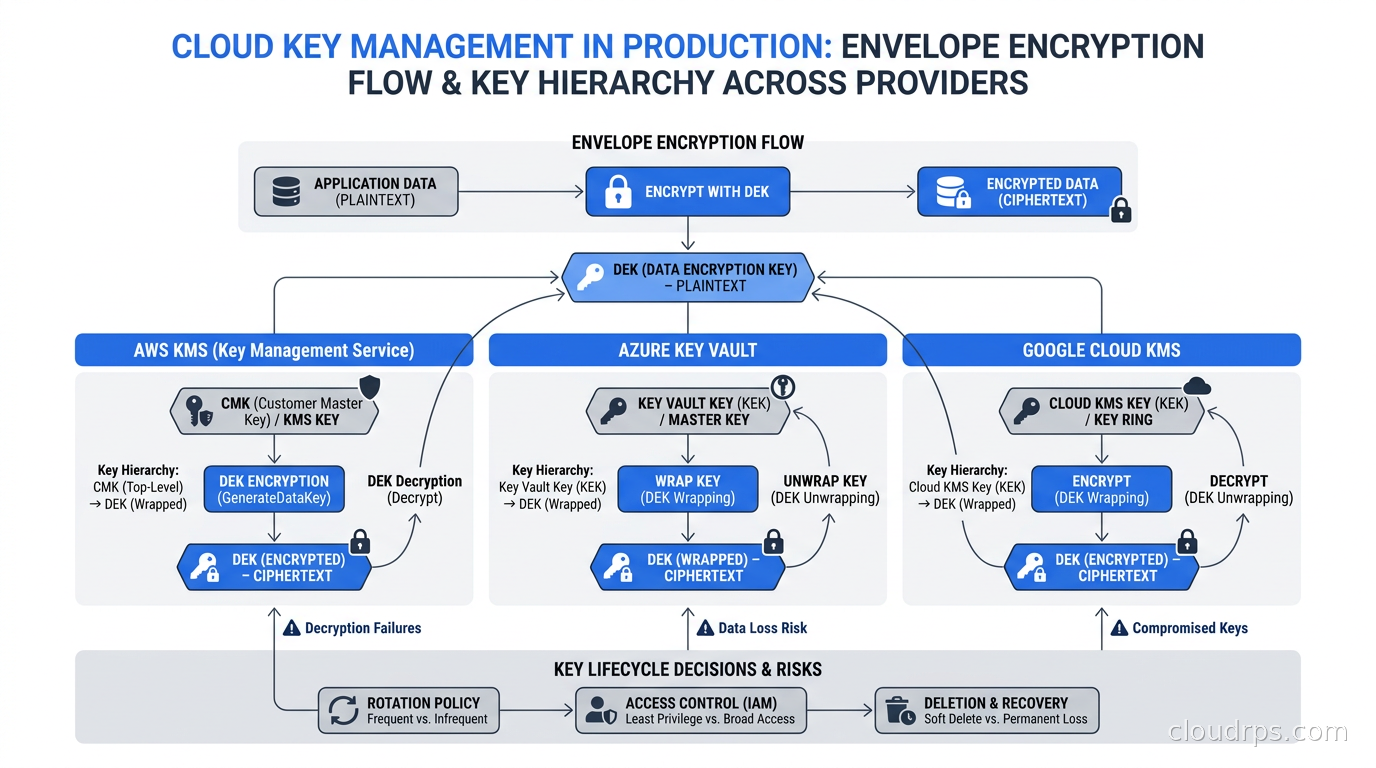
Envelope encryption is the pattern all three major cloud KMS implementations use to solve this. The idea is straightforward: you generate a data encryption key (DEK) locally, encrypt your data with it, then immediately encrypt the DEK itself using a master key (the CMK or key encryption key) that lives inside the HSM-backed KMS service. The encrypted DEK travels with the ciphertext. The master key never leaves the KMS. To decrypt data, your application calls KMS to unwrap the DEK, which the KMS does only after checking that the calling identity has the right IAM permissions, then uses the plaintext DEK to decrypt the payload and throws it away. The DEK is ephemeral; only the wrapped version persists.
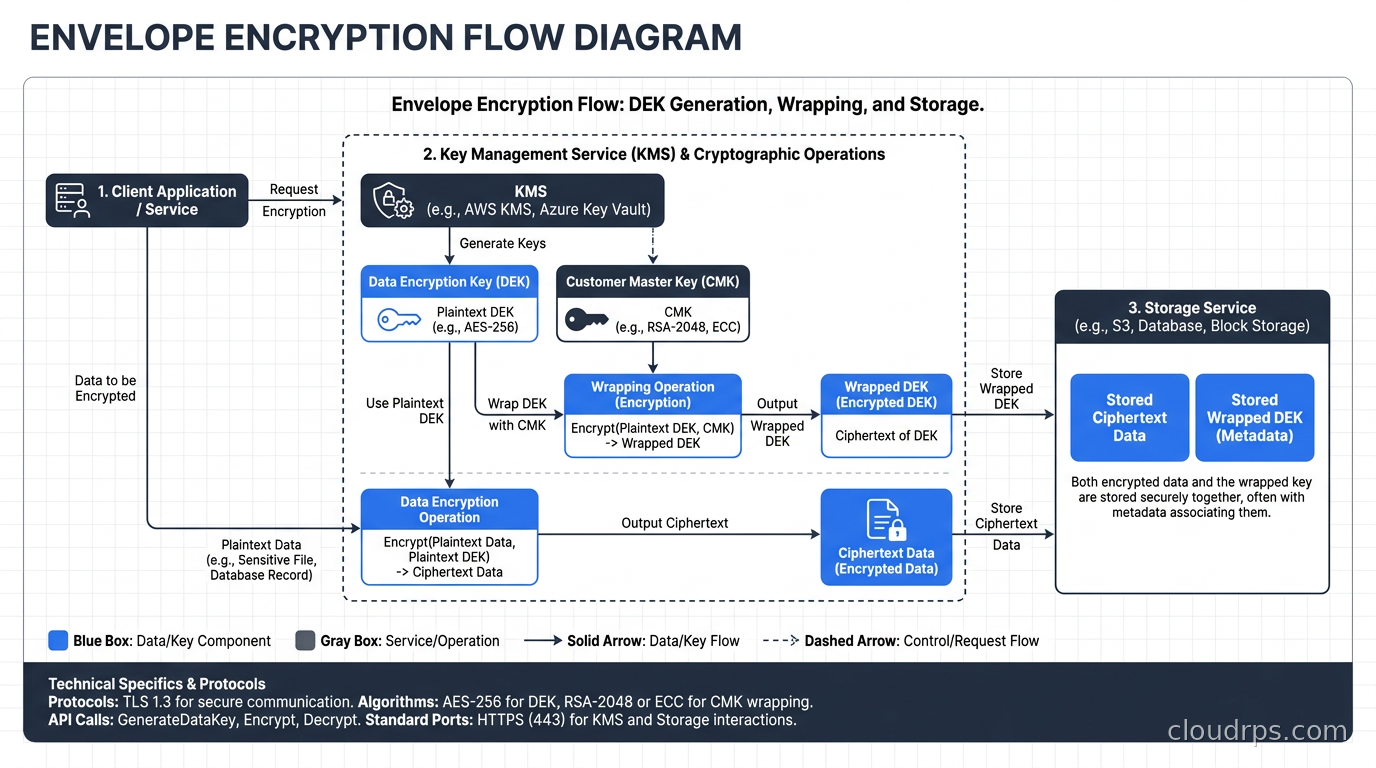
This architecture gives you two important properties. First, rotating the master key does not require re-encrypting your data, because you only need to re-wrap the DEK. Second, every key operation is auditable: every call to KMS for a Decrypt or Unwrap operation shows up in your cloud audit logs with the caller identity, timestamp, and key identifier. If you are ever breached, you have a complete record of every piece of data that was accessed and by which principal. That audit trail is what SOC 2 and PCI DSS auditors actually want to see.
AWS KMS: The Default for AWS-Heavy Shops
AWS KMS manages two categories of keys: AWS managed keys, which are created and rotated automatically by AWS on behalf of services like S3, EBS, and RDS, and customer managed keys (CMKs), which you create and control. AWS managed keys are free and rotate automatically every year. CMKs cost a flat fee per key per month (check the current AWS KMS pricing page for the exact rate, as pricing can change) plus a charge per 10,000 API requests beyond the free tier.
The key design decision with AWS KMS is whether to use symmetric or asymmetric CMKs. Symmetric CMKs use AES-256-GCM and are the right choice for envelope encryption: fast, inexpensive API calls, and the same key can encrypt and decrypt. Asymmetric CMKs use RSA or ECC and are appropriate when you need signature verification, public-key encryption, or cross-account cryptographic operations where you want the encryption to happen without calling KMS (using the public key directly). Most teams overuse asymmetric keys because they sound more “secure.” For data encryption at rest, symmetric CMKs with envelope encryption are the correct choice.
AWS KMS automatic key rotation now supports configurable rotation periods rather than just annual rotation. You can set a custom schedule from 90 days to seven years for symmetric CMKs. The key material rotates, but the key ID remains stable, so your references in application configs and IaC do not change. The older key material is retained indefinitely so that data encrypted before the rotation can still be decrypted. This is a point of confusion on every team I have worked with: rotating a KMS key does not mean you need to re-encrypt your data. It means that future encrypt calls use the new material, while decrypt calls for older ciphertext automatically use the correct historical version.
For multi-account architectures, cross-account KMS access requires explicit key policy entries. The key policy (not IAM) is the primary access control mechanism for CMKs. A common mistake is granting kms:* in a key policy to arn:aws:iam::ACCOUNT:root, which effectively delegates all KMS permissions to that account’s IAM policies. That is not wrong per se, but it means that anyone with broad IAM permissions in the target account can use your keys. Use resource-based conditions in key policies to restrict usage to specific IAM roles, services, or even specific VPC endpoints.
AWS KMS custom key stores let you back a CMK with dedicated CloudHSM hardware under your exclusive control, addressing compliance requirements that mandate FIPS 140-2 Level 3 validation and sole tenancy. The tradeoff is a significant increase in cost and operational complexity. The custom key store connects your KMS CMK to a CloudHSM cluster you manage, so HSM cluster health directly affects KMS availability. For most teams, the multi-tenant shared HSM backing of standard KMS (which AWS validates at FIPS 140-2 Level 3 for the HSM component) is sufficient. Reserve custom key stores for specific regulatory mandates that explicitly require sole-tenant hardware.
Azure Key Vault: Three Tiers with Very Different Properties
Azure splits key management across three offerings with meaningfully different security and operational properties: Key Vault Standard, Key Vault Premium, and Managed HSM.
Key Vault Standard is a multi-tenant service providing software-protected keys and secrets. It is not FIPS 140-2 Level 3 validated and does not use dedicated HSM hardware. For most general-purpose secret and key storage, it is fine. Key Vault Premium adds HSM-backed key protection: your key material lives inside shared HSM hardware that Microsoft manages, validated at FIPS 140-2 Level 2. Managed HSM is a single-tenant, dedicated HSM service validated at FIPS 140-2 Level 3, and it is priced per active HSM cluster per hour, making it significantly more expensive than Key Vault. As of November 2026, Managed HSM pricing is listed at approximately $3.20/hour per HSM pool on the Azure pricing page; verify the current rate before budgeting.
The bring-your-own-key (BYOK) story on Azure is better than on AWS for regulated industries. With Key Vault Premium or Managed HSM, you can import keys from an on-premises HSM using the BYOK transfer specification, which wraps your key in an HSM-to-HSM encrypted transport so the plaintext key material never touches non-HSM storage. This matters for banking and healthcare customers where the key custody requirement specifically prohibits cloud-generated keys.
One operational nuance that trips up Azure teams: Key Vault has throttling limits that become relevant at scale. Standard Key Vault is throttled at a few hundred operations per 10 seconds per vault, per region. If you wire every service in a large Azure estate to a single Key Vault for BYOK encryption, you will hit these limits during bulk encryption operations. The right answer is sharding across multiple Key Vaults, with Managed HSM offering higher operation throughput for high-volume use cases.
Azure RBAC is now the preferred authorization model for Key Vault, replacing Key Vault access policies for new deployments. The Key Vault Secrets User, Key Vault Crypto User, and Key Vault Crypto Officer built-in roles map cleanly to least-privilege patterns. The older access policy model had a known footgun: access policies are per-vault, not per-key, so granting an application access to one secret in a vault inadvertently granted it access to all secrets in that vault. RBAC with its per-secret assignment capability is strictly better for multi-application scenarios.
Google Cloud KMS: CMEK Coverage and External Key Management
Google Cloud KMS offers three protection levels: software (default), HSM, and external. Software-protected keys are cheapest and suitable for most workloads. HSM-protected keys route operations through CloudHSM hardware validated to FIPS 140-2 Level 3 for use cases that need that validation. External Key Management (EKM) is unique to GCP among the major providers: it lets you hold your key material in an external HSM or key manager that GCP never accesses, with GCP calling your external key manager on every cryptographic operation. EKM is the strictest possible form of key sovereignty, and it comes with an availability caveat: if your external key manager is unreachable, the GCP operations that depend on it fail.
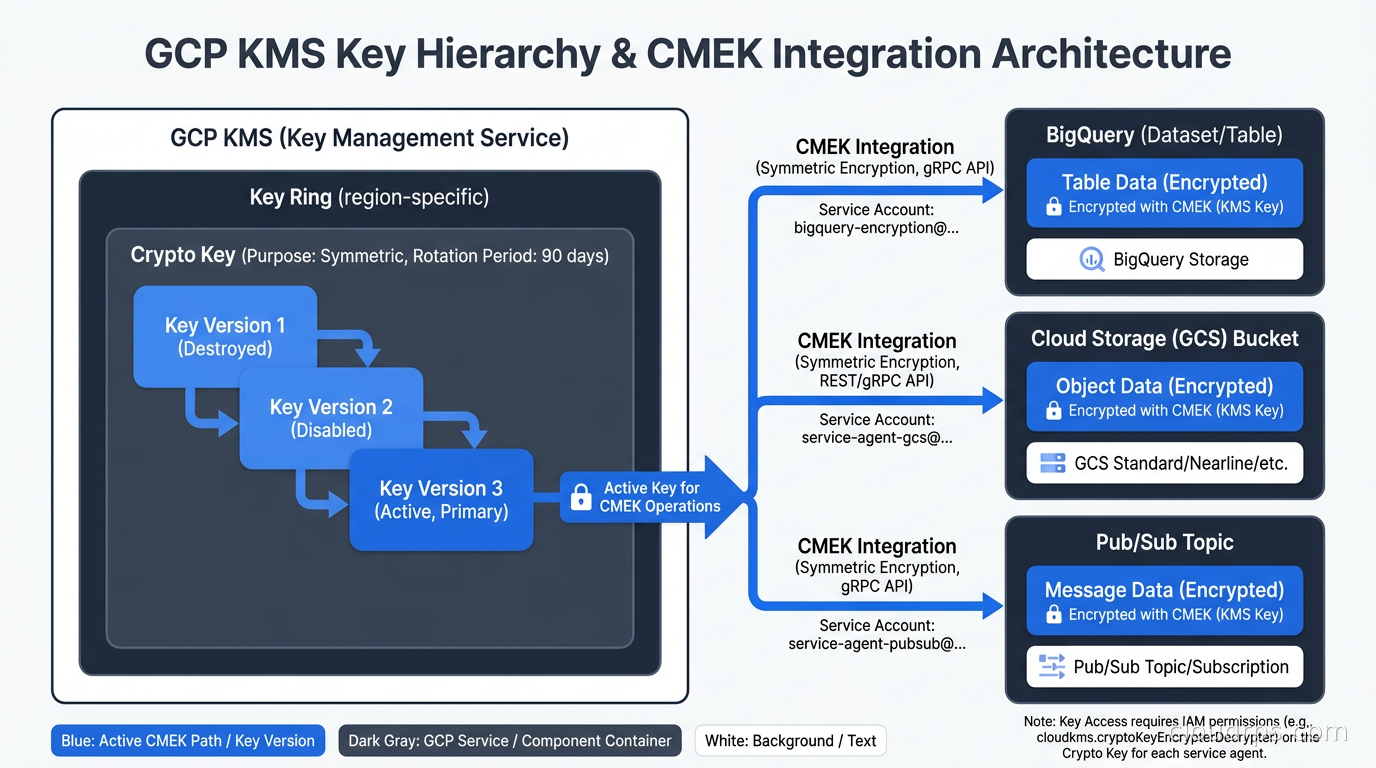
GCP’s CMEK integration is notably deep. BigQuery, Cloud Storage, Pub/Sub, Spanner, Bigtable, GKE, and many other services all support CMEK with Cloud KMS keys. When you provision a BigQuery dataset with CMEK, every table encryption key in that dataset is wrapped by your CMK. This creates a cross-project billing dynamic worth understanding: the KMS API calls go to whichever project owns the keyring, so if you centralize keys in a security project and your data project does heavy CMEK encryption, the KMS costs land in the security project. Build cost attribution into your keyring design from day one.
GCP’s automatic key rotation works at the key version level. You set a rotation period on the key (90 days is common, expressed as 7776000s), and Cloud KMS creates a new key version on schedule. The primary version for new encryption operations automatically advances to the latest version, while old versions remain enabled for decryption of existing ciphertext. For CMEK-encrypted resources, the service handles re-wrapping of data encryption keys when you trigger a key rotation, though the timing and mechanics differ by service. For Cloud Storage, for example, you need to explicitly request re-encryption of objects to use the new key version rather than it happening automatically.
The GCP Cloud KMS API design is worth noting for teams building custom integrations. Wrapping and unwrapping operations are exposed as Encrypt and Decrypt on symmetric keys and AsymmetricSign or AsymmetricDecrypt on asymmetric keys. Cloud KMS also supports generating random bytes and MAC signing, making it a reasonable backend for HMAC-based API authentication tokens that need an auditable key custody chain. I have used this pattern to anchor token signing to KMS rather than a service account secret for systems where the non-human identity audit trail mattered for compliance.
Key Lifecycle and the Rotation Problem
Rotation sounds simple in theory: replace old keys with new ones periodically. In practice, teams struggle because they conflate rotation with key deletion, they do not test decryption after rotation, and they fail to account for the gap between when a key rotates and when all callers have switched to using the new material.
The practical rotation model for envelope encryption looks like this: the master CMK rotates on a schedule (90 days to one year, depending on your compliance requirements). The CMK rotation does not invalidate existing wrapped DEKs because those DEKs were wrapped with the old key material, which is retained. The only operational requirement is that you retain all historical key versions until every piece of data encrypted with the corresponding DEK has been deleted or re-encrypted. If you delete a key version while data encrypted with that version’s DEK still exists, you have permanent data loss with no recovery path.
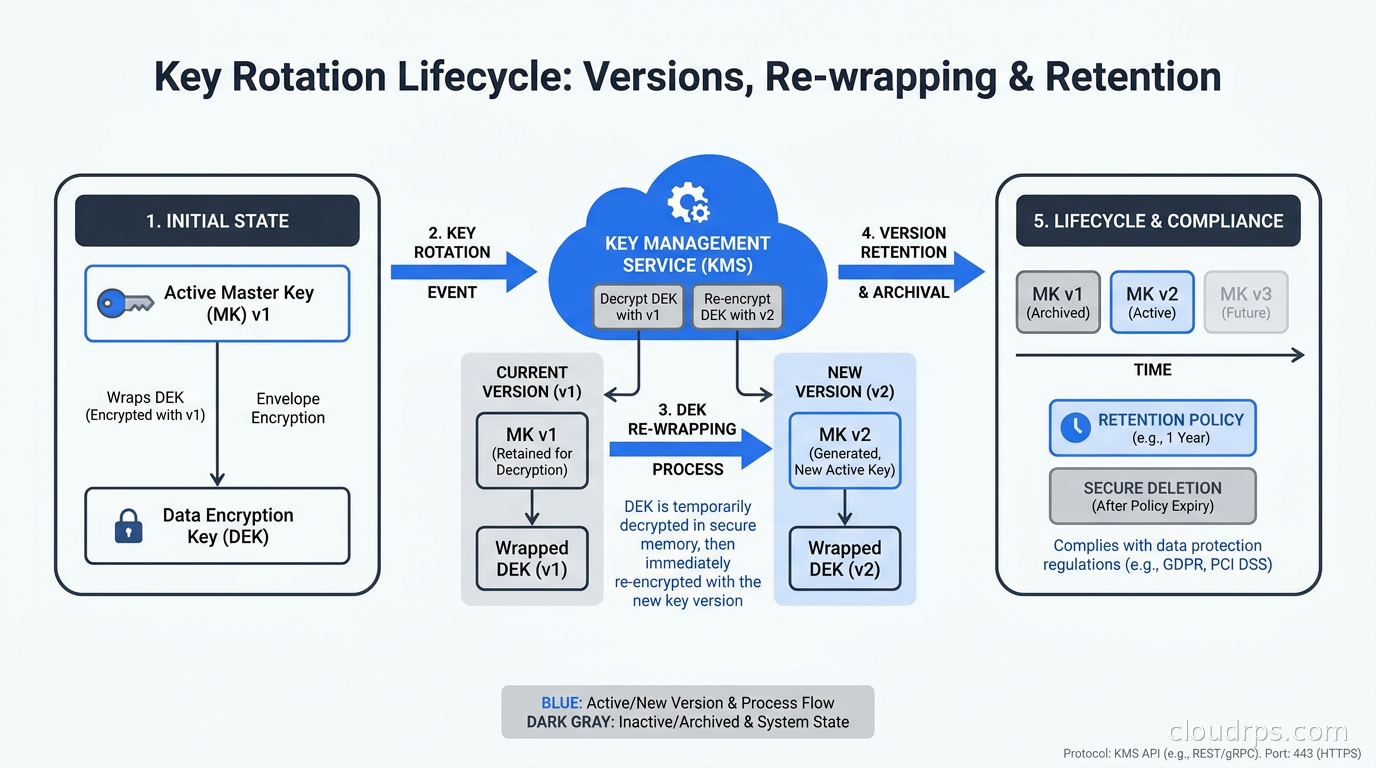
Key deletion policies differ across providers and are worth understanding before you need them. AWS KMS enforces a mandatory waiting period of 7 to 30 days before a scheduled key deletion completes, and you can cancel a deletion during this window. Azure Key Vault supports soft-delete and purge protection: soft-delete retains deleted key material for a configurable period (7 to 90 days), and purge protection prevents any deletion until the retention period expires. GCP Cloud KMS key destruction has a default pending period of 24 hours, configurable up to 120 days. For regulated workloads, enable the maximum retention period on all three and require a second-party approval for any key destruction, implemented through your change management workflow rather than relying on the cloud provider’s approval model.
This lifecycle complexity is exactly why compliance as code for key management matters. Encode your rotation period, retention configuration, and allowed key usage as policy, enforce it via IaC with Terraform or Pulumi, and detect drift with Checkov or SCPs. A CMK that was manually created with annual rotation disabled and no purge protection is a compliance finding that should fire in CI before it reaches production.
Multi-Cloud Key Management and Third-Party Solutions
If your organization genuinely operates across multiple cloud providers with encryption requirements that span all three, you have three options: manage native KMS in each cloud independently, centralize in one cloud’s KMS and configure cross-cloud access, or deploy a third-party key management platform.
Managing native KMS independently is the most common pattern and works well when your compliance boundary is per-cloud. Each cloud controls its own keys, audit logs are per-cloud, and there is no cross-cloud key dependency. The downside is operational fragmentation: different rotation policies, different audit log formats, different IAM models for access control, and no unified view of key usage across the estate. For teams with a data residency requirement that spans clouds, this approach means duplicating key management operational discipline across three different systems.
Third-party platforms like Thales CipherTrust and Hashicorp Vault (in KMS proxy mode) provide a single pane of glass for key management across AWS, Azure, GCP, and on-premises. Vault’s key management secrets engine can distribute keys to AWS KMS and Azure Key Vault, creating a consistent rotation and audit policy that the cloud-native tools independently cannot coordinate. The tradeoff is added operational complexity for the KMS proxy layer, an additional blast-radius surface if that layer goes down, and licensing cost. Most teams do not need this until they have specific cross-cloud rotation governance requirements that cannot be satisfied by policy documentation alone.
Common Mistakes I Have Seen Twenty Times
The mistakes that show up repeatedly on every engagement have more to do with configuration and operational discipline than with choosing the wrong provider.
Using the same CMK for multiple data classifications is the most common. I have seen a single KMS key used to encrypt PCI cardholder data, general application logs, and dev environment test data, all in the same key. When you need to demonstrate that dev personnel cannot access production PCI data, you cannot do that if they share a CMK. Align your CMK structure to your data classification model: one CMK per data tier, per environment, per application where the classification boundaries require it.
Not auditing key usage is the second. All three providers integrate KMS audit logs with their native logging services: CloudTrail for AWS, Azure Monitor for Azure, Cloud Audit Logs for GCP. Teams set up encryption correctly and then never look at the audit trail until an incident. Set up alerting on unusual key usage patterns: unusually high decrypt call volume, decrypt calls from unexpected geographic regions, or decrypt calls from IAM principals that have no business touching that data. This kind of anomaly detection is what transforms encryption from a checkbox into an actual control.
Disabling key rotation because it feels risky is the third. Teams are afraid to enable automatic rotation because they worry about breaking existing decryption. As I described above, rotation on modern cloud KMS retains all historical key material. It does not break anything. The right policy is automatic annual rotation as a minimum, with quarterly rotation for CMKs protecting sensitive classifications. Document this in your encryption policy, enforce it via IaC, and use policy as code tools like Checkov or AWS Config Rules to detect keys where rotation is disabled.
Choosing Your Tier
Here is the decision framework I use in practice. Start with AWS managed keys for managed services where you have no specific compliance requirement for key control: this costs nothing additional and is operationally invisible. Move to CMKs with automatic rotation when you need audit trails for specific key usage, cross-service access controls, or compliance requirements that mandate customer-managed keys. Add HSM-backing (AWS custom key stores, Azure Key Vault Premium, or GCP HSM protection level) only when a specific regulatory requirement names FIPS 140-2 Level 3 or sole-tenant hardware as mandatory. Add BYOK only when the mandate explicitly prohibits cloud-generated keys.
The post-quantum cryptography transition adds an additional consideration: check your cloud provider’s roadmap for ML-KEM and ML-DSA support in their KMS. AWS has begun supporting hybrid post-quantum TLS in some services, and GCP has announced post-quantum support roadmaps for Cloud KMS. If your data has a long sensitivity horizon, design your key hierarchy now to support key replacement when PQC algorithms reach production KMS support.
For TLS certificate management, note that cloud KMS is not a certificate authority. KMS manages symmetric encryption keys and asymmetric signing keys, but PKI certificate issuance belongs to a CA service (ACM for AWS, Azure-managed certificates, GCP CAS) or an internal CA like cert-manager backed by a CA that uses KMS for the signing key. The two functions are complementary: use KMS to hold the CA’s private key material, and use the CA to issue certificates. Keep them architecturally separate.
The teams that get key management right treat it as infrastructure with the same rigor they bring to networking: documented, automated, tested, and monitored. The ones that struggle treat it as a one-time encryption setup that needs no further attention. Cloud KMS has made the cryptographic operations simple. The operational discipline around key lifecycle is still on you.
Get Cloud Architecture Insights
Practical deep dives on infrastructure, security, and scaling. No spam, no fluff.
By subscribing, you agree to receive emails. Unsubscribe anytime.