
I’ve seen what happens when you skip the landing zone. An organization migrates fifty applications into a single AWS account, gives everyone admin access, uses the default VPC, and tags nothing. Six months later, they can’t tell which team owns which resources, their security team is having an aneurysm, and their cloud bill is an indecipherable mess. The remediation project takes longer than building a proper landing zone would have in the first place.
A cloud landing zone is the foundational infrastructure that your cloud workloads run on. It’s the account structure, networking, security controls, identity management, logging, monitoring, and governance policies that form the base layer. Get it right and every subsequent workload deployment is straightforward. Get it wrong and you’ll spend years cleaning up the technical debt.
This is the part of cloud migration that feels like it slows you down. It doesn’t. It’s the part that prevents you from having to start over.
What a Landing Zone Actually Includes
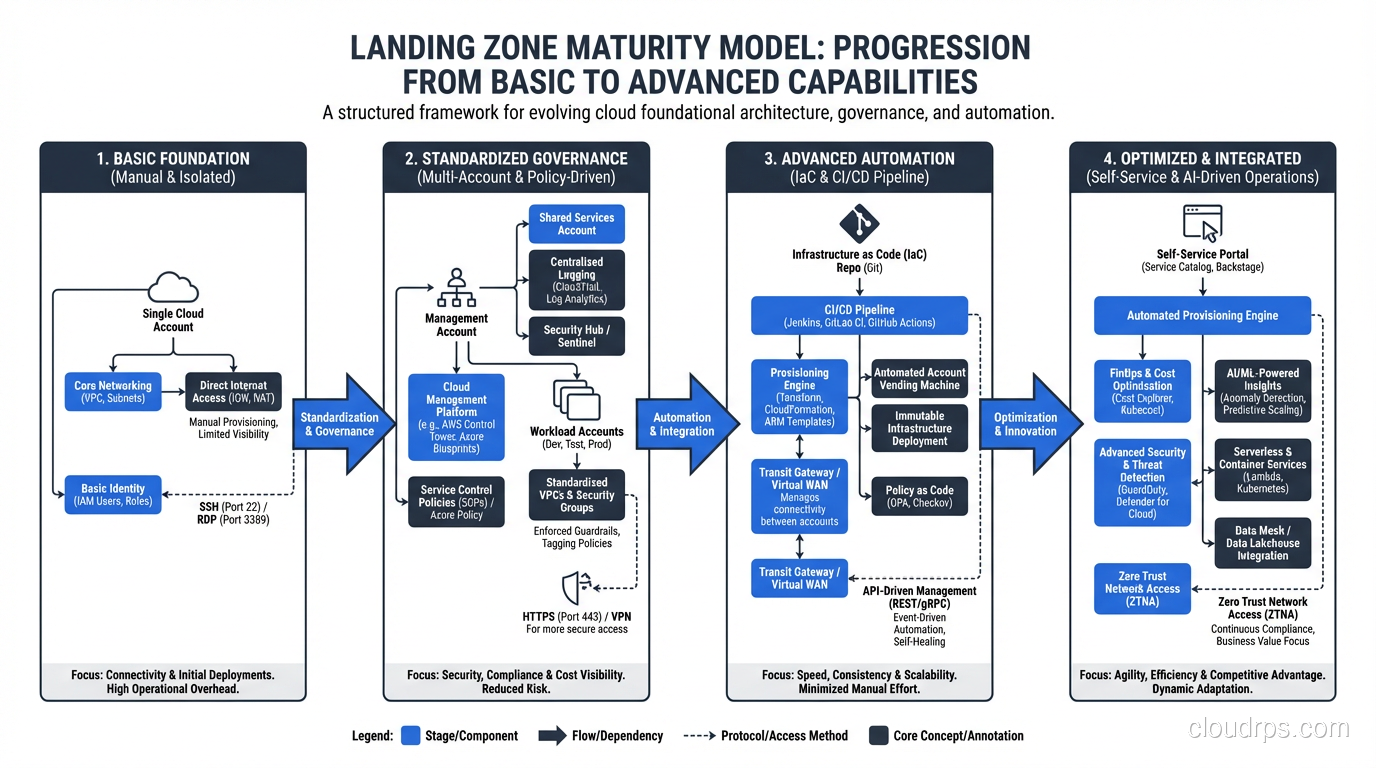
A complete landing zone addresses six domains:
- Account/subscription structure: how you organize your cloud accounts
- Identity and access management: who can do what
- Networking: how resources communicate
- Security: how you protect resources and detect threats
- Logging and monitoring: how you see what’s happening
- Governance: how you enforce standards and manage costs
Let me walk through each one.
Account Structure: The Foundation of the Foundation
Multi-Account Strategy
Every cloud provider has converged on the same recommendation: use multiple accounts (AWS), subscriptions (Azure), or projects (GCP). Never run production and development in the same account. Never mix security tooling with application workloads.
The reasons are practical:
- Blast radius containment: A misconfiguration in a development account can’t affect production
- Billing separation: You can attribute costs to teams, projects, or environments without tagging gymnastics
- Security boundary: IAM policies are scoped to accounts, providing a hard security boundary
- Service limits: Each account has independent service quotas, preventing one team from exhausting limits that affect everyone
My Recommended Account Structure
After implementing landing zones for banks, healthcare providers, retailers, and government agencies, here’s the structure I use:
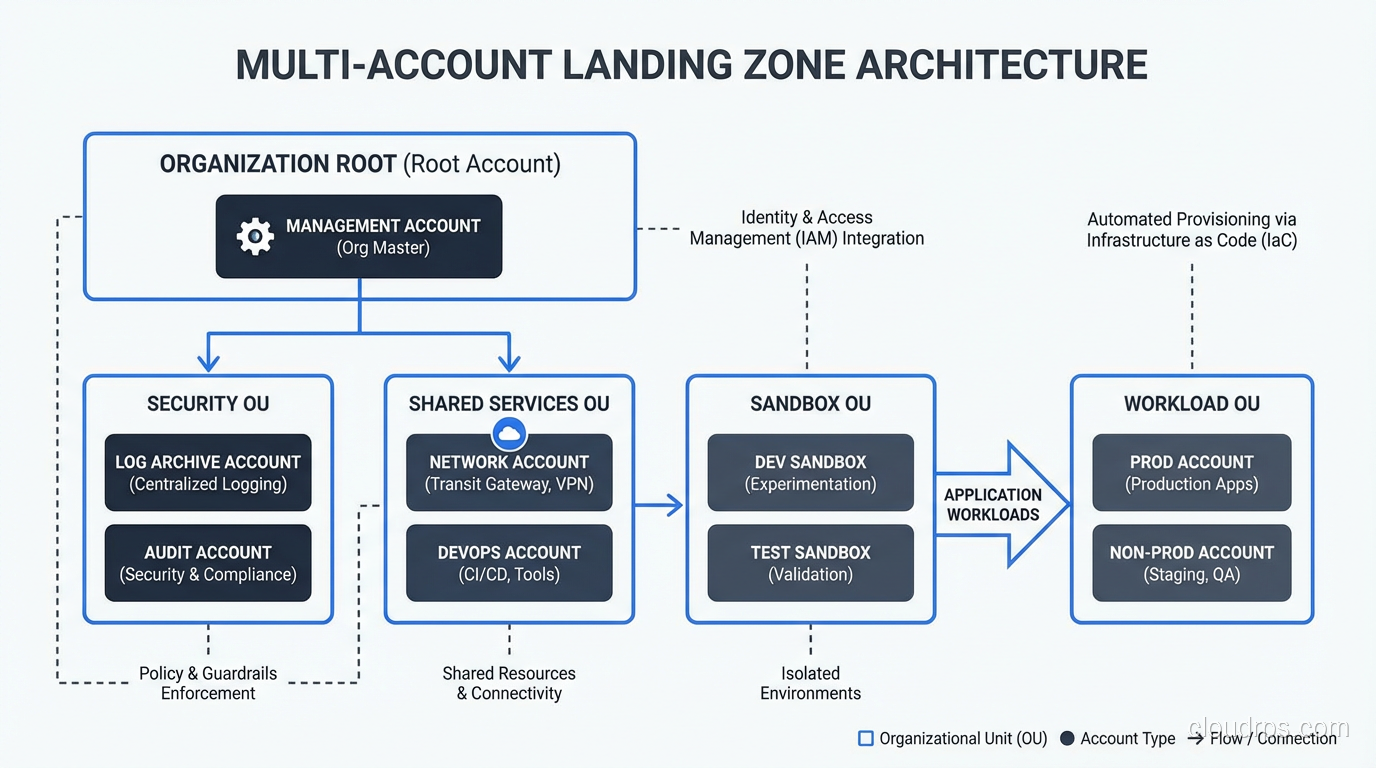
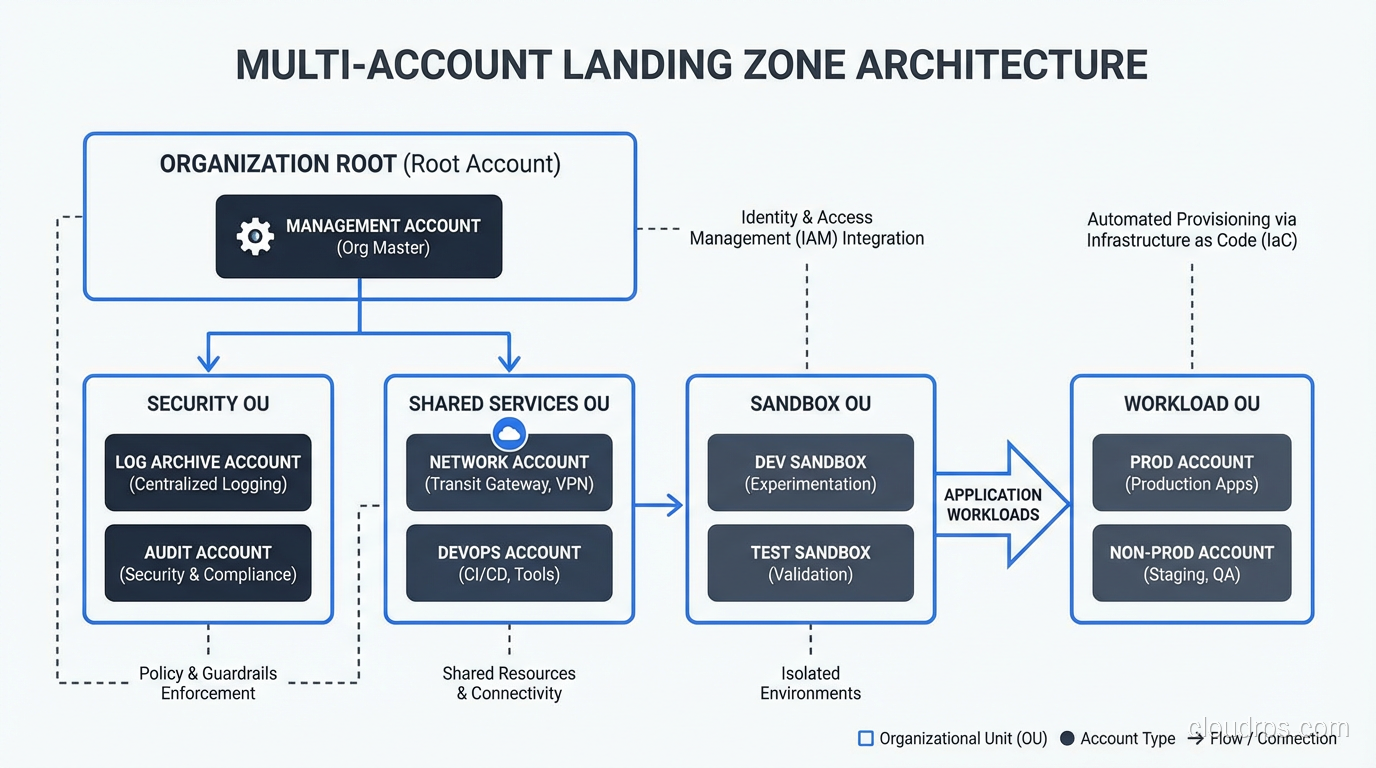
Management account: Houses the organization root, billing, and AWS Organizations (or Azure Management Group) configuration. Nothing else runs here. This account is locked down tight, and only a handful of people have access.
Security account: Centralized security tooling: GuardDuty/Sentinel aggregation, Security Hub, CloudTrail log aggregation, vulnerability scanning. The security team owns this account.
Logging account: Centralized log storage. CloudTrail logs, VPC Flow Logs, application logs all flow here. Separate from security because the access patterns and retention requirements are different.
Shared services account: DNS, Active Directory (if needed), shared container registries, CI/CD tooling, shared databases.
Network account: Transit Gateway, VPN connections, Direct Connect, DNS resolution. Centralizing networking simplifies management and reduces redundant connections.
Workload accounts: One account per application per environment (or per team per environment, depending on your organization). So your CRM application gets crm-dev, crm-staging, and crm-prod accounts.
This sounds like a lot of accounts, and it is. A mid-sized enterprise typically ends up with 50-200 accounts. AWS Organizations and Azure Management Groups provide the hierarchy and policy enforcement to manage them at scale.
Account Vending
Creating accounts manually doesn’t scale. You need an automated account vending machine, a process that creates a new account, applies baseline configurations (networking, security, IAM roles, tagging), and integrates it with centralized services.
AWS Control Tower provides this out of the box. For Azure, Landing Zone Accelerator fills the same role. For organizations that need more customization, I’ve built account vending with Terraform and custom Lambda functions or Azure Functions.
The key: every account should be identical in its baseline configuration. Different workloads get customization on top, but the foundation (networking, security, logging, IAM) is standardized.
Networking: The Connective Tissue
Hub-and-Spoke vs Mesh
The dominant pattern is hub-and-spoke networking. A central network hub (Transit Gateway on AWS, Azure Virtual WAN or hub VNet on Azure) connects to spoke VPCs/VNets in each workload account. Traffic between spokes flows through the hub, where you can inspect, filter, and route it.
Mesh networking, where every VPC peers directly with every other VPC, doesn’t scale. At 20 VPCs, you have 190 peering connections. At 100 VPCs, it’s 4,950. Hub-and-spoke keeps the connection count linear.
IP Address Planning
This seems mundane but causes enormous headaches when done wrong. Plan your IP address space before deploying the first VPC.
My rules:
- Use a /16 or larger block for your entire cloud environment
- Subdivide into /20 or /22 blocks per VPC
- Don’t overlap with on-premises IP ranges (you’ll need connectivity between them)
- Reserve blocks for future growth (you’ll always need more than you think)
- Document everything in an IPAM system
I’ve remediated environments where three different teams independently chose 10.0.0.0/16 for their VPCs. When they needed to connect those VPCs to each other and to the corporate network, everything overlapped and nothing could route. Re-IP-addressing running workloads is miserable.
Connectivity to On-Premises
During and after migration, you need connectivity between cloud and on-premises. Options:
- VPN over internet: Cheapest, easiest to set up. Fine for light traffic and development environments. Latency and throughput are unpredictable.
- AWS Direct Connect / Azure ExpressRoute / Google Cloud Interconnect: Dedicated, private connections with consistent performance. Essential for production workloads that communicate with on-premises systems.
I always recommend starting with VPN for initial testing and deploying Direct Connect/ExpressRoute before production migration begins. The lead time for dedicated connectivity can be 4-8 weeks, so plan accordingly.
Security: Defense in Depth
Identity and Access Management
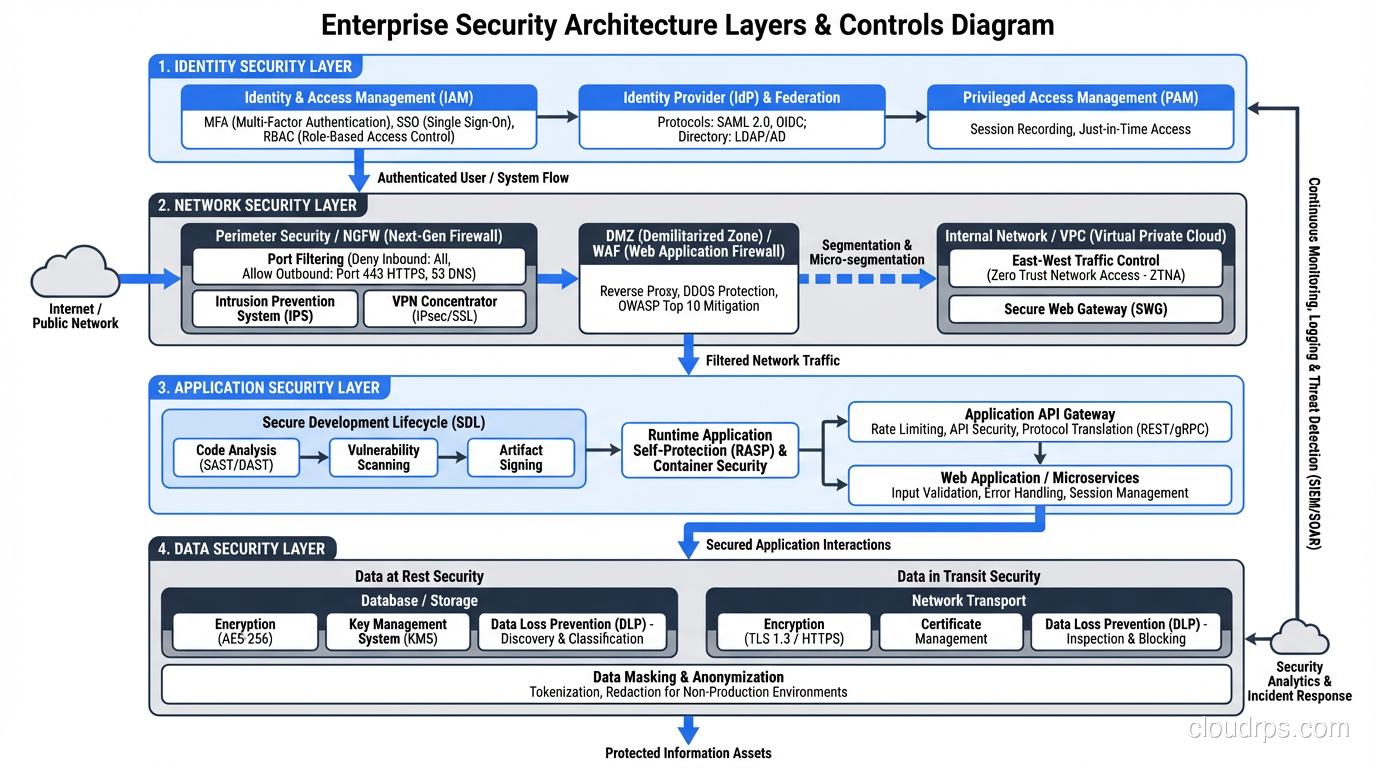
Centralize identity. Use AWS IAM Identity Center (formerly SSO), Azure AD, or Google Cloud Identity to federate access from a single identity provider. Every user authenticates through the central IdP and receives role-based access to specific accounts.
Principles:
- Least privilege everywhere. Start with zero access and add permissions as needed.
- No long-lived access keys. Use temporary credentials through IAM roles and federation.
- MFA on every human account. No exceptions.
- Separate human and service identities. Applications use IAM roles, not user credentials.
Network Security
Implement security groups and network ACLs as your first layer of defense. Security groups are stateful (return traffic is automatically allowed), while network ACLs are stateless (you must explicitly allow return traffic). I use security groups for application-level access control and network ACLs for broad subnet-level restrictions.
For environments that require inspection (financial services, healthcare, government), deploy a centralized firewall (AWS Network Firewall, Azure Firewall, or a third-party appliance like Palo Alto) in the network hub.
Zero Trust Principles
Modern landing zones should incorporate zero trust security principles: verify explicitly, use least-privilege access, and assume breach. In practice, this means:
- Network segmentation isn’t enough; authenticate and authorize every request
- Encrypt data in transit and at rest by default
- Log everything and use security analytics to detect anomalies
- Implement service mesh for workload-to-workload authentication in containerized environments
Logging, Monitoring, and Governance
Centralized Logging
Every account sends logs to the central logging account. At minimum:
- CloudTrail / Activity Logs for API calls
- VPC Flow Logs / NSG Flow Logs for network traffic
- Config / Policy changes
- Application logs (via CloudWatch, Azure Monitor, or a third-party like Datadog)
Retain CloudTrail logs for at least one year (many compliance frameworks require this). Store them in S3 or Azure Blob with lifecycle policies that move them to cheaper tiers after 90 days.
Cost Governance
Cost surprises are the most common complaint I hear after cloud migration. Prevent them with:
- Tagging enforcement: Require tags for cost center, application, environment, and owner on every resource. Use AWS Service Control Policies or Azure Policy to prevent untagged resource creation.
- Budgets and alerts: Set budgets at the account and organizational unit level. Alert at 50%, 80%, and 100% of budget.
- Anomaly detection: AWS Cost Anomaly Detection or Azure Cost Management anomaly alerts catch unexpected spend spikes.
- Regular reviews: Monthly cost reviews with engineering leads. I’ve never seen automated tools fully replace human review for catching waste.
Guardrails: Preventive and Detective
Guardrails are the policies that keep teams within safe boundaries without requiring a ticket for every action.
Preventive guardrails (Service Control Policies, Azure Policy with Deny effect): Prevent actions that violate policy. Examples: “No resources outside approved regions,” “No unencrypted S3 buckets,” “No public RDS instances.”
Detective guardrails (AWS Config Rules, Azure Policy with Audit effect): Detect and alert on non-compliant resources. Examples: “Alert if a security group allows 0.0.0.0/0 on port 22,” “Alert if an EBS volume is not encrypted.”
I start with detective guardrails and graduate to preventive once the team is comfortable. Turning on preventive guardrails without warning will break things and create enemies.
Landing Zone Tooling
AWS Control Tower
AWS’s managed landing zone service. Sets up a multi-account environment with guardrails, account vending, and centralized logging. Good starting point for organizations new to AWS.
Limitations: opinionated about account structure, limited customization without drift, doesn’t handle all enterprise requirements (especially complex networking).
Azure Landing Zone Accelerator
Microsoft’s equivalent. Provides reference architecture and deployment templates for a well-architected Azure environment.
Terraform/OpenTofu
For organizations that need full control and multi-cloud support, Terraform is the tool. You define your entire landing zone as code: accounts, networking, security policies, IAM roles, everything.
I use Terraform for most enterprise landing zones because the customization requirements always exceed what managed solutions offer. The trade-off is more operational responsibility.
Building the Landing Zone: Practical Sequence
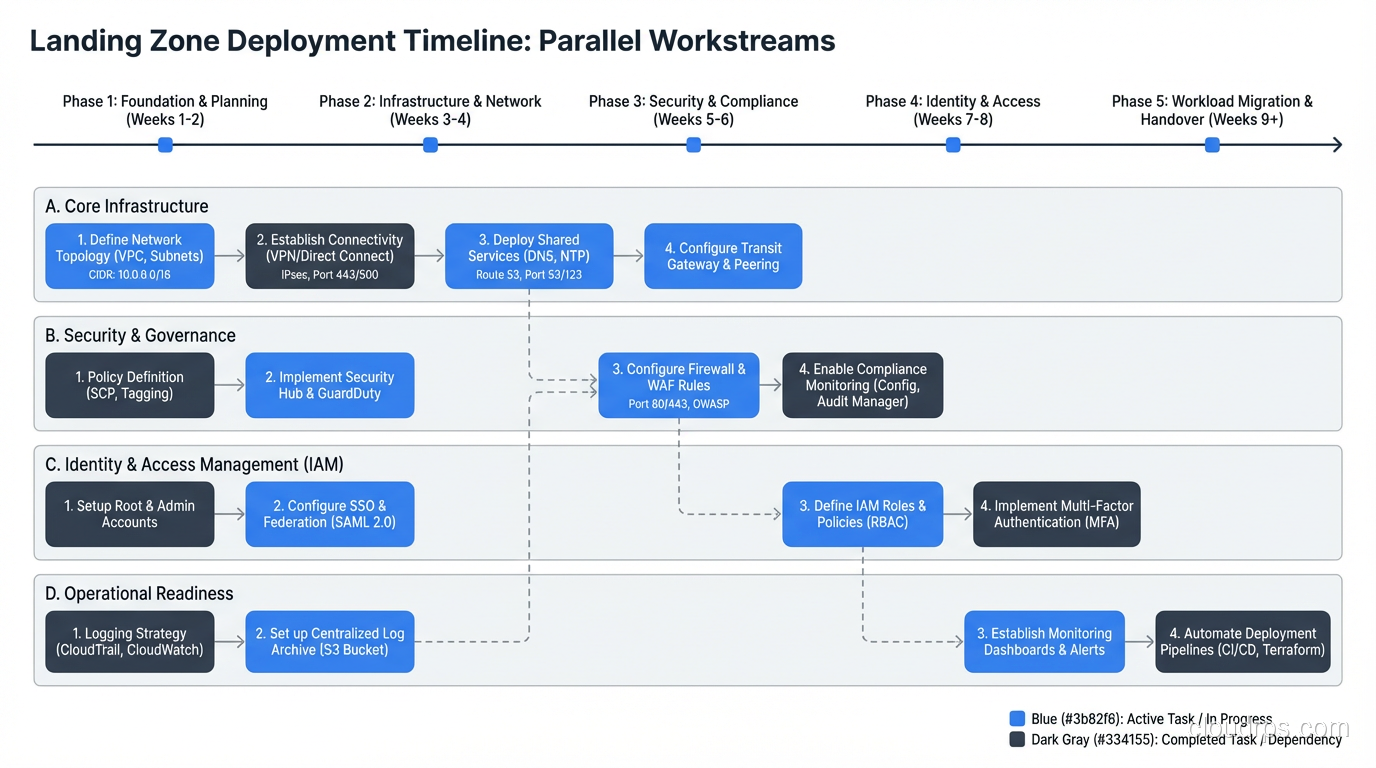
- Design the account structure and IP plan (1-2 weeks)
- Deploy the management and security accounts (1 week)
- Set up centralized identity (1-2 weeks)
- Deploy the network hub and on-premises connectivity (2-4 weeks)
- Implement logging and monitoring (1 week)
- Define and deploy guardrails (1-2 weeks)
- Build the account vending process (1-2 weeks)
- Deploy the first workload account and validate (1 week)
Total: 8-14 weeks for a production-ready landing zone. This can run in parallel with the application assessment and wave planning phases of the migration process.
Is eight weeks before you migrate a single workload frustrating? Yes. Is it faster than remediating a landing zone you built wrong? Every single time.
The Landing Zone Is Never Done
One last thing: the landing zone is a living system. You’ll add accounts, adjust networking, tighten security policies, and refine governance as your cloud maturity grows. Treat it as a product, not a project. Assign a team to own it, maintain it, and evolve it.
The foundation matters. I’ve never seen a successful large-scale cloud deployment built on a weak foundation, and I’ve never seen a well-designed landing zone that didn’t pay for itself many times over.
Get Cloud Architecture Insights
Practical deep dives on infrastructure, security, and scaling. No spam, no fluff.
By subscribing, you agree to receive emails. Unsubscribe anytime.