
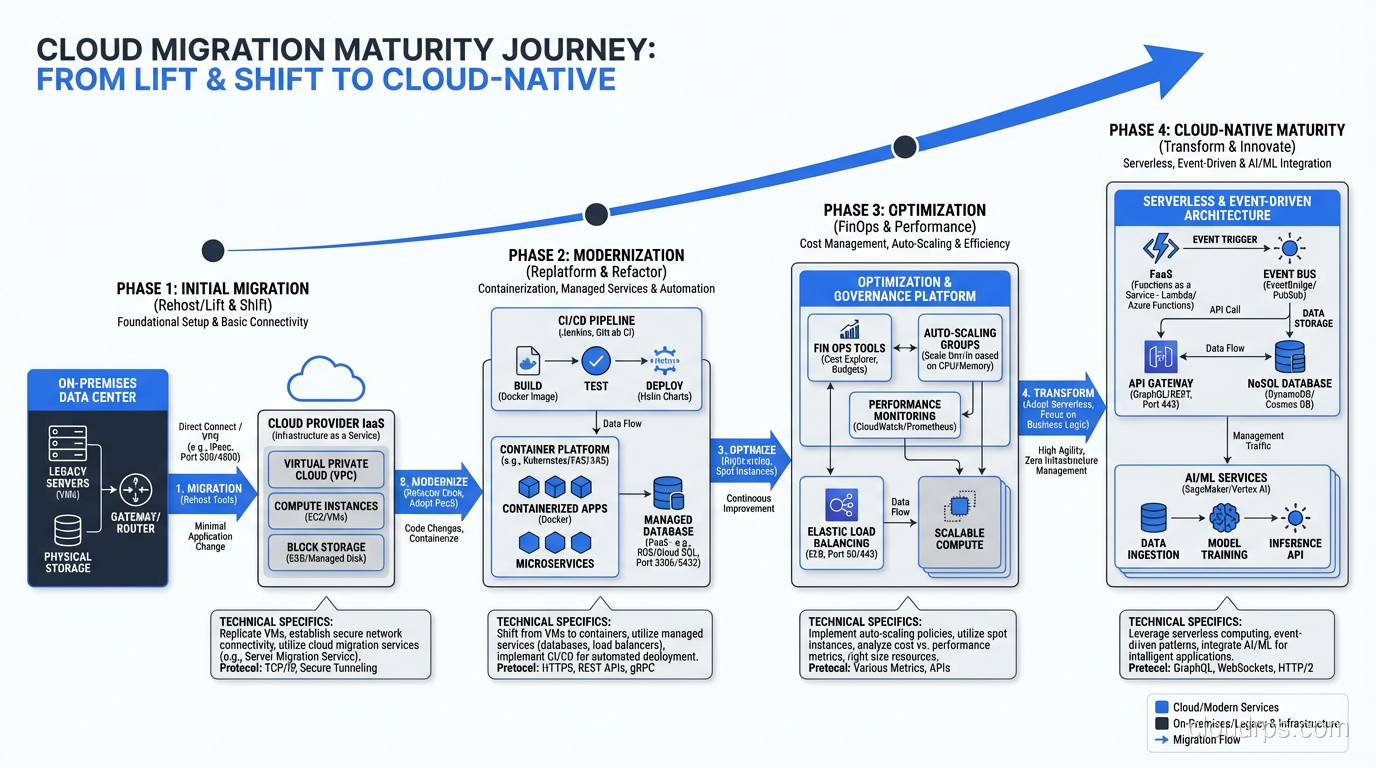
I’ve led over fifty enterprise cloud migrations. Some were fast, three months from kickoff to production workloads running in AWS. Others were marathons: eighteen months of legacy untangling, political battles, and late-night cutovers. The successful ones all had one thing in common: a disciplined, phased process. The failures? They all tried to skip steps.
Cloud migration isn’t a technology project. It’s an organizational transformation that happens to involve technology. The technical work (moving servers, refactoring applications, setting up networks) is maybe 40% of the effort. The other 60% is discovery, planning, stakeholder management, and process change.
This guide walks through the process I use. It’s not theoretical. Every step comes from real migrations with real consequences.
Phase 1: Assessment and Discovery
You can’t plan a migration until you know what you’re migrating. This sounds obvious, but I’ve walked into organizations where the CMDB was two years out of date and nobody could tell me how many servers they actually had.
Application Portfolio Discovery
Start by building a complete inventory of applications, their dependencies, and their technical characteristics. You need:
- Every application, including the ones “nobody uses” that turn out to be critical
- The infrastructure each application runs on (servers, databases, storage, network)
- Dependencies between applications (which apps call which other apps)
- Data flows: where data originates, where it moves, where it’s consumed
- The technology stack of each application (language, framework, database, middleware)
I use a combination of automated discovery tools (AWS Application Discovery Service, Flexera, Device42) and manual interviews. The tools catch the infrastructure. The interviews catch the business context: who owns it, how critical it is, when it was last updated, whether the vendor still exists.
Business Criticality and Risk Assessment
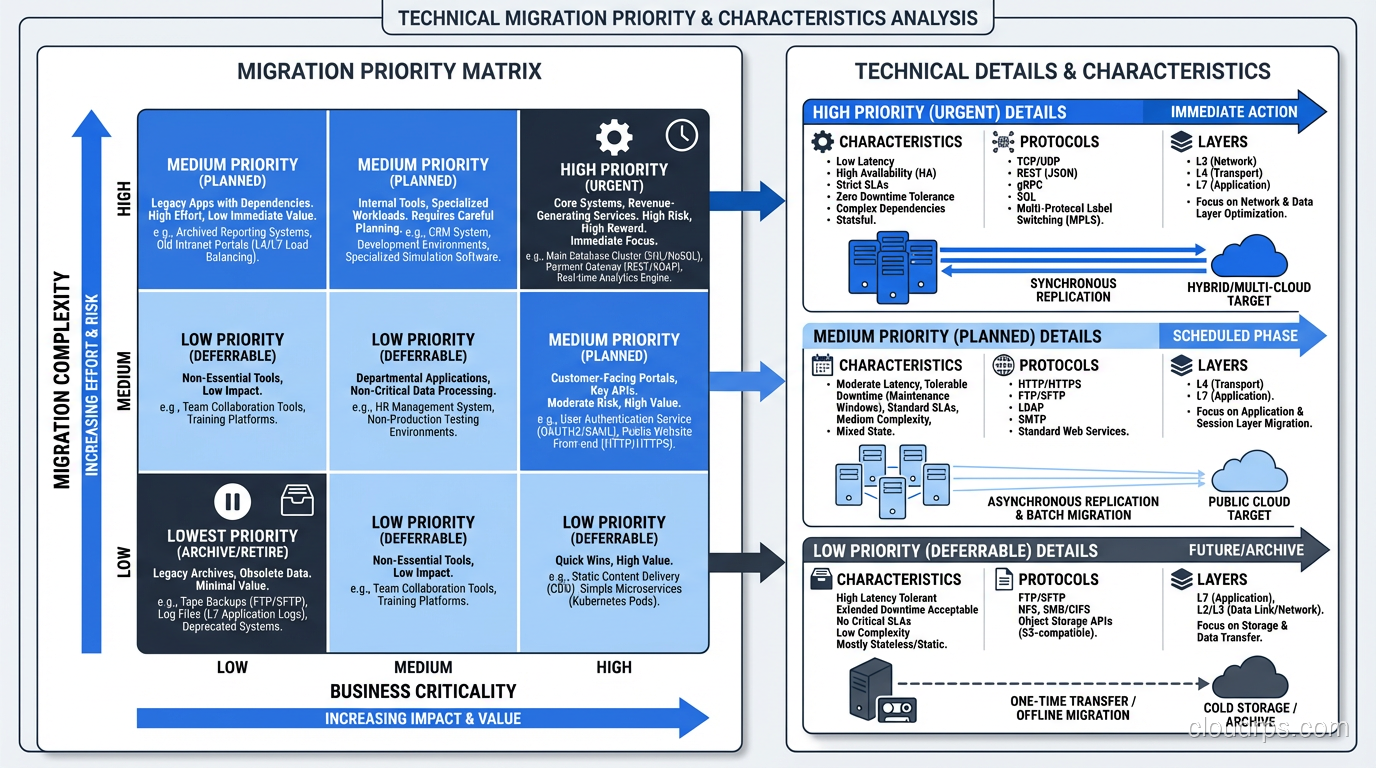
Not all applications are equal. Classify each application on two dimensions:
Business criticality: How much damage occurs if this application goes down? A customer-facing e-commerce platform is tier 1. An internal HR reporting tool is tier 3.
Migration complexity: How hard is it to move? A stateless web application on Linux is simple. A mainframe COBOL application with 40 years of business logic is nightmarish.
This two-dimensional classification drives your migration sequencing. Start with low-complexity, low-criticality applications (to learn and build confidence), then move to low-complexity, high-criticality applications (to deliver value), and save the high-complexity applications for last (when your team has experience and your landing zone is mature).
Total Cost of Ownership Analysis
Before migrating anything, you need an honest total cost of ownership (TCO) analysis. Cloud migration doesn’t always save money, at least not immediately. I’ve seen migrations that increased costs by 30% in the first year because nobody accounted for data transfer fees, reserved instance planning, or the cost of running both environments during the transition period.
A good TCO analysis includes: current infrastructure costs (hardware, maintenance, power, cooling, floor space, licensing), migration costs (tooling, labor, consulting, downtime), and projected cloud costs (compute, storage, network, licensing, managed services, operations).
Phase 2: Strategy and Planning
With discovery complete, you can build a migration strategy.
Choosing Your Migration Approach
The 7 Rs of cloud migration define the spectrum of migration approaches. For each application, you’ll choose one:
- Rehost (lift and shift): Move as-is to cloud infrastructure
- Replatform (lift, tinker, and shift): Make minor changes to take advantage of cloud services
- Refactor/Re-architect: Redesign the application for cloud-native patterns
- Repurchase: Replace with a SaaS solution
- Retire: Decommission
- Retain: Keep on-premises
- Relocate: Move to another on-premises environment
In my experience, a typical enterprise migration breaks down roughly as: 60% rehost, 15% replatform, 10% refactor, 10% repurchase, and 5% retire. The exact numbers vary, but rehosting dominates because it’s the fastest path to getting out of the data center.
Building the Migration Wave Plan
Group applications into migration waves, sets of applications that will be migrated together. Wave composition considers:
- Application dependencies (migrate dependent apps together or ensure connectivity)
- Team capacity (how many apps can your migration team handle simultaneously)
- Business calendar (don’t migrate the payroll system during year-end processing)
- Risk appetite (mix high-risk and low-risk apps in each wave to limit blast radius)
I typically plan waves of 5-15 applications, with each wave taking 4-8 weeks including validation. The first wave is always the smallest and simplest; it’s your learning wave.
Landing Zone Design
The cloud landing zone is the foundational infrastructure your workloads will run on. This includes account structure, networking, identity and access management, security controls, logging, monitoring, and governance policies.
Do not, I repeat, do not start migrating applications until your landing zone is ready. I’ve seen organizations start migrating into a single account with no network segmentation, no security baseline, and no cost allocation tags. Cleaning that up after the fact is ten times more expensive than doing it right from the start.
Phase 3: Proof of Concept
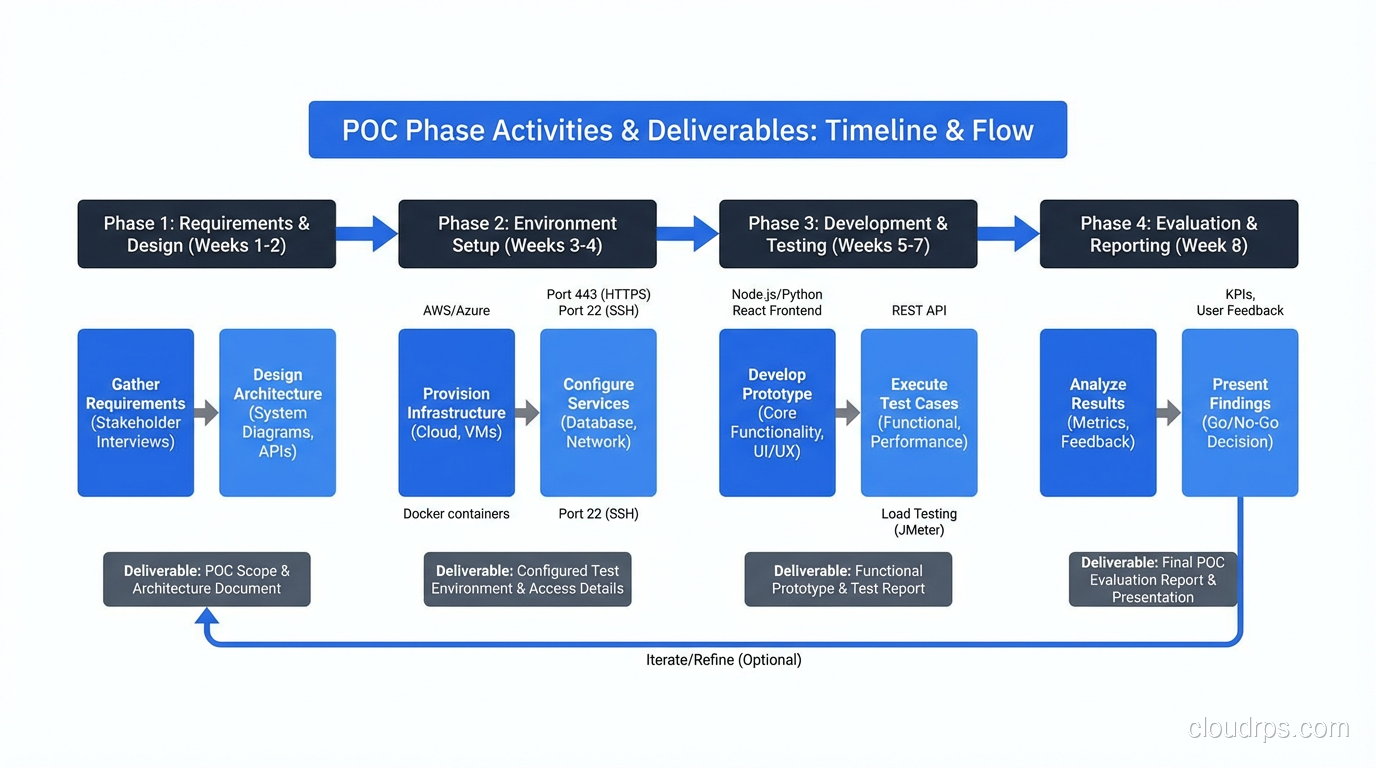
Before committing to the full migration, run a proof of concept with a small set of applications. This validates:
- Your landing zone design works for real workloads
- Network connectivity between cloud and on-premises is adequate
- Security controls don’t break application functionality
- Your migration tooling works as expected
- Your team’s skills are sufficient (or identifies training gaps)
I usually pick 3-5 applications for the POC: one simple web application, one database-backed application, and one that has specific requirements (GPU, high IOPS, regulatory compliance) that test the edge cases of your landing zone.
The POC phase typically takes 4-6 weeks. Don’t rush it. The lessons learned here shape every subsequent wave.
Phase 4: Migration Execution
This is where the actual migration happens, wave by wave.
Pre-Migration Checklist
For each application in each wave:
- Runbook reviewed and signed off by application owner
- Rollback plan documented and tested
- Cutover window agreed with business stakeholders
- Monitoring and alerting configured in the target environment
- DNS and load balancer changes staged
- Communication plan distributed
The Migration Itself
The specific technical steps depend on the migration approach (rehost, replatform, etc.) and the tooling you’re using. But the general pattern is:
Replicate: Copy data and server images to the target environment. For rehost, tools like AWS MGN (Application Migration Service) handle this. For databases, use native replication or AWS DMS.
Test: Spin up the target environment and run functional tests, performance tests, and integration tests. Don’t skip integration tests. I’ve seen migrations that passed every unit test but failed in production because an upstream service couldn’t reach the new IP addresses.
Cutover: Switch production traffic to the cloud environment. This is usually a DNS change, load balancer update, or route table modification. The cutover window is the riskiest moment, so keep it short and have your rollback plan ready.
Validate: After cutover, monitor everything. Application logs, performance metrics, error rates, user complaints. I keep the on-premises environment running in parallel for at least a week after cutover.
Decommission: Once you’re confident the cloud environment is stable, shut down the on-premises resources. Don’t rush this. I’ve seen teams decommission too early and regret it.
Handling Dependencies
The hardest part of migration execution isn’t moving individual applications; it’s managing the dependencies between them. Application A calls Application B, which reads from Database C, which replicates to Database D. If you migrate A without B, you need network connectivity between cloud and on-premises. If you migrate B’s database but not B’s application server, you need to update connection strings.
I draw dependency maps for every wave. The maps are always more complex than anyone expects. There’s always a mystery dependency that nobody documented: a cron job that calls an API, a stored procedure that writes to a file share, a legacy integration that uses SFTP.
Phase 5: Optimization
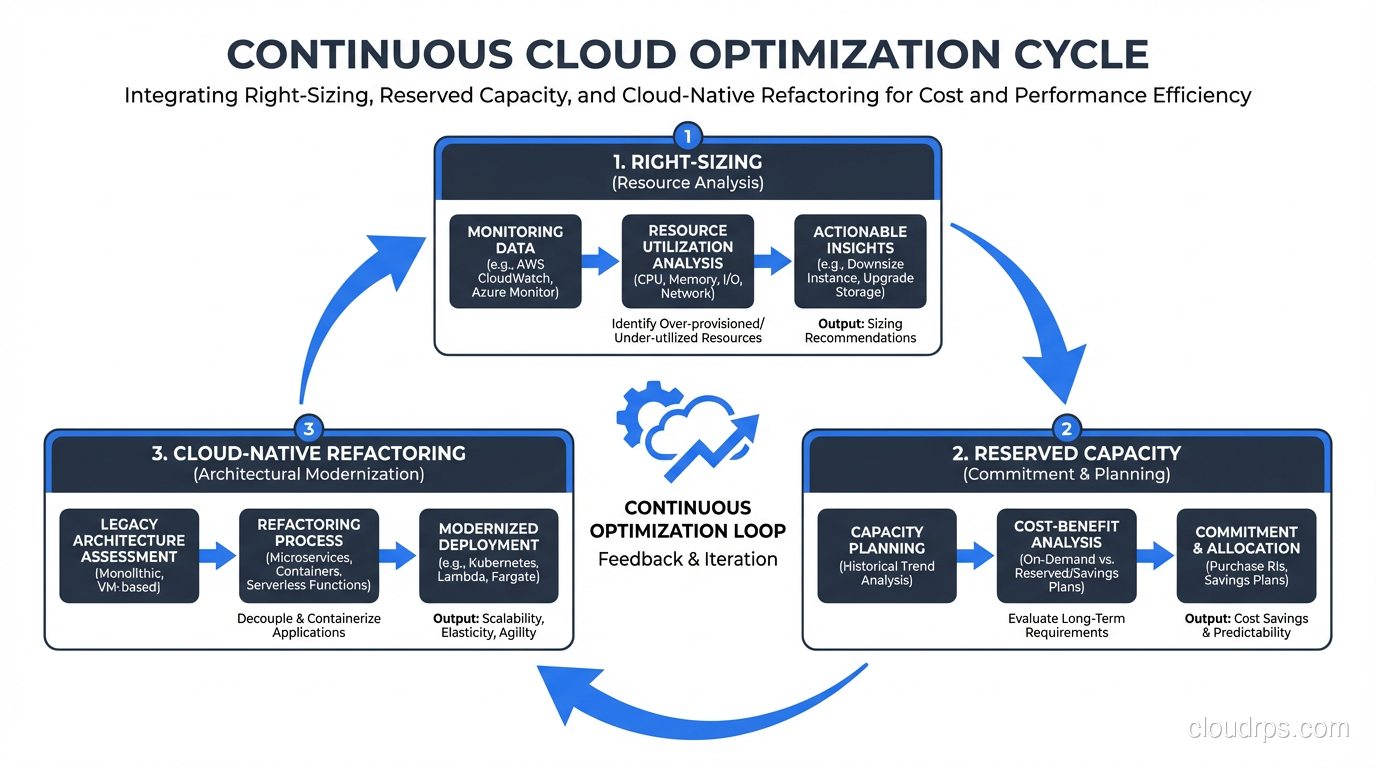
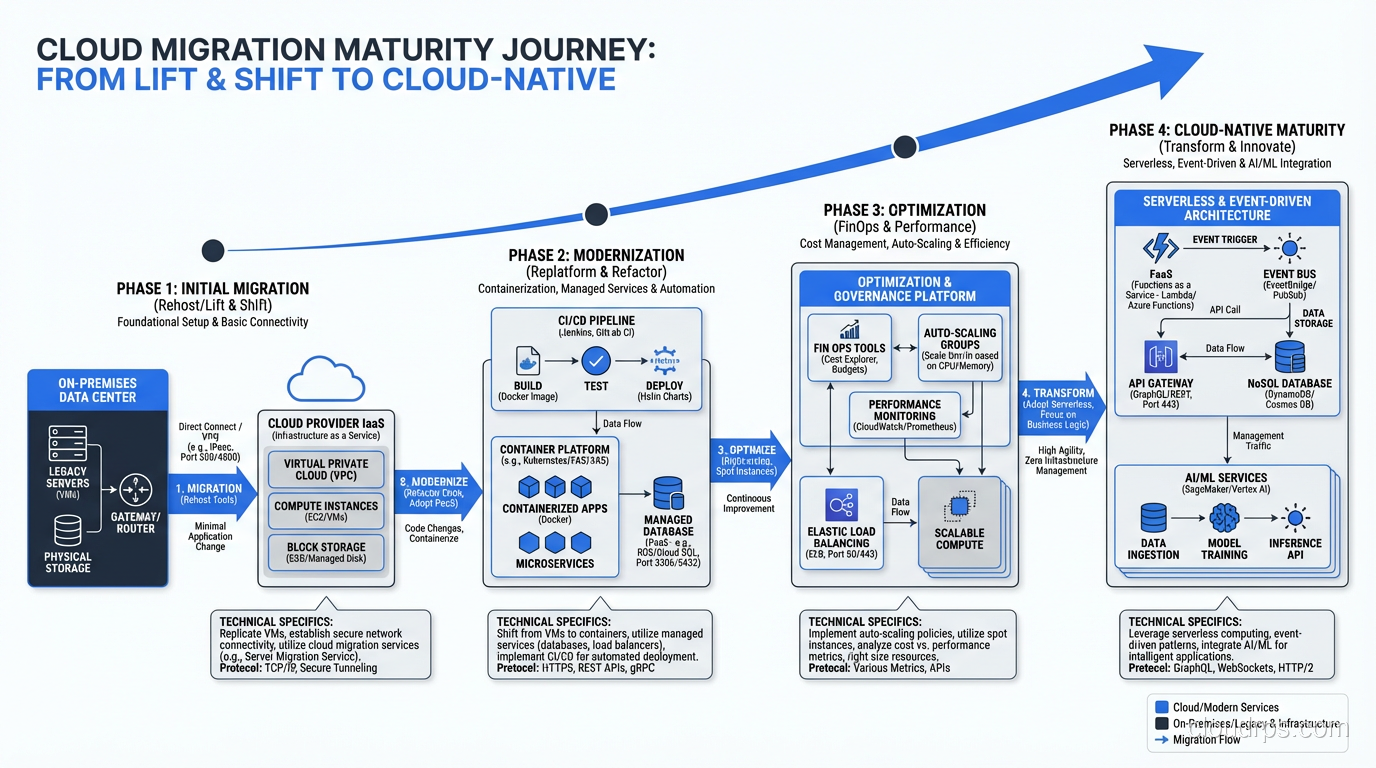
Rehosting gets your workloads to the cloud, but it doesn’t optimize them. Phase 5 is about right-sizing, cost optimization, and taking advantage of cloud-native capabilities.
Right-Sizing
On-premises servers are typically oversized because hardware procurement takes months and nobody wants to be the person who ordered too little. In the cloud, you can resize in minutes. After a few weeks of monitoring actual utilization in the cloud, right-size every instance.
I’ve consistently seen 30-40% cost reduction from right-sizing alone. Most on-premises servers run at 10-20% CPU utilization. There’s no reason to pay for an m5.4xlarge when an m5.xlarge handles the workload.
Reserved Capacity and Savings Plans
Once your workloads are stable and right-sized, purchase reserved instances or savings plans for predictable workloads. This typically delivers 30-50% savings over on-demand pricing.
Cloud-Native Refactoring
For applications that justify the investment, refactoring toward cloud-native patterns (containerization, serverless, managed databases) delivers both cost savings and operational improvements. But this is a separate project, not part of the initial migration. Don’t let refactoring ambitions delay the migration itself.
Phase 6: Governance and Continuous Improvement
Migration isn’t done when the last server moves. You need ongoing governance:
- Cost management: Budgets, alerts, tagging enforcement, regular reviews
- Security posture: Continuous compliance scanning, vulnerability management, access reviews
- Operational excellence: Runbook automation, incident response procedures, capacity planning
- Architecture review: Regular reviews to identify refactoring opportunities
I set up monthly cloud operations reviews with every client. We review cost trends, security findings, operational incidents, and optimization opportunities. Without this cadence, costs creep up and technical debt accumulates.
Common Mistakes I See Repeatedly
Starting without a landing zone. Migrating into an ungoverned environment creates a mess that takes months to clean up.
Trying to refactor everything during migration. Rehost first, optimize later. Trying to modernize and migrate simultaneously doubles the risk and timeline.
Underestimating network requirements. The network between on-premises and cloud is the lifeline during migration. Size it generously, test it thoroughly, and monitor it continuously.
Ignoring the people side. Your operations team needs training. Your developers need to learn cloud services. Your finance team needs to understand OpEx vs CapEx. Budget for training and change management.
No rollback plan. Every migration step should have a documented, tested rollback procedure. The one time you need it and don’t have it will be catastrophic.
Cloud migration is a journey with a clear destination but no shortcuts. Follow the process, invest in the foundation, and resist the temptation to skip steps. I’ve never regretted being methodical. I’ve frequently regretted being rushed.
Get Cloud Architecture Insights
Practical deep dives on infrastructure, security, and scaling. No spam, no fluff.
By subscribing, you agree to receive emails. Unsubscribe anytime.