
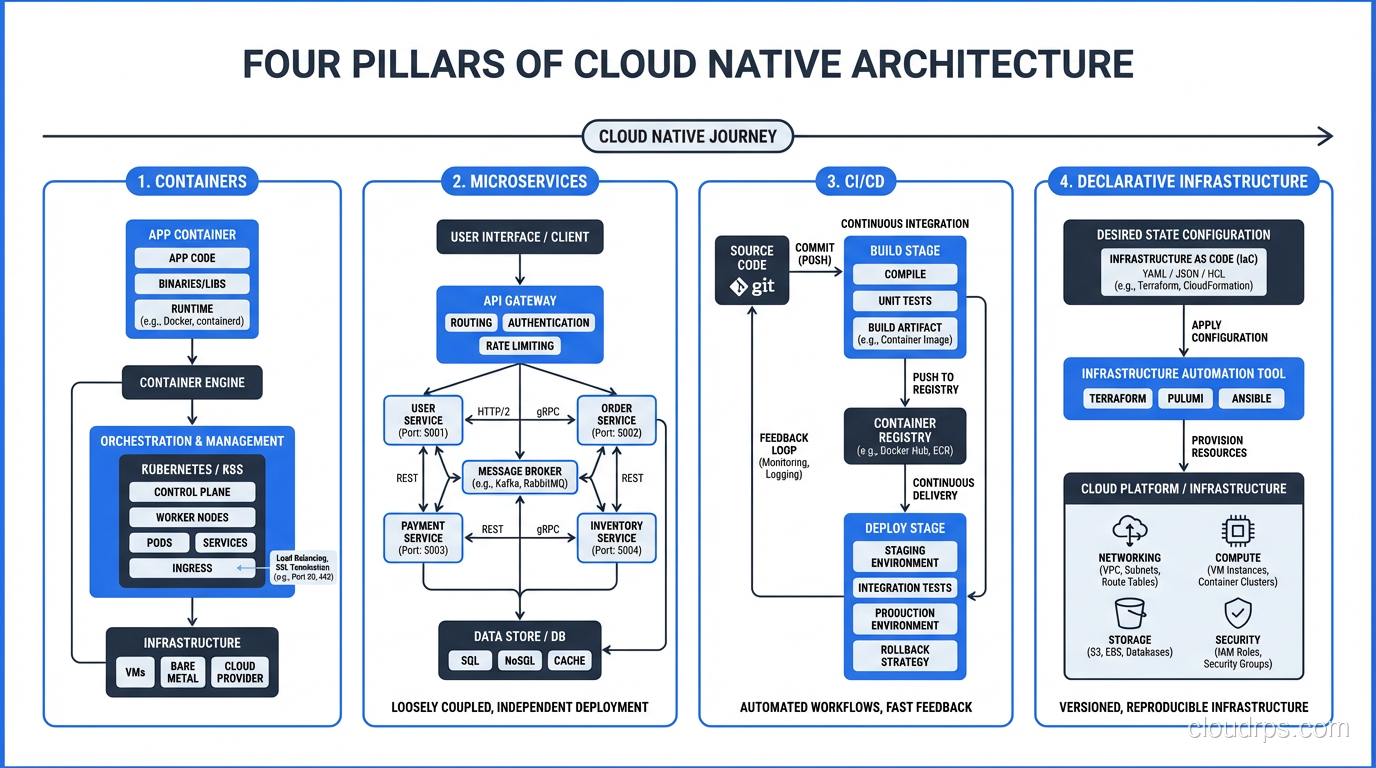
I was at a conference in 2018 when a startup founder told me their application was “cloud native.” I asked what that meant to them. They said, “We run on AWS.” That’s not cloud native. That’s cloud-hosted. There’s a massive difference, and confusing the two leads to architectures that get all the complexity of modern cloud patterns with none of the benefits.
Cloud native has become one of those terms that means everything and nothing simultaneously. Every vendor claims their product is cloud native. Every job posting requires cloud native experience. The CNCF (Cloud Native Computing Foundation) has a definition, but it reads like a press release. So let me give you the practitioner’s definition, what cloud native actually means when you’re building real systems.
The Real Definition
Cloud native is an approach to building and running applications that fully exploits the advantages of the cloud computing delivery model. Applications are designed from the ground up to leverage cloud characteristics: elasticity, distribution, automation, and managed services.
A cloud native application:
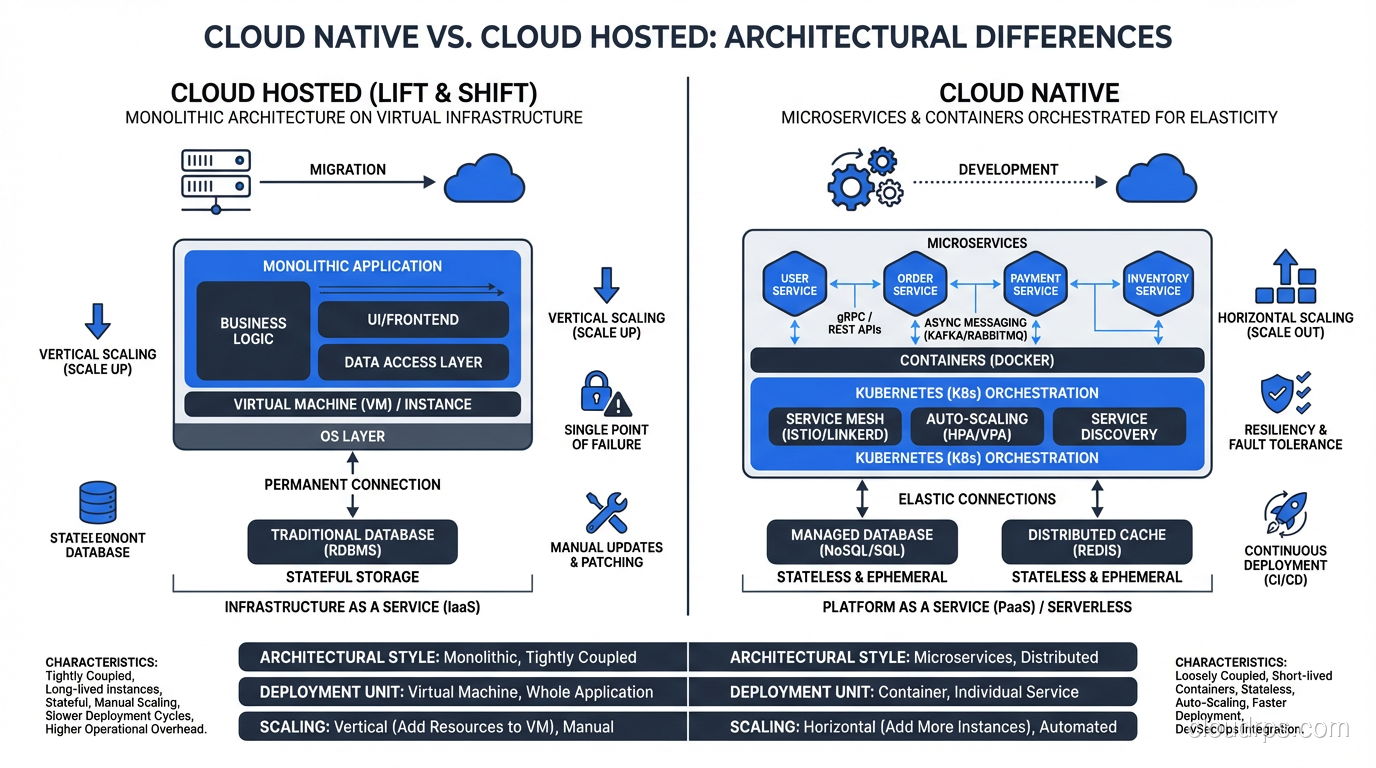
- Runs in containers (or serverless functions), not on VMs configured by hand
- Is composed of loosely coupled services, not a single monolithic process
- Is deployed through automated pipelines, not manual processes
- Manages infrastructure as code, not through console clicking
- Scales horizontally, not vertically
- Expects and handles failure, not assumes stability
The critical distinction: cloud native isn’t about WHERE you run. It’s about HOW you build. You can run a legacy monolith on Kubernetes and it’s still not cloud native. You can run a properly designed microservices architecture on bare metal and it arguably is cloud native (though that would be unusual).
The Four Pillars
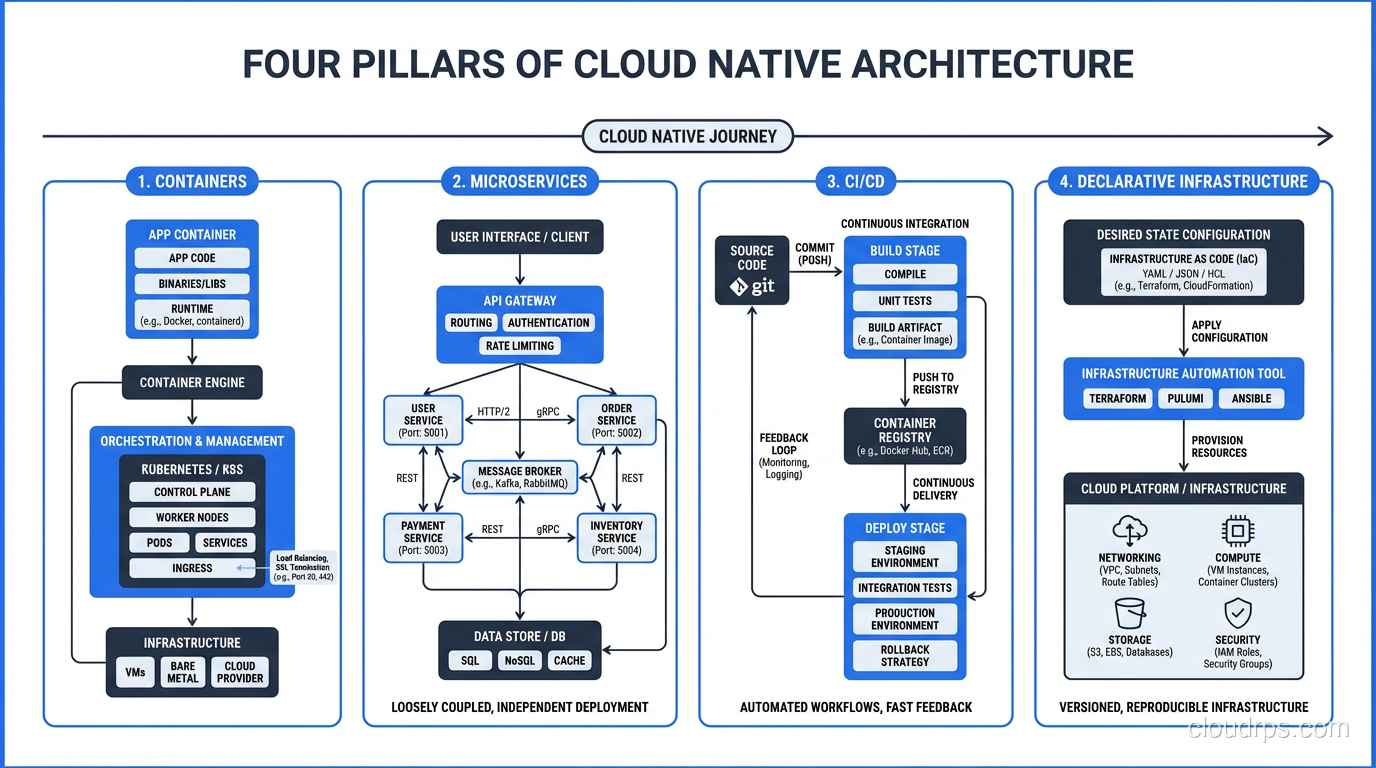
Pillar 1: Containers
Containers are the packaging standard for cloud native applications. A container bundles your application code with its dependencies, runtime, and configuration into a single, portable, immutable unit.
I resisted containers for about two years longer than I should have. I had a well-oiled VM-based deployment pipeline, and I didn’t see the point. Then I joined a project with twelve microservices, each with different runtime requirements: Node.js 14, Python 3.8, Java 11, Go 1.17. Managing those runtimes across VMs was a nightmare. Containers solved it instantly, since each service brings its own runtime.
The key benefits that matter in practice:
Immutability. A container image is the same in dev, staging, and production. No more “works on my machine” because the machine IS the container. I’ve eliminated entire classes of deployment bugs by adopting container-based delivery.
Density. Containers share the host OS kernel and use far less overhead than VMs. Where I might run 10 VMs on a host, I can run 100+ containers. The economics are significantly better for microservices architectures.
Speed. Containers start in seconds, not minutes. This enables patterns like rapid scaling, rolling deployments, and canary releases that are impractical with VM-based deployment.
For deeper coverage on containers and Kubernetes, I wrote a dedicated post.
Pillar 2: Microservices
Microservices decompose applications into small, independently deployable services that communicate over well-defined APIs. Each service owns its data, its business logic, and its deployment lifecycle.
I want to be clear: microservices are not a universal good. I’ve built monoliths that served companies beautifully for years, and I’ve seen microservices implementations that were disasters. The right architecture depends on your team size, your problem domain, and your operational maturity.
That said, for organizations with multiple teams working on a single product, microservices provide genuine benefits:
Independent deployment. The payments team can deploy their service without coordinating with the inventory team. This organizational independence is the primary driver of microservices adoption. It’s about team autonomy, not technical elegance.
Independent scaling. The search service gets 100x more traffic than the account settings service. With microservices, you scale each independently. With a monolith, you scale everything together.
Technology flexibility. Each service can use the language, framework, and database that best fits its requirements. The real-time event processor uses Go. The ML pipeline uses Python. The admin dashboard uses Node.js. This is freedom that monoliths can’t provide.
Fault isolation. A bug in the recommendation service doesn’t crash the checkout service. In a well-designed microservices system, failures are contained within service boundaries.
Pillar 3: CI/CD
Continuous Integration and Continuous Delivery is the operational backbone of cloud native. Code changes are automatically built, tested, and deployed through a pipeline that enforces quality gates at every stage.
In a cloud native world, you deploy dozens of times per day across many services. This is only possible with full automation. Manual deployment gates don’t scale to microservices velocity.
My standard pipeline:
- Commit: Developer pushes code
- Build: Container image is built
- Unit tests: Automated tests run in the build pipeline
- Security scan: Static analysis and dependency vulnerability scanning
- Integration tests: Service is deployed to a test environment and tested with dependencies
- Staging deployment: Deployed to a production-mirror environment
- Production deployment: Canary or rolling deployment to production
- Verification: Automated smoke tests and metrics validation post-deployment
Every step is automated. No human in the loop except for code review (which happens before the commit).
Pillar 4: Declarative Infrastructure
Cloud native systems define their infrastructure as code, using declarative configuration rather than imperative procedures. You describe the desired state, and the system makes it happen.
Terraform, CloudFormation, Pulumi for infrastructure provisioning. If you are evaluating which IaC tool fits your team, I wrote a detailed comparison of Terraform, Pulumi, and CloudFormation that covers the real trade-offs. Kubernetes manifests, Helm charts for application deployment. GitOps (ArgoCD, Flux) for keeping deployed state synchronized with source control.
The principle is: if it’s not in code, it doesn’t exist. No clicking through consoles, no SSH-ing into servers to make changes, no snowflake configurations. Everything is version-controlled, reviewable, and reproducible.
I’ve been in the infrastructure-as-code camp since the early Puppet/Chef days, and declarative infrastructure remains one of the highest-leverage practices in modern operations. The ability to recreate your entire environment from code, and know that your production environment matches your staging environment exactly, eliminates an enormous category of operational incidents.
The Twelve-Factor App: Still Relevant
The Twelve-Factor App methodology, published by Heroku engineers in 2011, predates the term “cloud native” but captures many of the same principles. It’s still the best concise guide to building cloud native applications. Let me highlight the factors that matter most:
Config in the environment: Don’t hardcode configuration. Use environment variables or external configuration services. This enables the same container image to run in any environment.
Stateless processes: Application processes should be stateless. Any state that needs to persist must be stored in a backing service (database, cache, object store). This enables horizontal scaling and instance replacement.
Port binding: The application exports its service by binding to a port. It doesn’t depend on a runtime server being injected (no deploying WARs to Tomcat). The application is self-contained.
Disposability: Processes should start fast and shut down gracefully. A cloud native application must handle being killed and restarted at any time, because in a container orchestrator, that happens regularly.
Dev/prod parity: Keep development, staging, and production as similar as possible. Containers make this dramatically easier than it was in the VM era.
What Cloud Native Is NOT
Let me clear up some misconceptions:
Cloud native is not just Kubernetes. Kubernetes is a powerful tool for running cloud native applications, but it’s not a requirement. Serverless architectures on Lambda are cloud native. ECS on Fargate is cloud native. Even a well-designed application on Heroku is cloud native. The principles matter more than the platform.
Cloud native is not microservices only. A well-designed modular monolith deployed as a container through a CI/CD pipeline with declarative infrastructure can be cloud native. Microservices are a common pattern in cloud native architectures, but they’re not mandatory.
Cloud native is not a rewrite. You don’t need to rewrite your application from scratch to become cloud native. Many organizations adopt cloud native principles incrementally: containerize first, then add CI/CD, then extract services as needed. The strangler fig pattern (incrementally replacing parts of a monolith with services) is a proven migration strategy.
Cloud native is not more complex by definition. Done well, cloud native simplifies operations through automation, reproducibility, and managed services. Done poorly, it adds complexity without benefit. The difference is whether you’re adopting cloud native principles to solve real problems or because someone read a blog post.
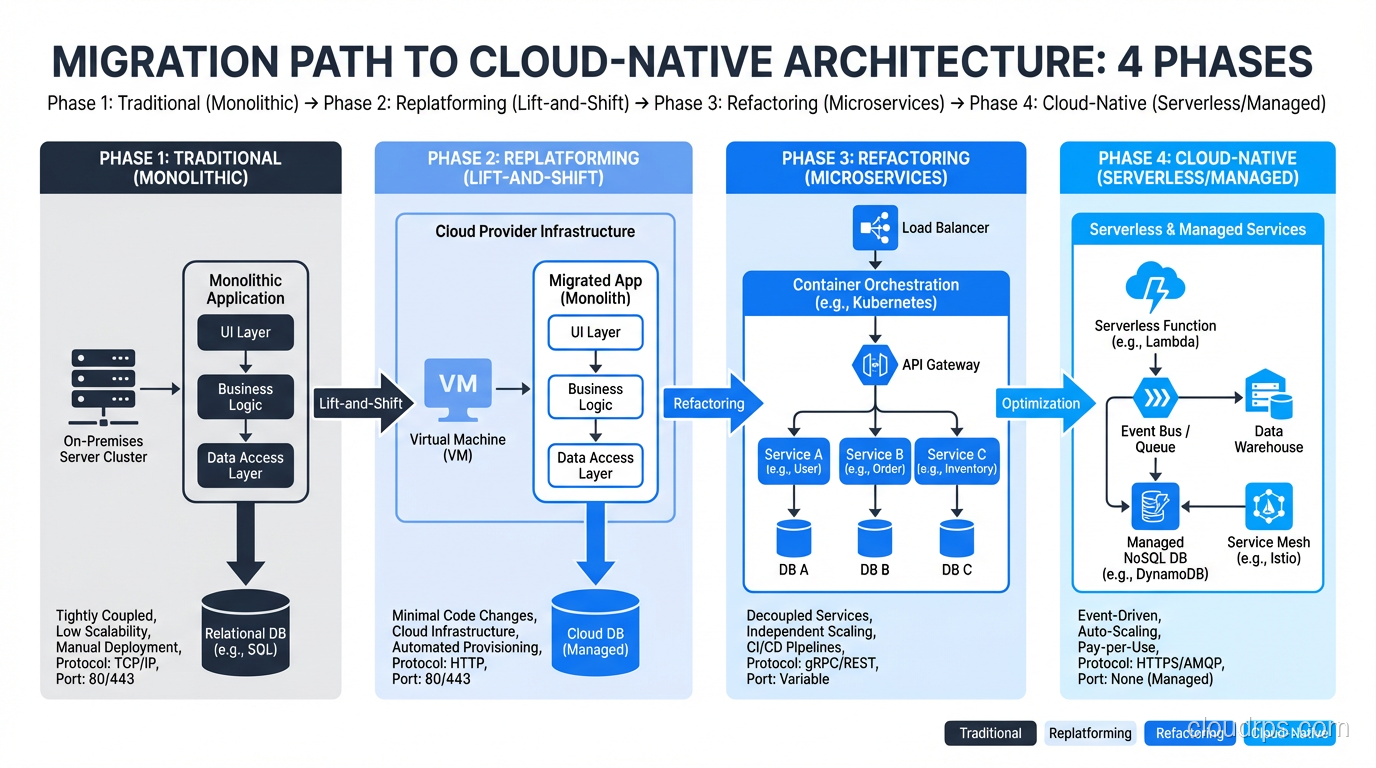
The Migration Path
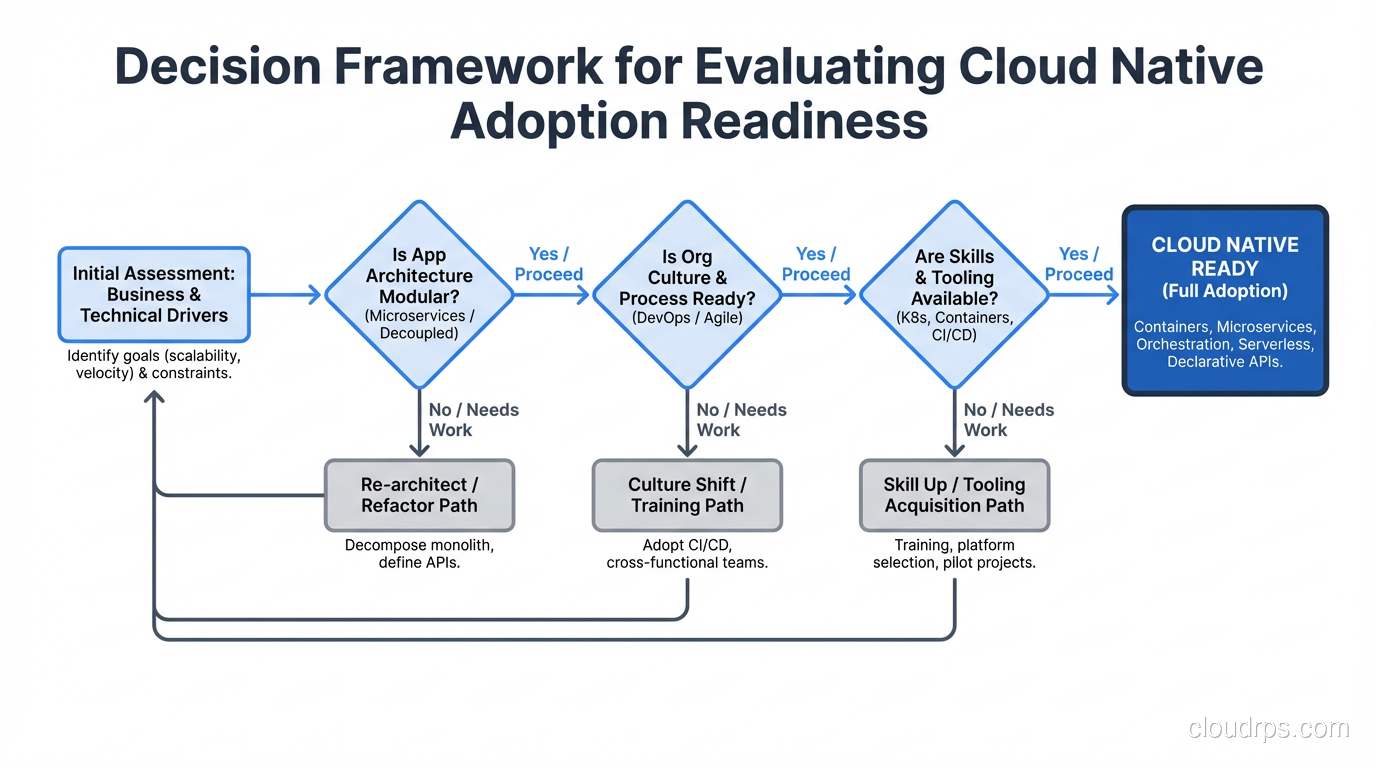
For organizations moving from traditional to cloud native, here’s the sequence I recommend:
Phase 1: Containerize
Package your existing application in containers. Don’t change the architecture; just change the packaging. This gives you immutable deployments, faster startup, and environment consistency. It’s the highest-value, lowest-risk first step.
Phase 2: Automate Delivery
Build a CI/CD pipeline that automatically builds, tests, and deploys your containerized application. This eliminates manual deployment, reduces human error, and creates the operational foundation for faster iteration.
Phase 3: Declare Infrastructure
Move your infrastructure provisioning from manual console clicks to Terraform (or equivalent). Version control your infrastructure. Make environments reproducible.
Phase 4: Extract Services (If Needed)
Only decompose into microservices when you have a clear organizational or scaling reason. Don’t extract services because someone told you monoliths are bad. Extract services because two teams need to deploy independently, or because one component needs to scale differently from the rest.
The Honest Trade-Offs
Cloud native architecture introduces complexity that traditional architectures don’t have:
Distributed systems are hard. Network failures, partial failures, eventual consistency, distributed transactions: these are genuinely difficult problems that don’t exist in a monolith talking to a local database.
Observability is harder. Tracing a request across multiple services requires investment in distributed tracing, structured logging, and metrics aggregation. A monolith’s single log file is much simpler to debug.
Operational overhead increases. More services means more things to deploy, monitor, debug, and maintain. Kubernetes itself has significant operational overhead unless you use a managed service.
Team skills matter more. Cloud native requires skills in containers, orchestration, CI/CD, networking, security, and distributed systems design. The bar for engineering competency is higher.
These are real costs. They’re worth it for large organizations building complex systems. They’re often not worth it for small teams building simple applications. Knowing when cloud native is the right approach, and when it’s unnecessary complexity, is one of the most important judgment calls an architect makes.
After thirty years of building systems, I’ve learned that the best architecture is the simplest one that meets your requirements. Sometimes that’s a cloud native microservices architecture on Kubernetes. Sometimes it’s a Rails monolith on Heroku. Both can be excellent choices. The key is matching the architecture to the actual problem, not to the industry’s current enthusiasm.
Get Cloud Architecture Insights
Practical deep dives on infrastructure, security, and scaling. No spam, no fluff.
By subscribing, you agree to receive emails. Unsubscribe anytime.