
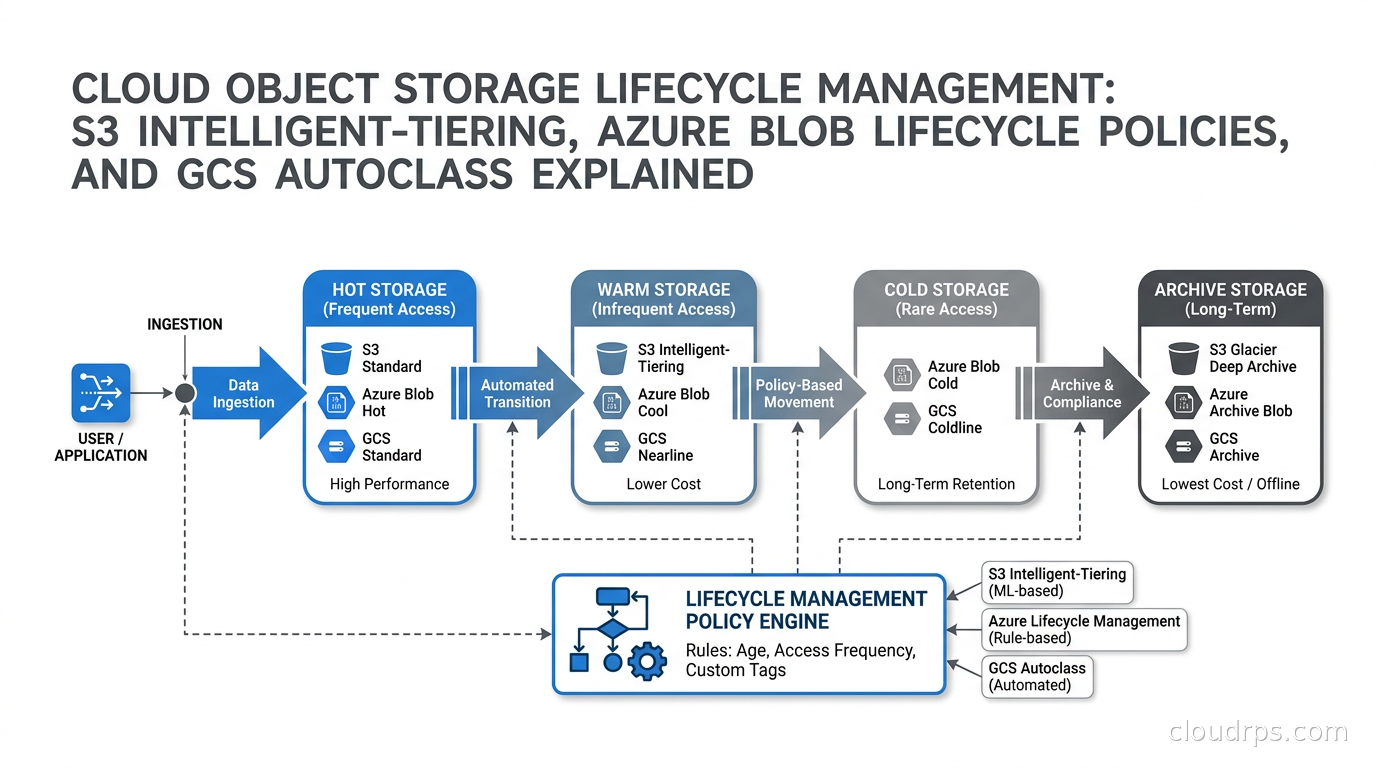
Twenty years in cloud infrastructure teaches you that most expensive storage mistakes are not about buying the wrong hardware or picking the wrong database. They are about forgetting that object storage is not a single price. Every major cloud provider now offers at least four storage tiers for object storage, and the price difference between the cheapest and most expensive tier can be 20x or more. I have watched teams drop six figures per year on data that nobody has touched in 18 months because they never configured a lifecycle policy.
This is not a novel problem. But I keep seeing it in 2026, even at companies with dedicated FinOps programs. The reason is usually one of three things: the team that built the data pipeline knew S3 but not lifecycle rules; the policy was written once and never revisited as data volumes grew; or someone was afraid to move compliance data to Archive tier because they were not sure if they could get it back fast enough. All three problems are solvable with clear thinking about access patterns and a day of configuration work.
This article walks through how lifecycle management works across the three major cloud providers, how to choose between automated tiering (Intelligent-Tiering, Autoclass) and manual lifecycle rules, and the practical considerations that determine which approach fits which workload. I will give you the framework for thinking about this, not just the console steps.
Why Object Storage Tiering Matters
Cloud object storage pricing has three components: the per-GB storage fee, the per-request fee, and the retrieval fee (which only applies to colder tiers). The per-GB fee varies dramatically by tier. As of September 2026, in AWS’s us-east-1 region, S3 Standard costs around $0.023 per GB per month, while S3 Glacier Deep Archive costs around $0.00099 per GB per month. That is roughly a 23x difference. At 100 TB, the gap between Standard and Deep Archive is the difference between paying about $2,300 per month and about $99 per month.
The catch is that colder tiers are not free to use. They impose minimum storage durations (if you delete an object before its minimum duration, you still pay for the full period), retrieval fees when you actually read the data, and latency on retrieval ranging from milliseconds for Instant Retrieval tiers to hours for Deep Archive. Understanding your access patterns is the prerequisite for everything else.
Before going deeper into the per-provider mechanics, it helps to understand what a lifecycle policy actually does: it automatically moves objects to cheaper tiers (or deletes them) based on age, tags, or both. You define the rules once, and the cloud provider enforces them continuously. The alternative, Intelligent-Tiering and equivalents like GCS Autoclass, uses access tracking to move objects automatically without you predicting the access pattern upfront.
AWS S3 Storage Classes and Lifecycle Policies
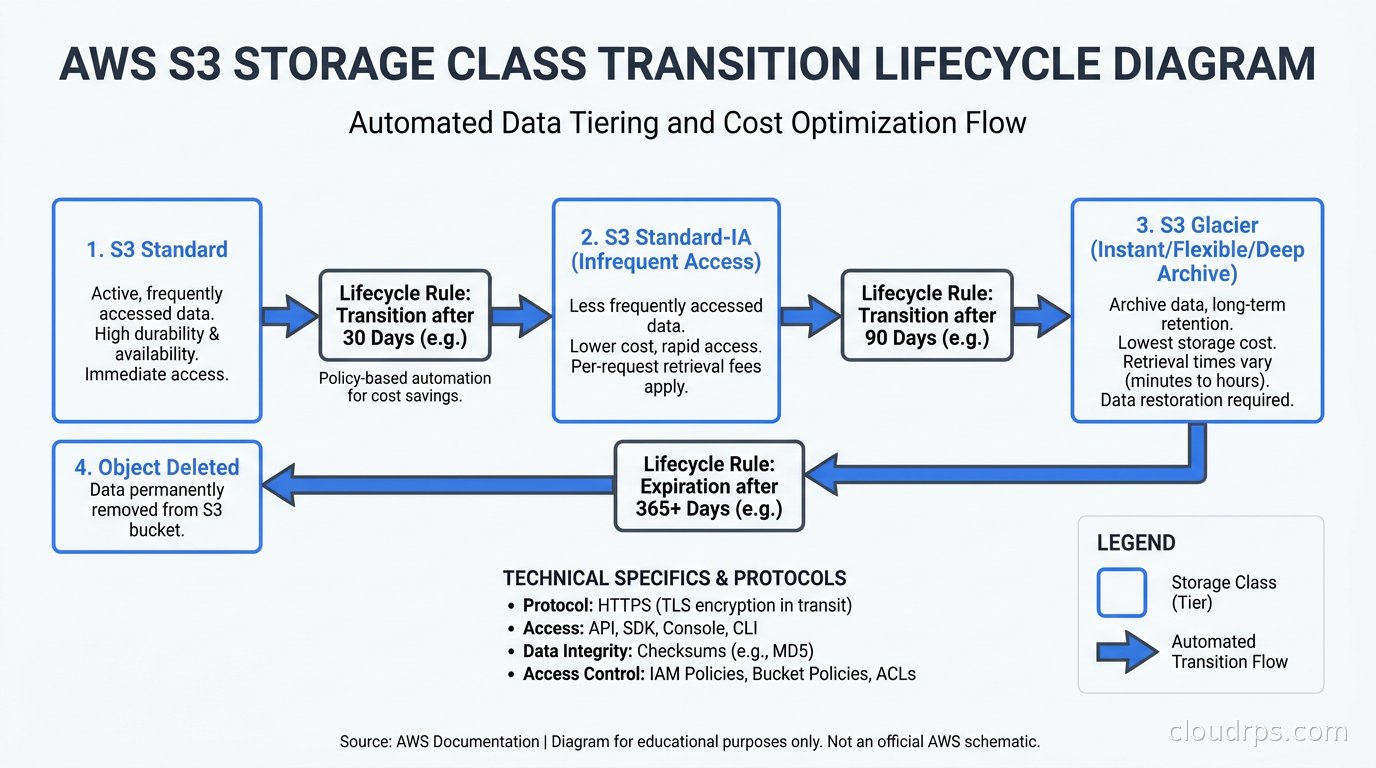
AWS offers more storage classes than any other provider, which is both a blessing and a source of confusion. The main classes you need to understand for lifecycle work are Standard, Standard-IA (Infrequent Access), One Zone-IA, Glacier Instant Retrieval, Glacier Flexible Retrieval, and Glacier Deep Archive. There is also S3 Express One Zone for ultra-low latency, and S3 Intelligent-Tiering, which is less a storage class than a tier management service layered on top of the others.
Standard-IA is the first transition point for data you access occasionally but not regularly. The per-GB rate is about 46% lower than Standard, but there is a per-GB retrieval fee and a 30-day minimum storage duration (if you delete or transition an object out of IA before 30 days, you are billed for the full 30 days). As of July 2026, AWS removed the previous requirement that objects must spend at least 30 days in S3 Standard before being eligible for a lifecycle transition to Standard-IA. You can now configure lifecycle rules to transition objects to Standard-IA on the same day they are created, which is useful for workloads like database backups or ML model checkpoints that are rarely accessed after the initial write. One Zone-IA stores data in a single availability zone, which cuts the price another 20% but means the data is gone if that AZ has a failure. I use One Zone-IA for derived data, thumbnails, and processing outputs that can be regenerated from primary storage.
Glacier Instant Retrieval is the sweet spot for compliance archives and ML training data. It retrieves in milliseconds like Standard, costs about 83% less per GB, but has a 90-day minimum and a higher per-retrieval fee. Glacier Flexible Retrieval (formerly just Glacier) adds retrieval latency of minutes to hours. Deep Archive is for data you expect to access fewer than twice a year; retrieval takes up to 12 hours for standard retrieval.
A typical lifecycle policy for application logs looks like this:
{
  "Rules": [
    {
      "ID": "application-logs-tiering",
      "Filter": { "Prefix": "logs/" },
      "Status": "Enabled",
      "Transitions": [
        { "Days": 30, "StorageClass": "STANDARD_IA" },
        { "Days": 90, "StorageClass": "GLACIER_IR" },
        { "Days": 365, "StorageClass": "DEEP_ARCHIVE" }
      ],
      "Expiration": { "Days": 2555 }
    }
  ]
}
This moves logs to Standard-IA after 30 days of inactivity (logs that are a month old are rarely accessed), to Glacier Instant Retrieval at 90 days, to Deep Archive at a year, and deletes them after 7 years. You can adjust the transitions to match your actual access patterns and retention requirements.
The part teams often miss is the transition cost. Every object transition incurs a per-thousand-objects fee. For buckets with millions of tiny objects like application event logs, those transition costs can offset the storage savings. AWS documents the transition costs per tier; they are worth calculating before you commit to a policy.
S3 Intelligent-Tiering
Intelligent-Tiering solves the problem where you cannot predict which objects will be accessed. It monitors access patterns per object and moves them automatically between Frequent Access, Infrequent Access, Archive Instant Access, Archive Access, and Deep Archive Access tiers. The storage rates match the manual tiers. The extra cost is a monitoring and automation fee: approximately $0.0025 per 1,000 objects per month as of late 2026, according to AWS pricing documentation.
The math on Intelligent-Tiering only works in your favor if the average object size is large enough for the monitoring fee to be smaller than the storage savings. AWS’s documentation gives a rough threshold around 128 KB. Below that, the monitoring fee per GB exceeds what you save on tiering. For buckets with millions of small objects (thumbnails, JSON event records, log lines), manual lifecycle rules or S3 Batch Operations are better.
The other limitation is that Intelligent-Tiering does not optimize aggressively for newly written objects. A log file written today will sit in Frequent Access for at least 30 days before becoming eligible to move to Infrequent Access, even if nobody reads it. For workloads where access drops predictably by age (which is most log and audit workloads), a time-based lifecycle rule starts saving money faster.
I use Intelligent-Tiering for user-generated content in production: documents, images, attachments whose access pattern depends on whether the user ever comes back. I use manual lifecycle rules for everything with a predictable time-based access profile: logs, metrics, ETL outputs, model training snapshots.
Azure Blob Storage Lifecycle Management
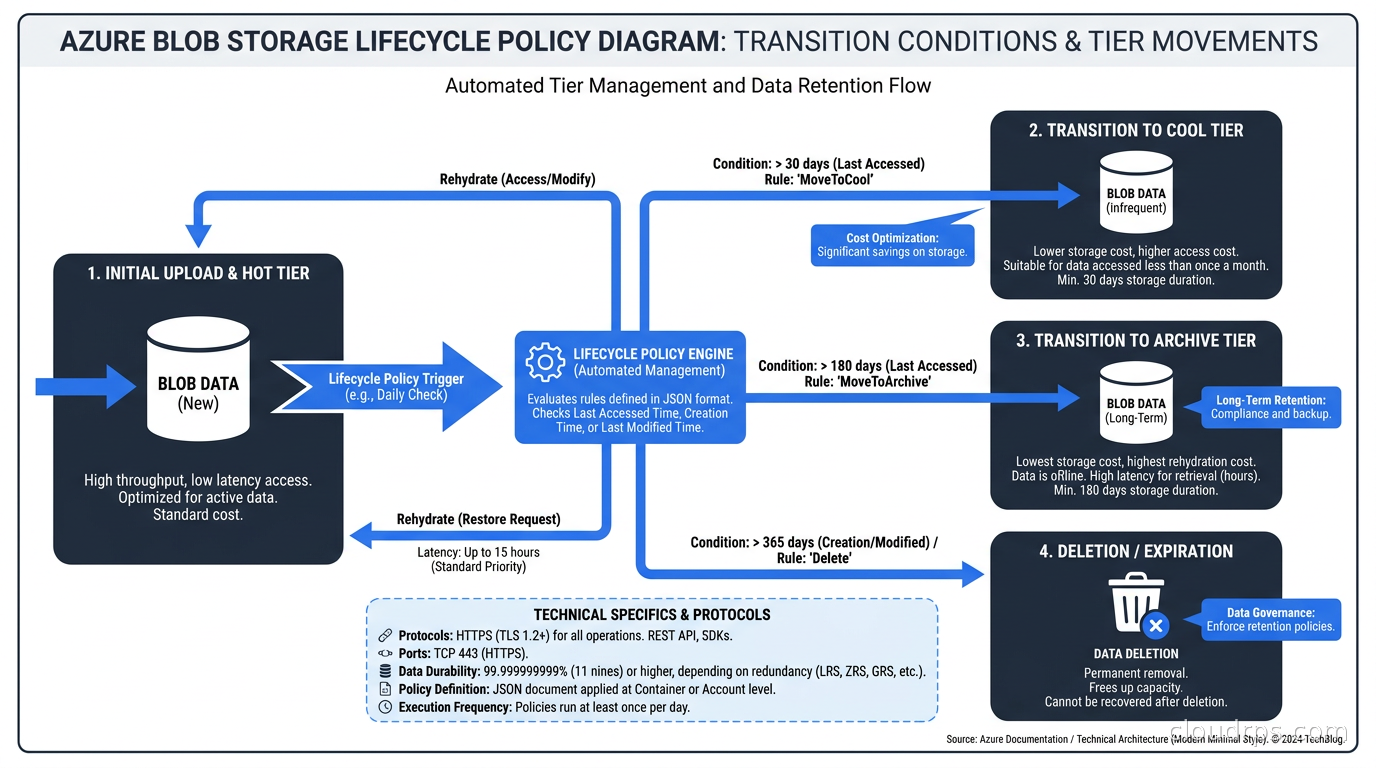
Azure’s tier structure is Hot, Cool, Cold, and Archive. As of September 2026, per Microsoft’s pricing documentation, Hot is around $0.018 to $0.023 per GB depending on region, Cool around $0.01, Cold around $0.0036, and Archive around $0.00099. The retrieval fee pattern mirrors AWS: colder tiers have higher per-GB retrieval costs, and Archive requires a rehydration step before the data is accessible.
Azure does not have an exact equivalent of Intelligent-Tiering as a per-object service, but it offers Smart tier, which is a feature that automatically moves blobs between Hot, Cool, and Cold based on access. Archive tier is excluded from automatic movement because rehydration takes time.
Azure lifecycle management policies are defined at the storage account or container level and support if-then rules:
{
  "rules": [
    {
      "name": "tiering-rule",
      "enabled": true,
      "type": "Lifecycle",
      "definition": {
        "filters": { "blobTypes": ["blockBlob"], "prefixMatch": ["backups/"] },
        "actions": {
          "baseBlob": {
            "tierToCool": { "daysAfterModificationGreaterThan": 30 },
            "tierToCold": { "daysAfterModificationGreaterThan": 90 },
            "tierToArchive": { "daysAfterModificationGreaterThan": 365 },
            "delete": { "daysAfterModificationGreaterThan": 2555 }
          }
        }
      }
    }
  ]
}
The transition from Archive to any accessible tier on Azure requires rehydration, which Microsoft calls “rehydrating a blob.” This can take up to 15 hours for standard rehydration or about 1 hour for high-priority rehydration (at a higher cost). For compliance data where you only need it if there is a legal hold or an incident, Archive is fine. For data you might need within minutes, you want Cold at coldest.
One thing Azure does well is blob index tags for lifecycle filtering. You can apply lifecycle policies based on custom tags, not just prefix and age. This lets you apply different retention rules to different data classifications stored in the same bucket (container):
{
  "filters": {
    "blobTypes": ["blockBlob"],
    "blobIndexMatch": [{ "name": "DataClassification", "op": "==", "value": "PII" }]
  }
}
This is genuinely useful for regulated industries where different data types have different retention requirements mandated by law. If you are building a data platform that handles both user analytics and HIPAA-regulated health data, tag-based policies let you enforce different rules without physically separating the data into separate accounts.
Google Cloud Storage and Autoclass
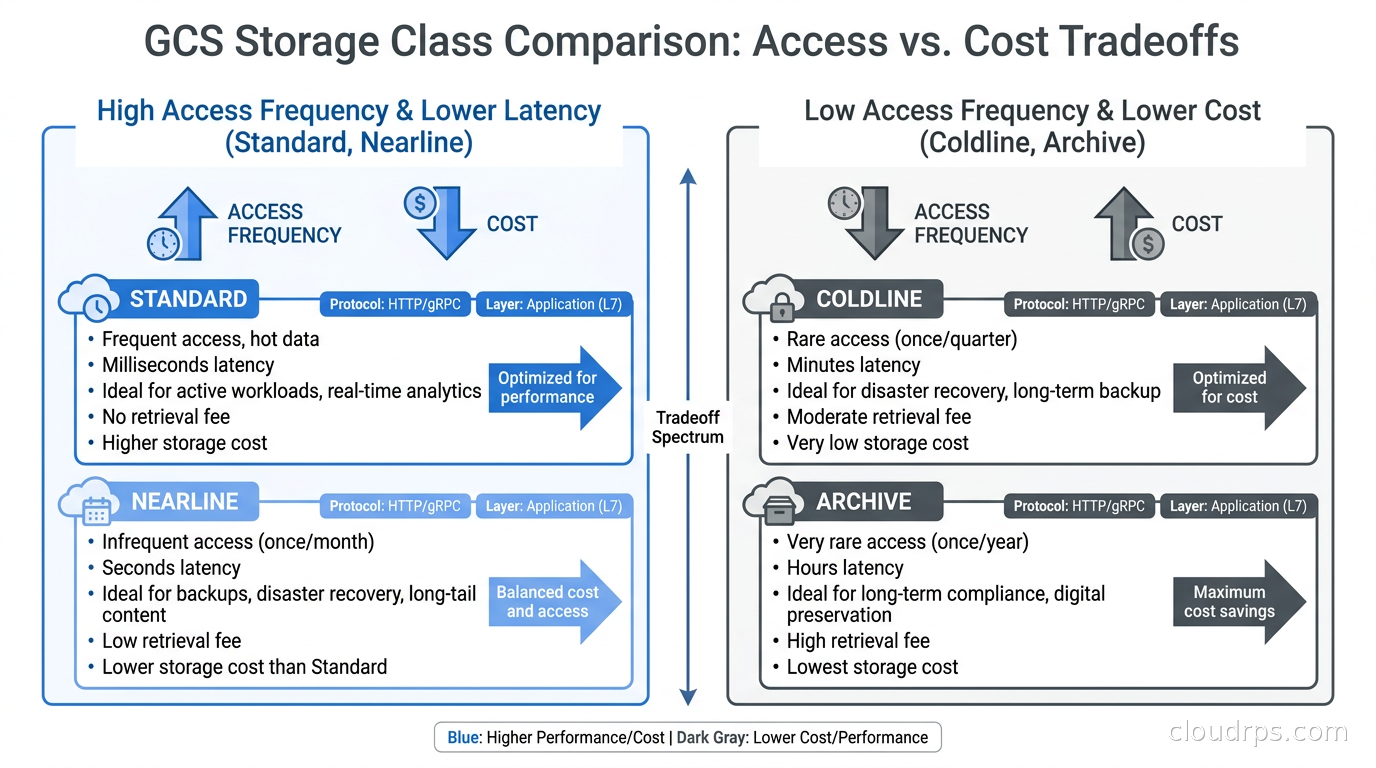
GCS has four storage classes: Standard, Nearline, Coldline, and Archive. Per Google’s pricing pages as of late 2026, Standard is around $0.02 per GB per month in US multi-region, Nearline $0.01, Coldline $0.004, and Archive $0.0012. Like AWS and Azure, colder tiers have minimum storage durations (Nearline: 30 days, Coldline: 90 days, Archive: 365 days) and per-byte retrieval costs.
GCS Lifecycle rules work similarly to AWS and Azure: you define conditions (age, storage class, number of newer versions, creation time) and actions (change storage class, delete). A straightforward log tiering policy:
{
  "lifecycle": {
    "rule": [
      {
        "action": { "type": "SetStorageClass", "storageClass": "NEARLINE" },
        "condition": { "age": 30 }
      },
      {
        "action": { "type": "SetStorageClass", "storageClass": "COLDLINE" },
        "condition": { "age": 90 }
      },
      {
        "action": { "type": "SetStorageClass", "storageClass": "ARCHIVE" },
        "condition": { "age": 365 }
      },
      {
        "action": { "type": "Delete" },
        "condition": { "age": 2555 }
      }
    ]
  }
}
GCS Autoclass is Google’s equivalent of S3 Intelligent-Tiering. It monitors access patterns per object and automatically sets the storage class to minimize cost for the observed pattern. Autoclass handles the full range from Standard down to Archive (with the option to restrict the coldest tier it can use), and there is no per-object monitoring fee analogous to Intelligent-Tiering’s per-1,000-objects charge. Instead, Autoclass charges a flat monthly fee per bucket when enabled.
The critical detail about Autoclass is how it handles newly uploaded objects. Everything starts in Standard regardless of the Autoclass setting. GCS then monitors access and transitions downward as access frequency drops. The transition to Coldline requires 90 days of no access, and to Archive requires 365 days. For workloads where access drops quickly (logs that are rarely read after 7 days), this means Autoclass will be slower to optimize than a manual policy with age-based rules. The manual rule starts transitioning at day 30; Autoclass transitions based on observed access, which takes longer to confirm.
Choosing Between Automated Tiering and Manual Rules
The choice between Intelligent-Tiering, Autoclass, and manual lifecycle rules comes down to one question: do you know your access pattern?
If access frequency is primarily age-dependent, use manual rules. This covers the vast majority of operational data: logs, metrics, audit trails, ETL outputs, backups, model training snapshots. These data patterns are predictable. A file written yesterday has high access probability. A file written a year ago almost certainly has low access probability unless an incident or audit triggers a lookup. Manual rules capture this perfectly, start saving money immediately, and cost nothing per object to operate.
If access frequency is user-driven and unpredictable, use Intelligent-Tiering or Autoclass. User-generated content, project archives, media files, and document stores fall into this category. Whether a file written six months ago gets accessed depends on whether the user who created it is still active, whether a project gets revived, or whether someone does a bulk export. You cannot write a meaningful age-based policy for this without either paying too much (keeping everything in Standard) or paying retrieval fees on data that turns out to still be warm.
The size-based cost floor for Intelligent-Tiering is worth computing before you enable it. For a bucket with 10 million objects averaging 50 KB each, the monitoring fee is 10,000 * $0.0025 = $25 per month. The storage savings start appearing only if enough objects are inactive enough to drop from Standard to IA (about a 46% storage discount). If your objects average 500 KB and most are accessed less than once a month after 30 days, the math works in your favor. If your objects average 5 KB and get accessed frequently throughout their lifetime, manual rules probably save more.
Practical Implementation Patterns
When I implement storage lifecycle management for a new system, I start with a storage audit. Most cloud providers have storage analytics: S3 Storage Lens, Azure Storage Insights, GCS Cloud Monitoring. Run a one-week analysis of per-prefix access patterns before writing any policy. You often discover that a “hot” data pipeline is leaving cold data in the wrong prefix, or that a cache layer means your retrieval patterns look different from what the application developers expect.
The second thing I do is separate buckets by access profile rather than mixing everything together. This sounds like extra overhead, but it makes lifecycle policy management much cleaner:
raw-data-{env}/: incoming raw data, lifecycle to IA at 7 days, Glacier at 30processed-{env}/: ETL outputs, lifecycle to IA at 30 days, Glacier at 90archives-{env}/: cold archives, straight to Glacier Instant Retrieval on writeuser-uploads-{env}/: Intelligent-Tiering enabled
When you mix data with different profiles in the same bucket using prefixes, you end up with complex policy logic and accidental transitions when a new team starts writing data under an unexpected prefix.
Tag-based policies are powerful for regulated data. In financial services and healthcare, different data types have different legally mandated retention periods. Rather than maintaining separate buckets for each data classification, you can tag objects at write time:
s3.put_object(
    Bucket='data-lake',
    Key='events/2026/09/24/batch.parquet',
    Body=data,
    StorageClass='STANDARD',
    Tagging='DataClass=operational&RetentionYears=3'
)
Then apply separate lifecycle rules for each DataClass value. This keeps the bucket topology simple while enforcing per-classification retention. Make sure your data pipeline sets tags consistently at write time, and validate tag presence in your data quality checks. A tag omitted at write time means no policy applies, and data stays in Standard forever.
The other mistake I see regularly is forgetting multipart uploads. A multipart upload that never completes leaves parts that are not visible in the bucket listing but do consume storage at Standard pricing. All three providers support lifecycle rules to clean up incomplete multipart uploads:
{
  "Rules": [
    {
      "ID": "abort-incomplete-multipart",
      "Status": "Enabled",
      "AbortIncompleteMultipartUpload": { "DaysAfterInitiation": 7 }
    }
  ]
}
I add this to every bucket by default. Failed uploads in an ETL pipeline accumulate silently, and multipart upload parts are charged at Standard rates regardless of what lifecycle rules apply to completed objects. One production incident taught me this lesson: an ETL job that had been failing silently for three months had accumulated hundreds of GBs of orphaned parts. The bill was not enormous but the waste was avoidable.
Cross-Cloud Considerations and Edge Cases
If your architecture spans multiple cloud providers, as I have seen increasingly in multi-cloud strategies, note that the tiering semantics differ enough to matter for compliance and DR design. AWS Glacier requires explicit retrieval requests before data is readable; Azure Archive requires rehydration that can take hours; GCS Archive also requires a retrieval operation. But the S3 Glacier Instant Retrieval tier is millisecond-latency despite the name, which is confusingly different from the behavior teams expect when they hear “Glacier.”
For disaster recovery and backup designs involving cold storage, these latency differences matter for your RTO and RPO targets. If your recovery plan requires restoring from archive in two hours, AWS Glacier Instant Retrieval or Azure Cold tier work; AWS Glacier Deep Archive does not unless you initiate retrieval 12 hours before you need the data.
The relationship between lifecycle tiering and egress costs also deserves attention. Moving data between tiers incurs transition fees, not egress fees. But once data is in Archive tier and you retrieve it, you pay both the retrieval fee and, if you then transfer it out of the region, the egress fee. For disaster recovery tests that involve pulling archived data and restoring it in a different region, the cost model gets complex quickly. Factor this into your DR test budgets. The egress cost architecture article has detailed numbers on inter-region transfer costs.
Object versioning interacts with lifecycle policies in ways that catch teams off guard. If versioning is enabled, lifecycle rules apply to each version independently. An object that gets overwritten daily will accumulate old versions, each with their own lifecycle timeline. You need separate lifecycle rules for current versions and noncurrent versions:
{
  "Rules": [
    {
      "ID": "current-versions",
      "Status": "Enabled",
      "Filter": {},
      "Transitions": [
        { "Days": 30, "StorageClass": "STANDARD_IA" }
      ]
    },
    {
      "ID": "noncurrent-versions",
      "Status": "Enabled",
      "Filter": {},
      "NoncurrentVersionTransitions": [
        { "NoncurrentDays": 7, "StorageClass": "GLACIER_IR" }
      ],
      "NoncurrentVersionExpiration": { "NoncurrentDays": 90 }
    }
  ]
}
Without the noncurrent version rule, versioned buckets with frequent writes will accumulate versions in Standard storage until someone notices the bill.
Connecting to the Broader Data Architecture
Object storage lifecycle management does not exist in isolation. The tiering decisions you make directly affect the economics of the data lakehouse layer on top. If your Apache Iceberg metadata points to files that have been transitioned to Glacier, any query that touches those files will either fail or incur retrieval costs, depending on how the query engine handles it. Iceberg itself does not automatically prevent queries from accessing cold storage. You need to partition your data such that active query partitions stay in Standard or IA, and archive partitions sit in Glacier behind a separate access path.
The same applies to data warehouses that query directly from S3. Snowflake, BigQuery, and Redshift Spectrum all support querying from object storage, but if the files have been tiered to Glacier, those queries will hit retrieval fees and latency that can break SLAs. Be explicit about which S3 prefixes are queryable at warehouse speed and which are archival-only.
For backups specifically, lifecycle tiering pairs well with database backup strategies that dump to S3. Full backups from six months ago are unlikely to be needed for recovery but may be needed for point-in-time analysis or compliance. Transitioning them to Glacier Instant Retrieval or Archive after 90 days is almost always the right call. The retrieval latency is acceptable for compliance work; the cost savings are substantial.
Monitoring and Governance
Once lifecycle policies are in place, the work is not done. You need to monitor that they are executing as expected and that data volumes are tracking your projections.
S3 Storage Lens gives a per-prefix, per-storage-class breakdown of object counts and bytes. Set up a weekly review of Storage Lens metrics for your largest buckets. A storage class distribution that is 90% Standard on a 12-month-old bucket is a signal that lifecycle rules are misconfigured or not applied to new prefixes. Azure Storage Insights and GCS Cloud Monitoring provide equivalent dashboards.
The FinOps cost anomaly detection tooling from your cloud provider can alert on unusual storage cost spikes, but it typically does not distinguish between “you stored more data” and “your lifecycle policy stopped working.” For that, you need per-storage-class usage tracking as a separate metric. A sudden drop in data volume moving from Standard-IA to Glacier, combined with Standard costs rising, means something broke in your lifecycle chain.
Tag coverage auditing matters if you are using tag-based policies. S3 and Azure both let you run inventory reports that include tags. Schedule a monthly inventory analysis that checks for objects with missing classification tags and routes them for manual review. Objects that slip through the tagging step at write time are a compliance risk: they may stay in Standard forever and miss the retention schedule your legal team requires.
What Twenty Years of Storage Bills Teaches You
The pattern I see most consistently is that storage optimization gets deferred. The team building the pipeline is focused on getting data flowing, not on lifecycle rules that will not matter for six months. Then six months pass, the data accumulates, and nobody remembers to revisit the storage design.
The fix is to make lifecycle policy configuration part of the infrastructure as code template for every new bucket, not an afterthought. If you use Terraform or CDK or Pulumi to provision your buckets, include the lifecycle policy in the module. Make it opt-out, not opt-in. A sensible default (move to IA at 30 days, Glacier at 90) is right for most workloads, and teams that need different behavior can override it. Buckets created with no lifecycle policy are the ones that run up bills.
The second pattern is over-engineering the tiering policy. Four or five tiers with overlapping conditions become hard to reason about when something goes wrong. Start with two transitions: Standard to Standard-IA at 30 days, and Standard-IA to Glacier Instant Retrieval at 90 days. That alone handles 80% of the savings opportunity for most teams. Add Deep Archive only for data with legally mandated multi-year retention where you are confident you will never need it quickly.
The third pattern is confusing retrieval cost with inaccessibility. Glacier is not tape; you can retrieve your data, you just pay more for it. For data you access less than once per quarter, even Glacier retrieval costs are typically lower than Standard storage for that period. Do the math on your actual retrieval frequency before avoiding colder tiers out of fear.
Cloud object storage is not expensive by default. It gets expensive when you treat it like a write-once dump and never think about where your data actually needs to live as it ages. Lifecycle policies are the mechanism that keeps costs aligned with the actual value of your data over time. Set them up at bucket creation, review them quarterly, and enforce them in code. The savings compound with data growth, which means the benefit gets larger over time, not smaller.
Get Cloud Architecture Insights
Practical deep dives on infrastructure, security, and scaling. No spam, no fluff.
By subscribing, you agree to receive emails. Unsubscribe anytime.