
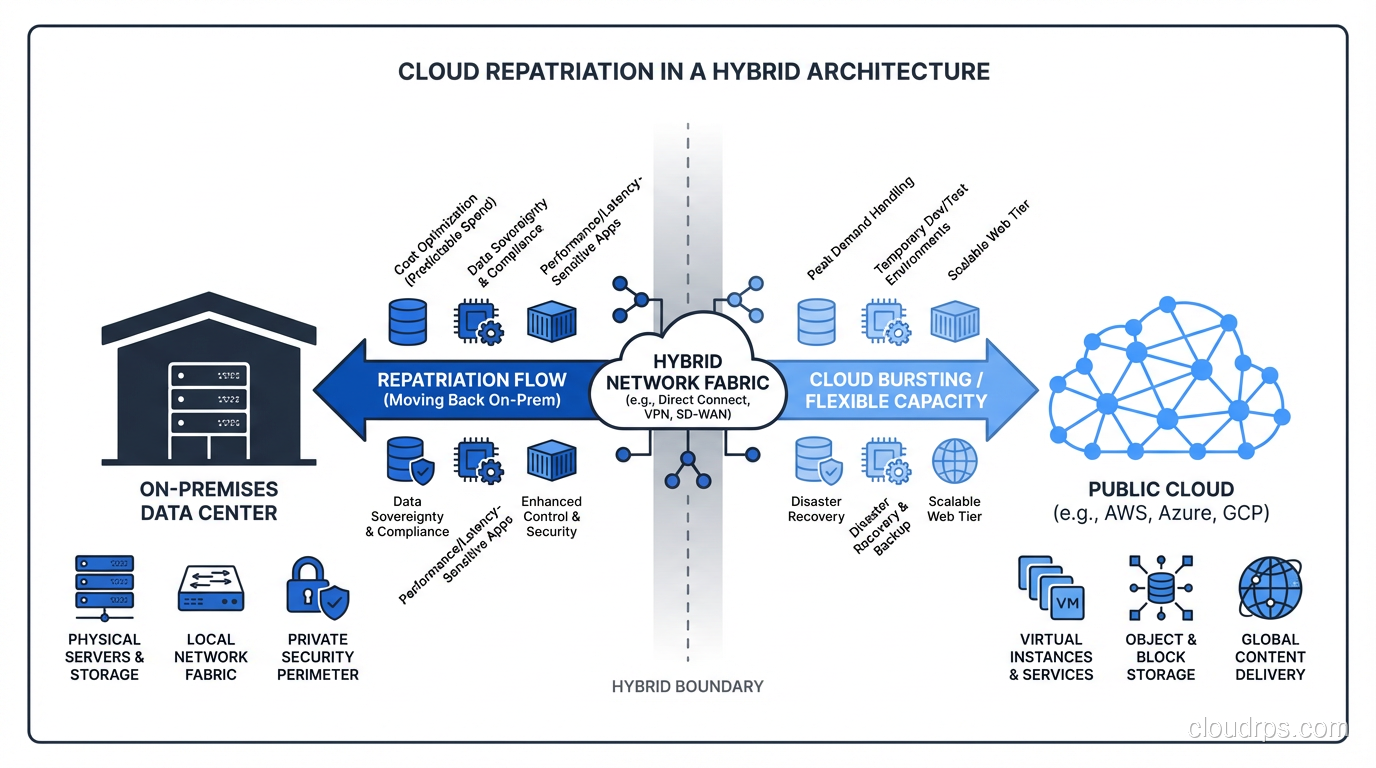
Three years ago, I was on the opposite side of a conversation I now have all the time. A manufacturing company had hired my team to migrate their entire data center to AWS. The pitch from leadership was the usual: operational simplicity, elastic scaling, no more hardware refresh cycles, pay-as-you-go economics. We delivered the migration on schedule. The team was proud of the work. And then the bills started arriving.
The first full month in the cloud, their infrastructure spend was 340% of what they’d been paying to run the same workloads on-prem. Month two was 380%. The workloads were deterministic, predictable, running 24/7. They didn’t need elastic scale. They needed cheap, reliable compute. And public cloud is genuinely bad at providing cheap, reliable compute for predictable, always-on workloads.
By month six, we were having a very different conversation: how do we get some of this back.
That experience, and dozens of similar ones since, taught me that the cloud-versus-on-prem debate was never settled by the cloud winning. It was settled by organizations convincing themselves there was only one right answer. The repatriation wave happening right now is not a cloud failure story. It’s what happens when the pendulum swings back from a period of uncritical enthusiasm toward engineering reality.
What Repatriation Actually Is (and Isn’t)
Let me be precise because this word gets thrown around loosely. Cloud repatriation is the act of moving a workload that was previously running in public cloud back to infrastructure you own or control: an on-premises data center, a colocation facility, or private cloud hardware.
It is not the same as:
Multi-cloud migration: Moving workloads from AWS to GCP or Azure is still public cloud. You’re not repatriating, you’re shopping. If cost is the driver, this rarely helps much. The multi-cloud strategy conversation is a different one.
Hybrid cloud: Running some workloads in public cloud while keeping others on-prem is hybrid cloud. Repatriation is a specific move within that broader hybrid context.
Cloud failure: I want to be careful here because I’ve seen this narrative abused. Organizations that had genuinely bad cloud experiences sometimes use “repatriation” as cover for “we didn’t architect this properly and now we’re blaming the cloud.” True repatriation is a rational economic or operational decision, not a failure story.
The scale of this movement is real. DHH and the 37signals team famously documented moving their infrastructure off cloud in 2023, saving roughly $7 million over five years. Basecamp’s specific situation (large, predictable compute, a team capable of running infrastructure, high enough scale to absorb fixed costs) is not universal. But it opened the door for more organizations to ask the question out loud without feeling like heretics.
The Economics: When the Math Flips
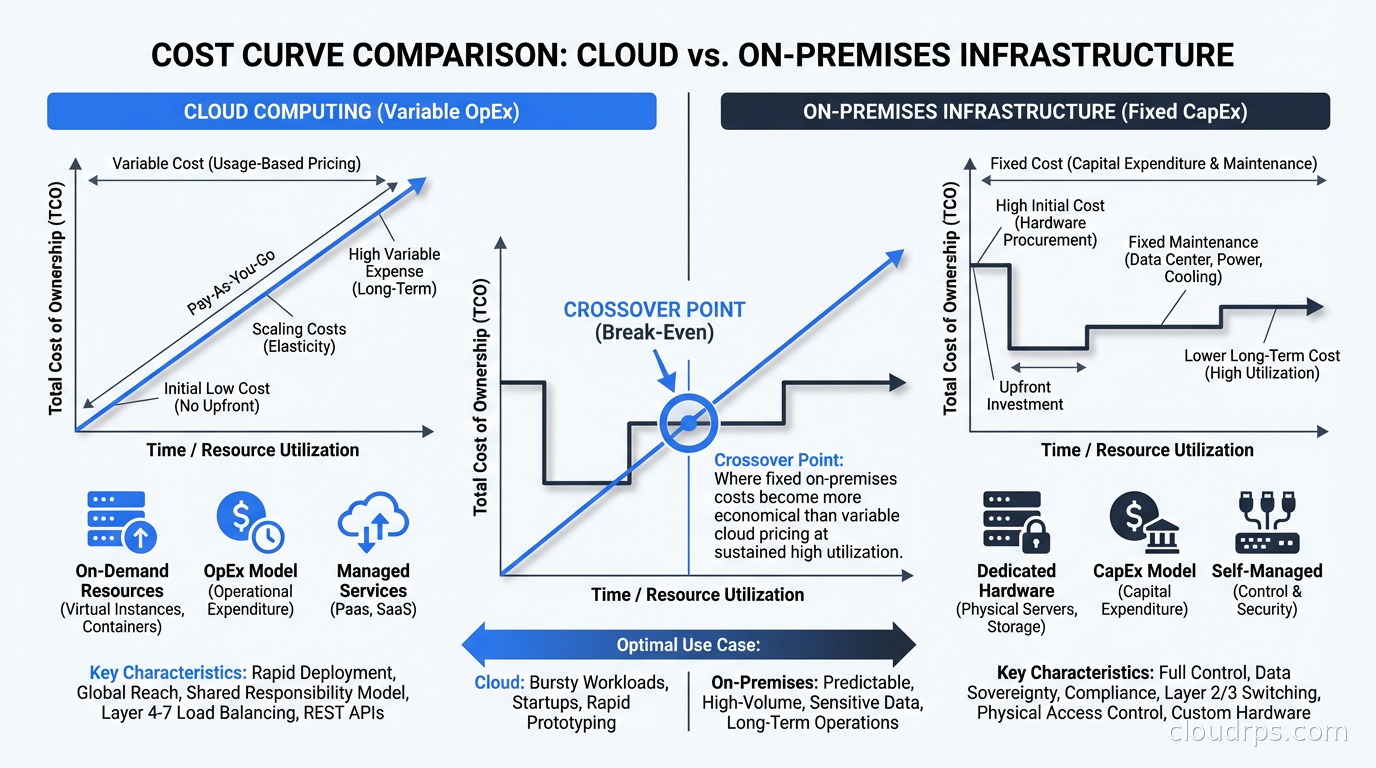
The fundamental reason cloud economics work is the variable cost model. You pay for what you use, you don’t pay for capacity you’re not using. This is genuinely valuable when your workloads have spiky, unpredictable demand. Building capacity for peak means idle hardware most of the time, and idle hardware is money sitting in a rack doing nothing.
But a large class of enterprise workloads doesn’t look like that at all. Consider:
- Core ERP systems running business processes
- Internal databases serving internal applications
- Analytics pipelines that run on defined schedules
- Rendering farms that fill up during business hours and sit idle overnight
- Manufacturing control systems with fixed throughput requirements
These workloads are predictable. They run at roughly the same load, day after day, year after year. For this class of workload, the total cost of ownership calculation tilts toward on-prem at meaningful scale.
The crossover point varies, but a rough heuristic I’ve used: if a workload runs at more than 40-50% utilization consistently and you have a team capable of managing infrastructure, dedicated bare metal or colocation typically wins on cost above about $50,000 per month in cloud spend. Below that threshold, the management overhead isn’t worth it. Above it, the math gets interesting quickly.
The specific numbers I’ve seen in practice:
A media company I worked with was spending $180,000 per month on a cluster of EC2 instances running video transcoding. The instances were c5.4xlarge, running near full CPU for 20 hours a day. We costed out a colocation arrangement: comparable bare metal servers at a tier-2 data center, a 3-year commitment, staff augmentation to manage it. Total cost including depreciation and operations: $48,000 per month. The 3-year total cost of ownership calculation, including migration costs and transition overhead, still showed $3.2M in savings over the period.
That’s not a close call. That’s an engineering decision being made.
The calculation changes dramatically when you factor in FinOps practices. If you’re using reserved instances, savings plans, and spot instances aggressively, cloud costs can come down 30-40%. I’ve seen organizations get their EC2 spend cut in half through proper RI coverage. But even with those discounts, the predictable-workload calculus often still favors on-prem at scale.
When Repatriation Makes Sense
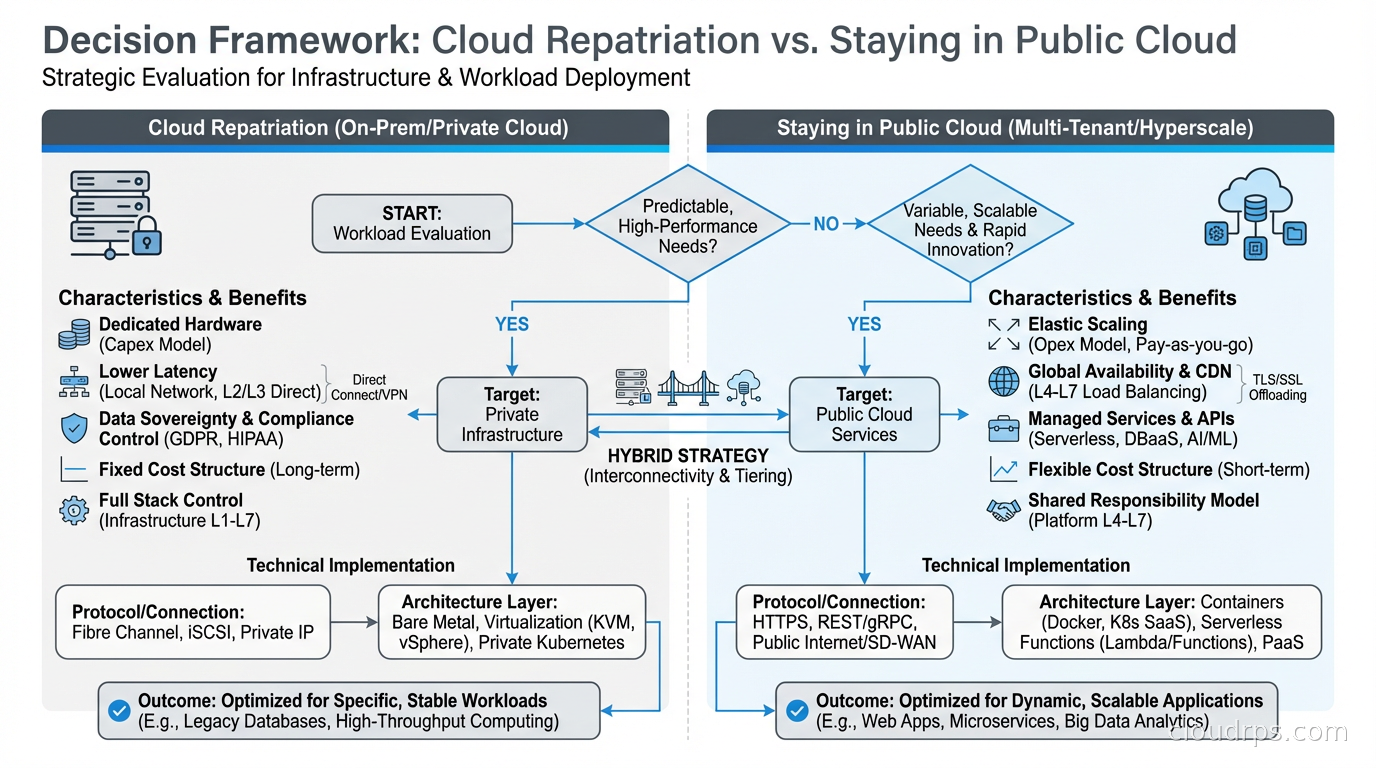
After working through this decision with a lot of teams, I’ve developed a set of criteria. Repatriation is worth serious consideration when:
You have predictable, stable workloads. The cloud variable cost model only wins when demand is variable. If your workload profile is flat, you’re paying for flexibility you never use.
You’re at meaningful scale. The economics don’t work for small teams. You need enough volume to amortize the fixed costs of colocation, hardware refresh, and operational overhead. I’ve generally found this kicks in somewhere above $600K per year in cloud spend for the workload in question.
You have or can build the operational capability. This is where a lot of repatriation projects fail. The reason many organizations went to cloud in the first place was to escape the burden of managing hardware. If you don’t have the team, expertise, or appetite to run infrastructure, the theoretical savings get consumed by operational failures, longer incident resolution times, and the hidden cost of oncall burden.
Data gravity is working against you. If your application needs to be close to a large on-premises dataset (think: manufacturing telemetry stored on-prem, or a compliance requirement to keep certain data off public cloud), it sometimes makes more sense to move the compute to the data rather than pulling petabytes of data into the cloud.
Compliance or data sovereignty requirements constrain your options. Certain regulated industries and certain countries have requirements that make public cloud complicated. I’ll cover this more in the context of sovereign cloud, but this can be a legitimate forcing function.
When Repatriation Is the Wrong Answer
I want to spend equal time on this because I’ve watched organizations convince themselves they should repatriate when the actual problem was something else entirely.
When you haven’t done the FinOps work first. Before you entertain moving workloads back on-prem, you owe it to yourself to actually optimize your cloud spend. Reserved instances, right-sizing, graviton migration for AWS workloads, spot for batch jobs, storage class optimization. I’ve seen organizations with 60% of their EC2 fleet on on-demand when they could have been on reserved. That’s not a cloud problem, that’s a financial discipline problem.
When the workloads actually do have variable demand. This sounds obvious but people underestimate the variability of their own systems. A retail company’s “predictable” order processing system has massive holiday spikes. A gaming company’s “stable” backend has launch day demand 20x baseline. If you build for average on fixed hardware, you either over-provision (and the economics stop working) or you under-provision (and you have outages).
When your engineering team isn’t ready. Running bare metal at a colocation facility is not the same as running EC2. You’re responsible for hardware failure, firmware updates, capacity planning, physical access coordination, and a hundred other things AWS handles for you silently. Teams that underestimate this operational burden end up spending the money they saved on cloud on consulting fees and burnout.
When you’re in a growth phase. If your workload might 10x in the next 18 months, committing to physical hardware is a bet that can go badly wrong in either direction. Too much capacity and you’ve bought expensive insurance you didn’t need. Too little and you’re scrambling to procure hardware on a timeline that doesn’t work.
The Hybrid Architecture: Not All or Nothing
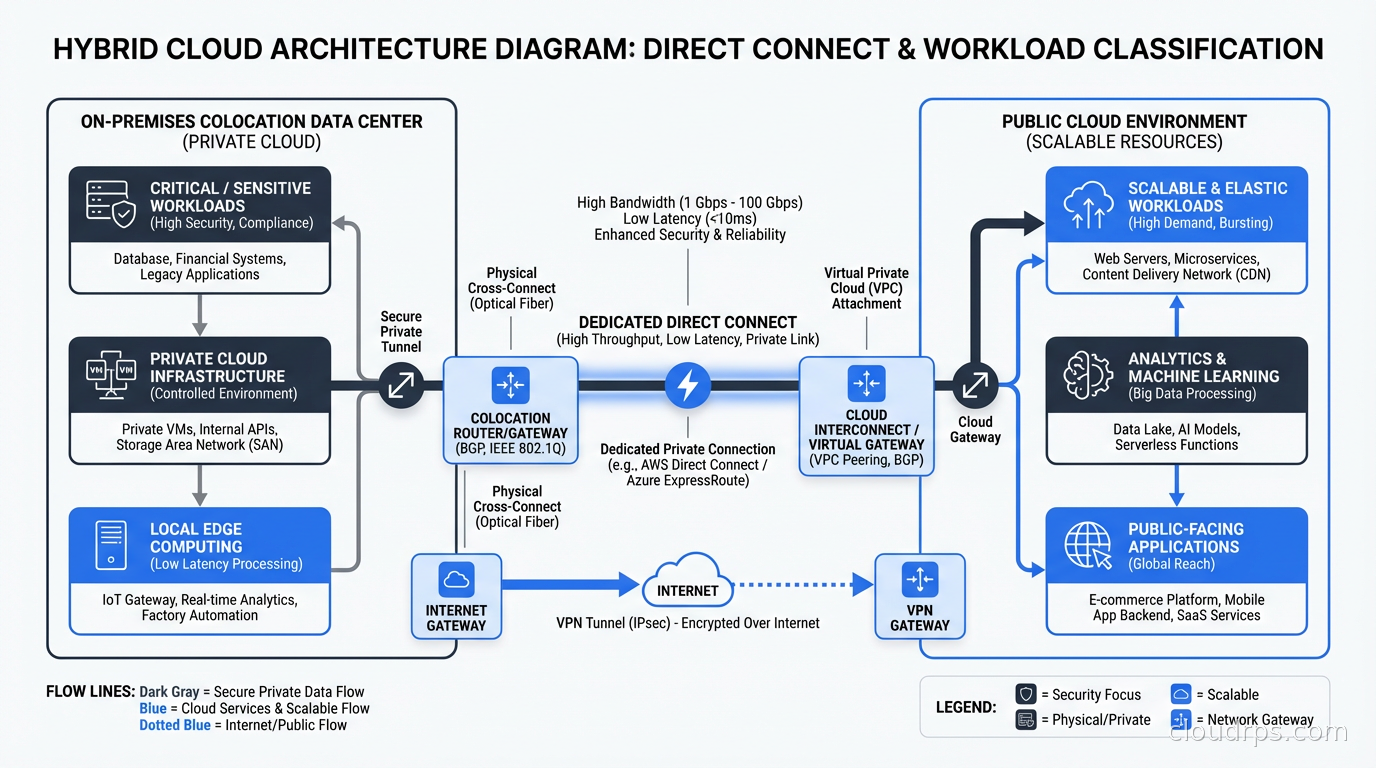
The organizations doing this well aren’t doing a full repatriation. They’re building a deliberate hybrid architecture where workload placement is an explicit engineering decision rather than a default.
The pattern I’ve seen work looks like this:
Classify workloads by demand profile. Separate your workloads into predictable/stable versus variable/spiky. This classification should be data-driven, not intuitive. Pull your CloudWatch metrics, look at the actual CPU utilization histograms over the past 12 months, and let the numbers tell the story.
Keep bursty workloads in cloud. Development environments, CI/CD infrastructure, staging environments, and anything with genuinely variable demand stays in public cloud. The cloud landing zone for these workloads should be purpose-built for elastic use.
Move predictable, high-utilization workloads to colocation. Databases, internal applications, analytics infrastructure that runs on a schedule. These go to dedicated hardware where the cost curve favors you.
Build the connective tissue carefully. The hardest part of hybrid architecture is the network layer between your cloud VPCs and your on-prem infrastructure. Direct Connect (AWS), ExpressRoute (Azure), or Cloud Interconnect (GCP) for production traffic. But plan for latency. Your application teams need to understand that a database call that took 0.5ms within a cloud data center now takes 2-5ms across a dedicated circuit. This matters enormously for certain application patterns.
Maintain a cloud egress runway. One thing I always insist on: even after repatriation, maintain the ability to burst back to cloud for exceptional demand. This means keeping your cloud configuration in infrastructure-as-code, keeping credentials and access patterns current, and doing periodic drills. The hybrid architecture works best when you can treat cloud as overflow capacity rather than burning the boats.
For high availability architecture, the hybrid model introduces complexity that needs explicit design. If your on-prem cluster fails, what fails over to cloud, and how quickly? Your disaster recovery playbook for repatriated workloads needs to account for the fact that your recovery target might be in a different physical location with different network topology.
The Colocation Decision
Most repatriation doesn’t mean building your own data center. It means colocation: you buy or lease the hardware, the colo facility provides power, cooling, physical security, and connectivity.
Choosing a colocation facility is a lot like choosing a cloud region, with a few key differences. Key factors:
Latency to your users and your cloud. Pick a colo that’s close to where your users are and close to your cloud region. You want low latency to both. For most US enterprises, this means carrier hotels in major metros: Equinix in Ashburn, Switch in Las Vegas, Digital Realty in Chicago.
Carrier diversity. A good colo facility has multiple network carriers. This matters for both performance and resilience. Ask what happens to your connectivity when their primary upstream goes down.
Power and cooling SLAs. This is not glamorous but it matters. What’s the facility’s uptime track record? What’s their PUE (Power Usage Effectiveness)? What redundancy do they have in power and cooling?
Contract terms. Colo contracts are not like cloud. You’re typically signing 3-5 year agreements. Understand the exit provisions, the cross-connect costs, and what happens if you need to expand faster than anticipated.
Physical access. How quickly can you get a technician on-site? For most enterprises, the answer is “24-hour contract, someone can be there in 2-4 hours.” For some scenarios (GPU rack firmware updates during an incident), that’s a painful SLA compared to the AWS console.
What Nobody Talks About: The Migration Back
The actual mechanics of moving workloads back from cloud are underestimated in almost every project I’ve worked on. Moving from on-prem to cloud has a massive ecosystem of tools: AWS MGN, CloudEndure, Database Migration Service, Snow family devices. Moving from cloud back to on-prem is much more DIY.
In practice, this usually means:
Database migration: Export from RDS or Aurora, import to self-managed PostgreSQL or MySQL on bare metal. This is usually the most painful part. If you’re moving a multi-TB database, you’re either shipping a physical device or accepting a network transfer window that might take days.
Application configuration: Everything that was hard-coded to an AWS service endpoint (S3 buckets, SQS queues, RDS endpoints) needs to be re-pointed. If you built well on infrastructure as code, this is configuration changes. If you didn’t, it’s archaeology.
Networking reconfiguration: Your VPC security groups, NACLs, and routing tables need to be mirrored in your on-prem network configuration. The mental model is different (physical switches and routers instead of virtual constructs), but the intent is the same.
DNS cutover: The actual traffic migration is a DNS TTL game. Cut TTLs down to 60 seconds a week before migration. On migration night, update the records and watch traffic drain from cloud to on-prem. Keep the cloud environment warm for at least 30 days for rollback capability.
Budget for the migration itself taking 2-3x longer than you expect. The production surprises always show up.
The Philosophical Point
I want to end with something that sounds simple but took me years to internalize: infrastructure placement is an engineering decision, not a religious one.
The cloud-first mandate made sense as a corrective measure against the inertia of organizations that kept everything on-prem regardless of whether that made sense. But “cloud first” became “cloud always” in a lot of organizations, and that’s not an engineering stance. That’s a policy stance, and policies don’t understand utilization curves.
The right question is never “cloud or on-prem.” The right question is “for this specific workload, with this specific demand profile, at this specific scale, with this specific operational team, what is the optimal placement?” Sometimes the answer is cloud. Sometimes it’s on-prem. Often it’s both, for different parts of the system.
The companies doing this well in 2026 are the ones that have stopped treating infrastructure placement as a settled question and started treating it as a continuous optimization problem. Your workload profile changes. Your team’s capabilities change. Cloud pricing changes. Hardware costs change. The answer you arrived at three years ago might not be the right answer today.
Do the total cost of ownership math regularly. Challenge your assumptions. And don’t let sunk cost in either direction drive the decision. The goal is to build the best possible system, not to be right about a choice you made in a board deck five years ago.
Get Cloud Architecture Insights
Practical deep dives on infrastructure, security, and scaling. No spam, no fluff.
By subscribing, you agree to receive emails. Unsubscribe anytime.