
A few years ago I was doing a security review for a mid-sized SaaS company. They had CSPM from one vendor, a container security scanner from another, a cloud workload protection agent from a third vendor, and separate tools for IAM analysis and vulnerability scanning. Eight different consoles. Eight different alert queues. Nobody knew which alerts actually mattered.
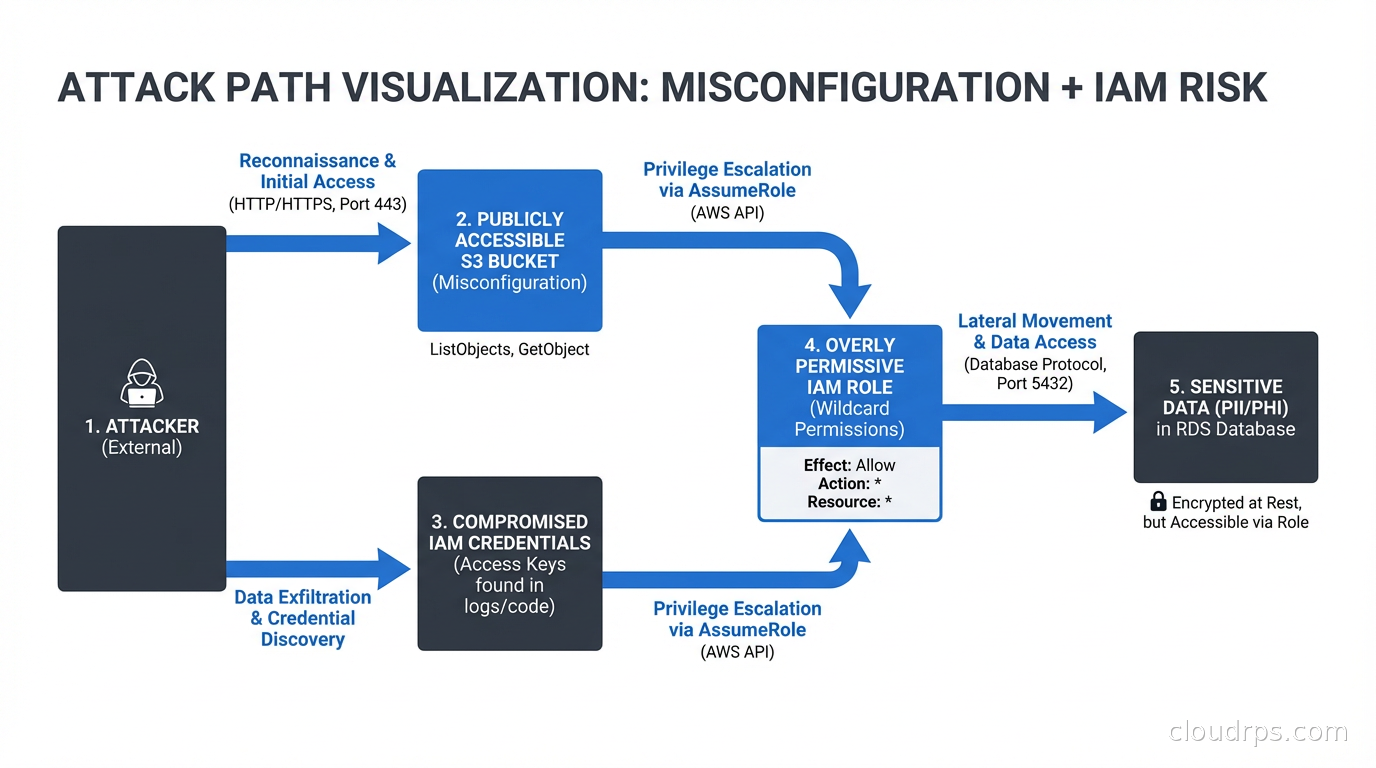
When we finally correlated the data manually, we found something terrifying: there was a publicly accessible S3 bucket containing exported database credentials, and a Lambda function with overly permissive IAM that could read that bucket. Neither finding was critical in isolation. Together, they were a complete path to their production database. Neither alert system had surfaced this chain. They were too busy flooding the oncall with noise.
That is the problem CNAPP was invented to solve.
What CNAPP Actually Is
Cloud-Native Application Protection Platform is one of those analyst-coined terms that sounds like marketing until you understand what problem it solves. Gartner coined it around 2021, but the concept was already emerging from practitioners who were tired of stitching together siloed tools.
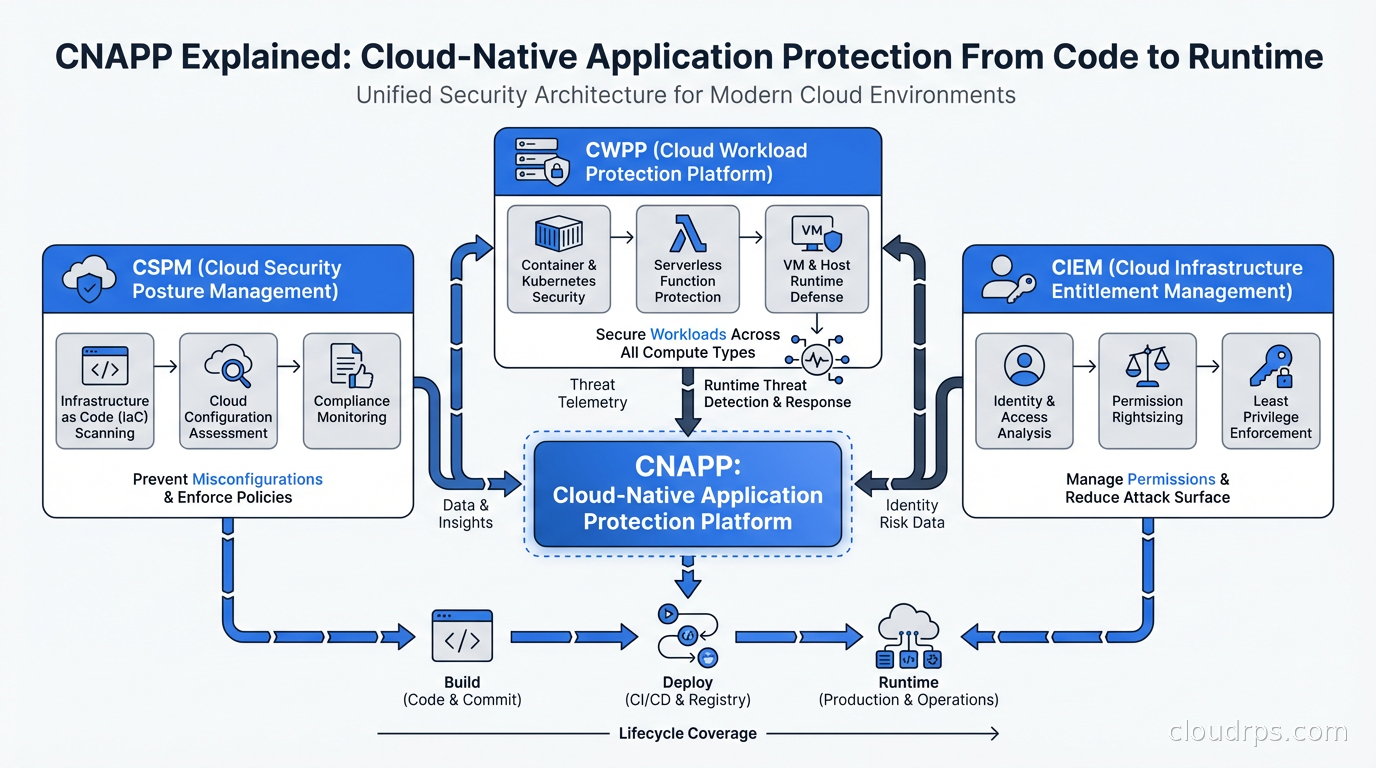
CNAPP converges several previously separate security disciplines into a unified platform:
CSPM (Cloud Security Posture Management): Continuously monitors your cloud infrastructure configurations against security benchmarks (CIS, NIST, PCI-DSS, etc.). Finds misconfigured S3 buckets, unrestricted security groups, unencrypted volumes, public RDS instances. This is the foundation. If your CSPM is not running, you are flying blind on configuration drift.
CWPP (Cloud Workload Protection Platform): Protects running workloads: VMs, containers, serverless functions. Covers vulnerability scanning, malware detection, runtime anomaly detection, and file integrity monitoring. Agent-based CWPP tools run inside your workloads. Agentless CWPP scans workload images and memory snapshots without installing anything.
CIEM (Cloud Infrastructure Entitlement Management): Analyzes IAM permissions across your cloud environment. Finds over-privileged roles, unused permissions, cross-account access risks, and lateral movement paths. This is the one most organizations underinvest in, and it is often how breaches actually happen. Not through a firewall hole but through an IAM role that had more permissions than it should.
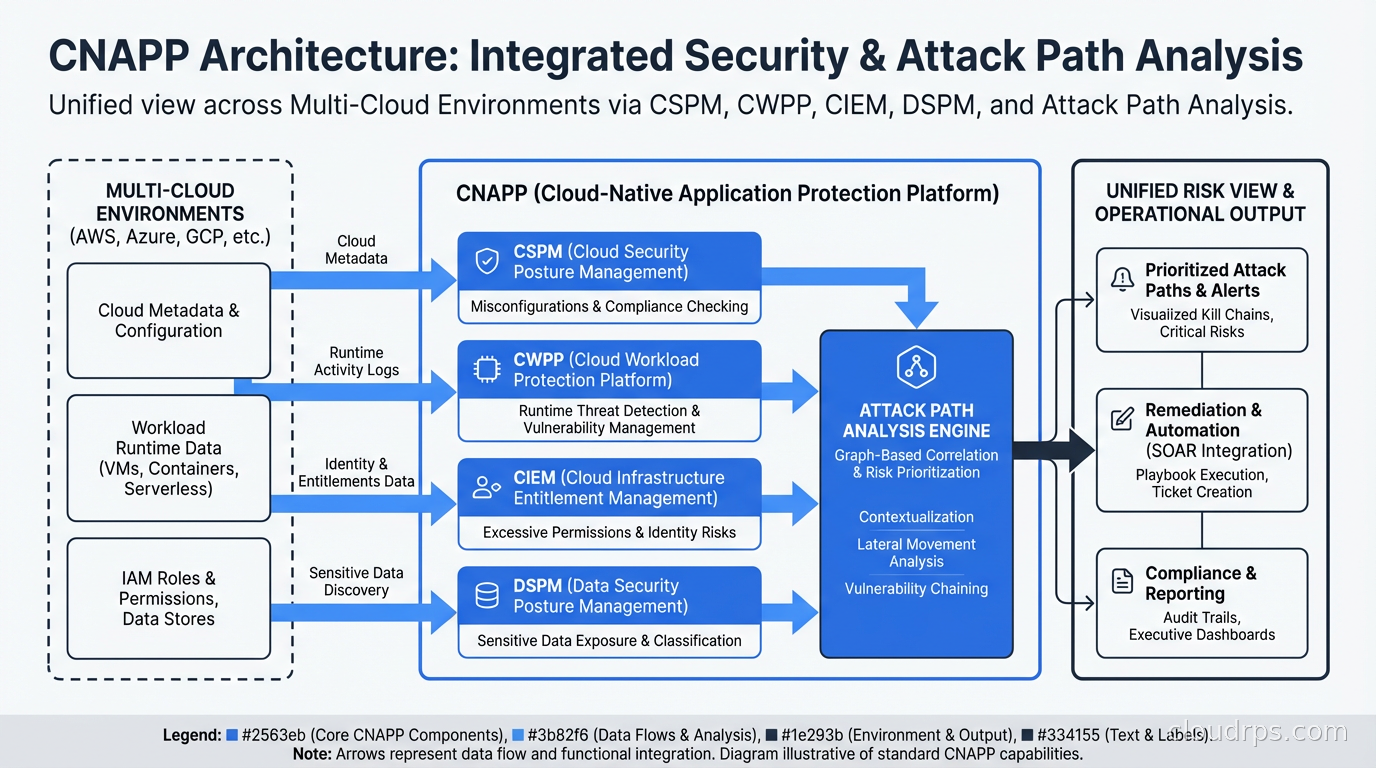
DSPM (Data Security Posture Management): Newer addition to most CNAPPs. Discovers sensitive data (PII, financial data, credentials) across your cloud environment and maps what identities and workloads have access to it.
The convergence matters because the real risks are chains. A misconfiguration (CSPM) plus an overprivileged identity (CIEM) plus a vulnerable workload (CWPP) sitting next to sensitive data (DSPM) equals a critical finding. No single-discipline tool sees the full chain.
Attack Path Analysis: The Real Differentiator
The single most important feature in a CNAPP is attack path analysis. This is the capability that correlates findings across disciplines to surface the chains that matter, like the S3 bucket plus Lambda example above.
Good attack path analysis builds a graph of your cloud environment: every resource, every permission, every network path, every piece of data. Then it walks that graph from the perspective of an attacker looking for paths from an internet-accessible entry point to a high-value target (a database containing PII, a secrets manager instance, a Kubernetes API server).
Wiz built its reputation largely on this. Their Security Graph is genuinely impressive. It answers questions like “which of my findings create a path to a critical data store?” instead of giving you a list of 4,000 medium-severity misconfigurations and leaving you to figure out which ones matter.
I have seen teams go from reviewing 3,000 daily alerts (mostly noise) to reviewing 15 prioritized attack paths per week. That is the difference between an alert that gets ignored and one that gets fixed.
Agentless vs. Agent-Based: The Architecture Debate
This is one of the most heated debates in the CNAPP space and I have a strong opinion: both matter, and the tools that give you both have an advantage.
Agentless scanning uses cloud APIs and snapshot analysis. For AWS, it assumes an IAM role in your account, takes EBS snapshots, and analyzes them without ever installing software in your environment. Benefits: zero deployment friction, works on ephemeral workloads, no performance impact on running workloads, covers your entire environment immediately. Wiz and Orca Security built their initial products entirely on agentless approaches.
Agent-based protection runs inside your workloads. It sees actual process execution, network connections, file access, and system calls in real time. Benefits: runtime detection, response capabilities (block a malicious process), deeper behavioral analysis, lower latency for detecting active attacks. Traditional CWPP vendors like CrowdStrike and SentinelOne are agent-first.
The honest answer: agentless is great for posture management and vulnerability scanning. For runtime threat detection (active attacks, not just misconfigurations), you want agents. A mature CNAPP strategy uses agentless for breadth and agents on your most critical workloads.
This connects directly to container runtime security with Falco. Falco is an excellent open-source complement to commercial CNAPPs for kernel-level runtime detection in Kubernetes environments.
The Shift Left Component
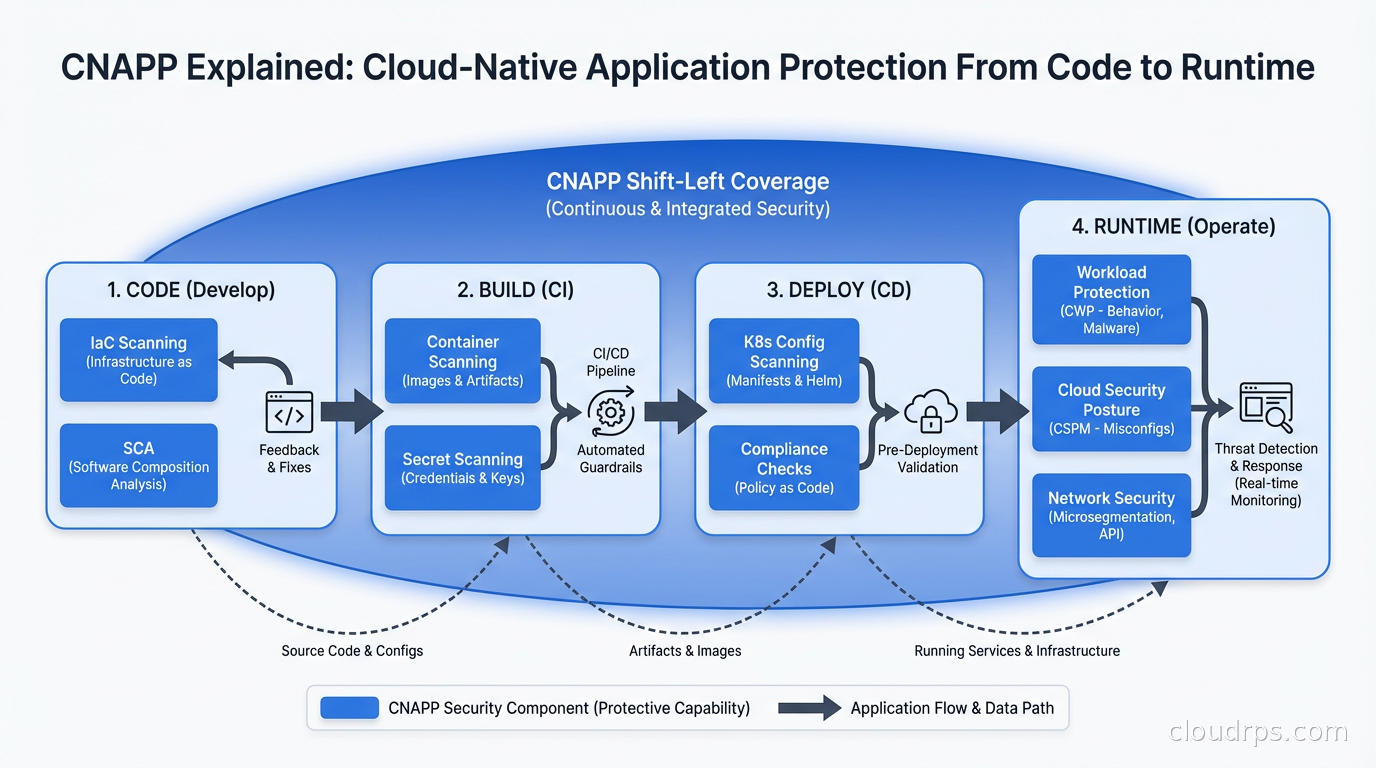
Modern CNAPPs are not just runtime tools. They also integrate into your development pipeline to catch issues before they hit production. This is the “shift left” piece.
The shift left capabilities typically include:
- Infrastructure as code scanning: finds misconfigurations in Terraform, CloudFormation, and Helm charts before they are applied.
- Container image scanning: checks images for known CVEs during CI/CD, before images are deployed.
- Secret scanning: catches hardcoded credentials in code and IaC templates.
- Software composition analysis: catalogs third-party dependencies and flags vulnerable ones.
For software supply chain security, the CNAPP’s CI integration can generate and attach SBOMs to container images, giving you traceability from deployed workload back to the specific dependencies it contains.
The power is connecting the dev-time findings to the runtime findings. A CVE found in a container image during CI is one thing. But when your CNAPP can tell you that the vulnerable image is deployed to a pod with a ServiceAccount that has cluster-admin permissions, sitting on a node with an exposed metadata endpoint, that is a different conversation with your developers about urgency.
Key Vendors: Who Does What Well
The CNAPP market has consolidated significantly, but there are meaningful differences between the major players.
Wiz: Currently the market leader on mindshare and growth. Built agentless from day one. The Security Graph and attack path visualization are best-in-class. Strongest on CSPM, CIEM, and contextual risk. Recent addition of runtime sensor fills the agent gap. UI is genuinely good. Expensive, but teams that adopt it consistently reduce their security team’s alert review time significantly. Wiz was acquired by Google in 2025 for $32B, which will be interesting to watch for AWS and Azure shop customers.
Prisma Cloud (Palo Alto Networks): Broadest feature set in the market. Covers everything including WAAS (Web Application and API Security), which others do not. Agent-based runtime protection is mature and battle-tested. Built from multiple acquisitions (Twistlock, Aporeto, Bridgecrew) which means the UI still shows some integration seams. Best for organizations that want the deepest runtime protection and are already in the Palo Alto ecosystem.
Orca Security: Pioneered agentless scanning with their SideScanning technology. Good contextual risk scoring. Strong for organizations that want broad coverage quickly with minimal deployment friction. Less mature on CIEM compared to Wiz.
Microsoft Defender for Cloud: If you are a Microsoft shop (Azure primary, E5 licensing), this is worth serious evaluation. Deep integration with Azure services, reasonable pricing within the M365/Azure ecosystem, and it has improved substantially in the past few years. Multi-cloud support exists but it is noticeably weaker than its Azure-native capabilities.
Sysdig: Strong agent-based runtime security built on Falco. Best for Kubernetes-heavy environments where you want deep runtime visibility. The posture management features have improved but Sysdig’s primary strength is still runtime.
Implementation: Where Teams Get Stuck
I have implemented CNAPPs at several organizations now, and the pattern of where teams get stuck is predictable.
The first problem is alert volume. A CNAPP scan of a medium-sized AWS environment on day one will surface hundreds or thousands of findings. Most of them have existed for months or years. The mistake is trying to fix everything immediately. The right approach is to use the risk scoring and attack path analysis to prioritize, and to agree upfront that historical debt will be tracked and remediated on a schedule, while new violations will be addressed immediately.
The second problem is ownership. A CNAPP can tell you that an S3 bucket is misconfigured, but who is responsible for fixing it? Cloud security teams do not always own application resources. You need a clear mapping of cloud resources to owning teams, and you need the CNAPP to route findings to those owners via ticketing or Slack integrations. Without this, findings pile up in a shared queue that nobody feels responsible for.
The third problem is CI/CD integration. Getting agentless scanning running takes an afternoon. Getting shift-left scanning properly integrated into your pipelines, with appropriate break-build thresholds and exception workflows, takes weeks. Do not underestimate it.
Policy as code with OPA or Kyverno complements CNAPP well. Your CNAPP catches runtime and configuration issues. Kyverno prevents clearly-misconfigured Kubernetes resources from being admitted in the first place. Defense in depth means not relying on a single tool to catch everything.
A War Story: Finding the Breach Before the Breach
At a healthcare startup about two years ago, we deployed a CNAPP (Wiz in this case) against an AWS environment that had never had systematic security tooling. The initial scan took about four hours to process everything.
The attack path analysis surfaced something that took my breath away. An EC2 instance tagged as a dev Jenkins server was reachable from the internet on port 443. It had an attached IAM instance profile with permissions to read from any S3 bucket in the account. One of those S3 buckets contained database backup files. Those backup files contained PHI.
Three hops: internet access to Jenkins, Jenkins to S3, S3 to PHI. The CSPM tool had flagged the overpermissive IAM role as a medium-severity finding six months earlier. Nobody had acted on it because there were 800 other medium-severity findings and no context for which ones were actually dangerous.
Within 48 hours we had locked down the Jenkins instance to VPN-only access, scoped the IAM role to only the specific buckets it needed, and moved the backup files to a separate account with explicit access controls. No breach happened. But without the attack path correlation, that chain would have remained invisible in a pile of deduped medium-severity alerts.
For organizations dealing with cloud sovereignty and compliance requirements, CNAPP’s ability to map sensitive data discovery to compliance frameworks (HIPAA, PCI-DSS, GDPR) and show you the access paths to that data is genuinely valuable for audit preparation.
CNAPP and Identity Security
CIEM deserves more attention than it typically gets. IAM is the new network perimeter in cloud environments. Most organizations have accumulated years of IAM debt: roles with overly broad permissions, service accounts with admin access, cross-account trust relationships that were created for a specific project and never cleaned up.
CIEM analysis will typically find that the top 20 percent of your IAM roles have permissions they have never used. That is your attack surface. Enforcing least-privilege IAM is straightforward in principle and painful in practice because every IAM reduction risks breaking something.
A good CNAPP gives you used vs. granted permissions analysis, so you can safely propose scoped-down policies knowing they match actual usage patterns. Coupling this with secret management best practices gives you a complete picture: you know which workloads access which secrets and whether those access permissions are appropriate.
What to Look for When Evaluating
When you are evaluating CNAPPs, here is my shortlist of things that matter:
Coverage depth vs. breadth: Some vendors cover 20 services shallowly. Others cover 8 services deeply. Know which cloud services your organization actually uses heavily and evaluate depth there.
False positive rate: Ask for a trial against your real environment. Look at what comes back as critical. If every critical finding is obviously noise, the tool is going to get ignored.
Attack path quality: Run the tool for two weeks and look at the attack paths it surfaces. Do they make intuitive sense? Does it find chains that span multiple finding types? This is what separates good CNAPPs from CSPM tools wearing a CNAPP costume.
Developer workflow integration: Test the CI/CD plugins. See how findings flow into your ticketing system. See how exceptions and suppressions work. These daily friction points matter more than any demo feature.
Multi-cloud parity: If you are multi-cloud, test all your clouds during the evaluation. Some vendors have excellent AWS coverage and noticeably weaker GCP or Azure support.
The Cost Reality
CNAPP tools are not cheap. Pricing is usually based on cloud spend, number of workloads, or number of resources protected. A mid-sized organization spending $500K per month on cloud might spend $150K to $300K annually on a full-featured CNAPP.
The math usually works: one prevented breach pays for years of CNAPP licensing. One audit failure from a compliance gap costs more than the tool. But you do need to make this case explicitly to finance, and you need usage metrics to show the tool is actually surfacing and driving remediation of real findings, not just generating reports.
Zero trust security principles align naturally with CNAPP. You cannot enforce least-privilege access, validate workload identity, or detect lateral movement without the visibility that a CNAPP provides. Think of CNAPP as the observability layer that makes zero trust enforcement possible.
Starting Point: The 30-Day Plan
If you are deploying a CNAPP for the first time, here is a practical sequence.
In the first week, connect your cloud accounts with read-only access, run the initial scan, and spend time in the attack path view rather than the full findings list. Understand the top 10 critical attack paths. Do not try to fix anything yet.
In week two, scope down your alert policy to only the highest-confidence, highest-severity findings. Integrate with your ticketing system. Assign ownership for cloud resource namespaces or accounts.
In week three, deploy the CI/CD integration to your most critical pipelines. Set break-build thresholds conservatively (only block on secrets and critical CVEs in production images).
In week four, review what got fixed, what got suppressed, and why. Tune the noise. Present the attack path reduction to leadership.
From there it becomes ongoing operations. The tool is most valuable when your developers treat it as part of their normal workflow rather than a quarterly compliance exercise.
Get Cloud Architecture Insights
Practical deep dives on infrastructure, security, and scaling. No spam, no fluff.
By subscribing, you agree to receive emails. Unsubscribe anytime.