
The first time I ran an analytical query on a columnar database, I thought something was broken. The query scanned billions of rows across a multi-terabyte table and returned results in seconds. The same query on our PostgreSQL instance (identical data, carefully indexed) took the better part of an hour. I checked the numbers three times because I genuinely could not believe the difference.
That was 2013, and the columnar database was Amazon Redshift. In the twelve years since, I have built and operated columnar systems at significant scale, and I have also watched teams deploy them for workloads where a traditional row store would have been dramatically better. The performance characteristics of columnar and row databases are so different that choosing the wrong one is not a minor optimization miss. It can be an order-of-magnitude mistake in either direction.
Let me explain why, starting with the physical reality of how data gets stored and read.
How Row Stores Actually Work
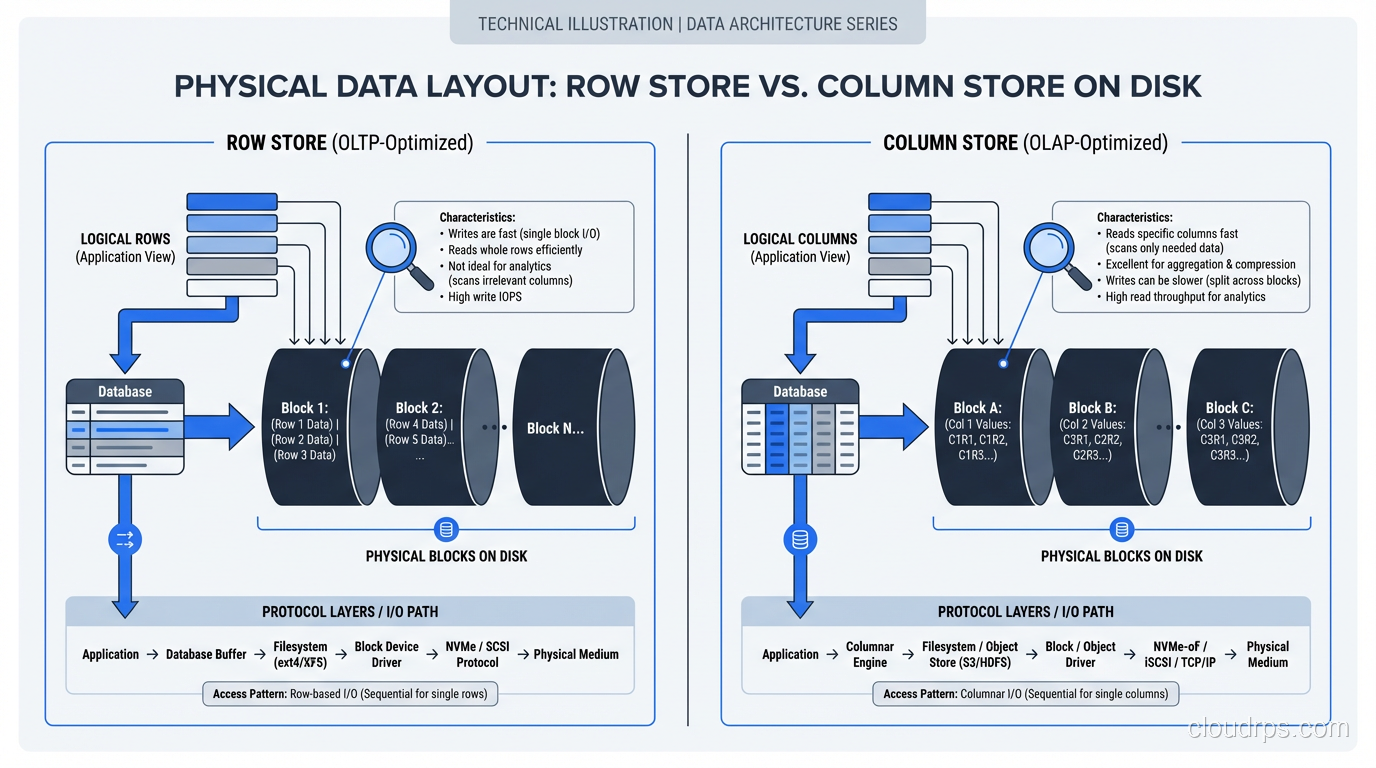
In a traditional row-oriented database (PostgreSQL, MySQL, SQL Server, Oracle), data is stored row by row. When the database writes a row to disk, it writes all the columns of that row contiguously. Row 1’s columns are followed by Row 2’s columns, followed by Row 3’s, and so on.
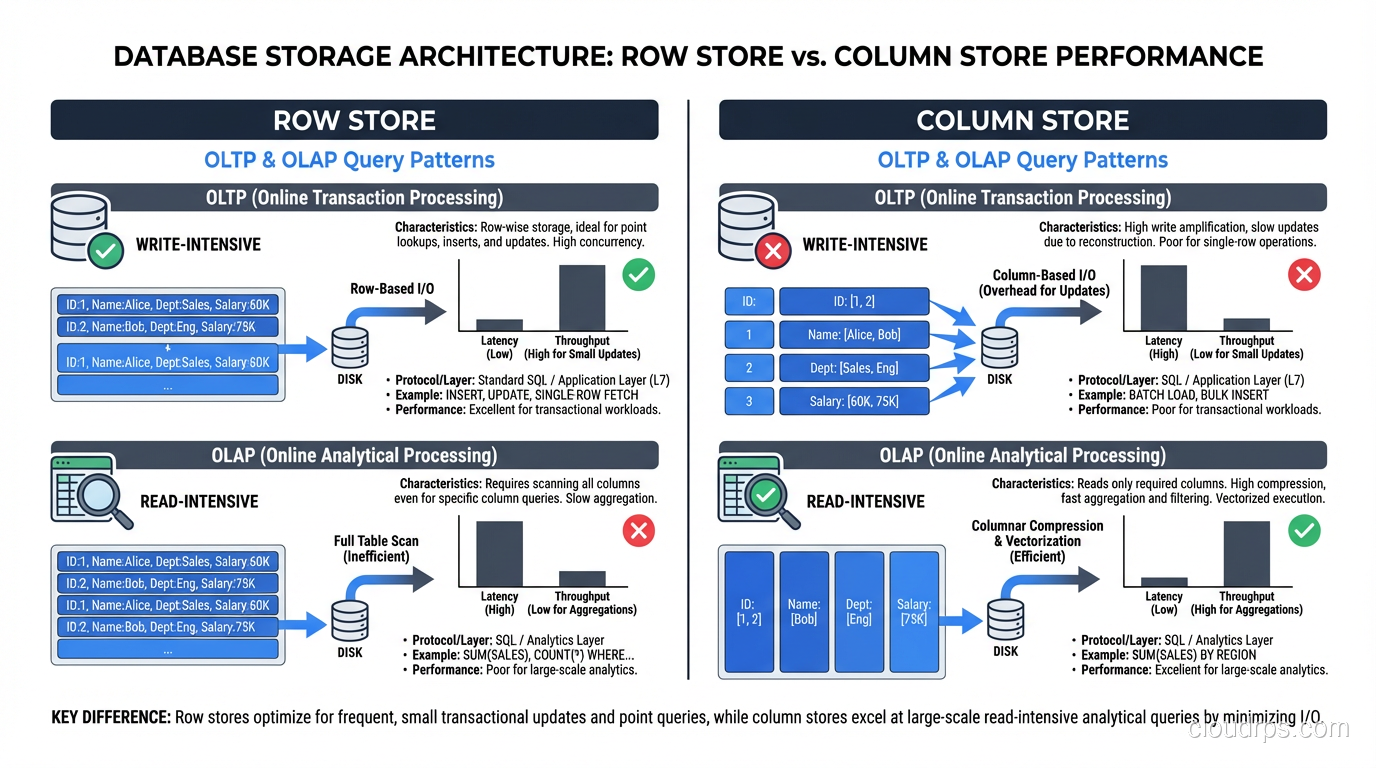
This layout is optimized for a specific access pattern: fetching or modifying complete rows. When your application runs SELECT * FROM customers WHERE customer_id = 4521, the database uses an index to find the disk location of that row, reads a single block containing all of the row’s columns, and returns it. One disk read, one row, all columns. Fast.
Inserts and updates are equally efficient. Writing a new row means appending a block of contiguous column values. Updating a row means reading one block, modifying it, and writing it back.
This is why every OLTP database on earth is row-oriented. Transactional workloads (point lookups, single-row inserts, updates, deletes) are overwhelmingly row-at-a-time operations. The row store layout is perfectly matched to this access pattern.
How Column Stores Actually Work
A columnar database stores data column by column instead of row by row. All the values for column A are stored contiguously, followed by all the values for column B, and so on. To reconstruct a complete row, the database reads from each column’s storage and assembles them.
This sounds inefficient, and for row-level operations, it is. But for analytical queries, it is transformatively faster, for three reasons.
Reason 1: You Only Read the Columns You Need
Consider a table with 200 columns (not unusual for analytical tables) and a query that touches 5 of them: SELECT region, product_category, SUM(revenue) FROM sales GROUP BY region, product_category. In a row store, reading any row means reading all 200 columns off disk, even though you only need 3 (region, product_category, revenue). Ninety-seven percent of the I/O is wasted.
In a column store, the database reads only the three columns it needs. If each column is roughly 1/200th of the total data, you have just reduced your I/O by 98.5%. On a 4 TB table, that is the difference between reading 4 TB and reading 60 GB.
This column pruning is the single biggest factor in columnar query performance. It is not clever indexing or query optimization; it is the storage layout eliminating the I/O before the query engine even starts processing.
Reason 2: Compression Is Dramatically Better
When column values are stored together, they tend to be very similar. A country_code column might contain “US” repeated 500 million times, “GB” 80 million times, and a handful of other values. A timestamp column for today’s data will share the same date prefix.
Column stores exploit this similarity with specialized compression algorithms. Dictionary encoding replaces each unique value with a small integer (turning “United States” into “3”). Run-length encoding collapses consecutive identical values (“US, US, US, US” becomes “US x 4”). Delta encoding stores only the differences between consecutive values in a sorted column.
The result is compression ratios of 5:1 to 20:1, compared to 2:1 to 4:1 for row stores. That 4 TB table might occupy 400 GB on disk in a columnar format. Less data on disk means less data to read, which means faster queries. It also means less data to cache in memory, which means your hot data is more likely to fit in RAM.
Reason 3: Vectorized Execution
Modern columnar databases process data in vectors (batches of values from the same column) rather than row by row. When filtering a column of integers, the CPU can apply the filter predicate to a batch of 1,000 values using SIMD instructions, processing multiple values per clock cycle. Row stores process one row at a time, with branching and function call overhead for each row.
Vectorized execution on compressed columnar data can process an enormous number of rows per second per core, this is well documented across the major columnar engines, not just marketing copy. A well-tuned ClickHouse instance on modern hardware can scan a billion rows in under a second for simple aggregation queries.
The OLTP/OLAP Divide Is Not a Suggestion
I need to be blunt about something I see teams get wrong repeatedly: columnar databases are terrible for OLTP workloads, and row databases are terrible for OLAP workloads at scale. This is not a minor preference; it is a fundamental architectural mismatch.
Inserting a single row into a column store requires writing to every column’s storage separately. If your table has 200 columns, that is 200 separate write operations instead of 1. Column stores mitigate this with batch loading (accumulating rows in a buffer and writing them in bulk), but single-row inserts are orders of magnitude slower than in a row store.
Point lookups in a column store require reading from every column to reconstruct a complete row. If you need all 200 columns, you are doing 200 reads instead of 1. Indexes help, but the fundamental overhead of column assembly cannot be avoided.
Running an analytical scan on a row store means reading every column of every row, wasting I/O on columns you do not need. No amount of indexing fixes this. You can create covering indexes for specific queries, but that is essentially building a column store inside your row store, with all the maintenance overhead that implies.
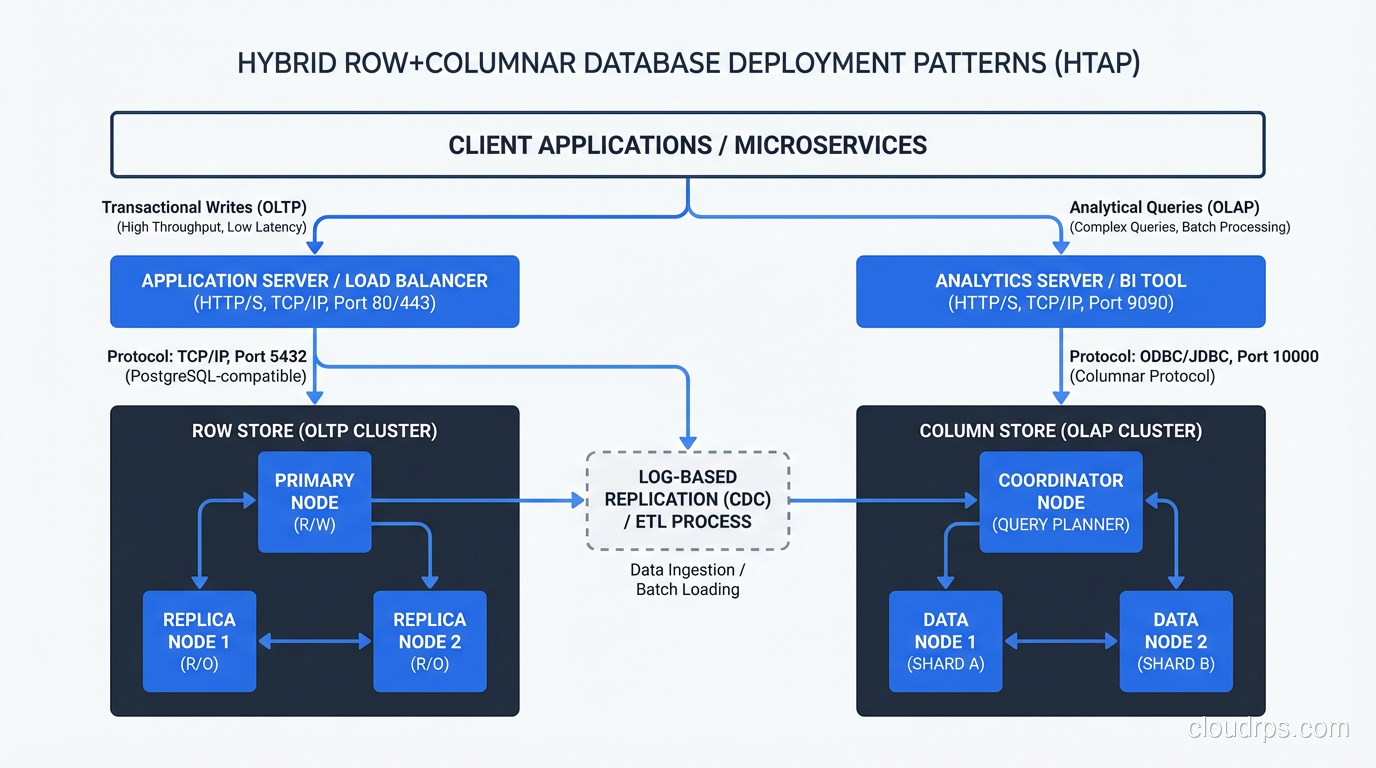
The right architecture for most organizations is both: a row store for your application’s transactional workload and a column store for analytics, with a pipeline between them. For teams working with large-scale analytical workloads, the choice of column store often intersects with big data technologies like Hadoop and MapReduce as well.
The Major Column Store Options in 2025
Let me give you a practical tour of the columnar databases I have actually used in production.
Amazon Redshift
Redshift was my introduction to column stores at scale, and it remains a solid choice for teams already invested in the AWS ecosystem. It is a distributed columnar database based on ParAccel (which was based on PostgreSQL), and it is wire-compatible with PostgreSQL, which means your existing SQL tools mostly work.
Redshift’s strengths are its integration with the AWS ecosystem (S3 loading, IAM authentication, VPC networking) and its Redshift Serverless option, which eliminates capacity planning for bursty workloads. Its weakness is that performance tuning requires understanding distribution keys, sort keys, and encoding types. Get these wrong and performance suffers dramatically.
Google BigQuery
BigQuery is a serverless columnar database that separates storage and compute entirely. You load data, write SQL, and pay for the bytes scanned. There is no cluster to manage, no sort keys to choose, no vacuuming to schedule.
For ad-hoc analytics and organizations that do not want to operate database infrastructure, BigQuery is hard to beat. The tradeoff is cost unpredictability, since a poorly written query that scans a multi-petabyte table will generate a bill that gets someone’s attention.
ClickHouse
ClickHouse is the fastest columnar database I have used for raw scan performance. It is open source, runs on your own infrastructure, and processes analytical queries at speeds that frequently surprise me even after years of using it.
ClickHouse stores data in sparse-indexed, compressed columns and is designed for append-heavy workloads. It handles tens of millions of inserts per second and scans billions of rows per second. The tradeoff is that it is not a general-purpose SQL database. Updates and deletes are expensive, transactions are limited, and the operational model requires more hands-on management than a managed service.
Apache Parquet (Columnar File Format)
Parquet deserves mention because it brings columnar storage to the file layer. If your data lives in a data lake, Parquet files give you column pruning, predicate pushdown, and excellent compression without a database engine. Tools like Spark, Presto, Trino, and DuckDB read Parquet natively.
I use Parquet as the storage format for cold analytical data in S3. Queries that would take minutes against CSV files take seconds against Parquet because the engine only reads the columns it needs.
Hybrid Approaches: Having Both
The strict columnar-vs-row divide has blurred over the last decade as databases have adopted hybrid approaches.
PostgreSQL with columnar extensions. The Citus extension for PostgreSQL includes columnar table storage, and the Hydra project provides a columnar storage engine for PostgreSQL. You can have some tables in row format and others in columnar format within the same database. I have used this for workloads where most queries are transactional but a few reporting queries need to scan large tables.
SQL Server columnstore indexes. SQL Server lets you add a columnstore index to a row-oriented table. Analytical queries use the columnstore index; transactional queries use the regular B-tree indexes. This is a pragmatic hybrid that works well for mixed workloads, though the columnstore index adds storage overhead and slows down writes.
SingleStore (formerly MemSQL). SingleStore has both row store and column store table types within the same database. You choose the storage format per table based on the access pattern. Transactional tables use row storage; analytical tables use columnar storage.
These hybrids are appealing because they reduce the need for separate database systems and the ETL pipelines between them. But they come with tradeoffs. Typically, the row store performance is not quite as good as a dedicated row store, and the column store performance is not quite as good as a dedicated column store. For many workloads, “good enough at both” is the right answer. For workloads at serious scale, dedicated systems win.
Sizing and Capacity Planning Differences
Capacity planning for column stores and row stores follows different rules, and I have seen teams make expensive mistakes by applying row store assumptions to column store deployments.
Storage. Columnar compression means your data footprint is typically 3-10x smaller than in a row store. A 10 TB row store table might be 1.5 TB in a well-tuned column store. Do not over-provision storage for columnar systems based on raw data size. Run a proof of concept and measure the actual compressed size.
Memory. Column stores are memory-hungry during query execution. Aggregations, joins, and sorts on columnar data all benefit enormously from large memory buffers. For ClickHouse, I typically provision memory well in excess of the hot dataset size, often several times over, and tune from there.
CPU. Vectorized execution in column stores is CPU-intensive but efficient. More cores directly translate to faster query performance for scan-heavy workloads. Row stores tend to be more I/O-bound.
Concurrency. Here is a critical difference that bites teams. Column stores are designed for a modest number of complex queries running simultaneously, typically dozens rather than hundreds. Row stores are designed for thousands of concurrent simple queries. If you try to run hundreds of concurrent analytical queries against a column store, you will exhaust memory and CPU long before you exhaust I/O.
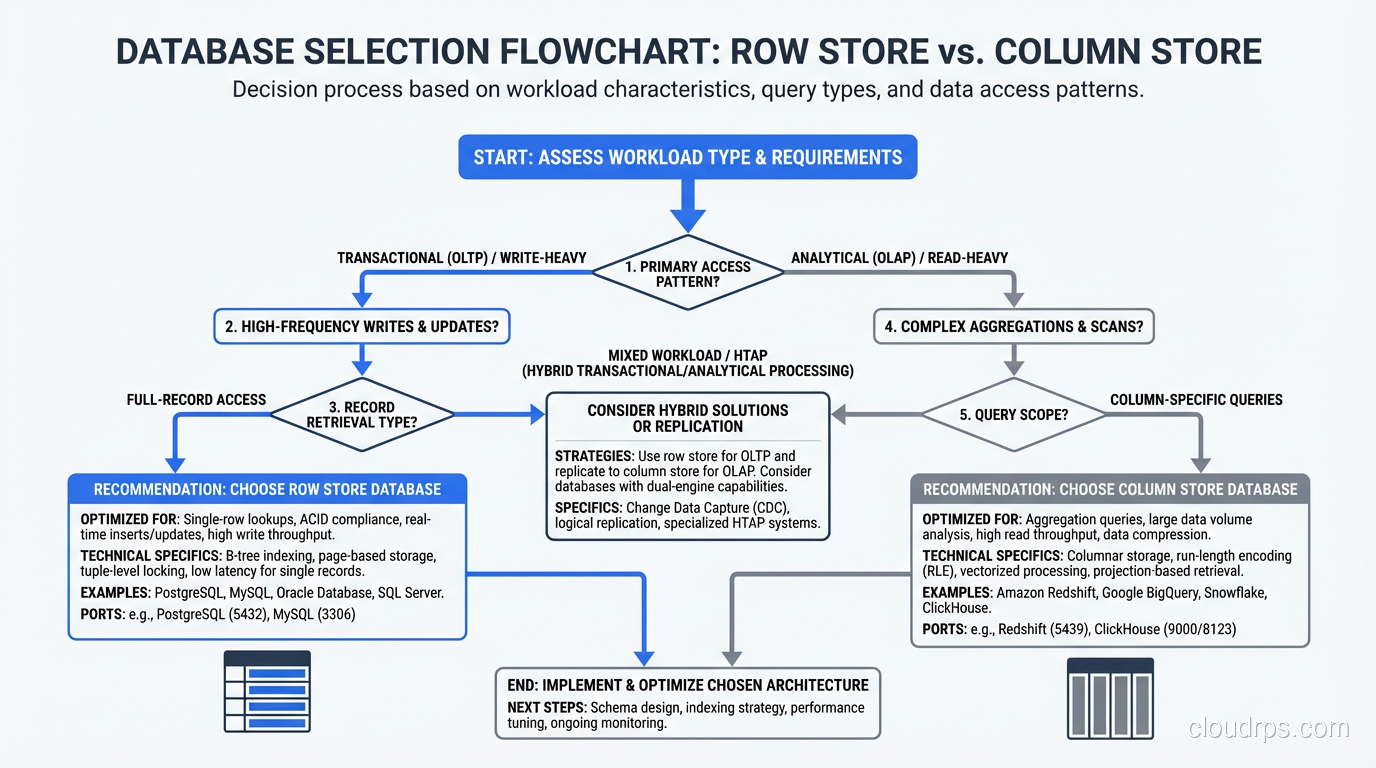
Making the Decision
My decision framework is straightforward.
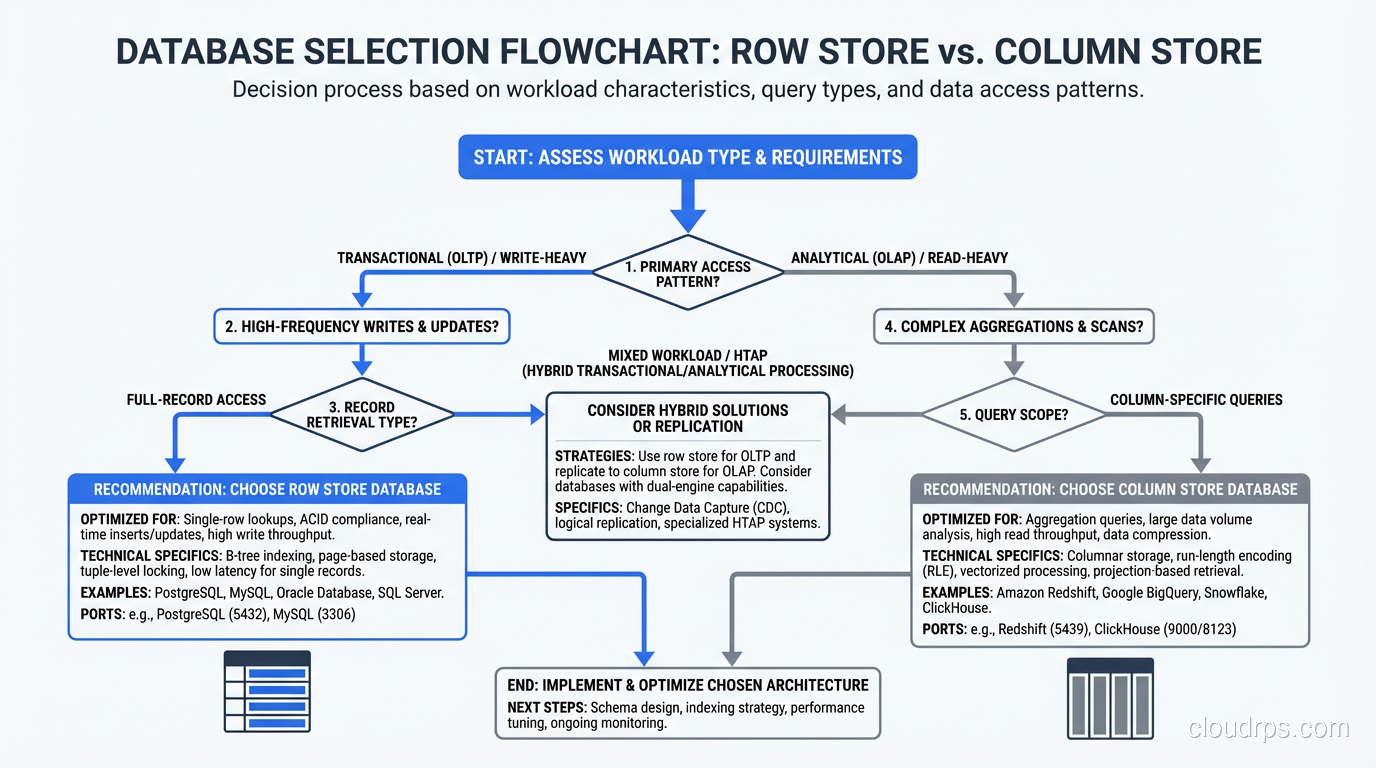
If your workload is primarily transactional (point queries, single-row inserts, updates, deletes, with occasional simple aggregations), use a row store. PostgreSQL, MySQL, or SQL Server will serve you well. Do not overcomplicate this.
If your workload is primarily analytical (aggregations over millions or billions of rows, group-by queries, time-series analysis, ad-hoc exploration of large datasets), use a column store. Choose between managed (Redshift, BigQuery) and self-hosted (ClickHouse) based on your operational capabilities and budget.
If your workload is mixed, either use a hybrid database or, more commonly, use both a row store and a column store with a data pipeline between them. The row store handles the application’s transactional needs; the column store handles reporting and analytics.
If you are unsure, start with a row store. Row stores are the general-purpose default. You can always add a column store later when your analytical needs outgrow what the row store can handle. Going the other direction, from a column store to a row store for transactional workloads, is a much more painful migration.
The column-vs-row choice is one of the most impactful architectural decisions you will make. A 10x or even 100x performance difference for your dominant query pattern is not unusual. Take the time to understand your workload before you commit.
Where This Is Headed
The trend I am watching most closely is the convergence of row and column storage in a single engine. DuckDB (an embedded analytical database) has shown that you can achieve excellent columnar performance without a distributed system. If you want to understand exactly how DuckDB’s in-process OLAP model works and where it fits in your stack, my DuckDB and embedded OLAP guide covers the architecture in depth. New engines are emerging that promise OLTP and OLAP performance in a single system (HTAP, or Hybrid Transactional/Analytical Processing).
I am cautiously optimistic about HTAP, but my production experience so far suggests that the “hybrid” in HTAP usually means “acceptable at both, excellent at neither.” For high-stakes workloads, I still separate my transactional and analytical paths. Maybe in another five years that changes. For now, understanding the row-vs-column tradeoff and making a deliberate choice remains one of the most valuable things you can do for your data architecture.
Updated September 1, 2026: removed unsourced statistics as part of an accuracy review.
Get Cloud Architecture Insights
Practical deep dives on infrastructure, security, and scaling. No spam, no fluff.
By subscribing, you agree to receive emails. Unsubscribe anytime.