
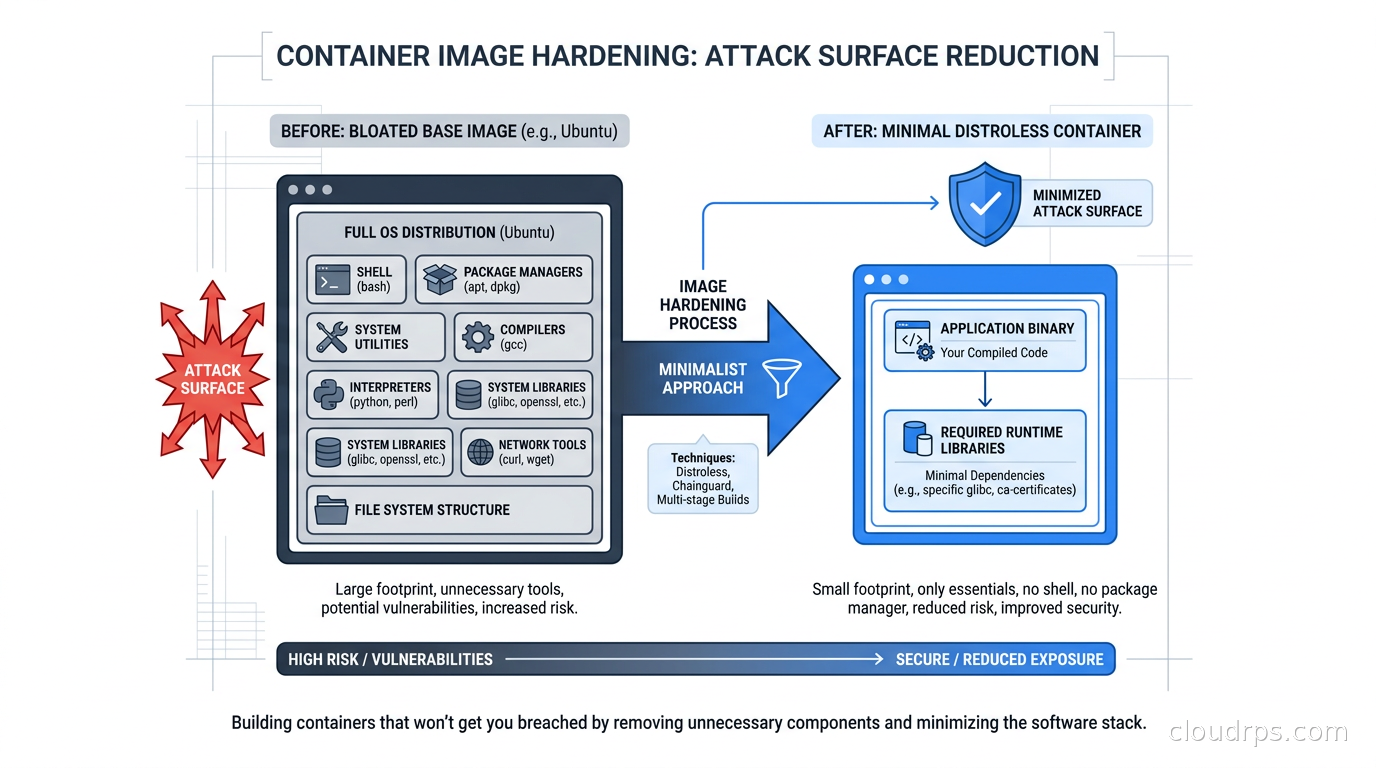
I was brought in to do a post-incident review for a mid-sized fintech company in 2019. Their Go microservice had been running inside a container based on ubuntu:18.04. The container had bash, curl, wget, python2, perl, and roughly 400 packages the application never used. An attacker got code execution through a deserialization vulnerability in a third-party library, and within minutes they had everything they needed: a shell to explore the environment, curl to exfiltrate secrets from the metadata endpoint, and apt to install a reverse shell if they felt like it. The breach ran undetected for three weeks.
Image hardening would not have prevented the initial compromise. The deserialization bug was the root cause. But it would have turned a comfortable, tool-rich environment into a hostile one. No bash. No curl. No package manager. Just a Go binary and the libraries it actually needs. That changes the calculus for an attacker considerably.
After twenty years of building cloud infrastructure, I have learned that defense-in-depth is not a buzzword. It is the difference between a contained incident and a catastrophic one. Container image hardening is one of the most cost-effective layers you can add. The security payoff is high, the operational cost is moderate, and the skills transfer across every team building containers.
The Real Problem with “Just Pull Ubuntu”
Most teams grab ubuntu:22.04 or debian:bookworm as their base image because it is familiar, everything installs easily, and the mental overhead is low. I understand the appeal. I have done it myself on internal tooling where I did not care about the attack surface.
In production, though, you are pulling in 80-plus megabytes of operating system, hundreds of packages, and a shell that exists purely for the convenience of whoever built the image. None of those packages are maintained by your team. They update on the distro’s schedule, which means your container’s vulnerability count grows every week regardless of whether your code changes.
The practical consequence: if you scan a freshly pulled ubuntu:22.04-based image today, you will typically find between 20 and 80 CVEs before you install a single application dependency. Most of those CVEs will never be patched by your team. They will live in your scan report as accepted risk until someone above you in the org chart reads an article about container security and starts asking uncomfortable questions.
More importantly, a full Linux userspace gives an attacker capabilities they should not have. A shell means they can explore. curl or wget means they can pull down additional tooling. A package manager means they can install whatever they need. Stripping those tools out does not require complex tooling. It requires choosing a different base image.
Multi-Stage Builds: The Foundation You Should Already Be Using
Before you change your base image, you need to understand multi-stage builds. If you are not using them, fix that first. The concept is simple: your Dockerfile has multiple FROM statements. The first stage is your build environment, with all the compilers, dev tools, and build-time dependencies it needs. The final stage is your runtime environment, which copies only the compiled artifact from the build stage.
FROM golang:1.22 AS builder
WORKDIR /app
COPY go.mod go.sum ./
RUN go mod download
COPY . .
RUN CGO_ENABLED=0 GOOS=linux go build -o /api-server ./cmd/api

FROM gcr.io/distroless/static-debian12
COPY --from=builder /api-server /api-server
USER nonroot:nonroot
ENTRYPOINT ["/api-server"]
That Dockerfile takes a Go application from 850MB (the full golang image) down to somewhere around 10-15MB at runtime. The build stage has everything Go needs to compile. The runtime stage has the static binary and nothing else.
This pattern applies to every compiled language. Rust, C, C++ all produce static binaries that run without a full OS. For interpreted languages like Python or Node.js you need a bit more in the runtime stage, but you can still strip out the package managers, the dev headers, and the test frameworks.
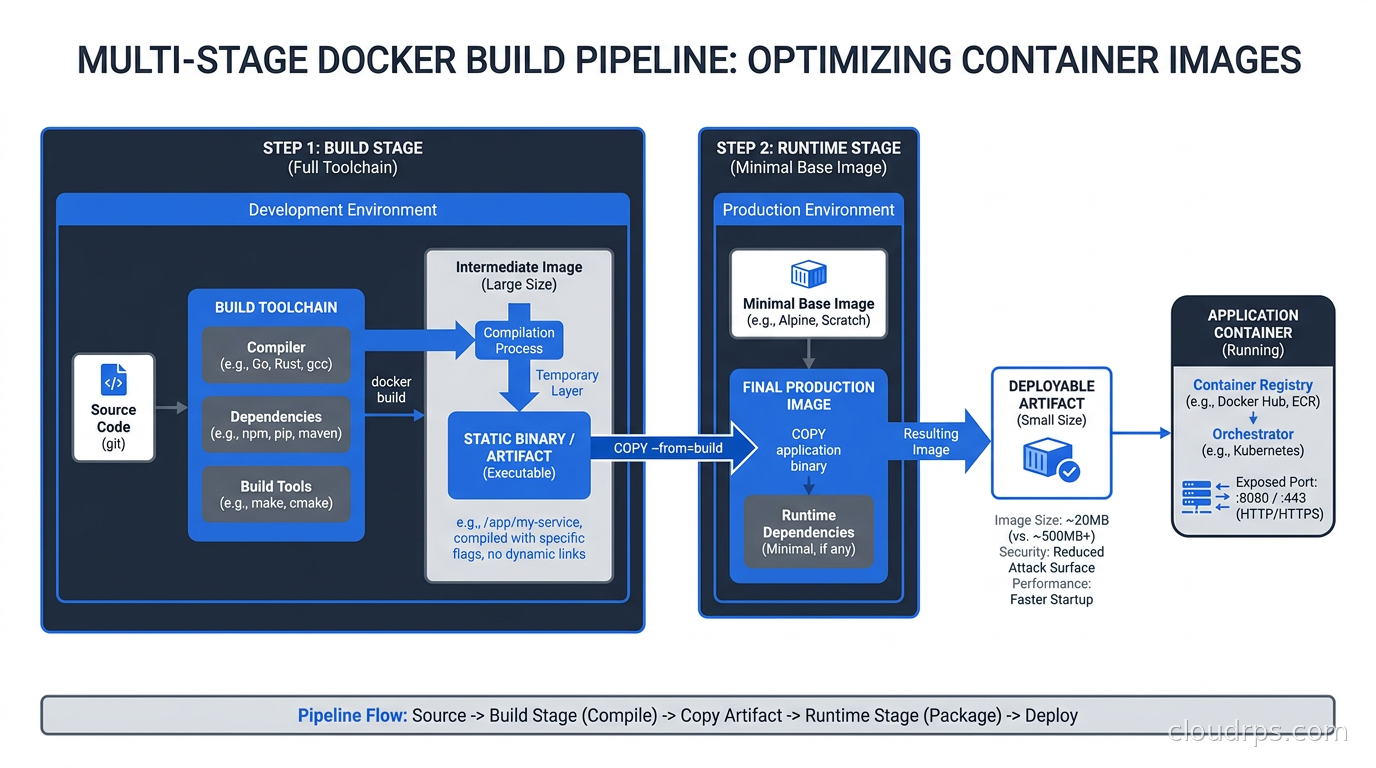
The biggest mistake I see teams make with multi-stage builds is using ubuntu:22.04 as the final stage just to have apt available “in case.” That defeats the purpose. The runtime stage should be as minimal as possible. Which brings us to the two realistic options for minimal base images. A complementary approach for platform teams managing many services is Cloud Native Buildpacks, which automates the selection of a minimal run image and separates the OS base from the application layer so that security patches can be applied via rebase without developer involvement.
Distroless: Google’s Answer to the Fat Base Image Problem
Google open-sourced the distroless project around 2017, and it has become the reference implementation for what a minimal container base image looks like. The name is slightly misleading. Distroless images do contain a Linux-compatible runtime. They just do not contain a Linux distribution in the traditional sense: no shell, no package manager, no coreutils, no system package management tooling of any kind.
What you get depends on which distroless image you choose:
gcr.io/distroless/static-debian12is the most minimal option, suitable for statically compiled binaries with no libc dependency. It contains only the CA certificates, timezone data, and a minimal set of base files. A Go binary compiled withCGO_ENABLED=0runs perfectly here.gcr.io/distroless/base-debian12adds libc for binaries that need it. Most C programs and some compiled Go programs with CGO fall here.gcr.io/distroless/cc-debian12adds libgcc and libstdc++ for C++ programs.gcr.io/distroless/python3-debian12adds the Python runtime but not pip or any standard library extras beyond what Python itself ships.gcr.io/distroless/nodejs22-debian12adds Node.js.gcr.io/distroless/java21-debian12adds the JRE.
The :debug variants of each image add a busybox shell for troubleshooting. Use these in development and staging. In production, use the non-debug variant.
The immediate operational benefit is image size. A Go application that ran in a 350MB Ubuntu-based image often drops to 12-20MB with distroless. A Node.js application that sat at 1.2GB drops to 150-200MB. That is not just a storage saving. It is faster image pulls, faster pod startup during scale events, and less data to scan.
The security benefit is more significant. Distroless images typically show zero or near-zero CVEs from the base image layer because there is almost nothing to have a CVE in. The CA certificates get updated regularly. The libc variants track Debian security updates. For the static variant there is genuinely almost nothing to patch.
Chainguard Images: Production-Hardened with Supply Chain Provenance
Google’s distroless project proved the concept. Chainguard refined it and built a commercial product around it that addresses the legitimate operational concerns teams have about maintaining minimal images.
Chainguard images are built on Wolfi, which Chainguard describes as a “Linux undistro.” Wolfi is not trying to be a full Linux distribution. It is a purpose-built collection of packages designed for containerized environments, with security-first design decisions built in from the start. Every package in the Wolfi ecosystem is built reproducibly, signed with Sigstore, and accompanied by an SBOM (software bill of materials).
What makes Chainguard’s operational model interesting is the continuous rebuild pipeline. Rather than building an image once and patching it reactively, Chainguard rebuilds images on a defined cadence (often daily) and pulls in upstream patches as soon as they land. As of early 2026, Chainguard maintains over 2,000 images in their catalog, and a significant portion show zero CVEs from Trivy or Grype scans because the underlying packages are aggressively patched.
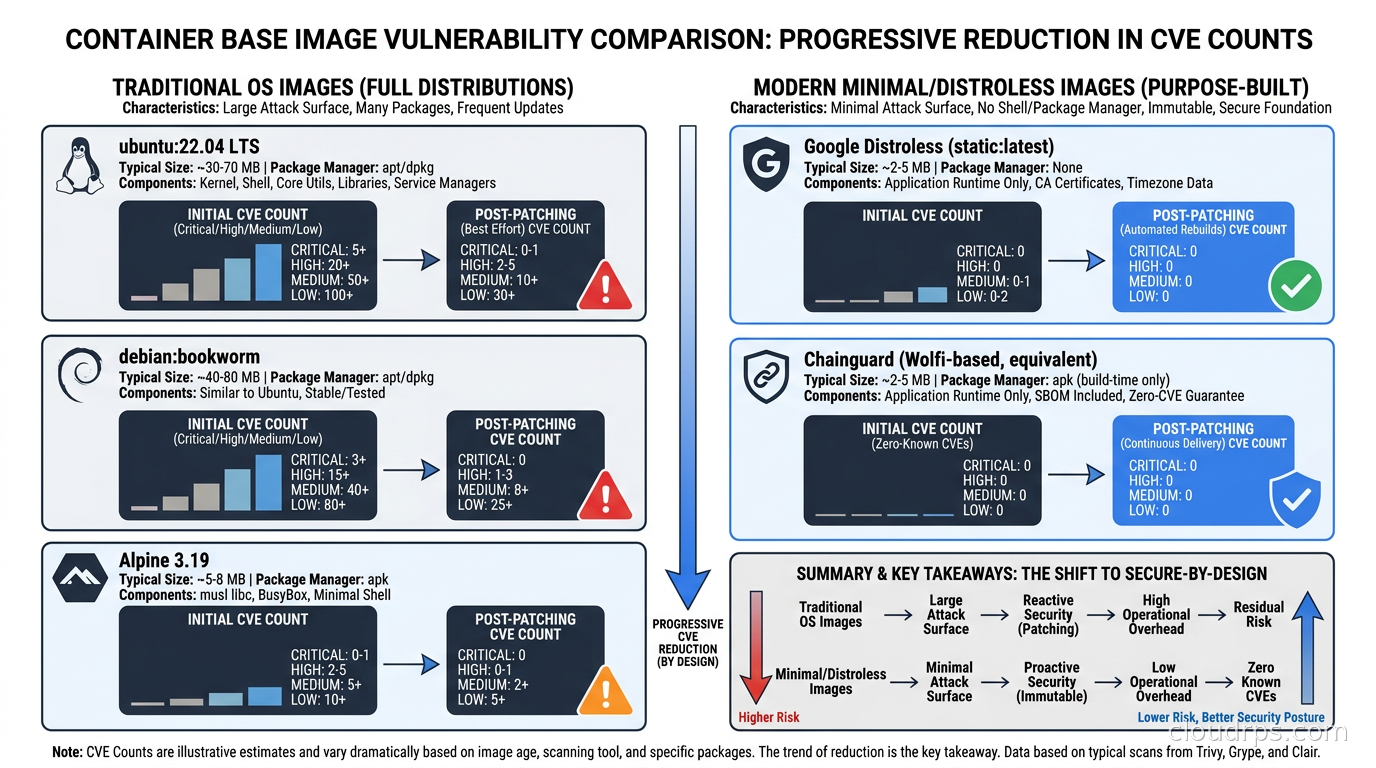
This matters operationally. If your security team runs a nightly scan and your base image perpetually shows 15 CVEs with CVSS scores above 7, someone has to triage those weekly. With a minimal base image that shows zero or two low-severity CVEs, that toil disappears. Your scanning noise drops to the CVEs that actually exist in your application dependencies, which is where the real work should be.
Chainguard images also come with SLSA Build Level 2 provenance attestations and Sigstore-signed SBOMs. This means you can cryptographically verify that an image was built from specific source code by Chainguard’s infrastructure, not tampered with in transit. For organizations in regulated industries, this attestation significantly simplifies compliance conversations about software supply chain integrity. If you want to dig deeper into SBOM practices and supply chain signing, I covered the broader landscape in the software supply chain security guide.
The tradeoff with Chainguard is cost. The free tier gives you access to latest tags. Pinned version tags and SLA-backed support require a paid subscription. For most companies running in production, the subscription cost is trivial compared to the engineering time savings from reduced CVE triage. For startups and personal projects, Google’s distroless project works fine.
Scanning: What You Should Be Running Before This Matters
Minimal base images reduce your base layer CVE count dramatically, but they do not eliminate the need for image scanning. Your application dependencies still exist. That third-party logging library you pulled in two years ago might have a known vulnerability. Image scanning catches those.
Two tools dominate this space in 2026: Trivy and Grype.
Trivy, maintained by Aqua Security, is the more commonly deployed scanner. It handles OS packages, language-specific packages (pip, npm, cargo, go.sum, etc.), IaC files, and Kubernetes manifests. The CLI is simple and the output is structured enough to parse in CI.
trivy image --exit-code 1 --severity HIGH,CRITICAL myapp:latest
That command fails the build if there are any HIGH or CRITICAL CVEs. In practice, you will want to tune the threshold and maintain an acceptance list for CVEs in packages you know you cannot patch immediately. But this is a reasonable starting point for a CI gate.
Grype, maintained by Anchore, is a worthy alternative and is particularly strong at matching CVEs to package versions accurately. Some teams run both and compare results because the two tools occasionally differ on which CVEs apply to which package versions.
Neither scanner is a replacement for minimal base images. They are complementary. Minimizing the base image reduces the CVE count. Scanning catches what remains and identifies issues in your application layer. One additional vector to scan is secrets baked into image layers: if a developer used a credential in a RUN command during debugging and committed that layer, TruffleHog can scan the image directly. The broader secrets detection workflow with Gitleaks and TruffleHog covers this image-scanning step alongside the git history scan.
Signing Images with Cosign: Proving Provenance at Admission
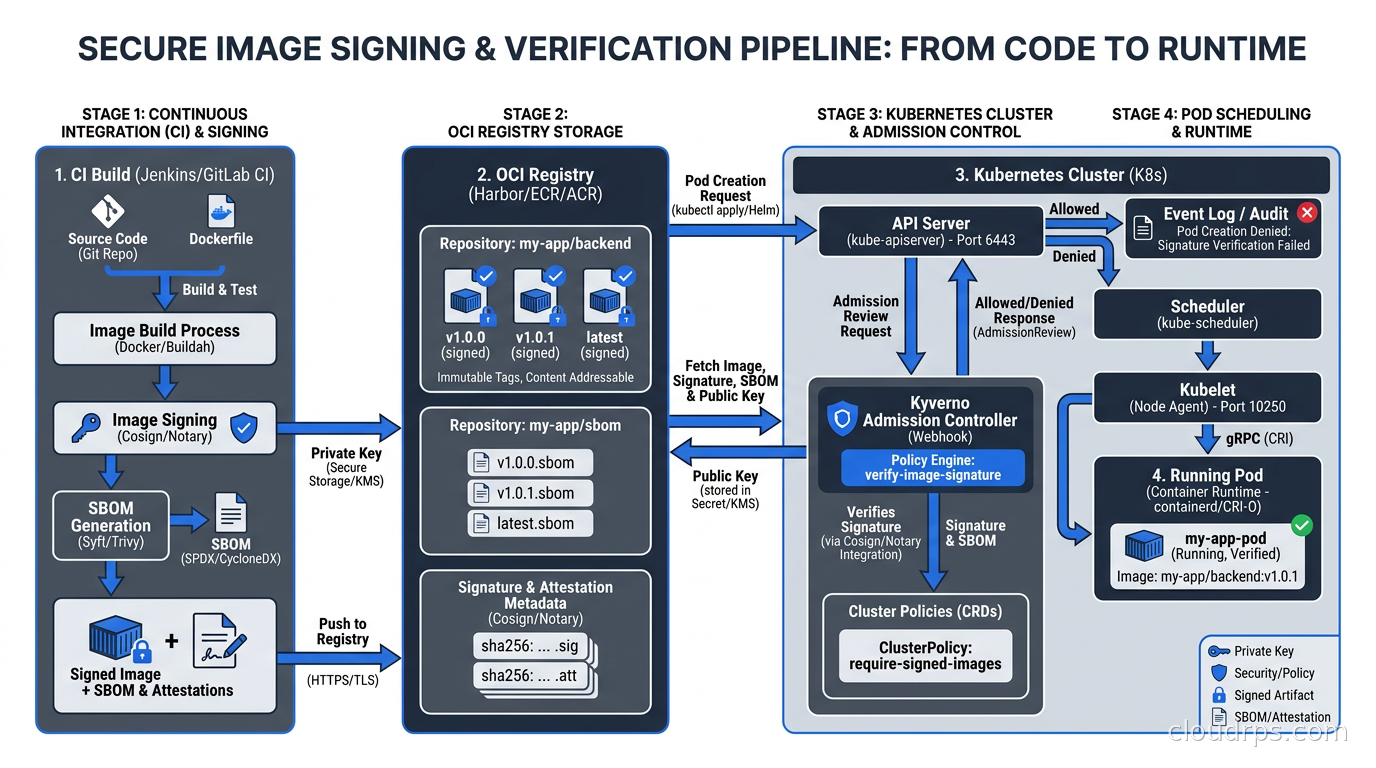
An image scanner tells you what vulnerabilities exist in an image. Cosign tells you whether the image is actually the one your build system produced, or whether someone swapped it out in transit.
Cosign is part of the Sigstore project (CNCF), and it implements keyless signing using ephemeral keys backed by an OIDC identity. The signing ceremony works like this: your CI pipeline builds an image, pushes it to a registry, and then calls cosign sign using the OIDC token from your CI provider (GitHub Actions, GitLab CI, etc.). Cosign gets a short-lived signing key from Sigstore’s Fulcio CA, signs the image digest, and records the signature in Sigstore’s Rekor transparency log.
At admission time in Kubernetes, a policy controller (Kyverno or OPA/Gatekeeper with the appropriate policy) verifies that every image has a valid Cosign signature from your expected OIDC identity before allowing the pod to start.
apiVersion: kyverno.io/v1
kind: ClusterPolicy
metadata:
  name: require-signed-images
spec:
  validationFailureAction: Enforce
  rules:
  - name: check-image-signature
    match:
      resources:
        kinds: ["Pod"]
    verifyImages:
    - imageReferences: ["registry.example.com/*"]
      attestors:
      - count: 1
        entries:
        - keyless:
            subject: "https://github.com/myorg/*"
            issuer: "https://token.actions.githubusercontent.com"
This policy says: any image from our private registry must have a Cosign signature where the signing identity was a GitHub Actions workflow from our organization. If someone pushes an unsigned image or an image signed by an unexpected identity, Kubernetes refuses to schedule the pod.
The operational overhead of setting this up is real but finite. Once it is running, the admission check is invisible to developers. Images that pass the CI pipeline get signed automatically. Images that bypass CI get rejected at the cluster.
The Debugging Problem Nobody Talks About Enough
I want to be honest about the operational pain that comes with distroless. When something breaks at 2am, your first instinct is to kubectl exec into the pod and poke around. With a distroless image, there is no shell to exec into. That can be jarring the first few times.
There are three practical approaches:
Ephemeral debug containers are the cleanest solution. Kubernetes has supported them since 1.23, and they are stable in 1.25+. You attach a temporary container to a running pod without modifying the pod spec:
kubectl debug -it pod/myapp-7d8f9-xyz --image=busybox:1.36 --target=myapp
This gives you a busybox shell that shares the process namespace with your application. You can see the running processes, check /proc/PID/fd to look at open file descriptors, and access the pod’s network. The ephemeral container disappears when you exit. This is the right pattern for production debugging.
Debug image variants are useful in non-production environments. Google’s distroless project ships :debug tags for most of their base images. These add a busybox shell. You can build your staging images on top of gcr.io/distroless/static-debian12:debug, giving your debugging a shell in environments where the security tradeoff is acceptable.
Structured logging and tracing are the real answer. If you are debugging in production regularly by shelling into containers, that is a symptom of insufficient observability. The right investment is structured JSON logging piped to a centralized log platform, distributed tracing covering your service calls, and metrics covering your business logic. Container runtime security with Falco can also surface behavioral anomalies that would previously have required shell access to investigate. The same immutability principle applies at the node OS layer: Talos Linux extends the distroless philosophy to the entire Kubernetes node, removing SSH and the shell from the host itself for a consistent defense-in-depth posture.
Getting your team to accept no-shell containers requires a cultural shift as much as a technical one. The engineers who are used to kubectl exec into every pod to investigate problems need upfront investment in observability tooling before the move to distroless feels like a win rather than a restriction.
The Non-Root User: Stop Running as Root
This deserves its own callout because I still see it constantly. A significant fraction of containers in production run as root, even though there is rarely any reason to. Running as root inside a container does not mean you have root on the host if the container is correctly isolated, but it does mean that a container escape gives the attacker root-level capabilities within the container namespace before they escalate further.
Distroless images include a nonroot user specifically so you have a non-root user available without adding a full passwd/shadow management system. Use it:
FROM gcr.io/distroless/static-debian12
COPY --from=builder /app/server /server
USER nonroot:nonroot
ENTRYPOINT ["/server"]
For applications that need to bind to a privileged port (anything below 1024), the right answer in Kubernetes is to bind to a high port and use a Service to map it. Do not add NET_BIND_SERVICE capabilities just to listen on port 80. Bind on 8080, and let the Service handle the port mapping. This pairs naturally with Kubernetes RBAC access control principles where your workloads operate with least privilege all the way down.
A Practical Migration Path
If you are inheriting a codebase with fat images, here is the migration sequence that has worked for me:
Start with multi-stage builds. Even if your final stage is still ubuntu:22.04, separating build from runtime cuts image size significantly and reduces the packages that end up in production. This step is safe and usually uncontroversial.
Add image scanning to CI. Set the scan to warn only initially. Let the team see what the current CVE count looks like. This builds the case for moving to minimal images without creating immediate pressure.
Move statically compiled services first. Go services with CGO_ENABLED=0 are the easiest migration. Swap the final stage to gcr.io/distroless/static-debian12, verify the container starts, verify your health checks pass, deploy to staging. It usually takes less than an hour.
Tackle JVM and Python services next. These are messier because they have more runtime dependencies. The distroless Java and Python images cover a lot of cases, but you may find that some packages your application imports have system library dependencies that are not in the distroless image. Inventory those dependencies first.
Evaluate Chainguard for high-priority services. For services handling payments, PII, or authentication, Chainguard’s zero-CVE SLA and continuous rebuild pipeline justify the subscription cost. Start there.
Add Cosign signing at the end. Get the images minimal first. Once your teams are comfortable with the images, add image signing to CI and admission-time verification in Kubernetes. This is the most complex step and should be saved for after the team has internalized the rest.
A fourth approach worth knowing about is building images with Nix using dockerTools.buildImage. Unlike Dockerfiles, a Nix-built image is derived entirely from content-addressed packages: given the same flake.lock, the build produces a byte-identical image every time. This is the strongest possible reproducibility guarantee, and it pairs naturally with Sigstore signing since the image digest is deterministic. The tradeoff is the Nix learning curve. If your team is already using Nix for development environments or CI builds, extending it to image builds is a natural step. If not, distroless and Chainguard get you most of the security benefit with less infrastructure investment. See the Nix and NixOS infrastructure guide for a deeper treatment.
For services using containers as sandboxing boundaries for untrusted workloads, also look at gVisor and Kata Containers. They address a different layer than image hardening, but they are complementary controls worth understanding.
What You Actually Get Out of This
Let me quantify what I typically see after this work:
Image size reductions of 80-95% for compiled services are common. A 900MB Java service drops to 80-100MB with a distroless JRE base. A 350MB Go service drops to 10-15MB with a static distroless base. Smaller images mean faster CI push times, faster node startup during scale events, and lower image storage costs.
CVE counts from base image layers drop to near zero. Your scanner output shifts from noise about packages you cannot touch to signal about vulnerabilities in your actual code and dependencies. That makes your security remediation work more focused.
Post-exploitation capability for an attacker who achieves code execution inside a container drops dramatically. No shell means reconnaissance requires writing custom code. No curl means exfiltration requires implementing HTTP from scratch. No package manager means installing additional tooling requires the attacker to bring it themselves. These are not insurmountable obstacles for a sophisticated attacker, but they add friction that matters against the median threat actor.
Compliance conversations become simpler. When your auditor asks how you manage container vulnerabilities, “our base images ship with zero CVEs from a vendor that provides SLSA-attested SBOMs and Sigstore signatures” is a much better answer than “we scan quarterly and accept the rest.” This connects to the broader zero trust security posture your organization is probably working toward.
The Long View
The underlying shift here is treating container images as software artifacts that need provenance, not just build outputs that get shipped when they compile. The supply chain attacks of the early 2020s – SolarWinds, the xz backdoor, various typosquatted npm packages – demonstrated that attackers are patient enough to compromise the build and distribution pipeline if it gets them into production undetected.
Distroless and Chainguard images, combined with SBOM generation and Cosign signing, give you the ability to answer “where did this image come from and what is in it” with cryptographic confidence. That matters for security. It also increasingly matters for regulatory compliance as frameworks like SLSA and requirements like EO 14028 in the US make software provenance a first-class concern. If you want to go further and add cryptographic build provenance to your container images, the SLSA build provenance guide covers the slsa-github-generator reusable workflow and how to verify provenance at admission time.
The operational cost of maintaining minimal images is real but manageable. The teams I have seen struggle with it most are the ones who skip the observability investment and then hit the no-shell wall in production. Do not make that mistake. Build your observability foundation first, as discussed in the Prometheus, Loki, and Grafana observability stack guide. Then move to minimal images from a position of confidence that you will actually be able to debug problems when they arise.
Start with your highest-value, highest-risk services. Get a proof of concept running with distroless. Add scanning to CI. Demonstrate that it works without breaking anything. Then expand. The teams that do this incrementally ship it in weeks. The teams that try to do it all at once tend to get blocked on edge cases and lose momentum.
Your containers should contain exactly what they need to run and nothing else. Everything beyond that is attack surface you are volunteering to defend.
Get Cloud Architecture Insights
Practical deep dives on infrastructure, security, and scaling. No spam, no fluff.
By subscribing, you agree to receive emails. Unsubscribe anytime.