
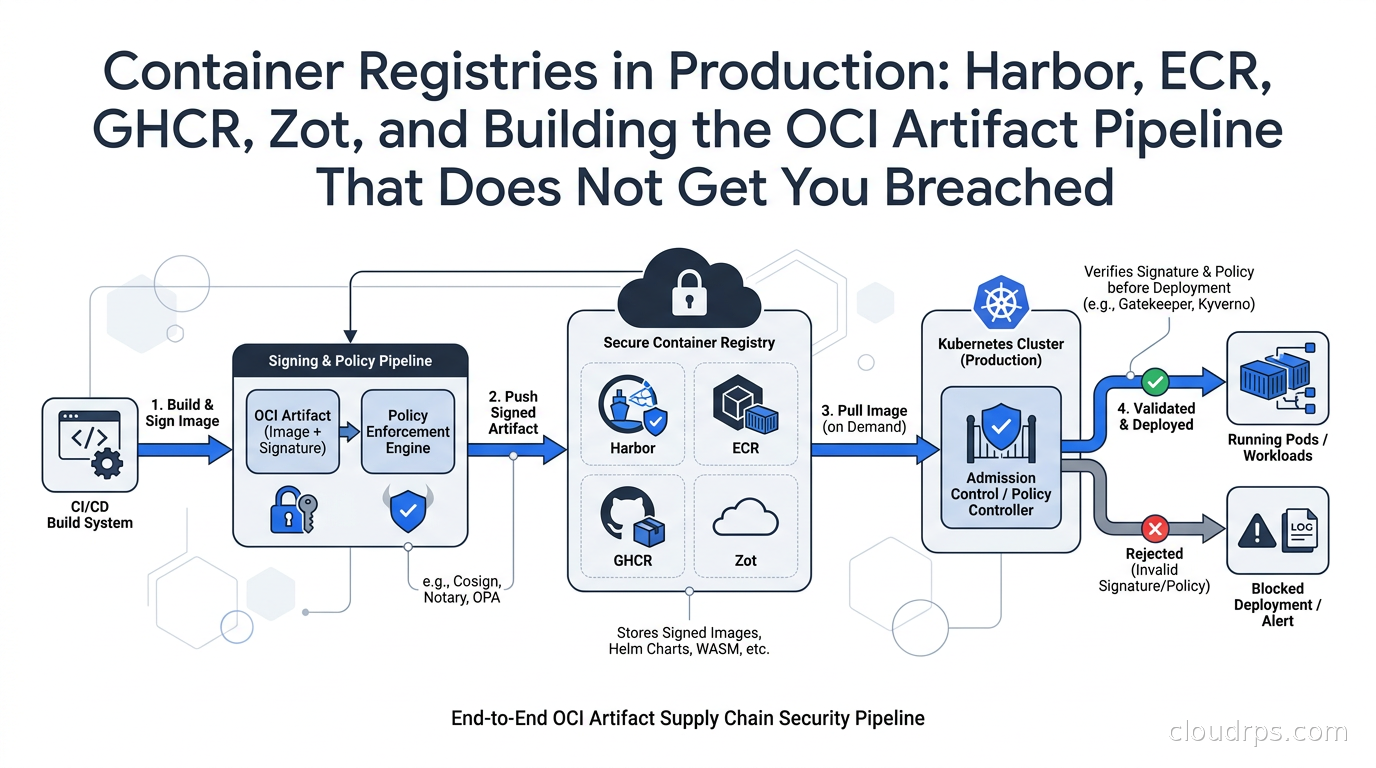
Twenty years in this industry and I still see teams treat their container registry as an afterthought. A quick push to Docker Hub in development, a scramble to set up something production-grade six months later when security comes knocking. The registry is where your entire software supply chain converges: every image your cluster will ever run passes through it. Getting the registry architecture right is not optional.
In October 2024 I helped a financial services client through an unpleasant conversation. Their Kubernetes clusters were pulling images from Docker Hub with anonymous credentials. Their rate limit budget hit zero during peak deployment windows. But the rate limit was not the real problem. The real problem was that nobody could tell me, with any confidence, that the images running in production matched what came out of CI. No signing. No verification. No attestations. Just hope.
That situation is not unusual. The containerization wave of 2016-2018 focused on getting things running. The supply chain security wake-up call came later, intensified by incidents like SolarWinds and the 3CX compromise. In 2026, if you are still running unsigned images from an unauthenticated registry, you are operating with a blind spot that attackers know how to exploit.
This guide covers the registry landscape, explains the OCI specifications that underpin all modern registries, and walks through a production setup that gives you image provenance you can actually verify.
The OCI Distribution Spec and Why It Matters Now
Before picking a registry, you need to understand what a registry actually is in 2026. The Open Container Initiative maintains two specifications that govern registry behavior: the Image Spec (how layers and manifests are structured) and the Distribution Spec (how clients push and pull content).
The Distribution Spec version 1.1, which shipped in 2024, made a change that matters for supply chain security: it standardized the Referrers API. Before 1.1, attaching a Cosign signature, an SBOM, or a vulnerability scan result to an image was a workaround involving a separate registry tag. The Referrers API gives every artifact a standard way to query what is attached to it. You push a signature as a referrer to an image digest, and any conformant client can discover it with a single API call.
The OCI also rewrote their conformance test suite in April 2026, exposing edge cases in registries that previously passed. If you run Harbor or a distribution-based registry, check whether your version passes the current conformance suite before trusting it with production workloads.
The practical implication: any registry that does not implement Distribution Spec 1.1 cannot properly serve Cosign signatures or ORAS-attached SBOMs as referrers. You end up relying on the tag-based fallback, which works but is messier to query and manage. When evaluating registries, check their compliance level explicitly.
The Registry Landscape
Docker Hub: Still There, Still Rate-Limiting You
Docker Hub remains the largest public registry by image count. Anonymous pulls are currently limited to 100 per 6 hours, authenticated free accounts to 200. Paid plans remove the cap. In a CI environment with many ephemeral runners, anonymous pulls from Docker Hub will fail during busy periods.
The standard mitigation is a pull-through cache: your registry sits between your Kubernetes nodes and Docker Hub, caches images locally, and absorbs rate limit pressure. I will cover setting this up in the Harbor and ECR sections. Even with a cache, I recommend reducing your dependency on public Docker Hub images for anything running in production. Build your own base images from scratch or from verified minimal distributions.
Amazon ECR: The Pragmatic Default for AWS Shops
If you are deep in AWS, ECR is the path of least resistance. It integrates with IAM, it does not rate-limit your internal pulls, and it handles the storage billing without separate infrastructure. Standard storage runs $0.10 per GB-month in us-east-1 as of mid-2026, according to third-party price guides, though verify current rates on the AWS pricing page directly.
ECR’s pull-through cache feature deserves attention. It was originally limited to a handful of public registries, but AWS has steadily expanded the list. In March 2025 they added ECR-to-ECR replication, letting you sync images across accounts and regions automatically. In March 2026 they added Chainguard as an upstream source, which is useful if you are adopting Chainguard hardened base images. As of May 2026 the pull-through cache supports Quay, GHCR, ACR, and GitLab as upstream sources in most regions.
The pull-through cache dramatically simplifies Docker Hub rate limit management in AWS environments. You configure an ECR pull-through cache rule pointing at Docker Hub or another upstream, authenticate your nodes to ECR, and upstream pulls are cached automatically. Your pods never touch Docker Hub directly.
ECR’s weakness is scanning. Its built-in scanning (powered by Snyk as of my last look) covers known CVEs but is not as configurable as Harbor’s scanning integrations. For teams that need custom scanning policies or multi-scanner setups, ECR scanning alone is usually insufficient.
GitHub Container Registry: The Developer-Friendly Option
GHCR (ghcr.io) lives inside GitHub’s ecosystem. For open source projects, public images are free and public GHCR pulls have no published rate limits. For private images, storage is bundled with GitHub plans.
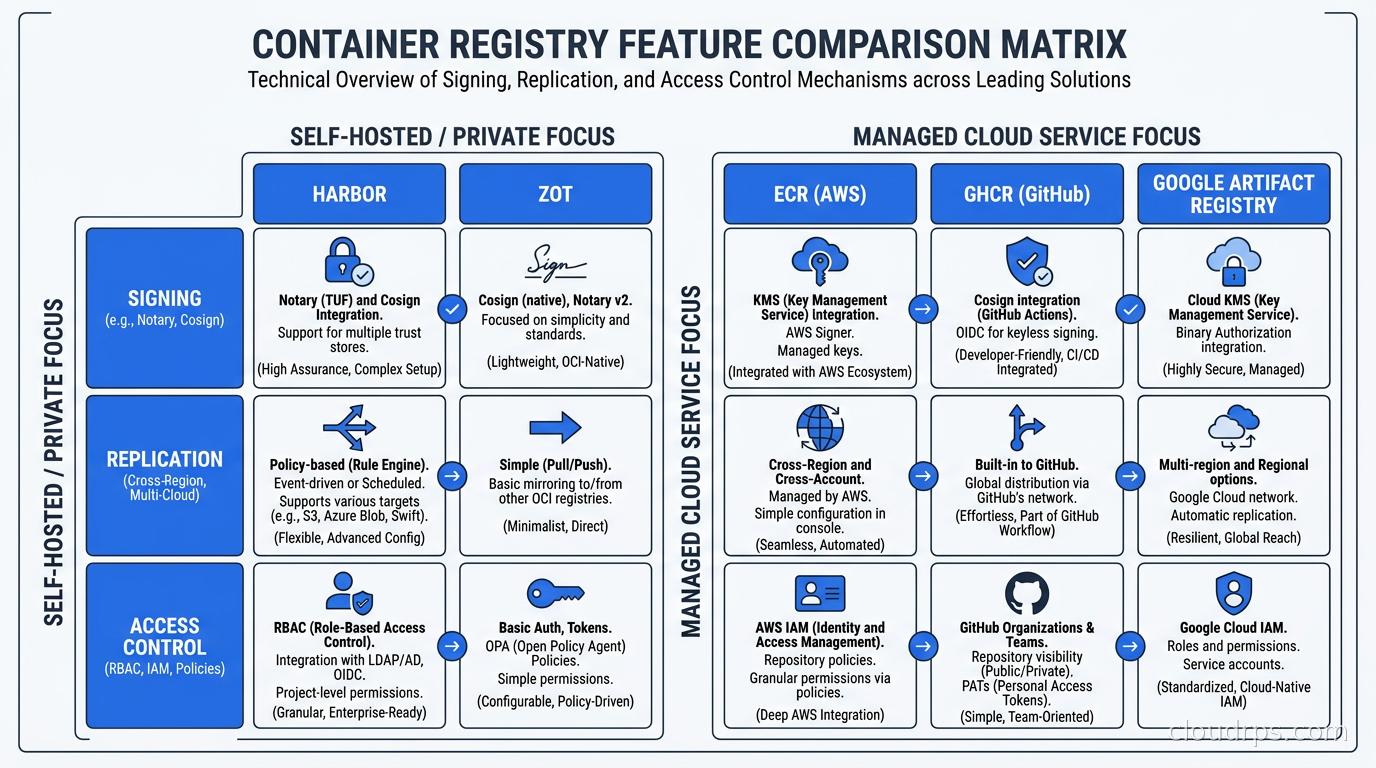
GHCR’s main advantage is GitHub Actions integration. Pushing a signed image to GHCR with Cosign keyless signing from a GitHub Actions workflow requires almost no ceremony. The OIDC token issued by GitHub Actions is exactly what Fulcio (the Sigstore certificate authority) expects. Your build signs the image with an ephemeral identity derived from the repository and workflow that produced it, and the signature is stored as a Referrer in GHCR.
The limitation: GHCR is a hosted service with no self-hosting option. For organizations under data residency requirements or with air-gapped environments, GHCR does not fit. Its enterprise controls are also lighter than Harbor’s for complex multi-team access patterns.
Harbor: The Graduated CNCF Standard for Enterprise Self-Hosting
Harbor is the CNCF’s graduated project for self-hosted container registries. It started as VMware’s open source registry and has grown into a comprehensive platform. The version on Azure Marketplace as of this writing is 2.15.x, so the project has iterated well beyond its initial release.
Harbor adds governance layers that raw registries lack: RBAC (project-based with member roles), image retention policies, vulnerability scanning (pluggable, supports Trivy and Clair), content trust enforcement, replication policies, and a complete audit log.
The production deployment question for Harbor is almost always the same: PostgreSQL and Redis. Harbor uses PostgreSQL as its primary datastore and Redis for job queuing and caching. If you run Harbor on Kubernetes (which I recommend for operational consistency), you want to treat the PostgreSQL and Redis instances as production databases, not as throw-away containers. Use a managed PostgreSQL service or Patroni, and do not let Redis data be ephemeral if you rely on Harbor’s scan scheduling and replication jobs.
The other Harbor production consideration is storage. Harbor delegates image layer storage to a configurable backend. In production on AWS, that means S3. On GCP, GCS. On premises, you typically use a Ceph cluster or a NetApp. The Harbor application tier can be stateless once you externalize PostgreSQL, Redis, and object storage. That makes horizontal scaling and upgrades much cleaner.
Harbor’s replication feature supports push and pull replication to other Harbor instances and to ECR, ACR, GCR, Docker Hub, and any OCI-compliant registry. Use this when you need a harbor-of-record in one region and mirrors in others.
Zot: The Minimal OCI-Native Alternative
Zot is a CNCF Sandbox project that ships as a single statically compiled binary. It is fully OCI Distribution Spec compliant, including the Referrers API. The release cadence is active, with v2.1.x releases continuing through 2026.
Zot is the right choice when you want OCI compliance without Harbor’s operational complexity. Use cases: an air-gapped registry for a small team, a local development registry, a thin mirror of a few specific upstream images. Zot does not have Harbor’s RBAC depth, its scanning integration, or its web UI polish. For teams that need to store images for twenty developers without enterprise multi-tenancy, that is fine.
The single-binary deployment is a genuine operational win. You can run Zot on a single VM, put an nginx TLS terminator in front of it, and have a fully compliant OCI registry in under an hour. It also works embedded as a library if you need to build registry functionality into another tool.
Image Signing with Cosign and Sigstore
The registry holds your images. Cosign makes those images verifiable. These two concerns are separate, and I see teams conflate them constantly.
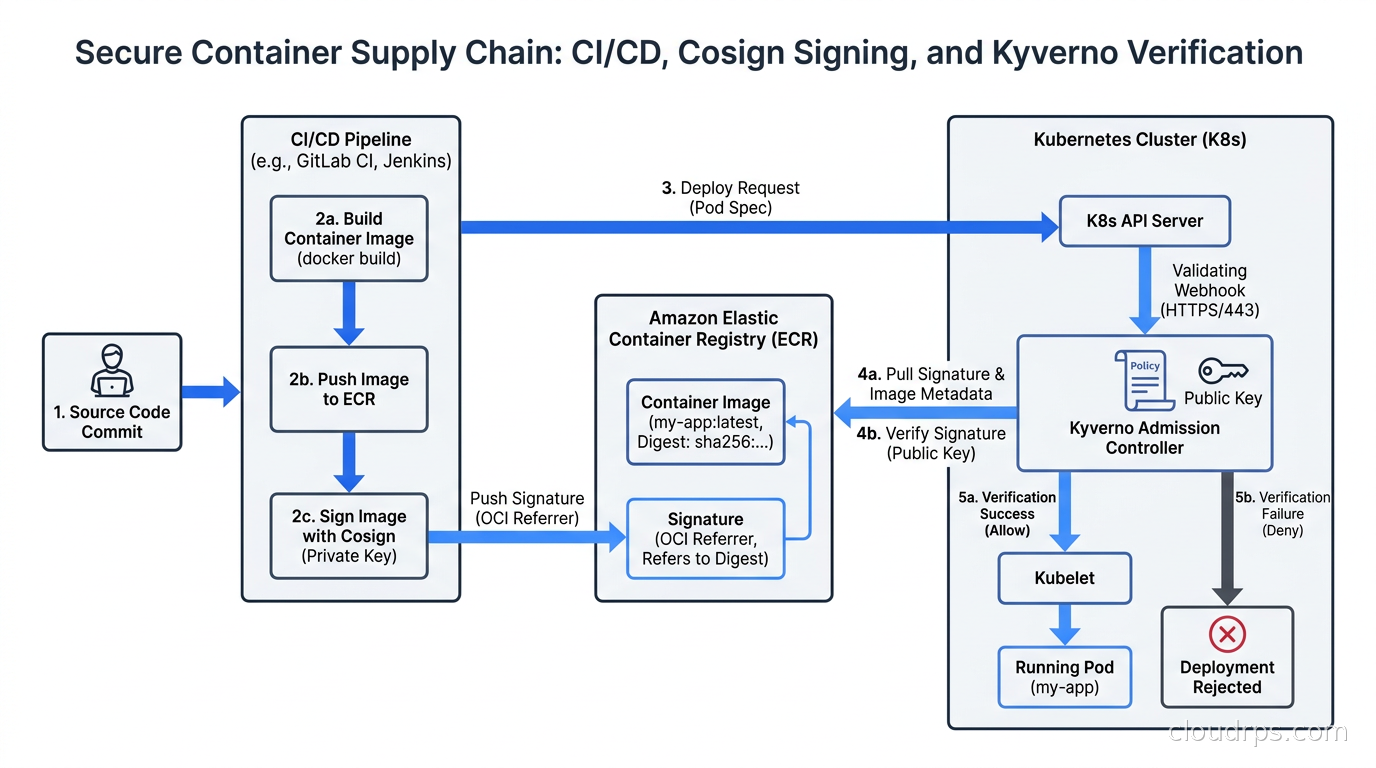
Sigstore is the ecosystem. Cosign is the tool you use to sign images. Rekor is the transparency log that records signing events. Fulcio issues the ephemeral certificates.
For teams on GitHub Actions or any major CI provider with OIDC support, keyless signing is the standard approach. In your build workflow, after you push an image by digest:
cosign sign --yes $IMAGE_DIGEST
Cosign requests a short-lived certificate from Fulcio, signed to the OIDC identity of the CI job. The signature is stored in your registry as a Referrer on the image manifest. Rekor records the event in an append-only transparency log. Nobody needs to manage a private key.
The verification side is where admission control matters. Cosign alone does not prevent you from running an unsigned image. You need a policy enforcement layer. For teams on Kubernetes, Kyverno’s VerifyImages rule lets you declare that images from a specific registry must have a valid Cosign signature from a specific Fulcio identity pattern (like https://github.com/your-org/*). Pods that reference unsigned or improperly signed images are rejected by the admission webhook before they ever schedule.
For environments that cannot reach public Sigstore infrastructure (air-gapped, strict egress controls), run a private Sigstore stack. The Sigstore project provides Helm charts for self-hosted Rekor and Fulcio. You configure Cosign with SIGSTORE_REKOR_URL and SIGSTORE_FULCIO_URL environment variables pointing at your private endpoints. This is operationally heavier, but it works cleanly with Harbor’s project integration.
One thing to get right from the start: sign by digest, not by tag. A tag is mutable. The same latest tag in your registry today and tomorrow may point to different layers. When you sign by digest (sha256:abc123...), the signature is cryptographically bound to that specific set of layers, forever. Cosign’s verification fails if someone replaces the content behind a digest, because the digest itself would change. This is the guarantee you need.
For supply chain documentation beyond signatures, look at SBOM attestations. After building an image, use Syft or Trivy to generate an SPDX or CycloneDX SBOM, then attach it as a Cosign attestation:
cosign attest --predicate sbom.spdx.json --type spdxjson $IMAGE_DIGEST
The SBOM is now retrievable by any tool that queries the Referrers API on your registry. This integrates with software supply chain security practices directly, and with SLSA provenance attestations for build integrity verification per the SLSA build provenance framework.
Pull-Through Caching: Solving the Rate Limit Problem at the Architecture Level
Pull-through caching deserves its own section because I have seen it done wrong in costly ways.
The naive approach: configure your container runtime to use authentication credentials for Docker Hub. This works until the credentials expire, the team that set them up leaves, or the rate limit still hits because every node independently pulls.
The right approach: one registry sits in front of Docker Hub, caches images locally, and your nodes pull from that single point. Each unique image is pulled from Docker Hub exactly once (or at your configured TTL). After that, every subsequent pull is local.
In Harbor, create a Proxy Cache project pointing at Docker Hub (or any upstream). Configure your Kubernetes image pull spec to reference your-harbor.example.com/dockerhub-proxy/library/nginx:1.27 instead of nginx:1.27. Harbor fetches from Docker Hub on the first pull, caches the layer data in your configured S3 bucket, and serves subsequent pulls from cache. The rate limit is effectively eliminated from the perspective of your nodes.
In ECR, configure a pull-through cache rule for Docker Hub (requires a Secrets Manager entry with Docker Hub credentials for authenticated pulls). Update your node configurations or image pull specs to use the ECR pull-through cache URI. AWS handles the rest.
The cache TTL matters. Harbor’s default TTL for cached images is configurable; I typically set it to 24 hours for base images that update frequently, and 168 hours (one week) for images on release tags that should not change. You also want a cron job or Harbor’s built-in retention policies to garbage-collect cached images that are no longer referenced, keeping storage costs in check.
Pair pull-through caching with your cloud object storage lifecycle tiering strategy. Image layers in S3 can often be moved to cheaper storage classes after they age out of frequent use.
Vulnerability Scanning Integration
Most registries offer some form of vulnerability scanning. The details matter.
Harbor integrates with Trivy (the default since Harbor 2.x) and Clair. You can configure it to scan on push and block pulls of images with vulnerabilities above a configured severity threshold. A Harbor project policy can prevent images with critical CVEs from being pulled at all. This is a registry-level gate that catches images before they reach Kubernetes admission control.
The gap in registry-level scanning is context. A CVE in a library your application does not use, or that is not reachable given your runtime configuration, shows up the same as a critical reachable vulnerability. Harbor’s scanner will tell you the CVE exists. It will not tell you if it is exploitable in your specific usage. For that you need a runtime CSPM or a tool like Wiz or Snyk that correlates CVEs with actual code paths.
My production pattern: use Harbor to gate on critical and high severity CVEs as a broad filter. Then run a more context-aware scanner as a separate CI stage, with findings surfaced to the team rather than hard-blocking deploys. The goal is signal, not friction. A policy that blocks every deploy because of a medium-severity CVE in a transitive dependency is a policy that gets disabled.
This ties directly to your broader container image hardening practice. If you are starting from Chainguard or distroless base images, the CVE surface is dramatically smaller, and registry scanning becomes less of a constant fire drill.
RBAC and Multi-Tenancy in Harbor
For organizations running multiple teams on shared infrastructure, Harbor’s project model is the right level of abstraction.
A Harbor project is a namespace that holds repositories, access policies, scanning policies, and retention policies. A team gets a project, a service account with robot credentials that CI uses to push, and developer accounts with pull access. Cross-project pulls are controlled by robot accounts scoped to specific repositories.
The role model has five levels: Limited Guest (pull only, no list), Guest (pull, list), Developer (push/pull), Maintainer (manage repositories), and Project Admin (full project control). This maps well onto real teams where most engineers need pull access and CI needs push access.
For Kubernetes, I configure a registry secret in each namespace that maps to a Harbor robot account with pull permissions for the projects that namespace consumes. I generate robot accounts with Harbor’s API and store the credentials in Kubernetes external secrets management or Vault. Robot credentials rotate automatically on a schedule that Harbor manages.
System-level RBAC (controlling who can create projects, configure system settings, manage global replications) is controlled by Harbor’s LDAP or OIDC integration. Most enterprises connect Harbor to their IdP, so teams and permissions stay synchronized with organizational changes.
Registry FinOps: The Bill Nobody Planned For
Image layers are not free. In ECR, storage is $0.10/GB-month. A team that builds frequently and retains every build artifact can accumulate surprising amounts of data over months. I worked with one team that was spending hundreds of dollars a month on ECR storage entirely because their CI pipeline pushed a new image on every commit to every branch and never cleaned up.
The fix is lifecycle policies. ECR lifecycle policies can automatically expire images based on age or count rules. Configure policies like: keep only the 10 most recent tagged images per prefix, expire untagged images after 7 days, expire branch-build images after 30 days. Apply these policies to every repository, not just the ones you think are large.
Harbor handles retention through its configurable retention policies per project, with similar rule structures. Add the retention policy configuration to your Harbor project IaC (Terraform or the Harbor provider), not as a manual step someone might skip.
The other cost lever is deduplication. OCI layers are content-addressed; if two images share layers (both derived from the same base image), they store those shared layers once. This is registry-level deduplication and it works transparently. Choose base images consistently across your fleet to maximize layer sharing. A policy of “every Go service uses the same distroless base at the same digest” is both a security practice and a storage cost practice.
This connects to the broader cloud cost anomaly detection discipline: alert when your registry storage cost increases faster than your deployment frequency, which is a signal that something is retaining more than it should.
Policy Enforcement: Closing the Loop with Admission Control
The registry signs and scans your images. Kubernetes admission control ensures those controls actually apply to running workloads.
Policy-as-code with OPA and Kyverno gives you the admission layer. Kyverno is my preference for image verification because its VerifyImages policy type is purpose-built for Cosign, while OPA Gatekeeper requires more boilerplate for the same result.
A complete admission policy stack covers:
- Image signing: reject pods whose images do not have a valid Cosign signature from your trusted CI identity
- Registry allowlist: reject images not from your approved registries (prevents pulling directly from Docker Hub into production)
- Vulnerability threshold: optionally integrate with an image scanning API at admission time (some teams do this; it adds latency to pod scheduling)
- Image digest pinning: reject pods that reference images by mutable tags without an explicit digest
The registry allowlist is underrated. If your admission policy accepts images from your-registry.example.com/* only, an attacker who compromises a developer workstation cannot push a malicious image to Docker Hub and have it run in production even if they find a way to trigger a deployment. The attack has to go through your controlled registry first.
In Kubernetes RBAC, pair the image admission policies with namespace-level restrictions on who can create or modify pod specs. If only your CI service account can deploy workloads in production namespaces, the registry signing chain and the Kubernetes RBAC chain together give you a strong integrity guarantee.
Choosing Your Registry: A Decision Framework
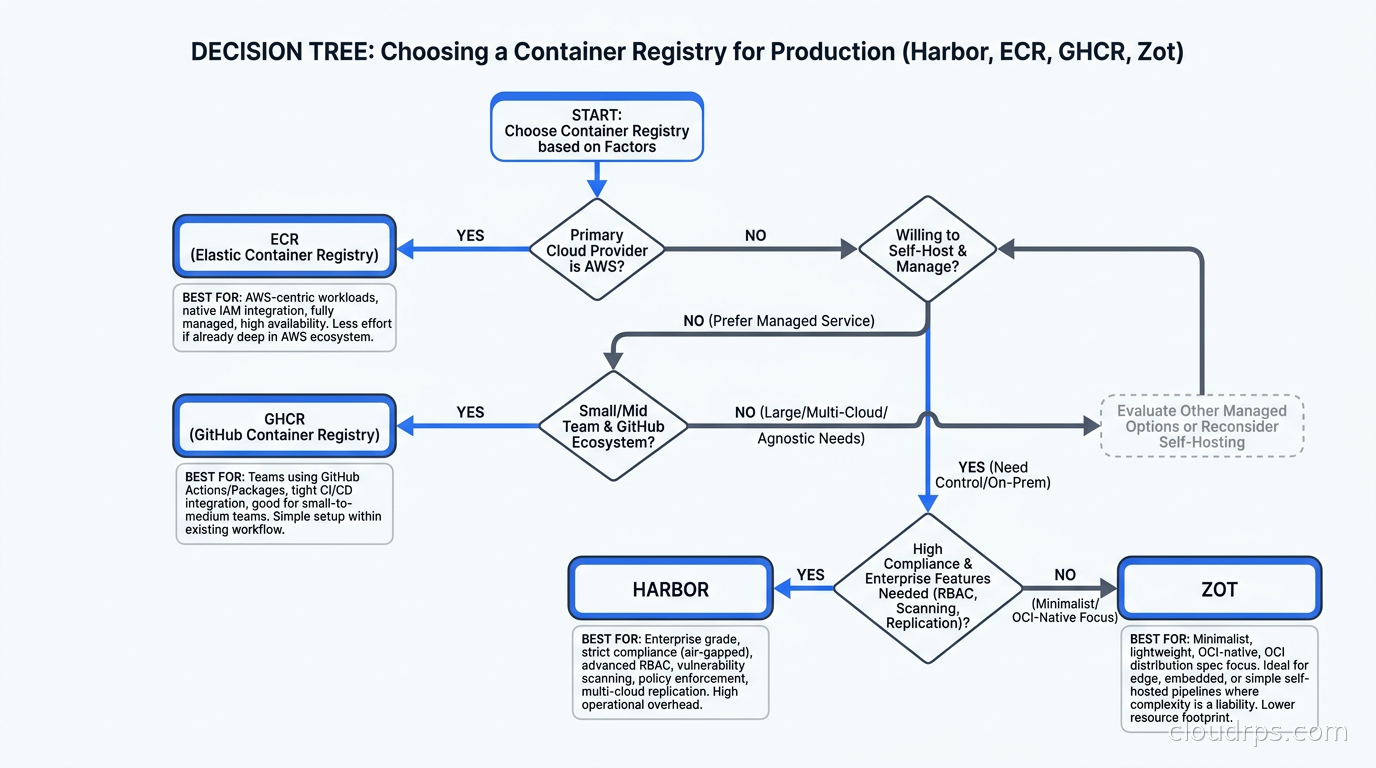
After twenty years of this, my registry recommendations come down to a few key questions:
Are you AWS-native with no data residency constraints? ECR is the pragmatic default. Use pull-through caches for upstream dependencies, set lifecycle policies from day one, integrate with ECR scanning and layer Cosign on top. The operational overhead is minimal and the IAM integration is seamless.
Do you need self-hosted for compliance, air-gap, or cost at scale? Harbor. Run it on Kubernetes, externalize PostgreSQL and Redis, store layers in S3-compatible object storage. Budget an afternoon for initial setup and an occasional upgrade cycle. The CNCF graduation status means it is not going away.
Are you primarily a GitHub shop running open source or small teams? GHCR. Free for public images, native GitHub Actions integration, Cosign keyless signing works out of the box. The limits become apparent if you need enterprise RBAC or multi-tenancy.
Do you need a minimal compliant registry for a specific internal use case? Zot. Single binary, OCI 1.1 compliant including the Referrers API, easy to operate. Not a Harbor replacement for enterprise workloads, but excellent for its niche.
In practice, most organizations end up with more than one. You might run Harbor as your primary internal registry for applications you build, ECR as your AWS-native registry for production deployments, and use pull-through caches in Harbor to proxy your upstream dependencies. The GitOps pipeline pulls from ECR. Harbor replicates the final blessed image to ECR after CI signing and scanning. That two-tier model gives you the governance features of Harbor and the AWS-native deployment simplicity of ECR.
Whatever you choose, start with signing. Unsigned images in a well-configured registry are better than unsigned images in a poorly-configured one. But signed images in any registry give you the provenance chain that makes the rest of the security conversation tractable.
The DevSecOps container image security practices and CI/CD pipeline automation you already have should flow directly into your registry configuration. The registry is not a separate security domain. It is the artifact store that connects your build process to your deployment process, and it should be treated with the same rigor you bring to both.
Get Cloud Architecture Insights
Practical deep dives on infrastructure, security, and scaling. No spam, no fluff.
By subscribing, you agree to receive emails. Unsubscribe anytime.