
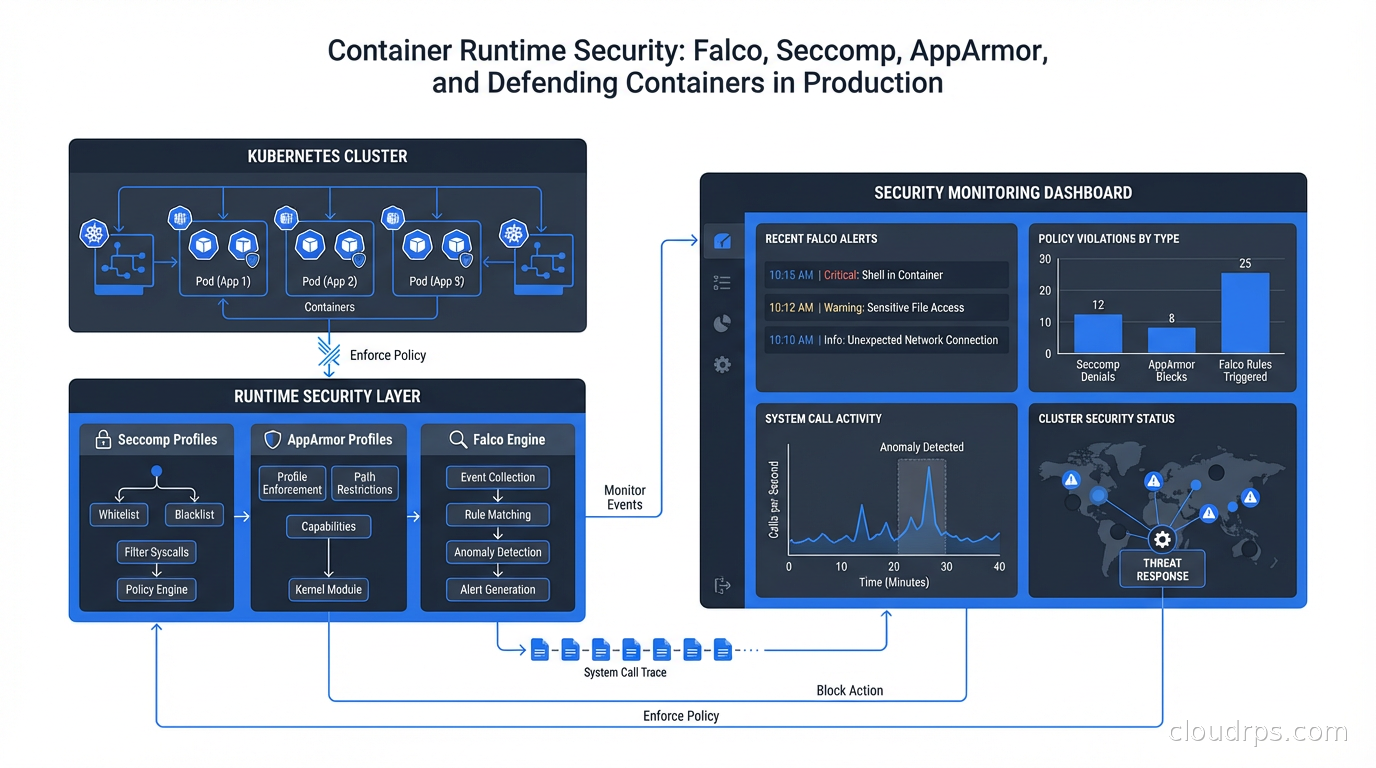
I remember the first time I got paged because of a cryptominer running in our Kubernetes cluster. Our image scanning was solid: every container image was scanned before it hit production, and we had policies blocking critical CVEs. The cryptominer didn’t exploit a CVE. It exploited our application code. A dependency in our Node.js application had a remote code execution vulnerability that scanning had flagged as “medium” severity, so it slipped through our threshold. Once inside the running container, the attacker downloaded the miner binary, modified cron, and started burning CPU. Our image scanner had no idea this was happening because it only runs before deployment.
That incident taught me the fundamental lesson of container security: image scanning and admission control are necessary but not sufficient. You need runtime visibility and enforcement to catch what happens after a container starts. Static analysis finds known vulnerabilities in images at rest. Runtime security catches unknown exploits against running containers, insider threats, supply chain compromises that activate after deployment, and all the creative ways attackers adapt when they get past the perimeter.
Why Runtime Security Is Different
The container image is an artifact. The container is a running process. Your image scanner checks the artifact before it runs. Runtime security observes the process while it runs.
Consider what runtime security can detect that image scanning cannot:
A compromised container that downloads an exploit payload at runtime. The image was clean; the payload was fetched after the fact. Image scanning sees nothing because the malicious binary wasn’t in the image.
A legitimate application binary that receives malicious input triggering unexpected behavior: shell spawning, file system modification, network connections to command-and-control infrastructure. The binary itself is clean and passes all scans.
Lateral movement inside a cluster: a compromised container attempting to access the Kubernetes API, reading secrets from mounted volumes it shouldn’t touch, or probing other services inside the cluster network.
Privilege escalation attempts: a process trying setuid, writing to /proc/sys, or executing syscalls that are normal in the OS context but deeply suspicious inside an application container.
These are runtime threats. Catching them requires observing what containers actually do, not what their images contain.
The Linux Security Primitives
Before getting into the tooling, understand the kernel-level mechanisms that container runtime security builds on. Linux has several overlapping security systems, and they work together.
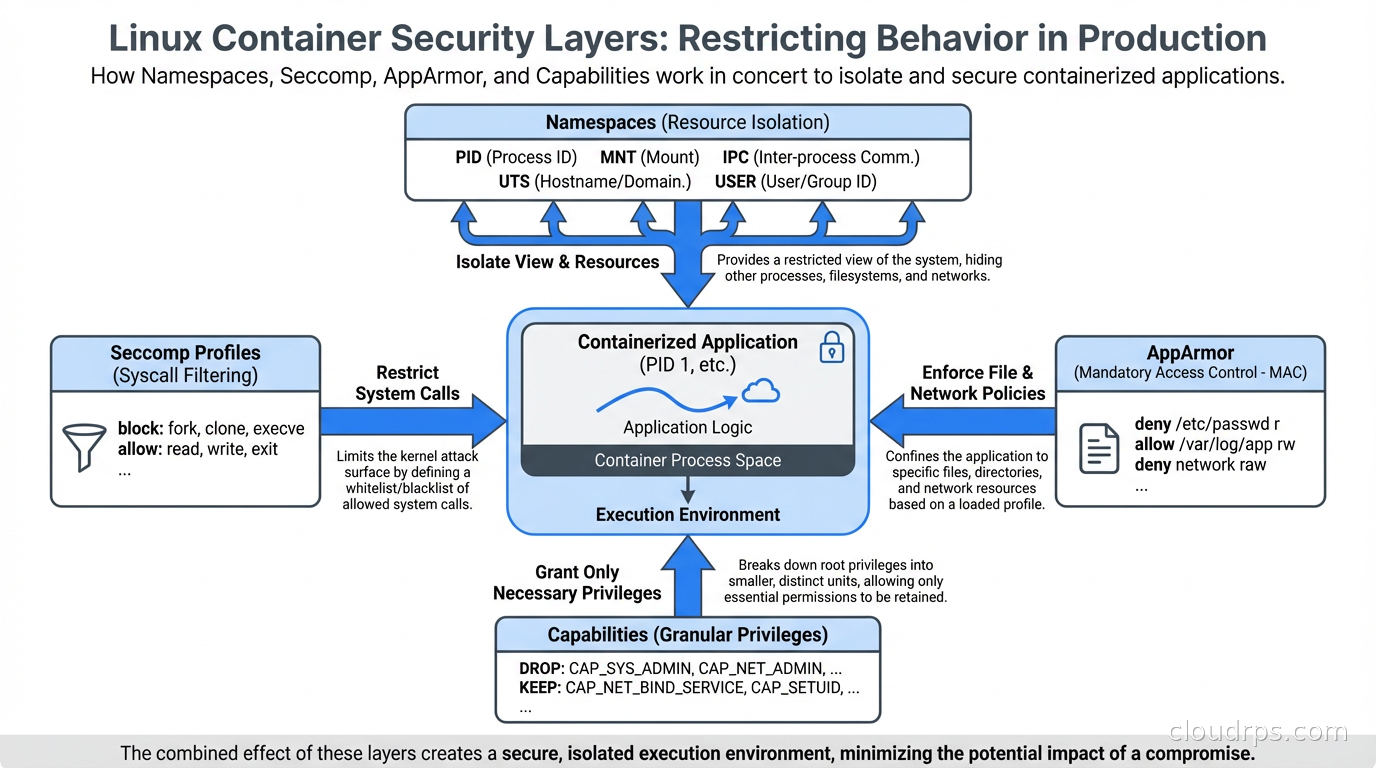
Namespaces provide isolation: each container gets its own PID namespace, network namespace, mount namespace, and so on. A process in one container can’t see processes in another (assuming correctly configured namespaces). Namespaces are foundational to containers but they’re not a security boundary by themselves because they don’t restrict what syscalls a process can make.
Seccomp (Secure Computing Mode) restricts the syscalls a process can make. Every Linux process runs in the kernel using system calls: open, read, write, execve, clone, mount, and hundreds of others. An application container typically only needs a small subset of these. Seccomp lets you define a profile that specifies exactly which syscalls are allowed, and blocks everything else. A blocked syscall either kills the process or returns an error, depending on configuration.
Docker applies a default seccomp profile that blocks about 44 dangerous syscalls: things like ptrace, personality, keyctl, and others that typical applications never need but that attackers frequently use for exploitation and privilege escalation. Kubernetes, by default, applies no seccomp profile (though this changed with Kubernetes 1.27, which has RuntimeDefault becoming the default in newer versions). Applying seccomp profiles is one of the highest-value security improvements you can make to a Kubernetes cluster.
AppArmor takes a different approach: instead of restricting syscalls, it defines a policy for what files, capabilities, and network operations a process can access. An AppArmor profile for a web server might allow it to read its configuration files, write to its log directory, and bind to TCP port 80, while blocking access to everything else. AppArmor is mandatory access control: even root inside the container can’t access resources the profile prohibits.
Linux Capabilities break the all-or-nothing nature of root privilege. Rather than requiring full root to do privileged operations, capabilities let you grant specific privileges individually: NET_BIND_SERVICE to bind to low-numbered ports, SYS_PTRACE for debugging, NET_ADMIN for network configuration. Containers should drop all capabilities by default and add back only what they need. Running with --cap-drop ALL --cap-add NET_BIND_SERVICE is dramatically more secure than running as root.
Falco: Runtime Threat Detection
Seccomp and AppArmor are enforcement mechanisms: they block behavior. Falco is a detection mechanism: it observes behavior and generates alerts. You need both.
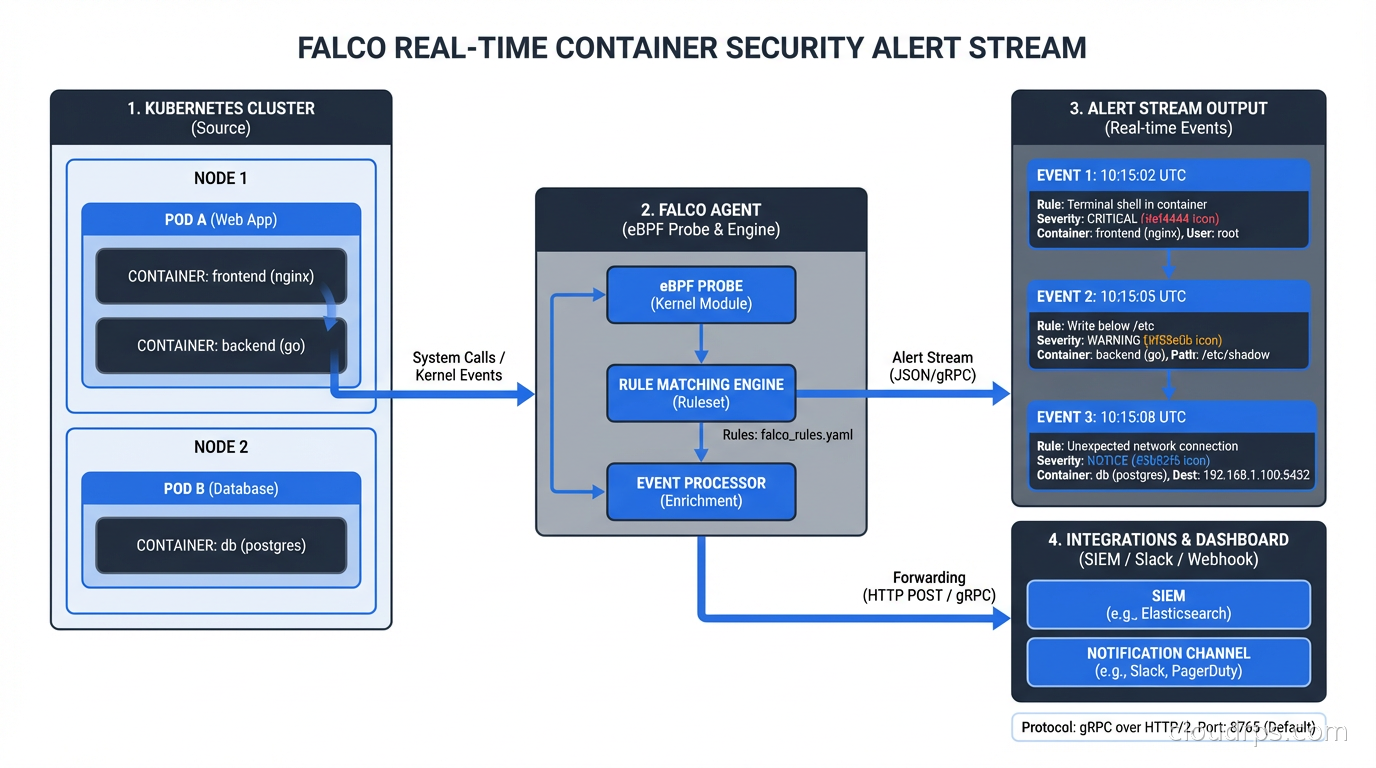
Falco was created by Sysdig and donated to the CNCF. It’s now a CNCF graduated project, which means it’s mature and widely adopted. Falco works by reading system calls from the kernel (using either a kernel module or eBPF probe) and evaluating them against a rule set to detect suspicious behavior.
The eBPF probe approach is strongly preferred in modern deployments because it’s safer (no kernel module loading, which requires privileged access and can destabilize the kernel), more portable, and aligns with the broader eBPF ecosystem that’s becoming the standard for kernel-level observability.
Falco rules look like this:
- rule: Shell Spawned in Container
  desc: A shell was spawned in a container
  condition: >
    spawned_process and container and
    proc.name in (shell_binaries)
  output: >
    Shell spawned in container (user=%user.name container=%container.name
    shell=%proc.name parent=%proc.pname cmdline=%proc.cmdline)
  priority: WARNING

- rule: Unexpected Network Connection
  desc: Unexpected outbound connection from web server container
  condition: >
    outbound and container and
    container.image.repository = "myapp/webserver" and
    not fd.sport in (80, 443)
  output: >
    Unexpected outbound connection (container=%container.name
    command=%proc.cmdline connection=%fd.name)
  priority: ERROR
Falco ships with a comprehensive default rule set covering the most common attack patterns: shell spawning in containers, privilege escalation attempts, sensitive file access, crypto miner detection patterns, reverse shell indicators, and more. You extend and tune this rule set for your environment.
The alerting outputs are flexible: Falco can write to stdout (for log aggregation), send to a Slack webhook, publish to a Kafka topic, trigger a webhook for automated response, or use Falcosidekick to fan out to dozens of destinations including PagerDuty, Datadog, Elasticsearch, and AWS Lambda for automated remediation.
Implementing Seccomp Profiles
The default Kubernetes behavior (no seccomp) is a missed opportunity. Getting seccomp profiles in place is the single change I recommend most for hardening Kubernetes workloads.
The practical challenge: writing seccomp profiles from scratch requires knowing exactly which syscalls your application uses, and that’s not knowledge most developers carry. The solution is to record actual syscall usage and generate profiles from it.
seccomp-bpf and the security profiles operator (SPO) for Kubernetes can do this automatically. The SPO runs in your cluster and can record the syscalls made by any pod, then generate a seccomp profile from that recording. You run the recorder in your staging environment, exercise all the application’s functionality, and get a profile you can apply to production.
A typical web application seccomp profile allows around 40-60 syscalls out of the 300+ available. The remaining 250+ are blocked. Attacks that rely on ptrace, personality, unshare, kexec_load, or bpf syscalls are stopped cold by the profile, even if the application code is exploited.
In your pod spec:
securityContext:
  seccompProfile:
    type: RuntimeDefault
RuntimeDefault applies the container runtime’s default profile, which is the Docker default seccomp profile and covers the most dangerous syscalls. For production workloads with specific requirements, replace RuntimeDefault with Localhost and reference a custom profile.
The Defense-in-Depth Picture
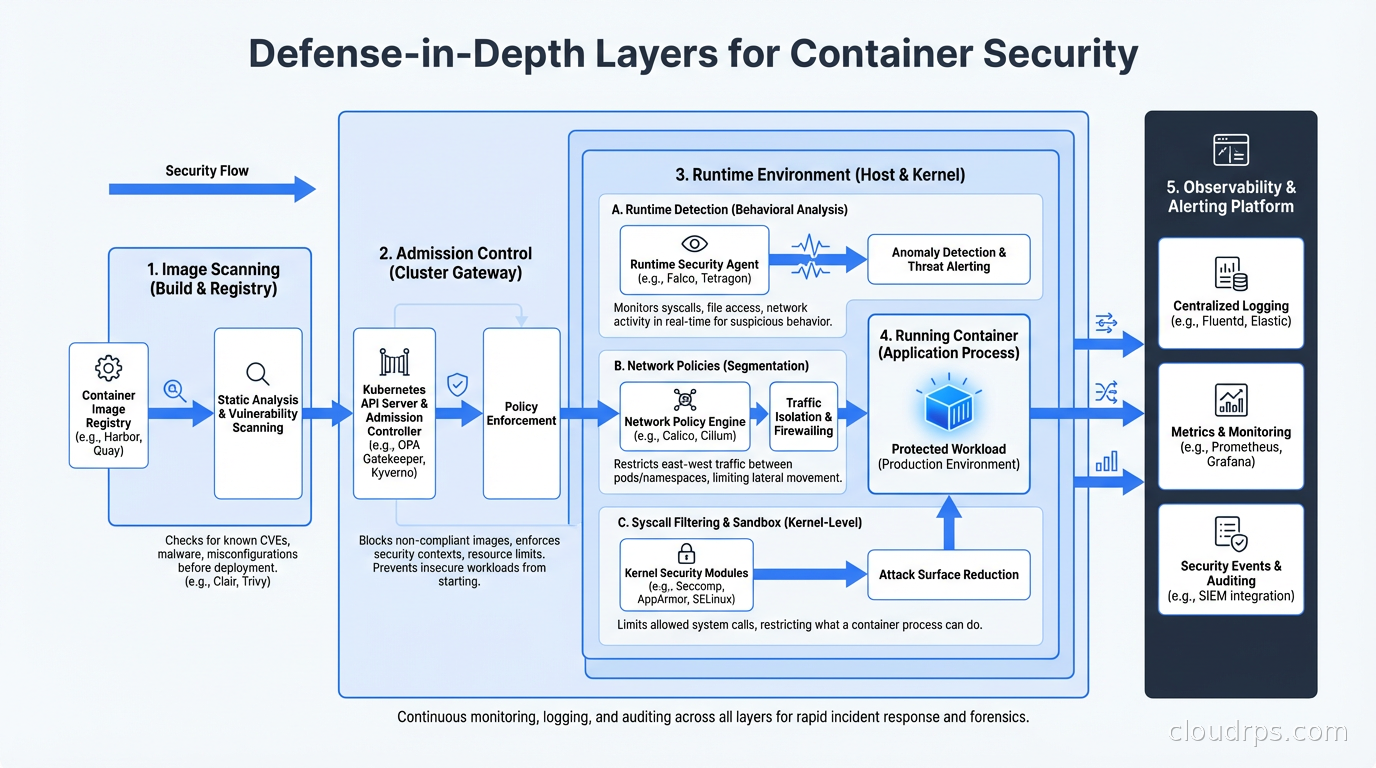
None of these tools work in isolation. Effective container runtime security requires layers.
At the image level: scan for known vulnerabilities with Trivy or Grype. Sign images and enforce signature verification at admission with Cosign and Sigstore. This connects to the software supply chain security work of generating SBOMs and tracking dependencies.
At the admission level: enforce policies with OPA Gatekeeper or Kyverno. Block containers that run as root, that request privileged mode, that don’t have resource limits, or that don’t specify a seccomp profile. Admission control is your last checkpoint before a container runs.
At the runtime level: Falco for detection, seccomp for syscall restriction, AppArmor or SELinux for mandatory access control, capabilities dropping for privilege restriction. These work at different points in the security model and complement each other.
At the network level: Kubernetes Network Policies restrict which pods can communicate with which. Combined with a service mesh that enforces mTLS between services, you limit the blast radius of a compromised container. The service mesh layer adds identity-based access control on top of network-level isolation.
At the observability level: ship container logs, Falco alerts, and audit logs to your SIEM. Establish baselines for normal behavior so anomalies stand out. Run regular threat hunting exercises looking for Falco alert patterns that individually look benign but together suggest compromise.
Common Falco Tuning Challenges
Out of the box, Falco generates a lot of noise. The default rules catch real threats, but they also fire on legitimate activity in ways that need tuning for your environment.
The “shell spawned in container” rule fires on every debugging session, every CI/CD job that needs to exec into a container, every Kubernetes job that runs a shell command. You need exception lists that match your actual workload patterns.
The “write to /etc” rule catches configuration management that legitimately writes to container filesystems. If you’re using init containers or sidecar injection that modifies configuration, you’ll get alerts that need suppression.
The network-related rules assume static, predictable connection patterns. Microservices that do service discovery dynamically will generate spurious connection alerts until you tune the rules to understand your service topology.
The right approach: start with Falco in audit-only mode (generating alerts without any enforcement action), review the alert stream for a week, categorize each rule’s output as “true positive”, “expected behavior that needs exception”, or “too broad”, and tune accordingly. Only move to automated response (killing containers, creating network policies) after you’re confident in the signal quality.
The OpenTelemetry ecosystem is starting to converge with security telemetry here: Falco’s eBPF-based data collection is compatible with the emerging semantic conventions for security events, making it possible to correlate security alerts with application traces in unified observability platforms.
Automated Response
Once you trust your Falco signal, automated response becomes viable. The patterns I’ve seen work well:
When Falco detects a crypto miner pattern, automatically quarantine the pod (add a network policy blocking all egress, kill the pod, trigger an incident). The blast radius of the attack is contained within seconds, not the 15 minutes it takes for a human to respond.
When Falco detects a shell spawned in a production container that should never have shells, page the on-call engineer immediately and capture a memory dump and process listing for forensics before killing the container.
When Falco detects unexpected network connections to known malicious IPs (using threat intel feeds), automatically block and alert.
Automated response requires confidence in your false positive rate. Test your response playbooks in staging first. A false positive that kills a production container during peak traffic is its own incident. Start conservatively and tighten the response automation as your signal quality improves.
Runtime container security is not glamorous work. Writing seccomp profiles, tuning Falco rules, implementing AppArmor policies: it’s all detail-oriented, time-consuming, and produces no visible features. But it’s the difference between detecting a breach in 30 seconds and discovering it in the quarterly security audit. Given how quickly containerized environments can be compromised and how hard cloud-native forensics can be, the investment pays for itself the first time you catch something real.
The cryptominer incident I started with? It cost us about four hours of CPU and a lot of embarrassment. With the runtime security stack I’ve described, we’d have caught it within two minutes of the binary executing. That’s the value you’re building toward.
Get Cloud Architecture Insights
Practical deep dives on infrastructure, security, and scaling. No spam, no fluff.
By subscribing, you agree to receive emails. Unsubscribe anytime.