
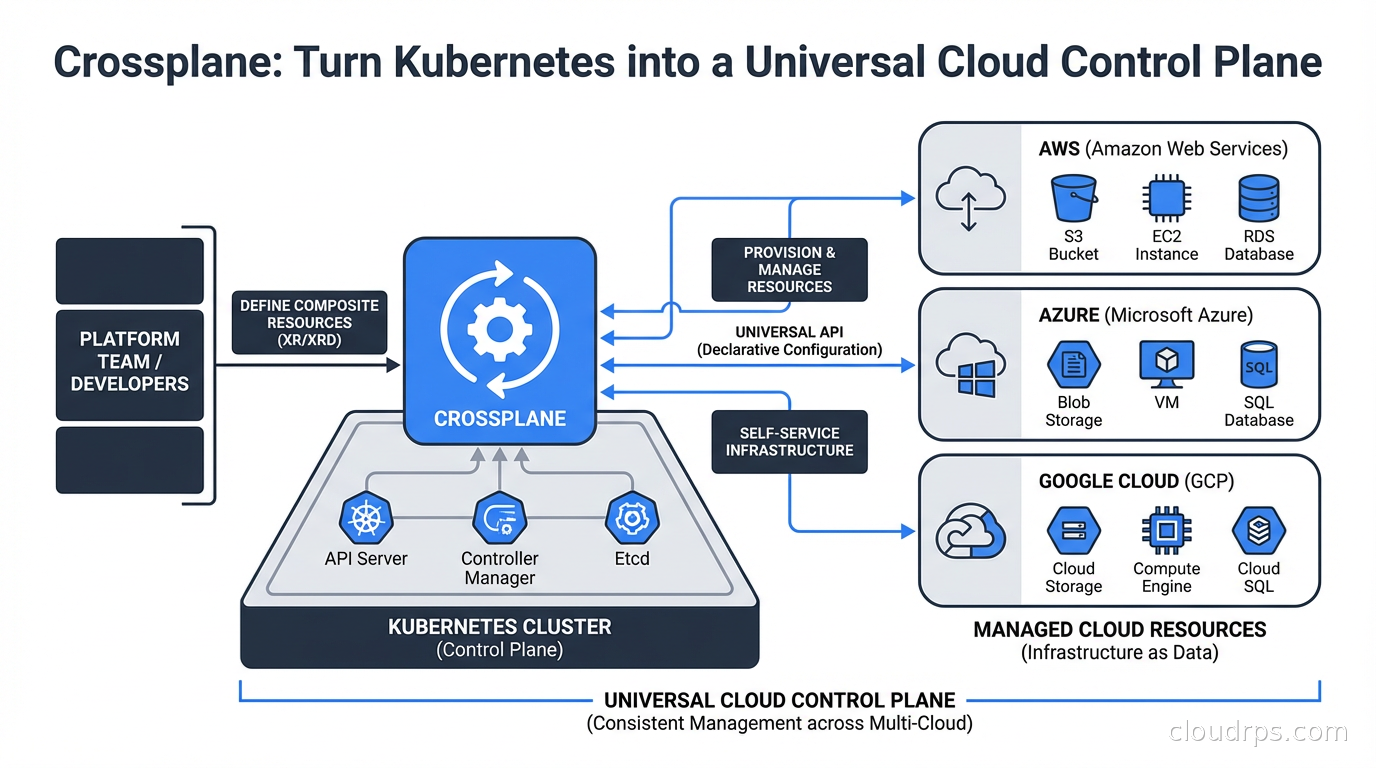
I have been managing cloud infrastructure since before Terraform was a thing. Back when CloudFormation templates felt like a miracle and we were all writing bash scripts around the AWS CLI. So when Crossplane showed up on my radar in 2020, I was skeptical. Another tool promising to solve infrastructure management? Sure.
Three years later, I use Crossplane on most of the platform engineering projects I work on. Not because it replaces Terraform (it does not), but because it solves a fundamentally different problem that Terraform never really addressed: giving application teams self-service access to cloud resources without giving them access to your Terraform state or your AWS account credentials.
Here is what I have learned building Crossplane-based platforms at scale.
The Problem Crossplane Actually Solves
Let me set the scene. You have a platform team of 8 engineers supporting 60 development teams. Each dev team needs databases, queues, storage buckets, and caches. The current process: dev team submits a Jira ticket, platform team provisions the resource via Terraform, updates the state file, hands back connection strings. Average lead time: 3 days.
Sound familiar? That is not a Terraform problem. Terraform is doing exactly what it was designed to do. The problem is organizational. You have created a central bottleneck because dev teams cannot safely self-serve infrastructure without either (a) getting access to your Terraform state and AWS credentials, or (b) going through a ticket queue.
Crossplane’s core insight is that Kubernetes is already a general-purpose API server with reconciliation loops, RBAC, and audit logging. Instead of building a separate self-service portal, why not expose infrastructure resources as Kubernetes custom resources? Dev teams already know kubectl. They already have namespace-scoped RBAC. Let them request a database the same way they request a pod.
If you have not dug into Kubernetes operators yet, that is worth doing first. Crossplane is built entirely on that pattern. Understanding how controllers reconcile desired state against reality is prerequisite knowledge for getting the most out of Crossplane.
How Crossplane Works
Crossplane installs into your Kubernetes cluster as a set of controllers. Once running, it gives you three main abstractions.
Providers: These are Crossplane’s equivalent of Terraform providers. There is a provider for AWS, GCP, Azure, and dozens of other services. Each provider registers a set of Managed Resources into your cluster. Install the AWS provider and suddenly you have CRDs for Bucket, RDSInstance, VPC, SecurityGroup, and hundreds more. These are direct, one-to-one mappings to cloud API objects.
Managed Resources (MRs): These are the raw, provider-specific resources. A RDSInstance managed resource maps directly to an AWS RDS instance. You can create them directly with kubectl, and Crossplane’s provider will reconcile them against real AWS resources. The moment you apply a RDSInstance manifest, Crossplane calls the AWS API to create the database. Delete the manifest, the database gets deleted. Crossplane watches for drift too: if someone manually changes a setting in the AWS console, the next reconciliation cycle will revert it.
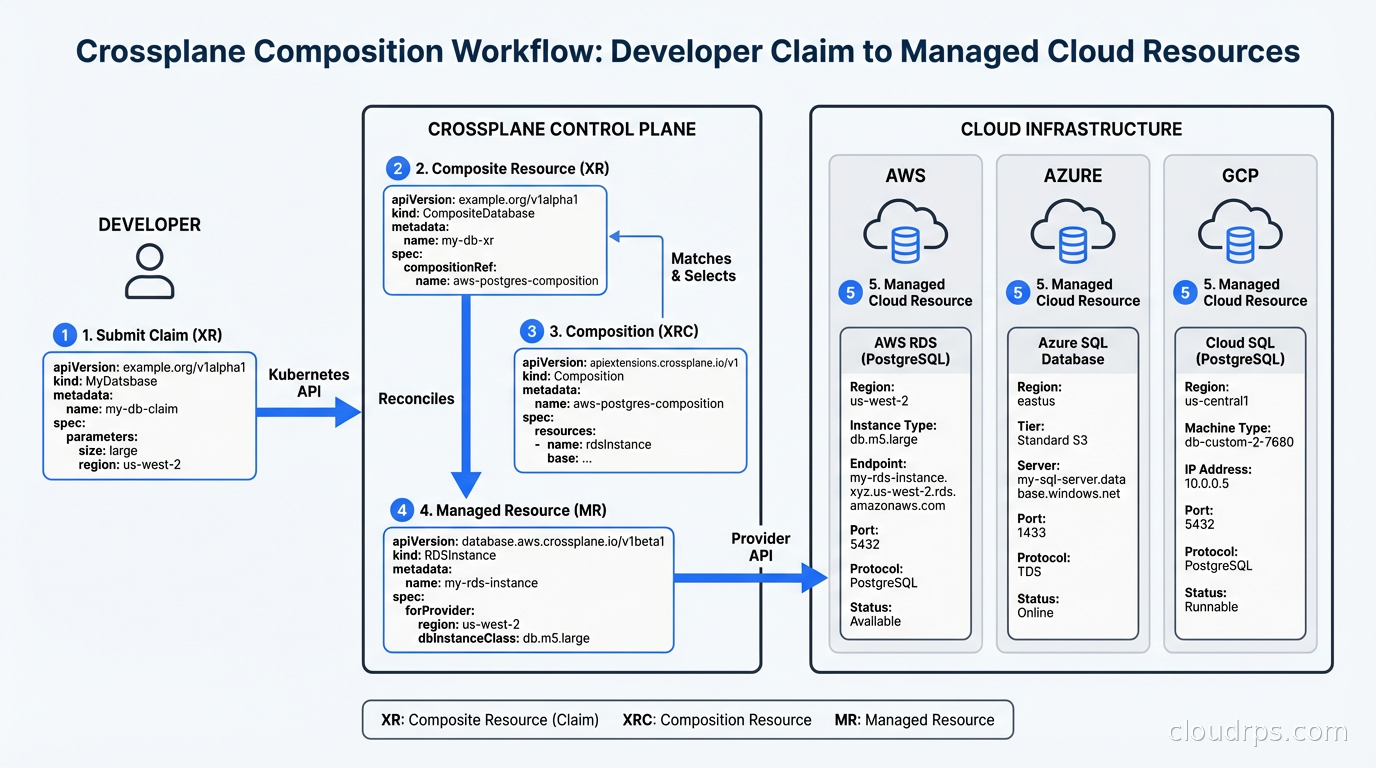
Composite Resources (XRs) and Compositions: This is where Crossplane gets powerful and where the real platform engineering work happens. You define a Composition that takes a high-level, platform-specific resource (say, a PostgresDatabase) and maps it to one or more managed resources. A PostgresDatabase claim might create an RDS instance, a security group, a parameter group, and store credentials in a Kubernetes secret, all from a single simple YAML object.
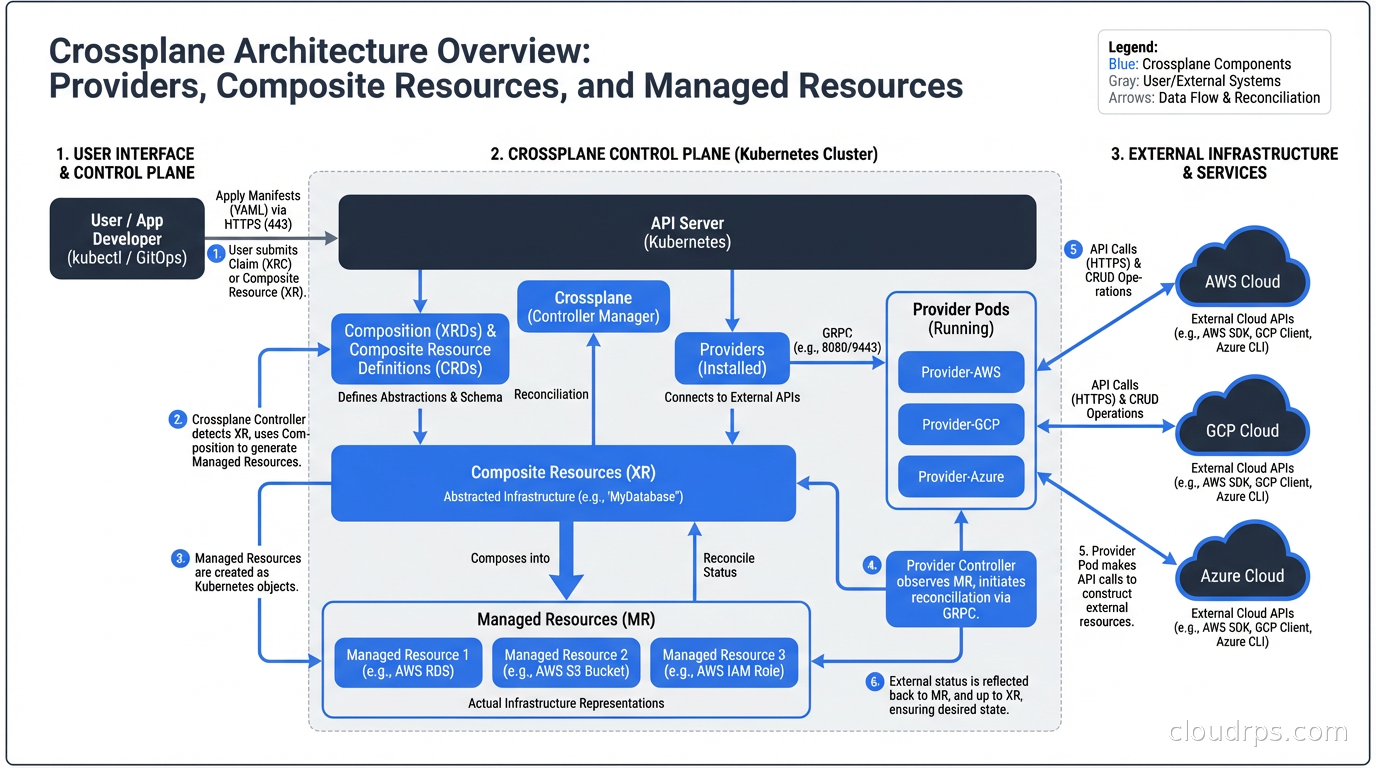
The dev team does not see any of this complexity. They apply something like:
apiVersion: platform.company.com/v1alpha1
kind: PostgresDatabase
metadata:
  name: my-app-db
  namespace: team-payments
spec:
  parameters:
    size: small
    version: "15"
    region: us-east-1
  writeConnectionSecretToRef:
    name: my-app-db-creds
Crossplane takes this claim, instantiates a Composite Resource, and the Composition renders all the underlying managed resources. The connection secret appears in their namespace. They never touched AWS credentials. They never filed a ticket.
Compositions: The Real Work
I will not sugarcoat this: writing Compositions is hard. Not conceptually hard, but YAML-hard. The composition engine uses patches to transform values from the claim spec into managed resource specs. You write patch transforms to rename fields, convert between types, and apply string formatting. It is declarative, which is good, but also verbose and hard to debug.
The Crossplane community has been working on this. Crossplane v1.14 introduced Composition Functions, which let you write composition logic in Go, Python, or any other language via a gRPC interface. Functions like function-go-templating and function-kcl give you real programming constructs instead of a pile of YAML patches. I have been using function-kcl on recent projects and it has significantly reduced composition complexity.
Platform teams typically maintain a library of Compositions that reflect your organization’s standards. A PostgresDatabase Composition might enforce specific instance types allowed by tier (dev/staging/prod), backup retention policies, encryption settings, and maintenance windows. App teams cannot bypass these because they never see the underlying managed resource specs. They only interact with your opinionated API.
This maps directly to what platform engineering is trying to accomplish: building paved roads. The golden path is not just documentation. It is enforced defaults with optional overrides.
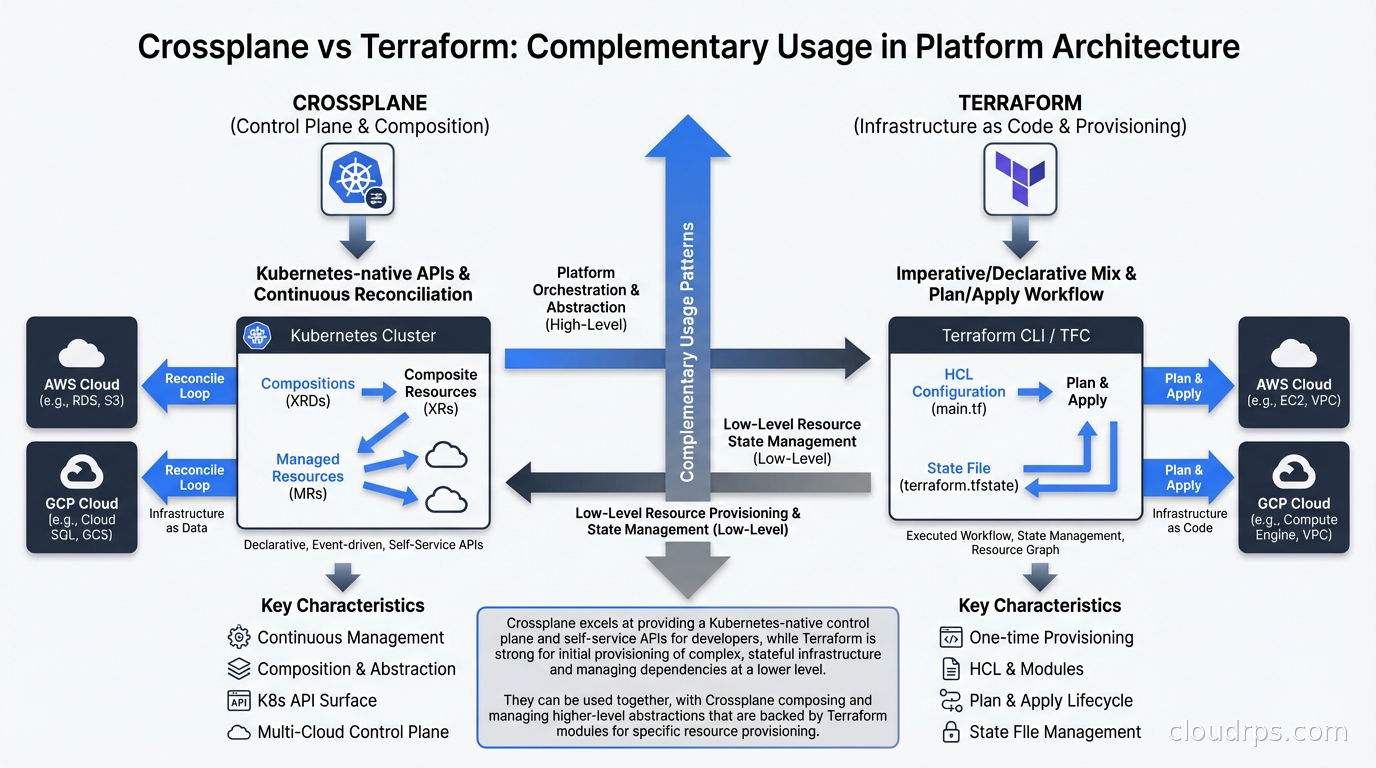
Crossplane vs. Terraform: An Honest Comparison
I have written about infrastructure as code with Terraform, Pulumi, and CloudFormation before, and I want to be direct about this comparison because the community tends to get tribal.
Terraform is better at:
- Initial provisioning of clusters and foundational infrastructure (VPCs, EKS clusters, IAM roles). Crossplane cannot provision the cluster it runs on.
- Complex dependency graphs across resources that span multiple providers in a single plan.
- Teams that do not already have Kubernetes investment.
- Drift detection via
terraform planbefore applying changes. Crossplane reconciles continuously, which is a different model.
Crossplane is better at:
- Self-service infrastructure for dev teams within an existing Kubernetes environment.
- Continuous reconciliation. Crossplane will fight configuration drift constantly, not just when you run a plan.
- Extending your platform’s API with infrastructure resources that behave like Kubernetes resources.
- Environments where you want RBAC, audit logging, and GitOps workflows to apply uniformly to both app and infra resources.
Most mature setups I have seen use both. Terraform provisions the core infrastructure, including the Kubernetes cluster. Crossplane runs inside that cluster and handles the per-team, per-service resource provisioning. The platform team owns Terraform. Dev teams interact with Crossplane. That boundary is clean and it works.
Real-World Setup: What It Actually Takes
Here is the honest picture of what it takes to get Crossplane running well in production.
Installation: You install Crossplane via Helm into a dedicated namespace. Then you install providers. Each provider is itself a Crossplane package, installed via a Provider CRD. The full AWS provider registers roughly 700 CRDs. That is a lot of CRDs. In large clusters this can cause apiserver load issues if you are not careful. There are now provider families (provider-aws-s3, provider-aws-rds, etc.) that let you install only the services you actually need.
Authentication: Providers need cloud credentials. You can use static credentials (bad), pod identity via IRSA (better), or workload identity (best). Setting up IRSA for the Crossplane AWS provider is well-documented but has several steps. Budget a few hours for this on a fresh setup.
Compositions: Writing your first Composition takes time. Writing your tenth is faster. I typically estimate two days for a well-tested Composition with proper documentation, validation rules, and error handling. You will want to invest in a testing framework. crossplane-contrib/function-test or simply applying test claims against a dev cluster both work.
GitOps Integration: Crossplane is a natural fit for GitOps with ArgoCD or Flux. Your Compositions live in git. Your provider configs live in git. Claims live in app team repos. ArgoCD manages the sync. This is the production setup I recommend. Claims become pull requests, which means you get review, auditability, and rollback for free.
Policy Integration: You will want policy as code with OPA or Kyverno to validate claims before they hit Crossplane. Kyverno is particularly useful here because it can validate a claim’s spec against your organizational policies: no production databases in dev namespaces, minimum retention period for anything touching PCI data, required tagging on all resources.
A War Story: The Self-Service Portal We Built in Six Weeks
At a fintech company a few years back, we had the classic platform bottleneck. Development teams were blocked waiting for infrastructure. The infra team was drowning in tickets. Leadership wanted a self-service developer portal, but the engineering estimate for a custom web app was six months minimum.
We built it with Crossplane in six weeks. Not because Crossplane is magic, but because it shifted the scope of the problem. Instead of building a database provisioning UI, we built Compositions and let dev teams use kubectl (or Argo workflows that called kubectl). We created Compositions for PostgreSQL on RDS, Redis on ElastiCache, S3 buckets with standard IAM, and SQS queues.
The Kubernetes RBAC model meant we could scope permissions easily. Teams could create, read, and delete claims in their own namespaces only. We added Kyverno policies to enforce tagging standards and prevent dev teams from requesting production-tier instances in non-production namespaces.
Lead time dropped from 3 days to 20 minutes. Infra team tickets dropped by 60 percent. Development teams loved it because they could declare what they needed in the same place they declared their Deployments. The infra team loved it because they stopped being a bottleneck while retaining full control over what could be provisioned and how.
Composition Functions: The Future of Complex Logic
The original Composition engine (sometimes called Patch and Transform) works well for straightforward transformations. But when you need conditional logic (“if environment is production, add multi-AZ and enable automated backups; otherwise do not”), P&T gets unwieldy fast.
Composition Functions solve this. A Function is a container image that runs as part of the composition pipeline. You can write them in any language. The community has published functions for Go templating, KCL (a Python-like configuration language), CUE, and more.
You chain functions in your Composition’s pipeline. Each function receives the current state of resources and can add, modify, or remove managed resources. This composable pipeline model is significantly more powerful than the original P&T approach.
The KCL function is my current recommendation for complex Compositions. It is readable, has actual loops and conditionals, and can be tested locally before running in the cluster.
Observability and Debugging
Crossplane resources have events, conditions, and ready/synced status fields, similar to any Kubernetes resource. When something goes wrong, you inspect the managed resource:
kubectl describe rdsinstance my-db-xyz
The events section will tell you exactly what API call failed and why. This is often better than Terraform’s error messages in many cases, because every reconciliation attempt logs its result.
For production deployments, you want metrics from the Crossplane providers. Most providers expose Prometheus metrics for reconciliation errors, API call latency, and managed resource counts. Wire these into your existing monitoring stack.
When to Skip Crossplane
Crossplane is not the answer to every infrastructure problem.
If your team has no Kubernetes footprint, do not add it just for Crossplane. The operational overhead of running a production Kubernetes cluster is real. If you are not already paying that cost, you are not going to recoup it from Crossplane alone.
If you have a small platform team (fewer than 5 people) supporting fewer than 10 dev teams, the ticket-based process might actually be fine. Crossplane’s overhead (writing Compositions, maintaining provider versions, debugging reconciliation errors) is not free.
If your infrastructure is mostly foundational, meaning VPCs, DNS, and certificates rather than per-service resources, Terraform handles that better. Crossplane shines when you are creating N instances of the same resource pattern across many teams. One RDS instance? Terraform. One hundred RDS instances across fifty teams? Crossplane.
The Upbound Managed Platform
Upbound, the company behind Crossplane, also offers a hosted control plane product called Upbound Cloud. It gives you managed Crossplane control planes without needing to run the Kubernetes cluster yourself, plus a UI for browsing and managing resources. Worth evaluating if you want Crossplane’s capabilities without the operational burden of the underlying cluster.
The open-source Crossplane project and the Upbound commercial product are separate. Everything I have described above applies to open-source Crossplane. Upbound Cloud adds management, UI, and SLA.
Getting Started
If you want to try Crossplane locally: install it into a Kind cluster, install the AWS provider (or the Helm provider if you do not want to deal with cloud credentials right now), write a simple Composition, and apply a claim. The official Crossplane quickstart walks through this well.
For production adoption, the learning curve is real but the payoff at scale is substantial. A platform team that builds good Compositions once can support ten times the number of application teams with no additional headcount. That is the math that makes Crossplane worth the investment.
Get Cloud Architecture Insights
Practical deep dives on infrastructure, security, and scaling. No spam, no fluff.
By subscribing, you agree to receive emails. Unsubscribe anytime.