
I have been writing CI/CD pipelines for twenty years. I have authored YAML files that stretched across six hundred lines. I have debugged the same pipeline failure locally that runs clean on GitHub Actions because the environment variables load in a different order. I have sat in a post-incident review where the root cause turned out to be a single tab character in a GitHub Actions workflow that caused a build step to silently skip. At some point you stop blaming the tool and start asking whether YAML was ever the right abstraction for this job.
It was not. And Dagger, the project Solomon Hykes shipped after leaving Docker, is the most serious attempt I have seen to fix that.
The Problem With How We Write CI/CD Today
The original sin of modern CI/CD is that we conflated configuration with programming. When Jenkins came out, Groovy pipelines felt like an upgrade from shell scripts glued together with cron jobs. When GitHub Actions shipped, YAML workflows felt cleaner than Jenkinsfiles. But the fundamental model never changed: you are writing instructions for a remote machine you cannot easily run locally, in a format that does not give you types, tests, imports, or refactoring tools.
The consequences are predictable. You end up with:
- Pipelines that pass on CI and fail on your laptop because the Docker images diverge
- Hundreds of lines of YAML copy-pasted between repositories with subtle differences that nobody can explain
- Build steps that take fifteen minutes to discover they are broken because you pushed a typo
- GitHub Actions reusable workflows that look elegant until you need to pass a complex input through three levels of nesting
The workaround most teams converge on is writing shell scripts and calling them from YAML. You move the logic somewhere testable and use the CI YAML purely as a trigger. That works until the scripts grow large enough that they start having their own portability problems.
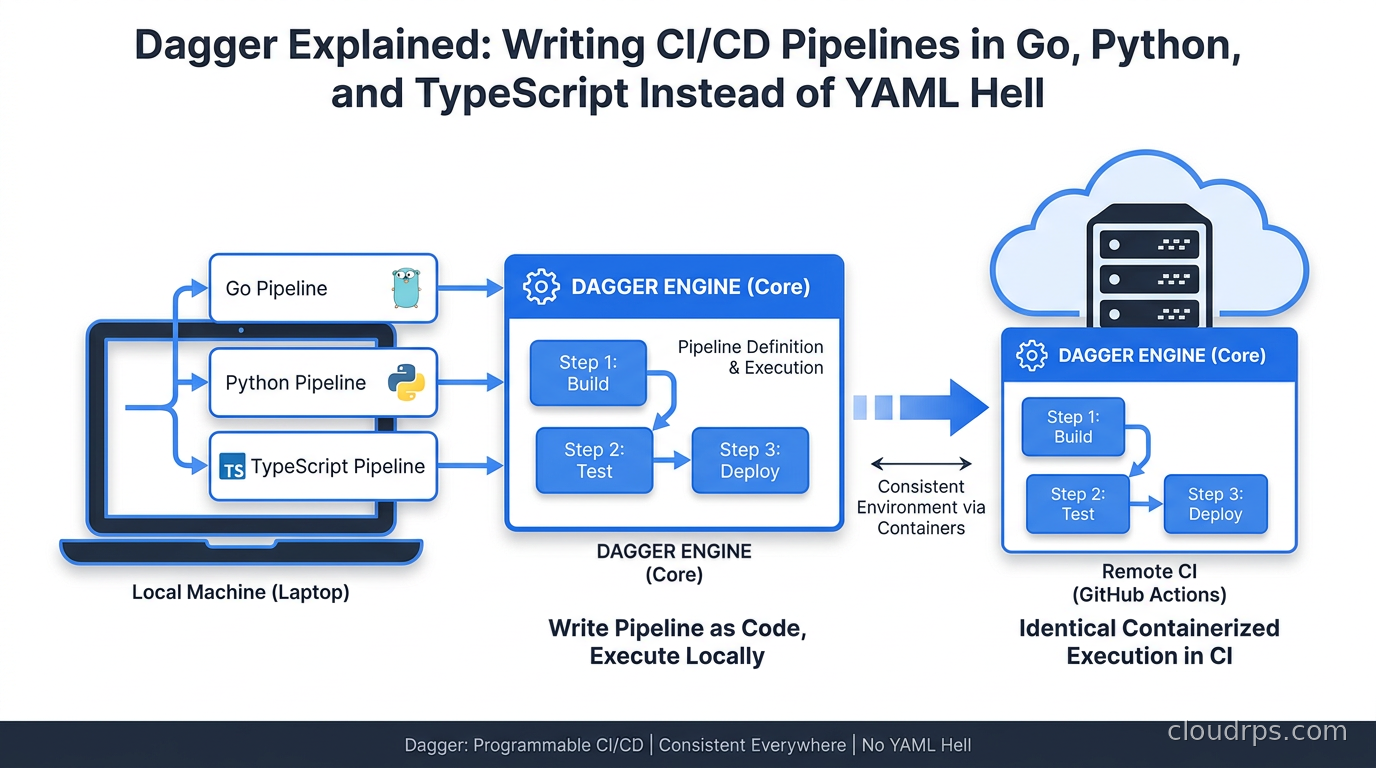
Dagger’s answer is: stop writing YAML for pipeline logic at all. Write a real program in a real language with real tests, and run it through the Dagger engine, which executes every step inside containers built on top of BuildKit. The pipeline becomes code you can run on your laptop with dagger call, debug with a real debugger, and commit with confidence because the execution environment is identical everywhere.
What Dagger Actually Is
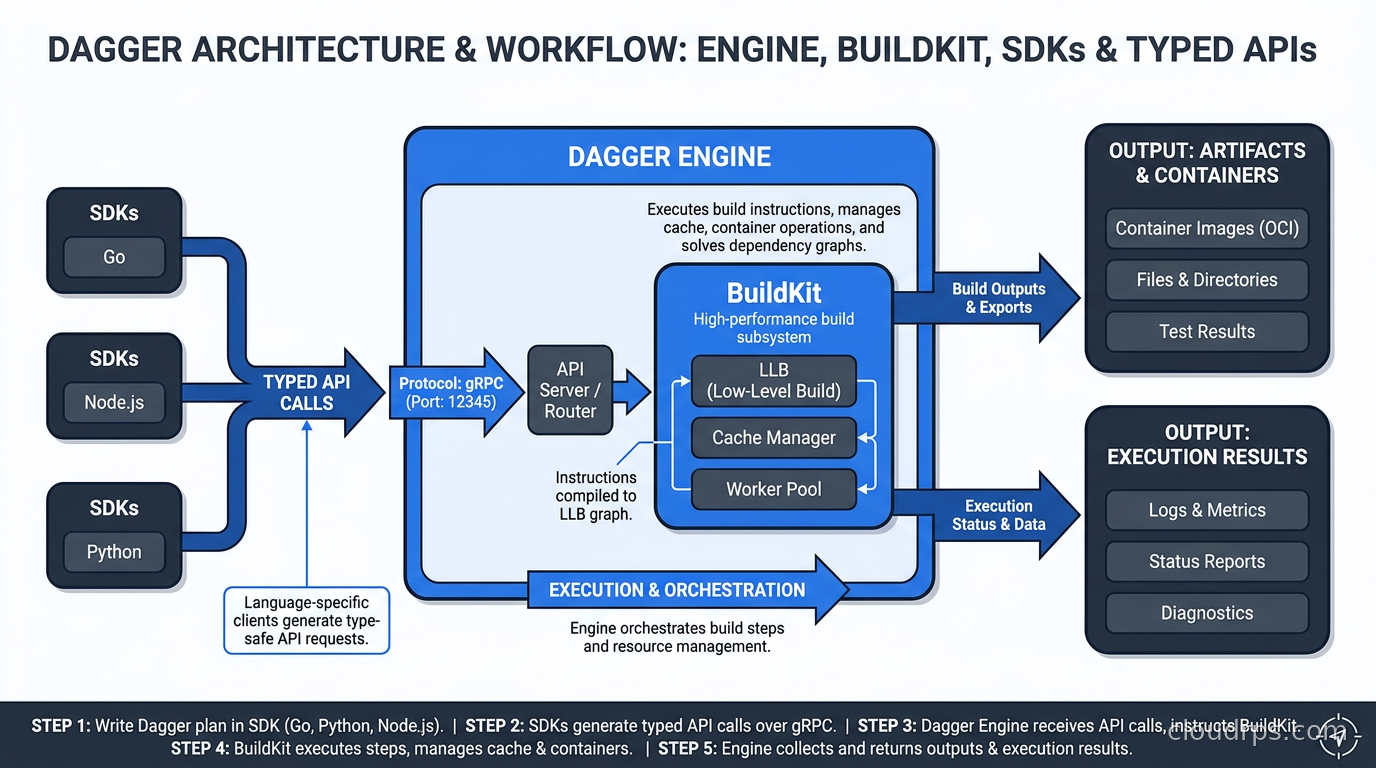
At its core, Dagger is an execution engine that wraps BuildKit, the same technology behind docker build. You describe a pipeline as a directed acyclic graph of containerized operations, and Dagger handles the scheduling, caching, and execution of those operations. The key insight is that the description happens through an SDK, not through a configuration language.
The Dagger engine exposes a GraphQL API. The SDKs (Go, Python, TypeScript, PHP, Java, Elixir, Rust) are generated from that API, which means they are always in sync with the engine and they look idiomatic in each language. You are not wrapping shell commands in a slightly nicer syntax. You are calling typed functions that return typed values.
A simple pipeline in Go looks like this:
package main

import (
    "context"
    "dagger.io/dagger"
)

func main() {
    ctx := context.Background()
    client, err := dagger.Connect(ctx, dagger.WithLogOutput(os.Stderr))
    if err != nil {
        panic(err)
    }
    defer client.Close()

    src := client.Host().Directory(".")

    golang := client.Container().
        From("golang:1.22-alpine").
        WithDirectory("/src", src).
        WithWorkdir("/src").
        WithExec([]string{"go", "test", "./..."})

    _, err = golang.Sync(ctx)
    if err != nil {
        panic(err)
    }
}
The same snippet in Python:
import anyio
import dagger

async def main():
    async with dagger.Connection() as client:
        src = client.host().directory(".")
        result = await (
            client.container()
            .from_("python:3.12-slim")
            .with_directory("/app", src)
            .with_workdir("/app")
            .with_exec(["pip", "install", "-r", "requirements.txt"])
            .with_exec(["pytest", "tests/"])
            .sync()
        )

anyio.run(main)
Both of these run identically on your laptop and in any CI system. No special environment variables, no Docker socket shenanigans. You install the Dagger CLI, run dagger call test, and you get the exact same container executing the exact same commands as your CI runner does.
The Dagger Engine and How Caching Actually Works
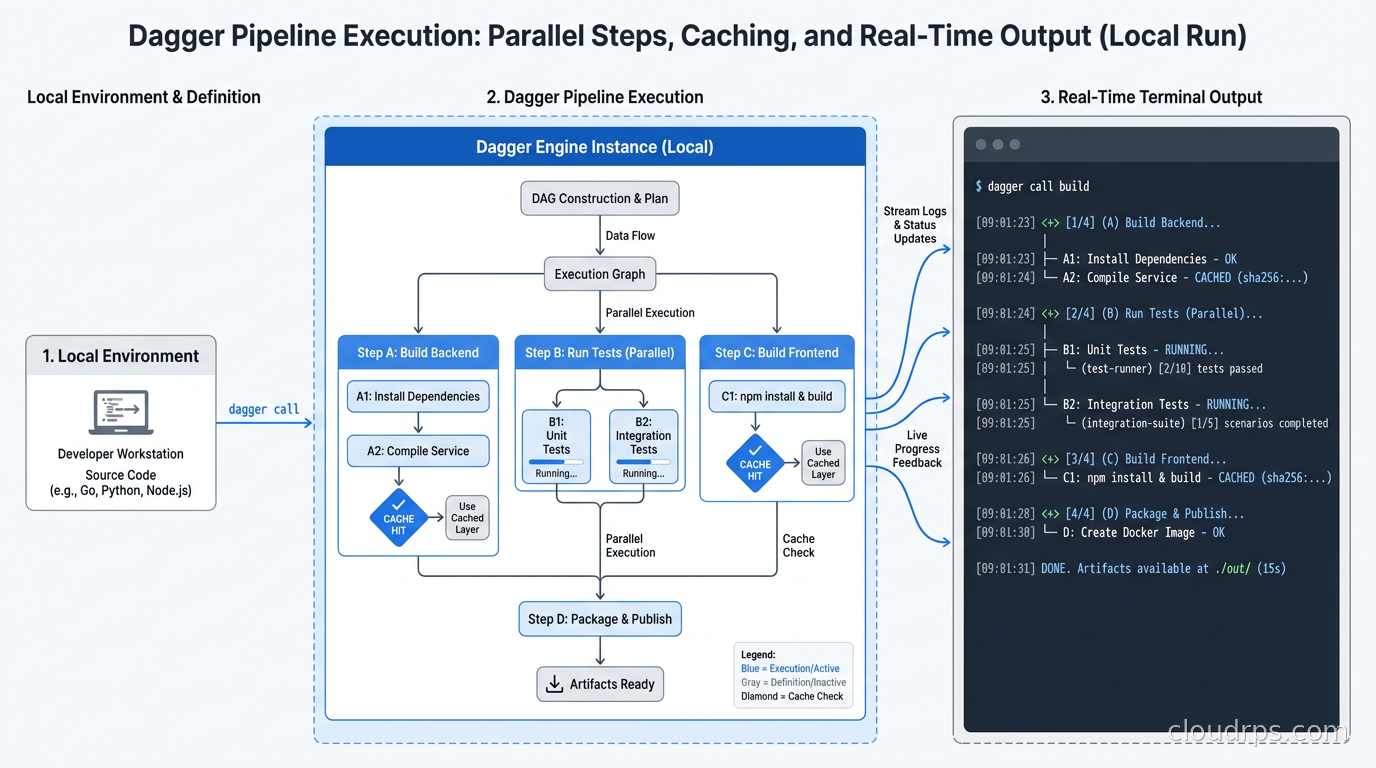
One of the things that impressed me when I first ran Dagger on a real project is how the caching model works. BuildKit already has excellent layer caching for Docker builds. Dagger extends that to arbitrary pipeline steps.
When you call WithDirectory() to mount your source code, Dagger computes a content-addressable hash of that directory. If nothing in that directory has changed since the last run, the step is a cache hit and returns instantly. This is not the rough caching you get with GitHub Actions using actions/cache and a cache key based on hashFiles('**/package-lock.json'). It is fine-grained, operation-level caching that understands exactly what inputs each step depends on.
In practice this means that if you run your full pipeline locally, push a change, and then run CI, the CI run only executes the steps whose inputs actually changed. Not the steps in changed jobs. Not the steps that happened to run after your changed file. Just the steps that had a dependency on what changed. On a monorepo with a Go backend, a Python service, and a Node frontend, this can cut CI time by seventy percent.
The Dagger Cloud product adds a distributed cache layer so that cache hits from one developer’s laptop are available to another developer and to CI. I have seen teams go from twelve-minute CI runs to under three minutes purely from shared caching after cutting over to Dagger. That said, the Dagger Cloud cache is a paid feature and requires a small amount of configuration to set up correctly. The self-hosted alternative is to point Dagger at your own BuildKit cache backend, which is more work but keeps everything in your own infrastructure.
Dagger Modules: The Ecosystem That Makes This Scale
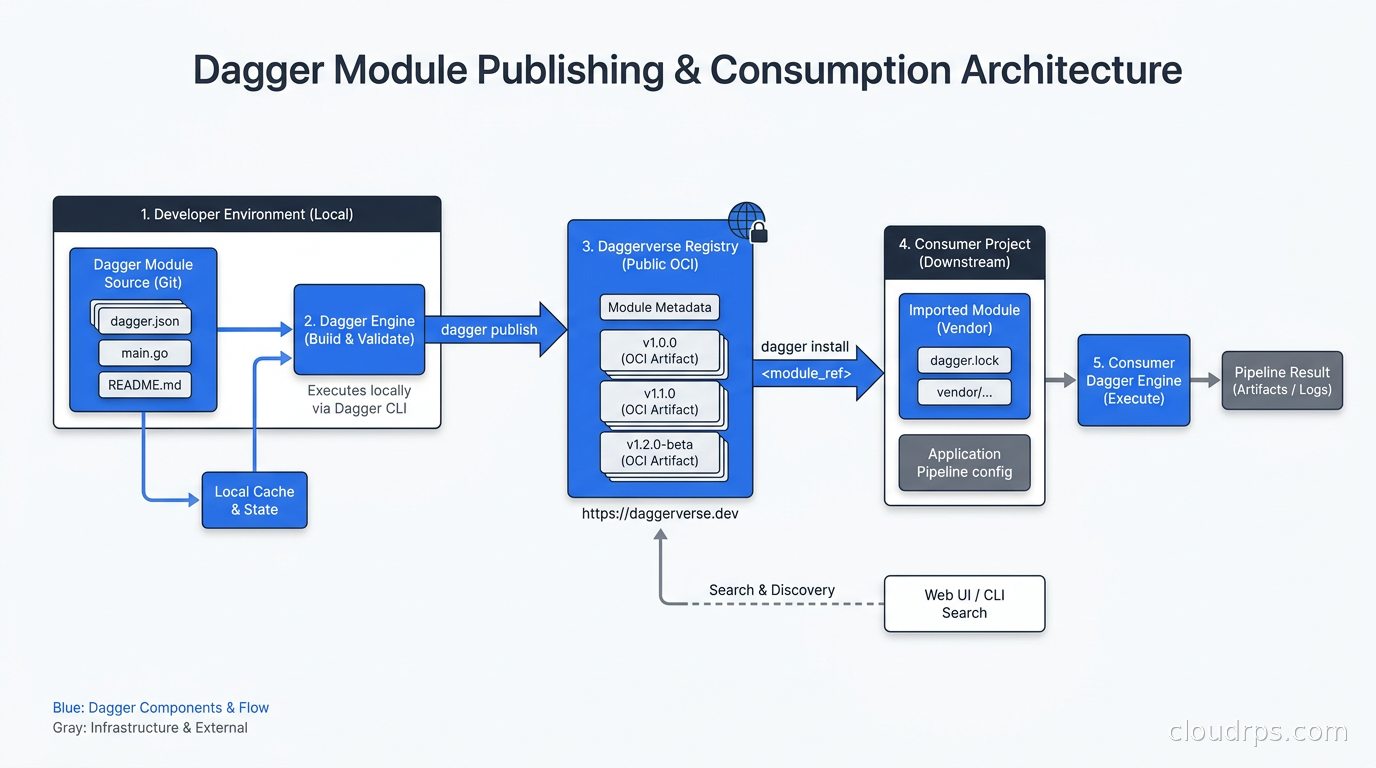
The part of Dagger that I find most compelling for teams beyond the proof-of-concept stage is the module system. A Dagger module is a reusable set of pipeline functions packaged and published to a registry. You can use someone else’s module for, say, building and pushing a Docker image, without writing or maintaining that code yourself.
Here is what using the official Go module looks like in your pipeline:
dag.Go().
    WithSource(src).
    BuildContainer(dagger.GoBuildContainerOpts{
        Platform: "linux/amd64",
    })
The dag.Go() call pulls in the official Go Dagger module. The module provides typed functions with proper defaults and documented options. If the module has a bug or a security issue, you update your module reference and the fix propagates automatically on next run.
This is the part where I start to believe Dagger has a real answer to the copy-paste problem. The CI ecosystem today is littered with GitHub Actions that are wrappers around other GitHub Actions that are wrappers around shell scripts. Every repository in your organization has its own slightly different version. With Dagger modules, you publish your standard build procedure once and pin to it with a version hash. Changes go through a real review process and get tested before anyone else pulls them.
The module registry at daggerverse.dev is the discovery layer. When I was evaluating Dagger for a client last year, I found existing modules for Terraform plan and apply, Helm chart packaging, Trivy scanning, AWS ECR authentication, and Slack notifications. Not all of them were production-quality but most were close enough to serve as a starting point.
Running Dagger in Your Existing CI System
This is where Dagger makes a pragmatic design choice that I think is underappreciated. Dagger does not replace your CI system. It runs inside it.
Your GitHub Actions workflow might look like this after a Dagger migration:
name: CI
on: [push]
jobs:
  build:
    runs-on: ubuntu-latest
    steps:
      - uses: actions/checkout@v4
      - name: Install Dagger CLI
        run: curl -L https://dl.dagger.io/dagger/install.sh | sh
      - name: Run pipeline
        run: dagger call build-and-push --registry ghcr.io --image myapp
        env:
          REGISTRY_TOKEN: ${{ secrets.GITHUB_TOKEN }}
The YAML becomes a thin wrapper that installs Dagger and invokes it. All the real logic lives in your Go or Python code. You get the branch triggers, secrets injection, and compute provisioning from GitHub Actions, and you get the portable, testable, cacheable pipeline logic from Dagger.
This means you can migrate incrementally. You do not need to move everything at once. Start with the steps that are the most painful to debug locally, extract them into Dagger functions, and call those functions from your existing YAML. Expand from there.
I ran this kind of migration at a fintech startup two years ago. We had a Jenkins pipeline with about 800 lines of Groovy that nobody on the team fully understood. We extracted the Docker build and push steps into a Dagger module first, which gave us local reproducibility for the most common failure mode. Over the next three months, every time someone needed to modify a pipeline step, they moved it to Dagger instead. By the end of the quarter, the Groovy was down to about 150 lines and every interesting piece of build logic was testable.
When Dagger Is Not the Right Call
After using Dagger on half a dozen projects, I have developed a clear sense of when it adds more than it costs.
Dagger shines when:
- Your CI pipelines are complex enough that copy-paste between repos is already a problem
- You have multiple languages or runtimes in your monorepo and pipeline logic is fragmented
- Local reproducibility is a recurring debugging tax (CI passes, laptop fails)
- You want to share pipeline logic across teams without creating an internal YAML library
- You are building a platform engineering capability and want pipeline logic to be a first-class artifact
Dagger is probably overkill when:
- You have a simple single-service repository with a standard build-test-deploy cycle that is not changing much
- Your team has no Go, Python, or TypeScript experience and you do not want to add a new language to the mix
- You are on a managed CI platform like Vercel or Netlify where the deployment pipeline is largely abstracted away
- Your pipeline spends most of its time waiting on external systems rather than executing build logic
The Dagger CLI and engine do add some overhead. Cold starts on GitHub Actions with no Docker layer cache can add thirty to sixty seconds to your first run. On a pipeline that takes two minutes total, that is significant. On a pipeline that takes twenty minutes, it is noise.
I also want to be honest about the documentation situation. As of mid-2025, the Dagger documentation is comprehensive but not always well organized. Some SDK-specific examples are out of date. The best source of working examples is often the Daggerverse module source code rather than the official docs. This is a real friction point for onboarding new engineers.
Comparing Dagger to the Alternatives
The honest comparison landscape here is:
Makefile-driven CI: Still the most common approach for teams trying to get local reproducibility without a new tool. Works well for simple projects but does not give you the containerized execution model or the caching. You are still debugging “it works on my Mac, not on Ubuntu CI” problems.
Earthly: The closest competitor to Dagger. Earthly uses an Earthfile syntax (an extension of Dockerfile) and also runs on BuildKit. The conceptual model is slightly more approachable for people who think in Dockerfiles. The trade-off is that you are still in a custom DSL rather than a real programming language. Dagger’s full SDK in a real language is more powerful for complex pipelines, even if it has a higher initial learning curve.
GitHub Actions reusable workflows: Composable but still YAML. You can build a solid library of reusable workflows and this works fine for medium-complexity setups. The problem is that workflows are hard to test locally and the input/output model is clunky for anything beyond simple key-value parameters.
Custom Golang build tooling: Some large projects (Kubernetes itself, etcd, several major CNCF projects) maintain their own Go-based build tooling. This gives you maximum flexibility but at the cost of building and maintaining your own build system. Dagger is essentially a standardized, more complete version of this pattern.
For teams at the scale where CI/CD complexity is a real cost, Dagger is the most principled approach I have seen. It does not pretend that configuration languages are a good fit for procedural logic. It gives you the same tools you use for writing application code: types, tests, imports, and a package ecosystem.
This fits directly into the broader infrastructure as code movement, where the goal is to treat operational artifacts with the same engineering discipline as application code. Dagger applies that principle specifically to build and deployment pipelines, which have historically been the last holdout of artisanal shell scripting.
Integration with GitOps and Deployment
Dagger covers the build and test side of the pipeline. The deployment side still typically lives in a GitOps tool. The common pattern is:
- Dagger handles build, test, lint, scan, and image publication
- Dagger updates a Kubernetes manifest or Helm values file in a GitOps repository
- ArgoCD or Flux detects the change and deploys to the cluster
The Dagger module for Helm chart packaging and the modules for various registries handle the image publishing step cleanly. You can encode the entire artifact promotion logic from source to Helm chart update in one Dagger call, and your GitOps tool handles the rest.
For Kubernetes-native environments, this separation is clean and works well. The build pipeline and the deployment pipeline have different concerns and different failure modes. Keeping them in separate tools with a manifest repository as the handoff point aligns with what teams are actually doing in production.
Getting Started Without Burning a Weekend
If you want to try Dagger without committing to a full migration, here is what I recommend:
Install the CLI:
curl -L https://dl.dagger.io/dagger/install.sh | sh
Initialize a new module in your project:
dagger init --name myapp --sdk go
Write a single Dagger function that runs your test suite. Verify it produces the same result locally and in CI. If it does, you have proved the model works for your project. If there are differences, you have learned something important about your environment before it becomes a production incident.
The Dagger quickstart documentation (at docs.dagger.io) is a reasonable starting point. The SDK-specific guides have improved significantly in 2025. The Go SDK is the most mature and has the most community modules behind it. If your team primarily works in Python or TypeScript, those SDKs are production-ready but have a smaller module ecosystem.
The CI/CD fundamentals still apply: you want fast feedback, isolated steps, and reproducible artifacts. Dagger does not change what you want from a pipeline. It changes the tooling you use to express it, and in my experience that change pays for itself quickly once you stop debugging the same environment drift for the fourth time in a month.
The Bigger Picture
What I find interesting about Dagger is that Solomon Hykes is essentially trying to solve the same problem he solved with Docker, one layer up. Docker made containerized runtime environments reproducible. Dagger is trying to make the pipeline that builds those containers equally reproducible and portable.
The insight from Docker was that developers and operations teams should share the same artifact. The insight from Dagger is that developers and CI systems should share the same build code. Both insights are obvious in retrospect and both took longer to become mainstream than they should have.
The platform engineering angle is worth noting here too. As organizations build internal developer platforms, the question of how to share build and deployment logic at scale becomes real. Dagger modules give platform teams a first-class mechanism to publish and version that logic in a way that YAML libraries never quite achieved. The module is testable. The module has typed inputs and outputs. When something breaks, you get a real stack trace, not a generic YAML parsing error.
I am not ready to say YAML in CI is dead. There is too much inertia and too many cases where a thin YAML wrapper calling a simple command is the right call. But for teams where CI/CD complexity is a real bottleneck, Dagger is worth a serious look. The model is sound, the tooling has matured considerably, and the ecosystem is reaching critical mass.
The YAML sprawl problem does not fix itself. Every quarter you wait, you add more workflows, more reusable action references, more copy-pasted steps. At some point the cost of the current system exceeds the cost of migrating to something better. In my experience, that point arrives earlier than most teams expect.
Start small. Pick the most painful pipeline step. Write it as a Dagger function. Run it locally until you trust it. Then push it to CI. That is how every successful migration I have seen starts, and it is the path that makes the cost manageable while building team confidence in the new model.
The Docker Compose versus Kubernetes tradeoff is a useful analogy. Docker Compose is simpler and faster to start with, but at a certain scale Kubernetes is the right answer. Dagger is similar: native YAML CI is simpler for small pipelines, but at a certain complexity level, real code is the better choice. Knowing which side of that line your organization sits on is half the battle.
Get Cloud Architecture Insights
Practical deep dives on infrastructure, security, and scaling. No spam, no fluff.
By subscribing, you agree to receive emails. Unsubscribe anytime.