
Early in my career, I managed a backup environment for a financial services firm that was growing storage at 40% per year. We were buying disk shelves faster than we could rack them. The CFO wanted to know why the storage budget was growing faster than revenue, and honestly, I didn’t have a great answer. We were storing the same data over and over: full backups every night, multiple copies for compliance, replicas for disaster recovery.
Then we deployed deduplication on the backup targets and the effective storage consumption dropped by 15:1. Fifteen to one. The same backup data that was consuming 200 terabytes of raw disk suddenly fit in under 15 terabytes. The CFO thought I was making the numbers up.
Compression and deduplication are two of the most impactful technologies in data management, yet most engineers treat them as black boxes, knobs you turn on and forget about. Understanding how they actually work changes the way you architect storage, design data pipelines, and think about cost optimization. Let me peel the covers off.
Compression: Squeezing Redundancy Out of Data
Data compression reduces the size of data by encoding information more efficiently. There are two fundamental categories: lossless and lossy.
Lossless compression preserves every bit of the original data. You compress, decompress, and get exactly what you started with. This is what you use for databases, backups, file archives, and any data where correctness matters.
Lossy compression discards information deemed less important, achieving much higher compression ratios at the cost of fidelity. JPEG, MP3, and H.264 are lossy. You’d never use lossy compression on a database, but it’s perfectly appropriate for images, audio, and video where some quality loss is acceptable.
For the rest of this article, I’ll focus on lossless compression since that’s what matters for infrastructure and data engineering.
How Lossless Compression Works
Most lossless compression algorithms exploit two types of redundancy:
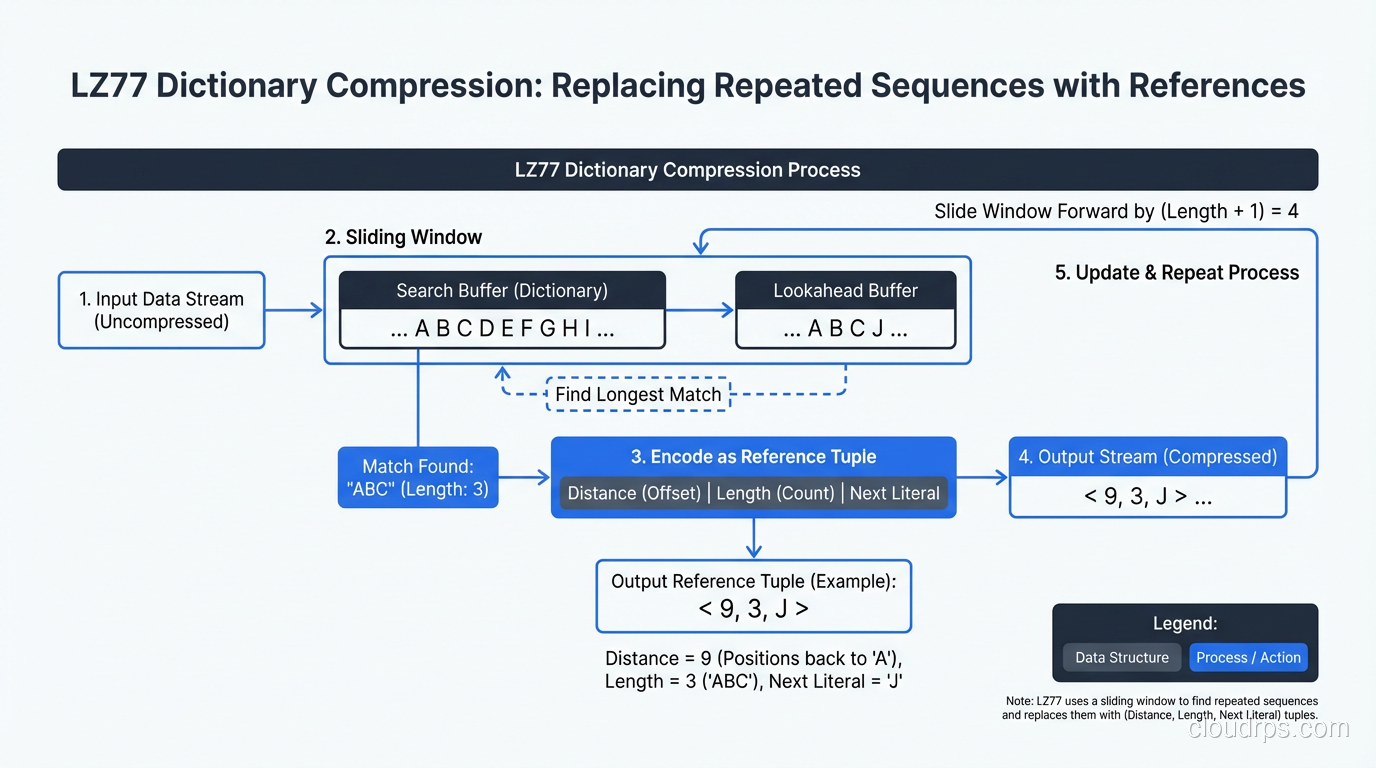
Repeated byte sequences: If the string “ERROR: Connection timeout” appears 10,000 times in a log file, a compression algorithm can store it once and replace each occurrence with a short reference. This is the core idea behind LZ77, LZ78, and their descendants (LZO, LZ4, Snappy, Zstandard).
Statistical redundancy: Some bytes appear more frequently than others. In English text, ’e’ appears far more often than ‘z’. Huffman coding and arithmetic coding assign shorter bit sequences to more frequent symbols, reducing overall size.
Modern algorithms like Zstandard (zstd) combine both approaches (dictionary-based matching for repeated sequences plus entropy coding for statistical redundancy) and add techniques like finite state entropy for even better ratios.
The Compression Ratio vs Speed Trade-off
Every compression algorithm sits somewhere on the spectrum between compression ratio (how small the output is) and speed (how fast it compresses and decompresses).
Here’s my practical breakdown of the algorithms I actually use:
LZ4: Extremely fast compression and decompression. Modest compression ratios (typically 2:1 to 3:1). Use when speed matters more than space: real-time data pipelines, intermediate data in Spark jobs, anything latency-sensitive.
Snappy: Similar to LZ4 in philosophy. Developed by Google for use in their internal systems. Slightly different trade-off points than LZ4 but in the same ballpark. Common in Hadoop ecosystem tools.
Zstandard (zstd): The modern default choice for most workloads. Excellent compression ratios (3:1 to 8:1 on typical data) with good speed. Adjustable compression levels let you dial between faster compression and better ratios. I use zstd for almost everything now.
Gzip/zlib: The classic. Decent compression ratios, moderate speed. Still everywhere because of ubiquity, but zstd beats it on both ratio and speed in most scenarios. The main reason to use gzip in 2026 is compatibility with systems that don’t support zstd yet.
Brotli: Developed by Google, optimized for web content. Excellent compression ratios for text, especially HTML/CSS/JavaScript. Slower to compress than zstd but comparable decompression speed. My pick for static web asset compression.
I ran a benchmark last year compressing 10GB of mixed server logs across these algorithms. LZ4 finished in 8 seconds with a 2.5:1 ratio. Zstd at default level finished in 22 seconds with a 5.8:1 ratio. Gzip took 45 seconds for a 4.1:1 ratio. The numbers tell the story: zstd wins the ratio-to-speed trade-off for almost every workload.
Compression in Storage Systems
Modern storage systems build compression deep into their architecture. ZFS, Btrfs, and most enterprise storage arrays offer transparent compression, where data is compressed before writing to disk and decompressed on read, invisible to applications.
On SSDs specifically, compression provides a double benefit: reduced write amplification (less data written to flash cells) and effectively increased capacity. Several SSD controllers perform hardware compression internally.
For NAS and SAN systems, inline compression is now standard. NetApp ONTAP, Pure Storage, and Dell PowerStore all compress data as it’s written, claiming 3:1 to 5:1 data reduction ratios in typical mixed workloads. Those vendor claims are optimistic (I usually see 2:1 to 3:1 in practice), but it still translates to significant cost savings.
Deduplication: Eliminating Redundant Copies
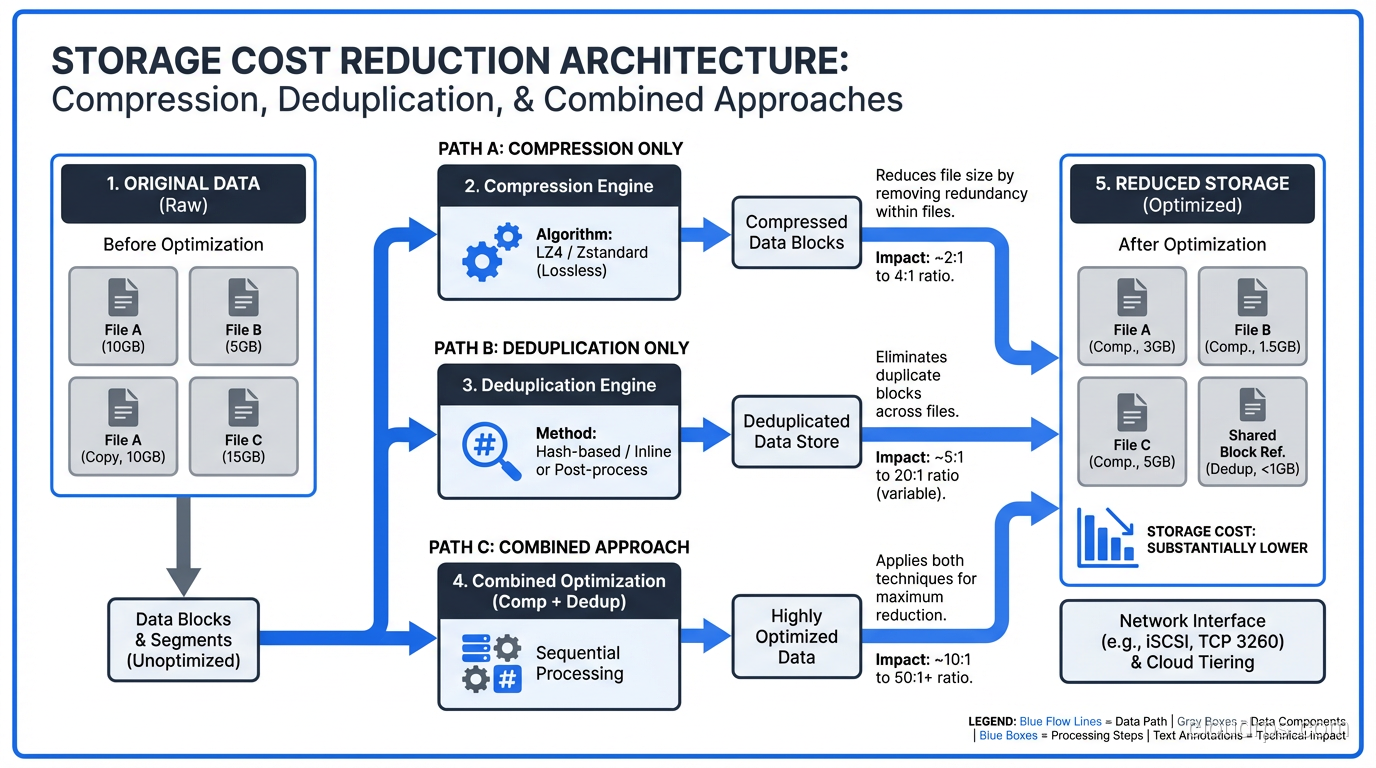
Deduplication works at a fundamentally different level than compression. Instead of squeezing redundancy out of individual data streams, deduplication identifies duplicate chunks of data across many files or objects and stores only one copy.
How Deduplication Works
The process breaks down into these steps:
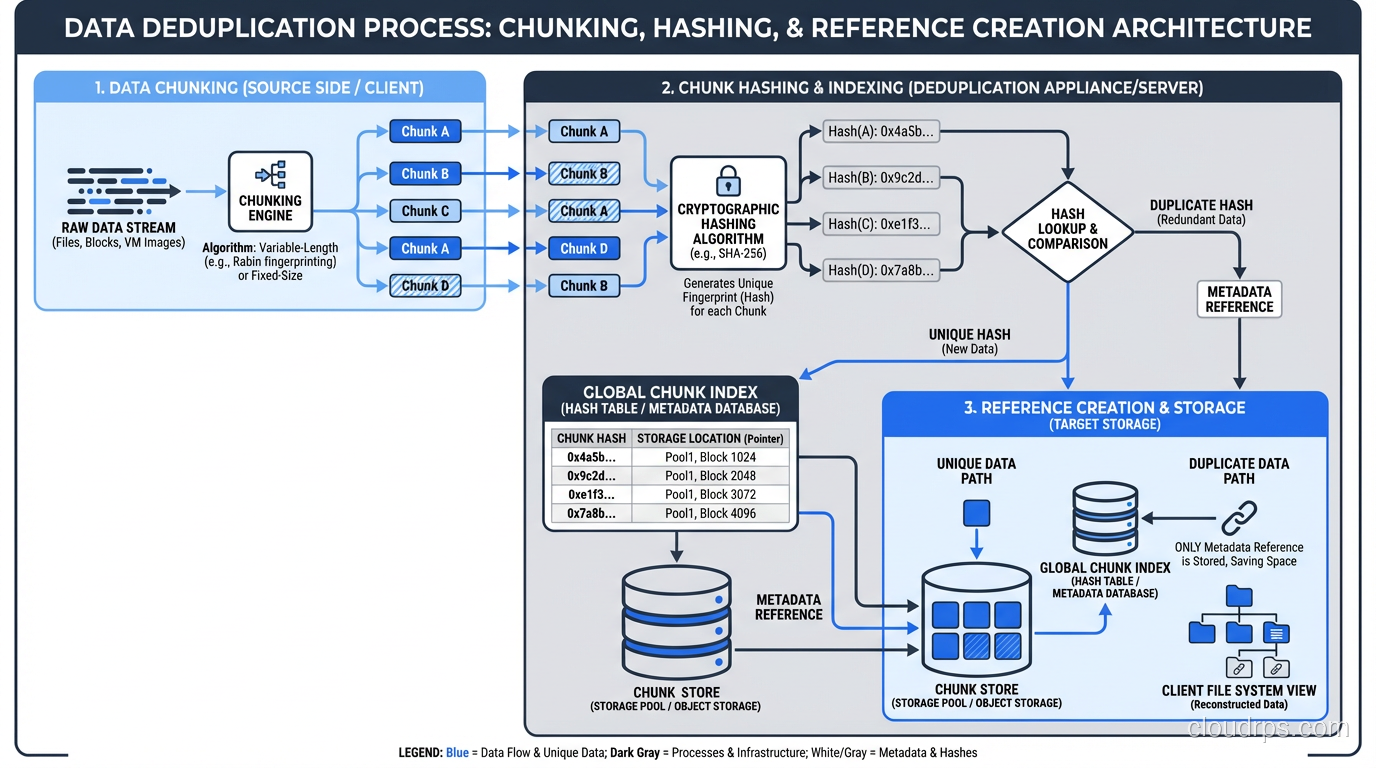
Chunking: The data stream is divided into chunks. Fixed-size chunking uses a constant block size (4KB, 8KB, etc.). Variable-length chunking uses a content-defined algorithm (like Rabin fingerprinting) to find natural break points in the data, which is much better at detecting duplicates that are offset by insertions or deletions.
Fingerprinting: Each chunk is hashed (typically SHA-256 or a faster alternative) to create a unique fingerprint.
Lookup: The fingerprint is checked against an index of all previously stored chunks.
Store or reference: If the chunk is new, it’s stored and its fingerprint is added to the index. If it’s a duplicate, only a reference to the existing chunk is stored.
The result: if 100 virtual machines all run the same operating system, the OS files are stored once instead of 100 times. If your backup system backs up 500 laptops with the same version of Office installed, those Office binaries exist once on the backup target.
Fixed vs Variable-Length Chunking
This distinction matters more than most people realize. Fixed-size chunking is simple and fast: divide the data into 8KB blocks and hash each one. But it’s fragile. If you insert one byte at the beginning of a file, every single chunk boundary shifts, and no chunks match their previous versions. You’ve destroyed all deduplication potential with a one-byte change.
Variable-length chunking solves this. By using the content itself to determine chunk boundaries (looking for specific byte patterns that statistically occur at regular intervals), insertions only affect the chunks immediately around the change. The rest of the file still chunks the same way, so duplicates are still detected.
Every production deduplication system I’d recommend uses variable-length chunking. The CPU overhead is higher, but the deduplication ratios are dramatically better.
Inline vs Post-Process Deduplication
Inline deduplication deduplicates data as it’s written. The chunk, hash, and lookup happen in the write path. This means you never store duplicate data (great for capacity) but adds latency to every write operation.
Post-process deduplication stores data normally and runs deduplication as a background job. Write performance is unaffected, but you need enough space to store the data before dedup runs, and there’s a window where duplicates consume disk.
My recommendation: inline for backup targets (where write speed is less critical than capacity savings) and post-process for primary storage (where write latency matters). Most modern systems let you choose.
Where Deduplication Shines (and Where It Doesn’t)
High dedup ratios (10:1 to 50:1):
- Virtual machine backups (many VMs share OS and application files)
- File server backups (multiple versions of the same documents)
- VDI (Virtual Desktop Infrastructure) storage
- Development environments (many copies of similar codebases)
Moderate dedup ratios (2:1 to 5:1):
- General-purpose backup
- Database backups (some shared structure, but data varies)
- Container image registries (shared layers)
Poor dedup ratios (near 1:1):
- Already-compressed data (JPEG, MP4, encrypted data)
- Truly unique data (scientific sensor readings, financial tick data)
- Encrypted data (encryption destroys deduplication patterns by design)
That last point catches people by surprise. If you encrypt data before deduplication, dedup ratios collapse to near zero because encrypted data looks random. Always deduplicate before encrypting, or use a system that handles both in the right order.
Compression Plus Deduplication: The Combined Strategy
In practice, you almost always use both compression and deduplication together. They address different types of redundancy and complement each other well.
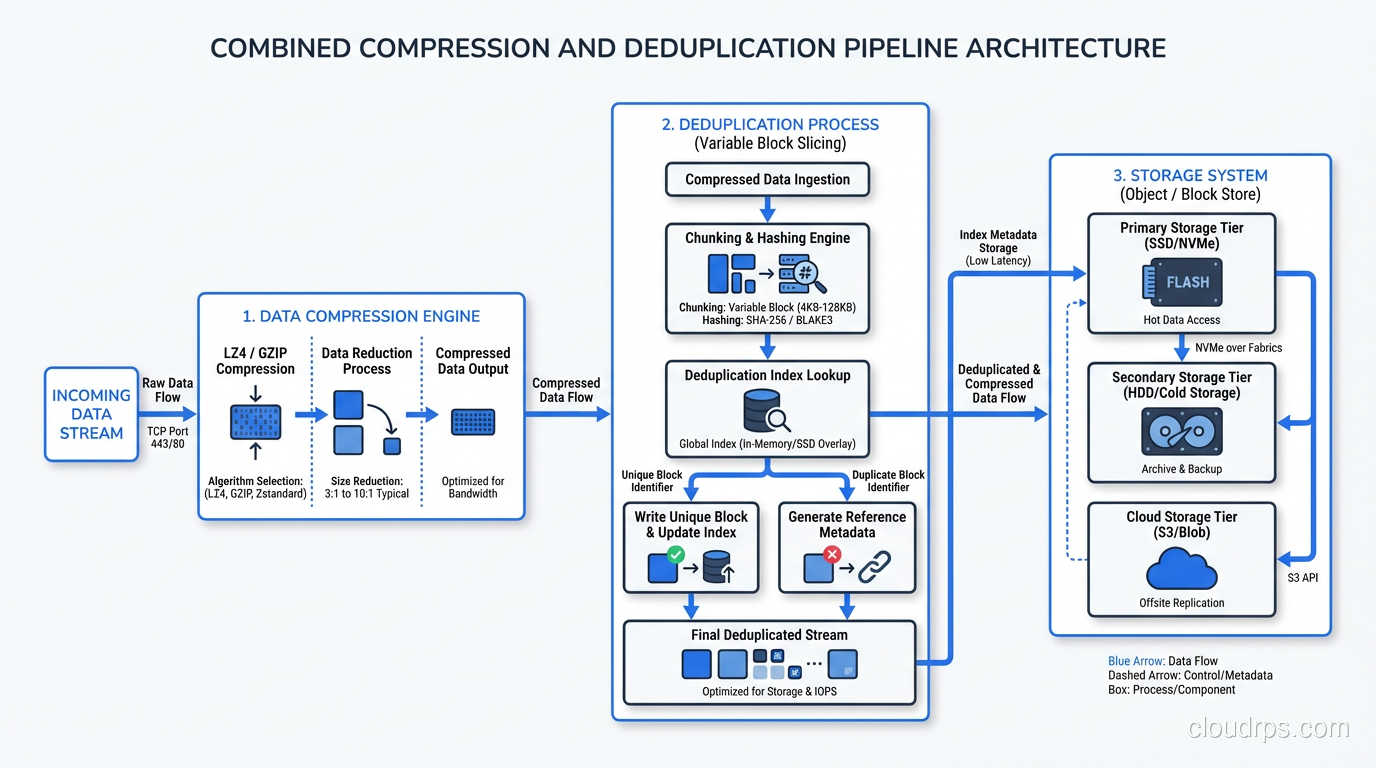
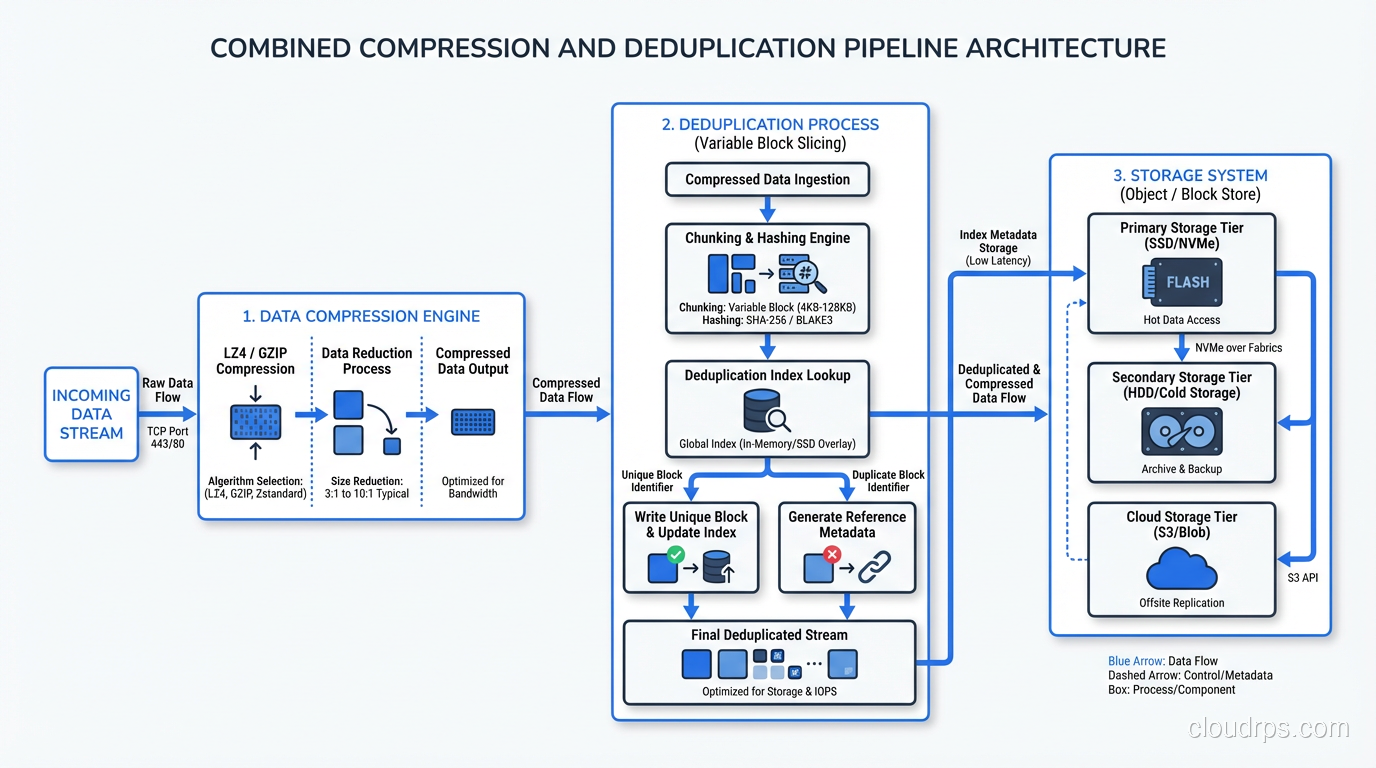
The order matters: deduplicate first, then compress. Deduplication works on chunks of data across files; it needs to see the raw content to identify duplicates. Compression works on individual data streams; it squeezes remaining redundancy after dedup has eliminated the cross-file duplicates.
Most enterprise backup and storage systems handle this automatically. Dell Data Domain, for example, deduplicates with variable-length chunking, then compresses each unique chunk with LZ compression. The combined ratios can be impressive. I’ve seen 30:1 or better on VM backup workloads.
For block and object storage systems, the implementation varies. Object stores like S3 typically don’t provide built-in deduplication (though some S3-compatible stores do). Block storage arrays from major vendors almost universally include both compression and deduplication as inline features.
Practical Implementation Guidance
For Data Engineers
When building data pipelines, compression choice directly impacts processing performance and storage cost.
- Use Snappy or LZ4 compression in Parquet/ORC files for intermediate datasets that will be read many times. The fast decompression pays for itself.
- Use zstd for archival or cold storage datasets where space savings matter more than read speed.
- If you’re writing Parquet files, enable dictionary encoding in addition to compression. It pre-deduplicates repeated values within each column chunk before compression kicks in, and the combined effect is substantial.
- Compress before uploading to object storage. The compute cost of compression is almost always less than the storage and network cost of uncompressed data.
For Infrastructure Engineers
Storage-level compression and deduplication settings have knock-on effects:
- Don’t compress already-compressed data. If your application compresses data before writing it to a storage array that also compresses, you’re wasting CPU cycles for zero benefit. Coordinate between application and storage teams.
- Monitor dedup metadata overhead. The deduplication index itself consumes memory and storage. On large-scale dedup systems, the index can consume 1-2% of the logical data size in RAM. Plan your hardware accordingly.
- Test compression ratios on representative data. Vendor benchmarks use best-case data. Run your actual workload through the system before committing to capacity plans based on assumed ratios.
For Backup Architects
Backup is where compression and deduplication deliver the most dramatic returns.
- Source-side dedup sends only unique chunks over the network, reducing backup window and network load. I’ve cut backup windows by 60% with source-side dedup alone.
- Target-side dedup is simpler to deploy but requires full data transfer before dedup happens.
- Global deduplication across all backup clients gives the best ratios but requires a centralized index. Per-client dedup is simpler but misses cross-client duplicates.
- Rehydration cost matters. When you restore from a deduplicated backup, the system must reassemble the original data from scattered chunks. Full VM restores from heavily deduplicated targets can be slow. Plan your RTO accordingly.
The Future: Hardware Acceleration and AI-Driven Compression
Two trends are worth watching. First, hardware-accelerated compression is becoming mainstream. Intel QAT, AMD accelerators, and purpose-built ASICs can perform zstd compression at line rate, removing the CPU overhead that was historically the main argument against aggressive compression.
Second, learned compression (using neural networks to build data-specific compression models) is moving from research into production for specific domains. Image compression with neural codecs already outperforms JPEG. General-purpose learned compression for structured data is still early, but the trajectory suggests it will be practical within a few years.
For now, the practical advice is simple: compress everything with zstd, deduplicate where the workload profile supports it, and always deduplicate before encrypting. These three rules alone will save most organizations 40-60% on storage costs with minimal effort.
Get Cloud Architecture Insights
Practical deep dives on infrastructure, security, and scaling. No spam, no fluff.
By subscribing, you agree to receive emails. Unsubscribe anytime.