
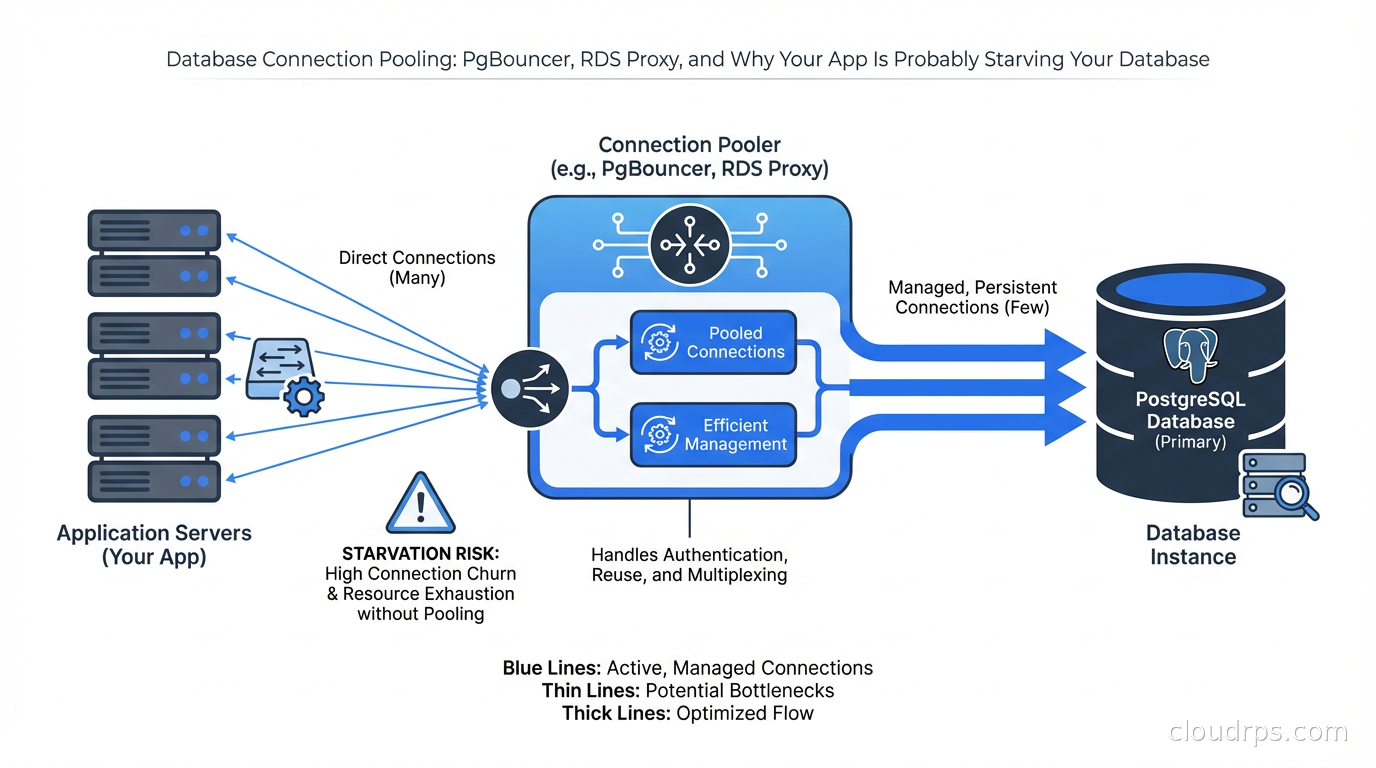
I spent three days debugging a production incident that turned out to be 900 idle database connections bringing a PostgreSQL cluster to its knees. The application was doing fine. The query plans were fine. The indexes were fine. The database was spending 40% of its CPU just managing connection overhead. We had auto-scaling enabled on the application tier, and every new instance opened its own connection pool, and suddenly we had a connection storm that took down the primary.
That incident taught me more about database connection pooling than any documentation ever did.
Connection pooling is one of those topics that sounds simple until you’re in the weeds at 2am. Every junior engineer knows “connections are expensive, use a pool.” But knowing why they’re expensive, which pooler to use, how to size it, and what mode to run it in - that’s where most teams fall short.
Why Database Connections Are Expensive
When your application opens a connection to PostgreSQL, the database does a surprising amount of work. It forks a backend process (yes, PostgreSQL uses a process-per-connection model, not threads), allocates around 5-10MB of memory for that process, performs authentication, loads session state, and establishes a bunch of bookkeeping structures.
For a connection that you’re going to use once and discard, that’s a lot of overhead. And it’s not just about memory: each idle connection still consumes a PostgreSQL backend process slot, contributes to lock table pressure, and makes checkpoint and vacuum operations slower because the system has more state to track.
PostgreSQL’s default max_connections is 100. This sounds generous until you have 20 application servers each running a connection pool of 10. That’s 200 connections right there, and you haven’t even accounted for monitoring agents, migrations, data pipelines, or admin queries.
Most managed databases let you bump max_connections to 500 or 1000, but you’re not solving the problem - you’re delaying it while making the database work harder. Each connection is a process, and 500 processes competing for CPU and memory on your database server is not a win.
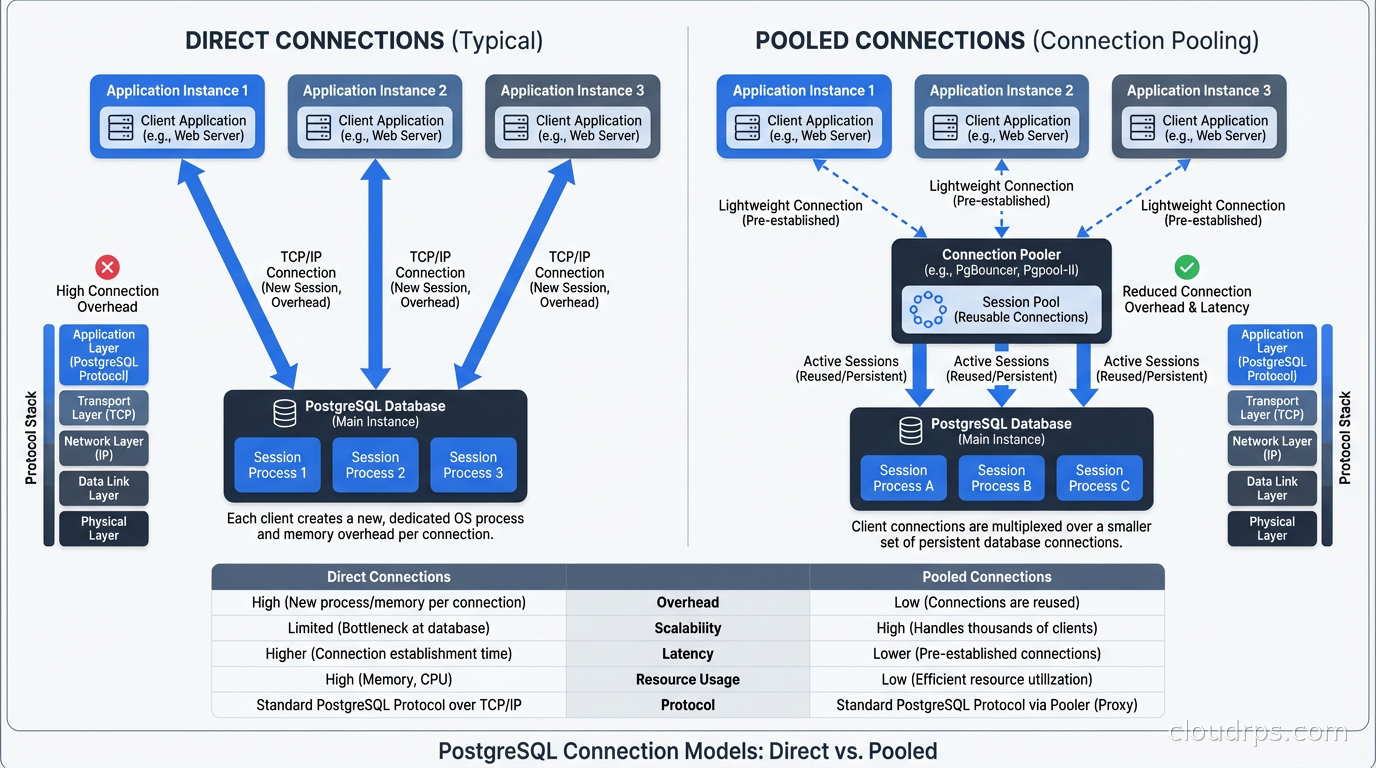
The right solution is connection pooling: a middleman that maintains a smaller number of long-lived connections to the database and multiplexes many application connections through them.
PgBouncer: The Industry Standard
PgBouncer is a lightweight connection pooler written in C that’s been the go-to choice for PostgreSQL shops for over 15 years. It’s fast, battle-tested, and does one thing extremely well. I’ve used it at multiple companies and it has never been the source of an incident - which is the highest praise I can give infrastructure software.
PgBouncer operates in three modes, and choosing the right one matters enormously.
Session pooling is the simplest. A server connection is assigned to a client connection for the lifetime of the client’s session. When the client disconnects, the server connection returns to the pool. This is the most compatible mode but provides the least benefit: you still need one server connection per active client connection.
Transaction pooling is where PgBouncer shines. Server connections are assigned only for the duration of a transaction. Between transactions, the server connection returns to the pool and can be used by another client. This means you can have thousands of client connections sharing dozens of server connections, as long as your transactions are short-lived (which they should be).
Statement pooling is the most aggressive mode: server connections are reassigned after every statement. This breaks multi-statement transactions entirely and is almost never appropriate for production applications. I’ve never run this in production and I’d struggle to think of a use case.
For most web applications using short transactions, transaction mode is the right choice. Here’s a minimal working PgBouncer config:
[databases]
myapp = host=db.internal port=5432 dbname=myapp

[pgbouncer]
listen_port = 6432
listen_addr = *
auth_type = md5
auth_file = /etc/pgbouncer/userlist.txt
pool_mode = transaction
max_client_conn = 1000
default_pool_size = 25
min_pool_size = 5
reserve_pool_size = 5
reserve_pool_timeout = 3
server_idle_timeout = 600
log_connections = 0
log_disconnections = 0
That default_pool_size = 25 means PgBouncer maintains 25 server connections to the database and routes up to 1000 client connections through them. The math works because web requests spend most of their time in application logic, not in database transactions.
What PgBouncer Cannot Do
Transaction pooling breaks several PostgreSQL features. Session-level settings like SET search_path don’t survive across transactions in the pool, because your connection might be handed to a different server connection. Prepared statements don’t work unless you use named prepared statements and PgBouncer is configured to track them. Advisory locks become dangerous. LISTEN/NOTIFY can’t use the connection pool at all and needs a dedicated connection.
I’ve seen teams spend days debugging mysterious bugs that turned out to be session state leaking across pooled connections. If your application uses SET LOCAL in transactions, you’re fine. If it uses SET at the session level, you need to rethink your approach or use session pooling.
For applications that rely heavily on PostgreSQL features like advisory locks or LISTEN/NOTIFY - I’m thinking of job queues like Que or Delayed Job - you need to be thoughtful about which connections go through the pooler and which connect directly.
RDS Proxy: Managed Pooling for AWS
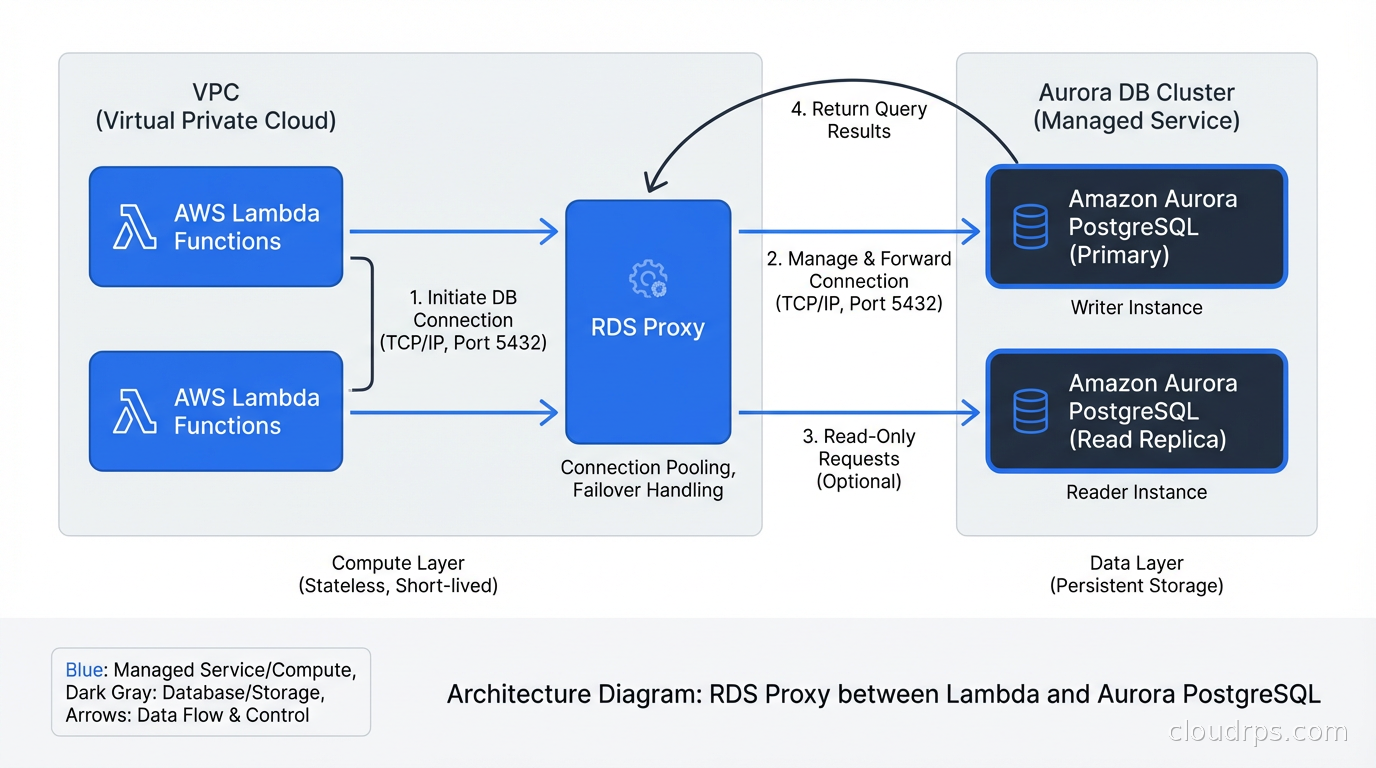
If you’re running PostgreSQL on Amazon RDS or Aurora, RDS Proxy is the managed alternative. AWS launched it in 2020 and I’ve been using it since 2021. The pitch is appealing: no infrastructure to manage, automatic failover handling, IAM authentication support, and built-in connection pooling.
RDS Proxy multiplexes connections to your database and handles failover much more gracefully than direct connections. When your Aurora primary fails, applications with direct connections will experience a 30-60 second interruption while DNS propagates and connections reconnect. Applications connecting through RDS Proxy typically see under 5 seconds of disruption because the proxy maintains the connections and handles the reconnection transparently.
This matters a lot for Lambda functions. Lambda can have hundreds of concurrent invocations, each potentially opening a database connection. Without a pooler, your Lambda workload can exhaust database connections trivially. RDS Proxy was specifically designed to address this.
The cost model is straightforward: you pay per vCPU on your database instance. A db.r5.large (2 vCPUs) will cost around $0.015 per hour for RDS Proxy, roughly $11/month. For most production databases, this is noise in the bill.
What RDS Proxy does less well: it doesn’t expose fine-grained pool configuration. You can’t easily tune pool sizes the way you can with PgBouncer. It also adds a small latency overhead (typically 1-3ms) due to the additional network hop. For high-frequency, latency-sensitive queries, this matters.
pgpool-II: The Swiss Army Knife
pgpool-II is a different beast. Where PgBouncer does one thing (connection pooling) extremely well, pgpool-II tries to do many things: connection pooling, connection limiting, query caching, load balancing reads across replicas, and even table partitioning.
In theory, this sounds great. In practice, I’ve found pgpool-II to be significantly more complex to operate correctly, and its query cache can lead to subtle data consistency issues if you’re not careful. The read load balancing is genuinely useful if your application is read-heavy and you’re not handling replica routing at the application layer, but you need to understand which queries are safe to serve from replicas.
My rule of thumb: if you need basic connection pooling and are self-hosting PostgreSQL, use PgBouncer. If you need connection pooling plus read replica load balancing without changing your application code, pgpool-II is worth evaluating carefully. If you’re on AWS, start with RDS Proxy.
Sizing Your Connection Pool
This is where most teams get it wrong. The typical mistake is setting pool sizes based on a vague intuition (“we have 100 application threads so let’s set pool size to 100”). The right approach is based on database capacity.
A good starting formula for PostgreSQL:
pool_size = (cpu_cores * 2) + effective_spindle_count
For a modern SSD-based database server with 8 CPU cores, that’s around 16-18 connections for most workloads. Even for a moderately large database with 32 cores, you rarely want more than 100 server connections.
This sounds absurdly small until you measure it. A PostgreSQL server with 20 active connections processing short transactions can do more total throughput than the same server with 200 connections thrashing on CPU and memory. The pooler’s job is to queue excess requests and let the database work efficiently.
The pool sizing discussion is deeply connected to everything I’ve written about scalability vs elasticity - more connections is not the same as more throughput, and treating the database as something you can simply throw connections at is a category error.
You can monitor the right pool size empirically. Watch your database server’s CPU. If it’s consistently above 70-80% with your current pool size, adding more connections won’t help - you need more database capacity. If CPU is low but query latency is high, you might need to look at index coverage or query plans, not the pool size.
Application-Level Connection Pools vs. External Poolers
Most modern application frameworks have built-in connection pools. SQLAlchemy, HikariCP (Java), ActiveRecord (Rails), and Prisma (Node.js) all maintain connection pools within the application process. If you’re connecting directly to PostgreSQL, these pools are essential: without them, you’d open a new connection for every database operation, which is the performance anti-pattern I described at the start.
The question is whether you need an external pooler like PgBouncer on top of your application-level pool. The answer depends on scale and deployment model.
For a single application server, your application’s built-in pool is often sufficient. For 20 application servers each running their own pool, an external pooler centralizes and reduces the total connection count the database sees. This is the scenario that gets teams into trouble with auto-scaling: every new application instance creates a new pool, and the database connection count grows proportionally.
External poolers also survive application crashes and deployments gracefully. When you roll out a new version and restart your application servers, PgBouncer maintains the server connections. The database never sees the churn of applications disconnecting and reconnecting.
This integrates naturally with broader high availability design: the database tier should be shielded from the volatility of the application tier as much as possible.
Monitoring Connection Pool Health
A connection pool you’re not monitoring is a connection pool that will eventually bite you. The key metrics to track:
Pool utilization: what percentage of server connections are in use right now. Sustained utilization above 80% means you’re at risk of connection starvation. Consistent utilization below 20% means your pool is oversized.
Wait queue length: how many client connections are waiting for a server connection to become available. Any nonzero wait queue under normal load is a warning sign.
Connection errors: failed connection attempts, authentication failures, pool exhaustion errors. These often appear in application logs well before the database starts struggling.
PgBouncer exposes these via its admin console (SHOW POOLS;, SHOW STATS;, SHOW CLIENTS;). You should be scraping these and feeding them into your monitoring stack. The monitoring and logging best practices I’d apply to any infrastructure service apply here too.
RDS Proxy exposes CloudWatch metrics including ClientConnections, DatabaseConnections, QueryDuration, and MaxDatabaseConnectionsAllowed. Set alerts on these.
Handling Prepared Statements in Transaction Mode
One of the most common issues teams hit when moving to PgBouncer transaction pooling is prepared statement errors. Your ORM or database driver likely uses prepared statements for query caching, and these are session-scoped in PostgreSQL.
In transaction mode, the server connection changes between transactions, so prepared statements from a previous transaction are not available. This causes errors like: ERROR: prepared statement "s1" already exists or ERROR: prepared statement "lrupsc_1_0" does not exist.
The solution depends on your driver and ORM. For SQLAlchemy, you can disable server-side prepared statements with the prepared_statement_cache_size=0 parameter or use statement_cache_size=0. For ActiveRecord (Rails), prepend DEALLOCATE ALL in a connection checkout hook or use pgbouncer_prepared_statements: false in your database.yml.
Some drivers support a “simple query” protocol mode that avoids prepared statements entirely, at a small performance cost. For most web applications, the connection pooling benefits far outweigh this cost.
A Production Deployment Pattern
Here’s the architecture I’d deploy for a serious production PostgreSQL setup: application servers connect to PgBouncer running locally on each app server (for connection limiting at the source), which in turn connects to a regional PgBouncer instance (for centralized pooling and monitoring), which connects to the primary PostgreSQL and read replicas.
Alternatively, for teams on AWS: application connects to RDS Proxy, which connects to Aurora PostgreSQL with automatic failover. This is simpler operationally and good enough for most use cases.
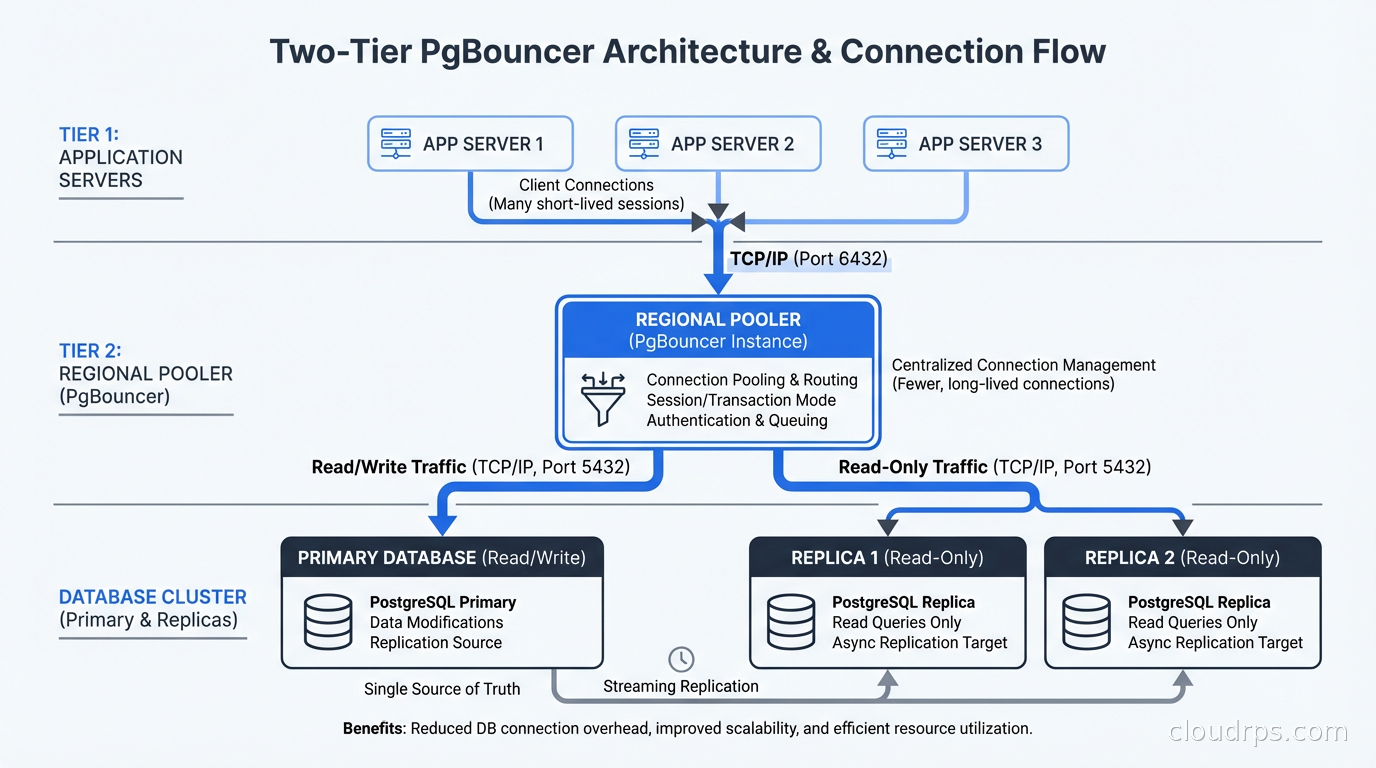
If you’re using databases on Kubernetes, a PgBouncer sidecar or a shared PgBouncer deployment within the cluster is the typical pattern. Running PgBouncer as a sidecar per application pod gives you good isolation; running it as a shared deployment reduces the number of server connections the database sees. The right choice depends on your workload patterns.
The Connection Between Pooling and Application Architecture
Connection pool starvation often reveals deeper architectural problems. When I investigate a connection exhaustion incident, I usually find one of a few underlying causes.
Long-running transactions that hold connections unnecessarily. The fix is to move business logic outside of transaction boundaries and keep transactions as short as possible. If your application code is calling external APIs or doing complex computation inside a database transaction, that’s a problem regardless of pooling.
N+1 query patterns that hold connections longer than necessary due to accumulated latency. The fix is better query design, not more connections.
Missing timeouts that let failed or slow queries accumulate. Every database call should have a timeout. RDS Proxy and PgBouncer both have query_timeout and client_idle_timeout settings you should configure.
Connection pooling is not a substitute for good application design, but it is a necessary infrastructure layer for any application that scales beyond a handful of application servers. The teams that get this right are the ones who understand their connection count as a finite resource to be managed, not an infinite reservoir to draw from.
If you’re building systems where database replication is part of your HA story, connection pooling is essential infrastructure: your read replica routing, failover handling, and connection management all need to work together coherently. Get PgBouncer or RDS Proxy in place before you need it, not after a 2am incident teaches you why it matters.
Get Cloud Architecture Insights
Practical deep dives on infrastructure, security, and scaling. No spam, no fluff.
By subscribing, you agree to receive emails. Unsubscribe anytime.