
“Should we run our databases on Kubernetes?”
I get this question at least once a month. And my answer, which frustrates people, is always the same: it depends. But since “it depends” isn’t useful without context, let me give you the full picture: the good, the bad, and the things that will keep you up at night.
I’ve run databases on Kubernetes in production. I’ve also migrated databases off Kubernetes in production. Both were the right decisions at the time for the specific circumstances. The technology has matured significantly since the early days when running anything stateful on Kubernetes was considered reckless, but it still comes with trade-offs that you need to understand before making the decision.
The Case Against: Why Running Databases on Kubernetes Is Hard
Let me start with the challenges, because they’re significant and I think people underestimate them.
Kubernetes Was Built for Stateless Workloads
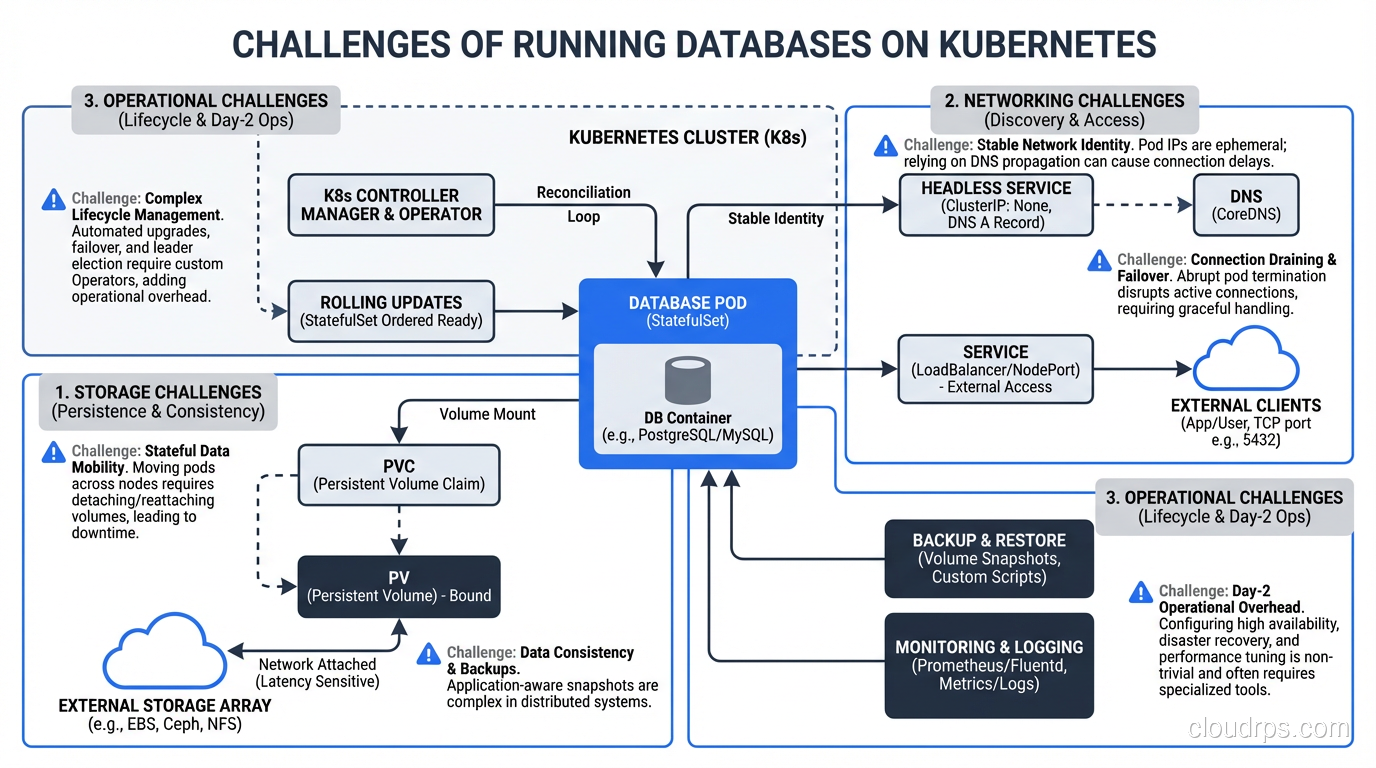
This is the fundamental tension. Kubernetes’ core design assumes that pods are ephemeral. They can be killed and recreated at any time. The scheduler can move them between nodes. Scaling means adding more identical copies.
Databases are the opposite of ephemeral. They maintain state on disk. They can’t be casually moved between nodes without careful data migration. You can’t just add another copy; you need replication configured correctly. And if a database pod is killed unexpectedly, you might lose data.
Kubernetes has added features to address this (StatefulSets, PersistentVolumes, PersistentVolumeClaims), but these features add complexity on top of an already complex platform. StatefulSets provide stable network identities and ordered deployment/scaling, which databases need. But they don’t handle replication, failover, or backup. You need to manage those yourself or use an operator.
Storage Is the Hard Part
When your database pod writes data, that data goes to a PersistentVolume. In cloud environments, this is typically a network-attached block device (EBS in AWS, Persistent Disk in GCP, Managed Disk in Azure). These work, but they have characteristics you need to understand:
Network latency. Network-attached storage adds 0.5-2ms of latency to every I/O operation compared to local storage. For write-heavy databases, this matters. Local NVMe drives have sub-100-microsecond latency; network-attached EBS has 1-2ms. That’s an order of magnitude difference.
IOPS limits. Cloud block storage has IOPS limits that depend on the volume type and size. If your database exceeds these limits, I/O operations queue up and latency spikes. You need to provision storage with IOPS headroom, which costs money.
Volume attachment. When a pod moves to a different node (due to node failure, scaling, or rebalancing), its PersistentVolume needs to be detached from the old node and attached to the new one. This takes time, sometimes minutes. During this time, the database is unavailable.
Snapshot and backup. Volume snapshots are your backup mechanism, but they’re point-in-time and don’t capture in-flight transactions. For consistent backups, you need to use the database’s native backup tools (pg_dump, mysqldump, pg_basebackup) in addition to volume snapshots.
Operational Complexity
Running a database on Kubernetes means you need to understand both Kubernetes operations and database operations. These are both deep disciplines, and the intersection creates unique challenges:
- Upgrades: Upgrading the Kubernetes cluster or the database version requires careful planning. Kubernetes node upgrades drain pods, which means your database pod gets evicted. You need to handle this gracefully.
- Monitoring: You need both Kubernetes-level monitoring (pod status, node health, volume utilization) and database-level monitoring (query performance, replication lag, connection counts). These are different tools and different expertise.
- Troubleshooting: When the database is slow, is it a Kubernetes problem (resource contention, I/O throttling, network policy) or a database problem (bad query, lock contention, insufficient memory)? Disentangling these layers requires expertise in both.
The Case For: Why It Can Work
Despite the challenges, there are legitimate reasons to run databases on Kubernetes, and the ecosystem has matured enough that it’s no longer crazy talk.
Unified Platform
If your entire application stack runs on Kubernetes, there’s real operational value in keeping the database there too. One platform to monitor, one deployment tooling chain, one set of operational procedures. The alternative, managing Kubernetes for your application and a separate managed database service, means operating two platforms.
Database Operators
This is the biggest game-changer. Kubernetes operators are custom controllers that encode operational knowledge for specific workloads. For databases, operators handle:
- Automated replication setup
- Automatic failover when the primary fails
- Backup scheduling and management
- Scaling (adding replicas)
- Version upgrades with rolling restarts
The major database operators in 2025:
CloudNativePG (PostgreSQL): This is the operator I recommend most for PostgreSQL on Kubernetes. It handles cluster provisioning, automated failover, backup to object storage (S3, GCS), monitoring integration, and rolling updates. It’s mature, well-documented, and actively maintained.
Percona Operator (PostgreSQL, MySQL, MongoDB): Percona’s operators are production-grade and come from a company with deep database expertise. They support both PostgreSQL and MySQL/MongoDB with enterprise-grade features.
Zalando Postgres Operator: Built by Zalando for their own use at scale, it handles PostgreSQL clusters including connection pooling (PgBouncer integration), logical backups, and team-based access control.
Vitess: If you need horizontal sharding of MySQL, Vitess on Kubernetes is a proven combination (it’s how YouTube runs MySQL at scale).
These operators don’t eliminate the complexity; they encode it. You still need to understand database operations, but the operator handles the mechanical parts (failover, backup scheduling, replica management) that would otherwise require manual intervention or custom scripting.
Development and Testing Environments
This is a lower-risk use case where I almost always recommend databases on Kubernetes. For non-production environments, the simplicity of kubectl apply -f postgres-dev.yaml to spin up a database is hard to beat. Developers get their own database instances, ephemeral environments get ephemeral databases, and CI pipelines get clean databases for each test run.
The data loss risk in dev/test is acceptable, the performance requirements are lower, and the operational simplicity of having everything in one platform is a genuine advantage.
Multi-Cloud and On-Premises
If you’re running Kubernetes on-premises or across multiple cloud providers, managed database services aren’t an option (or require vendor-specific solutions for each cloud). Running the database on Kubernetes with an operator gives you a consistent experience across environments.
For a deeper exploration of different database types and their characteristics, see my post on SQL vs NoSQL databases.
What You Need to Get Right
If you decide to run databases on Kubernetes, here’s what you must get right. Not “should,” but must.
Storage Configuration
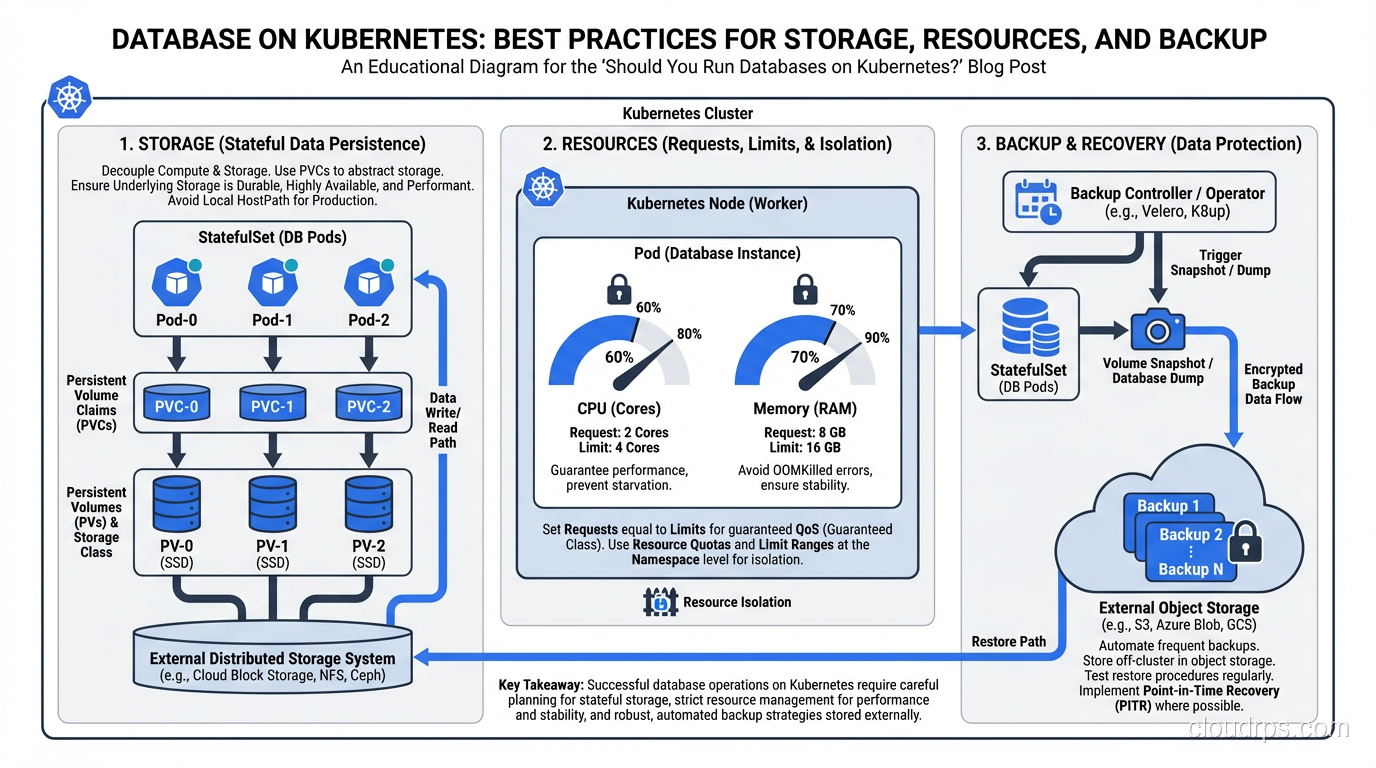
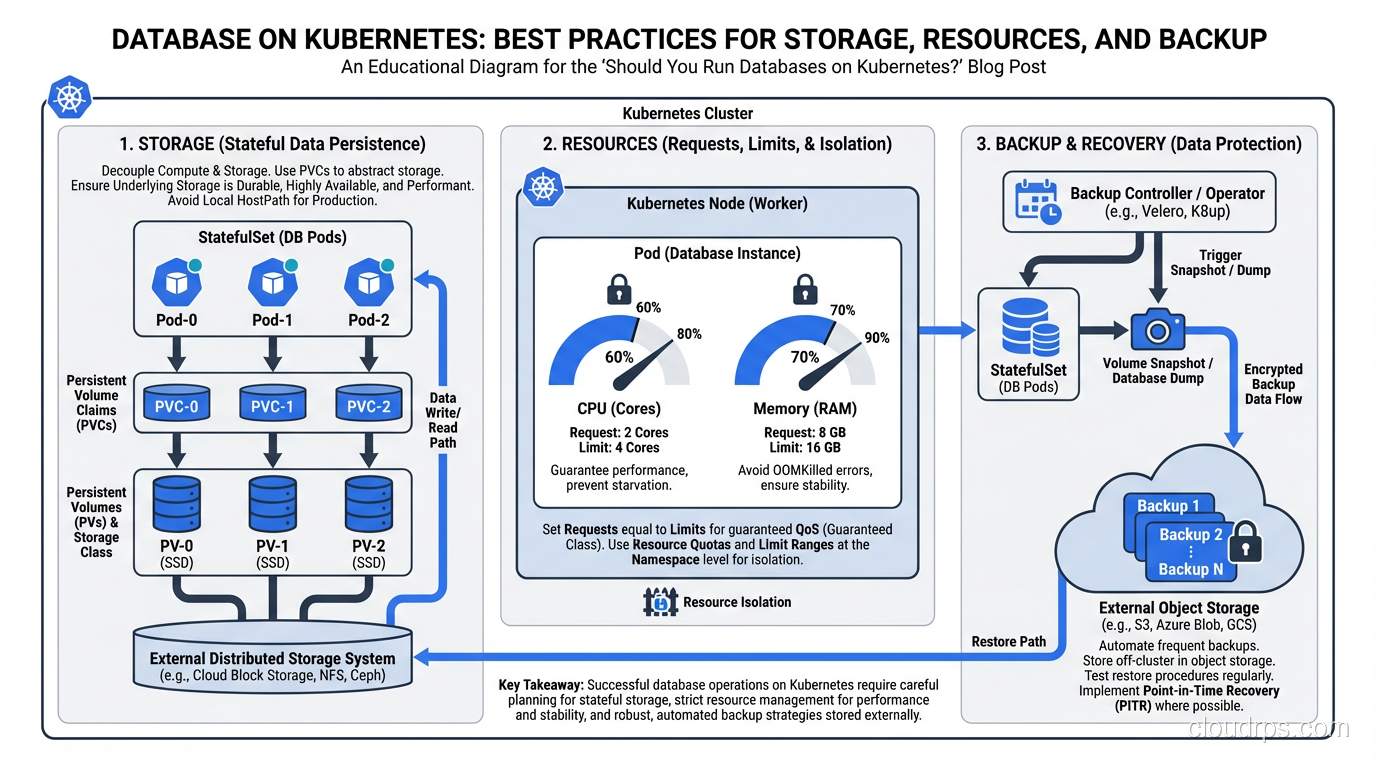
Use the fastest storage class available. For production databases, use provisioned IOPS SSD volumes (io2/gp3 on AWS, SSD persistent disks on GCP). The extra cost is negligible compared to the performance impact.
Size your volumes with growth in mind. Expanding a PersistentVolume is possible but not always seamless. Provision 2-3x your current data size.
Test failover with storage. Simulate a node failure and measure how long it takes for the volume to reattach to a new node and the database to recover. This is your actual RTO for a node failure scenario.
Resource Management
Set resource requests and limits carefully. Databases need predictable resources. A PostgreSQL instance that gets CPU-throttled because it hit its limit will have unpredictable query performance. I set CPU requests to match the steady-state usage and don’t set CPU limits for database pods (or set them very high). For memory, set both request and limit to the same value to prevent the pod from being OOM-killed.
Use dedicated node pools. Don’t mix your database pods with your application pods on the same nodes. Use node affinity or taints/tolerations to ensure database pods run on dedicated nodes with the appropriate storage and compute resources.
Pod disruption budgets. Set a PodDisruptionBudget that prevents Kubernetes from evicting more than one database pod at a time during node maintenance or cluster upgrades.
Backup and Recovery
Do not rely solely on PersistentVolume snapshots. Use the database’s native backup tools. For PostgreSQL, use continuous WAL archiving to object storage (S3/GCS). For MySQL, use mysqldump or Percona XtraBackup. The operator should handle this, but verify it’s configured correctly.
Test your restores regularly. I’ve said this before in my disaster recovery writing, and I’ll say it again: backups that can’t be restored are not backups. Schedule monthly restore tests.
Have a point-in-time recovery strategy. WAL archiving for PostgreSQL, binary logs for MySQL. This lets you restore to any point in time, not just the last full backup.
Monitoring and Alerting
You need both Kubernetes-level and database-level monitoring:
Kubernetes metrics:
- Pod status and restarts
- PersistentVolume usage and IOPS
- Node resource utilization
- Pod scheduling latency
Database metrics:
- Replication lag (critical for high availability)
- Query latency percentiles
- Connection count and pool utilization
- Transaction throughput
- WAL/binlog generation rate
- Table bloat and vacuum activity (PostgreSQL)
Alert on replication lag, volume space utilization (alert at 70%, critical at 85%), and pod restarts. A database pod that’s restarting repeatedly is a critical issue. Investigate immediately.
Security
- Encrypt at rest. Use encrypted storage classes.
- Encrypt in transit. Configure TLS for all database connections.
- Manage credentials properly. Use Kubernetes Secrets (encrypted with a KMS provider) or an external secrets manager (Vault, AWS Secrets Manager).
- Network policies. Restrict which pods can connect to the database. Only your application pods and monitoring tools should have network access.
- RBAC. Restrict who can access database pods, exec into them, or view their logs.
My Recommendation by Workload Type
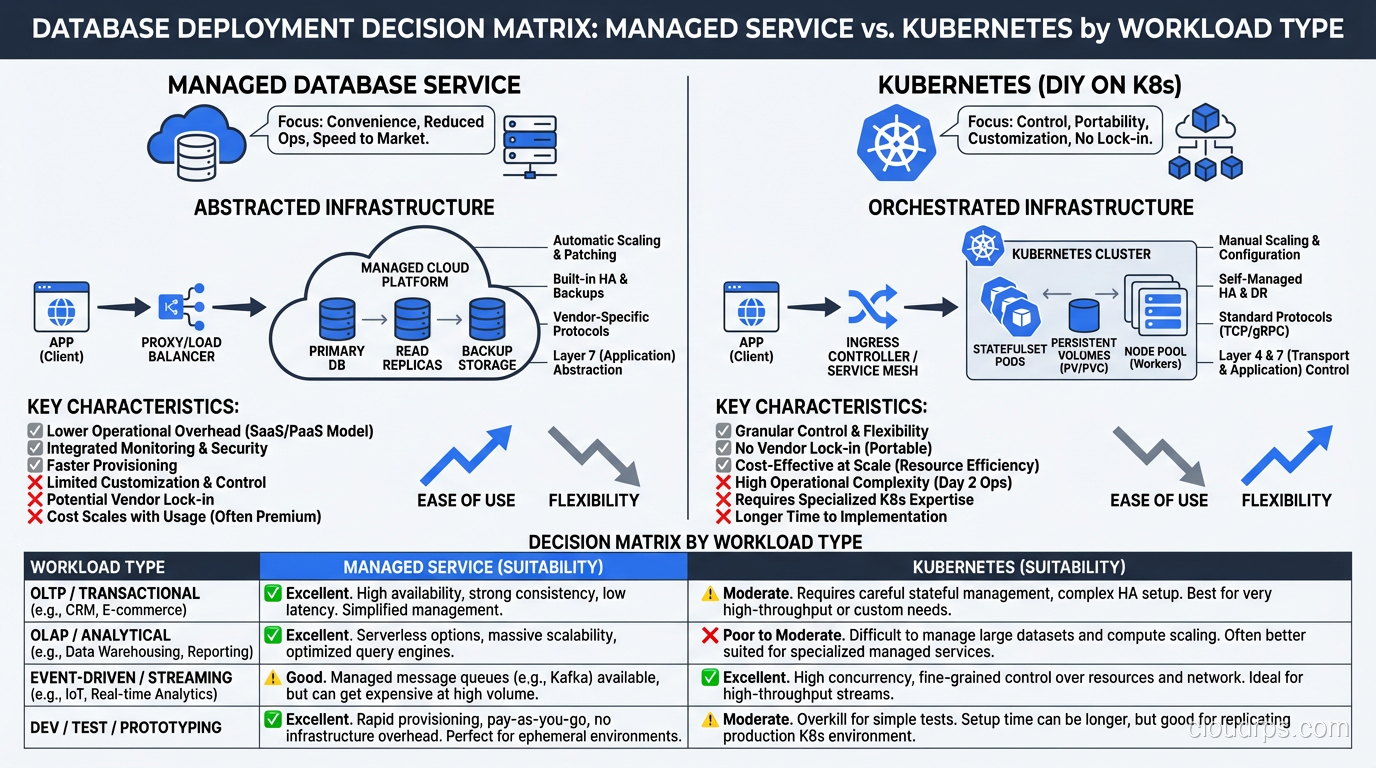
After years of experience, here’s my honest recommendation matrix:
Production, Tier 1 (revenue-critical): Use a managed database service (RDS, Cloud SQL, Azure Database). The operational burden of running your critical database on Kubernetes isn’t worth the platform consistency benefit. Let the cloud provider handle failover, patching, backups, and high availability. Focus your team on building product.
Production, Tier 2-3 (important but not revenue-critical): Database on Kubernetes with a mature operator is reasonable. The operator handles the day-to-day operations, and the lower criticality means the risk profile is acceptable.
Development and Testing: Databases on Kubernetes all the way. The simplicity and consistency are unbeatable for non-production workloads.
On-Premises or Multi-Cloud: Database on Kubernetes with operators is your best option. Managed services aren’t available, and the operator gives you the automation you’d otherwise have to build yourself.
Legacy databases (Oracle, SQL Server): Don’t put these on Kubernetes. The operator ecosystem for legacy commercial databases is immature, and the licensing implications can be nightmarish.
The Trend Line
The technology is getting better every year. Operators are more mature. Storage drivers are more reliable. The community has accumulated more operational wisdom. Five years ago, I would have said “don’t run databases on Kubernetes” without much nuance. Today, I say “maybe, depending on your circumstances.”
Five years from now, running databases on Kubernetes will probably be as normal as running databases on VMs is today. The tooling and operational patterns are heading in that direction.
But “probably normal in five years” is not the same as “definitely right for you today.” Evaluate your specific circumstances: team expertise, workload criticality, operational capacity, and platform strategy. Make the decision based on those factors, not on industry trends or conference talks.
The best database platform is the one your team can operate reliably. For most teams today, that’s a managed service. For some teams, it’s Kubernetes with the right operator. For almost no teams, it’s self-managed Kubernetes with hand-rolled database operations.
Know which team you are.
Get Cloud Architecture Insights
Practical deep dives on infrastructure, security, and scaling. No spam, no fluff.
By subscribing, you agree to receive emails. Unsubscribe anytime.