
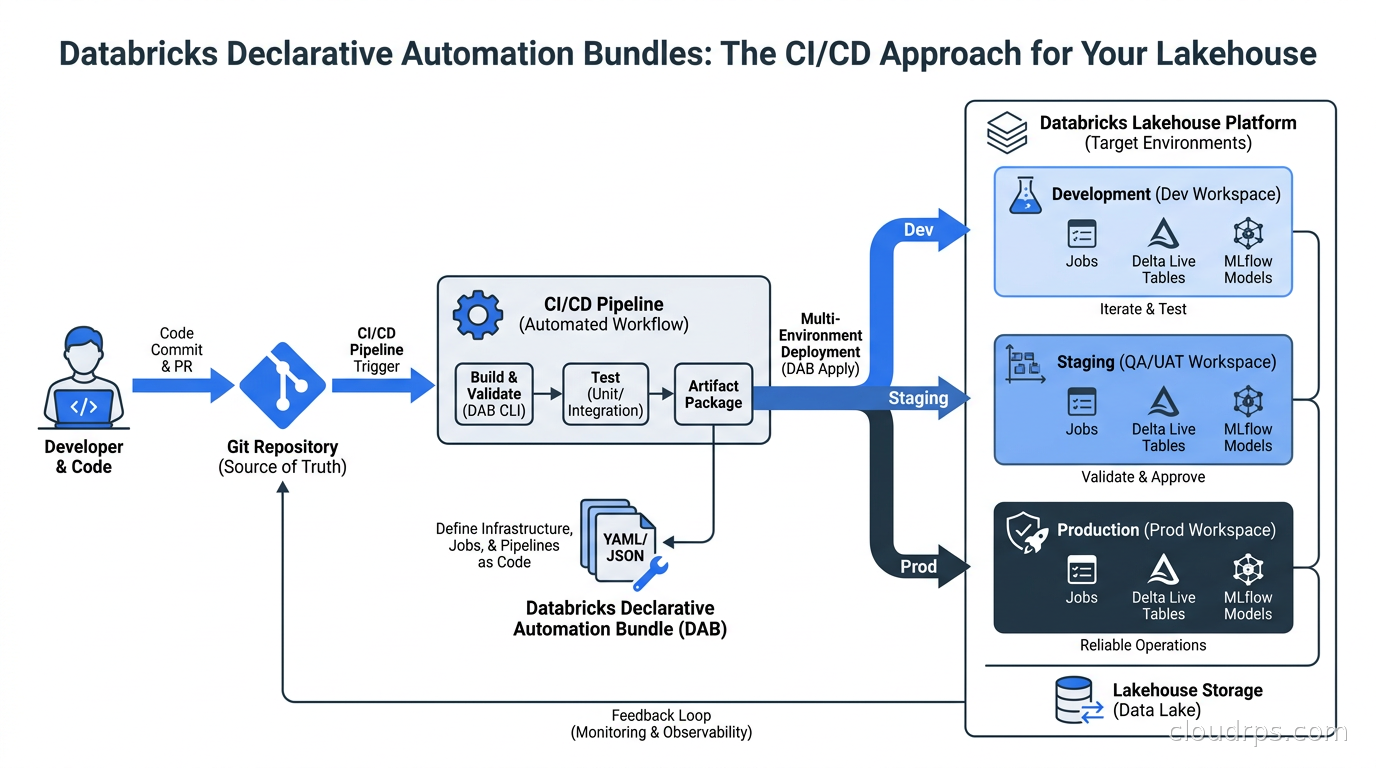
The first time I tried to get a Databricks workspace under proper source control, I resorted to a brittle mix of exported JSON notebook files in Git, a hand-rolled Python script that called the Jobs API, and a CI/CD pipeline that largely consisted of hope and manual intervention. That was 2020. I was building out a data platform for a healthcare analytics company, and the disconnect between how their application engineers shipped code and how their data engineers shipped code was becoming a real operational liability.
Over twenty years working across data infrastructure, I’ve watched that same pain play out at almost every organization that grows beyond a handful of data engineers. The application code gets proper CI/CD, automated testing, pull request reviews, and promotion gates. The Databricks workspace gets committed JSON files and a Slack message saying “I deployed that change to prod.”
Databricks Declarative Automation Bundles (DAB) is the platform’s answer to this problem. What was called Databricks Asset Bundles until March 2026 has been renamed and significantly expanded. The Thoughtworks Technology Radar rated it “Adopt” as of April 2026, which in my experience with that radar is roughly the point where a tool has earned real production credibility. If you are running any substantial workload on Databricks and you are not using bundles for deployment, this article is for you.
What Problem DABs Actually Solve
Before I walk through the mechanics, it is worth being precise about the problem. The Databricks workspace is not a static artifact. It contains jobs, Delta Live Tables (DLT) pipelines, SQL dashboards, cluster policies, model serving endpoints, and increasingly AI/BI content. All of these can be configured interactively in the UI. And that is exactly the problem: interactive UI configuration does not version-control, does not reproduce reliably across environments, and does not give you a pull request review or a rollback.
Data engineering teams have traditionally handled this with one of three approaches, each with its own failure mode:
The first approach is the workspace-as-truth model. Everything lives in the UI and is periodically exported. Changes are made directly in production. I’ve seen teams lose months of configuration work this way when someone “cleaned up” the wrong workspace.
The second approach is rolling your own API scripts. You write Python wrappers around the Databricks REST API and call them from CI. This works until it doesn’t. API version drift, inconsistent state handling, partial deployment failures that leave resources in an indeterminate state. The script that “worked on my machine” and the one that runs in GitHub Actions diverge over six months.
The third approach, the one I see most often in mid-sized data shops, is using Terraform with the Databricks Terraform provider. This is actually reasonable and I’ll come back to comparing it with DABs later in this article.
Declarative Automation Bundles are Databricks’ first-party answer to all three failure modes. You define your resources in YAML, commit them to Git alongside your Python code, and use a CLI to validate, preview, and deploy to named environments. The key insight is that the bundle encompasses both the code (notebook files, Python modules, SQL scripts) and the resource configuration that uses that code (the job that runs the notebook, the cluster it runs on, the schedule). They deploy together as a unit.
The databricks.yml File
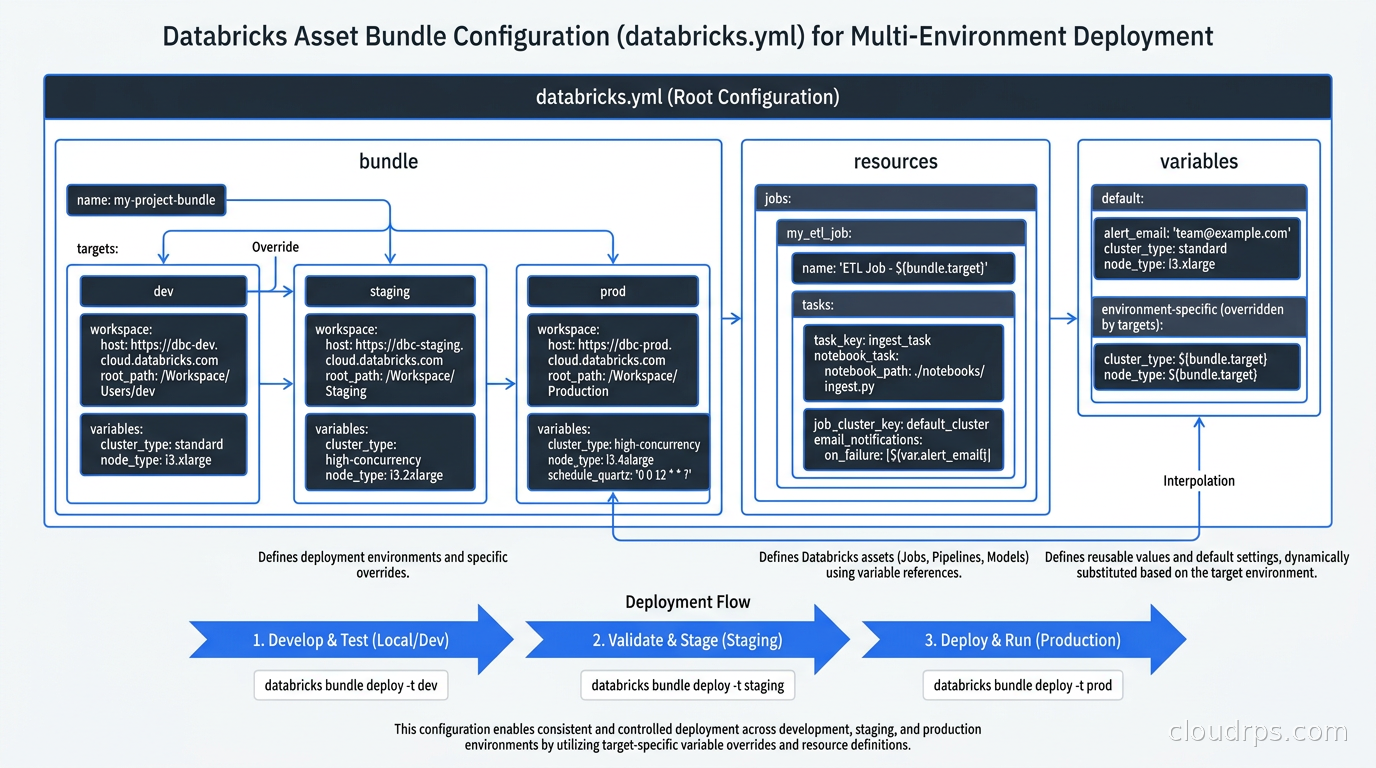
Every bundle starts with a single databricks.yml file at the project root. This is the manifest that tells the Databricks CLI what your project contains and how to deploy it.
A minimal bundle looks like this:
bundle:
  name: analytics-platform

workspace:
  host: https://your-workspace.azuredatabricks.net

targets:
  dev:
    mode: development
    default: true
    workspace:
      host: https://dev-workspace.azuredatabricks.net

  prod:
    mode: production
    workspace:
      host: https://prod-workspace.azuredatabricks.net
    permissions:
      - level: CAN_VIEW
        group_name: data-analysts

resources:
  jobs:
    daily_ingestion:
      name: "Daily Ingestion Pipeline"
      tasks:
        - task_key: ingest
          notebook_task:
            notebook_path: ./notebooks/ingest.py
            source: WORKSPACE
          job_cluster_key: main_cluster
      job_clusters:
        - job_cluster_key: main_cluster
          new_cluster:
            spark_version: 15.4.x-scala2.12
            node_type_id: Standard_DS3_v2
            num_workers: 2
      schedule:
        quartz_cron_expression: "0 0 6 * * ?"
        timezone_id: America/New_York
The structure has a few key sections worth understanding:
bundle: The project name. Required. This becomes the prefix for all deployed resources, which is how the CLI avoids naming collisions when multiple engineers deploy development copies to a shared workspace.
workspace: The default workspace host and authentication settings. Individual targets can override this.
targets: This is where multi-environment management lives. Each target is a named deployment environment. mode: development tells DAB to prefix all resource names with your username, so your dev job is [yourname] Daily Ingestion Pipeline and you don’t clobber your colleague’s. mode: production removes that prefix and applies stricter defaults. Exactly one target can be marked default: true, which is what databricks bundle deploy uses when you don’t specify -t.
resources: The declarative definition of everything Databricks should create. Jobs, pipelines, model serving endpoints, SQL dashboards, registered model aliases, clusters, and more. Each resource type maps to the corresponding Databricks resource API.
For projects with many resources, you can split resource definitions across files using an include directive:
include:
  - resources/jobs/*.yml
  - resources/pipelines/*.yml
This keeps the main databricks.yml from becoming a 2000-line file that nobody wants to review.
Variables and Environment Parameterization
One of the common sources of configuration duplication in multi-environment setups is that dev and prod differ in ways that go beyond just workspace host: cluster sizes, schedule frequencies, catalog names, storage paths. Hardcoding these leads to either copy-paste between target overrides or separate YAML files per environment.
DABs handle this with a variables block:
variables:
  catalog_name:
    description: Unity Catalog catalog to use
    default: dev_catalog

  cluster_workers:
    description: Worker node count
    default: 2

targets:
  prod:
    mode: production
    variables:
      catalog_name: prod_catalog
      cluster_workers: 8
You then reference variables throughout your resource definitions with ${var.catalog_name}. The target’s variable overrides apply at deploy time, so your notebooks can reference the same path and you’re not maintaining separate notebooks per environment.
For secrets, the pattern is different. You should never put secrets in databricks.yml directly. Instead, reference Databricks Secrets or external secret stores with the secrets lookup syntax, and use service principal credentials that are injected by your CI/CD environment rather than stored in the bundle.
The Bundle Lifecycle Commands
The DAB CLI gives you five operations that mirror what you’d want from any infrastructure-as-code tool:
databricks bundle validate runs a syntax and schema check without touching any workspace. This should be in your CI on every pull request. It catches malformed YAML, references to notebooks that don’t exist, and invalid resource configurations before they cause a failed deployment.
databricks bundle plan is the equivalent of terraform plan. It shows what will change in the target workspace: resources that will be created, updated, or deleted. This is the command you want engineers to run and review before merging to main. I’ve seen a few teams skip this step and then be surprised when a job gets deleted because they renamed a resource in YAML without realizing the CLI treats rename as delete-and-create.
databricks bundle deploy applies the bundle to the target workspace. By default it targets default, but most CI/CD usage specifies -t staging or -t prod explicitly. The deploy is idempotent: running it twice with no changes results in no changes.
databricks bundle run triggers a resource immediately. databricks bundle run -t staging daily_ingestion runs the job in the staging workspace and streams its output to your terminal. This is useful for one-off runs and for testing post-deployment before enabling the schedule.
databricks bundle destroy tears down all resources in a target. I’ve found this most valuable for ephemeral development environments: spin up a full pipeline stack in a personal workspace for testing, then destroy it when done.
GitHub Actions Integration
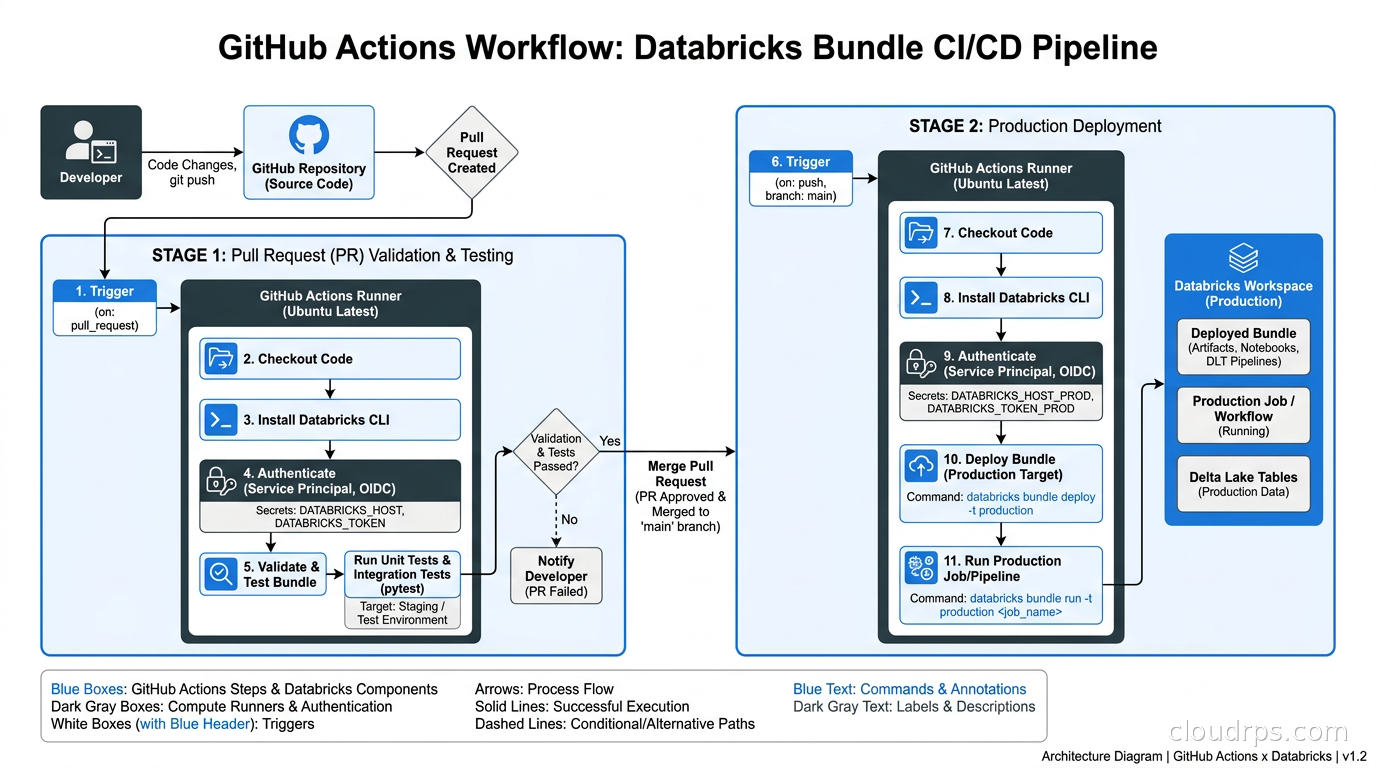
This is where the lifecycle commands pay off. The official pattern uses two separate workflows: one that validates on pull requests, and one that deploys on merge.
# .github/workflows/validate-bundle.yml
name: Validate Bundle
on:
  pull_request:
    branches: [main, staging]

jobs:
  validate:
    runs-on: ubuntu-latest
    steps:
      - uses: actions/checkout@v4
      - uses: databricks/setup-cli@v0.237.0
      - name: Validate bundle
        env:
          DATABRICKS_HOST: ${{ secrets.STAGING_DATABRICKS_HOST }}
          DATABRICKS_TOKEN: ${{ secrets.STAGING_SP_TOKEN }}
        run: databricks bundle validate -t staging
# .github/workflows/deploy-prod.yml
name: Deploy to Production
on:
  push:
    branches: [main]

jobs:
  deploy:
    runs-on: ubuntu-latest
    environment: production
    steps:
      - uses: actions/checkout@v4
      - uses: databricks/setup-cli@v0.237.0
      - name: Deploy bundle
        env:
          DATABRICKS_HOST: ${{ secrets.PROD_DATABRICKS_HOST }}
          DATABRICKS_TOKEN: ${{ secrets.PROD_SP_TOKEN }}
        run: |
          databricks bundle deploy -t prod
          databricks bundle run -t prod data_quality_check
A few things worth noting in that example. I’m pinning the CLI setup action to a specific version (v0.237.0) rather than main. Pinning versions in CI is table stakes for reproducibility and I still see teams using @main and then getting surprised when the CLI changes behavior between runs.
The token in secrets should belong to a service principal, not a human. When that engineer leaves the company or rotates their personal token, your CI breaks. A service principal with least-privilege permissions to create and manage the specific resource types in your bundle is the right model.
The best authentication approach as of late 2026 is workload identity federation where your CI environment supports it. GitHub Actions with OIDC and Azure Databricks can be configured to exchange a short-lived GitHub token for Databricks credentials with no stored long-lived secret at all. This is documented in Microsoft’s Azure Databricks CI/CD guide. For teams already using this pattern with Azure or AWS IAM, the configuration is worth the upfront investment.
What Resources Can Be Managed
This is the part most guides under-cover. It is easy to show a simple notebook job in a bundle tutorial and leave you thinking that is the full scope. The resource coverage is now considerably broader:
Jobs are the most common use case: multi-task workflows with multiple notebook and Python wheel tasks, job clusters, task dependencies, retry policies, notifications.
Delta Live Tables pipelines can be fully defined in bundles, including the DLT cluster configuration, catalog and schema targets, and development vs. production modes. For teams using DLT for their data lakehouse ingestion layer, this is significant: the pipeline that feeds your lakehouse and the ingestion code it runs can live in the same bundle, deployed together.
Model serving endpoints let you deploy a model from Unity Catalog as a serving endpoint with the right compute configuration, managed from the same bundle that contains your training job. The lifecycle is cleaner: train in CI, register to catalog, promote to serving endpoint, all in one automated flow.
SQL warehouses and dashboards can be declared in bundles, though I will be honest that I find SQL warehouse management more naturally done through workspace-level configuration rather than per-bundle because a single warehouse is typically shared across many jobs.
Clusters and cluster policies can be defined, which is relevant for teams that need specific cluster configurations shared across multiple jobs in the bundle.
Lakebase Postgres resources were added in CLI v0.287+ (February 2026) according to community documentation, though I’d recommend verifying this against Databricks’ current release notes if you’re planning to use this feature.
DABs vs Terraform: Choosing the Right Tool
This question comes up in every organization already using Terraform for infrastructure. The honest answer is that the two tools have different scope and can coexist.
The Databricks Terraform provider is mature and covers everything DABs covers, plus workspace-level infrastructure: creating workspaces themselves, managing Unity Catalog metastores, configuring workspace settings. If you are using Terraform for the rest of your cloud infrastructure, using it for Databricks workspace-level concerns is reasonable and keeps your toolchain consistent.
Where DABs win is for per-project deployment. A data engineering team writing a specific pipeline should not need to understand Terraform state management, remote backends, and workspace management to deploy their job. databricks.yml lives next to their code in the same repo. databricks bundle deploy is a command they can run from their laptop during development. The mental model is simpler.
A pattern that works well: Terraform manages workspace-level infrastructure (the workspace itself, Unity Catalog metastore, cluster policies, baseline permissions). DABs manage individual project deployments (the jobs, pipelines, and application code that data engineers ship). These operate at different layers without conflicting.
The analogy to the application world is useful. You would not use Terraform to deploy individual microservices; you use it to provision the EKS cluster those services run on. Helm or Argo Rollouts handles the application-level deployments. DABs are the data engineering equivalent of that application deployment layer.
Testing Strategy
One thing that separates mature bundle deployments from naive ones is a real testing strategy. databricks bundle validate is necessary but not sufficient.
For jobs with Python tasks, unit testing the transformation logic outside of Databricks is straightforward and fast. Write your PySpark logic as functions, test with pytest and a local SparkSession. This catches logic bugs without needing to provision cloud compute.
For data quality checking and integration testing, running the actual pipeline against a small dataset in a development or staging environment is the right approach. databricks bundle run -t staging after a deploy lets you trigger the job and verify it completes successfully against real infrastructure.
A pattern I have used effectively: add a data quality job to the bundle that runs after the main pipeline and fails loudly if output row counts, schema, or business-rule checks fail. This job runs as part of the CI deploy to staging, and the GitHub Actions workflow fails if the quality job fails. It is not quite the same as a formal test framework, but it catches a surprising fraction of real bugs before they reach production.
What you should not do is rely solely on databricks bundle validate for correctness guarantees. Validate checks YAML schema, not whether your notebook SQL is correct or whether the cluster configuration will actually start. Those require running code.
Multi-Environment Promotion in Practice
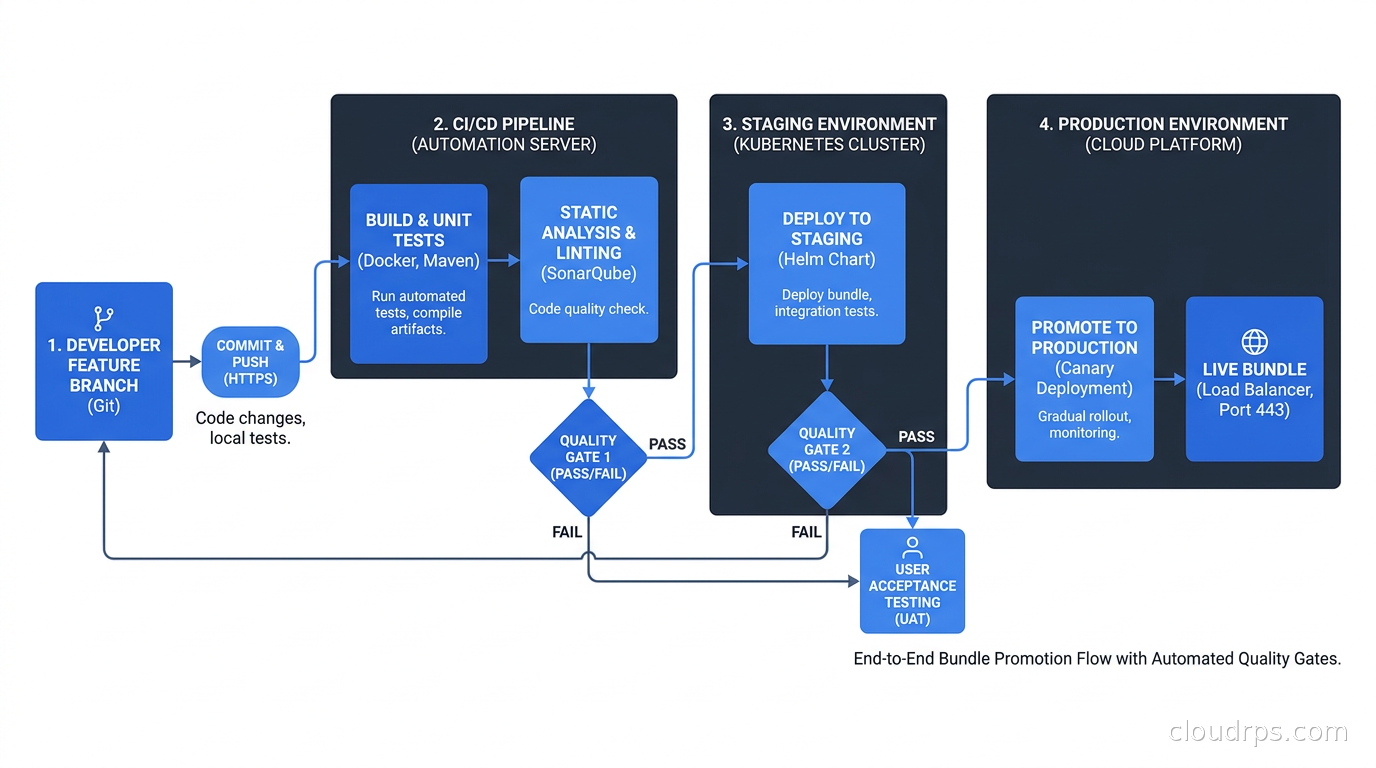
The day-to-day workflow for a data engineering team using DABs looks like this:
A data engineer creates a feature branch, modifies their pipeline code and potentially their databricks.yml resource configuration. They deploy to their personal dev copy with databricks bundle deploy targeting the development target. They test the change interactively.
They open a pull request. The CI workflow runs databricks bundle validate and optionally runs unit tests against the Python code. Reviewers see both the code change and any YAML resource configuration change in the same PR.
After approval and merge to a staging branch, an automated deployment runs databricks bundle deploy -t staging followed by a data quality run. If the quality job fails, the staging deployment is marked failed and engineers are notified before the change reaches prod.
Merge to main triggers the production deployment. Because the resource definitions in YAML are explicit and versioned, there is a clear audit trail of exactly what changed in the production workspace and when.
This is GitOps applied to data engineering. The workspace state follows the repository state. It is a significant improvement over interactive UI management, and the operational maturity it brings is worth the upfront investment in bundle setup.
Common Pitfalls
Renaming resources without understanding the lifecycle. If you rename a job in databricks.yml, the CLI does not detect this as a rename: it creates a new job with the new name and deletes the old one. Any historical run data associated with the old job is gone. If you need to rename a production job, do it deliberately with downtime or migration steps, not as a casual YAML edit.
Putting secrets in databricks.yml. The bundle YAML should be committed to Git, which means anything in it is potentially exposed. Use Databricks Secrets for sensitive values and reference them through the secrets lookup syntax. For CI credentials, use short-lived tokens or workload identity federation, not long-lived service principal tokens stored as GitHub secrets.
Not pinning CLI versions. The Databricks CLI changes behavior between versions. Pin your CI to a specific CLI version using databricks/setup-cli@v0.237.0 or equivalent. The @main or @latest shortcut will eventually break your pipeline at an inconvenient moment.
Letting bundle scope creep into workspace infrastructure. I’ve seen teams start including workspace-level cluster policies, metastore configurations, and workspace settings in their bundles. This creates conflicts when multiple bundles are deployed to the same workspace, each claiming ownership of shared infrastructure. Keep bundle scope to per-project resources. Workspace infrastructure belongs in Terraform or workspace-level configuration managed separately.
Skipping the development target workflow. Some teams deploy directly to staging or even prod during development because it is “just a quick change.” This destroys the value of the multi-environment model. Enforce the convention that all development work deploys to a dev or personal target first, even when it feels like overkill.
When to Adopt
For any team with more than two or three people shipping code to Databricks on a regular basis, DABs are worth the adoption cost today. The Thoughtworks “Adopt” rating reflects real production experience, not marketing. The tooling is mature enough that you are not fighting the framework.
For teams already running data pipeline orchestration via Airflow or Dagster and using Databricks for the execution layer, DABs do not replace those orchestrators. They manage the Databricks resources those orchestrators interact with. You can have an Airflow DAG that triggers a Databricks job, where both the Airflow pipeline definition and the Databricks job configuration are managed as code in their respective tools.
For teams building ML pipelines on Databricks, the ability to define model training jobs and serving endpoints in the same bundle as the training code is genuinely useful. The MLOps lifecycle becomes more auditable when the entire stack is in version control.
The one situation where I would evaluate carefully before committing to DABs is an organization already deeply invested in Terraform for Databricks resources and happy with that workflow. The Terraform provider is mature and there is real value in a consistent IaC toolchain. DABs are a compelling alternative, but migration from an existing Terraform-managed Databricks deployment is work, and “both work fine” is a valid assessment when you have something working.
For greenfield Databricks deployments, start with DABs for per-project resources from day one. Retrofitting CI/CD discipline onto an existing workspace that has accumulated years of interactive UI configuration is significantly harder than building the right habits from the beginning.
The old model of treating a Databricks workspace as a manually managed sandbox that gets periodically exported to Git is not sustainable at team scale. Declarative Automation Bundles are the tool that finally makes “treat your data platform like production software” achievable without a PhD in infrastructure tooling.
Get Cloud Architecture Insights
Practical deep dives on infrastructure, security, and scaling. No spam, no fluff.
By subscribing, you agree to receive emails. Unsubscribe anytime.