
I remember the first time I inherited a company’s analytics stack and found a folder called final_final_v3_USETHS.sql. Inside was 800 lines of SQL that nobody fully understood, had no tests, no documentation, no version history, and ran as a scheduled job in a cron script. Breaking it meant the CFO got wrong numbers in their board deck. Modifying it required tribal knowledge about three systems that had been deprecated two years prior.
That stack was more common than anyone in data tooling wants to admit. Most analytics SQL lives in a graveyard of unversioned files, BI tool query editors, and stored procedures that nobody dares touch. The data warehouse gets fed by pipelines that nobody owns, and the business makes decisions off numbers that nobody can trace back to source.
dbt didn’t solve all of those problems, but it gave us the conceptual framework and tooling to solve most of them. In 2026, if your data team isn’t using dbt or something heavily inspired by it, you are carrying technical debt that will eventually bite you.
The Mental Model Shift: ETL to ELT
Traditional ETL (Extract, Transform, Load) does the transformation work before data lands in the warehouse. You pull data from source systems, run transformations in a separate compute layer (Spark, Glue, Informatica), and load clean data into the warehouse. This made sense when compute inside the warehouse was expensive and limited. Modern cloud data warehouses (Snowflake, BigQuery, Redshift, DuckDB) have made in-warehouse compute cheap, fast, and scalable. If you have not yet chosen your warehouse, our comparison of Snowflake, BigQuery, Redshift, and Databricks covers the architecture and pricing trade-offs in detail. If you’re doing local development of dbt models, DuckDB makes a surprisingly capable dev warehouse that costs nothing and runs anywhere.
ELT (Extract, Load, Transform) inverts the order. Load raw data into the warehouse first, then transform it inside the warehouse using SQL. This has several advantages: you have a complete audit trail of raw data, your transformations run on the warehouse’s own execution engine which is optimized for that workload, and you can re-run transformations against historical raw data when logic changes.
dbt is the “T” in ELT. It doesn’t move data. It doesn’t connect to source systems. It doesn’t replace your ingestion layer (Fivetran, Airbyte, or custom pipelines handle that). dbt takes raw data that’s already in your warehouse and transforms it into analytics-ready tables and views using SQL.
This scoping is intentional and important. By doing one thing well, dbt stays simple. Your dbt project is just SQL files and YAML configuration. There’s no proprietary language to learn, no custom UI to navigate, no black box transformations. Your data team already knows SQL. dbt meets them where they are.
How dbt Projects Are Structured
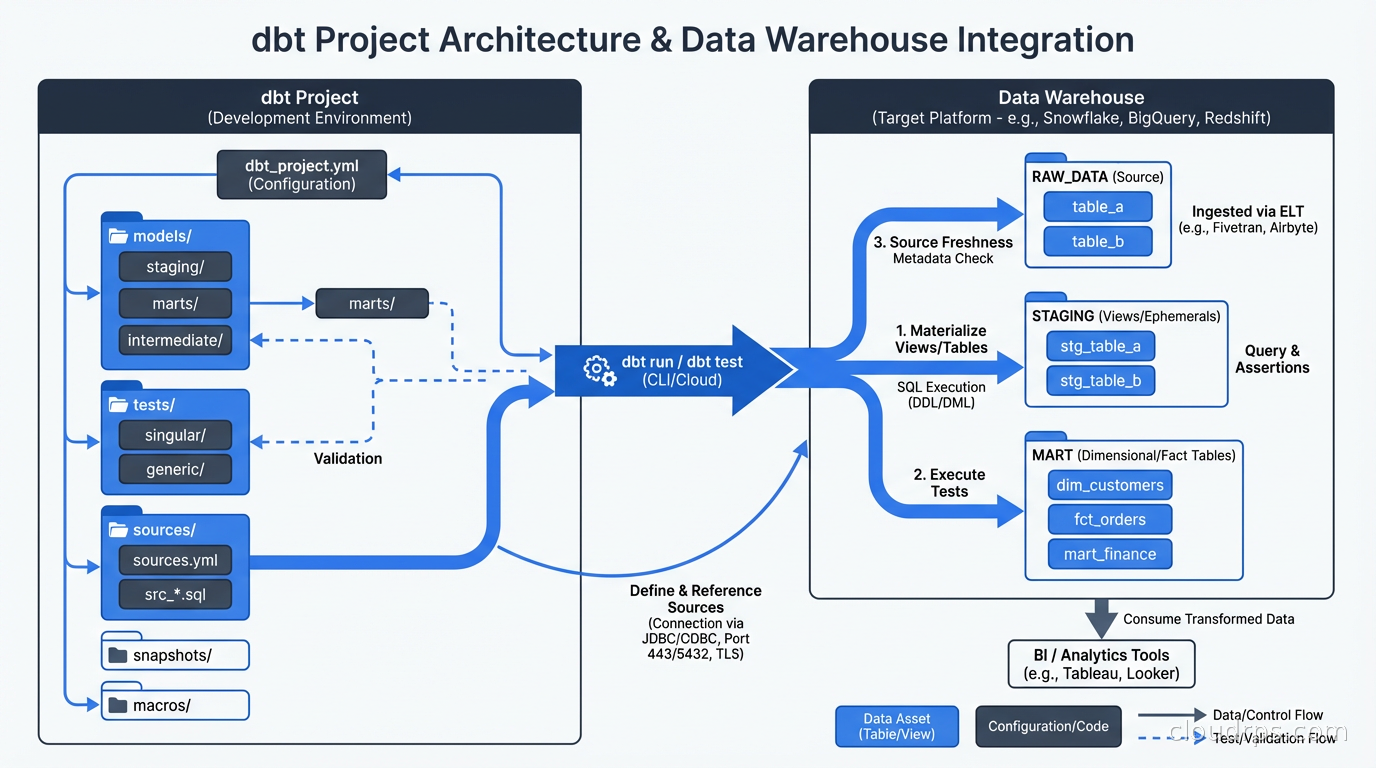
A dbt project is a directory of SQL files and YAML files, version-controlled in Git. The core concepts:
Models are SQL files that define transformations. Each .sql file is a model. When you run dbt run, dbt compiles each model and executes it in your warehouse, creating a table or view. A model that looks like this:
-- models/staging/stg_orders.sql
select
    id as order_id,
    customer_id,
    status,
    cast(created_at as timestamp) as created_at,
    amount_cents / 100.0 as amount_dollars
from {{ source('raw', 'orders') }}
where status != 'test'
Gets compiled and executed as a CREATE VIEW AS SELECT ... or CREATE TABLE AS SELECT ... statement. The {{ source('raw', 'orders') }} is Jinja templating, which I’ll get to shortly.
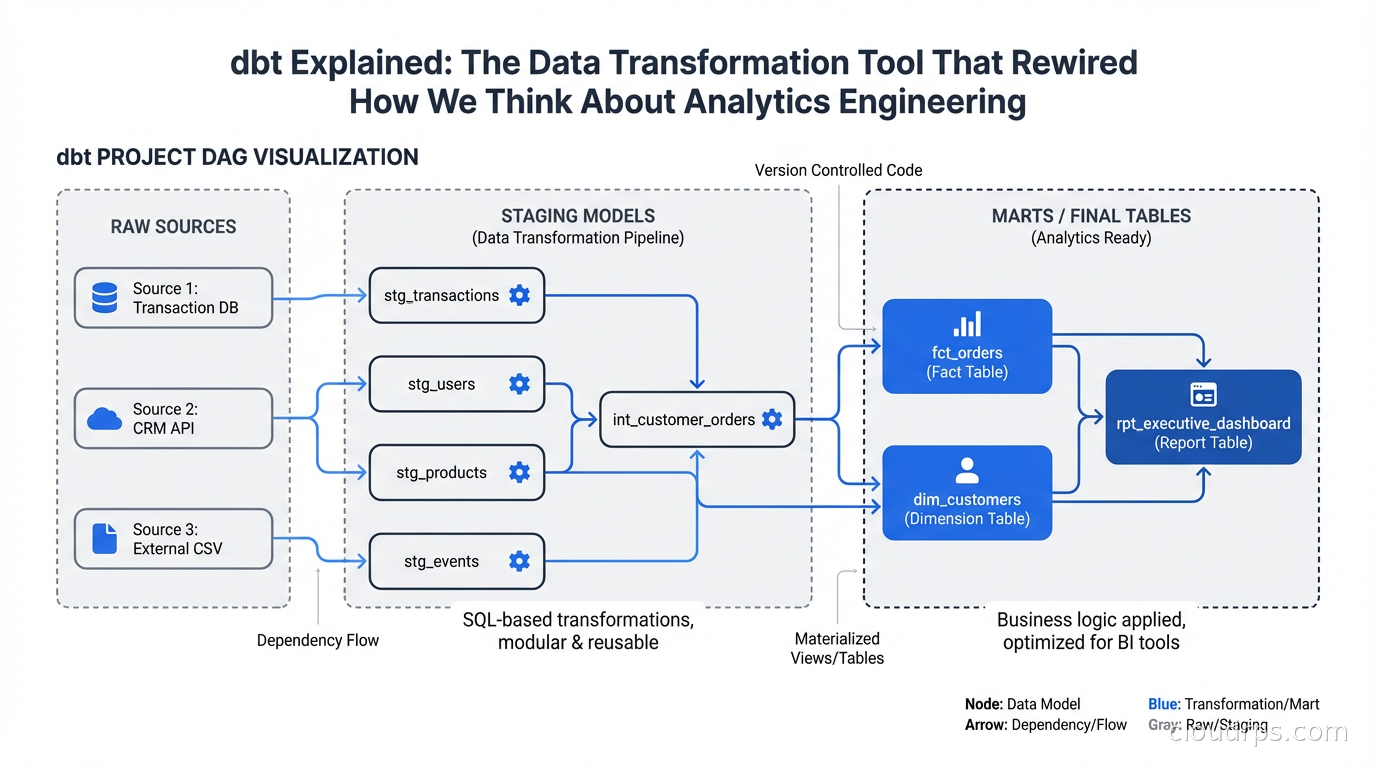
Models reference each other using the ref() function: select * from {{ ref('stg_orders') }}. This does two things. At compile time, it resolves to the actual table name in your warehouse. At dependency resolution time, dbt builds a DAG (Directed Acyclic Graph) of model dependencies and executes them in the correct order. You never have to manually manage execution order.
Sources are declarations of your raw tables. You define them in YAML and then reference them with {{ source('schema', 'table') }} in your models. Declaring sources lets dbt track freshness (when was this table last updated?), document them, and test them.
Tests are assertions about your data. dbt has built-in generic tests: not_null, unique, accepted_values, and relationships (referential integrity). You apply them in YAML:
models:
  - name: stg_orders
    columns:
      - name: order_id
        tests:
          - unique
          - not_null
      - name: status
        tests:
          - accepted_values:
              values: ['placed', 'shipped', 'delivered', 'cancelled']
When you run dbt test, dbt compiles each test into a SQL query (essentially a SELECT COUNT(*) FROM ... WHERE condition_fails) and checks that zero rows are returned. This gives you a test suite for your data that runs in your warehouse using the same SQL engine as your transformations.
Snapshots handle slowly changing dimensions. They let you track historical state of records that change over time, which is essential for analytics that need to report on past states.
Macros are reusable Jinja functions. If you write the same SQL pattern repeatedly (date spine generation, surrogate key hashing, fiscal calendar logic), extract it into a macro. The Jinja templating system means you can write SQL that is genuinely DRY.
The Layered Architecture Pattern
Every serious dbt project I’ve worked on uses some variant of the layered architecture. The names vary but the concept is consistent.
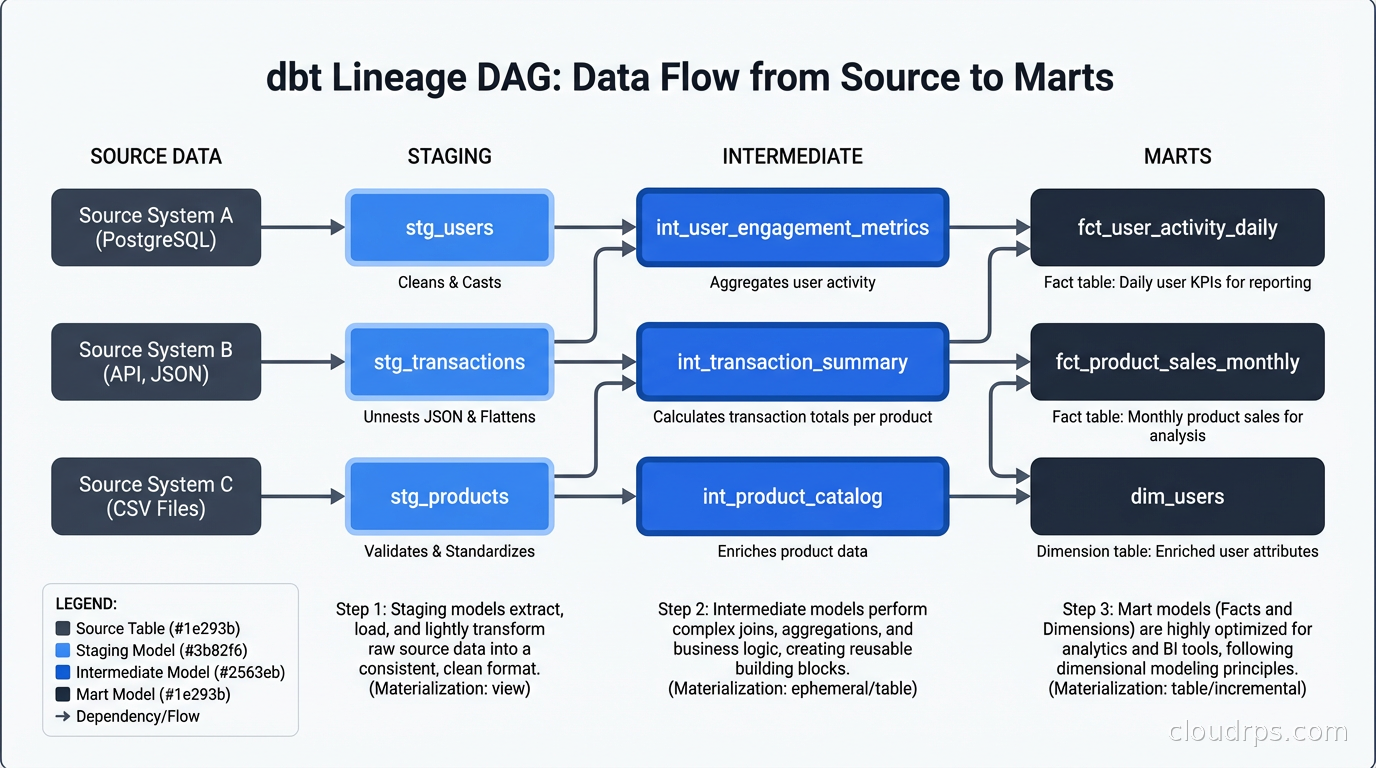
Staging layer contains one model per source table. Staging models do light transformations: rename columns to consistent conventions, cast data types, apply basic filters for obviously bad data. They do not join tables together. They do not apply business logic. A staging model maps 1:1 to a source table and cleans it up.
Intermediate layer contains joins and light aggregations that prepare data for marts. Not every project needs this layer, but if you find yourself repeating the same joins across multiple mart models, extract them to intermediate models.
Mart layer (sometimes called the “gold” layer) contains the final analytics-ready tables. Marts are organized around business domains: fct_orders, dim_customers, fct_sessions, dim_products. Mart models contain the business logic, the joins, the aggregations. They are what your BI tool, your data science team, and your operational dashboards read from. Increasingly, mart models are also the source for Reverse ETL pipelines that sync computed attributes back to operational tools – pushing a lead score from your warehouse into Salesforce, or a health metric into Zendesk, without custom script maintenance.
This layering has a practical benefit beyond code organization: it controls blast radius. When you change business logic in a mart model, you change it in one place. When source data changes schema, you fix it in one staging model and the entire downstream chain picks up the fix automatically.
The most important discipline in the layered architecture is not bypassing it. I’ve worked with teams where “I just need a quick query” turns into a mart model that joins directly to raw tables, bypassing staging, and now the staging layer’s cleaning logic doesn’t apply to that model. Six months later someone has to untangle why two models that should agree give different numbers.
dbt Core vs dbt Cloud
This is the question every team faces when adopting dbt.
dbt Core is the open-source CLI. It’s free, runs anywhere, and is everything you need for transformations. You run it locally, in CI/CD pipelines, in Airflow, in Dagster, anywhere you can execute a shell command. If you have strong data engineering capacity and existing orchestration infrastructure, dbt Core is probably all you need.
dbt Cloud is the managed platform built on top of dbt Core. It adds a web IDE, scheduled job execution, a metadata API, the Semantic Layer (more on this in a moment), data lineage visualization, and recently an AI assistant. It’s a hosted service with SLAs, monitoring, and support. If your data team includes analysts who aren’t comfortable with CLIs and Git workflows, dbt Cloud’s web UI reduces the barrier significantly.
The decision comes down to your team’s capabilities and your organization’s tolerance for operational overhead. Running dbt Core in production means you’re responsible for orchestration, retry logic, alerting on failures, and managing the execution environment. dbt Cloud handles all of that. For smaller data teams without dedicated platform engineering support, the cost of dbt Cloud is usually justified.
One thing that’s changed recently: dbt Cloud’s Semantic Layer has become a compelling reason to use the managed platform even for technically sophisticated teams. The Semantic Layer lets you define metrics once in dbt and consume them consistently across BI tools, AI agents (including via the dbt MCP server), and custom applications. Building that integration yourself is non-trivial work.
Lineage and Documentation as First-Class Features
The best argument for dbt over raw SQL files isn’t the testing or the version control. It’s the lineage.
Run dbt docs generate && dbt docs serve and you get a full data catalog: every model documented, every column described (if you write descriptions, which you should), and a full interactive DAG showing every dependency relationship in your project. This catalog is auto-generated from your code. It’s always accurate because it’s derived from the actual models, not maintained separately.
I’ve worked at companies that spent significant engineering time and money on dedicated data catalog tools, trying to document what tables existed and how data flowed. With dbt, that catalog is a side effect of building your models correctly. The data observability story gets dramatically simpler when you have a machine-readable model of your data lineage. For teams that need full platform-wide discovery and governance beyond what dbt’s built-in catalog provides, tools like OpenMetadata and DataHub ingest dbt lineage and combine it with metadata from warehouses, BI tools, and orchestrators into a single searchable surface.
This lineage also unlocks impact analysis. If a source table is going to change schema, you can see exactly which models depend on it (directly and transitively) and know what’s at risk. If a mart model’s numbers change unexpectedly, you can trace upstream through the DAG to find where the change entered.
Testing Strategies That Scale
The built-in generic tests are necessary but not sufficient for production data pipelines. The packages ecosystem extends them considerably. The dbt-expectations package (inspired by Great Expectations) adds tests like expect_column_values_to_be_between, expect_column_proportion_of_unique_values_to_be_between, and distribution tests. The dbt-utils package adds testing utilities like expression_is_true for arbitrary SQL assertions.
The pattern I advocate for production dbt projects: test every staging model’s primary key for uniqueness and not null, test every foreign key relationship, test every column that carries categorical values for accepted values, and add at least one business logic test per mart model that checks a known invariant.
The “row count doesn’t drop below 90% of yesterday’s count” test catches more silent data quality failures than most other tests combined. Source systems have incidents. Ingestion pipelines miss windows. Without a freshness-sensitive row count test, these failures propagate silently to your BI dashboards.
Custom singular tests are just SQL files in the tests/ directory that return rows on failure. If you have a complex business rule that’s hard to express as a generic test, write a SQL query that returns rows when the rule is violated and put it in a singular test. These run with dbt test just like generic tests.
Running tests in CI before merging changes to production is non-negotiable. Your PR workflow should include dbt build --models state:modified+ (run models changed in this PR and everything downstream) and dbt test --models state:modified+. This catches breaking changes before they reach production.
CI/CD for dbt Projects
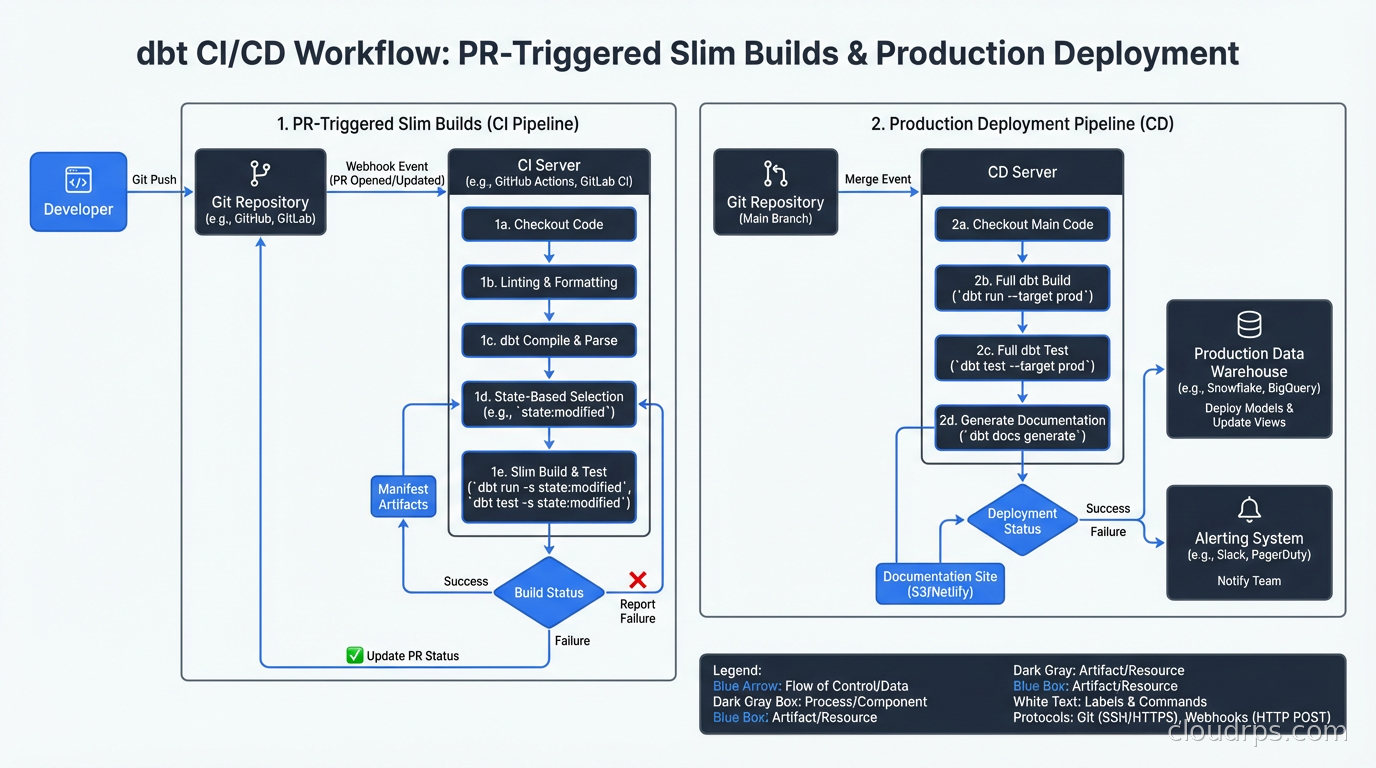
Treating dbt models like application code means applying the same CI/CD practices. The CI/CD practices you use for application deployments apply directly here.
The key concept is state-based selection. dbt can compare your current project state to a previous state (the production manifest) and only run models that have changed. This makes CI faster and production deployments safer. dbt build --select state:modified+ runs only the models you changed and everything downstream from them. You’re not re-running your entire 500-model project for every PR.
A typical production deployment workflow:
- Developer opens a PR with model changes
- CI runs
dbt build --select state:modified+ --target ciagainst a staging environment, using fresh copies of production data or generated seed data - Tests run, lineage is validated, no compile errors
- PR merges to main
- Deployment pipeline runs
dbt build --select state:modified+against production - Freshness checks and row count tests confirm data quality post-deployment
The branch-based development pattern works well: feature branches for new models, review of both the SQL changes and the impact on lineage in the PR, merge to main triggers production run. This is exactly how you manage application code and exactly how data transformations should be managed.
The Semantic Layer
The dbt Semantic Layer is the evolution of dbt beyond pure transformation. It lets you define metrics in YAML as first-class objects:
metrics:
  - name: monthly_recurring_revenue
    label: Monthly Recurring Revenue
    description: Sum of all active subscription revenue for the period
    type: sum
    type_params:
      measure: subscription_amount
    filter: |
      {{ Dimension('subscription__status') }} = 'active'
Once defined, these metrics are queryable through the dbt Semantic Layer API and accessible from BI tools that support it (Tableau, Looker, Mode, others) and from AI agents via the dbt MCP server. The value is consistency: instead of ten analysts each writing their own SQL for MRR and getting ten slightly different numbers, there’s one definition and everyone queries it.
For data teams managing data mesh architectures with multiple domain teams each owning their own dbt projects, the Semantic Layer provides a way to expose metrics from different domains through a consistent interface. The domain team owns the metric definition; consumers query it without caring about the underlying models.
Integration with the Broader Data Stack
dbt sits in the middle of the modern data stack and integrates with everything around it. Apache Iceberg and lakehouse architectures work well with dbt: dbt can materialize models as Iceberg tables on your lakehouse, giving you the transformation framework for both your data warehouse and your data lake. Change data capture with Debezium feeds raw change events into your warehouse, and dbt transforms them into analytics-ready tables.
For teams using stream processing alongside batch analytics, dbt handles the batch layer of a Lambda architecture cleanly. Your streaming pipeline produces real-time aggregates; dbt produces historical aggregations from the same raw data; a union gives you a complete picture. The two paradigms are complementary, not competing.
Data observability tools like Monte Carlo and Acyl have native dbt integrations that use the dbt manifest and run history to provide smarter alerting. Instead of alerting on raw table row count drops, they understand your dbt DAG and can alert on anomalies at any point in the lineage.
What dbt Doesn’t Do
Being clear about dbt’s scope prevents a category of adoption mistakes I’ve watched teams make.
dbt doesn’t orchestrate your ingestion. You still need Fivetran, Airbyte, Stitch, or custom pipelines to get data from source systems into your warehouse. dbt starts after the data is there.
dbt doesn’t replace your orchestrator. For complex pipelines with dependencies on non-dbt tasks (Python scripts, API calls, ML model training), you need Airflow, Dagster, Prefect, or similar. These tools call dbt as a step in a larger workflow. The dbt-airflow and dbt-dagster integrations make this straightforward. For a deep comparison of those orchestration options, see Airflow vs Dagster vs Prefect: How to Choose.
dbt is not a real-time system. It runs in batch. If you need sub-second freshness, you need a streaming system. dbt can complement streaming by providing batch-layer accuracy on top of streaming speed, but it doesn’t replace streaming.
dbt doesn’t solve governance problems by itself. If your organization has unclear data ownership, competing metric definitions, and no data contracts, dbt gives you the tools to address these, but the organizational work is still required. Technology doesn’t fix process problems.
For teams just starting out: begin with dbt Core, a simple layered architecture with three layers, and generic tests on primary keys and foreign keys. You can adopt the Semantic Layer, dbt Cloud, and more sophisticated testing patterns incrementally. The architecture scales with you.
If you outgrow dbt’s dev/prod isolation model or need Terraform-style plan/apply semantics for your data warehouse, SQLMesh is the most mature alternative and can read existing dbt projects with minimal changes.
Get Cloud Architecture Insights
Practical deep dives on infrastructure, security, and scaling. No spam, no fluff.
By subscribing, you agree to receive emails. Unsubscribe anytime.