
In my career, I’ve lived through three genuine disasters, not “the server went down” incidents, but actual disasters where we lost entire facilities. A flooded data center in Houston. A fire that took out a colocation facility in New Jersey. And a cloud region outage that dragged on for the better part of a day and took a huge swath of the internet down with it.
Each of these events taught me something different about disaster recovery. The flood taught me that untested DR plans are fiction. The fire taught me that people panic and documentation matters more than you think. The cloud outage taught me that “the cloud” doesn’t eliminate the need for DR. It changes the shape of it.
If your disaster recovery plan is a dusty PDF that nobody has read since it was written three years ago, you don’t have a DR plan. You have a liability. Let me walk you through how to build one that actually works when the building is on fire, metaphorically or literally.
What Disaster Recovery Actually Covers
Let’s get clear on scope. Disaster recovery (DR) is specifically about restoring IT systems and data after a significant disruptive event. It’s a subset of business continuity planning (BCP), which covers the broader question of how the entire business operates during and after a disaster.
DR focuses on:
- Restoring application services to operational state
- Recovering data to an acceptable point (your RPO)
- Meeting time-to-recovery targets (your RTO)
- Ensuring the recovered environment is fully functional
If you haven’t defined your RTO and RPO yet, stop here and read my guide on RTO vs RPO. Those objectives are the foundation of everything that follows. Without them, you’re building a plan without requirements.
DR Strategy Tiers
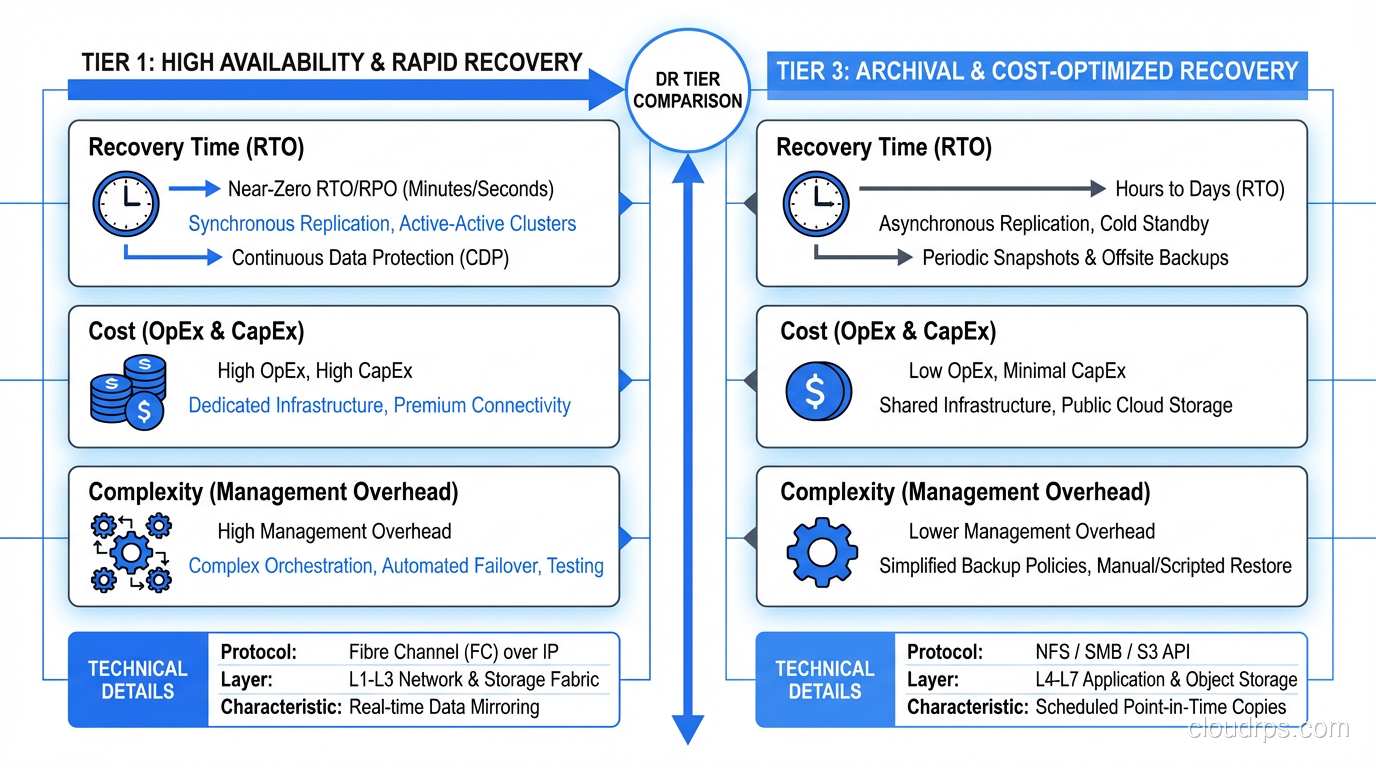
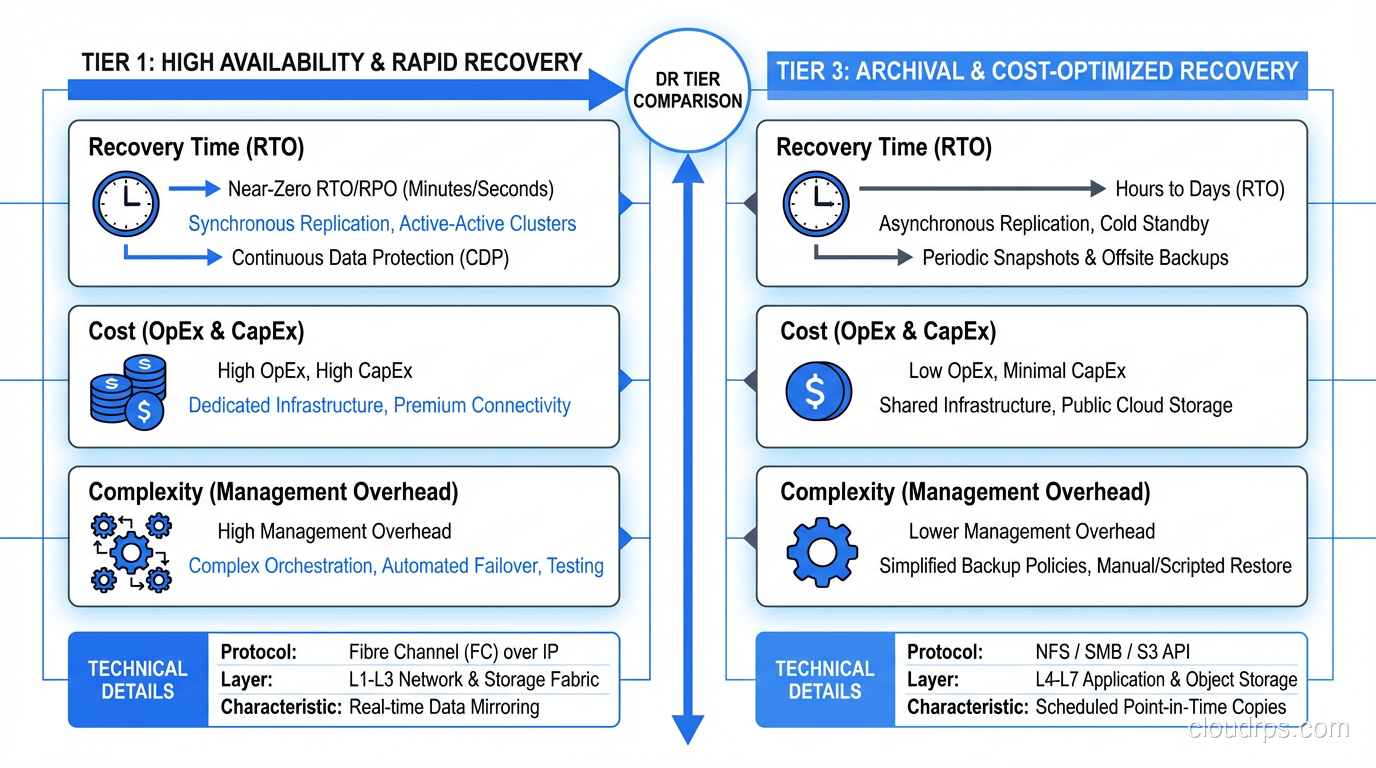
The industry has standardized on a tiering model that maps recovery capabilities to cost and complexity. I use a simplified version of the SHARE tier model that I’ve found more practical than the original seven-tier version.
Tier 0: No DR (Don’t Be Here)
Backups exist on the same infrastructure as the primary system. If the infrastructure goes down, the backups go with it. I still encounter this more often than I’d like, usually in smaller organizations or for systems that “aren’t that important,” until they are.
Tier 1: Cold Standby
You have offsite backups and documented recovery procedures, but no standing infrastructure at the recovery site. When disaster strikes, you provision new infrastructure, restore from backups, and bring systems online.
Recovery time: Days to weeks Cost: Low (just backup storage and documentation maintenance) Best for: Non-critical systems, development environments, archival systems
The biggest risk with cold standby: your recovery procedures are wrong. They were written months or years ago. The infrastructure has changed. The team that wrote them has turned over. I’ve seen cold DR recovery drag on for many multiples of the planned time because of procedure rot.
Tier 2: Warm Standby
Infrastructure exists at the recovery site but is not actively serving traffic. Data is replicated on a delay (asynchronous). When disaster strikes, you activate the standby infrastructure, verify data consistency, and switch traffic.
Recovery time: Hours Cost: Moderate (standby infrastructure runs at reduced capacity) Best for: Business-critical internal systems, secondary customer-facing systems
Warm standby is the sweet spot for many organizations. The infrastructure is there, the data is reasonably current, and the recovery process is well-defined. The key is automation. The more of the failover process you automate, the closer you get to your target RTO.
Tier 3: Hot Standby
The recovery site runs a complete copy of the production environment. Data is replicated in near-real-time. Failover is automatic or semi-automatic.
Recovery time: Minutes Cost: High (essentially doubling your infrastructure) Best for: Revenue-generating customer-facing systems, regulated industries
This is where most high-availability architectures operate. The secondary environment is always warm, always synchronized, and ready to take over at a moment’s notice.
Tier 4: Active-Active
Both sites actively serve traffic simultaneously. There is no primary and secondary; both are primary. If one goes down, the other absorbs all traffic automatically.
Recovery time: Near zero (seconds) Cost: Very high (full infrastructure at every site, plus complexity overhead) Best for: Systems where any downtime is unacceptable
Active-active is the most resilient and the most complex. It requires careful handling of data consistency, request routing, and conflict resolution. It’s not always the right answer, even for critical systems, because the complexity introduces its own risks.
Building Your DR Plan: A Step-by-Step Guide
Step 1: Inventory and Classify
Document every system, every database, every integration, every external dependency. Then classify each one using your tiered approach. This inventory becomes the backbone of your DR plan.
For each system, document:
- What it does and who depends on it
- Where it runs (cloud provider, region, account)
- What data it stores and how that data is backed up
- What other systems it depends on
- What systems depend on it
- Its assigned DR tier (which determines RTO/RPO targets)
This inventory exercise alone is worth doing even if you never finish the DR plan, because it forces you to understand your system landscape in a way that day-to-day operations never does.
Step 2: Design Recovery Architecture
For each DR tier, design the specific architecture that will deliver the required RTO and RPO.
For cold standby systems: Document the infrastructure provisioning process. Use infrastructure-as-code (Terraform, CloudFormation, Pulumi) so that the recovery site can be provisioned automatically. Store these templates in a separate location from your primary infrastructure. If your primary cloud account is compromised, you need access to these templates from elsewhere.
For warm standby systems: Provision the standby infrastructure. Set up data replication. Database replication is typically the most complex piece, so make sure it’s configured, monitored, and tested. Write automated failover scripts that handle DNS updates, connection string changes, and service startup.
For hot standby and active-active: This is a full architecture project. You need load balancing across sites, data replication with conflict resolution, health checking and automatic failover, and a plan for split-brain scenarios.
Step 3: Document Recovery Procedures
Write runbooks for every recovery scenario. These runbooks should be usable by someone who has never done this before, because the person doing the recovery might be a junior engineer at 3 AM on a Saturday.
Every runbook should include:
- Triggering conditions: When should this runbook be executed?
- Prerequisites: What access, tools, and information do you need?
- Step-by-step procedures: Explicit, numbered, copy-pasteable commands
- Verification steps: How do you confirm each step worked?
- Rollback procedures: What if a step fails?
- Escalation contacts: Who to call if you’re stuck
I format my runbooks as checklists because under stress, people skip steps. A checkbox forces you to confirm each step before moving on.
Step 4: Implement Monitoring and Alerting
Your DR infrastructure needs its own monitoring. Specifically:
- Replication lag monitoring: If your RPO is 15 minutes, alert when replication lag exceeds 5 minutes
- Backup verification: Don’t just monitor that backups ran. Monitor that they completed successfully and can be restored
- Standby health checks: Verify that standby infrastructure is actually healthy and ready to receive traffic
- DR infrastructure access: Can your team actually reach the DR environment? VPN access, credentials, SSH keys? Verify these regularly
Step 5: Test, Test, Test
I dedicated a whole section to this because it’s the most important and most neglected part of DR planning. I covered testing approaches in my RTO vs RPO guide, but let me add some DR-specific testing guidance here.
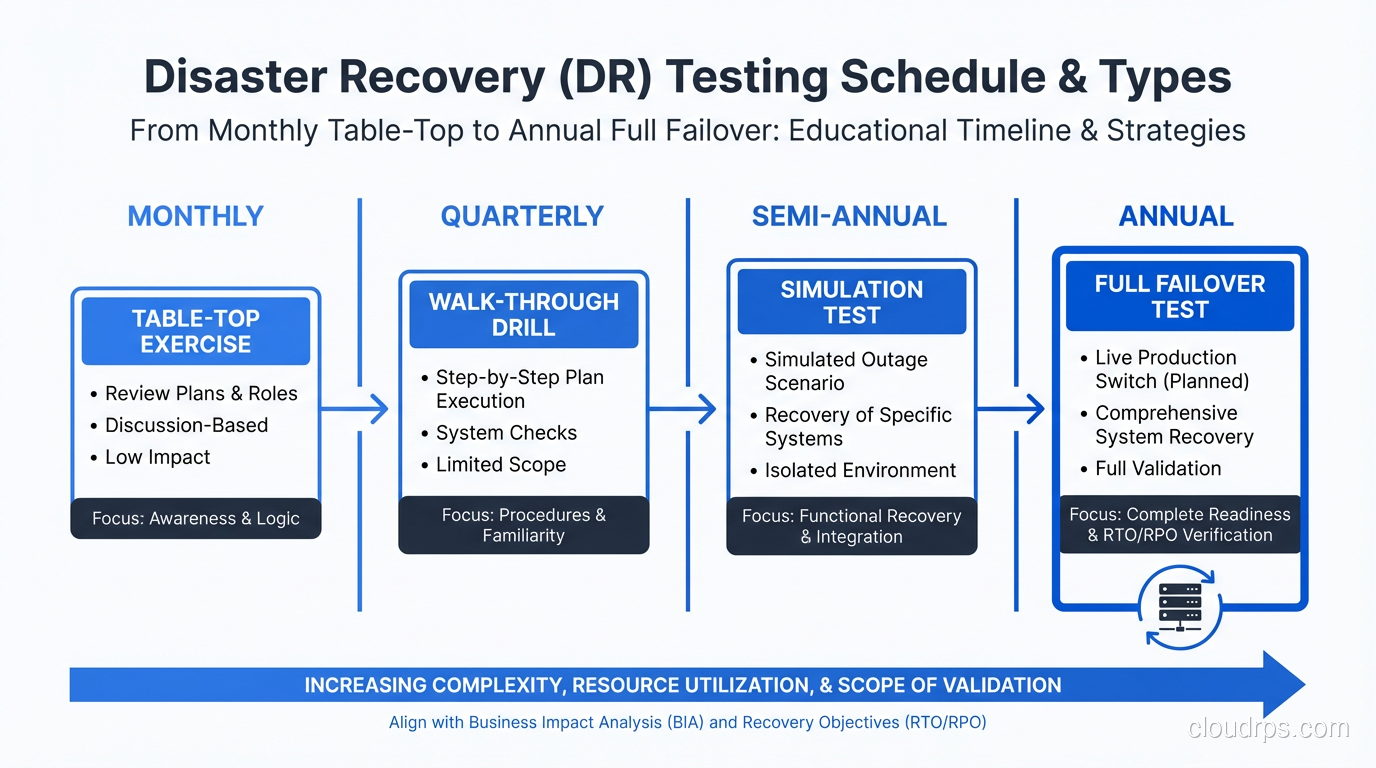
Backup restore tests (monthly): Pick a random system, restore its latest backup to a clean environment, and verify the data. Time the restore. Compare to your RTO. I’ve found corrupted backups, incomplete backups, and backups that restored successfully but were missing critical data. Better to find these problems on a Tuesday afternoon than during a real disaster.
Component failover tests (quarterly): Fail over individual components (a database, a cache cluster, an application service) and verify that the system continues operating. This tests your redundancy at the component level.
Site failover tests (semi-annually): Fail over an entire service or application to the DR site. Run real traffic against it. Verify performance, functionality, and data integrity. Then fail back.
Full DR simulation (annually): Simulate loss of the primary site. Recover everything. Involve leadership, communication teams, and customer support. Time everything. Document every problem encountered. This is the gold standard of DR testing. These full simulations share a lot of DNA with chaos engineering game days, where you deliberately inject failures to validate your assumptions about system resilience. I wrote a dedicated guide on chaos engineering and resilience testing that covers how to plan and run these exercises safely.
Cloud-Specific DR Considerations
The cloud hasn’t eliminated the need for DR. It’s changed the tooling and the failure modes.
Multi-Region Is Your DR Strategy
In cloud environments, your “DR site” is another region. AWS us-east-1 goes down? Fail over to us-west-2. This is conceptually the same as traditional DR but with cloud-native tooling.
Key cloud DR services:
- AWS: S3 cross-region replication, RDS cross-region read replicas, Route 53 health checks and failover routing, Aurora Global Database
- GCP: Cloud SQL cross-region replicas, Cloud Storage dual-region/multi-region, Global Load Balancer with failover
- Azure: Azure Site Recovery, Cosmos DB multi-region, Traffic Manager with priority routing
If your workloads run on Kubernetes, you need a Kubernetes-specific backup layer on top of these cloud services. Kubernetes cluster state, including all your Deployments, ConfigMaps, Secrets, and custom resources, lives in etcd. PersistentVolume data lives in attached block storage. Neither is automatically covered by standard cloud DR tooling. Velero is the de facto open-source solution for this: it backs up Kubernetes objects to S3-compatible storage and handles persistent volume snapshots through CSI integration. See the Kubernetes backup and disaster recovery guide for a full treatment of etcd snapshots, Velero scheduling, and how to test cluster-level restores.
Don’t Forget Cloud Account Security
A common DR blind spot: what if you lose access to your cloud account? Compromised credentials, billing issues, or vendor disputes can lock you out of your entire infrastructure. Have a plan that addresses:
- Multi-factor authentication recovery
- Break-glass access procedures
- Backups stored outside your primary cloud provider (even if it’s just critical data)
- Infrastructure-as-code stored in a separate version control system
Availability Zones vs. Regions
Deploying across availability zones within a region gives you high availability against single-facility failures. It does not give you disaster recovery against regional failures. For true DR, you need multi-region capability. These are different design points with different costs and different risk profiles.
The Human Element
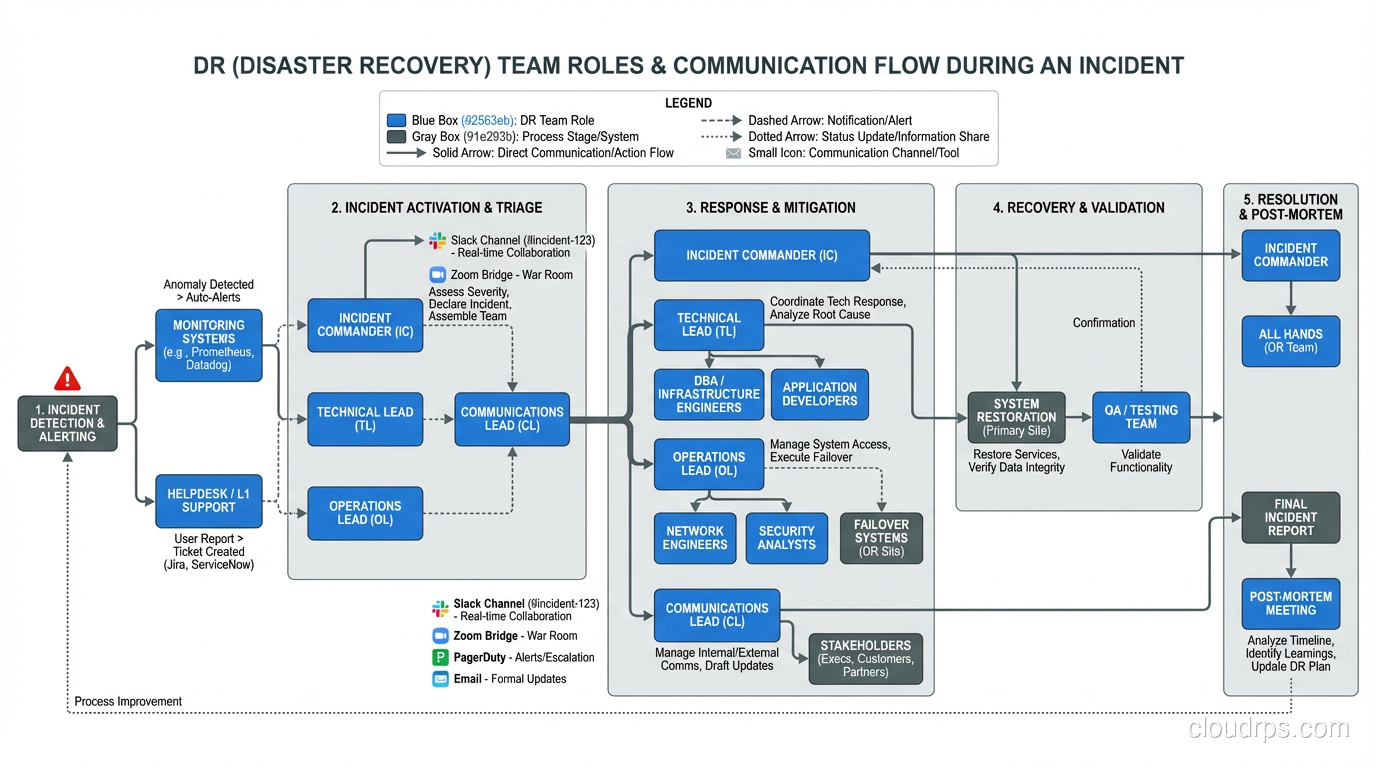
The best DR plan in the world fails if people don’t know their roles. When the disaster happens, you need:
An incident commander: One person who makes decisions and coordinates the response. Not a committee. One person.
Clear communication channels: How do you communicate when your primary tools are down? If Slack is hosted in the same region that just failed, how does the team coordinate? Have a backup communication plan (phone tree, secondary Slack workspace, Microsoft Teams, carrier pigeon, whatever works).
Customer communication: Who tells customers what’s happening? What channels? How frequently? Pre-draft templates for common scenarios so you’re not wordsmithing a status page update during an outage.
Decision authority: Who can authorize a failover that might cause brief data inconsistency? Who can authorize spending on emergency infrastructure? Pre-authorize these decisions so you’re not waiting for executive approval at 2 AM.
A Real-World DR Playbook
Let me share the skeleton of a DR playbook I’ve used for a SaaS platform running on AWS:
Scenario: Complete loss of primary region (us-east-1)
Detection: Route 53 health checks fail for all primary endpoints. Monitoring alerts fire. On-call engineer confirms regional outage via AWS status page and independent testing.
Decision: Incident commander authorizes failover (pre-authorized for this scenario).
Execution (automated via runbook):
- Promote RDS read replica in us-west-2 to primary (5 minutes)
- Update application configuration to point to new primary database (automated via Parameter Store, 2 minutes)
- Scale up ECS services in us-west-2 to handle full traffic (3 minutes)
- Verify application health checks pass in us-west-2 (2 minutes)
- Update Route 53 to route all traffic to us-west-2 (immediate, DNS propagation 60-300 seconds)
- Run smoke test suite against production endpoints (5 minutes)
- Monitor error rates and latency for 15 minutes
Total target RTO: 30 minutes Actual tested RTO: consistently under target across repeated tests
Post-failover: Customer communication sent. Engineering team begins root cause analysis. Failback planning begins once primary region is confirmed stable (typically 24-48 hours after region recovery).
This playbook works because we tested it. The first time we ran it, it took a lot longer than planned and turned up a string of issues we had to fix. By the last test, it was comfortably under target and ran smoothly.
Start Now
If you’ve read this far without a DR plan, let me leave you with a simple starting point: back up your critical data to a different geographic location, write down how to restore it, and test the restore. That’s Tier 1, cold standby. It’s not perfect, but it’s infinitely better than nothing.
Then work your way up from there. Classify your systems. Define your tiers. Build the architecture. Write the runbooks. Test the recovery. Each step makes your organization more resilient.
Disasters are not theoretical. They happen. I’ve been through them. The organizations that recover quickly are the ones that planned and practiced. The ones that don’t… well, some of them aren’t around anymore.
Updated September 1, 2026: removed unsourced statistics as part of an accuracy review.
Get Cloud Architecture Insights
Practical deep dives on infrastructure, security, and scaling. No spam, no fluff.
By subscribing, you agree to receive emails. Unsubscribe anytime.