
DNS is the phone book of the internet, and DNS records are the individual entries in that phone book. But unlike a phone book that just maps names to numbers, DNS maps names to all sorts of things: IP addresses, mail servers, verification tokens, service endpoints, and more. Each record type serves a specific purpose, and using the wrong one (or misconfiguring the right one) can cause anything from email delivery failures to complete website outages.
I’ve spent a disturbing amount of my career debugging DNS problems. The running joke in operations is “it’s always DNS,” and it’s funny because it’s true. Roughly 40% of the outages I’ve investigated over the past decade had a DNS component. Not always the root cause, but DNS was involved somewhere in the failure chain.
Let me walk you through every record type you’re likely to encounter, with real examples and the gotchas that’ll save you a 3 AM debugging session.
How DNS Records Work: A Quick Refresher
Before diving into record types, let’s establish the basics. DNS records live in zone files hosted on authoritative nameservers. When someone queries www.example.com, the DNS resolution process eventually reaches the authoritative nameserver for example.com, which looks up the record and returns the answer.
Every DNS record has these common fields:
| Field | Description | Example |
|---|---|---|
| Name | The domain/subdomain | www.example.com |
| Type | The record type | A, CNAME, MX, etc. |
| TTL | Time to live (seconds) | 300 (5 minutes) |
| Value/Data | The record’s answer | 93.184.216.34 |
The TTL is critical. It tells DNS resolvers how long to cache this answer. A TTL of 3600 means resolvers will cache the record for 1 hour before querying the authoritative server again. Lower TTL = more queries to your nameserver = faster propagation of changes. Higher TTL = fewer queries = better performance but slower change propagation.
Pro tip: Before making a DNS change, lower the TTL to 60-300 seconds and wait for the old TTL to expire. Then make your change. This ensures the change propagates quickly. After the change is stable, raise the TTL back up. I’ve seen people change an A record with a 24-hour TTL and then wonder why half the internet still goes to the old IP address.
The Essential Record Types
A Record (Address)
The A record is the most fundamental DNS record type. It maps a domain name to an IPv4 address.
example.com.        300     IN      A       93.184.216.34
www.example.com.    300     IN      A       93.184.216.34
You can have multiple A records for the same name (round-robin DNS):
api.example.com.    60      IN      A       10.0.1.10
api.example.com.    60      IN      A       10.0.1.11
api.example.com.    60      IN      A       10.0.1.12
Resolvers will return all three addresses, and clients typically try the first one, falling back to others if it fails. This is the simplest form of DNS-based load balancing, though it’s crude. DNS doesn’t know if a server is healthy, so it’ll happily return the IP of a dead server.
Gotcha: Round-robin DNS is NOT a load balancer. Clients cache DNS responses (respecting TTL), so a client that resolves api.example.com might send all its requests to 10.0.1.10 for the entire TTL duration. If you need real load balancing, use a load balancer.
AAAA Record (IPv6 Address)
The AAAA record (often called “quad-A”) is the IPv6 equivalent of the A record. It maps a domain name to an IPv6 address.
example.com. 300 IN AAAA 2606:2800:220:1:248:1893:25c8:1946
The name “AAAA” comes from the fact that IPv6 addresses are 128 bits, four times the size of IPv4’s 32-bit A record.
Should you add AAAA records? Yes. IPv6 adoption is above 40% globally (higher in some countries; India is over 60%, the US over 45%). If your server has an IPv6 address, add the AAAA record. Many mobile networks and modern ISPs prefer IPv6, and having AAAA records lets those clients connect directly over IPv6 instead of going through carrier-grade NAT.
CNAME Record (Canonical Name)
A CNAME record maps one domain name to another domain name (an alias). It’s one of the most commonly used and most commonly misused record types.
www.example.com.           300     IN      CNAME   example.com.
blog.example.com.          300     IN      CNAME   mysite.wordpress.com.
status.example.com.        300     IN      CNAME   abc123.statuspage.io.
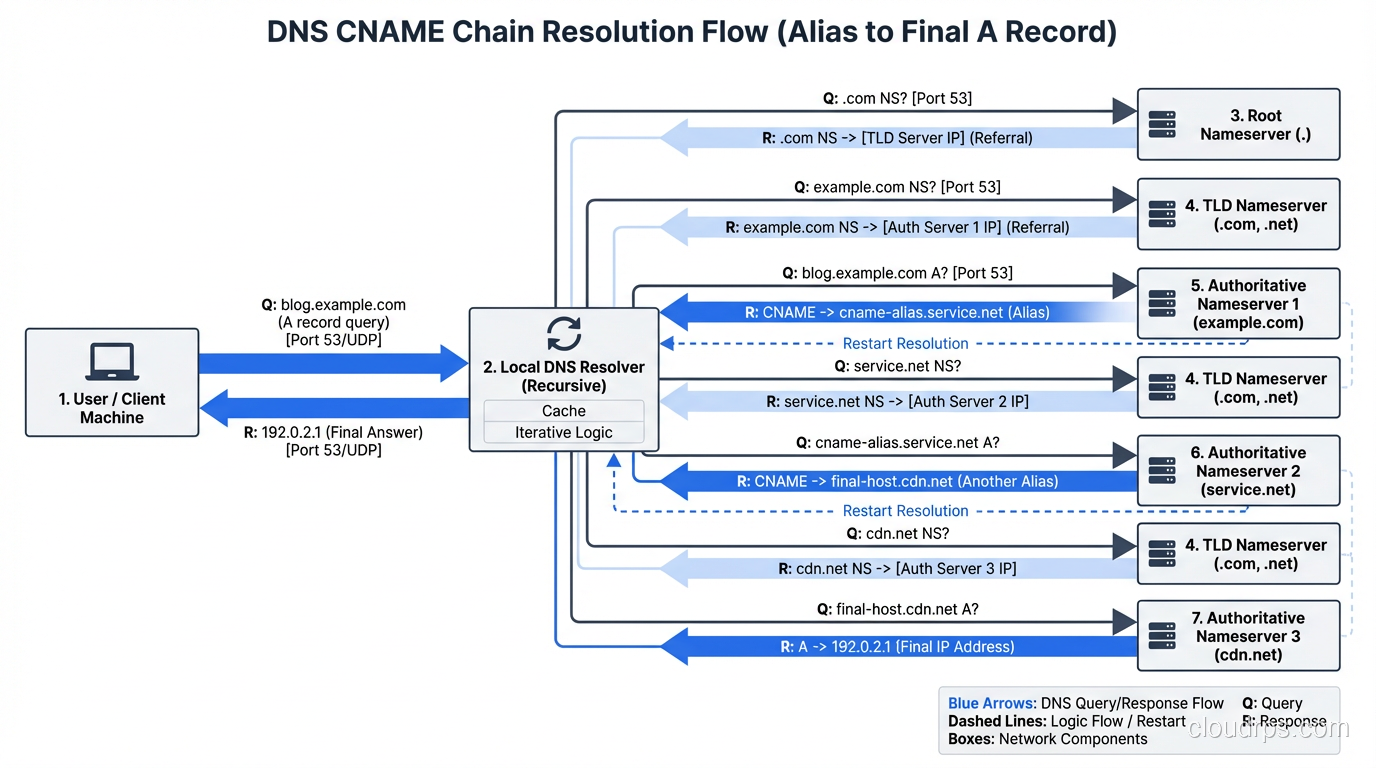
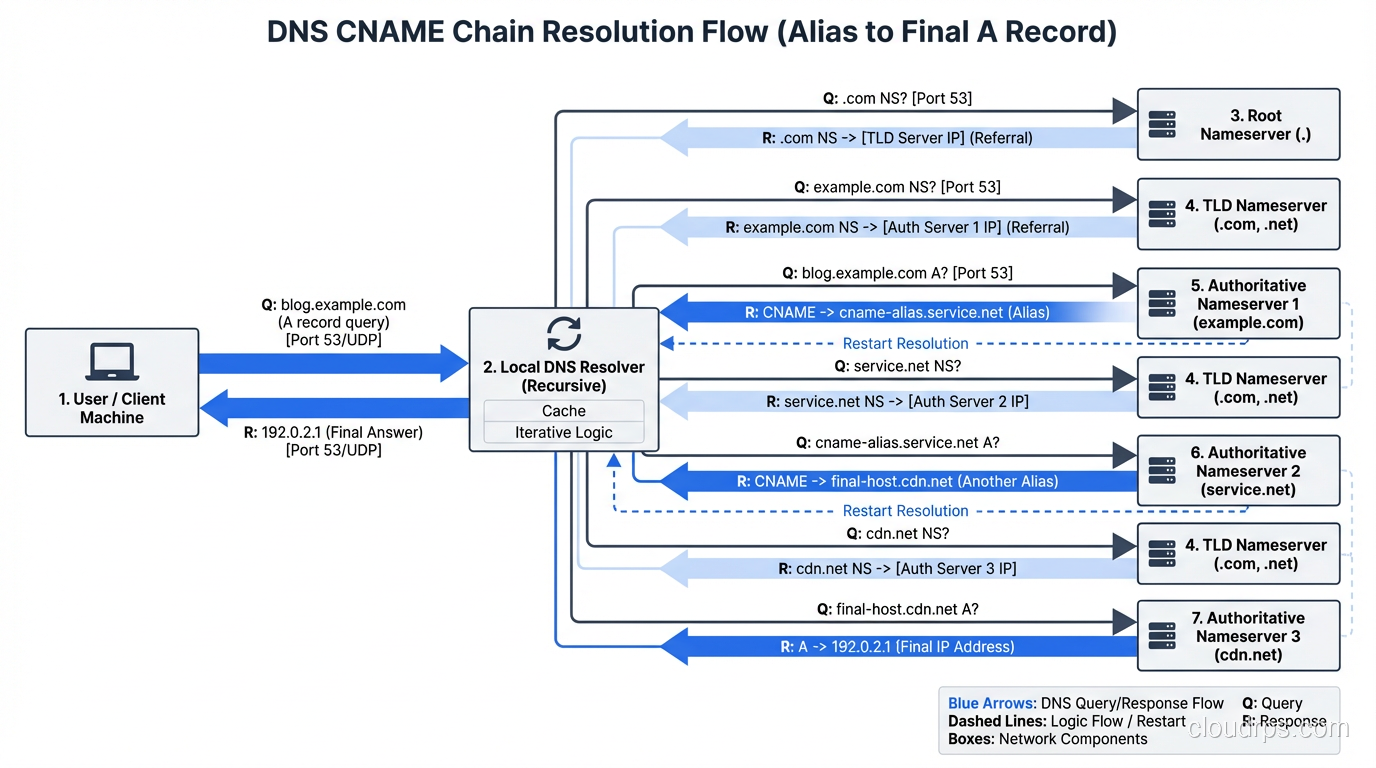
When a resolver encounters a CNAME, it follows the chain. It resolves blog.example.com → mysite.wordpress.com → (A record) 198.51.100.1. This is how SaaS services, CDNs, and cloud platforms work: you CNAME your domain to their domain, and they handle the actual IP address management.
Critical CNAME Rules:
Rule 1: A CNAME cannot coexist with other record types at the same name. This is the most frequently violated DNS rule. If example.com has a CNAME, it CANNOT also have an MX record, TXT record, or A record. Period. This is an RFC requirement, and breaking it causes unpredictable behavior.
This is why you can’t CNAME your apex domain (example.com) to a CDN. The apex always needs SOA and NS records, which would conflict with the CNAME. The workaround is provider-specific:
- Cloudflare: “CNAME flattening,” which resolves the CNAME at the DNS server and returns the A/AAAA record
- Route 53: “Alias” records, an AWS-specific feature that acts like a CNAME but returns A/AAAA records
- DNSimple: “ALIAS” records, a similar concept
Rule 2: CNAME chains add latency. Each CNAME hop requires an additional DNS resolution. foo.example.com → bar.cdn.com → baz.cdn.com → 10.0.0.1 is three resolutions. Keep chains short.
MX Record (Mail Exchange)
MX records tell the world where to deliver email for your domain. They point to the mail servers that accept email for @yourdomain.com.
example.com.    3600    IN      MX      10 mail1.example.com.
example.com.    3600    IN      MX      20 mail2.example.com.
example.com.    3600    IN      MX      30 backup.example.com.
The number before the hostname is the priority (lower = higher priority). In this example, mail is delivered to mail1.example.com first. If it’s unreachable, the sending server tries mail2.example.com (priority 20), then backup.example.com (priority 30).
For Google Workspace:
example.com.    3600    IN      MX      1  ASPMX.L.GOOGLE.COM.
example.com.    3600    IN      MX      5  ALT1.ASPMX.L.GOOGLE.COM.
example.com.    3600    IN      MX      5  ALT2.ASPMX.L.GOOGLE.COM.
example.com.    3600    IN      MX      10 ALT3.ASPMX.L.GOOGLE.COM.
example.com.    3600    IN      MX      10 ALT4.ASPMX.L.GOOGLE.COM.
For Microsoft 365:
example.com. 3600 IN MX 0 example-com.mail.protection.outlook.com.
Gotcha: MX records must point to A/AAAA records, NOT CNAMEs. While some implementations tolerate it, RFC 2181 says MX targets should not be CNAME aliases. Sending mail servers may not follow CNAME chains from MX records, causing delivery failures.
Gotcha: If you have no MX records, some mail servers will fall back to the A record and try to deliver mail directly to the domain’s IP address. This is rarely what you want. If you don’t use email on a domain, add a null MX: example.com. IN MX 0 . (RFC 7505).
TXT Record (Text)
TXT records hold arbitrary text data. They’ve become the Swiss Army knife of DNS, used for domain verification, email authentication, and various other purposes.
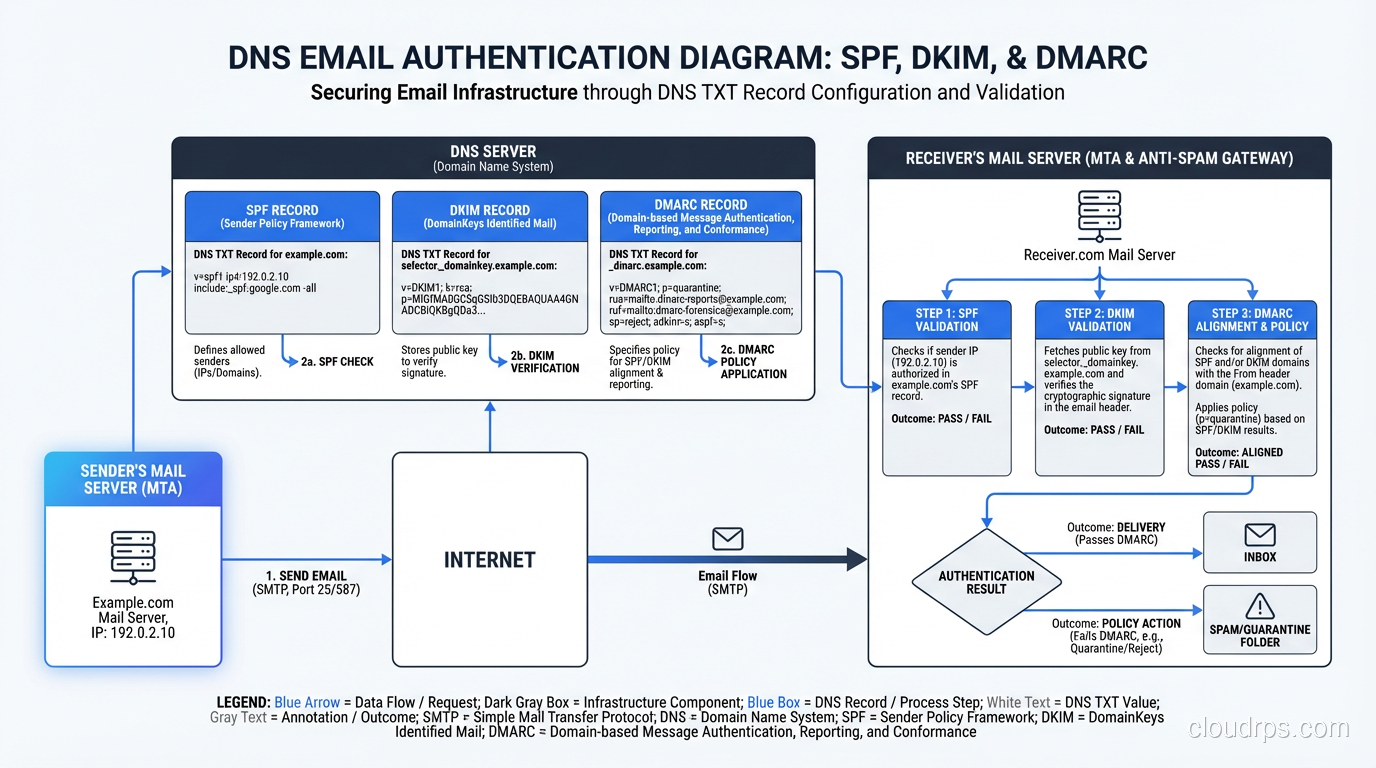
example.com.    300     IN      TXT     "v=spf1 include:_spf.google.com ~all"
example.com.    300     IN      TXT     "google-site-verification=abc123def456"
SPF (Sender Policy Framework)
SPF records (stored as TXT) tell receiving mail servers which IP addresses are authorized to send email on behalf of your domain:
example.com. 3600 IN TXT "v=spf1 ip4:198.51.100.0/24 include:_spf.google.com include:sendgrid.net -all"
v=spf1: SPF version 1ip4:198.51.100.0/24: Allow this IP range to sendinclude:_spf.google.com: Allow Google’s mail serversinclude:sendgrid.net: Allow SendGrid-all: Reject everything else (use~allfor soft fail during testing)
Gotcha: SPF has a 10 DNS lookup limit. Each include: and a: and mx: mechanism counts as a lookup. include: targets that themselves have include: statements count toward the limit too. Exceeding 10 lookups causes SPF validation to fail (permerror). I’ve seen this break email delivery for organizations that use multiple SaaS email tools.
DKIM (DomainKeys Identified Mail)
DKIM uses TXT records to publish public keys for email signing:
selector1._domainkey.example.com. 3600 IN TXT "v=DKIM1; k=rsa; p=MIIBIjANBgkqhk..."
The selector1 prefix is a selector that lets you rotate keys without downtime. Your mail server signs with selector1, you create selector2 with a new key, switch signing to selector2, then eventually delete selector1.
DMARC (Domain-based Message Authentication, Reporting and Conformance)
DMARC ties SPF and DKIM together and tells receivers what to do when authentication fails:
_dmarc.example.com. 3600 IN TXT "v=DMARC1; p=reject; rua=mailto:dmarc@example.com; pct=100"
p=reject: Reject emails that fail both SPF and DKIM (strongest policy)rua=: Send aggregate reports to this email addresspct=100: Apply to 100% of messages
My strong recommendation: Every domain should have SPF, DKIM, and DMARC records. Without them, your emails are more likely to land in spam, and anyone can send email pretending to be from your domain. Start with p=none (monitor only), review reports, then ramp up to p=quarantine and eventually p=reject.
Domain Verification
Nearly every SaaS tool uses TXT records for domain ownership verification:
example.com.    300     IN      TXT     "google-site-verification=abc123"
example.com.    300     IN      TXT     "MS=ms12345678"
example.com.    300     IN      TXT     "atlassian-domain-verification=abc123"
example.com.    300     IN      TXT     "stripe-verification=abc123"
These accumulate over time. I’ve seen domains with 15+ TXT records. It’s fine; there’s no practical limit, but keep them organized and remove records for services you no longer use.
NS Record (Name Server)
NS records delegate a domain or subdomain to specific authoritative nameservers.
example.com.    86400   IN      NS      ns1.example.com.
example.com.    86400   IN      NS      ns2.example.com.
These records exist at the registrar/parent zone level (the .com zone has NS records pointing to your nameservers) and within your zone itself.
Subdomain delegation: You can delegate a subdomain to entirely different nameservers:
; Main zone managed by Cloudflare
example.com.         86400   IN      NS      ns1.cloudflare.com.
example.com.         86400   IN      NS      ns2.cloudflare.com.

; Delegate staging.example.com to Route 53
staging.example.com. 86400   IN      NS      ns-1234.awsdns-01.org.
staging.example.com. 86400   IN      NS      ns-567.awsdns-02.co.uk.
This is useful when different teams manage different subdomains, or when you use different DNS providers for different environments.
SOA Record (Start of Authority)
The SOA record is the master record for a DNS zone. Every zone has exactly one SOA record, and it contains metadata about the zone:
example.com.    86400   IN      SOA     ns1.example.com. admin.example.com. (
                                        2024042801  ; Serial number
                                        7200        ; Refresh (2 hours)
                                        3600        ; Retry (1 hour)
                                        1209600     ; Expire (14 days)
                                        86400       ; Minimum/Negative TTL (1 day)
                                        )
The admin.example.com. is actually an email address (admin@example.com) with the @ replaced by a period. The serial number must increase with every zone change (often formatted as YYYYMMDDNN).
Most people never need to manually manage SOA records. Managed DNS providers (Route 53, Cloudflare, etc.) handle this automatically.
SRV Record (Service)
SRV records (RFC 2782) specify the location of a specific service. They’re structured as _service._proto.name:
_sip._tcp.example.com.     3600 IN SRV 10 60 5060 sip1.example.com.
_sip._tcp.example.com.     3600 IN SRV 20 40 5060 sip2.example.com.
_xmpp-server._tcp.example.com. 3600 IN SRV 5 0 5269 xmpp.example.com.
The fields are: priority weight port target. Priority works like MX (lower = preferred). Weight provides load balancing among records with the same priority. In the first example, 60% of traffic goes to sip1 and 40% to sip2.
SRV records are used by:
- SIP (VoIP)
- XMPP (messaging)
- LDAP
- Minecraft (server discovery)
- Microsoft Active Directory (service discovery via
_ldap._tcp.dc._msdcs.domain.com)
CAA Record (Certification Authority Authorization)
CAA records (RFC 8659) specify which Certificate Authorities are allowed to issue TLS certificates for your domain:
example.com.    3600    IN      CAA     0 issue "letsencrypt.org"
example.com.    3600    IN      CAA     0 issue "amazon.com"
example.com.    3600    IN      CAA     0 issuewild "letsencrypt.org"
example.com.    3600    IN      CAA     0 iodef "mailto:security@example.com"
issue: Authorized CA for regular certificatesissuewild: Authorized CA for wildcard certificatesiodef: Where to report policy violations
CAs are required to check CAA records before issuing certificates. If you don’t have CAA records, any CA can issue certificates for your domain. Adding CAA records is a simple way to reduce the risk of unauthorized certificate issuance.
Set these up. If you only use Let’s Encrypt and AWS Certificate Manager, add CAA records for just letsencrypt.org and amazon.com. It takes 2 minutes and significantly reduces your attack surface.
PTR Record (Pointer / Reverse DNS)
PTR records are the reverse of A records. They map an IP address back to a domain name. They live in special reverse DNS zones:
; For IP 93.184.216.34, the PTR record lives at:
34.216.184.93.in-addr.arpa.  3600  IN  PTR  example.com.
PTR records are managed by whoever owns the IP address block (usually your ISP or cloud provider). In AWS, you request reverse DNS setup through a support ticket.
Why PTR matters: Mail servers check PTR records as part of spam filtering. If your mail server’s IP (say, 198.51.100.25) doesn’t have a PTR record, or the PTR doesn’t match your sending domain, many receivers will reject or spam your email. A proper setup looks like:
Forward: mail.example.com → A → 198.51.100.25
Reverse: 25.100.51.198.in-addr.arpa → PTR → mail.example.com
Newer Record Types You Should Know
HTTPS/SVCB Records (Service Binding)
These are the newest additions to the DNS family (RFC 9460), and they’re increasingly important:
example.com. 300 IN HTTPS 1 . alpn="h2,h3" ipv4hint="93.184.216.34" ech="AEX..."
HTTPS/SVCB records tell clients about service parameters before they connect:
- Which protocols are supported (HTTP/2, HTTP/3)
- IP address hints (skip an extra DNS lookup)
- Encrypted Client Hello keys (for SNI privacy)
- Port numbers (if non-standard)
These records are being adopted rapidly because they enable QUIC/HTTP/3 discovery and ECH, both of which improve performance and privacy.
DNSKEY and DS Records (DNSSEC)
DNSSEC records provide cryptographic authentication of DNS responses:
- DNSKEY: The public key used to sign the zone
- DS: A hash of the child zone’s DNSKEY, stored in the parent zone
- RRSIG: The actual cryptographic signature over a record set
DNSSEC is important for preventing DNS cache poisoning attacks but adds complexity to DNS management. Most managed DNS providers support DNSSEC with a single click.
Common DNS Debugging Commands
# Query a specific record type
dig example.com A
dig example.com AAAA
dig example.com MX
dig example.com TXT
dig example.com CNAME
dig example.com NS
dig example.com CAA

# Query a specific nameserver (bypass cache)
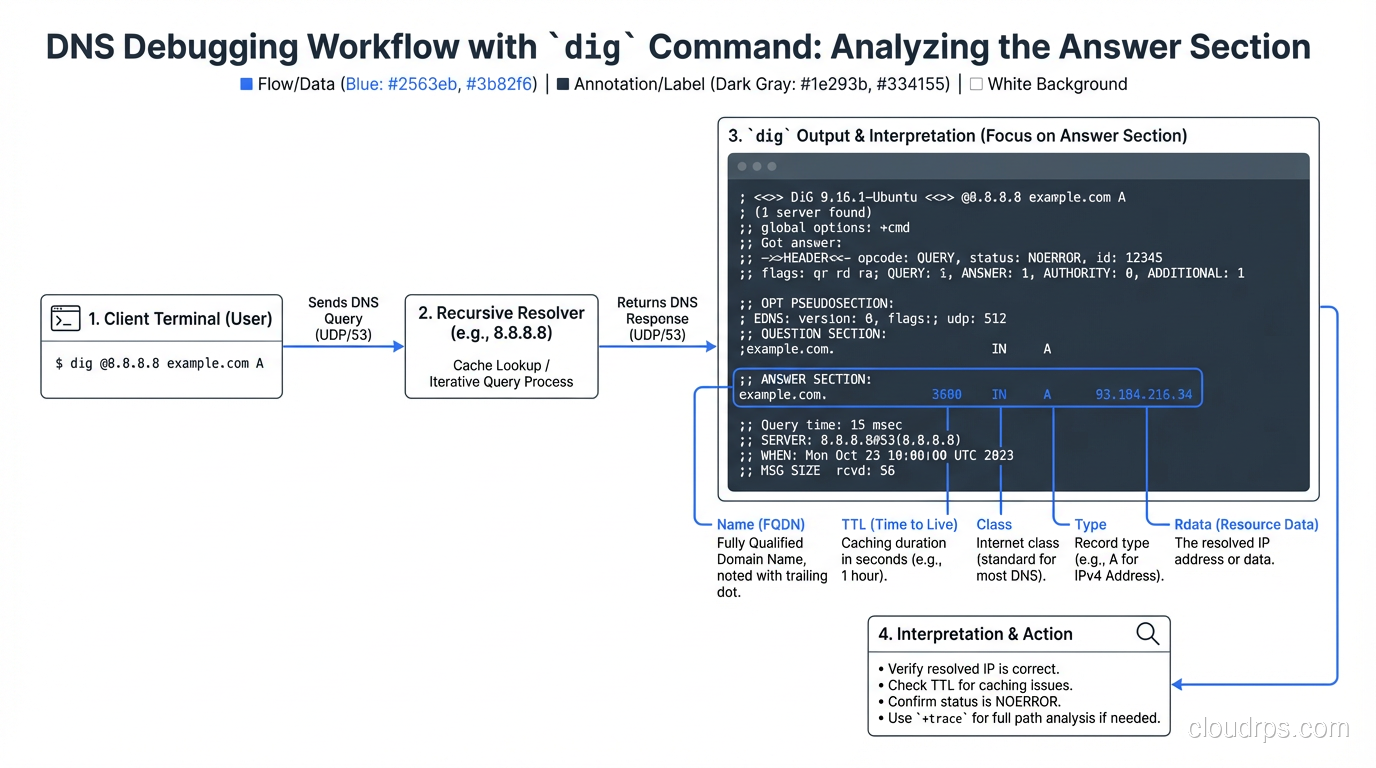
dig @8.8.8.8 example.com A
dig @ns1.cloudflare.com example.com A

# Trace the full resolution path
dig +trace example.com

# Short output
dig +short example.com A

# Check all records for a name
dig example.com ANY    # Note: many servers block ANY queries now

# Reverse DNS lookup
dig -x 93.184.216.34

# Check DNSSEC
dig +dnssec example.com A

# Check propagation across multiple resolvers
dig @8.8.8.8 example.com A      # Google
dig @1.1.1.1 example.com A      # Cloudflare
dig @9.9.9.9 example.com A      # Quad9
dig @208.67.222.222 example.com A  # OpenDNS
DNS Record Quick Reference
| Record | Maps | Example Use |
|---|---|---|
| A | Domain → IPv4 | example.com → 93.184.216.34 |
| AAAA | Domain → IPv6 | example.com → 2606:2800:220:1:... |
| CNAME | Domain → Domain | www → example.com |
| MX | Domain → Mail server | Email routing |
| TXT | Domain → Text | SPF, DKIM, DMARC, verification |
| NS | Domain → Nameserver | Zone delegation |
| SOA | Zone metadata | Serial, refresh, retry, expire |
| SRV | Service → Host:Port | SIP, XMPP, Active Directory |
| CAA | Domain → Authorized CAs | Certificate issuance control |
| PTR | IP → Domain | Reverse DNS, mail server identity |
| HTTPS/SVCB | Domain → Service params | HTTP/3, ECH, connection hints |
Common Mistakes I’ve Seen in Production
CNAME at apex: Trying to CNAME
example.com(withoutwww) to a CDN. This breaks because of the CNAME/other-records conflict. Use your DNS provider’s ALIAS/flattening feature instead.Missing trailing dot: In zone files,
mail.example.com(no trailing dot) is actuallymail.example.com.example.com. The trailing dot makes it a fully qualified domain name. Managed DNS UIs usually handle this for you, but if you’re editing zone files, watch out.SPF lookup limit: Adding too many
include:mechanisms and exceeding the 10-lookup limit, silently breaking SPF validation.TTL too high before migration: Changing an A record with a 24-hour TTL and expecting instant propagation. Lower TTL first, wait, then change.
Forgotten MX records: Migrating DNS providers and forgetting to copy MX records. Email stops working, and nobody notices for hours because of TTL caching.
Wildcard records catching unintended subdomains: A wildcard
*.example.com → A → 10.0.0.1catches everything, includingrandom-typo.example.com. This can mask configuration errors and cause unexpected behavior.
Wrapping Up
DNS records are the foundation of how the internet finds things. Getting them right means your website loads, your email delivers, your CDN routes correctly, and your TLS certificates validate. Getting them wrong means silent failures that are maddening to debug because “it works for me” (thanks, DNS caching).
My practical advice:
- Set up SPF, DKIM, and DMARC on every domain you own. No exceptions.
- Add CAA records to restrict certificate issuance.
- Use short TTLs (60-300 seconds) during changes, longer TTLs (3600+) for stable records.
- Document your DNS records in a source-of-truth that’s not just “whatever’s in the DNS provider’s UI.” Infrastructure-as-code tools like Terraform’s DNS providers or OctoDNS are excellent for this.
- Monitor your DNS: tools like DNSCheck, MXToolbox, or automated monitoring will catch problems before your users do.
DNS is the invisible infrastructure that everything else depends on. Treat it with the respect it deserves, and it’ll serve you well. Treat it as an afterthought, and it’ll bite you at the worst possible time.
Get Cloud Architecture Insights
Practical deep dives on infrastructure, security, and scaling. No spam, no fluff.
By subscribing, you agree to receive emails. Unsubscribe anytime.