
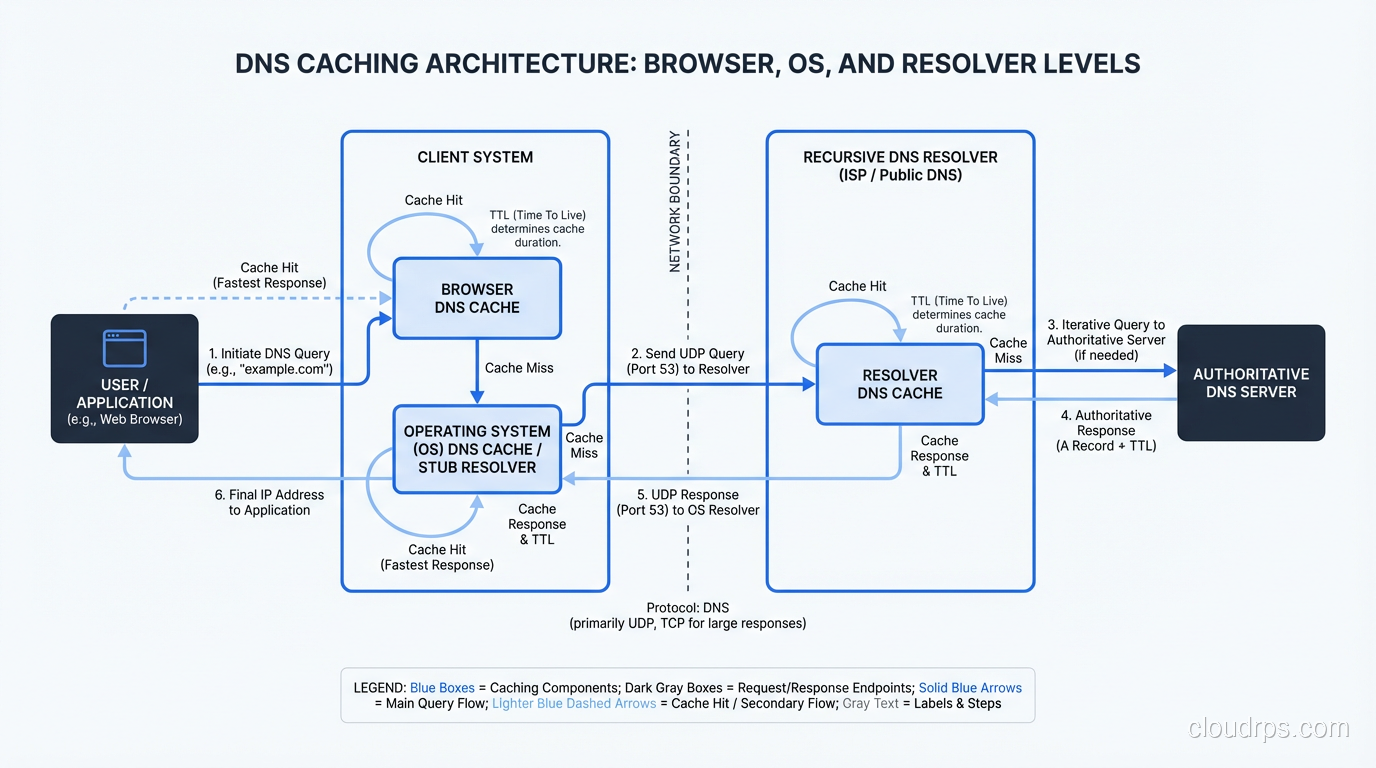
Every time you type a URL into your browser, a small miracle happens in the background. Before a single byte of HTML crosses the wire, your computer has to figure out where that server actually lives. That process, DNS resolution, is one of the most fundamental and most misunderstood pieces of the internet.
I’ve been debugging DNS problems since the early ’90s, back when BIND was the only game in town and a misconfigured zone file could take down an entire university’s email for a weekend. I’ve seen DNS failures cascade into full production outages at companies you’ve definitely heard of. And after three decades of staring at packet captures, I can tell you this: most engineers have a surface-level understanding of DNS at best.
Let’s fix that. We’re going to walk through every single step of DNS resolution, from the moment you press Enter to the moment your browser gets an IP address back.
What DNS Actually Does
At its core, DNS is a distributed, hierarchical database that maps human-readable domain names to IP addresses. That’s the textbook answer. The real answer is that DNS is the glue that holds the internet together, and it’s running on infrastructure that would give most people nightmares if they saw how it actually worked.
When you type www.example.com into your browser, your machine doesn’t know what to do with that string. Routers don’t understand domain names. TCP connections need IP addresses. So before anything else can happen, someone has to translate www.example.com into something like 93.184.216.34.
That “someone” is the DNS resolution process. And it involves way more steps than most people think.
Step 1: The Browser Cache
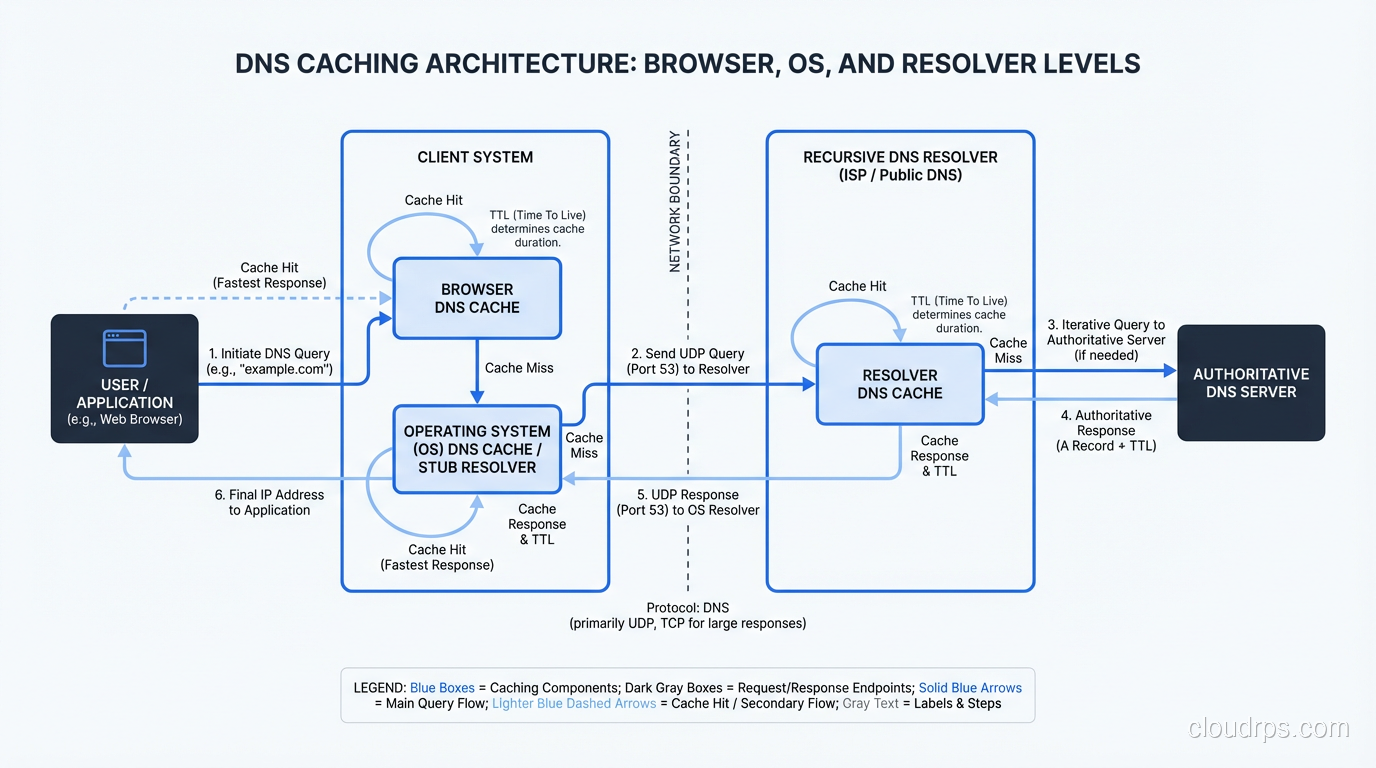
The first place your browser looks is its own cache. If you visited www.example.com five minutes ago, Chrome or Firefox probably still has the IP address cached in memory. No network request needed.
This is important. In my experience, a huge percentage of DNS “lookups” never leave the browser. Modern browsers cache aggressively, respecting the TTL (Time to Live) values from DNS responses but sometimes holding onto records even longer for performance reasons.
If the browser cache misses, we move on.
Step 2: The Operating System’s Stub Resolver
Your browser asks the operating system to resolve the name. On Linux, this goes through the stub resolver, typically configured via /etc/resolv.conf or, more recently, systemd-resolved. On Windows, it’s the DNS Client service. On macOS, it’s mDNSResponder.
The OS has its own cache. On Linux with systemd-resolved, you can inspect it with resolvectl statistics. On Windows, ipconfig /displaydns will show you what’s cached. I’ve debugged countless issues where stale OS-level DNS cache was the culprit. Someone updates a DNS record, the TTL expires, but the OS is still holding the old address.
The OS stub resolver also checks the local hosts file (/etc/hosts on Linux/Mac, C:\Windows\System32\drivers\etc\hosts on Windows). If there’s a hardcoded entry for the domain, the lookup stops here. I’ve seen production incidents caused by forgotten hosts file entries on developer machines that made it into container images. Fun times.
If the OS cache also misses, the stub resolver sends a query to the configured recursive resolver.
Step 3: The Recursive Resolver
This is where the real work begins. The recursive resolver (sometimes called a “caching resolver” or “DNS recursor”) is the workhorse of the DNS system. It’s the server your machine is configured to talk to, typically provided by your ISP, your corporate network, or a public resolver like Google’s 8.8.8.8 or Cloudflare’s 1.1.1.1.
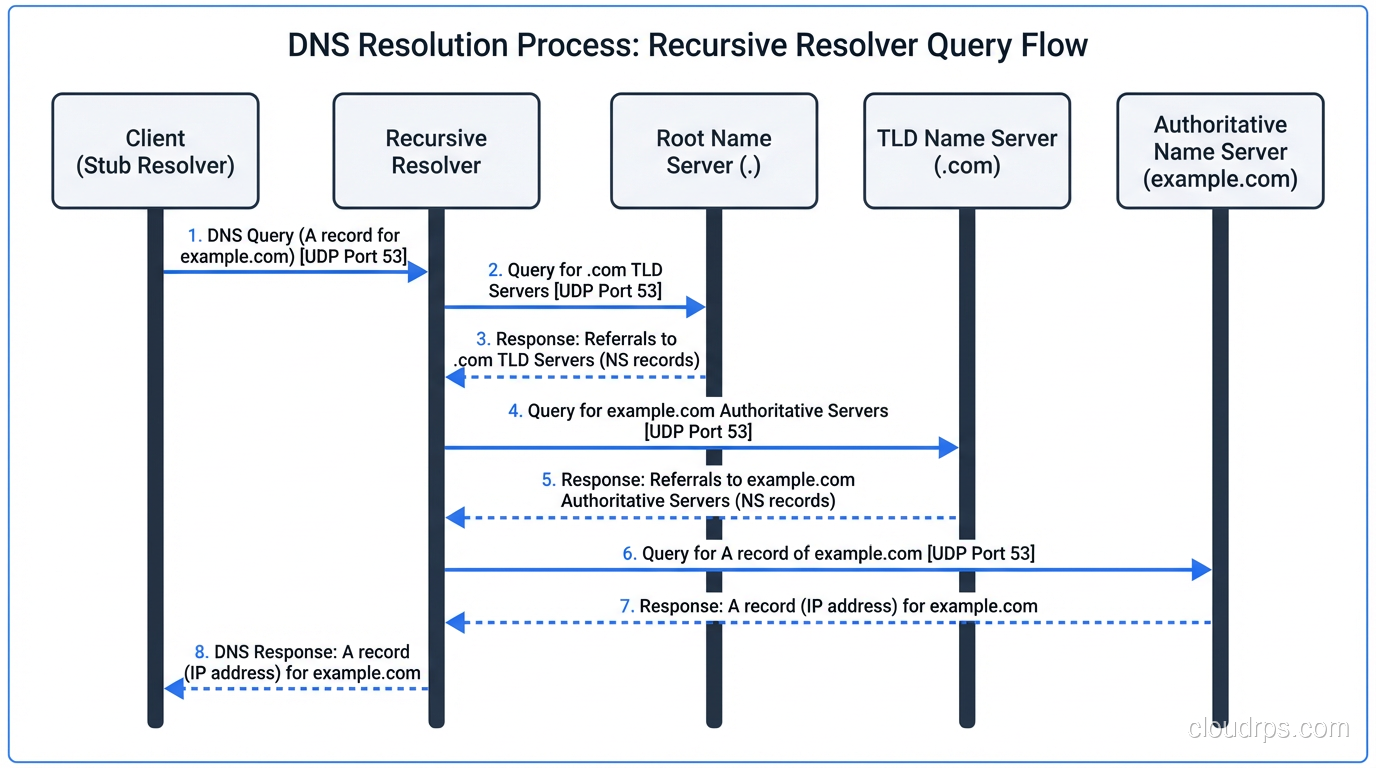
The recursive resolver’s job is to take your query and chase it down through the DNS hierarchy until it finds the answer. It does this on your behalf, so your client doesn’t have to understand the hierarchy at all. Your stub resolver sends one query and gets back one answer. The recursive resolver might make a dozen queries behind the scenes.
But first, the recursive resolver checks its own cache. If someone else on the same network recently looked up www.example.com, the answer might already be cached. This is a massive performance optimization. Corporate DNS servers serving thousands of employees cache aggressively and dramatically reduce external DNS traffic.
If the cache misses, the recursive resolver starts the iterative resolution process.
Step 4: Querying the Root Nameservers
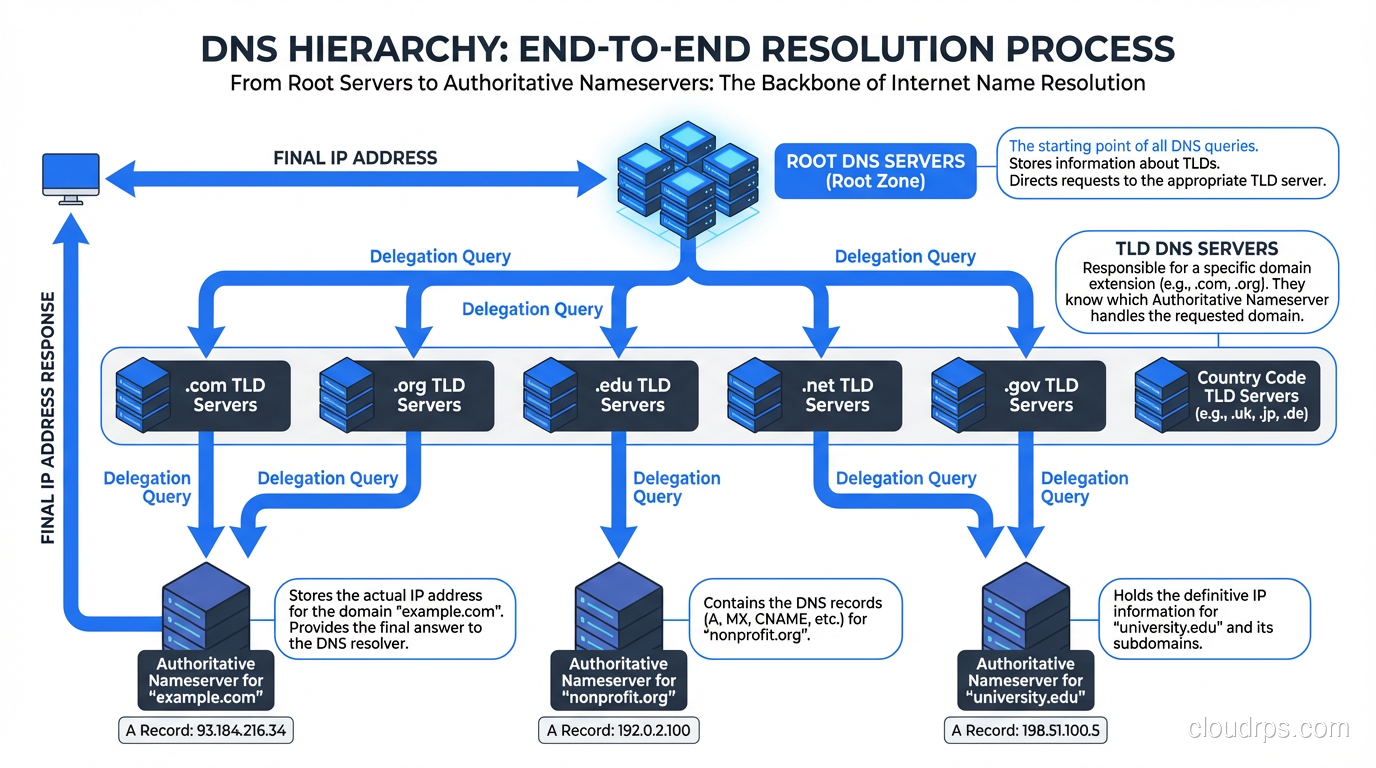
There are 13 root nameserver addresses (labeled a.root-servers.net through m.root-servers.net), though thanks to anycast routing, there are actually hundreds of physical servers distributed globally. These root servers are maintained by organizations like ICANN, NASA, the US Army Research Lab, and Verisign.
The recursive resolver comes preconfigured with the IP addresses of all 13 root servers. This is called the “root hints” file. It’s one of the few hardcoded things in the DNS system. If you’ve ever looked at named.root or db.root, that’s what it is, a static list that gets updated maybe once a year.
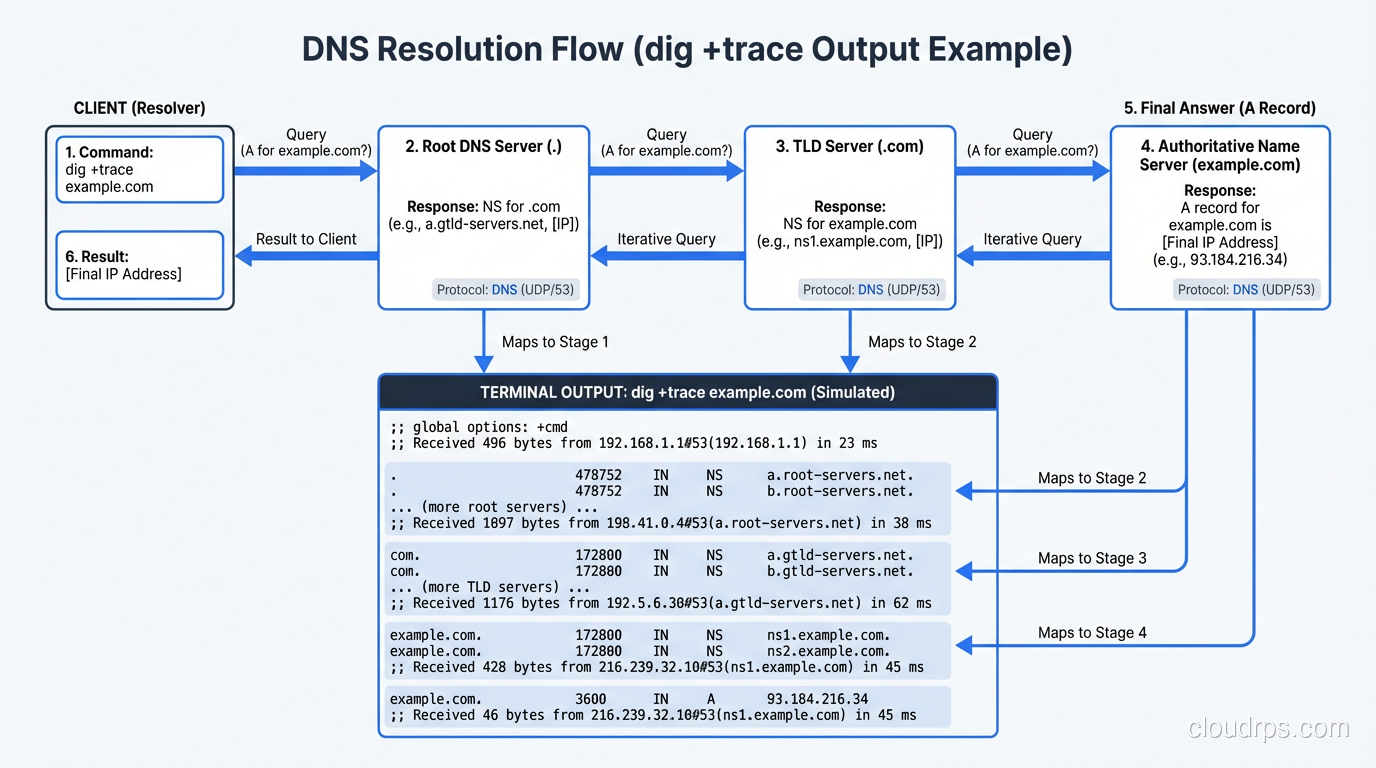
The resolver sends a query to one of the root servers: “Where can I find www.example.com?”
The root server doesn’t know the answer. It doesn’t know about example.com. What it does know is who’s responsible for the .com top-level domain. So it responds with a referral: “I don’t know, but here are the nameservers for .com.”
This is an important distinction. Root servers don’t resolve queries. They delegate. They point you one level down the hierarchy.
Step 5: Querying the TLD Nameservers
Armed with the referral from the root server, the recursive resolver now queries one of the .com TLD nameservers. Verisign operates the .com TLD servers, and they handle an absolutely staggering volume of queries, tens of billions per day.
The resolver asks the .com TLD server: “Where can I find www.example.com?”
Again, the TLD server doesn’t have the final answer. But it knows which nameservers are authoritative for example.com. When the domain was registered, the registrar submitted NS records to the TLD zone. The TLD server responds with another referral: “I don’t know the IP, but here are the authoritative nameservers for example.com.”
Step 6: Querying the Authoritative Nameserver
Now we’re at the end of the chain. The recursive resolver queries the authoritative nameserver for example.com. This is the server that actually has the DNS records: the A records, AAAA records, CNAME records, MX records, all of it. If you want a deeper dive into these record types, check out our post on DNS record types explained.
The authoritative server looks up www.example.com in its zone file and responds with the IP address. Finally, after all those hops, we have an answer.
The recursive resolver caches this answer (respecting the TTL), and sends it back to your OS stub resolver, which caches it too, and passes it to your browser, which also caches it. Next time you look up www.example.com, the whole chain short-circuits at whatever cache layer still has the record.
TTL: The Silent Troublemaker
Every DNS record has a TTL (Time to Live) measured in seconds. When you get a DNS response, the TTL tells every cache in the chain how long they can hold onto that record before they need to look it up again.
Here’s where things get interesting. A TTL of 3600 means one hour. If you change your DNS record, it could take up to an hour for everyone to see the update. But in practice, it’s worse than that. Some resolvers are known to not respect TTLs strictly. ISP resolvers are particularly notorious for this. I’ve seen records cached for hours beyond their TTL.
This is why experienced ops teams lower TTLs before making DNS changes. If your TTL is normally 86400 (24 hours), you drop it to 300 (5 minutes) at least 24 hours before the planned change. That way, when you make the switch, propagation is fast. I’ve watched junior engineers skip this step and then wonder why half their users are hitting the old server twelve hours later.
When Things Go Wrong
DNS resolution fails more often than most people realize. Here are the common failure modes I’ve seen in production.
SERVFAIL
The recursive resolver tried to resolve the name but something went wrong. Maybe the authoritative server is down. Maybe there’s a DNSSEC validation failure. SERVFAIL is the DNS equivalent of a 500 error; something broke on the server side.
NXDOMAIN
The domain doesn’t exist. The authoritative server looked and found nothing. This is the DNS equivalent of a 404. You see this when a domain expires, is mistyped, or hasn’t been configured yet.
Timeouts
The resolver sent a query and never got a response. This happens more than you’d think, especially with UDP-based DNS. Network congestion, firewall rules blocking port 53, misconfigured ACLs: I’ve seen all of these cause DNS timeouts. And because DNS is UDP by default, there’s no connection establishment phase to give you an early signal that something’s wrong.
Poisoned Cache
A malicious actor injects a fake DNS response into a resolver’s cache. This was a massive problem before DNSSEC, and the Kaminsky attack in 2008 scared the entire industry into action. Even today, DNS cache poisoning remains a real threat if DNSSEC isn’t properly deployed.
DNS and CDNs
Modern CDN infrastructure relies heavily on DNS to route users to the nearest edge server. When you look up a domain served by Cloudflare or AWS CloudFront, the authoritative nameserver returns different IP addresses based on the geographic location of the resolver making the query.
This is why using a geographically distant DNS resolver can hurt your CDN performance. If you’re in Tokyo but your recursive resolver is in Virginia, the CDN’s authoritative server thinks you’re in Virginia and sends you to a Virginia edge node. Your web traffic then crosses the Pacific unnecessarily. This is a problem I’ve helped multiple clients diagnose, and it always surprises them.
EDNS Client Subnet (ECS) was developed to address this. With ECS, the recursive resolver forwards a portion of the client’s IP address to the authoritative server, so CDN-backed DNS can make better geographic routing decisions even when the resolver is far from the client.
DNS Over HTTPS and DNS Over TLS
Traditional DNS queries are sent in plaintext UDP. Anyone on the network path (your ISP, your coffee shop’s WiFi operator, a state-level censor) can see every domain you look up.
DNS over HTTPS (DoH) and DNS over TLS (DoT) encrypt DNS queries. Firefox was one of the first browsers to enable DoH by default (using Cloudflare’s resolver), and it caused significant controversy. ISPs weren’t happy because they could no longer see DNS traffic. Enterprise admins weren’t happy because it bypassed their internal DNS infrastructure.
Both protocols change the transport layer but not the DNS protocol itself. The queries and responses are identical; they’re just wrapped in TLS. From an architecture perspective, DoH is particularly interesting because it runs over port 443, the same port as regular HTTPS traffic, making it nearly impossible to block at the network level without breaking all HTTPS traffic.
DNS and NAT
One thing worth mentioning: NAT (Network Address Translation) doesn’t directly affect DNS resolution, but it does affect how DNS traffic is routed. In a typical home network, all DNS queries from every device go through the router’s NAT, which means the external recursive resolver sees all queries as coming from a single public IP. This can have implications for rate limiting and for CDN-based geographic routing, since the resolver is making decisions based on the router’s public IP rather than the individual device’s location.
Practical Debugging
When DNS isn’t working, here are the tools I reach for.
dig is the gold standard on Linux and Mac. dig www.example.com gives you the full answer. dig +trace www.example.com simulates the entire recursive resolution process step by step. It shows you the root server referral, the TLD referral, and the final answer, which is invaluable for debugging.
nslookup works on all platforms and is simpler, but gives you less detail. host is another option on Unix systems.
For deeper investigation, tcpdump or Wireshark on port 53 will show you the actual DNS packets. I’ve caught many issues this way: queries going to the wrong resolver, responses being silently dropped by firewalls, truncated UDP responses that should have fallen back to TCP.
DNS at Scale
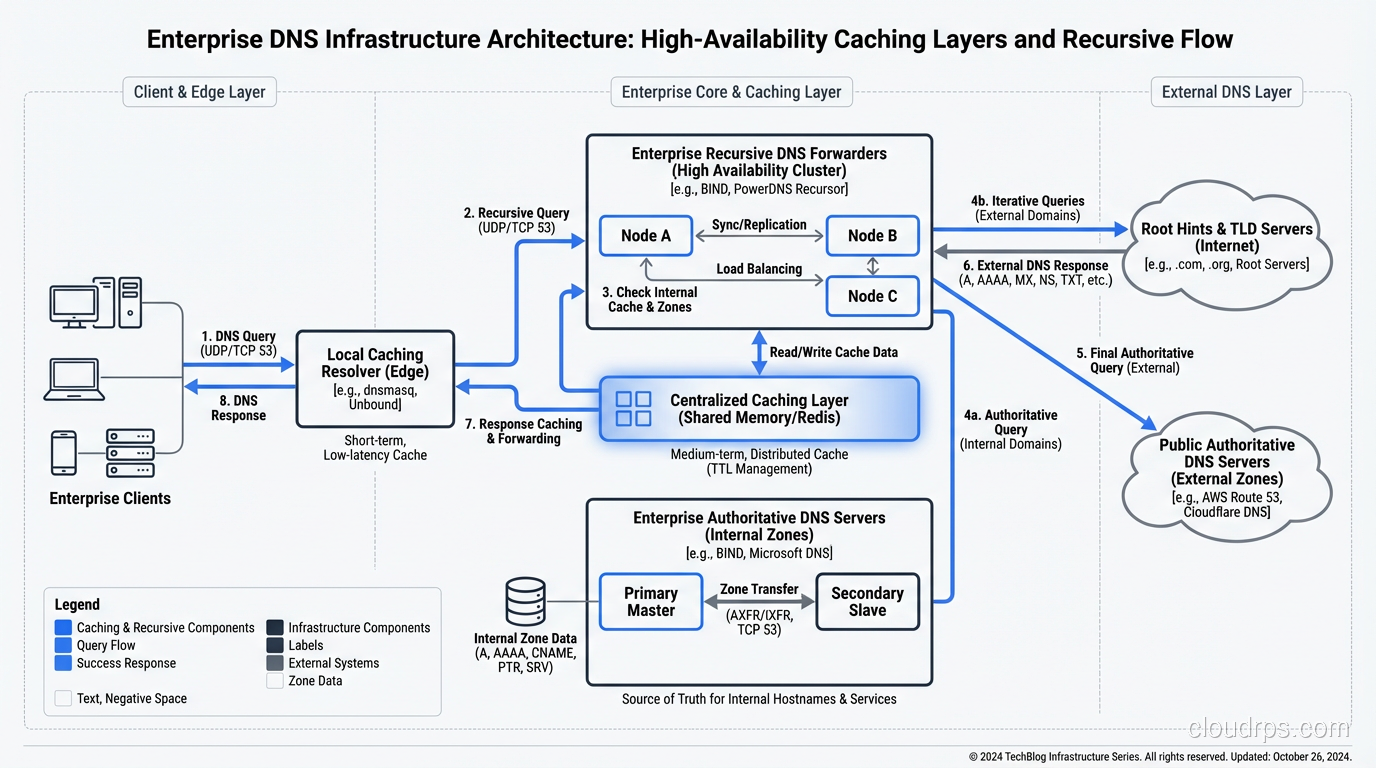
Running DNS infrastructure at scale is its own discipline. At large companies I’ve worked with, the internal DNS architecture typically includes:
- Local caching resolvers on every subnet or in every availability zone
- Forwarding resolvers that aggregate traffic before hitting authoritative servers
- Split-horizon DNS that returns different answers for internal vs. external queries
- Health-check-integrated DNS that removes unhealthy backends from DNS responses
AWS Route 53, Google Cloud DNS, and Azure DNS all provide managed authoritative DNS with health checking and failover built in. For recursive resolution, many organizations run their own resolvers internally (using something like Unbound or PowerDNS Recursor) while falling back to public resolvers like 8.8.8.8 for external queries.
The performance characteristics matter. A DNS lookup typically takes 20-120 milliseconds for a cache miss. If every page load requires 20 DNS lookups for different assets (scripts, images, APIs), that latency adds up fast. This is why browsers use dns-prefetch hints and why HTTP/2’s single-connection model was such a win. Fewer unique hostnames means fewer DNS lookups.
The Hidden Complexity
There’s something I’ve come to appreciate over the decades: DNS is simultaneously the simplest and most complex protocol on the internet. The basic concept, mapping a name to a number, is trivial. But the implementation involves caching hierarchies, TTL semantics, zone transfers, DNSSEC chain of trust, anycast routing, EDNS extensions, and failure modes that can cascade through an entire infrastructure.
The 2016 Dyn DDoS attack took out DNS for a massive chunk of the internet. Twitter, Reddit, Netflix, Spotify all went down because their DNS provider was under attack. It was a brutal reminder that DNS is a single point of failure for almost everything on the internet, and most organizations don’t think about it until it breaks.
Wrapping Up
DNS resolution is a beautifully designed distributed system that we all take for granted. From the browser cache to the stub resolver to the recursive resolver to the root servers to the TLD servers to the authoritative nameserver, each layer plays a critical role, and understanding the full chain is essential for anyone working in infrastructure.
The next time DNS breaks in your environment (and it will), you’ll know exactly where to look. Start at the bottom of the stack with dig +trace, work your way up through the caching layers, and check your TTLs. Nine times out of ten, the answer is stale cache or misconfigured records.
DNS isn’t glamorous, but it’s the foundation everything else is built on. Treat it with the respect it deserves.
Get Cloud Architecture Insights
Practical deep dives on infrastructure, security, and scaling. No spam, no fluff.
By subscribing, you agree to receive emails. Unsubscribe anytime.